
ROATEE Rechargeable Graphing Calculator
4.4Editor score
Detachable LCD notepad
Eco-friendly rechargeable
Large screen input
Finding the right graphing calculator can transform how you approach complex math and science courses. Whether you are in high school or college, a reliable device helps visualize functions and solve equations efficiently. This guide explores the best options available to ensure you select a tool that meets your academic needs.
We have carefully evaluated ten leading models based on performance, display quality, and user feedback. Our comparison highlights key features like screen resolution, battery life, and compatibility with standardized tests. Each product offers unique strengths, from color displays to advanced computer algebra systems tailored for different learning levels.
Each pick below showcases specific details to help you understand why these calculators stand out in the market. You will find information on specs, pros, and cons to guide your decision-making process. Please note that prices and availability can change frequently, so verify current details before purchasing your ideal device.
4.4Editor score

4.6Editor score

4.4Editor score
As an Amazon Associate we earn from qualifying purchases.
Below is a detailed side-by-side comparison of all ten models evaluated in this guide. Each entry highlights essential specifications and features to help you quickly identify the device that best fits your specific academic requirements and budget constraints.




The Texas Instruments TI-84 Plus CE stands out as a top choice for students across various education levels. It features a vibrant color display that makes visualizing complex math concepts significantly easier than traditional monochrome screens. With a strong rating from users, this model offers a reliable and efficient way to handle coursework in algebra and calculus.
We may earn a commission when you buy through this link, at no additional cost to you.
One of its standout qualities is the built-in MathPrint feature, which allows you to input and view math symbols exactly as they appear in textbooks. This functionality helps reduce confusion and speeds up the process of solving equations. Additionally, the rechargeable battery ensures you can work for extended periods without needing frequent replacements or access to outlets.
While the device is highly capable, some users might find the price point slightly higher than basic scientific calculators. However, the investment pays off through enhanced learning tools and durability that withstands daily classroom demands. The lightweight design ensures portability without compromising on the robust features needed for advanced math tasks.
If you are a student looking for a balance between performance and usability, this calculator is an excellent recommendation. It supports you from middle school through college, making it a versatile tool for long-term academic success. Ensure you check compatibility with your specific exam requirements before finalizing your purchase decision.
The color display helps differentiate multiple functions on a graph simultaneously, making patterns and intersections clearer for students.
The rechargeable battery eliminates the need for constant AAA replacements, offering up to a month of use on a single charge.
We may earn a commission when you buy through this link, at no additional cost to you.
The TI-84 Evo represents the newest iteration in the popular TI-84 series, designed specifically for everyday classroom use. Its icon-based home screen places popular math tools front and center, allowing for faster and more intuitive navigation. This modernization helps students focus on solving problems rather than searching for functions.
We may earn a commission when you buy through this link, at no additional cost to you.
Performance is a key strength here, with a processor that delivers three times faster calculations and smoother graphing compared to previous models. The bigger, clearer graphs provide 50% more space, making it easier to see patterns and relationships within data sets. These improvements significantly enhance the efficiency of studying complex topics.
Despite its advanced features, the keypad design has been simplified with larger buttons and reduced clutter to help you work faster with fewer steps. This ergonomic approach reduces fatigue during long study sessions. However, as a newer model, initial availability or software familiarity might present minor hurdles for some users adjusting to the interface.
This calculator is ideal for students who want the latest technology to support their math learning. It streamlines the workflow and provides a robust platform for various mathematical tasks. Consider this option if you value speed and modern interface design in your daily academic tools.
The icon-based screen reduces the time needed to access common tools, allowing for more time spent on actual problem-solving.
With increased graphing space, students can view more detailed data points and relationships without unnecessary zooming.
We may earn a commission when you buy through this link, at no additional cost to you.
Similar to the white version, the TI-84 Evo in Lavender offers the same cutting-edge performance with a distinct aesthetic appeal. It features the icon-based home screen that makes navigating math tools straightforward and efficient. This color option allows students to personalize their study tools while maintaining high functionality.
We may earn a commission when you buy through this link, at no additional cost to you.
The powerful processor ensures three times faster performance, delivering quicker calculations and smoother graphing experiences. The 50% increase in graphing space helps visualize patterns and relationships more effectively. These technical enhancements make it a powerful tool for tackling demanding math and science curriculums.
The simplified keypad design features larger buttons and less clutter, which aids in working faster with fewer steps. While the technical specs are identical to the white model, the unique color can be a deciding factor for those who prefer a different look. Availability might vary slightly compared to standard colors.
Choose this model if you appreciate the latest technological advancements in calculators and prefer a unique color for your device. It is built for everyday classroom use and supports a wide range of academic needs. It remains a strong contender for students seeking both performance and style.
Having a distinct color like lavender can help students identify their calculator quickly among shared or group study resources.
The underlying processor speed improvements match the white model, ensuring no compromise in computational power.
We may earn a commission when you buy through this link, at no additional cost to you.
The Casio Prizm FX-CG50 is renowned for its large high-resolution LCD with over 65,000 colors, offering exceptional clarity for graphing. It supports up to three 3D functions like spheres and planes, making it ideal for advanced geometry and calculus tasks. This level of detail helps students visualize abstract concepts more concretely.
We may earn a commission when you buy through this link, at no additional cost to you.
One of its most significant features is the integration of Python directly on the calculator, allowing for program transfer and storage via PC. This capability bridges the gap between mathematical computation and coding, which is increasingly valuable in STEM fields. Additionally, the Natural Textbook Display simplifies writing and interpreting complex math expressions.
While highly capable, the sheer number of features can create a steeper learning curve for beginners compared to simpler models. It is also slightly bulkier due to the advanced hardware requirements. However, these trade-offs are acceptable for students needing robust tools for AP, SAT, and IB exams.
If your curriculum involves 3D visualization or programming, this calculator is a top choice. It offers a wide range of math applications and exam approval. Consider this device if you are ready to leverage advanced computational tools for higher-level mathematics.
The ability to plot three 3D functions simultaneously provides a deeper understanding of spatial relationships in mathematics.
Python integration allows students to write scripts directly on the device, fostering both math and programming skills.
We may earn a commission when you buy through this link, at no additional cost to you.
The HP Prime G2 offers a premium experience with a large high-resolution color screen featuring multi-touch capabilities. You can use pinch-to-zoom and interactive graph manipulation, which creates a tablet-like interaction for mathematics. This interface is intuitive for students accustomed to modern touch devices.
We may earn a commission when you buy through this link, at no additional cost to you.
It includes a powerful Computer Algebra System (CAS) and advanced graphing tools that allow switching between symbolic, graphical, and numerical views with dedicated keys. The expandable memory stores programs and exam configurations, while wireless features enable collaboration and data sharing. The brushed metal design with a slide-on cover adds durability and style.
While the interface is advanced, it might require some learning time for users transitioning from traditional key-based calculators. The price point is also higher than standard models, reflecting its robust feature set. However, the benefits in efficiency and visualization make it worth considering for advanced users.
Choose the HP Prime G2 if you want a calculator that feels like a specialized math tablet. It is approved for major exams and includes accessories like a case and cloth. This option suits college students or professionals needing powerful, flexible computational tools.
Multi-touch gestures allow for dynamic graph manipulation, making it easier to explore functions interactively.
Wireless connectivity allows teachers and students to poll and share data, fostering a collaborative learning environment.
We may earn a commission when you buy through this link, at no additional cost to you.
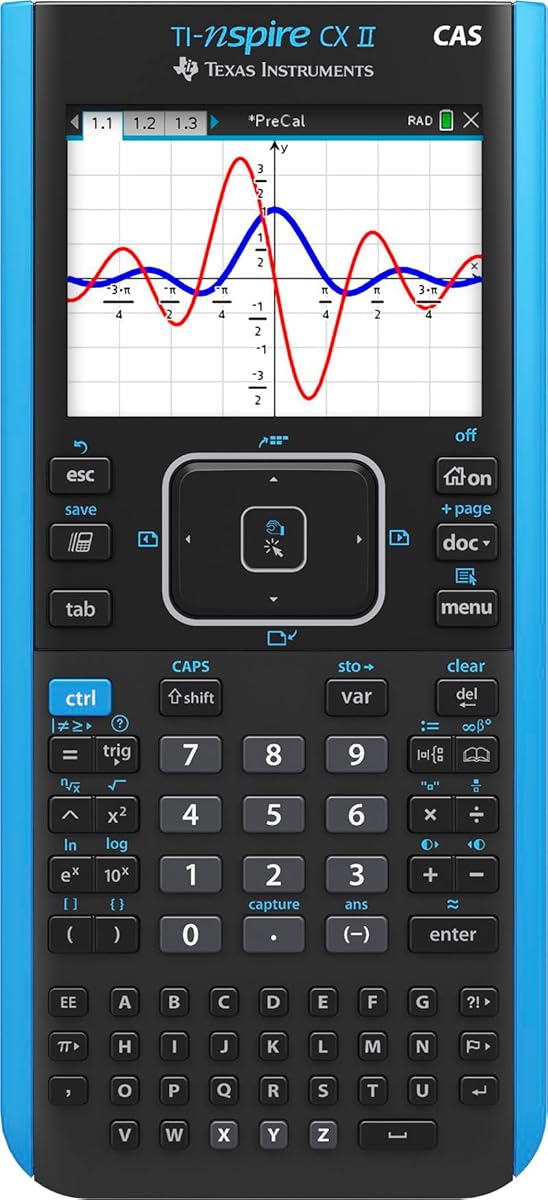
The TI-Nspire CX II CAS comes bundled with student software, enhancing graphing capabilities and functionality beyond the handheld unit. The color screen with a resolution of 320 x 240 pixels provides clear visualizations. This bundle ensures you have both hardware and software support for complex coursework.
We may earn a commission when you buy through this link, at no additional cost to you.
A rechargeable battery allows for up to two weeks of use on a single charge, reducing downtime. The thin, lightweight design makes it portable, while the touchpad navigation simplifies menu access. Six different graph styles and 15 colors help differentiate multiple graphs effectively for better analysis.
Users must be comfortable with the included software ecosystem to maximize value. Some might find the interface different from standard TI-84 models. However, the additional capabilities justify these differences for advanced math and science applications where CAS features are needed.
This model is excellent for students needing the full TI ecosystem, including PC/Mac software integration. It offers a modern approach to graphing with color and touch navigation. Consider it if you want seamless integration between your calculator and computer software.
Having the student software included means you can work on complex problems on your computer and sync with your calculator.
The rechargeable battery offers weeks of use, ensuring you are not left without power during critical exam periods.
We may earn a commission when you buy through this link, at no additional cost to you.
The ROATEE Graphing Calculator combines calculation with an LCD writing tablet and stylus for taking notes. This unique design allows you to work out problems directly on the device. The writing tablet charges independently and can be installed on either side for flexible use or removed for exams.
We may earn a commission when you buy through this link, at no additional cost to you.
It integrates essential calculations with advanced mathematical tools including complex, base, matrix, and vector operations. The eco-friendly design uses independent Type-C rechargeable power for both modules, reducing battery waste. The large screen supports up to 100-character input and 200-byte history records for detailed work.
While not a high-end graphing model, it offers exceptional value for students needing basic graphing and note-taking features. Some users might miss advanced CAS capabilities. However, for everyday calculations and advanced analysis within a budget, it is a practical choice.
Choose this model if you want an all-in-one study tool that saves paper. It is suitable for high school and college students needing versatile tools. It provides an efficient and eco-conscious experience for daily academic tasks.
The detachable notepad lets you sketch graphs and write notes without needing separate paper, saving resources.
Type-C charging for both calculator and notepad simplifies power management and reduces electronic waste.
We may earn a commission when you buy through this link, at no additional cost to you.
The IPepul Scientific Calculator is designed with a notepad integrated, allowing you to write while calculating. This setup improves learning and work efficiency for students. The blue matte LCD screen protects eyes and can be used as a notepad when the calculator is inactive.
We may earn a commission when you buy through this link, at no additional cost to you.
It weighs only 120g and features a 10-digit screen with 2 button batteries that are easy to replace. This lightweight design makes it easy to carry in a bag or pocket. It is versatile for office, construction, and student calculations alike.
While it lacks advanced graphing capabilities, it serves as a practical tool for basic math and science work. The environmental protection aspect reduces paper consumption. For students needing simple functionality with a notepad, this is a solid choice.
This calculator is an ideal back-to-school supply for those who value portability and simplicity. It is suitable for middle high school and college needs. If you need a lightweight tool for daily calculations without complex graphing, this is a good option.
The blue matte LCD screen reduces glare and eye strain during extended periods of study or work.
Standard button batteries are easy to replace without tools, ensuring you never lose power unexpectedly.
We may earn a commission when you buy through this link, at no additional cost to you.
The TI-84 Plus Black is a classic model preloaded with Cabri Jr. interactive geometry software. It allows up to ten graphing functions to be defined and analyzed at one time. The vibrant backlit color screen improves visibility in various lighting conditions.
We may earn a commission when you buy through this link, at no additional cost to you.
Features like horizontal and vertical split screen options allow for multitasking. The I/O port enables communication with other TI products for data transfer. Fourteen interactive zoom features help you examine graphs in detail. It remains a reliable tool for many academic settings.
Compared to newer models, it is bulkier and has an older interface. Some users might prefer the newer CE or Evo versions. However, it is a durable and approved option for those seeking a proven device.
Choose this calculator if you want a standard TI experience with geometry software included. It is a workhorse for many students and teachers. If you prefer a proven classic with essential graphing tools, this is a solid choice.
The included Cabri Jr. software provides interactive geometry capabilities that enhance understanding of shapes and proofs.
The I/O port allows you to share data with other calculators or computers, facilitating group projects.
We may earn a commission when you buy through this link, at no additional cost to you.
The TI-Nspire CX II Color Graphing Calculator is designed for learning with high-resolution full-color displays. Educators helped develop this device to challenge students with multiple visualizations of the same concept. It connects computer-like features with a portable design for easy use.
We may earn a commission when you buy through this link, at no additional cost to you.
It includes a 4-year license of computer software, ensuring you can work on desktops as well. The long-lasting rechargeable battery supports portable use without constant charging. It is approved for key exams including PSAT/NMSQT, SAT, ACT, AP, and IB.
The high cost and complex interface might be challenging for some users. However, the visualizations and software integration provide a deep learning environment. For those seeking a powerful tool, this is a strong candidate.
Consider this device if you want advanced visualization and exam approval. It supports various exam types and includes necessary software. If you are ready for a premium tool, this model offers significant benefits.
Multiple visualizations on one screen help students see connections between different representations of a concept.
Approval for SAT, ACT, AP, and IB exams ensures it is versatile for standardized testing across levels.
We may earn a commission when you buy through this link, at no additional cost to you.
Selecting the right calculator involves considering your academic needs, budget, and specific exam requirements.
The display is crucial for visualizing graphs. Color screens offer better differentiation for multiple functions compared to monochrome ones. Look for high resolution and backlit options if you work in low light.
Prioritize a display that matches your visualization needs. Color and high resolution are generally better for advanced math tasks.
Many standardized tests like SAT, AP, and IB have strict calculator policies. Ensure the model you choose is explicitly approved for these exams to avoid issues on test day.
Always check the exam board's latest rules before purchasing. A compatible calculator ensures you can use it without restrictions.
Battery life impacts how long you can use the device without interruption. Rechargeable batteries are convenient but take time to charge. Standard batteries offer easy replacements.
Choose a power source that fits your lifestyle. Rechargeable models reduce waste, but AA batteries are easier to replace quickly.
Advanced models include Computer Algebra Systems (CAS) for symbolic manipulation. If your course requires calculus or physics analysis, CAS capabilities may be essential.
Evaluate your curriculum needs. CAS is useful for higher-level courses but adds cost.
Some calculators come with software bundles for PC or Mac. This allows you to work on your computer and sync with the device. Connectivity features enable data transfer between devices.
Software integration expands your workflow. Check if your school or course requires specific software support.
Ergonomics matter for long study sessions. Key layouts, button sizes, and weight affect comfort. Touchscreens are becoming more common.
Physical comfort enhances efficiency. Choose a design that feels natural to your hands and usage patterns.
Calculators often face drops and bumps in daily use. Durable materials and protective cases help extend the device's life. Look for sturdy builds.
Invest in a durable model to protect your investment. Consider accessories like cases for extra protection.
Prices range from basic models to advanced premium devices. Determine what features are essential versus nice-to-have. Balance performance with cost.
Identify your must-have features to narrow down options. Avoid overspending on capabilities you won't use.
Start by reading the manual to understand the interface and basic functions. Familiarize yourself with the menu structure to access features efficiently. Practice entering equations using the specific input methods for your model.
Regularly update your calculator's software if applicable to access new features or fix bugs. Keep the screen clean with a soft cloth and avoid exposing the device to moisture or extreme heat.
Proper storage extends the device's life. Use a protective case when not in use and avoid keeping it in hot environments like a car dashboard. Replace batteries or recharge them before they are completely drained.
Most standardized tests like the SAT, ACT, and AP exams allow specific graphing calculators. Always check the official exam board rules before your test date. Approved models typically include TI-84 and Casio Prizm variants.
Scientific calculators focus on arithmetic and basic functions. Graphing calculators can plot functions, perform advanced calculus, and handle 3D visualization. They are more powerful and suitable for higher-level math.
Computer Algebra Systems (CAS) allow symbolic manipulation which is useful for college-level calculus. High school math often does not require CAS. Check your curriculum requirements before purchasing.
Battery life varies by model. Rechargeable batteries can last weeks on a single charge. Standard batteries might need frequent replacement. Power settings and usage frequency impact battery performance.
Some models like the Casio Prizm or TI-Nspire support programming or Python integration. This feature allows you to write scripts directly on the calculator. It is beneficial for STEM students interested in coding.
Slow performance can result from running multiple apps or background processes. Resetting the calculator or closing unused applications often helps. Older models may naturally be slower than new processors.
Most manufacturers offer a limited warranty for defects. Warranty duration varies by brand and region. Check the product description for specific terms before buying to understand your coverage.
This guide has explored ten top graphing calculators, each offering unique strengths for different academic needs. From the TI-84 Plus CE to the HP Prime G2, there is an option for every student.
Prioritize features like display quality and exam approval based on your specific coursework. Balancing performance with budget ensures you get the most value for your investment.
Remember to check current prices and availability before purchasing as these factors can change frequently. The right calculator will support your success in math and science classes for years.