
GE BigEZ OneTouch Big Button Universal TV Remote for Seniors, Easy to Use
4.3Editor score
Vision-friendly backlit buttons
Colorblind-friendly design
Multi-device control options
This guide compares the top easy to use TV remote for seniors models featuring large buttons and simple layouts to help elderly users control their televisions
Finding the right control device is essential for maintaining independence at home. Seniors often struggle with small buttons and complex menus found on standard remotes. A simplified remote can make a significant difference in daily entertainment and ease of use.
We evaluated ten top-rated models based on button size, layout simplicity, and compatibility. Our analysis focuses on devices designed specifically for those with vision or dexterity challenges. Each option offers a unique approach to reducing frustration during everyday viewing.
Every selection includes detailed insights into features and performance capabilities. You will see how each remote handles basic functions like power and volume. Please note that prices and availability can change frequently on retail platforms.
4.3Editor score
4.2Editor score

4.4Editor score
The following table provides a side-by-side comparison of the ten selected remote controls. It highlights key specifications and compatibility details to help you narrow down your choice based on specific needs and TV brands.


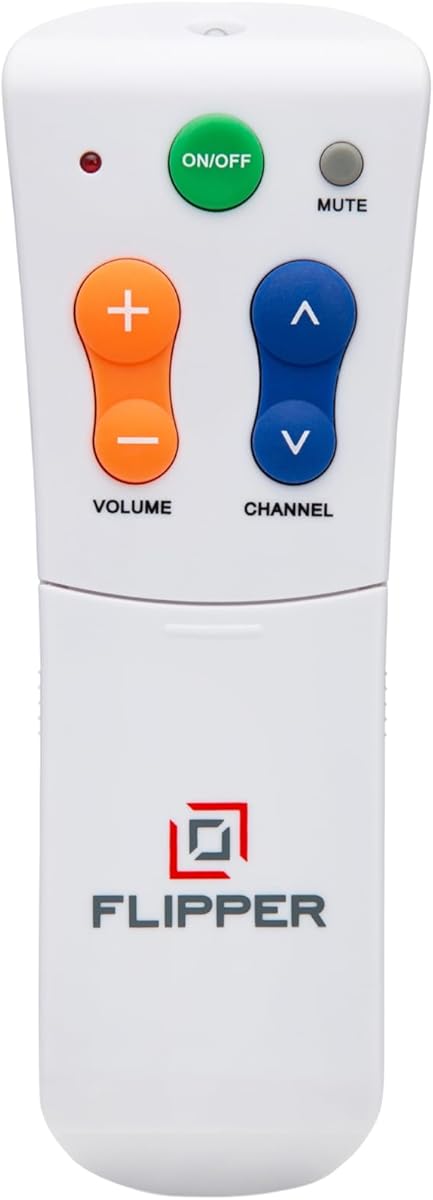
The Flipper remote stands out as a top choice for seniors requiring simplicity and clarity. With a rating of 4.2 stars it offers a highly focused user experience designed to reduce confusion.
We may earn a commission when you buy through this link, at no additional cost to you.
Its four-button design is the most distinct feature on the market. Green for power, orange for volume, blue for channels, and gray for mute make navigation intuitive. The hidden buttons for customization allow caregivers to preset favorite channels without complicating the main face.
While it does not support streaming apps like Netflix or Hulu, this limitation ensures it remains focused on traditional broadcast and cable viewing. This trade-off is acceptable for users who primarily watch linear television.
We recommend this remote for seniors with dementia or significant vision challenges. It provides peace of mind for caregivers and independence for users who need a straightforward way to enjoy their entertainment.
The minimal button layout prevents confusion and frustration during daily use.
Caregivers can set up to 25 favorite channels for easy access.
We may earn a commission when you buy through this link, at no additional cost to you.
The GE BigEZ OneTouch remote offers exceptional value for those seeking an accessible control solution. With a rating of 4.3 stars it balances cost and functionality effectively for everyday needs.
We may earn a commission when you buy through this link, at no additional cost to you.
Its white body and backlit buttons ensure visibility in low light conditions. The color-coded volume and channel buttons assist users with color vision deficiencies. Setup involves simple steps to select the TV brand and press power.
While it supports five major brands and one additional device, users with less common TVs might need to check compatibility. The AUX button can be reprogrammed for different devices like DVD players.
This model is ideal for budget-conscious buyers who need a reliable remote for traditional TVs. It is a strong choice for households needing basic functionality without unnecessary complexity or high cost.
Backlit buttons and high contrast colors help users see controls easily.
Free U.S.-based support is available to assist with setup or issues.
We may earn a commission when you buy through this link, at no additional cost to you.
This premium remote offers advanced features specifically for Samsung TV owners. With a rating of 4.4 stars it delivers high performance and convenience for those with vision impairments or dexterity issues.
We may earn a commission when you buy through this link, at no additional cost to you.
The standout feature is the automatic backlight that stays lit for 30 seconds. This allows users to find controls easily without fumbling in the dark. The included silicone cover and wall hook add practical protection and organization benefits.
Because it is tailored for Samsung TVs it may not work with other brands or universal setups. However for Samsung users this specificity ensures reliable performance without the need for programming or complex configuration steps.
We suggest this remote for Samsung owners who want a seamless high-quality experience. The included accessories and lighting features make it worth the premium price for targeted compatibility and ease of use.
The auto-backlight feature activates when buttons are pressed for ease of use.
The hook and cover help prevent loss and damage during daily use.
We may earn a commission when you buy through this link, at no additional cost to you.
The EZclicker Big Button Universal TV Remote focuses on tactile feedback and large inputs. With a rating of 4.2 stars it is designed to offer a comfortable user experience for those with limited dexterity.
We may earn a commission when you buy through this link, at no additional cost to you.
Its design includes an extra-large enter button that provides clear tactile response. The compact size makes it easy to hold and store. Pairing is straightforward requiring only a few button presses to synchronize with the TV.
Users should note that it does not support cable boxes or streaming devices. This limitation means it is best suited for households that primarily use over-the-air or traditional cable connections directly via TV.
This remote is a solid option for those prioritizing physical feedback and ease of handling. It is a reliable choice for users who need a simplified interface without unnecessary advanced features.
Buttons are designed to provide clear physical response when pressed.
The small form factor fits easily in drawers or on tables.
We may earn a commission when you buy through this link, at no additional cost to you.
This model emphasizes extreme simplicity and reliability for everyday TV viewing. With a rating of 4.2 stars it is built to minimize confusion and maximize ease of use for seniors.
We may earn a commission when you buy through this link, at no additional cost to you.
The layout is stripped down to essential functions with large buttons for easy pressing. Pairing takes less than a minute using the specific button combination. It is lightweight and easy to carry around the house.
While it lacks streaming capabilities, this keeps the interface clean and uncluttered. Users who rely on cable or antenna will find this remote sufficient for their basic needs without technical complexity.
We recommend this for users who need a no-fuss replacement for a lost or broken remote. It is a dependable choice for those who prioritize straightforward control over advanced features.
Fewer buttons mean less chance of pressing the wrong function by mistake.
Setup is fast and requires no manual codes or complicated instructions.
We may earn a commission when you buy through this link, at no additional cost to you.
This remote offers a plug-and-play solution for many major TV brands. With a rating of 4.4 stars it is designed to eliminate setup hurdles and provide immediate control for users.
We may earn a commission when you buy through this link, at no additional cost to you.
The key advantage is the lack of programming requirements after inserting batteries. It supports a wide range of brands including Samsung and LG which broadens its utility. The extra large enter key ensures precise control.
It does not support streaming devices or cable boxes, so it is best for direct TV control. The 90-day warranty adds a layer of confidence for buyers concerned about durability or performance issues.
This is a practical choice for households looking for a simple universal solution. It is ideal for those who want immediate functionality without technical steps or complicated programming.
No codes or pairing steps are needed to start controlling your TV.
Works with many major TV manufacturers for broad usability.
We may earn a commission when you buy through this link, at no additional cost to you.
The Large Button TV Remote Control is built with ergonomics and simplicity in mind. With a rating of 4.4 stars it offers a comfortable and accessible experience for users with vision or motor challenges.
We may earn a commission when you buy through this link, at no additional cost to you.
Its design features large, clearly marked buttons that are easy to press. The ergonomic shape ensures a comfortable grip which reduces strain during use. It is tailored for traditional TV operation without extra complexity.
While it lacks advanced smart features it excels at core functions. This focus ensures reliability and prevents confusion for users who do not need streaming or app navigation capabilities on their remote.
We suggest this remote for seniors who prioritize comfort and clear labeling. It is a solid, dependable choice for everyday viewing that is easy to hold and use.
The shape fits naturally in the hand to reduce fatigue during use.
Labels are designed to be read easily even in low light.
We may earn a commission when you buy through this link, at no additional cost to you.
The Philips BigEZ OneTouch remote brings full keypad backlighting to the simple remote category. With a rating of 3.8 stars it provides unique visibility features that stand out among other options.
We may earn a commission when you buy through this link, at no additional cost to you.
Its OneTouch setup process allows users to program their TV with a single button press. The backlighting covers the entire keypad ensuring all buttons are visible in the dark. It also supports directional navigation for smart TV menus.
Despite its advanced features some users report that setup may require patience or assistance. The rating suggests mixed experiences but those who need full backlit access may find it highly valuable.
We recommend this model for users who prioritize night-time visibility and directional control. It is a good fit for households needing navigation features alongside simple power and volume controls.
Every button lights up to ensure visibility without needing a light source.
Users can navigate menus more effectively than with basic remotes.
We may earn a commission when you buy through this link, at no additional cost to you.
This remote focuses on providing a basic and affordable solution for seniors. With a rating of 3.0 stars it offers a simple alternative for those needing core functionality without extra features.
We may earn a commission when you buy through this link, at no additional cost to you.
The design includes clear labels and large buttons for general visibility. It supports many TV brands making it versatile for standard household setups. The build is sturdy to handle regular daily handling and use.
Feedback suggests that it may lack some precision or features found in higher-rated models. Users looking for very basic control may find it sufficient while those needing more advanced support might seek other options.
We suggest this remote for budget-conscious buyers who need a straightforward device. It serves as a reliable backup or primary remote for simple TV viewing needs.
The cost-effective design provides essential controls without added expenses.
The construction is designed to withstand regular daily handling easily.
We may earn a commission when you buy through this link, at no additional cost to you.
The Anderic RR1004 remote features glow-in-the-dark keys for visibility in low light. With a rating of 4.0 stars it combines basic simplicity with specific low-light advantages for seniors.
We may earn a commission when you buy through this link, at no additional cost to you.
Its learning function allows copying signals from existing remotes to add extra buttons. The minimalist layout reduces confusion while still offering essential functions like power and volume. LG users can benefit from pre-programmed setup out of the box.
Users should note that it does not support Bluetooth or RF systems which limits streaming device compatibility. Setup may require assistance for non-LG TVs but it is straightforward once configured.
This remote is a solid choice for users needing low-light visibility and basic learning features. It is a practical option for those who need to mimic existing functions without complex programming.
Keys are designed to be visible even in complete darkness.
Users can copy commands from their old remote to add key functions.
We may earn a commission when you buy through this link, at no additional cost to you.
Selecting the right remote involves more than just finding large buttons. You must consider compatibility layout ease of setup and additional features that match your specific needs.
Large buttons are crucial for users with vision or dexterity issues. Look for remotes with extra-large keys that are spaced apart to prevent accidental presses.
A simple layout with fewer buttons reduces confusion and makes daily use more comfortable for seniors.
Ensure the remote supports your specific TV brand and type. Universal remotes should list compatible brands clearly on the product description or packaging.
Check if it works with streaming devices or cable boxes if those are part of your setup needs.
Some remotes require manual programming which can be challenging for seniors. Choose models that offer automatic pairing or one-touch setup processes.
Pre-programmed remotes save time and reduce the risk of setup errors during initial configuration.
Low light conditions are common when watching TV. Remotes with backlit buttons help users see controls without needing additional lights or phone flashlights.
Glow-in-the-dark keys are an alternative option for visibility in dark rooms without needing a power source.
The remote should feel comfortable in the hand and not be too heavy to hold. Lightweight models reduce fatigue during extended use or frequent handling.
Ergonomic shapes that fit naturally in the hand improve grip stability for those with arthritis or weak hands.
Consider extras like protective covers wall hooks or battery indicators that add convenience. Features like channel presets can simplify navigation for frequent viewers.
Ensure these additional features do not complicate the main interface or add unnecessary buttons to the device.
Check what battery type is required and how long it typically lasts. Rechargeable remotes reduce waste and cost but require more maintenance effort.
Standard battery models are often simpler and easier to replace without special chargers or cords.
Having access to customer support can be vital if the remote needs help setting up. Look for brands that offer clear instructions or technical assistance lines.
A warranty provides peace of mind and ensures you are covered if the product fails prematurely within the warranty period.
When setting up your remote begin by inserting batteries correctly according to the marked compartments. If pairing is required follow the simplified steps provided in the manual or on the product page.
Clean the remote regularly with a soft dry cloth to prevent dust from entering buttons. Avoid using harsh chemicals or liquids that could damage the casing or internal components.
Store the remote in a consistent location to prevent loss or damage. Using a hook or designated holder can help keep it accessible and protect it from spills or drops.
Most basic remotes focus on power volume and channel functions and may not navigate smart TV menus. Always check product details to ensure compatibility with your specific Smart TV model or streaming setup.
Some models support cable boxes while others are designed for TVs only. Look for devices that mention universal control for multiple devices if you need to switch between TV and cable functions.
Most remotes use standard AA or AAA batteries depending on the model size. Check product descriptions for the specific battery type to ensure you purchase the right replacements when needed.
Follow the provided manual to enter brand codes or use the learning function if supported. If unsure contact the manufacturer support for step-by-step assistance tailored to your device model.
Yes some models feature glow-in-the-dark keys or backlit buttons for visibility. This is especially helpful for users who watch TV in dimly lit rooms during the evening.
Certain advanced models allow channel customization or presets. Check product features for options that let caregivers set specific favorites to reduce navigation steps for users.
Check battery connections first then clean the battery contacts with a dry cloth. If issues persist review the troubleshooting section in the manual or contact the manufacturer for support.
We highlighted ten excellent models that prioritize accessibility and ease of use. Each option offers unique strengths from backlighting features to simplified layouts tailored for seniors.
Consider your specific needs such as TV brand compatibility and budget before making a decision. Features like custom channels or protective covers can add value depending on your household requirements.
Prices and availability may change so verify the latest details on retailer sites before buying. Choosing the right remote can greatly improve daily comfort and entertainment quality for elderly users.