
Thermaltake Pure 20 Series
4.5Editor score
High airflow design
Long life sleeve bearing
Easy installation frame
Choosing the right cooling solution is vital for any PC build. Large 200mm case fans move more air than standard sizes while often running quieter. They help keep components cool during heavy workloads or gaming sessions without adding excessive noise to your environment.
We evaluated ten top models based on airflow performance, noise levels, bearing technology, and mounting flexibility. Each option offers unique strengths for different budgets and case types. This list highlights fans that balance efficiency with reliability for long-term use in modern computer chassis.
Each pick shows key specs, pros, cons, and real-world performance details. We focus on verified data from manufacturers and user feedback. Prices and availability change frequently, so check current listings before buying to ensure you get the best value for your specific cooling needs.
4.5Editor score
4.8Editor score

4.6Editor score
As an Amazon Associate we earn from qualifying purchases.
This side-by-side comparison highlights key specifications for all ten fans. Use it to quickly match features like airflow, bearing type, and connector options to your specific case requirements and budget constraints.


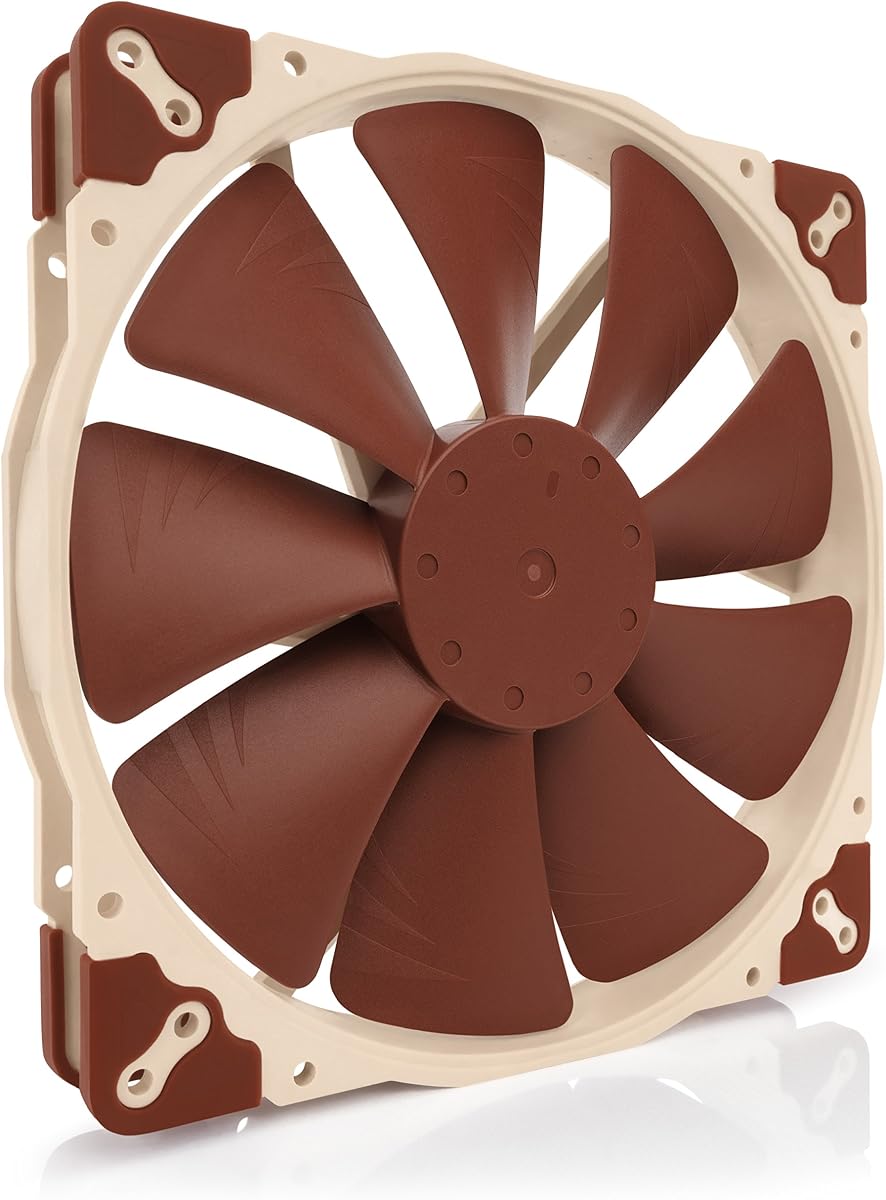
The Noctua NF-A20 PWM stands out as the top choice for high-performance cooling. It combines a massive 200mm diameter with advanced acoustic design to move air efficiently while staying exceptionally quiet.
We may earn a commission when you buy through this link, at no additional cost to you.
Its Flow Acceleration Channels and Acoustic Optimisation frame deliver superior cooling without the noise penalty common in large fans. The 4-pin PWM control allows smooth speed adjustments, and the included Low-Noise Adaptor offers even more silent operation flexibility.
While the price is higher than many competitors, the build quality and reliability justify the cost. It may lack flashy RGB lighting or multiple color variants, but its focus on pure cooling performance makes it ideal for quiet workstations or builds.
Buy this fan if you value silence and longevity over aesthetics. It fits standard 200mm mounts easily and comes with everything needed for installation. This model delivers the best balance of performance and quiet operation for most users today.
Advanced frame geometry reduces noise without sacrificing airflow, making it perfect for quiet systems.
Three sets of mounting holes ensure it fits various chassis and hardware configurations seamlessly.
We may earn a commission when you buy through this link, at no additional cost to you.
The Thermaltake Pure 20 Series offers exceptional value for users seeking powerful cooling on a budget. Its 200x30mm thickness provides high air pressure to push air through dense radiators or restrictive case vents.
We may earn a commission when you buy through this link, at no additional cost to you.
Blade design focuses airflow while reducing excess noise, creating a strong torrent of air. The anti-vibration mounting system minimizes rattle and vibration noise. A shaved frame allows flexible installation, especially in Thermaltake chassis.
While it lacks premium bearings or advanced noise reduction, it delivers solid performance for the price. The sleeve bearing is reliable but may not match the lifespan of fluid dynamic bearings found in costlier fans.
Choose this fan if you prioritize airflow and cost over long-term silence. It suits budget builds or secondary cooling needs where high volume movement is key. An LED version is available for those wanting subtle lighting.
Thick design focuses air movement for better cooling in tight or restrictive case environments.
Shaved frame and anti-vibration pads simplify installation across different chassis types.
We may earn a commission when you buy through this link, at no additional cost to you.
The chromax.Black.swap edition elevates the already excellent NF-A20 with an all-black finish and swappable anti-vibration pads. This allows users to match colors across their build while maintaining top-tier performance and silence.
We may earn a commission when you buy through this link, at no additional cost to you.
It shares the same Flow Acceleration Channels and acoustic frame as the standard model, ensuring quiet cooling. The large diameter delivers high airflow at low noise levels, and the four-pin PWM control provides precise speed management via motherboard headers.
Though pricey, it offers a unique customization feature not found elsewhere. The MTTF exceeds 150,000 hours for reliability. Still, it lacks RGB or other visual effects, focusing purely on form and function for clean setups.
Opt for this fan if you want premium looks and performance together. It works well in high-end black builds where customization matters. Its silence and compatibility make it a long-term solution for demanding cooling needs.
Swappable anti-vibration pads in multiple colors allow perfect matching with your system's design theme.
Award-winning A-series design ensures minimal noise while moving large volumes of air efficiently.
We may earn a commission when you buy through this link, at no additional cost to you.
The CT200 PWM delivers strong airflow performance designed to complement Thermaltake's existing CT fan lineup. Optimized with nine blades, it pushes over 130 CFM of air to keep high-performance components cool under load.
We may earn a commission when you buy through this link, at no additional cost to you.
Hydraulic bearings provide silent and reliable operation with speeds adjustable via PWM from 500 to 900 RPM. Daisy chain connectors simplify installation by linking multiple fans together quickly. Extension cables help reach distant fan headers.
Noise levels may rise slightly at max speed compared to premium silent fans. Its aesthetic limits to CT builds, and lacks extra mounting flexibility. Still, the airflow and price make it ideal for users needing strong cooling capacity.
Choose this fan for balanced performance and value in compatible builds. It handles heat well with minimal setup complexity. If you already use CT fans or need high CFM without premium costs, this is a solid pick.
Nine-blade optimized design moves large amounts of air for effective heat dissipation during gaming.
Daisy chain connectors and extension cables reduce cable clutter and speed up multi-fan setups.
We may earn a commission when you buy through this link, at no additional cost to you.
The SickleFlow 200 aRGB brings stunning lighting to large-case cooling setups. Its frosted blade design diffuses aRGB light for a vibrant and even glow without harsh hotspots on your system interior.
We may earn a commission when you buy through this link, at no additional cost to you.
Dynamic PWM control adjusts speeds up to 800 RPM for balancing noise and airflow. The hybrid frame minimizes resonance and vibration. A two-tier sealing mechanism prevents dust and oil leakage, extending fan lifespan.
Airflow is efficient but not the highest on this list. It requires a separate RGB controller and may not match specialized lighting ecosystems directly. However, visual appeal and build quality are strong for aesthetic-focused users.
Buy this fan if lighting effects matter as much as cooling. It suits builds needing 200mm RGB fans and stable performance. The frosted diffusion ensures colors look great from all angles without extra diffusers.
Frosted blades scatter light evenly for a soft and customizable luminous appearance inside your case.
Anti-resonance mounting reduces vibrations and noise for quieter operation at all speeds.
We may earn a commission when you buy through this link, at no additional cost to you.
The NF-A20 FLX is ideal for systems using 3-pin headers or needing simple speed control. It delivers the same quiet performance as PWM models but switches between two fixed speeds via a Low-Noise Adaptor.
We may earn a commission when you buy through this link, at no additional cost to you.
Flow Acceleration Channels and Acoustic Optimisation frame keep noise extremely low. The 3-pin Molex header works on older boards and PSUs. Included 3:4-pin adapter allows direct power supply connection if needed.
Lack of PWM means less automatic speed adjustment. This limits fine-tuning compared to PWM fans. Still, reliability remains high with excellent MTTF. The included adapters ensure versatile power options for most users.
Choose this for older setups or when PWM isn't available. It suits those preferring fixed reliable speeds. The acoustic performance remains top-class for a no-frills solution in demanding environments.
Low-Noise Adaptor lets you switch between airflow and near-silent modes manually with one plug.
Includes 3:4-pin adapter for PSU connection if motherboard headers are limited.
We may earn a commission when you buy through this link, at no additional cost to you.
This specialized 5V PWM fan connects via USB power, power banks, or smartphones instead of PC fans. It offers the same acoustic excellence as standard models with added flexibility for mobile or external cooling.
We may earn a commission when you buy through this link, at no additional cost to you.
Built with PWM speed control and polarity protection. The OmniJoin adaptor links proprietary headers. It runs on 12V or USB, making it unique. The acoustic frame ensures noise stays low even at full speed.
The niche voltage limits use to USB power sources only. Price is higher than standard fans. But the versatility shines in non-standard setups like mini-PCs or external cases without full power access.
Use this for specialized builds needing flexible power. It suits compact or portable systems where standard headers aren't available. Its performance ensures efficient cooling without noise compromises.
USB adaptor allows operation from power banks or smartphones for portable cooling applications.
OmniJoin adaptor connects to unique fan headers on specific motherboard or chassis designs.
We may earn a commission when you buy through this link, at no additional cost to you.
The MF200R RGB works with Asus Aura, ASRock RGB, Gigabyte Fusion, and MSI RGB platforms. Its Jet Engine and helicopter blade design balances static pressure and airflow for effective in-take cooling.
We may earn a commission when you buy through this link, at no additional cost to you.
Sound absorbing rubber pads reduce vibration noise. Smart fan sensor prevents motor damage if the fan jams. RGB lighting provides vibrant colors, though a controller is required for full functionality.
Airflow is lower than other 200mm options. Noise levels stay around 28 dB which is quiet. Price is competitive for RGB builds. Ideal for multi-brand setups needing lighting compatibility.
Pick this for RGB versatility without high cost. It suits builds using mixed RGB ecosystems. The jam sensor adds durability. Just ensure your case has a controller for lighting.
Certified to sync with major motherboard RGB software for unified lighting across components.
Automatic motor stop prevents damage when objects block airflow or blades unexpectedly.
We may earn a commission when you buy through this link, at no additional cost to you.
The CHICIRIS 200mm fan offers bright ARGB lighting with 34 LEDs spread across two circles. Its hydraulic bearing reduces friction, ensuring quiet operation around 9dBA while moving 95CFM of air efficiently.
We may earn a commission when you buy through this link, at no additional cost to you.
Syncs with major 5V ARGB motherboards for custom lighting effects. Includes 4PIN PWM for automatic speed control. A translucent 9-blade design diffuses light softly for even glowing aesthetics. Cables are included for easy setup.
Build quality is basic compared to premium brands. Brand reputation is less established. Noise remains very low though. Price is competitive for ARGB options. Suitable for budget RGB-focused builds.
Choose this for lighting on a budget. It delivers solid airflow and silent operation. Ensure your motherboard supports 5V ARGB for sync features. Good for entry-level setups.
34 LEDS create uniform glow and customizable color effects for visual appeal.
Oil-sealed cover reduces friction and oil leakage for extended lifespan and quiet operation.
We may earn a commission when you buy through this link, at no additional cost to you.
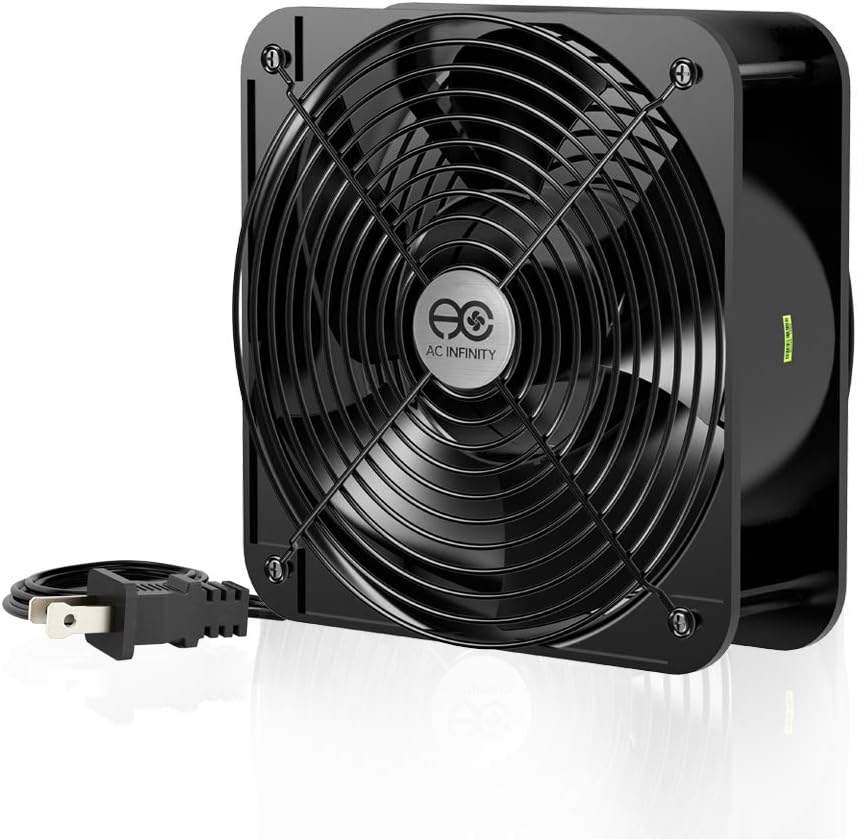
The AC IN AXIAL 2060 is built for high-demand industrial or rack cooling needs. It moves massive 425 CFM of air thanks to its 60mm thick aluminum design. Dual-ball bearings last over 67,000 hours.
We may earn a commission when you buy through this link, at no additional cost to you.
Runs on standard 120V AC. Includes power cord, two guards, and screws. Fans can stand upright or lay flat. Airflow is unmatched for ventilation projects. Noise levels are high but expected for this power.
This fan is not for quiet PC builds due to 65 dBA noise. Needs dedicated AC power. It is ideal for server racks or large industrial enclosures requiring extreme air exchange without electronics.
Use this for heavy ventilation or replacement in industrial gear. Avoid for quiet home PCs. Its durability and airflow excel in harsh environments where maximum cooling is essential.
60mm thick aluminum construction generates extreme airflow for heavy-duty ventilation tasks.
Dual-ball design supports flat or upright mounting with long lifespan and high reliability.
We may earn a commission when you buy through this link, at no additional cost to you.
Selecting the right 200mm fan involves balancing airflow, noise, and connectivity. This section covers the main factors influencing your decision and what to prioritize for your specific setup.
Airflow (CFM) measures air movement volume, while static pressure pushes air through restrictive areas like radiators. High airflow suits general case exhaust, but high static pressure is better for intakes blocked by dust filters or dense heatsinks.
Look for CFM values above 90 for general cooling and higher static pressure for tight spots.
Noise is measured in decibels (dBA). Lower dBA values mean quieter operation. Premium fans often balance airflow with noise reduction features like acoustic frames and optimized blade geometry.
Choose fans with noise ratings under 30 dB for quiet builds.
Bearing technology affects lifespan and noise. Sleeve bearings are affordable but wear faster. Hydraulic or fluid dynamic bearings last longer and run quieter, while ball bearings offer durability for industrial use.
Prioritize hydraulic bearings for longevity in PC builds.
PWM fans offer speed control via motherboard headers. Molex provides simple constant speed or Low-Noise Adaptor. ARGB fans need separate connectors for lighting control. Ensure compatibility with your case ports.
Select PWM for automatic speed control and ARGB for lighting.
200mm fans come in different thicknesses (25mm, 30mm, 60mm). Check your case clearance. Mounting hole patterns vary; some offer multiple sets for compatibility.
Verify case dimensions and hole sets before buying.
Anti-vibration mounts reduce rattle. Flexible frames fit various hole sizes. Daisy chain connectors simplify multi-fan wiring. These features save installation time and noise.
Look for included screws and anti-vibration pads.
Budget fans offer good value but may lack noise reduction or long-term reliability. Established brands provide better support and warranties. Balance features with cost.
Invest in reliable brands for critical cooling zones.
Industrial fans use AC power and high voltage, not PC headers. Ensure your use matches fan type. Some fans offer USB or 5V power for unique portable cooling setups.
Check voltage requirements for non-standard setups.
Install the fan on a case spot using included screws and anti-vibration pads. Ensure the airflow direction arrow points where you want air to move. Connect the power and control cable to the correct motherboard header.
Use BIOS or software to monitor speeds and noise. Adjust PWM curves if supported. For fans with ARGB, install matching lighting controllers or RGB software to customize colors and effects.
Clean dust regularly from blades and filters to maintain airflow. Avoid touching blades while running. Replace fans if noise increases or bearing wear becomes noticeable after several years.
Airflow (CFM) is air movement volume ideal for open spaces. Static pressure pushes air through restrictions like radiators. Use high airflow for general exhaust and high static pressure for blocked intakes or radiator cooling.
Most use standard 200mm holes but hole sets vary (154mm, 170mm, 110x180mm). Check your case compatibility before buying. Some fans include multiple hole sets to fit more cases.
PWM allows automatic speed control based on temperature. Molex fans run at fixed speeds unless using an adaptor. PWM improves efficiency and noise reduction for dynamic workloads.
Standard thickness is 25mm or 30mm. Thicker fans (60mm) offer more airflow but need clearance. Verify your case space before buying thick models.
No. AC fans need 120V wall power and are too loud for PCs. PC fans use 12V DC from the motherboard or PSU.
Yes. Most need a compatible motherboard ARGB header or separate controller. Check case support before buying ARGB fans to ensure lighting works.
Quiet fans operate below 30 decibels. Premium models can reach as low as 18 dBA. Industrial fans often exceed 60 dB and are not suitable for home use.
The Noctua NF-A20 PWM models lead for silent performance and reliability. Thermaltake and Cooler Master fans offer strong value and RGB features for budget builds.
Prioritize airflow and noise levels based on your case layout. Match PWM or ARGB connectors to your motherboard capabilities. Consider bearing type for long-term performance.
Prices fluctuate frequently so verify current listings. Check case clearance before purchase. Selecting the right fan ensures your system runs cool and quietly for years.