
Lenovo V15 Gen 4 Business Laptop
4.3Editor score
Military grade MIL-SPEC tested
Fast PCIe NVMe SSD
Windows 11 Pro security
Choosing a laptop that lasts requires careful consideration of build materials, component quality, and software support. A device designed for longevity minimizes obsolescence and ensures reliable performance over many years of professional and personal use.
We evaluated ten top-rated models focusing on durability certifications, thermal management, upgradeability, and vendor support policies. Each selection balances current performance with future-proofing features to help you make a smart investment decision today.
Every pick highlights specific strengths in durability and reliability while offering clear insights into real-world usage scenarios. Please note that product availability and pricing can fluctuate frequently, so always verify current details before making your final purchase.
4.3Editor score

4.5Editor score

4.2Editor score
As an Amazon Associate we earn from qualifying purchases.
The following comparison table provides a side-by-side overview of key specifications for each selected model. Use this data to quickly identify which device aligns best with your specific longevity and performance requirements.




This HP business laptop offers a robust combination of performance and screen real estate. With a 4.5 star rating, it stands out for its reliable hardware and long battery life features that support extended work sessions without constant recharging.
We may earn a commission when you buy through this link, at no additional cost to you.
The AMD Ryzen 5 processor paired with 16GB of RAM ensures smooth multitasking for office applications. The 512GB SSD provides fast boot times and ample storage, while the large 17.3 inch display enhances productivity by reducing the need for external monitors.
While the device is slightly heavier than portable ultrabooks, its durable silver finish and sturdy build justify the trade-off. The integrated numeric keypad further supports data entry efficiency, making it a practical choice for professionals who prioritize function over extreme portability.
Ideal for office users and students needing a stationary workstation, this laptop delivers consistent performance. Its preloaded Windows 11 and Office 365 integration streamline setup, ensuring you can focus on work immediately upon unboxing.
The expansive 17.3 inch FHD display reduces eye strain and allows side-by-side document viewing.
Long battery life and fast charge capabilities keep you productive throughout the workday.
We may earn a commission when you buy through this link, at no additional cost to you.
The Dell 16 Laptop delivers a premium visual experience with its FHD+ screen and Intel Core 7 processor. Rated at 4.4 stars, it excels in display quality and user comfort, making it suitable for long hours of screen time.
We may earn a commission when you buy through this link, at no additional cost to you.
Features like ComfortView Plus help reduce harmful blue light, protecting your eyes during extended usage. Adaptive thermals ensure the device runs efficiently without overheating, while the high-quality camera supports clear virtual connections for remote collaboration.
The design prioritizes clarity and comfort but may lack some legacy connectivity options like Ethernet. However, the modern port selection and powerful processor more than compensate for most users seeking a sleek and capable business machine.
Choose this model if you value display quality and eye comfort. The 16-inch form factor offers a balance between portability and workspace, while the onboard Intel Core 7 CPU handles demanding multitasking with ease.
Dell ComfortView Plus filters blue light to reduce strain during prolonged work sessions.
Built-in sensors adjust power and heat to maintain efficiency and longevity.
We may earn a commission when you buy through this link, at no additional cost to you.
This Lenovo V15 Gen 4 model is engineered for reliability and cost-effective performance. With a 4.3 star rating, it offers high-speed RAM and storage that ensure smooth operation for daily professional tasks without compromising on speed.
We may earn a commission when you buy through this link, at no additional cost to you.
The Intel Core i5-13420H processor delivers robust performance, outperforming competitors in its class. Windows 11 Pro adds enterprise-grade security features, while the variety of ports including HDMI and Ethernet supports diverse connectivity needs without adapters.
While the webcam is standard, the numeric keypad and full-size keyboard boost productivity for data-heavy work. The durable build and pre-configured layouts help streamline workflows, making this a smart choice for budget-conscious professionals.
Opt for this laptop if you need a dependable workhorse. Its combination of Windows 11 Pro security and hardware speed provides a solid foundation for long-term business use and educational purposes alike.
Windows 11 Pro provides advanced management tools and security layouts for teams.
Includes Ethernet and HDMI for seamless connections to external displays and networks.
We may earn a commission when you buy through this link, at no additional cost to you.
The Lenovo V15 stands out with its military-grade durability and DDR5 memory technology. Rated 4.7 stars, it offers exceptional reliability for everyday computing, making it ideal for environments where ruggedness is a priority.
We may earn a commission when you buy through this link, at no additional cost to you.
Its sleek design hides robust features including a privacy shutter for the webcam and support for two external 4K displays. The AMD Ryzen 5 processor ensures efficient performance, while the DDR5 RAM provides faster data throughput than previous generations.
Although the unit was resealed for upgrades, it remains a solid budget-friendly option. The inclusion of BitLocker encryption and remote desktop features makes it secure for business use, ensuring your data remains protected during daily operations.
Select this laptop for its proven durability and speed. It balances commercial-grade testing with consumer-friendly pricing, offering a dependable platform for students and professionals who need a sturdy machine that won't fail under pressure.
Windows 11 Pro ensures BitLocker encryption and secure remote management capabilities.
Tested to MIL-SPEC 810H standards for resistance against physical wear and tear.
We may earn a commission when you buy through this link, at no additional cost to you.
This Lenovo ThinkBook combines cutting-edge AI processing with massive storage and memory capacity. The 4.2 star rating reflects its high-end capabilities, offering professional-grade performance that future-proofs your workflow against evolving software demands.
We may earn a commission when you buy through this link, at no additional cost to you.
The Intel Core Ultra 7 processor with AI Boost NPU handles complex workloads efficiently. With 32GB of DDR5 RAM and a 1TB SSD, you have ample resources for large datasets and multitasking. Thunderbolt 4 ensures fast data transfer and display connectivity.
While the price is higher, the premium aluminum chassis and advanced security features justify the cost. It is built for professionals who need robust tools for data analysis and content creation without compromising on speed or reliability.
Invest in this laptop for its power and longevity. The enterprise-grade security and sleek design make it a standout choice for businesses and creative professionals seeking a high-performance machine that will remain relevant for years.
AI capabilities optimize workload distribution for improved battery efficiency and speed.
Includes fingerprint reader and BitLocker encryption for comprehensive data protection.
We may earn a commission when you buy through this link, at no additional cost to you.
This Lenovo V15 Gen 4 prioritizes reliability and productivity features. With a 4.5 star rating, it offers a long-term solution for users needing a capable machine without excessive costs, making it ideal for everyday business tasks.
We may earn a commission when you buy through this link, at no additional cost to you.
The AMD Ryzen CPU optimizes performance for high-demand days, while the anti-glare display ensures visibility in various lighting conditions. Dolby Audio and noise cancelation improve collaboration quality, ensuring professional interactions remain clear and focused.
Although the RAM is fixed, the overall build quality and military-grade toughness provide excellent durability. The focus on sustainability and energy efficiency aligns with eco-friendly practices, reducing your environmental impact while maintaining reliable performance.
Choose this laptop for steady productivity. It balances cost and quality effectively, offering features like a privacy shutter and robust connectivity that ensure you can work efficiently in any environment.
Intelligent noise cancelation and Dolby Audio enhance video conferencing clarity.
Made with responsibly sourced materials and holds sustainability certifications.
We may earn a commission when you buy through this link, at no additional cost to you.
This Dell Latitude Rugged model is built to survive harsh industrial environments. With a perfect 5.0 star rating, it proves its reliability in demanding settings, making it the top choice for field technicians and construction professionals.
We may earn a commission when you buy through this link, at no additional cost to you.
The 14-inch touchscreen with outdoor visibility ensures clear visuals even in direct sunlight. A reinforced chassis protects against drops and vibrations, while the comprehensive port selection allows direct connection to diagnostic tools without extra dongles.
As a renewed unit, it offers exceptional value for rugged hardware. The 16GB RAM and Windows 11 Pro ensure it handles professional workflows smoothly. Its robust build is unmatched by standard laptops for users in tough working conditions.
Invest in this laptop if you work outside an office. It delivers unmatched durability and functionality, ensuring your work continues uninterrupted regardless of the physical demands of your environment.
Reinforced chassis withstands drops and harsh conditions typical in industrial zones.
Outdoor-viewable technology keeps the display readable under bright sunlight.
We may earn a commission when you buy through this link, at no additional cost to you.
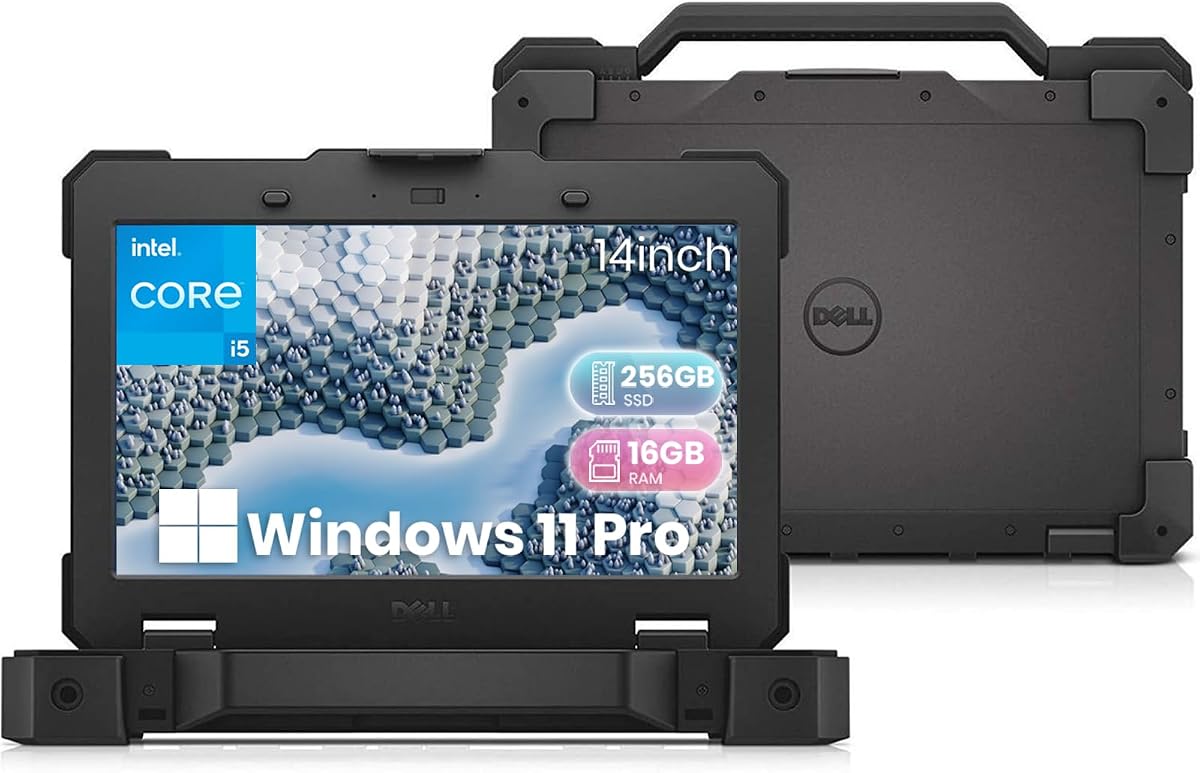
The Dell Latitude 5414 delivers military-grade durability and rapid responsiveness. Rated 5.0 stars, it offers a secure and streamlined experience for business use, ensuring reliability even when the device faces physical stress or spills.
We may earn a commission when you buy through this link, at no additional cost to you.
Its 256GB SSD and 16GB RAM ensure near-instant boot times and smooth multitasking. The rich array of legacy ports like VGA and RS-232 supports older industrial equipment, removing the need for complex adapters in specialized environments.
Though the processor is older, its efficiency and stability make it ideal for specific legacy applications. The certified refurbished status includes a service warranty, giving you confidence in its quality and functionality for daily operations.
Select this laptop for extreme durability. It is engineered to withstand harsh conditions and provides robust connectivity options that ensure you can operate effectively in diverse technical environments.
Includes VGA and RS-232 ports for connecting to older industrial tools.
Windows 11 Pro ensures enterprise-grade security with rapid boot times.
We may earn a commission when you buy through this link, at no additional cost to you.
This Lenovo V-Series V15 boasts massive memory and storage for heavy workflows. With a 4.2 star rating, it excels in multitasking performance, making it ideal for professionals managing large datasets or running multiple resource-heavy applications simultaneously.
We may earn a commission when you buy through this link, at no additional cost to you.
The AMD Ryzen 7 processor handles intensive tasks smoothly, while 40GB of RAM ensures you never face slowdowns. The 1TB SSD provides ample space for archives and projects, supporting a fast workflow from boot to shutdown.
Though the machine is built for power, its connectivity options like HDMI and Ethernet allow seamless expansion. It is designed for users who need a stationary powerhouse rather than a portable laptop, prioritizing raw capability over mobility.
Choose this laptop if you need maximum memory capacity. Its configuration supports complex software environments efficiently, ensuring productivity stays high even when managing large files or virtual machines.
40GB RAM allows smooth operation of multiple heavy applications at once.
1TB SSD provides space for extensive project files without external drives.
We may earn a commission when you buy through this link, at no additional cost to you.
The ThinkPad L16 offers enterprise-ready performance with customizable memory configurations. With a 4.4 star rating, it balances durability and power, making it suitable for professionals who need reliability without compromising on high-end specifications.
We may earn a commission when you buy through this link, at no additional cost to you.
Its Intel Core Ultra 5 processor ensures efficient performance, while the high-brightness display supports outdoor work. The MIL-STD-810H certification guarantees ruggedness, and the fast-charging battery keeps you productive throughout the day without frequent interruptions.
The laptop supports up to three external displays via Thunderbolt 4, ideal for multitasking setups. While it was resealed for upgrades, the enterprise-grade security and robust build make it a solid choice for demanding business environments.
Invest in this laptop for its flexibility and reliability. Its configurable components allow you to tailor the device to your specific workflow, ensuring long-term value for both students and corporate professionals.
Supports up to three external displays for maximum workspace efficiency.
Delivers up to 10 hours of battery life with fast charging support.
We may earn a commission when you buy through this link, at no additional cost to you.
Selecting a laptop built to last involves evaluating build materials, hardware durability, and software support timelines. Consider the following factors to ensure your investment remains viable for years.
Look for laptops constructed from metal or reinforced polymer to resist daily wear and tear. Models with MIL-STD certifications have undergone testing for drops and environmental stress, ensuring they survive rugged use.
A robust chassis protects internal components from damage, which is crucial for maintaining functionality over a long period.
Efficient heat dissipation is vital to prevent component degradation. Good airflow and cooling solutions reduce the risk of overheating, which can shorten the lifespan of the CPU and other critical parts.
Models with adaptive thermals or robust fans maintain stable performance and reduce heat-induced wear.
Ample RAM and SSD storage ensure the laptop remains fast as software requirements grow. Aim for at least 16GB of RAM and 512GB of SSD storage to handle modern multitasking without bottlenecks.
Upgradable RAM or storage options further extend the device's utility if you can easily increase capacity later.
Longevity depends on battery health. Opt for models with reliable battery chemistry and fast charging to maintain efficiency. Check the rated cycle count if available to understand how many charge cycles the battery can handle.
A well-managed battery ensures you can work away from outlets without frequent replacements.
Manufacturers with long OS update policies ensure your device stays secure. Windows devices typically receive years of updates, but check the vendor's commitment to drivers and firmware patches.
Regular software updates prevent vulnerabilities and keep the system running smoothly.
A versatile port selection prevents the need for dongles that can fail. Look for HDMI, USB-C, and Ethernet to ensure compatibility with various peripherals and displays.
Versatile connectivity reduces adapter clutter and ensures stable connections for years.
Devices with accessible internal components and strong warranty support are easier to maintain. Check if the manufacturer offers onsite service or extended warranty options to cover unexpected hardware issues.
Strong support ensures quick resolutions to hardware failures.
Keep your laptop in a climate-controlled environment and avoid exposing it to extreme temperatures or humidity. Heat and moisture are primary causes of hardware degradation over time.
Perform regular software updates and clean your system of unnecessary files to maintain speed. A cluttered operating system can lead to slow performance and instability.
Use protective cases during transport to shield the chassis from physical impacts. Avoid placing heavy objects on the laptop lid to prevent screen damage.
With proper maintenance, a high-quality laptop can last between five to seven years. Regular software updates and gentle physical handling significantly extend this lifespan.
Frequent crashes, overheating, or failing battery charge are common indicators. If performance slows significantly despite updates, internal hardware may need replacement.
Yes, SSDs are more durable than mechanical drives and offer faster performance. They reduce the risk of data loss from physical shocks and ensure consistent boot times.
Military-grade certification ensures the device can withstand drops and extreme temperatures. It is highly valuable for users working in rugged or unpredictable environments.
Clean vents and keyboard weekly to prevent dust buildup. Internal cleaning should be done every six months if you use the device frequently in dusty areas.
Many laptops allow RAM upgrades which extend useful life. Check if your specific model has upgradable slots before purchasing to maximize future performance.
Our top picks like the HP 17 inch Business Laptop and Lenovo ThinkBook offer robust features tailored for long-term use. These models balance performance, durability, and connectivity to meet diverse professional needs.
Prioritize build quality and thermal management when selecting a machine. A device that stays cool and resists physical stress will serve you better in the long run.
Always verify current specifications and pricing before purchasing as these can change. Choose the model that best fits your specific workflow requirements.