
Lightning to HDMI Adapter for iPhone
4.4Editor score
Affordable pricing option
1080p HD support
Includes charging port
Compact pocket size design
Compare the top HDMI Lightning adapters for iPhone to find the best Apple MFi certified digital AV dongle for 1080p mirroring to TV.
Connecting your iPhone to a larger display can transform how you view media and present content. A reliable HDMI Lightning adapter ensures stable mirroring without lag or compatibility issues across iOS versions.
We evaluated ten top-rated adapters based on build quality, MFi certification, video resolution support, and user feedback. Each product was assessed for real-world performance in home and business settings.
Each pick highlights key strengths and limitations to help you choose the right model for your device. Note that availability and pricing may change frequently on retail platforms.
4.4Editor score

4.2Editor score
4.6Editor score
This side-by-side comparison highlights the core specifications and features of the leading HDMI Lightning adapters available for iPhone users in 2026.






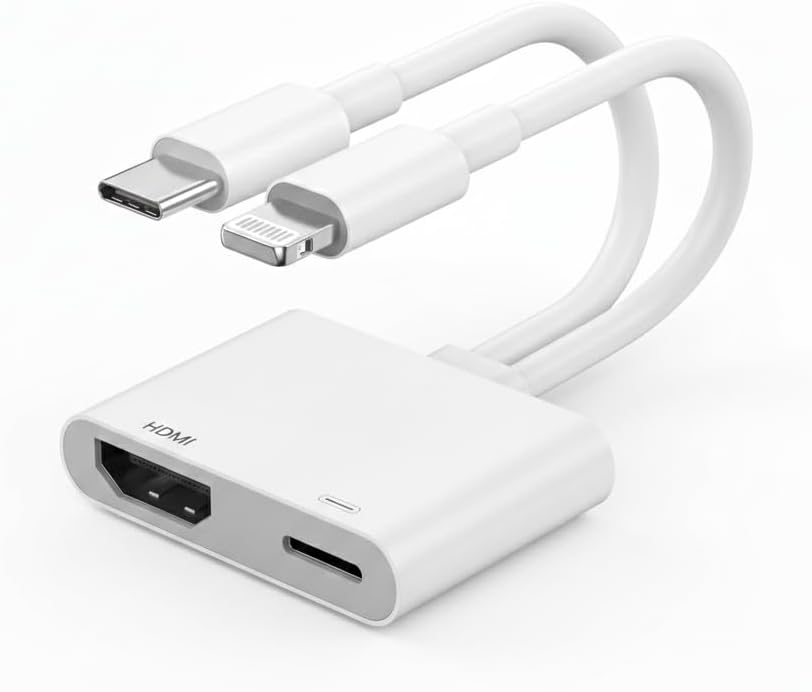
This Lightning to HDMI adapter is an excellent entry point for users seeking reliable screen mirroring. It holds MFi certification and supports 1080p HD output for crisp visuals.
We may earn a commission when you buy through this link, at no additional cost to you.
The included Lightning charging port allows you to keep your iPhone powered during long presentations or streaming sessions. It works seamlessly with devices from iPhone 5 up to iPhone 14.
Users should note that streaming apps with HDCP protection like Netflix will not play through this adapter. It is ideal for local videos and supported apps only.
If you need a budget-friendly option that balances features and performance, this adapter is a solid choice. It simplifies connecting your iPhone to any HDMI display.
The MFi certification ensures that this adapter meets Apple's safety and performance standards, reducing the risk of connection issues or device damage.
The Lightning charging port allows you to maintain battery life while mirroring, which is crucial for long meetings or extended movie watching sessions.
We may earn a commission when you buy through this link, at no additional cost to you.
This adapter is specifically designed for professionals who need reliable presentation capabilities. It supports mirroring of PowerPoint and Keynote slides without lag.
We may earn a commission when you buy through this link, at no additional cost to you.
The plug and play functionality means you can connect quickly in meeting rooms without troubleshooting. It supports iOS versions from 9.2 and above.
Streaming services like Netflix are restricted due to copyright protection laws. This is standard across all third-party adapters and not a flaw in this product.
Business users and educators will find this adapter valuable for classroom and conference presentations. It bridges the gap between mobile devices and large displays.
This adapter is optimized for business and education use cases where slide mirroring is the primary requirement rather than media streaming.
It supports a wide range of iOS versions, ensuring compatibility even with older devices that are still in active use in schools or offices.
We may earn a commission when you buy through this link, at no additional cost to you.
KikoSaka offers a straightforward Lightning to HDMI cable that prioritizes simplicity. It connects your iPhone directly to an HDMI port with minimal fuss.
We may earn a commission when you buy through this link, at no additional cost to you.
The MFi certified chip ensures stable video output without requiring external power for most standard mirroring tasks. It is ideal for quick video sharing.
Without a charging port, this adapter is best for short viewing sessions where your iPhone battery is sufficient. It lacks the extra convenience of power pass-through.
If you want a basic adapter that just works without extra features, this is a great choice. It delivers reliable 1080p output at a competitive price.
The cable design focuses on core connectivity without adding bulk or extra ports, making it easy to store in a small bag.
This adapter is built to work with all iOS versions, ensuring you don't face connection issues after system updates on your iPhone.
We may earn a commission when you buy through this link, at no additional cost to you.
This adapter stands out with its six point six feet cable length, giving you flexibility in placing your device away from the TV. It ensures high definition output.
We may earn a commission when you buy through this link, at no additional cost to you.
The MFi certified chip delivers stable performance with minimal lag, making it suitable for gaming or video playback at home. It supports a wide range of iOS devices.
While it does not support HDCP protected apps like Netflix, it handles local videos and supported apps like YouTube without issues. It is great for personal viewing.
If you need reach flexibility for your living room setup, this long cable adapter is highly recommended. It balances quality and convenience effectively.
The six point six feet cable allows you to charge your phone comfortably while connected to a distant display without cluttering your space.
The low latency and stable output make this adapter a good candidate for casual gaming on a larger screen with your iPhone.
We may earn a commission when you buy through this link, at no additional cost to you.
This is the official Apple Lightning Digital AV Adapter, ensuring maximum compatibility and reliability for iPhone users. It is built to last with durable materials.
We may earn a commission when you buy through this link, at no additional cost to you.
As an official product, it guarantees support for all current iOS features and updates. You do not need to worry about firmware or connection issues after updates.
The main downside is the higher cost compared to third-party alternatives. You also need to purchase an HDMI cable separately to connect to your TV.
If reliability and official warranty are your top priorities, this adapter is the safest choice. It is ideal for users who want peace of mind.
Buying the official Apple adapter provides access to their customer support and warranty services if you encounter any hardware issues.
The compact and durable design ensures the adapter can withstand daily use in professional and personal environments without wear.
We may earn a commission when you buy through this link, at no additional cost to you.
This adapter offers one of the best value propositions in the market with a competitive price and a five-year warranty. It supports iOS 17 and earlier versions.
We may earn a commission when you buy through this link, at no additional cost to you.
It provides a reliable 1080p HD output and includes a charging port to keep your device powered. The compact size makes it easy to carry in your pocket.
While it may not have the brand recognition of Apple, the high rating and warranty provide strong assurance of quality. It is a smart pick for budget-conscious buyers.
If you want essential features without spending much, this adapter is highly recommended. The long warranty period adds significant confidence to the purchase.
The five-year warranty is a standout feature that covers you for long-term use, reducing the risk of needing a replacement due to defects.
Support for the latest iOS versions ensures this adapter remains relevant and functional for iPhone users who update their devices frequently.
We may earn a commission when you buy through this link, at no additional cost to you.
lulaven has built a strong reputation with thousands of verified ratings. This adapter is compact and easy to carry while traveling. It delivers zero lag mirroring.
We may earn a commission when you buy through this link, at no additional cost to you.
The plug and play setup means you can connect to hotel TVs instantly without passwords. It supports a wide range of Lightning iPhones and iPads.
Users with newer USB-C iPhones should note this adapter is not compatible. It is strictly for Lightning models up to iPhone 14. Always check your model first.
For frequent travelers who need reliable connectivity on the go, this is an excellent choice. The trust built by reviews makes it a safe pick.
The ability to connect directly to hotel TVs without needing a specific Wi-Fi setup makes this adapter ideal for business or leisure travelers.
With thousands of verified ratings, users can feel confident that this adapter meets expectations for performance and durability across real-world use cases.
We may earn a commission when you buy through this link, at no additional cost to you.
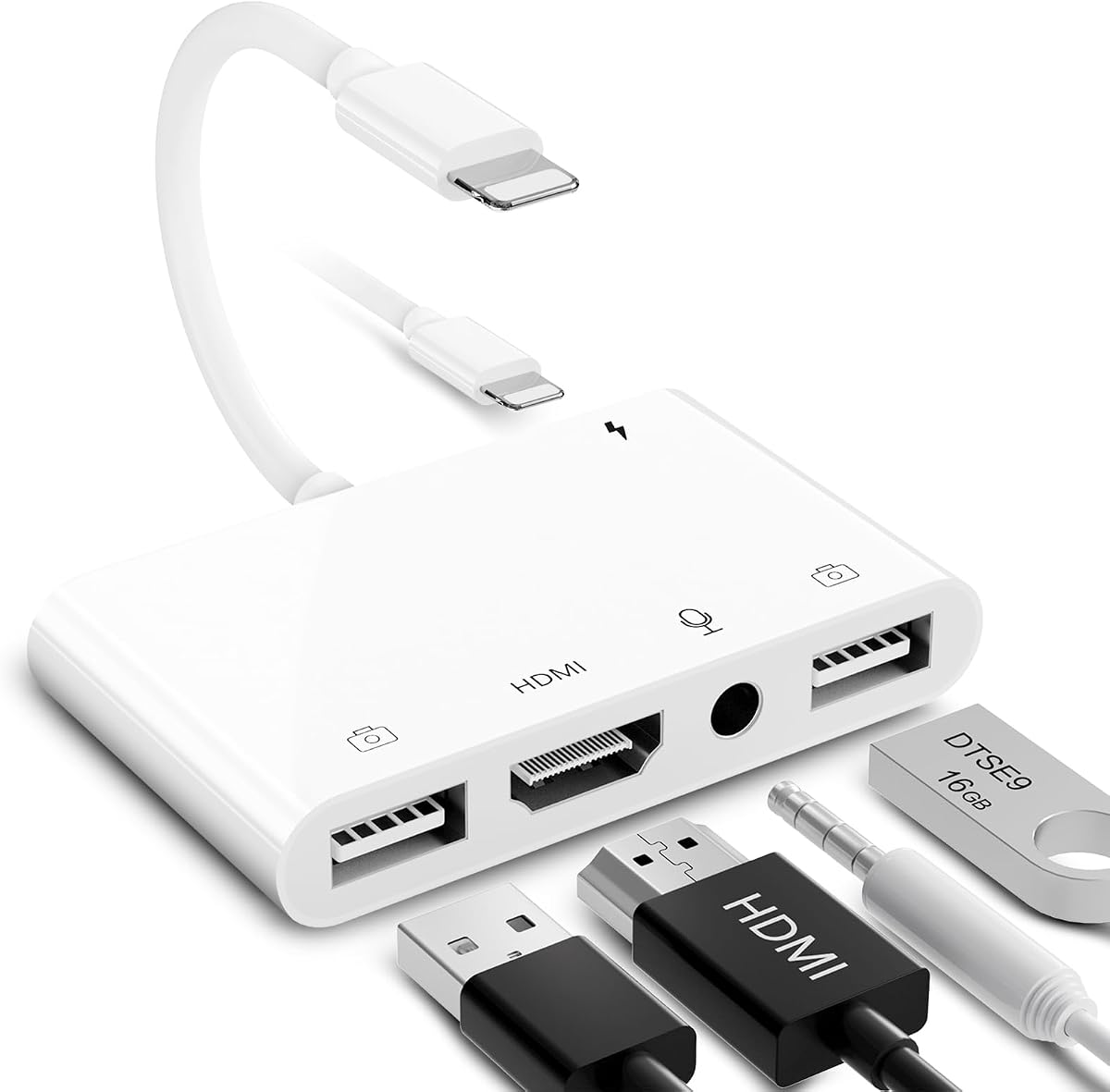
This adapter acts as a mini hub with dual USB ports and a headphone jack in addition to HDMI. It is great for transferring files from USB drives.
We may earn a commission when you buy through this link, at no additional cost to you.
The ability to connect a mouse or keyboard enhances productivity when presenting documents. It also supports streaming apps that require audio output.
It is larger than basic adapters and may require external power for stable HDMI output. This makes it less ideal for casual travel use.
If you need connectivity for multiple peripherals while mirroring your screen, this adapter is unique. It bridges the gap between a phone and a desktop setup.
The dual USB ports allow you to connect keyboards, mice, or flash drives directly, turning your iPhone into a more versatile workstation.
The 3.5mm headphone jack enables live streaming to platforms like YouTube or TikTok with clear audio input during recordings.
We may earn a commission when you buy through this link, at no additional cost to you.
This adapter offers versatile connectivity by supporting both USB-C and Lightning devices. It is ideal for households with mixed device types like MacBook and iPhone.
We may earn a commission when you buy through this link, at no additional cost to you.
With 100W power delivery, it can charge power-hungry devices like laptops while you stream. The USB-C mode supports HDCP content like Netflix and Hulu.
Lightning mode still has copyright restrictions, but the dual functionality makes this a premium choice. It simplifies your setup by replacing multiple cables.
If you want one adapter for all your Apple devices, this is the best option. The high rating and warranty reflect its robust performance and reliability.
Support for both USB-C and Lightning means you can use a single adapter for your iPhone, iPad, and MacBook without carrying multiple dongles.
Unlike Lightning ports, USB-C connections on this adapter support HDCP protected content, enabling streaming of services like Netflix on compatible devices.
We may earn a commission when you buy through this link, at no additional cost to you.
This classic Apple adapter maintains a high satisfaction rate among users. It delivers consistent performance for mirroring content from your iPhone or iPad to any display.
We may earn a commission when you buy through this link, at no additional cost to you.
It supports both video and audio output seamlessly, ensuring no issues with sound quality during playback. It is simple and does exactly what it promises.
The only limitation is the price compared to third-party options. However, you pay for the reliability and peace of mind that comes with the Apple brand.
If you want a proven product with a strong track record, this adapter is a solid choice. It is perfect for users who value simplicity and quality.
With a 4.6 rating, this adapter is trusted by a large number of users who have found it reliable over years of use.
The compact and no-frills design ensures that there are fewer points of failure, making it durable for daily use.
We may earn a commission when you buy through this link, at no additional cost to you.
Selecting the right adapter involves understanding several key factors including certification, video resolution, and compatibility with your specific device model.
Always choose an adapter that is MFi Certified to ensure it meets Apple's performance and safety standards. Non-certified adapters may cause connection drops or damage your device over time.
MFi certification guarantees stable communication between your iPhone and the display without unexpected disconnections.
Most adapters support up to 1080p HD which is sufficient for standard TVs and projectors. Avoid adapters that promise 4K over Lightning as the port does not physically support it.
Focus on 1080p support to ensure crisp visuals without paying for fake specs.
Be aware that streaming apps like Netflix and Prime Video are restricted due to HDCP copyright protection. This limitation applies to almost all Lightning adapters regardless of brand.
Use local video files or supported apps like YouTube for streaming if you need a big screen experience.
Adapters with a Lightning charging port allow you to power your iPhone while mirroring. This is essential for long presentations or movies to prevent battery drain.
Prioritize models with pass-through charging if you plan on using your device for extended periods.
Standard adapters are short which limits your seating position. Some models come with longer HDMI cables or extenders to give you more flexibility in placement.
Check the included cable length to ensure you can reach your TV without extra extension cables.
Verify the adapter supports your specific iPhone model and iOS version. Newer iOS updates can sometimes break compatibility with older adapters.
Check the product description to confirm support for your current device and software version before buying.
Look for adapters made from durable materials that can withstand frequent plugging and unplugging. A robust housing prevents internal connection issues over time.
Metal or high-grade plastic housings are generally more reliable than cheap plastic alternatives.
A good warranty period indicates the manufacturer stands behind their product. Look for brands offering at least a year or more of support for peace of mind.
Choose brands with responsive customer service in case you encounter setup or connection issues.
To start using your adapter, connect the Lightning end to your iPhone and plug an HDMI cable into the adapter. Then connect the other end of the HDMI cable to your TV or monitor.
Once connected, unlock your iPhone and tap Trust if prompted to allow the connection. Your screen should mirror within a few seconds without needing additional settings or apps.
To maintain longevity, avoid bending the cable sharply near the connector and store the adapter in a dry place. If you use a charging port, ensure the charger is securely plugged in during use.
Most Lightning adapters do not support Netflix or other HDCP protected apps due to copyright restrictions. You can stream local videos or apps like YouTube instead which are fully supported on these adapters.
Many adapters work without external power for short sessions, but using the charging port to plug in a power source is recommended for longer use. This prevents your iPhone battery from draining quickly during screen mirroring.
Yes, most modern Lightning adapters support all iPhone models with a Lightning connector including iPhone 14 and 13. Always verify compatibility in the product details before purchasing to be safe.
Lightning adapters typically support up to 1080p HD resolution. While some products may claim 4K, the physical Lightning port limits the output to 1080p for reliable performance.
A black screen often occurs due to HDCP protection on the content you are trying to play or an unstable connection. Try using a local video file or check your HDMI cable connection to resolve this issue.
No, all MFi certified Lightning adapters are plug and play. They do not require any apps or drivers to be installed on your iPhone for basic screen mirroring functionality.
Yes, any iPad with a Lightning connector works with these adapters. This allows you to mirror presentations or videos from your iPad to a TV or monitor seamlessly.
Most adapters remain compatible after iOS updates, but sometimes you may need to update the adapter firmware. Contact the seller for a guide if your connection stops working after a major update.
We reviewed ten top adapters ranging from official Apple hardware to versatile budget-friendly options. Each offers reliable 1080p output with MFi certification for safe connection.
Prioritize an adapter with a charging port and strong warranty if you use it frequently. Consider the Apple official adapter for maximum reliability or third-party models for better value.
Prices and availability can change so check current listings before purchasing. With the right adapter you can enjoy your iPhone content on any big screen effortlessly.