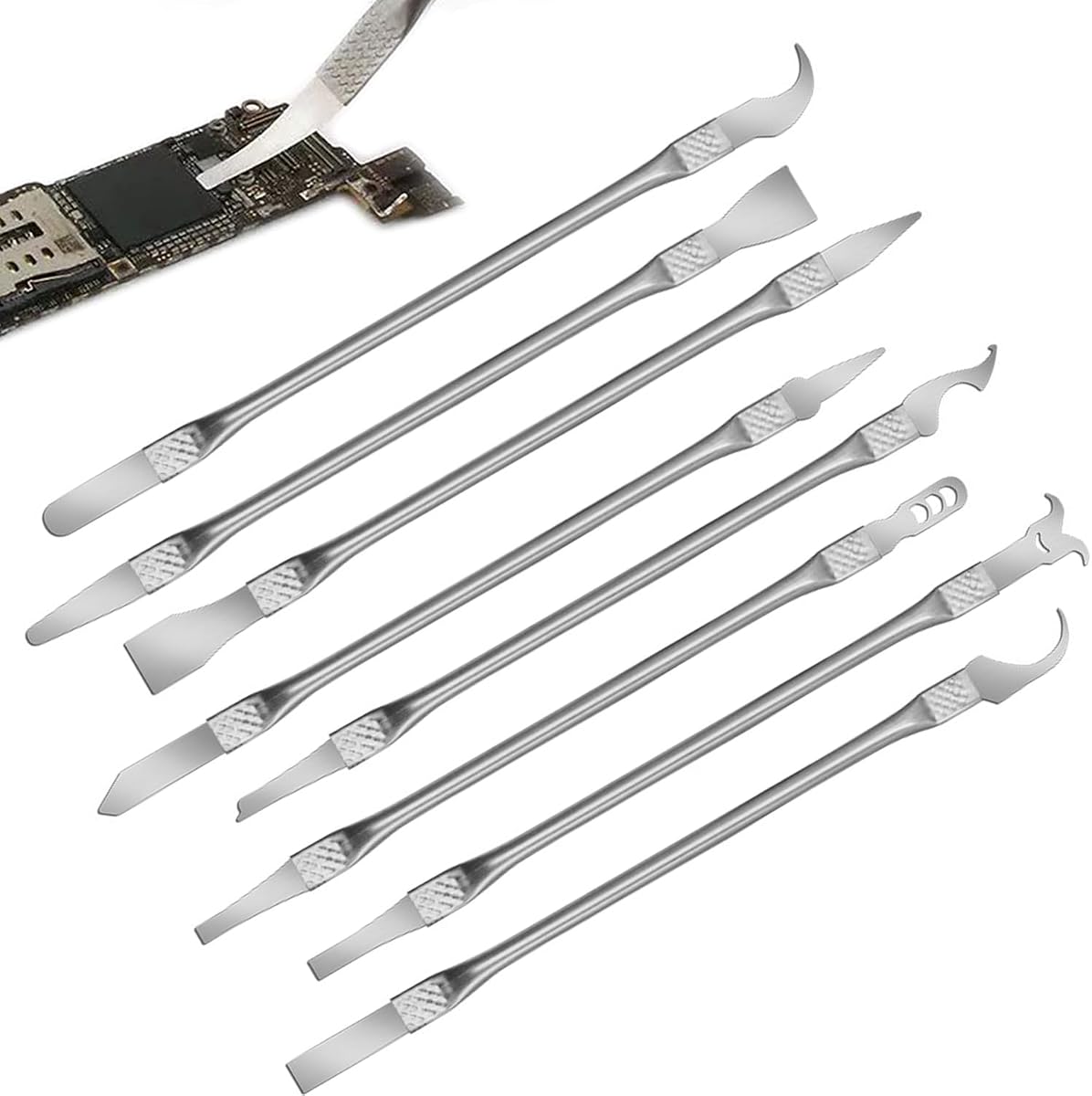
8 Piece Set Multi-Function CPU Removal Tool Set
4.0Editor score
Versatile repair kit for smartphones
Precision ultra-thin tool design
Durable alloy material construction
This guide compares the top delidding kits for CPUs and GPUs to help you reduce temperatures and improve performance without voiding warranties unnecessarily.
Delidding kits are essential tools for enthusiasts seeking to optimize thermal performance. By removing the integrated heat spreader, you expose the die for direct contact cooling. This process requires precision tools to avoid damaging sensitive components during the procedure.
We evaluated ten leading kits based on compatibility, build quality, and ease of use. Our analysis covers tools designed for specific CPU generations and general repair applications. Each product offers unique advantages for different user needs and skill levels.
Every pick highlights key features and real-world application scenarios for builders. Prices fluctuate frequently so verify current listings before purchasing. Our recommendations aim to guide you toward the safest and most effective solution for your hardware.
4.0Editor score

4.5Editor score

4.1Editor score
The following table provides a side-by-side comparison of all ten selected delidding kits to help you quickly identify the best fit for your specific hardware and repair requirements.


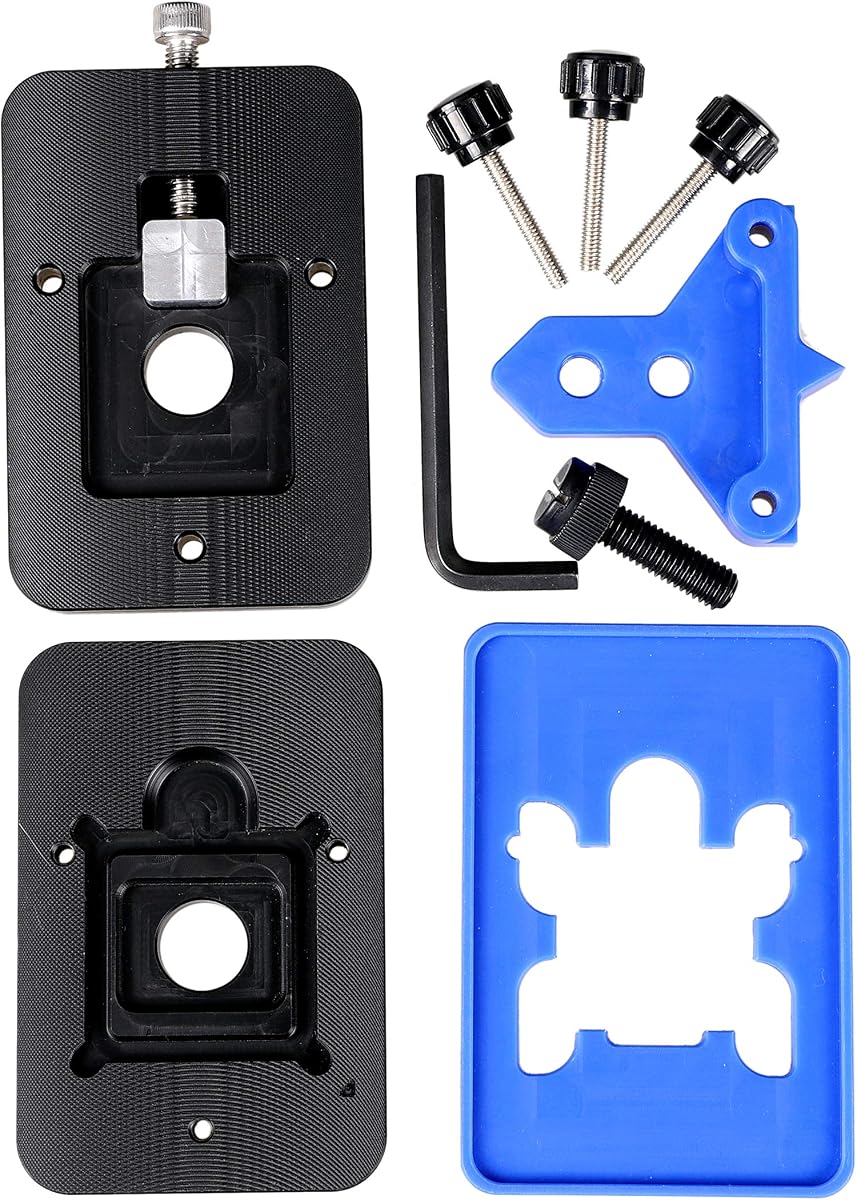


This tool stands out as the premier choice for Intel users. With a 4.5 star rating, it offers reliability for delidding 12th and 13th gen processors. The build quality ensures safety during the delicate removal process.
We may earn a commission when you buy through this link, at no additional cost to you.
The black and red anodized aluminum construction provides both durability and aesthetic appeal. It facilitates direct die cooling which is critical for high-performance computing tasks. The design simplifies the process making it accessible to enthusiasts.
Users must ensure their cooler supports a lower mounting height after removal. This trade-off is acceptable given the significant thermal improvements achieved. Always verify cooler compatibility before proceeding with the modification.
Enthusiasts seeking maximum performance should prioritize this tool. It balances ease of use with professional-grade results effectively. Following the manufacturer guidelines ensures a successful delidding experience every time.
The tool is specifically developed to match the dimensions of modern Intel CPUs for a perfect fit.
Direct die cooling eliminates the heat spreader bottleneck allowing for lower operating temperatures.
We may earn a commission when you buy through this link, at no additional cost to you.
This tool carries the legacy of the original delidding innovator. It targets specific high-end socket users who need reliable IHS removal. The construction focuses on protecting the silicon die during the process.
We may earn a commission when you buy through this link, at no additional cost to you.
The combination of aluminium and stainless steel offers robust durability. Users benefit from a design that turns a risky act into a routine procedure. This safety focus is crucial for expensive server-grade hardware.
Compatibility is strictly limited to socket 2066 processors. This narrow focus ensures perfect fitment but excludes other common platforms. Always double check your CPU socket before purchasing this specialized tool.
High-end workstation builders will find this tool essential for reliability. It represents a premium option for those needing proven safety standards. The investment pays off in peace of mind during maintenance.
Roman der8auer Hartung pioneered modern delidding making this brand a trusted name in the community.
The mixed metal construction ensures the tool withstands repeated use without bending or breaking.
We may earn a commission when you buy through this link, at no additional cost to you.
This set offers an entry-level solution for basic delidding and repair tasks. It covers smartphones and computers making it versatile for general maintenance. The low cost makes it accessible for beginners exploring hardware repair.
We may earn a commission when you buy through this link, at no additional cost to you.
The ultra-thin tools allow for careful maneuvering between components. Alloy construction provides resistance to corrosion and bending during use. This durability ensures the set lasts through multiple repair sessions.
Precision may not match dedicated CPU delidding tools perfectly. Users must exercise caution to avoid slipping on sensitive parts. However for simple removal tasks it offers good value for the price.
Home hobbyists needing a versatile toolkit should consider this set. It balances cost and utility effectively for casual repairs. Always prioritize safety and practice on old components first.
This kit is not limited to CPUs as it handles smartphone chips and general board work.
Blades and handles are integrated saving you the time of assembling separate pieces.
We may earn a commission when you buy through this link, at no additional cost to you.
This tool targets console enthusiasts facing overheating in their PS3 units. The version 3 upgrade offers improved blade flexibility for safer operation. It addresses specific thermal issues common in older gaming consoles.
We may earn a commission when you buy through this link, at no additional cost to you.
The replaceable blade feature ensures consistent performance over time. Users can swap out worn blades to maintain safety standards easily. The design is user-friendly suitable for both pros and DIYers.
It is highly specialized for the PS3 architecture. This specificity limits its use for PC builders needing general CPU tools. Verify your console model before ordering to ensure compatibility.
Console repair specialists will find this tool highly effective. It provides a purpose-built solution for a niche but common problem. Investing in dedicated tools saves time and reduces damage risks.
The tool geometry is tailored to fit the PS3 chassis and chip layout precisely.
Replaceable blades mean you do not need to buy a whole new kit after one use.
We may earn a commission when you buy through this link, at no additional cost to you.
This kit is designed for advanced repair tasks involving BGA chips. The ultra-thin blades allow movement between tiny components without damage. It serves professional technicians needing precision for circuit board maintenance.
We may earn a commission when you buy through this link, at no additional cost to you.
SK5 steel construction provides high heat tolerance and oxidation resistance. This ensures blades stay sharp through extended repair sessions. The ergonomic handle reduces hand fatigue during intricate work.
The low rating reflects the high skill required for use. Novices might find the blades too delicate for casual tasks. Professional users will appreciate the precision and control offered by the tools.
Serious electronics technicians should consider this kit for complex jobs. It offers the specificity needed for motherboard servicing and chip removal. Proper training is recommended to avoid damage to expensive boards.
Blades smaller than solder points enable removal of chips without affecting adjacent components.
Special quenching processes create blades that resist oxidation and maintain edge sharpness.
We may earn a commission when you buy through this link, at no additional cost to you.
This tool stands out because it includes a relid component. This feature allows users to reattach the heat spreader after applying new paste. It is ideal for those who want reversible modifications.
We may earn a commission when you buy through this link, at no additional cost to you.
The aluminum block provides crucial protection during the process. Proper placement is required to avoid board damage. When used correctly it ensures the safest method available for these sockets.
It covers a wide range of Intel processors. However specific attention to the instructions is mandatory for safety. Users must ensure the block is below the plastic plane to avoid risks.
Gamers looking to maximize overclocking potential will find this useful. The ability to relid offers flexibility for different cooling scenarios. Follow instructions closely to ensure a safe outcome.
The included relid tool ensures you can restore the CPU to stock configuration easily.
Support for LGA 775 through 1151 covers a vast range of consumer CPUs.
We may earn a commission when you buy through this link, at no additional cost to you.
This set provides a comprehensive solution for delicate electronics work. It includes twelve different blades for various scraping and cutting needs. The design focuses on efficiency for professional repair technicians.
We may earn a commission when you buy through this link, at no additional cost to you.
High-grade steel blades offer unmatched control and sharpness. The metal handle ensures balance and reduces hand fatigue during use. Non-slip features provide stability when working on expensive electronics.
The lack of a specific rating means relying on brand reputation. However the features indicate a high-quality professional product. Ensure you select the right blade for your specific task.
Repair technicians needing a versatile station tool should look here. It handles tasks from gl removal to chip lifting effectively. The comprehensive nature saves money compared to buying individual tools.
With twelve configurations you have the right tip for every angle and cut.
The metal handle design offers balance that plastic tools often lack.
We may earn a commission when you buy through this link, at no additional cost to you.
This tool targets the RSX GPU within the PS3 system. It provides access to the thermal interface material for maintenance. Designed for Fat and Slim models it addresses specific console repair needs.
We may earn a commission when you buy through this link, at no additional cost to you.
The design helps keep the working edge away from the main board. This reduces contact risks significantly during the process. It is essential for replacing aged thermal paste effectively.
Super Slim models are not supported due to hardware differences. Verify your console generation before purchase to avoid frustration. Careful usage is required to prevent chip damage.
Console repair technicians should use this for RSX specific tasks. It offers a tailored solution for a notoriously difficult repair job. Proper care ensures the console remains stable after thermal work.
The tool fits the geometry of the RSX chip specifically for safe access.
Design elements minimize contact with surrounding circuit board components.
We may earn a commission when you buy through this link, at no additional cost to you.
This three-pack provides reliable scrapers for post-delidding cleanup. Acrylic material ensures safety on delicate electronic surfaces. It is perfect for removing adhesive residue without scratching the die.
We may earn a commission when you buy through this link, at no additional cost to you.
The narrow tip targets silicone adhesive and solder residue effectively. Ergonomic design allows you to maintain control during small tasks. High ratings reflect user trust in its safety and utility.
Acrylic can wear faster than metal tools under heavy use. It is meant as a companion tool to the primary delid device. Always handle with care to avoid slipping on the surface.
Anyone who removes CPU lids will benefit from this set. It simplifies the cleaning process after removing the heatspreader. The three-pack ensures you have a spare ready for future use.
Acrylic is non-conductive and soft enough to prevent scratching sensitive silicon.
The narrow tip reaches into tight spots around the edges of the CPU package.
We may earn a commission when you buy through this link, at no additional cost to you.
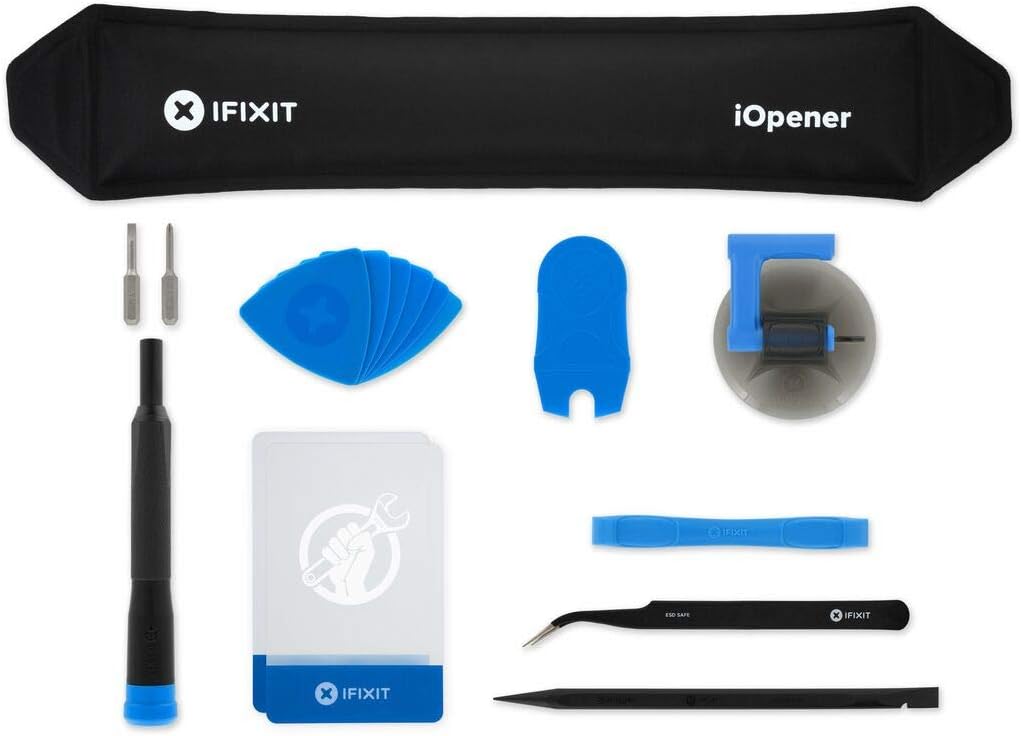
This tool uses heat to soften adhesive rather than prying. It is a universal solution for many electronics repair scenarios. While not a delid tool per se it assists in disassembly workflows.
We may earn a commission when you buy through this link, at no additional cost to you.
The iOpener is safe and non-toxic for any user. It works well on phones laptops and tablets needing heat application. This softening step often precedes delidding or screen replacement.
It requires a microwave to heat the pad properly. The included kit offers tools that work well with the opener. This makes it a complete package for general repair tasks.
Users needing a safe way to open devices should consider this. It complements mechanical tools by making adhesive removal safer. Always follow heating instructions to avoid damaging components.
Even heat distribution loosens adhesive safely without risking thermal shock to components.
The food-safe gel ensures no harmful chemicals are released during the heating process.
We may earn a commission when you buy through this link, at no additional cost to you.
Selecting the right kit depends on your hardware and technical comfort level.
Ensure the kit supports your specific CPU or GPU socket. Using an incompatible tool can lead to severe hardware damage during removal.
Check manufacturer specs for socket support before purchasing.
Look for durable materials like steel or aluminum that resist bending. Flimsy tools may snap under pressure causing potential risks.
Prioritize tools with proven durability in the industry.
Precision blades are essential to avoid damaging the silicon die. Thin edges allow better access to adhesives without collateral damage.
Select kits with ultra-thin blades for delicate operations.
Comfortable grips reduce hand fatigue during long repair sessions. Proper ergonomics help maintain control when working on small components.
Choose tools with non-slip handles for stability.
Kits with replaceable blades offer better long-term value. Worn blades should be swapped to maintain performance and safety.
Check if the kit includes spare parts.
Choose brands with a proven track record in repair tools. Established manufacturers often provide better documentation and support.
Read community feedback to validate reliability claims.
Safety features like guides or blocks protect surrounding components. These prevent accidental contact with the motherboard during work.
Prioritize designs that minimize board contact risks.
Consider the balance between cost and feature set. A slightly higher price often justifies superior safety and durability.
Evaluate what is included in the price point.
Start by removing the CPU from the socket and removing the heatspreader carefully. Use the blade to slide under the adhesive layer gently.
Apply steady pressure to break the bond without bending the die. Keep the blade parallel to the surface to avoid gouging.
Clean tools with alcohol wipes after use to prevent residue buildup. Store in a dry place to maintain blade sharpness and handle grip.
It carries risks including voiding warranties and potential chip damage. However using a proper tool minimizes these risks significantly.
Yes removing the heat spreader usually voids the manufacturer warranty. You should weigh the benefits against this risk carefully.
A dedicated delidding tool a scraper and some thermal paste are essential. Ensure you have anti-static protection for the components.
Yes direct die cooling can reduce temperatures by ten to twenty degrees. This improves performance stability especially during heavy loads.
Check mounting height compatibility after removing the heatspreader. Some coolers may not fit without adjustment or a modified block.
If you want to replace the spreader you will need a relid kit. Otherwise direct die cooling works with a flat cold plate cooler.
No only certain models have heat spreaders that can be removed. Some modern CPUs have fused lids that are not removable.
The main risk is breaking the silicon die or bending the contact frame. Using a guided tool reduces this risk significantly.
These ten kits offer solutions for various hardware and repair needs. Our top picks balance safety and performance for enthusiasts and pros.
Prioritize tools that fit your specific socket to ensure safe removal. Never compromise on build quality when handling sensitive electronic components.
Verify current prices and availability before purchasing any of these items. Regular updates help ensure you get the best value for your setup.