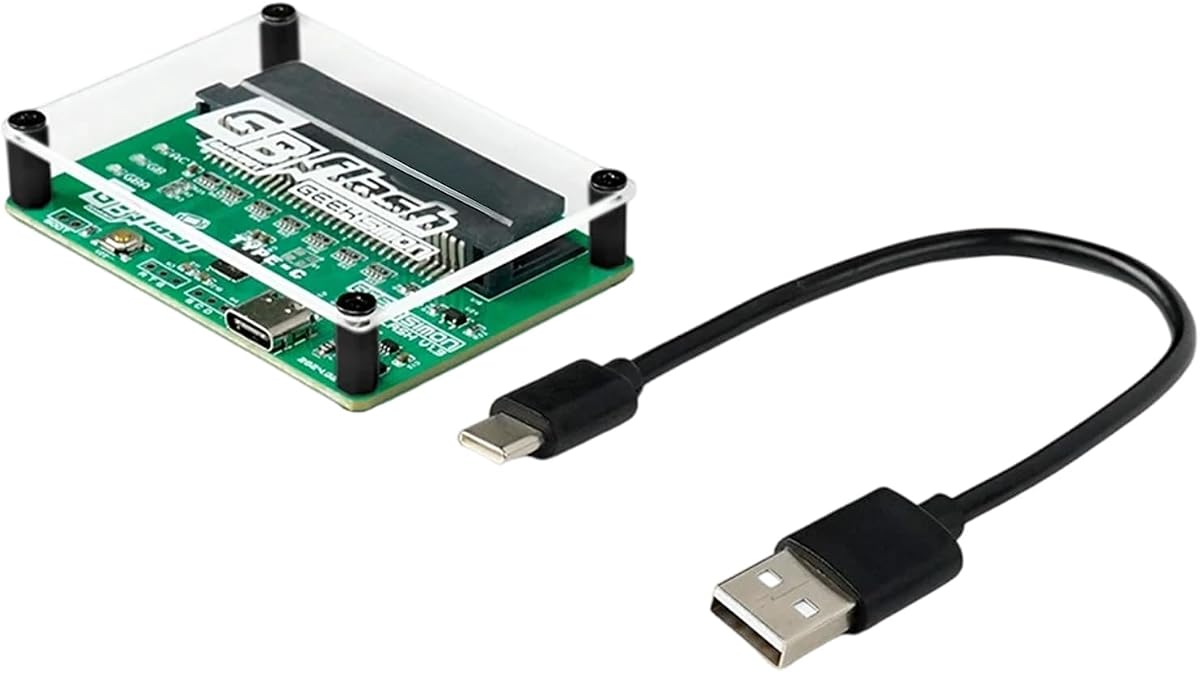
USB Retro Game Cartridge Reader Writer
Plug and play functionality
Supports GBFlash cartridges
Durable ABS metal casing
This guide compares the top Game Cartridge Readers for backup and repair, featuring detailed reviews of ten models for retro and modern gaming needs.
Finding the right Game Cartridge Readers is essential for preserving your retro gaming collection or repairing modern consoles. These devices allow you to backup saves, transfer data, and fix damaged slots efficiently. Whether you are a collector or a technician, choosing the correct reader ensures your games remain accessible.
We compared ten top models based on compatibility, speed, and build quality. Our analysis includes USB backup tools for handhelds and replacement slots for Switch and 3DS systems. Each product was evaluated for ease of use, firmware support, and reliability in real-world scenarios.
Every pick shows key specs, pros, and cons to help you decide quickly. Prices change often so check the links for current deals before buying. This list covers everything from budget backup tools to premium repair parts for various Nintendo systems.

5.0Editor score
This side-by-side comparison highlights key specifications for all ten models. Use it to find the perfect reader for your specific console or backup needs.


This reader offers excellent performance for Gameboy and GBA cartridges with its high speed USB 2.0 interface. It stands out for its independent save chip technology that ensures your data remains safe during transfers. The built-in firmware update key keeps it compatible with new ROM types easily.
We may earn a commission when you buy through this link, at no additional cost to you.
The smart burner automatically detects save types like flash and EEPROM which simplifies the backup process significantly. Transfer speeds are notably faster than many competitors allowing quick backups without data loss risks. The USB C interface modernizes the connection for better portability and support.
While it is limited to retro handhelds the focus on performance makes it reliable for collectors. The main control chip optimizes the USB port for consistent speeds that avoid common transfer errors. This trade-off is acceptable for those prioritizing data integrity over broad console support.
Collectors seeking a reliable way to preserve childhood memories should buy this unit. It balances speed and security effectively making it the top choice for Gameboy enthusiasts. Ensure you have the necessary cable for connection before starting your backup session.
Independent save chip technology prevents data loss and ensures file integrity during transfers.
Onboard function key and USB C interface make updating device firmware a quick breeze.
We may earn a commission when you buy through this link, at no additional cost to you.
This device allows direct control of content using a computer file manager like a standard USB drive. It supports various storage types to meet different requirements making it flexible for many users. The ability to back up games to a local PC helps protect your progress effectively.
We may earn a commission when you buy through this link, at no additional cost to you.
You can write your game on a rewritable cartridge which is great for game testing scenarios. Managing and editing game images on your computer becomes straightforward with this tool. It bridges the gap between physical cartridges and digital storage seamlessly for modern workflows.
The need for a PC connection might be a slight inconvenience if you prefer standalone tools. However the ease of use for file management offsets this limitation for those who work on computers. It is a practical choice for developers or those with large digital archives.
Developers and collectors who need to manage images and backups on a PC should buy this. It simplifies the backup process significantly compared to more complex devices. Check the specific storage types supported before purchasing to ensure compatibility with your needs.
Supports directly controlling content using computer file manager as easy as using a USB drive.
Allows you to write your game on a rewritable cartridge for easy game testing.
We may earn a commission when you buy through this link, at no additional cost to you.
This reader integrates seamlessly with firmware update software and USB compatible emulators to bridge physical cartridges. It is perfect for game enthusiasts and collectors with rare titles needing to preserve storage. You can digitize the progress of childhood games in your home office with ease.
We may earn a commission when you buy through this link, at no additional cost to you.
Backup your game memory and preserve storage directly on the game cartridge for safety. It supports fast transfer speeds and multiple storage types for efficient data management. The ability to enable direct game testing with rewritable cartridges via USB is a standout feature.
The reliance on specific software might add a layer of complexity for casual users. However for developers testing ROM hacking or rare title preservation it offers necessary functionality. The trade-off is worth the flexibility it provides for advanced gaming needs.
Developers and collectors testing ROM hacks should buy this unit for its emulator bridge capabilities. It keeps your physical copies safe while allowing digital experimentation. Ensure your system is USB compatible to maximize the benefits of this reader.
Works with USB compatible emulators to bridge physical cartridges to the latest game setup.
Enables direct game testing with rewritable cartridges via USB for flexible management.
We may earn a commission when you buy through this link, at no additional cost to you.
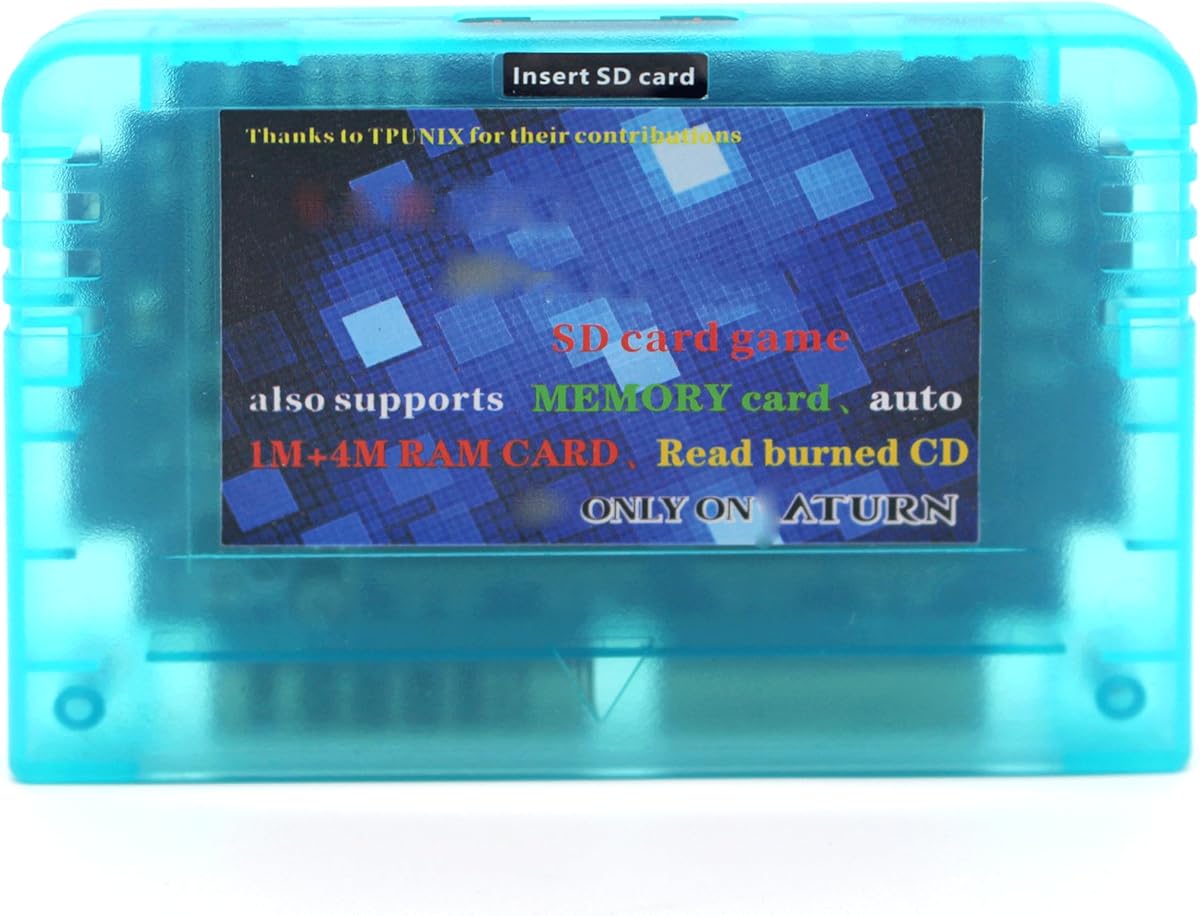
This Elite Version Arcade Game Reader offers a modern solution by allowing you to play directly with a TF memory card. It features fast loading speeds with expanded memory support for enhanced performance. The ergonomic design includes a sleek transparent blue casing with an angled slot for a secure fit.
We may earn a commission when you buy through this link, at no additional cost to you.
It protects your disc collection while providing convenient storage and quick startup options for your games. Designed exclusively for its corresponding console it serves as a dependable alternative to traditional media. The top-mounted card slot ensures easy access whenever you need to change games.
The console specific nature means it works only with Saturns consoles limiting versatility for multi-console owners. The higher price reflects the specialized hardware needed for this specific setup. If you have a large disc collection this upgrade is highly recommended for preservation.
Saturn console owners looking to protect discs should buy this Elite Version reader. It balances performance with preservation effectively for dedicated collectors. Verify console compatibility before purchasing to avoid any fit issues during installation.
Play directly with a TF memory card for disc-free gaming convenience.
Sleek transparent blue casing with angled slot for secure fit and access.
We may earn a commission when you buy through this link, at no additional cost to you.
This model is designed specifically for game consoles allowing gameplay through SD or TF memory cards. It features expanded memory capability with 1M+4M RAM card compatibility for better performance. The beveled socket ensures secure fitting and easy installation into the console.
We may earn a commission when you buy through this link, at no additional cost to you.
Support for both SD and TF memory cards gives you flexible storage options for your full games. It is a practical way to load games without the need for original cartridges every time. The installation process is simplified by the included socket design.
It is limited to Saturn consoles which may reduce its appeal for owners of other systems. The storage capacity is lower than the 128G version but still sufficient for many titles. This balance makes it a cost-effective choice for casual gamers.
Gamer owners wanting flexible storage should buy this 64G reader for its SD support. It offers good value compared to other specific models available. Check if your setup requires SD or TF cards before making your final selection.
Features SD card slot and support TF memory cards for game storage.
Includes beveled socket for secure fitting and easy installation into the console.
We may earn a commission when you buy through this link, at no additional cost to you.
This device combines a flash and reader in a sleek unit perfect for creating personalized game collections. The GBFlash game card provides full compatibility for reading and writing retro game cartridges. It supports both official and homebrew games making it essential for preserving titles.
We may earn a commission when you buy through this link, at no additional cost to you.
You can inject saves into old cartridges after battery replacement to extend the life of games. It features an integrated high speed USB reader with plug and play functionality for fast transfers. The strong ABS metal casing protects the internal components during transport.
The basic interface may require patience for first time users unfamiliar with retro tools. Setting up drivers on your computer might take a few extra steps to ensure recognition. However the functionality it offers for the price is excellent for preservation.
Collectors on a budget should buy this unit for its save injection capabilities. It keeps your vintage libraries intact without expensive professional service fees. Ensure you have the correct OS drivers before attempting any save repairs.
Injects saves into old cartridges after battery replacement effectively extending game life.
Housed in a strong ABS metal casing for long term protection and use.
We may earn a commission when you buy through this link, at no additional cost to you.
This replacement is the universal type game card reader for Nintendo Switch consoles that are not Lite or OLED. It helps solve problems when your NS Switch can't recognize game cartridges or the jack port is damaged. The NS Switch game card reader is made by good quality machine produce.
We may earn a commission when you buy through this link, at no additional cost to you.
The full board includes card slot reader, IC chip, flex cable and headphone connector for complete repair. It comes with back cover screws and a set of tools to help disassemble the console. All parts passed strictly QC double tested to ensure 100% good condition.
Installation requires careful disassembly which may be challenging for users with no experience. It is not compatible with Switch Lite or Switch OLED models so check your model carefully. The trade-off is a reliable fix for damaged original hardware without sending it away.
Original Switch owners needing card or headphone jack repair should buy this part. It restores the quality and size of your original game card reader perfectly. If you need guides search for video tutorials before starting the repair.
Full board includes card slot reader IC chip flex cable and headphone connector.
Comes with back cover screws and repair tools for convenient console disassembly.
We may earn a commission when you buy through this link, at no additional cost to you.
This replacement game cartridge card reader slot is compatible with Nintendo Switch Lite models only. It helps fix issues where unrecognized game cartridges or illegible games prevent proper gameplay. The package comes with required tools to help you install the parts carefully.
We may earn a commission when you buy through this link, at no additional cost to you.
No soldering is required when disassembly and assembly which simplifies the process for beginners. It is an economical way to fix the damaged Switch Game Card Reader and Headphone Jack effectively. The parts are carefully selected to ensure impeccable quality and perfect working order.
Installation is not complex but finding professional videos on YouTube is advised before starting. It does not work with standard Switch consoles so verify your device type carefully. The trade-off is a quick fix compared to waiting for official service centers.
Switch Lite owners facing read errors should buy this replacement part for an economical fix. It avoids the need for professional service visits saving time and money. Watch installation videos first to ensure you handle the components safely.
No soldering required when disassembly and assembly of the replacement slot.
Economical way to fix damaged Switch Game Card Reader and Headphone Jack.
We may earn a commission when you buy through this link, at no additional cost to you.
This replacement game card cartridge reader slot with headphones jack and Micro SD Card Slot is for Nintendo Switch OLED Model. It fixes issues like unrecognized game cartridges or broken headphone jacks effectively. The premium quality tri wing and Phillips Precision Screwdriver Professional Repair Tool Kit is included.
We may earn a commission when you buy through this link, at no additional cost to you.
It is an economical way to fix the damaged Nintendo Switch OLED yourself without the after-sales center. No soldering is required when disassembly and assembly making it easier for independent repair. The aluminum alloy handle with anti-slip grip ensures durable use during the process.
The kit is specific to Switch OLED models so do not use it on other consoles. The tool quality is high but you still need to install parts carefully. The trade-off is avoiding expensive repair fees by doing it yourself with good tools.
Switch OLED owners needing slot or jack repairs should buy this complete kit. It includes the tools needed to handle the process properly. Check your model year to ensure it matches before placing your order.
Premium quality tri wing and Phillips Precision Screwdriver Professional Repair Tool Kit Set included.
Economic way to fix damaged Nintendo Switch OLED yourself avoiding after-sales centers.
We may earn a commission when you buy through this link, at no additional cost to you.
This third-party part is compatible for NEW 3DS XL and NEW 3DS LL consoles from 2015. It helps replace a damaged or malfunctioning Game Card Reader Daughterboard so your console reads cards again. Each pack comes with one game cartridge reader daughterboard ready soldered to PCB.
We may earn a commission when you buy through this link, at no additional cost to you.
It is brand new and unused from the factory not refurbished or pulled parts. This modular part includes the game card reader slot socket for full functionality. It is ideal for repairing consoles that no longer read any game cartridges.
Ensure your model is NEW 3DS XL from 2015 not older models from 2012. The rating is lower than others but it is a functional specific part. The trade-off is cost savings compared to official Nintendo repair centers.
3DS XL owners with read errors should buy this replacement to restore cartridge functionality. It is a direct replacement for the specific board in your unit. Verify your console model year before ordering to avoid compatibility issues.
Modular part including Game Card Reader Slot socket ideal for repairing NEW3DSXL/LL.
1x Game Cartridge Reader Daughterboard ready soldered to PCB included.
We may earn a commission when you buy through this link, at no additional cost to you.
Choosing the right reader depends on your console and whether you need backup or repair functions.
Ensure the reader supports your specific console model like Switch, 3DS, or retro systems. Some tools are universal while others are designed for one system only.
Always verify your console model year before purchasing to avoid fit or software issues.
Decide if you need to backup game data or fix a broken slot. Backup tools save saves to computers while repair parts replace hardware inside the device.
Select the type that matches your goal to save time and money on unnecessary features.
Look for USB 2.0 or USB C connections that match your modern computer. Older readers may need specific drivers for new operating systems.
Choose a connection type that offers reliable data transfer without frequent disconnections.
Some readers support TF or SD cards for expanded storage capacity. Others rely on PC connections for long-term backup storage.
Opt for support that fits your existing storage hardware for easier file management.
Check for durable materials like metal casing or reinforced sockets. Good build quality prevents physical damage during frequent use.
Invest in a solid build to ensure your reader lasts through multiple transfer sessions.
Readers with firmware update options stay compatible with new game types. This ensures long-term usefulness without needing a new device.
Prioritize models with easy update processes to keep your backup tools current.
Repair kits often include screwdrivers or sockets for installation. These extras can save you from buying separate tools for console disassembly.
Look for packages that offer necessary tools to simplify the repair process.
Products with clear guides or online video support make installation easier. Good support resources help you avoid common mistakes during setup.
Choose brands with helpful documentation to ensure a smooth user experience.
For backup tools, connect the device via USB and install any required drivers before inserting a cartridge. This ensures your computer recognizes the reader for seamless data transfer.
For replacement slots, disconnect power and use the included tools to disassemble the console safely. Avoid using excess force on fragile connectors to prevent further damage to the hardware.
A Game Cartridge Reader is used to backup save data, repair broken slots, or transfer game files to a computer. It helps preserve your gaming progress and restore functionality to old or damaged units.
Backup tools often require specific software for transferring files to a PC. Some repair parts do not need software but must match your console model.
No, many readers are designed for specific systems like Switch or Gameboy. Always check compatibility with your exact console model before buying.
Most kits include tools for disassembly. You need to open the console and replace the board carefully. Watch video guides first if you are unsure.
Yes, USB 2.0 provides decent speed for saving game data without significant delays. Most backup tools are optimized for reliable transfers rather than high speeds.
Check for updates when new games are released or if you face compatibility issues. Firmware updates often add support for new save types.
Most replacement parts include limited warranties for defects. Backup tools may have shorter warranties so check the listing details before purchasing.
Basic repairs with included tools are possible for many users. If you lack experience, find professional videos or consult a technician first.
The Yoidesu Game Card Burner Reader offers the best balance of speed and security for retro handhelds. The Elite Version Arcade Game Reader provides top-tier options for Saturn console enthusiasts.
Choose repair parts based on your exact console model to avoid compatibility issues during installation. Always prioritize tools that include necessary screwdrivers or sockets for easier repairs.
Check current prices and stock before finalizing your purchase since these items vary in availability. This guide helps you find the right tool for your specific gaming needs.