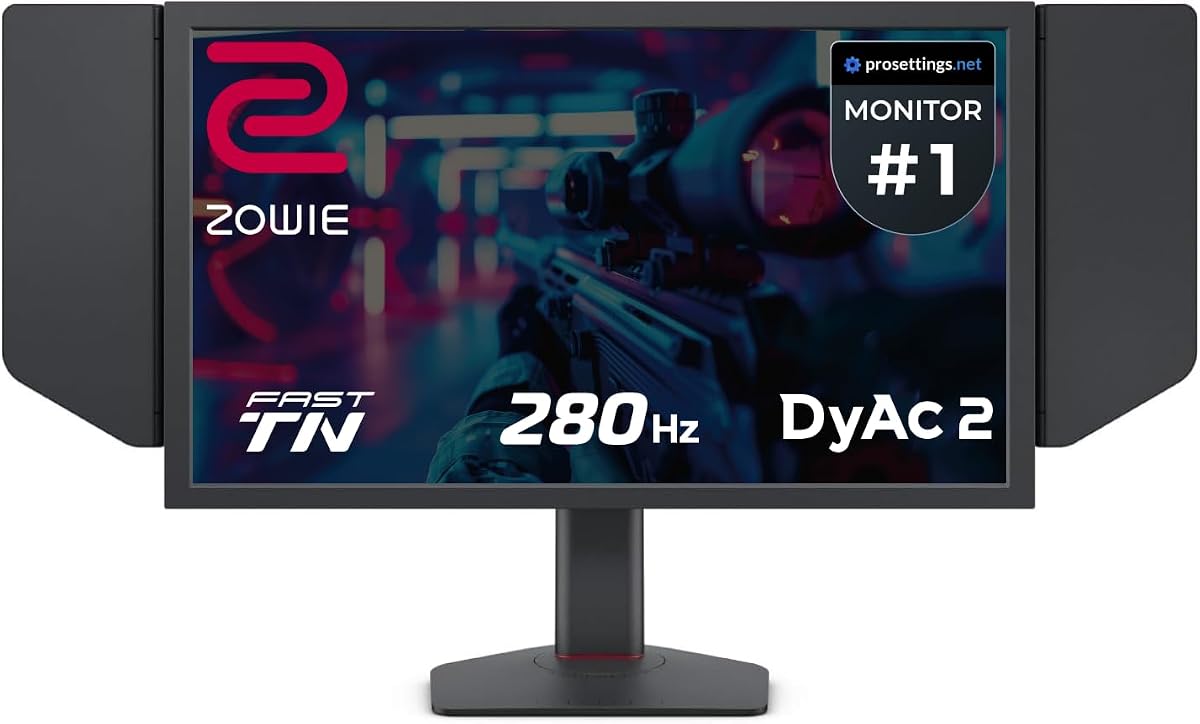
BenQ Zowie XL2546X+
4.3Editor score
280Hz refresh rate
DyAc 2 technology
Fast TN panel
Sharp motion clarity
Choosing the right Benq monitor for gaming can significantly enhance your gameplay experience. Whether you prefer fast-paced shooters or immersive story-driven adventures, having a display with low input lag and high refresh rates is crucial for performance.
We have carefully selected ten monitors that excel in different areas of gaming. Our comparison considers key specifications such as resolution, refresh rate, and specialized features like DyAc technology to ensure you find the perfect match for your setup.
Each pick highlights unique strengths and potential trade-offs to guide your decision. Please note that prices and availability can change frequently, so we recommend checking the latest offers before making your final purchase decision today.
4.3Editor score

4.3Editor score

4.2Editor score
As an Amazon Associate we earn from qualifying purchases.
Explore the side-by-side comparison of the top Benq monitors for gaming available today. This table helps you quickly identify key specifications like resolution, refresh rate, and connectivity options across all featured models.


The BenQ Zowie XL2566X+ stands out as a top-tier gaming monitor designed specifically for competitive esports. With a 400Hz refresh rate and DyAc 2 technology, it delivers unparalleled motion clarity that helps players react faster.
We may earn a commission when you buy through this link, at no additional cost to you.
Its Fast TN panel ensures the sharpest and clearest visuals at native FHD resolution. The redesigned panel improves electrical conductivity to reduce overshoot, making fast-moving enemies easier to track and identify during intense matches.
While TN panels traditionally suffer from poor viewing angles, this model focuses on performance where it matters most. The color performance has been meticulously redesigned to offer more vibrant hues, though it may still lag behind IPS in terms of angles.
This monitor is ideal for serious gamers who prioritize speed and clarity over multimedia features. If you are looking for the best motion clarity in the industry to gain a competitive edge, the XL2566X+ is a strong recommendation.
The DyAc 2 technology uses dual backlight to reduce blur, making moving objects appear sharper and easier to track.
Redesigned color performance provides greater clarity in identifying enemies, with vibrant hues that stand out against backgrounds.
We may earn a commission when you buy through this link, at no additional cost to you.
The BenQ Zowie XL2546X+ offers a compelling entry point for gamers seeking high performance without breaking the bank. Featuring a 280Hz refresh rate and DyAc 2 technology, it delivers clearer and sharper images than many competitors.
We may earn a commission when you buy through this link, at no additional cost to you.
Its Fast TN panel provides distinct advantages over IPS panels by offering sharper outlines of moving images. This helps you focus on the action with less distraction from unwanted afterimages that can occur during rapid motion in games.
The latest panel design improves electrical conductivity to effectively reduce overshoot, ensuring crisp visuals. While it may not have the highest refresh rate in the lineup, it remains a highly capable choice for competitive gaming at a great price.
If you are looking for a budget-friendly option that still offers pro-level motion clarity, this monitor is an excellent choice. It balances cost and performance effectively for esports enthusiasts on a tight budget.
The Fast TN panel ensures clearer outlines of moving images, helping you focus with less distraction from motion artifacts.
Improved electrical conductivity enhances responsiveness and reduces overshoot for cleaner visuals during fast-paced gameplay.
We may earn a commission when you buy through this link, at no additional cost to you.
The BenQ MOBIUZ EX271U is a premium gaming monitor that combines high resolution with advanced connectivity features. Its 4K resolution and 165Hz refresh rate provide a stunning visual experience for both gaming and entertainment purposes.
We may earn a commission when you buy through this link, at no additional cost to you.
With a built-in eARC supporting up to 7.1 channels, it addresses console sound directly without needing external audio equipment. The Pixsoul Engine and Color Shuttle presets boost the delicacy of your gaming experience with optimized visual settings.
Plug-and-play connectivity across platforms is seamless thanks to KVM support and versatile ports like HDMI 2.1 and USB-C. Eye-Care Technology ensures comfort during long sessions, though the higher cost may not fit every budget.
This monitor is perfect for gamers who want a high-end all-in-one solution for their battle station. If you value audio features and resolution alongside performance, the EX271U stands out as a top premium choice.
Built-in eARC supports up to 7.1 channels to deliver rich console sound without external speakers or soundbars.
Color Shuttle and Pixsoul Engine offer authorized presets tailored for popular games to enhance your visual experience.
We may earn a commission when you buy through this link, at no additional cost to you.
The BenQ Zowie XL2586X+ is designed for those who demand the absolute highest performance possible. With a groundbreaking 600Hz refresh rate, it offers the smoothest motion clarity available on the market today for competitive esports.
We may earn a commission when you buy through this link, at no additional cost to you.
Its Fast TN panel ensures the sharpest and clearest visuals at native FHD resolution. The new vivid color film improves color performance by 35%, reducing color wash-out and enhancing target visibility compared to standard TN panels.
While this level of performance comes at a premium cost, the reduction in overshoot and enhanced responsiveness are undeniable. It remains a niche choice but is unmatched for players who want every possible advantage in speed.
If you are a professional esports player or enthusiast who needs the fastest monitor available, the XL2586X+ is the clear choice. It pushes the boundaries of what is possible in gaming display technology.
The 600Hz refresh rate provides the fastest motion clarity in the industry for elite-level competitive gameplay.
New vivid color film improves color performance by 35% reducing wash-out for better target visibility.
We may earn a commission when you buy through this link, at no additional cost to you.
The BenQ MA320U is tailored for MacBook users who need a display that matches their existing workflow perfectly. With Mac Color Match and dual USB-C ports, it ensures vibrant P3 wide color gamut performance for Pro and Air models.
We may earn a commission when you buy through this link, at no additional cost to you.
You can adjust brightness and volume directly from your MacBook keyboard using integrated controls. The versatile connectivity allows you to connect and expand your MacBook display with a single USB-C cable delivering 90W power.
While it may not offer the high refresh rates of Zowie monitors, it excels in visual fidelity and ease of use for creative professionals. The adjustable stand ensures maximum comfort for long sessions of work or casual play.
This monitor is ideal for MacBook owners who want a seamless setup without dealing with complex adapters or cables. If Mac compatibility is your priority, the MA320U offers a tailored and reliable experience.
Integrated MacBook controls allow you to adjust brightness and volume directly from your keyboard for convenience.
Dual USB-C ports deliver 90W to your MacBook and 15W to charge devices like iPad or iPhone simultaneously.
We may earn a commission when you buy through this link, at no additional cost to you.
The BenQ GW2790Q is designed for users who spend long hours in front of the screen and prioritize eye comfort. Its IPS panel and 100Hz refresh rate react quickly to changes for a smoother experience during play or work.
We may earn a commission when you buy through this link, at no additional cost to you.
Low Blue Light Plus filters out harmful higher energy blue-violet radiation while maintaining vivid color quality. B.I. Gen2 auto adjusts brightness based on content and ambient light conditions to reduce strain without manual tweaking.
An Input Hotkey allows seamless device switching between work and play with a single click. While it is not the fastest gaming monitor, its comfort features make it ideal for hybrid setups where health is a priority.
This monitor is perfect for those who want a comfortable experience for both casual gaming and daily tasks. If you experience eye fatigue after long sessions, the GW2790Q offers the relief you need.
Brightness Intelligence Tech auto adjusts brightness based on content and ambient light conditions for comfort.
An Input Hotkey allows for seamless device switching between work and play with a single click.
We may earn a commission when you buy through this link, at no additional cost to you.
The BenQ RD320U is a specialized monitor designed for clarity and reduced distractions during intense focus sessions. Its Nano Matte Panel features low reflection properties to ensure unparalleled clarity for peak performance whether working or gaming.
We may earn a commission when you buy through this link, at no additional cost to you.
Coding Modes with Dark and Light Themes deliver clear fonts and better code differentiation to reduce eye strain. Night Hours Protection benefits from minimum brightness technology for enhanced eye protection during dark room usage.
The 2000:1 contrast ratio ensures deeper blacks and high contrast for movies or content consumption. While it is not a dedicated esports monitor, its eye-care tech makes it a great secondary screen for gamers.
This monitor is best for users who prioritize eye comfort and visual clarity in all conditions. If you need a high-resolution display that protects your eyes, the RD320U offers a premium solution.
The Nano Matte Panel minimizes reflections to reduce distractions and deliver unparalleled clarity for peak performance.
Benefit from minimum brightness technology that enhances eye protection during night hours and dark room usage.
We may earn a commission when you buy through this link, at no additional cost to you.
The BenQ GW2486TC is optimized for both work and play with an edge-to-edge display that allows you to focus on the important stuff. Its IPS panel and Eye-Care Technology reduce fatigue for optimal comfort during extended usage.
We may earn a commission when you buy through this link, at no additional cost to you.
Connectivity is streamlined with USB-C synchronization for images, videos, data, and charging all via a single cable with 60W power delivery. The built-in noise cancellation microphone helps reduce background noise for clearer calls.
Adaptive brightness optimizes display performance for work and play to protect your vision while providing a stunning image. While not the fastest for gaming, its office features make it a practical choice for hybrid users.
This monitor is ideal for professionals who also game casually and need a versatile setup. If you want one display to handle video calls and games, the GW2486TC is a reliable pick.
Synchronize images, videos, data and charge all devices with an all-in-one USB-C cable and 60W power delivery.
Reduce background noise with one-click using the built-in noise cancellation microphone for clearer communication.
We may earn a commission when you buy through this link, at no additional cost to you.
The BenQ PD2706QN offers accurate and consistent colors with factory calibration ensuring an average Delta E ≤ 2. Its 95% P3 and 100% sRGB/Rec.709 color coverage makes it ideal for creative work and immersive gaming experiences.
We may earn a commission when you buy through this link, at no additional cost to you.
The Nano Matte Panel diffuses ambient light to preserve color accuracy and reduce glare for enhanced eye comfort. ICCsync ensures color consistency across displays by automatically matching profiles when switching modes.
While the 100Hz refresh rate is decent, it is not optimized for high-speed esports. However, its ergonomic design and single cable power delivery make it an excellent hybrid monitor for creatives who also game.
This monitor is best for users who prioritize color fidelity and professional features. If you need a display that ensures color accuracy for design tasks and gaming, the PD2706QN is a top choice.
Factory calibration ensures average Delta E ≤ 2 for accurate and consistent colors across all displays.
Diffuses ambient light to preserve color accuracy and reduce glare during long creative sessions.
We may earn a commission when you buy through this link, at no additional cost to you.
The Acer Nitro KG241Y is an alternative option for gamers who want fast performance without a premium price. With a 180Hz refresh rate and 1ms response time, it delivers a smooth experience comparable to many BenQ Zowie models.
We may earn a commission when you buy through this link, at no additional cost to you.
It supports AMD FreeSync Premium technology to reduce screen tearing and stuttering during gameplay. The Zero-Frame Design provides a widescreen aesthetic that immerses you in the action without distracting borders.
While it uses a VA panel which may have slower response times in dark scenes, it offers solid color saturation. If you are looking for a budget alternative to BenQ gaming monitors, this is a strong contender.
This monitor is ideal for budget-conscious gamers who still want high refresh rates. If you value speed and value over brand loyalty, the Nitro KG241Y delivers competitive specs for the price.
The 180Hz refresh rate and 1ms response time deliver smooth and responsive gameplay for competitive titles.
AMD FreeSync Premium technology reduces tearing and stuttering for a seamless visual experience during play.
We may earn a commission when you buy through this link, at no additional cost to you.
Choosing the right gaming monitor requires understanding key features that impact performance and comfort. Here are the factors to consider before you buy.
Refresh rate determines how many times per second the screen updates. Higher rates like 280Hz or 400Hz provide smoother motion which is crucial for competitive shooters.
Look for at least 144Hz for smooth gaming, but prioritize 240Hz+ for competitive play.
TN panels offer the fastest response times but limited viewing angles. IPS provides better colors but may lag in speed.
Choose TN for pure speed in esports or IPS for better visuals in casual games.
Resolution impacts image clarity and detail. FHD is standard for high refresh rates while 4K offers more detail but requires more GPU power.
Prioritize FHD for competitive gaming to ensure high refresh rates are supported by your hardware.
DyAc technology reduces blur by controlling backlight flicker. It is unique to BenQ Zowie monitors and helps with target tracking.
If you play fast shooters, look for monitors with DyAc 2 for clearer motion.
Extended gaming sessions can cause eye strain. Look for Low Blue Light and Brightness Intelligence to reduce fatigue.
Prioritize these features if you game for hours daily.
Ensure your monitor has HDMI and DisplayPort versions that support your refresh rate and resolution. USB-C can simplify setups for laptops.
Check for HDMI 2.1 or DP 1.4 for high refresh rates and resolutions.
A good stand allows height and tilt adjustments to keep the screen at eye level. This prevents neck strain during long sessions.
Prioritize adjustable stands for health and comfort.
Color accuracy helps identify enemies and enjoy visuals. Look for wide color gamuts like P3 if you value vibrant images.
Choose a model with color calibration if you do design work alongside gaming.
Connect the monitor to your PC using the cable that supports your desired refresh rate. Ensure your graphics card drivers are updated to recognize the high refresh capabilities.
Use the OSD joystick or remote to adjust settings like DyAc or Game presets. Calibrate colors using built-in tools to match your viewing environment for comfort.
Clean the screen gently with a microfiber cloth to avoid scratches. Avoid using harsh chemicals or spraying liquid directly on the panel to maintain longevity.
DyAc stands for Dynamic Accuracy and is a proprietary BenQ technology designed to reduce motion blur. It works by controlling the backlight flicker to keep images sharp during rapid movement, giving you a clear advantage in fast-paced games.
TN panels offer the fastest response times and refresh rates, making them ideal for competitive esports. However, they have narrower viewing angles and lower color quality compared to IPS, so you must choose based on your priority between speed and visuals.
For casual gaming, 60Hz or 144Hz is sufficient. For competitive shooters, aim for 240Hz or higher to ensure smooth motion and minimal input lag. Higher refresh rates allow you to track enemies more effectively.
Some models like the MOBIUZ and MacBook series support USB-C for data and power delivery. The Zowie series focuses purely on gaming ports and does not typically include USB-C functionality.
Enable features like Low Blue Light and Brightness Intelligence available on most BenQ monitors. Also, maintain a proper viewing distance and ensure the screen brightness matches your room lighting to reduce fatigue.
Yes, many models support HDMI 2.1 and are compatible with PS5. Check the specs for HDMI 2.1 support to ensure you get the full resolution and refresh rate capabilities of the console.
We have explored ten top options ranging from the speed-focused Zowie series to versatile MOBIUZ and office-friendly models. The XL2566X+ stands out as the top pick for serious gamers prioritizing motion clarity.
When deciding, prioritize features that match your play style. If you compete in esports, focus on refresh rates and DyAc tech. For mixed use, consider comfort and connectivity like USB-C and color accuracy.
Always verify current availability and pricing before purchasing as deals change frequently. We hope this guide helps you find the perfect display to elevate your gaming experience in 2026.