
2026 Mac OS Shortcuts Sticker for MacBook Neo, Air & Pro (1-Pack)
4.6Editor score
Essential shortcuts at a glance
Residue-free premium vinyl adhesive
Water repellent and fade-resistant
The MacBook Neo brings fresh design and power, but it needs the right gear to shine. From protective cases to productivity hubs, the best accessories boost functionality and style without cluttering your workflow. Whether you need privacy or speed, finding the right tools matters.
We evaluated ten top-rated products based on compatibility, build quality, and user feedback. Each item was tested for fit on the new A3404 model and durability against daily wear. Our list covers essentials like sleeves, stickers, and adapters to cover every user need.
Every pick highlights key benefits and real-world performance to help you choose confidently. We focus on value and reliability, ensuring your investment lasts. Keep in mind that pricing and stock can change, so verify details before ordering your favorite picks online.
4.6Editor score

4.5Editor score

4.2Editor score
As an Amazon Associate we earn from qualifying purchases.
This side-by-side comparison highlights the unique strengths of each accessory option. We focus on fit, materials, and added features to help you find the perfect match for your workflow and budget.


This shortcut sticker offers a fast way to learn essential macOS commands without cluttering your desk. With a 4.6 rating from satisfied users, it delivers high value for students and professionals seeking efficiency. The sticker places critical keys like screenshot and navigation directly under your wrist.
We may earn a commission when you buy through this link, at no additional cost to you.
The design focuses on usability with a clean layout grouped by task. You can find basics, navigation, and system tools quickly. The vinyl is water repellent and fade-resistant, ensuring it stays sharp even with coffee spills or heavy daily use. The adhesive lifts off cleanly when you are ready for a change.
While effective, the sticker is only compatible with specific MacBook sizes including the new Neo models. It requires precise placement to align with your palm rest area. Users should follow the application instructions to avoid air bubbles and ensure a smooth finish on the device surface.
If you want to speed up your workflow without spending much, this sticker is an excellent addition. It helps you build muscle memory for common actions. Choose the color that matches your MacBook finish for a seamless look that fits your aesthetic preferences.
Stop searching online for commands and keep them visible right where you work for faster results.
Built to withstand spills and smudges while maintaining a sharp print over years of usage.
We may earn a commission when you buy through this link, at no additional cost to you.
This hard shell case wraps every side of your MacBook Neo in sturdy defense against daily wear. Rated highly for its exact compatibility with the A3404 model, it guards your device from keys and dust. The clear shell showcases your device's color while adding a layer of safety.
We may earn a commission when you buy through this link, at no additional cost to you.
The polycarbonate construction ensures the case lasts without yellowing or fading over time. Installation is simple with a gentle push that secures the covers without tools. The smooth surface repels fingerprints so your laptop looks polished even after heavy use in busy environments.
One trade-off is ensuring you select the right model number before buying. If your device does not match the A3404 designation, the fit may be off. Also, while thin, it adds a small layer of weight that some users might notice during travel.
For those wanting reliable all-around protection without hiding the Neo's look, this kit is ideal. It includes keyboard covers and a screen protector to guard against spills and debris. The storage bag helps keep everything organized until you are ready to travel.
Designed specifically for the A3404 model to ensure a snug fit that matches your device exactly.
Includes keyboard covers and screen protector to shield your device from multiple types of daily damage.
We may earn a commission when you buy through this link, at no additional cost to you.
This hub delivers ultra-fast Thunderbolt performance with up to 80Gbps bandwidth for demanding workflows. It supports 8K video at 240Hz so you get smooth visuals for editing or gaming. The detachable magnetic connector makes it easy to use on tablets or laptops without constant plugging.
We may earn a commission when you buy through this link, at no additional cost to you.
The aluminum alloy shell ensures durability while helping with heat dissipation during intensive tasks. You can charge your device with up to 140W pass-through power while using the extra ports. It works well with MacBook Neo and other devices including iPad and Android options.
Note that the magnetic piece might not fit if your MacBook has a bottom case installed. You may need to adjust your setup for stability. Also, 8K output requires a Thunderbolt-enabled host device so verify your system capabilities before connecting high-end displays.
If you need professional-grade connectivity with reliable performance, this hub is worth the investment. It transforms your Neo into a powerful workstation. Keep the magnetic piece handy for quick swaps between your laptop and other gadgets.
Unlock full device performance with 80Gbps bandwidth for seamless data transfer and video output.
Attach and detach effortlessly with the magnetic design that reduces wear on your ports.
We may earn a commission when you buy through this link, at no additional cost to you.
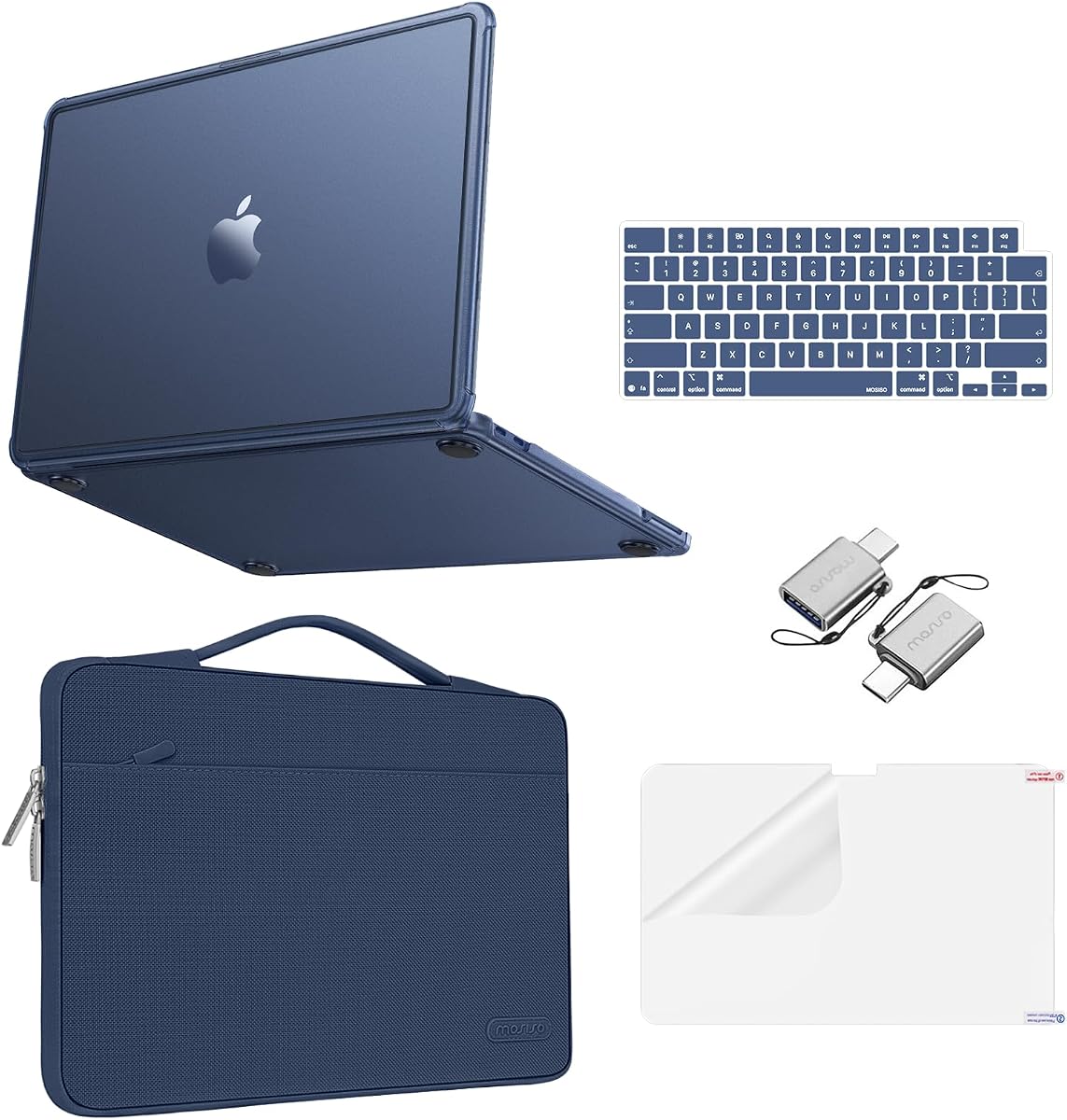
This set provides both a hard shell case and a protective sleeve for comprehensive daily safety. The matte finish resists fingerprints so your device stays clean. The polyester bag includes a front pocket for cables and protects against spills and bumps in transit.
We may earn a commission when you buy through this link, at no additional cost to you.
The case is built to last with crack-resistant materials that guard against minor impacts. Installation is tool-free so you can secure it quickly. The sleeve dimensions fit your Neo perfectly while adding minimal bulk to your bag or briefcase.
Keep in mind that transparency may vary slightly depending on the color you choose. Also ensure you match the model number A3404 for a proper fit on your Neo. These minor points do not affect the high protection value this kit provides.
For a complete travel solution, this kit saves you from buying items separately. It covers hardware, keyboard, and screen needs in one box. The portable design makes it easy to slide into your backpack for school or business trips.
Includes case, keyboard covers, screen protector, and sleeve to guard every part of your device.
Portable and lightweight with a front pocket to keep essentials organized during your daily commute.
We may earn a commission when you buy through this link, at no additional cost to you.
This bundle pairs a crack-resistant case with a soft puffy bag for maximum cushioning. The plush interior cushions your Neo against shocks and bumps during transport. The square quilted exterior adds style while protecting against accidental spills and dust buildup.
We may earn a commission when you buy through this link, at no additional cost to you.
The case slips off cleanly so you can maintain a sleek look when needed. It includes keyboard and screen protectors to cover common entry points for debris. The dimensions ensure it fits well without adding too much weight to your daily carry.
Be sure to check your model number before purchase to confirm compatibility with the A3404 device. The puffy design might not appeal to users who prefer a sleek minimalist look. Otherwise, it offers excellent protection for varied environments and travel needs.
If you prioritize cushioning and style, this set delivers both in one package. The soft lining keeps your device looking flawless. Keep the bag handy for daily commutes or weekend trips where extra safety matters.
Plush interior lining absorbs shocks to prevent scratches and bumps from damaging your Neo.
Square quilted polyester material offers a unique look with sturdy protection for daily use.
We may earn a commission when you buy through this link, at no additional cost to you.
This crystal clear case fully showcases your Neo's design while keeping it safe. The hard plastic exterior resists scratches and dust so your device looks brand new. Its slim profile adds minimal bulk so you retain the sleek feel of the original laptop.
We may earn a commission when you buy through this link, at no additional cost to you.
Included USB-C to USB-A adaptors make it convenient for older peripherals. The design is perfect for students and freelancers who want protection without hiding their device. High ratings reflect user satisfaction with the fit and clarity of the shell.
Double-check that your model matches the A3404 designation to ensure a proper fit. While it is durable, it is a simple shell so you might want separate screen protection. Still, the value is strong for the price and included adaptors.
If you want a no-fuss clear case that keeps your Neo looking sharp, this is a top choice. It guards against daily bumps and smudges effectively. The slim design ensures comfort during long typing sessions.
Shows off your device color with a clear PC material that resists yellowing over time.
Comes with versatile USB-C to USB-A adaptors to connect legacy devices effortlessly.
We may earn a commission when you buy through this link, at no additional cost to you.
This privacy screen blocks side views so your data stays safe in public spaces. The magnetic attachment allows one-second installation without adhesive residue. It fits your Neo's display perfectly and maintains original anti-reflective coating for clear visuals.
We may earn a commission when you buy through this link, at no additional cost to you.
The anti-blue light feature relieves eye strain during long work sessions. The ultra-thin 0.065mm profile ensures it works with most cases without affecting lid closure. It also includes scratch-resistant PET material to shield against daily abrasion.
Keep in mind that viewing angles are limited so you may need to face the screen directly. Also, some cases might need removal to align perfectly with the magnetic strip. These small trade-offs ensure high privacy and protection for sensitive data.
If you work in cafes or offices where privacy matters, this protector is ideal. It keeps your screen clear while blocking peeping eyes. Remove it easily when you need a wider view at home.
Blocks side views beyond 30 degrees to safeguard sensitive data in public or shared spaces.
Anti-blue light technology reduces strain so you can work longer without discomfort.
We may earn a commission when you buy through this link, at no additional cost to you.
This privacy screen uses a reinforced magnetic strip for quick setup and removal. It reduces 95 percent of blue light to protect your eyes during long sessions. The matte surface intercepts 95 percent of reflected light for better visibility in bright environments.
We may earn a commission when you buy through this link, at no additional cost to you.
It comes with a storage clip so you can use it when needed and store it safely. The 1:1 restoration ensures the filter matches your screen size exactly. High transmission rates keep picture quality close to the original display.
Ensure your model matches the A3404 designation for the best fit. The storage clip helps keep the magnetic strip clean when not in use. Otherwise, it offers solid privacy with high definition visuals for work or travel.
If you want privacy without compromising clarity, this filter delivers. The anti-scratch layer keeps it durable for daily use. Keep the clip handy to maintain the filter's quality when storing it away.
Reduces 95 percent blue light to minimize strain during extended daily work sessions.
High transmission rates maintain near-original picture quality while blocking side views effectively.
We may earn a commission when you buy through this link, at no additional cost to you.
This sticker helps you learn essential macOS commands instantly without searching online. The laminated vinyl is durable and designed to last. It features a stronger adhesive hold so it stays in place during daily use on your desk or bag.
We may earn a commission when you buy through this link, at no additional cost to you.
It is made in the USA with responsive customer support. The clear design fits Air and Pro models well. You can peel and stick it carefully for a smooth finish. The cheat sheet covers basics for beginners and power users alike.
Note that removing it might leave a light residue that wipes off easily with warm soapy water. Also, it is not specifically for Neo models so verify your device fit before ordering. It remains a solid choice for standard Air and Pro users.
If you want a reliable cheatsheet to boost efficiency, this one is well reviewed. It works well for students and seniors new to Macs. Follow the peel instructions to avoid air bubbles and ensure a neat application.
Keep essential commands visible to avoid frustration and speed up daily tasks effectively.
Designed and printed in the USA with strong adhesive and a satisfaction guarantee.
We may earn a commission when you buy through this link, at no additional cost to you.
This 7-pack dust plug set shields your Neo's ports from scratches and debris. The silicone plugs are flexible and safe to touch so you can insert them easily. It includes covers for USB-C, HDMI, SDXC, and MagSafe 3 for complete coverage.
We may earn a commission when you buy through this link, at no additional cost to you.
The low-profile design keeps your device looking sleek while hiding dirt. Webcam covers add privacy when not in use. The small storage case helps you keep all plugs together so you do not misplace them.
Be careful not to lose the small parts since they are easy to drop. Insertion is effortless but ensure you align them correctly to avoid sticking. They do not leave residue when removed and stay securely in place daily.
If you want to keep ports clean and extend your device's lifespan, this kit is perfect. It guards against liquid splashes and dust buildup effectively. Keep the case handy to store unused plugs neatly.
Covers USB-C, HDMI, SDXC, and MagSafe 3 to protect all entry points from dirt and debris.
Includes two webcam covers to safeguard your privacy during video calls or meetings.
We may earn a commission when you buy through this link, at no additional cost to you.
Selecting the right accessories for your MacBook Neo involves considering fit, protection level, and intended use. These factors ensure you enhance productivity without compromising the device's design or durability.
Always verify that the accessory lists compatibility with the A3404 model before purchasing. Even small differences in dimensions or ports can lead to poor fit or malfunction. Check the product title and description to ensure it matches your device's release year and chip type.
Prioritize products that specifically mention the A3404 designation to avoid returns. This step ensures that your case, hub, or protector fits perfectly without interfering with ports or buttons.
Assess how much protection you need based on your daily environment. If you travel often, consider a hard shell case with a soft sleeve. For desk use, a keyboard cover may suffice. Materials like polycarbonate and silicone offer different levels of impact resistance and flexibility.
Look for features like crack resistance and water repellency to extend your accessory life. Durable materials ensure your gear lasts as long as your Neo itself.
Evaluate your need for additional ports before choosing a hub. If you use external monitors or legacy devices, look for HDMI or USB-A adapters. Ensure the hub supports the speed of your Neo's ports so you do not experience slowdowns.
Choose hubs that support high wattage charging to avoid power loss when using multiple devices. This ensures your Neo stays charged while you work efficiently.
If you work in public spaces, consider a privacy screen to protect sensitive data. Look for ones that offer anti-blue light features to reduce eye strain during long sessions. Magnetic mounts make installation and removal simple without damaging the screen coating.
Ensure the screen protector is thin enough to work with your preferred case. Thick screens can prevent the laptop from closing fully or interfere with hinge movement.
Pick accessories that match your personal style and device color. Clear cases show off the Neo's finish while colored options add personality. Stickers should align with the keyboard or palm rest area for a clean look.
Avoid bulky designs that alter the sleek profile of the Neo. Minimalist choices keep your device looking professional and tidy in all settings.
Look for products that are easy to install without tools. Cases should snap on and off securely while stickers should have residue-free adhesive. Accessories that require complex setup may discourage you from using them regularly.
Consider maintenance needs such as cleaning surfaces or replacing covers. Smooth materials are easier to wipe down and keep looking fresh over time.
Compare what is included in the package versus the price. Kits that offer multiple items like screens and keyboard covers often provide better value than single items. Ensure that all components are compatible with your device model before buying.
Prioritize brands with good customer support and warranties to protect your investment. Higher ratings often reflect reliability and ease of use for the end consumer.
Check the weight and dimensions of cases or sleeves to ensure they fit your travel bag. Heavy accessories may add bulk that affects your ability to carry the Neo comfortably. Lightweight options maintain the portability that defines the laptop's appeal.
Ensure that added gear does not prevent the Neo from closing or fitting into existing compartments. Compact designs help you keep your workspace tidy and your commute smooth.
Always clean your Neo's surface before applying stickers or cases to ensure a tight fit and prevent dust traps. Use a soft cloth to wipe away fingerprints and oils before installation.
For hubs and docks, avoid forcing connectors and check that the magnetic pieces align properly with your ports. Regularly inspect cables for wear to prevent connectivity issues over time.
Store privacy screens and small parts in a dedicated case to avoid loss or scratches. Remove cases or accessories when transporting to reduce stress on the laptop's hinges and edges.
Most products in this guide are specifically designed for the MacBook Neo 13-inch A3404 model. Some stickers and hubs may work with other models, but always check the compatibility details before purchasing to ensure a proper fit.
High-quality hard cases are designed with vents or airflow gaps to prevent overheating. Always choose cases that allow air to circulate and avoid blocking vents to maintain optimal thermal performance during intensive tasks.
Some hubs require the bottom case to be removed for proper magnetic connection. Check the hub's specifications to see if it is compatible with a case on your Neo before connecting to avoid stability issues.
Use a soft lint-free cloth to gently wipe the surface without harsh chemicals. Avoid abrasive materials that could scratch the matte or anti-glare coating on the privacy screen.
The silicone plugs are designed to stay firmly in place during normal use. However, store them carefully in the provided case when not in use to avoid losing the small parts while on the go.
Most premium vinyl stickers are designed to lift off cleanly. If residue remains, use a soft cloth with warm soapy water to remove it safely without damaging the device's surface.
Pick a clear case to show off your Neo's original color or a tinted one to match your style. Ensure that the chosen color does not obscure the ports or buttons for easy access.
Yes, the selected accessories are designed to withstand daily wear and tear in office environments. They protect against common office hazards like spills and dust while keeping your device professional and functional.
We covered ten top accessories that balance protection, style, and functionality for your MacBook Neo. Each pick was evaluated for fit and durability to ensure it meets real-world needs.
Prioritize compatibility and protection levels first to avoid returns and ensure safety for your device. Consider how you will use the gear daily to pick the most practical option for your workflow.
Prices and availability change often so verify the current deal before you order your top picks. Keep this guide handy to compare options quickly as new products arrive in the market.