
Thibault Aluminum Laptop Stand
4.6Editor score
Aluminum alloy construction
Ventilated design for airflow
Ergonomic height elevation
Laptop overheating can slow down performance and shorten device lifespan. Finding the right cooling solution ensures your machine stays cool during intense tasks like gaming or video editing.
We compared ten top-rated cooling pads and stands based on fan performance, ergonomics, build quality, and user feedback. Each product offers unique features to tackle heat effectively.
Each pick highlights key strengths and ideal use cases for different laptops. Note that product details may change over time, so always verify specifications before purchasing.
4.6Editor score

4.5Editor score
4.4Editor score
As an Amazon Associate we earn from qualifying purchases.
The following table provides a side-by-side overview of all ten products analyzed in this guide. Each entry includes key specifications to help you quickly identify the right fit for your needs.


This TECKNET cooling pad stands out for its balanced mix of performance and ergonomics. With three efficient fans and a strong user rating, it delivers reliable cooling for most laptop sizes.
We may earn a commission when you buy through this link, at no additional cost to you.
The triple fan setup ensures consistent airflow across the laptop bottom. Dual USB ports let you connect peripherals without blocking laptop ports, which is a thoughtful design choice.
While the LED indicators confirm operation, they may be distracting in dark environments. The fans are quiet, but users who prefer absolute silence might need to manage lighting.
It is an ideal choice for daily work and gaming. If you want a reliable cooler with versatile connectivity, this model is highly recommended.
The three fans work together to pull cool air from below, preventing heat buildup during extended sessions.
Dual USB ports allow you to charge devices or connect mice and keyboards without using laptop ports.
We may earn a commission when you buy through this link, at no additional cost to you.
The havit HV-F2056 offers a slim, portable solution designed for 15.6 to 17 inch laptops. Its quiet fans and metal mesh provide a stable surface for your device.
We may earn a commission when you buy through this link, at no additional cost to you.
Three ultra-quiet fans create a noise-free environment, making it suitable for office use. The ergonomic stand with two height settings adds comfort during typing.
A USB to USB connection is included, but Type-C devices need an adapter. This minor limitation may inconvenience users with newer laptops that lack USB-A ports.
For users prioritizing portability and quiet operation, this pad is a solid choice. It balances cooling performance with a lightweight build.
Its slim profile allows easy transport, while the adjustable height promotes a comfortable viewing angle.
The metal mesh ensures your laptop sits securely without slipping during intense use or travel.
We may earn a commission when you buy through this link, at no additional cost to you.
The Kootek Cooling Pad features five quiet fans with blue LEDs for enhanced airflow. It supports laptops from 12 to 17 inches and offers six height settings.
We may earn a commission when you buy through this link, at no additional cost to you.
Two switches let you control fan and LED operation simultaneously. The dual USB hub provides extra connectivity, which is useful for expanding your setup.
While the multiple fans offer strong cooling, controlling them can be complex for some users. The bulkier design may not suit frequent travelers.
Ideal for stationary desktop-like setups, this pad delivers robust cooling. Its versatile height adjustment makes it suitable for long working sessions.
Five fans of varying sizes provide comprehensive coverage to dissipate heat effectively across the laptop base.
Six height settings allow you to find the perfect angle for comfortable typing and viewing.
We may earn a commission when you buy through this link, at no additional cost to you.
This aluminum stand offers passive cooling through ventilation and elevation. Its sturdy construction and ergonomic design make it a great budget-friendly choice.
We may earn a commission when you buy through this link, at no additional cost to you.
By raising your laptop, it allows efficient airflow beneath the device. The soft rubber pads protect your desk and laptop from scratches.
Unlike active coolers, it lacks fans, relying on natural convection. This is fine for moderate use but might not suffice for intense gaming.
For users seeking a simple, durable solution to improve airflow, this stand is perfect. It enhances ergonomics without extra power requirements.
Crafted from robust aluminum, it ensures unwavering durability while maintaining a minimalist design.
The ventilated structure promotes air circulation underneath the laptop, reducing heat buildup naturally.
We may earn a commission when you buy through this link, at no additional cost to you.
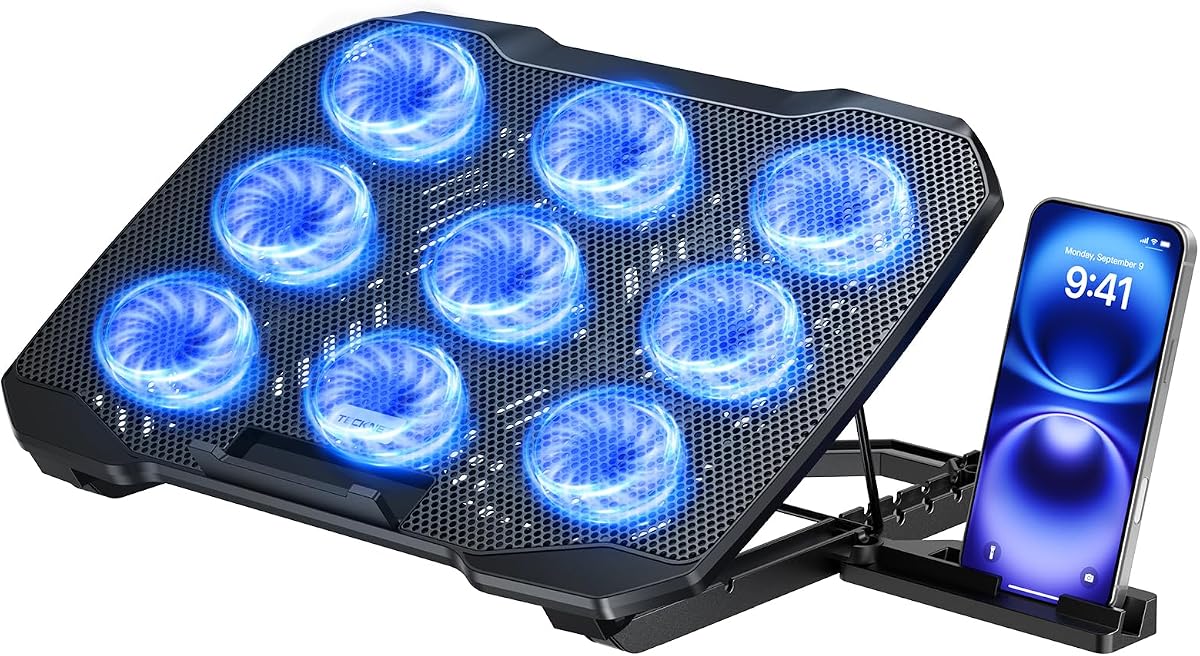
This advanced cooling pad features nine high-performance fans with stepless speed control. It includes a phone holder and dual USB ports for comprehensive connectivity.
We may earn a commission when you buy through this link, at no additional cost to you.
The 360-degree airflow helps dissipate heat quickly. With five height settings, it offers ergonomic comfort for long work or gaming sessions.
It is more expensive than basic models but justifies the price with advanced features. The whisper-quiet tech ensures noise levels stay under forty decibels.
Ideal for users who want premium cooling and added convenience, this pad is worth the investment. It supports up to 15.6 inch laptops.
Nine fans provide 360-degree surround airflow, ensuring heat is removed from all sides of the laptop.
The built-in phone holder keeps your device visible, so you never miss notifications while working.
We may earn a commission when you buy through this link, at no additional cost to you.
The KeiBn pad is designed for laptops up to 15.6 inches. It features two strong fans and a hidden phone holder for a tidy workspace.
We may earn a commission when you buy through this link, at no additional cost to you.
Five adjustable height stands allow you to position the laptop for comfort. The metal mesh provides quick airflow to prevent overheating.
While compact, it offers dual USB ports for connectivity. The simple blue LED helps confirm the active status without distraction.
Perfect for users with smaller laptops or limited desk space, it balances performance and portability. Its ergonomic design supports long sessions.
Two strong fans combined with metal mesh ensure your laptop stays cool during extended usage.
A hideable holder on the side releases your hands and keeps your phone within reach.
We may earn a commission when you buy through this link, at no additional cost to you.
The Hagibis Invisible Cooler uses magnetic feet to elevate your laptop. This passive method enhances airflow without needing power or cables.
We may earn a commission when you buy through this link, at no additional cost to you.
It weighs only 1.76 ounces, making it easy to carry. The silica gel pads prevent slipping and protect your devices from scratches.
Because it lacks fans, cooling relies on natural air circulation. This works well for light tasks but may not suffice for high-performance gaming.
Users looking for a discreet, portable way to improve ergonomics and airflow will appreciate this design. It is especially useful for MacBook users.
Strong Nd-Fe-B magnets ensure the stands connect securely to the laptop base for stability.
By elevating the laptop, bottom air circulation increases to reduce temperature effectively.
We may earn a commission when you buy through this link, at no additional cost to you.
AIMIUZI Cooling Stand features five low noise fans and a honeycomb metal mesh for airflow. It offers five angle adjustments and a metal bar for elevation.
We may earn a commission when you buy through this link, at no additional cost to you.
The central fan helps dissipate heat from the core. Dual USB ports allow for additional connectivity, and the included USB cable ensures easy setup.
While it provides good cooling, the fan speed is not as customizable as some competitors. The bulkier design may not be ideal for frequent travel.
This stand is suitable for users needing versatile height options and steady cooling. The 12-month warranty adds confidence to the purchase.
The honeycomb style metal mesh maximizes airflow area for efficient heat dissipation.
Multiple height settings help find the optimal position for comfortable typing and viewing.
We may earn a commission when you buy through this link, at no additional cost to you.
This TECKNET cooling pad uses targeted airflow to focus on the hottest parts of your laptop. It features two large fans and both USB-C and USB-A ports.
We may earn a commission when you buy through this link, at no additional cost to you.
Its thin and portable design makes it easy to carry. You can use it on your lap, as the flat base isolates heat effectively.
The adjustable fan speed lets you balance noise and cooling. However, some users may find the maximum speed slightly noisy.
It is an excellent choice for students and office workers needing portability. The three-year warranty shows confidence in its durability.
Internal channel design directs cool air to the center of the laptop where the CPU sits.
Dual ports support various devices, allowing you to charge phones or connect peripherals simultaneously.
We may earn a commission when you buy through this link, at no additional cost to you.
The Targus Lap Chill Mat offers a soft neoprene surface for comfortable lap use. Dual fans provide heat dispersion while keeping your hands and laptop cool.
We may earn a commission when you buy through this link, at no additional cost to you.
Its ergonomic tilt makes typing easier, and the open mesh top ensures constant airflow. Rubber stops prevent the laptop from slipping during use.
While durable, the mat may feel bulky compared to slim pads. It is specifically designed for larger 17 inch laptops and smaller devices.
Ideal for home use where comfort is a priority, this mat combines cooling with a plush surface. It is a reliable choice for casual users.
Soft neoprene material on the bottom provides cushioned comfort while resting on your lap.
The mesh top allows airflow to quickly move away from your laptop for efficient cooling.
We may earn a commission when you buy through this link, at no additional cost to you.
Selecting the right cooling solution depends on your laptop size, usage patterns, and portability needs. Consider the following factors before buying.
Ensure the cooling pad or stand supports your laptop's dimensions. Most products list a range from 12 to 17 inches. Using a mismatched size can reduce stability and cooling efficiency.
Check the product specifications to confirm it fits your device securely without overhang.
Active cooling pads use fans to dissipate heat. Look for models with adjustable speed control to balance noise and cooling. Quieter fans are essential for shared spaces or libraries.
High RPM fans offer better cooling but may be louder. Read reviews to gauge actual noise levels during use.
Adjustable height settings help maintain a comfortable typing angle. Ergonomic stands reduce neck strain and promote better posture during long work sessions.
Prioritize models with multiple height options or tilting mechanisms to fit your workspace needs.
Materials like aluminum or alloy mesh improve airflow and durability. Metal surfaces stay cooler to the touch and resist wear over time.
Soft materials like neoprene add comfort but may not conduct heat as efficiently.
If you travel frequently, choose slim and lightweight designs. Bulky cooling pads can take up space in your bag. Magnetic or foldable options are ideal for on-the-go use.
Balance cooling performance with weight. Heavy models may offer better stability but less convenience.
Look for USB hubs, phone holders, or LED indicators that add value. Extra USB ports help declutter your desk by avoiding laptop port congestion.
Decide if these features are necessary for your workflow before purchasing higher-end models.
Most pads are USB powered, requiring an available port. Some offer both USB-C and USB-A options for newer laptops. Ensure the included cable suits your device.
Avoid products that need external power adapters if you prefer a clean setup.
Check the manufacturer's warranty policy. Longer warranties indicate confidence in product durability. Good customer support helps resolve issues quickly.
Read user reviews to understand real-world reliability and service responsiveness.
Place the cooling pad on a flat, stable surface before setting your laptop on top. Ensure the fans or vents align with your laptop's exhaust vents for optimal airflow.
Regularly clean dust from the fans and mesh to maintain performance. Use compressed air or a soft brush to remove debris without damaging the components.
When traveling, secure any loose parts and store the device in a protective bag. Avoid placing heavy items on top to prevent bending or cracking the frame.
Yes, cooling pads enhance airflow around your laptop, which helps dissipate heat. They are especially useful during intensive tasks like gaming or video editing that generate extra heat.
Active coolers with fans provide stronger cooling and are ideal for high-performance tasks. Passive stands are quieter and sufficient for light usage or office work.
Yes, many pads are designed for lap use with soft surfaces or ergonomic bases. Ensure the device is stable to avoid accidental tipping while moving.
Most USB-powered cooling pads are plug-and-play and do not require drivers. They draw power directly from your laptop without needing extra software.
Use compressed air or a soft brush to clear dust from the fans and mesh regularly. This maintains airflow efficiency and prevents potential overheating issues.
MacBooks benefit from aluminum stands or USB-C compatible pads. Ensure the cooling solution supports the specific MacBook model and size for a secure fit.
We reviewed ten top cooling pads and stands, highlighting their unique strengths. Whether you need active cooling or passive airflow, there is a solution for every setup.
Prioritize ergonomics and noise levels based on your environment. Active fans suit gamers while stands work well for office users seeking simplicity.
Always check current product details before buying to ensure compatibility. The right choice keeps your laptop running smoothly and extends its life.