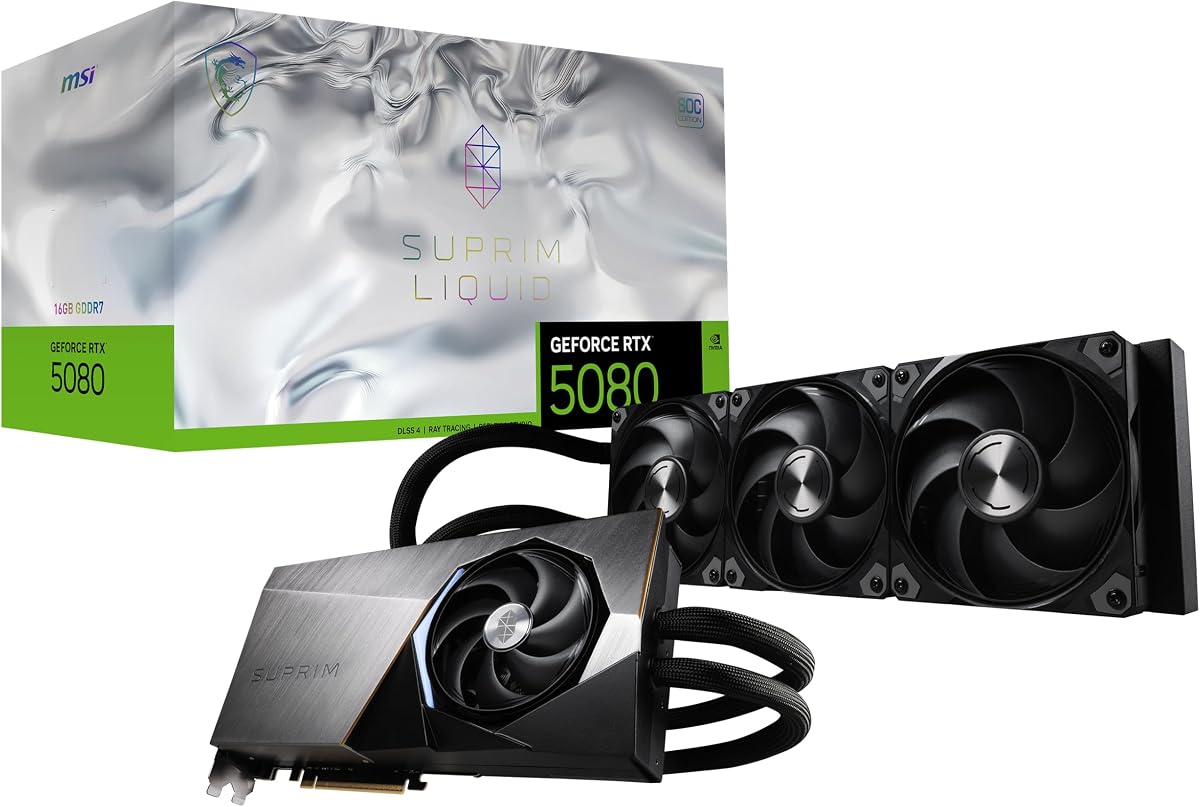
msi Gaming RTX 5080 16G SUPRIM Liquid SOC
4.7Editor score
Liquid cooling for extreme thermals
7680 x 4320 max resolution
DisplayPort 2.1a support
This guide compares the top 10 flagship graphics cards available in October 2026, evaluating performance, cooling, and value for high-end gaming and creative
Flagship graphics cards represent the pinnacle of visual computing power available to consumers today. These elite GPUs deliver exceptional frame rates at 4K and beyond while supporting advanced ray tracing and AI-driven upscaling technologies that redefine immersion.
We have analyzed ten leading models from major manufacturers to determine which cards offer the best blend of raw performance, thermal efficiency, and build quality. Our evaluation focuses on real-world gaming metrics, creative workload capabilities, and long-term reliability factors.
Each pick in this list highlights specific strengths tailored to different user needs and budgets. Please note that pricing fluctuates frequently due to market demand and availability, so always verify current costs before making your final purchase decision.
4.7Editor score

4.8Editor score

4.7Editor score
The following table provides a side-by-side comparison of all ten featured models. Examine key specifications and ratings to identify which GPU aligns best with your specific performance requirements and system constraints.





This model stands out as the top choice for enthusiasts seeking a balance of cutting-edge technology and robust build quality. Its high rating reflects consistent performance across demanding workloads and excellent thermal management under pressure.
We may earn a commission when you buy through this link, at no additional cost to you.
The use of military-grade components ensures longevity while the phase-change thermal pad provides superior heat transfer compared to traditional pastes. The three Axial-tech fans work in concert with a massive fin array to keep temperatures low even during extended sessions.
While the power requirements are significant, this is expected for a card of this caliber. The protective PCB coating adds a layer of security against environmental factors that could compromise stability over time.
If you demand top-tier performance for 4K gaming or professional rendering, this card is highly recommended. It delivers on its promises and offers software tools for fine-tuning to suit your specific system configuration.
The phase-change thermal pad outlasts traditional paste ensuring optimal performance longevity under heavy loads.
Military-grade components deliver rock-solid power and longer lifespan ensuring ultimate durability for your setup.
We may earn a commission when you buy through this link, at no additional cost to you.
This card represents the pinnacle of cooling technology with its liquid SOC design tailored for maximum overclocking headroom. The rating indicates strong user satisfaction regarding noise levels and sustained performance during intensive tasks.
We may earn a commission when you buy through this link, at no additional cost to you.
The NVIDIA Blackwell architecture combined with a 2760 MHz boost clock ensures that this model leads in raw processing power. It supports digital resolutions up to 7680 x 4320 making it ideal for multi-monitor professional setups.
While liquid cooling offers distinct advantages it does introduce complexity in system assembly and maintenance. Users should be comfortable with radiator mounting and pump management to fully benefit from this advanced cooling solution.
Enthusiasts looking to push frame rates beyond the limits of air cooling will find this card indispensable. It is a premium choice that justifies its cost through exceptional thermal management and future-proof connectivity options.
The liquid SOC design allows for extreme performance while maintaining lower noise levels compared to air solutions.
DisplayPort 2.1a and HDMI 2.1b support future display standards for high bandwidth and refresh rate needs.
We may earn a commission when you buy through this link, at no additional cost to you.
This graphics card offers an impressive entry point into high-performance gaming without the steep price tag of top-tier competitors. Its strong rating highlights excellent value for money and reliable performance in modern titles.
We may earn a commission when you buy through this link, at no additional cost to you.
Powered by the Radeon RX 9070 XT it features a robust WINDFORCE cooling system with Hawk Fans and server-grade thermal gel to maintain optimal temperatures. The PCIe 5.0 support ensures compatibility with next-generation platforms and high-speed storage.
While it uses GDDR6 memory instead of the newer GDDR7 standard it still provides ample bandwidth for current resolutions. The RGB lighting allows for customization but can be disabled if a cleaner look is preferred.
For gamers seeking high frame rates at 1440p or entry-level 4K this card is an excellent choice. It balances cost and capability effectively making it accessible to a wider audience of PC enthusiasts.
Server-grade thermal conductive gel ensures efficient heat transfer from the GPU to the cooling solution.
PCIe 5.0 connectivity prepares your system for future bandwidth demands and faster data transfer speeds.
We may earn a commission when you buy through this link, at no additional cost to you.
This model brings the latest NVIDIA Blackwell architecture to the market with a focus on efficient cooling and raw power. Users appreciate the integration of DLSS 4 and the substantial memory capacity for high-resolution textures.
We may earn a commission when you buy through this link, at no additional cost to you.
The 256-bit memory interface paired with GDDR7 delivers excellent bandwidth for rendering complex scenes and managing large datasets. The WINDFORCE cooling system utilizes multiple fans to dissipate heat effectively during prolonged usage.
While it is a significant investment, the performance gains over previous generations are tangible for both gaming and creative workloads. Ensuring your power supply meets the system requirements is essential for stable operation.
Gamers looking for a strong 4K experience will find this card highly capable. It serves as a reliable platform for high-end gaming that balances new features with proven cooling technology.
GDDR7 memory provides superior bandwidth enabling faster texture loading and smoother high-resolution rendering.
Blackwell architecture improves power efficiency and performance enabling more complex scenes and better frame rates.
We may earn a commission when you buy through this link, at no additional cost to you.
This variant offers the same core performance as other 5080 models but with ASUS TUF's signature durability. The high rating suggests that users are satisfied with the reliability and thermal headroom provided out of the box.
We may earn a commission when you buy through this link, at no additional cost to you.
The 3.6-slot design maximizes airflow through the massive fin array which works in tandem with three Axial-tech fans. Phase-change thermal pads are utilized to ensure consistent performance even when the card is pushed to its limits.
Users should measure their case clearance carefully as the card is quite large and heavy. The included GPU bracket helps prevent sagging which is a critical consideration for long-term structural integrity.
If you prefer ASUS software for monitoring and tweaking this model integrates well with GPU Tweak III. It is a solid choice for those who value build quality and component longevity alongside high-end graphics performance.
The 3.6-slot design allows for a larger heatsink which significantly improves cooling capacity and silence.
Auto-Extreme precision automated manufacturing ensures higher reliability by reducing human error during production.
We may earn a commission when you buy through this link, at no additional cost to you.
Although positioned lower in the flagship list, this card delivers surprising performance with modern architecture and ample memory. The rating reflects its ability to handle modern titles efficiently without excessive power draw.
We may earn a commission when you buy through this link, at no additional cost to you.
The 2.5-slot design makes it compatible with smaller chassis where larger cards cannot fit. Axial-tech fan technology and 0dB technology ensure that the system remains silent during light gaming or everyday tasks.
16GB of GDDR7 memory provides headroom for texture-heavy games or professional applications requiring significant VRAM. The Dual BIOS switch offers flexibility to toggle between quiet and performance profiles as needed.
This card is ideal for users upgrading older systems or building a compact PC without sacrificing modern features. It strikes a practical balance between size, noise, and gaming capability for 1080p and 1440p gaming.
0dB technology lets you enjoy light gaming in relative silence by stopping fans when loads are low.
16GB of GDDR7 memory supports high-resolution textures and complex workloads requiring large frame buffers.
We may earn a commission when you buy through this link, at no additional cost to you.
This card is designed for professionals and gamers who need the absolute maximum memory available on the market. The 32GB capacity is rare and useful for 8K rendering or extensive AI model training tasks.
We may earn a commission when you buy through this link, at no additional cost to you.
Despite its size class, the card utilizes a 2.5-slot design to maintain compatibility with smaller builds. Axial-tech fans and dual-ball bearings ensure that cooling remains effective without compromising the compact form factor.
While the AI performance is exceptional, the cost and power requirements are significant considerations for most users. It is a specialized tool for those who specifically require its capacity for high-end workloads.
If your workflow depends on massive datasets or future-proofing for upcoming AI demands, this model is a viable option. It delivers top-tier specs while managing physical size better than previous generations.
32GB GDDR7 memory supports 8K workflows and large AI models that require extensive frame buffer space.
SFF-Ready Enthusiast design allows high performance in smaller cases without sacrificing thermal stability.
We may earn a commission when you buy through this link, at no additional cost to you.
This Prime series card offers a reliable solution for mainstream gamers seeking high frame rates and stability. The consistent rating indicates satisfaction with the cooling system and the ease of software control.
We may earn a commission when you buy through this link, at no additional cost to you.
Axial-tech fans provide improved air pressure compared to standard designs and help maintain lower temperatures. The phase-change thermal pad aids in heat transfer efficiency which supports sustained performance during long gaming sessions.
While it uses GDDR6 memory, the 16GB capacity is sufficient for most modern titles at high resolutions. The Dual BIOS switch offers flexibility for adjusting between quiet and performance modes based on your preference.
Users looking for a dependable card that offers good value should consider this option. It balances cooling performance with build quality ensuring a smooth experience for both gaming and content creation tasks.
Axial-tech fans use a smaller hub for longer blades increasing downward air pressure for better cooling.
Dual-ball fan bearings last up to twice as long as sleeve bearings improving reliability and lifespan.
We may earn a commission when you buy through this link, at no additional cost to you.
This card is designed for gamers who want modern architecture without the bulk of larger flagship models. Its strong rating points to excellent compatibility with a wide range of systems and solid out-of-box performance.
We may earn a commission when you buy through this link, at no additional cost to you.
The 3.125-slot design optimizes airflow using three Axial-tech fans and phase-change thermal pads for effective heat dissipation. ASUS GPU Guard and bracket secure the GPU to prevent mounting issues or physical damage during transport.
With 12GB of GDDR7 memory it handles high-resolution textures well enough for most current game titles. The military-grade components contribute to a longer lifespan which is beneficial for long-term ownership costs.
If you need a compact yet powerful card for a mid-sized tower, this model is an excellent fit. It offers the reliability of the TUF line with sufficient performance for 1440p gaming at high settings.
ASUS GPU Guard and bracket secure the GPU reducing the risk of cracks and ensuring stable mounting.
Military-grade components deliver rock-solid power and longer lifespan for ultimate durability in your system.
We may earn a commission when you buy through this link, at no additional cost to you.
This card remains a powerful option for those who can secure it at a reasonable price. It offers massive CUDA core counts and dedicated AI features that accelerate both gaming and creative workflows effectively.
We may earn a commission when you buy through this link, at no additional cost to you.
New Flow Multiprocessors and third-generation RT Cores provide up to 2x performance in rendering and ray tracing tasks. The NVIDIA DLSS 3 technology further enhances frame rates by leveraging AI frame generation for smoother gameplay.
While it is an older generation, it still competes well in many scenarios and supports 8K HDR gaming as specified in HDMI 2.1a. The NVIDIA Reflex platform helps reduce latency for competitive gaming advantages.
If you prioritize raw rasterization power and already own a compatible system, this card offers enduring value. It is best for users seeking high performance for professional work or immersive 8K entertainment.
Fourth Generation Tensor Cores provide up to 2x AI performance for accelerated rendering and upscaling tasks.
Supports 4K 120Hz HDR and 8K 60Hz HDR for ultimate visual fidelity and immersive content consumption.
We may earn a commission when you buy through this link, at no additional cost to you.
Selecting the right flagship graphics card involves evaluating several critical factors that impact both performance and longevity. This section outlines the key aspects you should consider before finalizing your purchase.
Modern GPU architectures like Blackwell offer significant efficiency and performance gains over older generations. More CUDA cores or Stream Processors generally translate to better rendering speeds and higher frame rates in demanding games.
Prioritize cards with newer architectures for future-proofing and better AI capabilities in rendering tasks.
Video memory (VRAM) is crucial for handling high-resolution textures and complex scene data. GDDR7 is currently the fastest standard offering higher bandwidth than GDDR6 which helps reduce bottlenecks at 4K and beyond.
Look for at least 16GB of VRAM to ensure smooth performance in modern titles without stuttering.
Effective cooling systems maintain boost clocks and prolong the lifespan of internal components. Models using phase-change thermal pads and large fan arrays typically run cooler and quieter under load than basic air coolers.
Choose a card with robust thermal design to prevent thermal throttling during extended gaming sessions.
High-performance cards demand significant power from your system which often requires a dedicated PSU with sufficient wattage. Ensure your power supply unit meets the minimum requirements to avoid instability or hardware damage.
Verify your PSU wattage and connector types before buying to ensure compatibility with high-end models.
Flagship graphics cards often exceed standard dimensions which can cause clearance issues in smaller PC cases. Measuring the interior space of your case ensures the card will fit without obstructing other components.
Check the card length and slot width against your case specs to avoid assembly problems.
Modern cards support high-bandwidth display interfaces like HDMI 2.1b and DisplayPort 2.1a which enable high refresh rates and resolutions. Verify that the card has enough ports to match your monitor configuration.
Ensure the available outputs match your monitor needs for resolutions and refresh rates you plan to use.
Components such as military-grade capacitors and protective PCB coatings contribute to the long-term reliability of the graphics card. Auto-Extreme manufacturing processes often result in higher quality control and fewer defects.
Investing in a well-built card reduces the likelihood of hardware failure and extends the useful life of your system.
Companion software for tuning and monitoring allows users to optimize performance and track thermal data in real time. Reliable support ensures you can tweak settings for silence or speed based on your immediate needs.
Look for intuitive software suites that provide detailed control over fans and clock speeds for better system management.
Install the GPU securely using the provided brackets and screws to prevent sagging which can stress the PCIe slot over time. Ensure all power connectors are fully seated to maintain stable electrical contact during high-load activities.
Regularly clean dust from the fans and heatsinks to prevent airflow blockages that can lead to overheating and thermal throttling. Using compressed air carefully to remove debris from the vents keeps the cooling system operating at peak efficiency.
Update your graphics drivers regularly to access the latest performance optimizations and security patches provided by the manufacturer. Monitoring temperatures and fan curves through companion software helps you detect anomalies early and adjust settings accordingly.
The most critical factor is balancing performance needs with your system's power and physical constraints. Evaluate memory capacity, cooling efficiency, and the architecture generation to ensure the card delivers value for your specific workload.
Yes, flagship cards typically require a high-wattage power supply with sufficient 12V-2×6 connectors. Verify your PSU meets the minimum requirements to avoid instability or hardware damage during high-load gaming or rendering tasks.
GDDR7 offers higher bandwidth which helps reduce bottlenecks in high-resolution gaming and professional applications. While it is a newer standard, the performance gain depends on your specific workflow and resolution requirements.
Measure the available space in your case including the width and length where the GPU will be installed. Compare these measurements to the card's specifications to ensure it fits without obstruction from other components.
Liquid-cooled models provide superior thermal performance and lower noise levels but require more complex installation. They are ideal for overclockers but may be overkill for standard gaming unless you need maximum silence or stability.
DLSS uses AI to upscale images from lower resolutions increasing frame rates while maintaining visual quality. This feature is essential for playing modern games at 4K without requiring extreme native rendering power.
The ASUS TUF RTX 5070 Ti leads as our top pick due to its balance of performance and durability. The MSI SUPRIM Liquid and GIGABYTE RX 9070 XT serve as excellent premium and budget alternatives respectively.
Prioritize memory capacity and cooling efficiency to ensure your system remains stable during intensive workloads. Verify your power supply and case dimensions before purchasing to avoid costly return or compatibility issues.
Prices change frequently so always check current listings before making your final decision. Regular updates and proper maintenance will help you get the most value from your flagship graphics card investment.