
LeapFrog 2-in-1 LeapTop Touch
4.7Editor score
2-in-1 laptop and tablet mode
Customizable name and age settings
Five learning modes for preschoolers
This guide compares the top laptops for 5 year old kids including educational toys and real devices to help parents choose the best option for learning.
Finding the right laptop for a five year old child involves balancing educational value with durability and ease of use. Young learners need devices that encourage exploration while protecting them from complex software or inappropriate content. Parents often look for toys that mimic real computers to build early tech skills without overwhelming screen time.
We have carefully reviewed the top options available in the market today to provide a comprehensive comparison. Each product was selected based on its educational content, design quality, and suitability for young children. Our list includes both toy laptops designed for pretend play and more advanced devices that offer genuine learning experiences.
Each pick in this guide highlights specific features that make it stand out for different needs and budgets. You will find detailed insights into what each device offers for math, reading, and creative play. Please note that prices and availability can change frequently so check current listings before purchasing.
4.7Editor score

4.5Editor score

4.2Editor score
The following table provides a side-by-side comparison of all ten selected laptops to help you quickly identify the best fit for your child. needs. We have included key specifications and features for each model so you can see how they differ in size and learning capabilities.





The VTech Genio Bilingual JuniorBook stands out as a top choice for parents seeking to introduce early language skills alongside basic computer literacy. With a strong rating and extensive feature set it offers more than typical toy laptops. The full QWERTY keyboard allows children to practice typing in a safe controlled environment.
We may earn a commission when you buy through this link, at no additional cost to you.
This device includes over eighty activities that span math science language arts and music. The bilingual capability is particularly impressive as every activity can be played in English or Spanish. This immersion helps children build vocabulary and comprehension without feeling like they are studying. The offline functionality ensures that screen time remains focused and free from distractions.
While the learning potential is high there are minor trade-offs regarding power. The laptop requires four AA batteries which may be a recurring cost for active users. The included batteries are for demo purposes so parents should be prepared to buy fresh ones. However the educational value far outweighs this minor inconvenience.
This laptop is ideal for children aged five and up who are ready to explore more complex activities. It suits families looking for a screen toy that mimics real computer functions. We recommend this for parents who want to foster bilingualism and tech confidence in their young learners.
The ability to switch between English and Spanish for every activity supports natural language acquisition. Children learn vocabulary in context through games and exercises that adapt to their skill level.
Using a full-size keyboard and cursor controller helps kids understand how real computers work. This familiarity can make transitioning to actual devices easier later on.
We may earn a commission when you buy through this link, at no additional cost to you.
The LeapFrog 2-in-1 LeapTop Touch offers exceptional value for families on a budget who still want quality educational content. Its unique design allows the keyboard to flip and convert into a touch tablet. This versatility keeps children engaged as they can interact with content in different ways.
We may earn a commission when you buy through this link, at no additional cost to you.
Parents can customize the device with their child name name age and avatar. This personal touch makes the experience more engaging and helps the child feel ownership over their learning tool. The five learning modes cover ABCs numbers music and games ensuring a well-rounded introduction to basic concepts.
While it does not offer the complexity of more expensive models it excels in its target age range. The simplicity ensures that frustration is minimized for younger users. The battery requirement is standard for this category but parents should note that demo batteries are not for regular use.
This is an excellent entry point for children aged two to five. It is perfect for parents who want a reliable toy that encourages pretend play and early literacy. We recommend it for those seeking a cost-effective solution with trusted educational quality.
The 2-in-1 design lets kids switch between typing and touching. This adaptability supports different learning styles and keeps playtime dynamic.
Adding a child name name helps them recognize their work. This feature builds confidence and encourages repeated engagement with the device.
We may earn a commission when you buy through this link, at no additional cost to you.
The LEXiBOOK LAPTAB is a step up from toy laptops offering a genuine computing experience designed for children. It features a real Android operating system which opens access to a wide range of educational apps. This makes it suitable for children who are ready to transition from toys to actual devices.
We may earn a commission when you buy through this link, at no additional cost to you.
With a 10.1 inch HD touchscreen this laptop provides a clear and vibrant display for videos and apps. The 128GB storage allows for plenty of downloaded content without needing constant management. Parental controls are robust allowing parents to manage time and app access effectively to ensure safe usage.
The premium price reflects the advanced hardware and software capabilities. While it may be more than what a very young child needs it is ideal for school-age learners. The connectivity options like USB ports and WiFi make it a versatile tool for both play and study.
This device is best for families who want a single laptop that can grow with the child. It serves as a bridge between toy learning and real tech. We recommend it for parents comfortable managing digital tools and seeking long-term value.
Running Android allows access to thousands of educational apps. This ensures the device remains useful as the child's learning needs evolve over time.
Parental controls and a safe browser keep browsing secure. Parents can limit time and filter content to ensure a positive digital experience.
We may earn a commission when you buy through this link, at no additional cost to you.
The Lexibook Unicorn Educational Laptop brings a playful touch to learning with its charming design. It covers essential subjects like math and logic but places a special emphasis on music and melodies. This unique approach helps children understand musical notes and rhythms through interactive activities.
We may earn a commission when you buy through this link, at no additional cost to you.
The laptop features a realistic mouse and keyboard that mimic real computer peripherals. This design encourages proper usage and helps children build motor skills. The logic and memory games provide breaks from standard lessons keeping the experience fresh and engaging.
While it may not have as many subject categories as some competitors it excels in engagement. The ergonomic design ensures that it is comfortable for small hands to carry and use. However the need for batteries means parents should keep spares handy for continuous play.
This is a great choice for children who show an interest in music or creative play. It balances educational value with fun effectively. We recommend it for parents looking for a themed toy that still delivers solid cognitive benefits.
The music modes teach notes and composition basics. This early exposure can spark a lifelong interest in music education.
The slim and easy to grip design makes it portable. Children can carry it easily for play on the go.
We may earn a commission when you buy through this link, at no additional cost to you.
This Kids Laptop features a color screen that enhances the visual experience for young learners. The display makes activities more vibrant and engaging compared to monochrome screens. It includes forty-eight learning modes covering alphabet math and general knowledge to support diverse interests.
We may earn a commission when you buy through this link, at no additional cost to you.
The device includes practical tools like a calendar and clock reading function. These features help children understand time and organization in a fun way. The keyboard and mouse are designed to feel like real computer parts which builds familiarity.
While the screen is a highlight it comes with a protective film that must be removed. This small step ensures the best viewing quality from the start. The overall design is compact and fits well in a child hands hands for extended play sessions.
This laptop is suitable for children aged five and older who benefit from visual learning. It offers a solid range of activities without overwhelming complexity. We recommend it for families seeking a colorful and interactive educational tool.
The color screen makes learning materials pop. Visual learners often find this type of display more stimulating than black and white options.
Calendar and clock tools teach practical skills. Children can learn to read time and understand schedules through play.
We may earn a commission when you buy through this link, at no additional cost to you.
The VTech Play Smart Preschool Laptop offers a sleek design that appeals to older children who want a more mature look. It introduces early Spanish words and numbers alongside English learning. The activities are leveled to ensure that children can progress at their own pace.
We may earn a commission when you buy through this link, at no additional cost to you.
Beyond language this laptop includes animal sounds and logic games. The music section features instrument sounds which adds a creative element to the experience. These varied activities help keep interest high across different learning styles.
While it has fewer activities than some models it compensates with quality. The leveled learning ensures that the content remains challenging but not frustrating. The battery requirement is manageable and standard for this type of device.
This laptop is ideal for children aged three to six who are ready for more structured play. It is a great choice for parents interested in early bilingual exposure. We recommend it for its balanced approach to fun and education.
Introducing Spanish words early helps build linguistic flexibility. Children learn sounds and meanings through interactive and playful activities.
Animal sounds and footprints teach nature facts. This adds an element of science and biology to the standard curriculum.
We may earn a commission when you buy through this link, at no additional cost to you.
This Kids Laptop distinguishes itself with a built-in camera feature. This allows children to take photos and use filters to create fun images. It is a great way to encourage creativity and expression alongside standard educational activities.
We may earn a commission when you buy through this link, at no additional cost to you.
The device includes sixty-four learning modes which cover a wide range of subjects. The color display ensures that these activities are visually appealing. The realistic keyboard and mouse support typing practice and interaction with the interface.
While the camera is not for high-quality photography it serves as a fun toy tool. Children can record memories and share them with family. The learning content remains robust ensuring that the device is more than just a camera.
This laptop is perfect for creative children who enjoy capturing moments. It balances education with fun photography. We recommend it for families who want to foster creativity in their children's learning routine.
The camera mode lets kids express themselves visually. Filters and frames make the process fun and rewarding for young users.
Children can record memories with family and friends. This feature adds a social element to the learning process.
We may earn a commission when you buy through this link, at no additional cost to you.
The LeapFrog LeapPad Academy is a tablet focused on educational apps that grow with your child. It comes with twenty approved apps covering math reading and coding. The shatter-safe screen ensures durability against drops and rough handling.
We may earn a commission when you buy through this link, at no additional cost to you.
A three-month trial of LeapFrog Academy provides access to thousands of games and videos. This content expands the learning potential beyond the built-in apps. The stylus included allows children to practice writing skills effectively.
While it is a tablet rather than a laptop it offers similar learning benefits. The rechargeable battery is more convenient than disposable ones. Parental controls help manage screen time and ensure safe browsing.
This device is best for children aged three to eight who need a durable learning tool. It suits families comfortable with app-based learning. We recommend it for those prioritizing content variety and screen safety.
LeapFrog Academy offers a vast library of educational content. This ensures the device remains relevant as the child grows and learns.
The shatter-safe screen protects against breaks. This feature is essential for parents wanting a long lasting device.
We may earn a commission when you buy through this link, at no additional cost to you.
The Lexibook Barbie Educational Laptop combines a popular theme with serious educational content. It includes over one hundred activities covering math logic and music. The bilingual options support language learning while the games keep playtime entertaining.
We may earn a commission when you buy through this link, at no additional cost to you.
The compact design makes it easy to carry on trips. This portability ensures learning can happen anywhere. The realistic design helps children relate to real computer use while still enjoying their favorite characters.
While the theme is specific it does not limit the educational value. The content is robust and covers many subjects. Parents who value a trusted brand will appreciate the quality and safety.
This laptop is ideal for children who love the Barbie brand. It provides a safe and fun way to learn. We recommend it for families who want a themed device that delivers on learning.
With 124 activities there is plenty of variety. This ensures children do not run out of things to do quickly.
The small size fits easily in bags. This makes it perfect for car rides or family outings.
We may earn a commission when you buy through this link, at no additional cost to you.
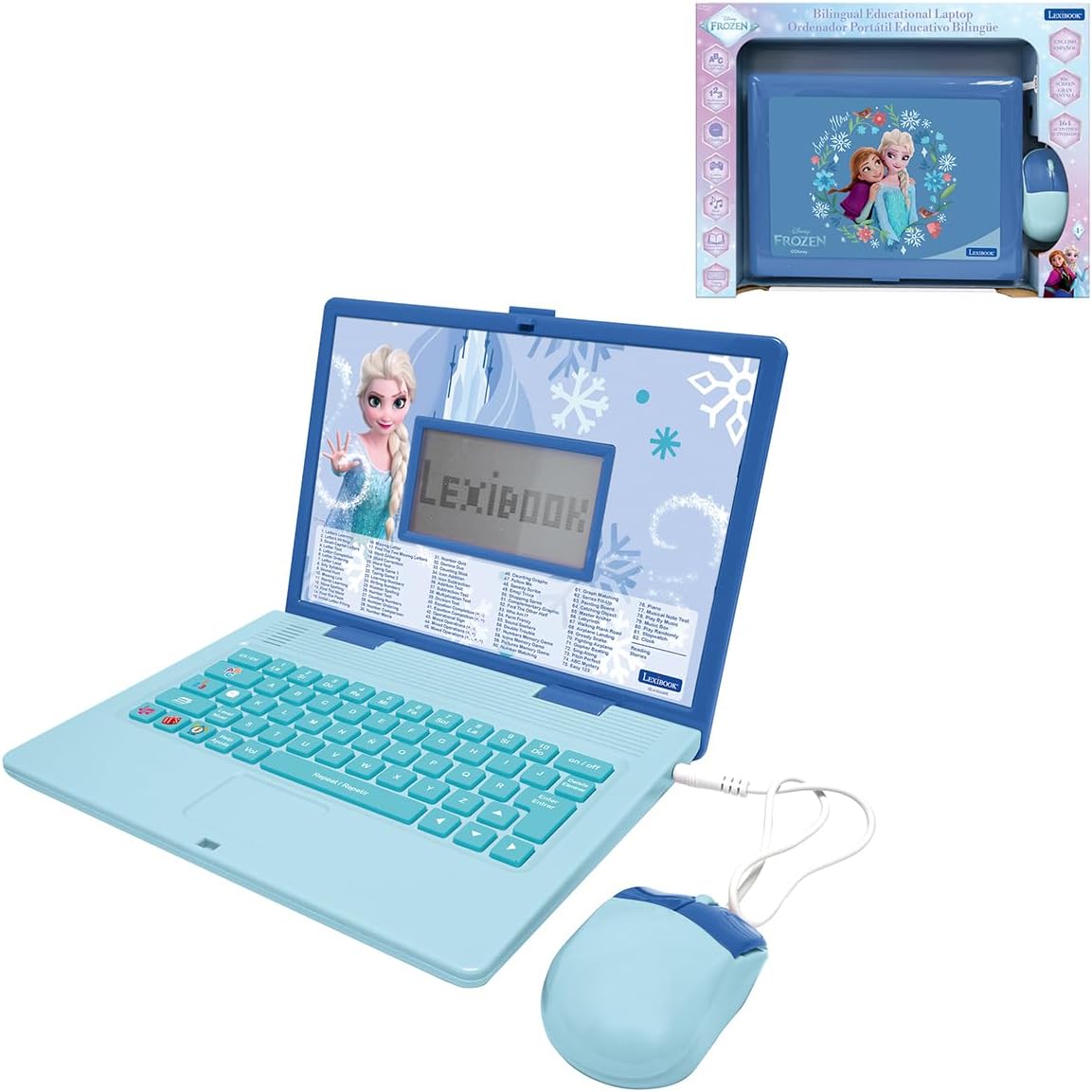
The LEXiBOOK Frozen Educational Laptop is designed for fans of the beloved animated movie. It includes over one hundred activities covering vocabulary spelling and math. The bilingual support ensures children can learn in their preferred language.
We may earn a commission when you buy through this link, at no additional cost to you.
Voice guidance makes navigation easy for those who cannot read well yet. This feature helps children access content independently. The lightweight design means it is comfortable to hold for long periods.
While the screen is basic it is sufficient for the activities provided. The theme makes the learning experience more engaging for young fans. The variety of activities ensures that boredom is minimized.
This laptop is perfect for children who love Frozen and want to learn. It balances fun and education effectively. We recommend it for fans looking for a themed educational tool.
Voice guidance helps children use the device alone. This builds confidence and encourages self-directed learning.
Exercises focus on spelling and vocabulary. Children learn new words through engaging and repetitive practice.
We may earn a commission when you buy through this link, at no additional cost to you.
Choosing the right laptop for a five year old involves considering several key factors that impact learning and safety.
Look for laptops that offer a variety of subjects like math reading and music. A good device should adapt to the child's learning pace and keep them engaged. Ensure the activities are age appropriate and promote critical thinking skills.
Prioritize laptops with diverse educational activities that grow with the child.
Young children are often rough with toys so durability is critical. Choose devices with reinforced corners or shatter resistant screens. The laptop should withstand drops and bumps without breaking easily.
Select models designed for durability to ensure long-term use.
Safety is paramount when choosing tech for kids. Look for laptops that do not require internet access or have strict parental controls. Ensure the content is filtered and safe for young users.
Prioritize safety features to protect children from inappropriate content.
Consider how the laptop is powered and how long it lasts. Some use disposable batteries while others have rechargeable options. A longer battery life reduces interruptions during playtime.
Check power options to ensure consistent usage throughout the day.
The interface should be easy for small hands to use. Realistic keyboards help build typing skills but should be simple enough for beginners. Ensure the layout is intuitive to prevent frustration.
Choose an ergonomic design that matches the child's motor skills.
A clear screen is important for eye health and engagement. Color displays are often more engaging than black and white ones. The size should be manageable for a child to hold comfortably.
Opt for a screen that is bright and appropriate for small hands.
Budget is a factor but value is more important. A slightly more expensive device with more features may be better in the long run. Compare the features against the price to find the best deal.
Evaluate the cost relative to the learning value provided.
If you want to teach multiple languages look for bilingual capabilities. Some laptops offer content in both English and Spanish. This can help develop early language skills without extra cost.
Consider bilingual options if language learning is a goal.
To ensure your laptop lasts as long as possible handle it with care during play. Teach your child to close the laptop gently and avoid dropping it. Keeping the device away from water and food will prevent damage.
Regularly check the batteries and replace them as needed. For rechargeable models plug them in before they are completely drained. This helps maintain battery health and ensures the laptop is ready to use.
Keep the screen clean with a soft cloth to maintain visibility. If the laptop has a removable film make sure to peel it off before first use. Storing the laptop in a safe place when not in use prevents loss or damage.
Most laptops in this list are educational toys designed to mimic real computers. They teach basic skills like typing and math without the complexity of a real OS. However some premium models offer actual operating systems for more advanced learning.
Many toy laptops work offline without needing internet. This makes them safer for young children. Premium models may need WiFi to download apps or access online content.
These laptops are generally designed for children aged two to eight. Five year olds will find most activities challenging enough to be engaging. Always check the age recommendation on the specific product.
Most laptops include demo batteries for testing purposes but not for regular use. You will need to buy fresh AA batteries separately. Some models have rechargeable batteries instead.
Toy laptops are not designed for school remote learning. They lack the necessary software and connectivity. For school work look for devices designed for educational use.
Yes these devices are designed with safety in mind. They avoid internet access and have durable parts. Always supervise screen time and follow age guidelines.
We have explored the top laptops for five year olds ranging from toy laptops to more advanced devices. The VTech Genio Bilingual JuniorBook and LeapFrog 2-in-1 LeapTop Touch offer excellent value for different needs.
When choosing prioritize safety and educational content. A device that grows with your child offers better long-term value. Ensure the laptop fits your budget and your child interests interests.
Prices for these products can change frequently. Always check current listings before making a purchase. This will help you get the best deal available today.