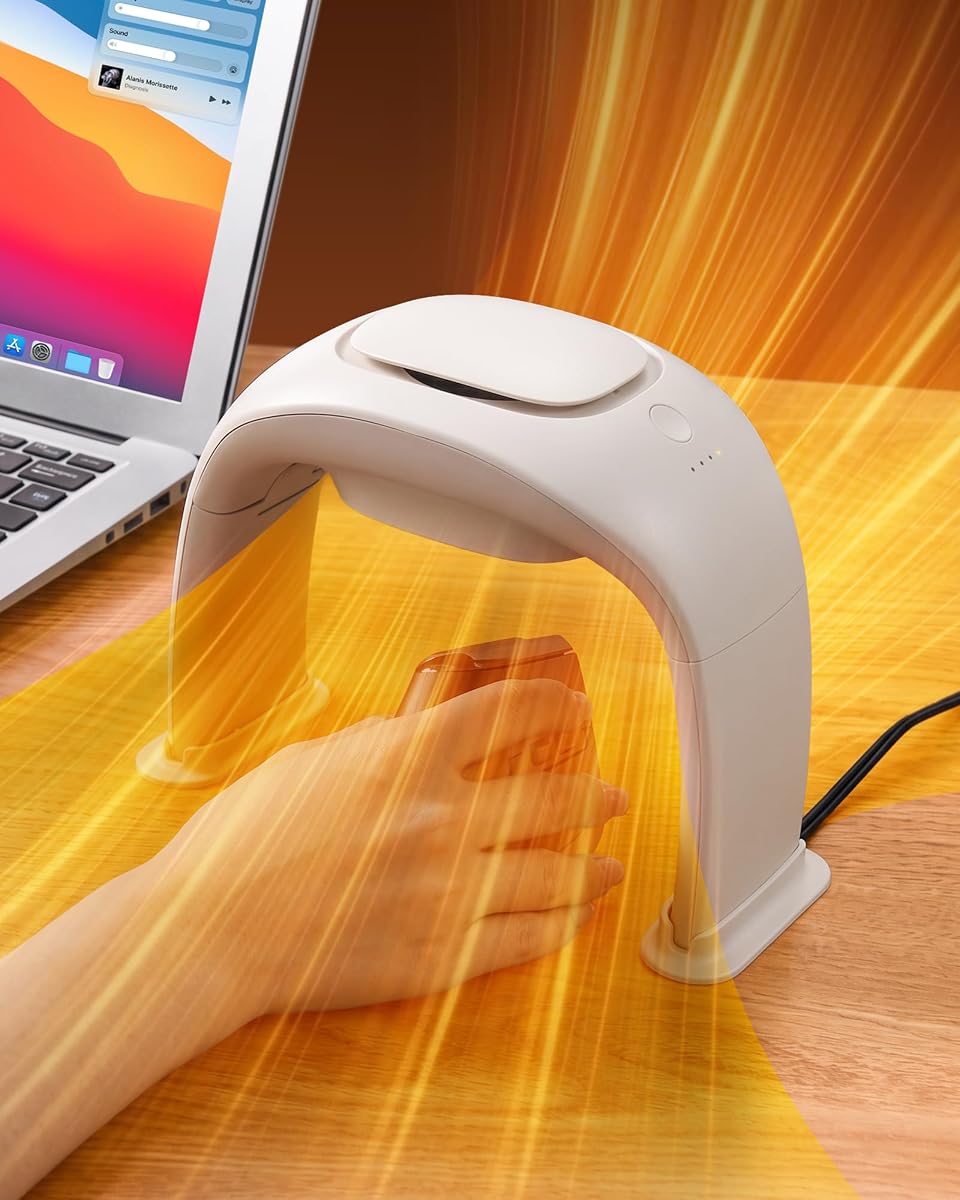
Desk Hand Warmer Over Mouse
4.5Editor score
Super quiet ceramic heating technology
Foldable compact space-saving design
Free mouse operation zone included
Discover the top hand warmer mouse pads for cold desks. We compare heating modes, safety features, and comfort to help you find the perfect solution for winter.
Cold hands can severely impact your productivity and comfort during long work or gaming sessions. A hand warmer mouse pad provides a dedicated solution to keep your extremities warm without heating your entire room.
We evaluated ten distinct models ranging from enclosed cocoon designs to open desk heaters. Our analysis focuses on heating efficiency, safety certifications, build quality, and ergonomic design to ensure you make an informed choice.
Each review highlights key features, pros, cons, and specific use cases. Note that product availability and pricing fluctuate frequently, so verify current details before making your final purchase decision online.
4.5Editor score

4.2Editor score

4.5Editor score
The following table provides a side-by-side comparison of all ten reviewed products. It highlights key specifications such as heating technology, power source, safety features, and unique design elements to facilitate quick decision-making.


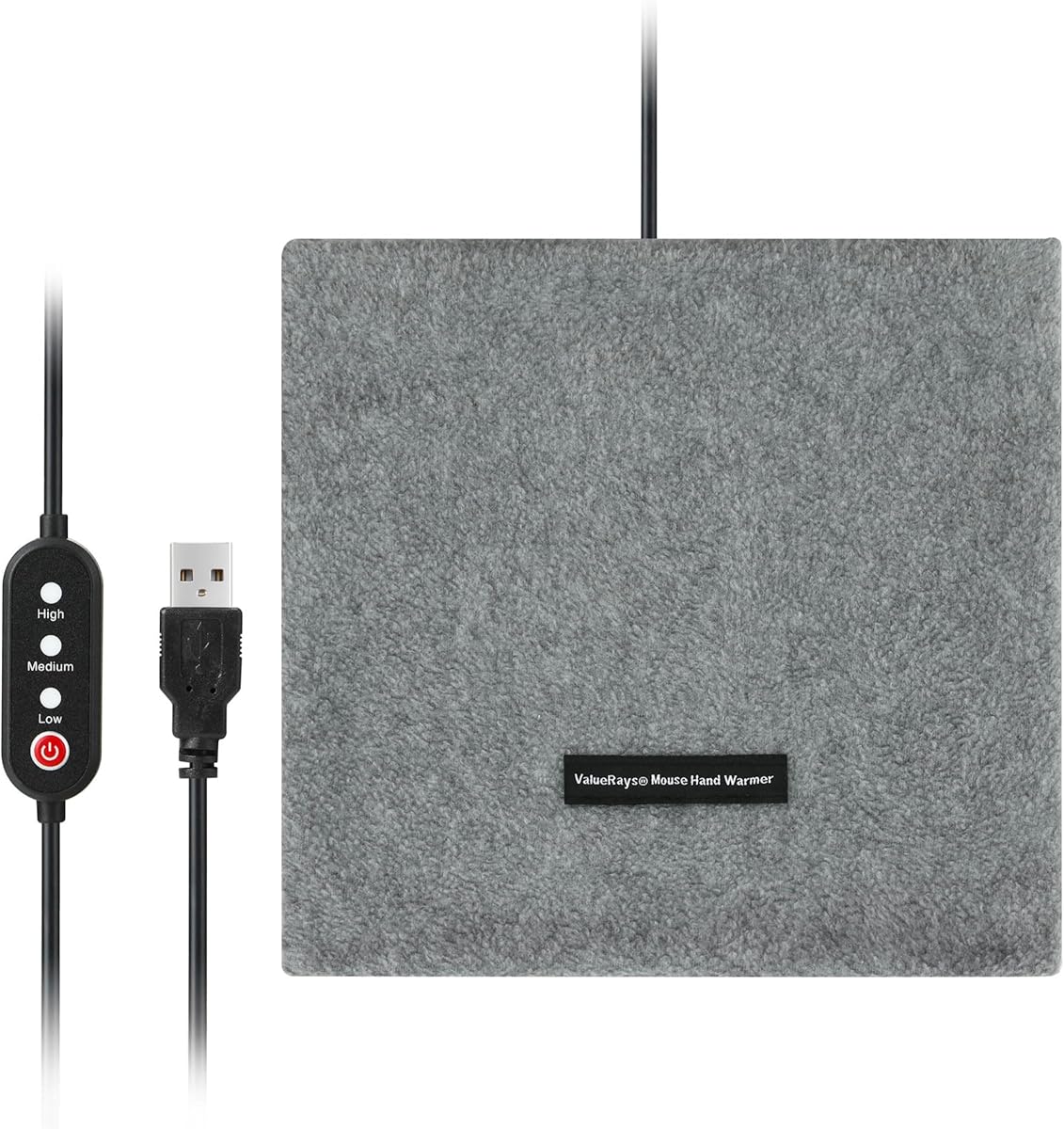
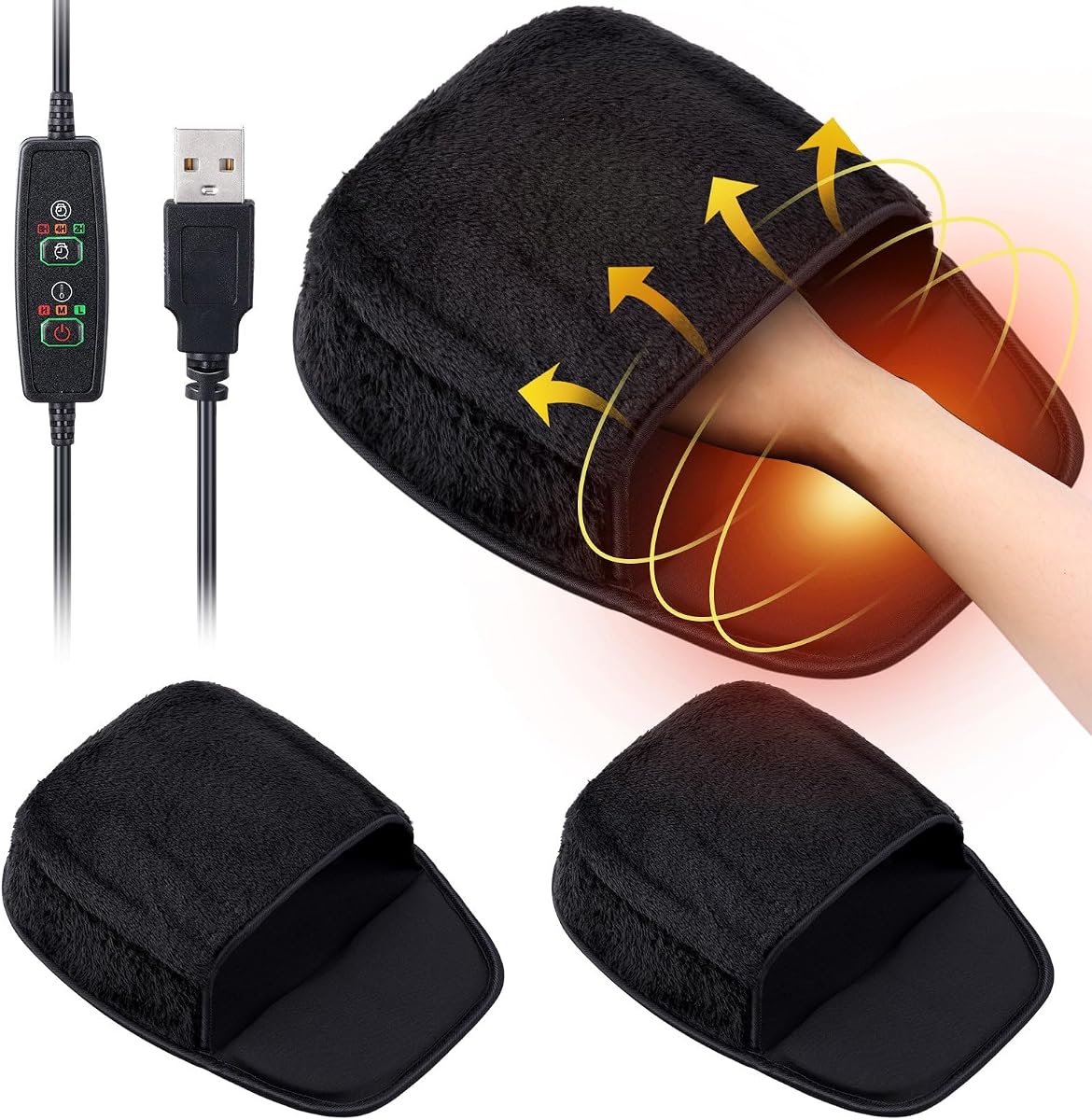

This product offers a unique enclosed design that wraps your entire hand in warmth rather than just warming the palm. It features a soft neoprene shell and a PTC heating element that distributes heat evenly for safe and comfortable use.
We may earn a commission when you buy through this link, at no additional cost to you.
The device includes three distinct temperature levels ranging from low to high, allowing you to customize the heat output based on your comfort needs. Additionally, it comes with built-in auto shut-off timers to ensure safe operation without constant supervision.
While the cocoon design provides excellent insulation, some users might find it slightly restrictive compared to open desktop heaters. However, the included ergonomic wrist rest helps maintain a neutral hand position during long sessions.
If you work in a cold environment and need reliable heat for your hands without heating your whole room, this is a top choice. Its safety features and ease of cleaning make it a practical long-term investment.
The PTC heating element ensures that warmth is spread evenly across your hand, preventing hot spots and maintaining consistent comfort throughout your work session.
Built-in auto shut-off timers and multiple safety certifications give you peace of mind, while the ergonomic wrist rest supports your hand to reduce fatigue.
We may earn a commission when you buy through this link, at no additional cost to you.
This hand warmer uses advanced ceramic heating technology to provide powerful and quiet warmth for your hands. Its design allows for free mouse operation, meaning you can move your hands freely without feeling restricted by a shell.
We may earn a commission when you buy through this link, at no additional cost to you.
With three adjustable heating modes, you can select the level of heat that suits your environment best. The unit includes safety features like tipping auto shut-off to prevent accidents if the device is knocked over.
While it offers excellent performance, it requires a standard wall outlet instead of a USB connection, which might limit placement options on some desks. However, its foldable design helps mitigate space concerns.
For users seeking a budget-friendly yet effective solution that doesn't compromise on heat output, this model stands out. Its quiet operation makes it suitable for shared workspaces or study areas.
Unlike enclosed warmers, this model leaves the top open, allowing you to lift your hands or type without feeling trapped or restricted by the device.
The built-in smart chip reduces power automatically when the target temperature is reached, helping to maintain comfort while conserving energy during extended use.
We may earn a commission when you buy through this link, at no additional cost to you.
This large desk pad combines warmth with style, offering a heated surface for both your keyboard and mouse. Made from high-quality PU leather, it not only warms your workspace but also protects your desk from scratches and stains.
We may earn a commission when you buy through this link, at no additional cost to you.
It features three heat settings controlled by a simple switch, with an automatic shut-off after four hours for added safety. The waterproof surface makes it easy to wipe down, maintaining a pristine look over time.
While the large size is a benefit for full desk coverage, it requires a standard US power outlet and may be less portable than smaller options. Ensure your power setup supports 110V before purchasing.
If you want a comprehensive solution that warms your entire workspace while adding a professional aesthetic, this is an excellent choice. It is ideal for users who spend long hours at a desk.
The extensive 31.5 by 13 inch surface ensures that your hands, wrists, and forearms stay warm, eliminating cold spots that can occur with smaller pads.
Constructed with premium PU leather and waterproof PVC, this pad resists spills and wear, ensuring it remains functional and stylish for years of daily use.
We may earn a commission when you buy through this link, at no additional cost to you.
This package includes two heated mouse pads, making it a cost-effective choice for users who want warmth at multiple locations. The pads feature a soft plush top and a large internal space for mouse movement.
We may earn a commission when you buy through this link, at no additional cost to you.
They connect via USB, offering a simple plug-and-play setup without requiring extra adapters. The included wrist rest adds an extra layer of comfort to your setup during long sessions.
However, these pads lack advanced safety features like auto shut-off, which requires manual monitoring to prevent overheating. The lower user rating also suggests potential inconsistencies in heating performance over time.
Despite these drawbacks, the value of receiving two pads at once is hard to beat for casual users. It is a decent option if you want to share warmth between home and office.
The plush material provides a comfortable touch that reduces friction during movement while adding a cozy feel to your workspace setup.
We may earn a commission when you buy through this link, at no additional cost to you.
This set provides two heated mouse pads designed for consistent warmth during winter work. The thick plush material ensures a soft touch, and the detachable heating pad makes maintenance easier for long-term use.
We may earn a commission when you buy through this link, at no additional cost to you.
Like other USB-powered options, it connects directly to your computer for convenient heating. The 11 by 9 inch size offers adequate space for both hand warming and mouse operation.
Users should note that the heating element durability may be limited, and there is no auto shut-off feature to prevent overheating. Regular checks are recommended to ensure safe operation.
If you are looking for a simple gift set to share warmth with a friend, this is a considerate option. However, for heavy daily use, models with better safety features may be preferable.
The detachable heating element allows you to remove the pad for hand washing, ensuring the plush top remains fresh and odor-free over time.
We may earn a commission when you buy through this link, at no additional cost to you.
This model emphasizes silent performance, operating at just 20dB to avoid disturbing your focus. It uses advanced PTC ceramic heating to deliver fast and even warmth for your hands.
We may earn a commission when you buy through this link, at no additional cost to you.
The design includes foldable legs for compact storage, making it easy to tuck away when not in use. An energy-saving chip helps maintain temperature efficiently without wasting electricity.
It requires a standard AC outlet rather than USB, which might be a limitation for portable setups. Additionally, the higher wattage means it uses more power than lower output models.
For users working in libraries or shared offices where noise is a concern, this is an ideal choice. The combination of power and silence makes it a standout option.
The legs can be folded flat, allowing you to store the unit in a drawer or bag when it is not in use to maximize desk space.
We may earn a commission when you buy through this link, at no additional cost to you.
This hand heater combines advanced MCH and PTC ceramic heating to provide warm comfort without noise. It is designed to be foldable, allowing you to take it with you for travel or storage.
We may earn a commission when you buy through this link, at no additional cost to you.
Safety is a priority with built-in tip-over protection that disconnects power if the unit is knocked over. The anti-skid base keeps the device stable on your desk during operation.
While it offers excellent heat and silence, its compact size means it is a heater rather than a full mouse pad. You may need to move your mouse carefully to stay within the warm zone.
If you travel frequently or have a small desk, this portable option is perfect. It balances powerful heating with a design that respects your limited workspace.
The internal protection mechanism detects when the device is no longer upright and cuts power immediately, preventing potential fire hazards from accidental tipping.
We may earn a commission when you buy through this link, at no additional cost to you.
This product utilizes infrared technology to provide heat directly to your hands through a simple USB connection. It features a manual switch that allows you to turn the heating on or off as needed.
We may earn a commission when you buy through this link, at no additional cost to you.
While the specifications are limited, it serves the basic purpose of warming hands during cold work sessions. It is suitable for users who do not require complex temperature controls or additional features.
The lack of detailed information makes it harder to predict performance compared to other models. However, the simplicity may appeal to those seeking a straightforward solution without extra complexity.
If you need a no-fuss hand warmer and prefer minimal features, this could be a viable choice. Just ensure your expectations align with the basic design before purchasing.
Infrared heating transfers energy directly to your hands rather than heating the surrounding air, which can make the warmth feel more immediate and efficient.
We may earn a commission when you buy through this link, at no additional cost to you.
This set offers two USB-powered mouse pads with three adjustable temperature modes to suit different comfort needs. A built-in wrist cushion helps reduce strain while providing a stable surface for your hands.
We may earn a commission when you buy through this link, at no additional cost to you.
The non-slip rubber base keeps the pads secure on your desk during movement. Additionally, the lightweight design allows for easy transport between home and office environments.
However, the low user rating suggests that there may be issues with durability or consistency in heating performance. The plush material might also show signs of wear more quickly than leather alternatives.
For a low-cost option that includes two units and basic safety features, this might be worth considering. Just keep in mind that it may not offer the same longevity as premium models.
The integrated wrist cushion follows the natural curve of your hand, helping to relieve pressure and prevent fatigue during long typing or gaming sessions.
We may earn a commission when you buy through this link, at no additional cost to you.
This extended desk pad covers a significant area, providing warmth for both your keyboard and mouse simultaneously. Made of premium PU leather, it offers durability and a sleek appearance that complements modern workspaces.
We may earn a commission when you buy through this link, at no additional cost to you.
It features a control switch that cycles through three temperature settings and includes non-slip features to keep the mat stable. The smooth surface is easy to wipe down, maintaining a clean environment.
While the size is a major benefit for full coverage, it occupies more desk space than smaller pads. The lack of a current rating makes it harder to gauge user satisfaction at this time.
If you need a large surface that warms your entire desk area while protecting it from wear, this is a strong option. It is ideal for users with ample desk space and a need for comfort.
The 31.5 by 13 inch dimensions ensure that both your hands and wrists stay warm, providing a cozy environment for your entire upper body.
We may earn a commission when you buy through this link, at no additional cost to you.
Choosing the right hand warmer requires considering factors like power source, safety features, and design. This guide breaks down the essential elements to help you select a model that fits your workspace and needs.
Hand warmers come in USB-powered or AC outlet types. USB models are portable and work with laptops, but AC models often offer higher power for faster heating. Check your power availability to decide.
Ensure the power source matches your desk setup. If you lack wall outlets, a USB option is practical, but for maximum heat output, an AC model might be necessary.
Look for PTC or ceramic heating elements which provide consistent and safe warmth without overheating. Materials like neoprene or plush add comfort, while PU leather is easy to clean and durable.
Higher quality materials improve heat retention and longevity. A good material choice ensures the device stays warm longer and resists wear from daily use.
Safety features like auto shut-off, overheat protection, and tip-over sensors are essential to prevent accidents. Certified products from agencies like UL or CE ensure compliance with safety standards.
Always prioritize models with built-in safety mechanisms. These features allow you to use the device without constant monitoring, especially if you leave it on during breaks.
Measure your desk space before buying. Large desk pads offer full coverage but require more room, while compact hand warmers fit smaller setups but may limit movement.
Choose a size that balances warmth with workspace utility. Ensure your mouse has enough room to move smoothly without sliding off the heated area.
Look for wrist rests or ergonomic designs that keep your hands in a neutral position. This reduces strain during long sessions and enhances overall comfort while typing or gaming.
Comfort is key for daily use. A device that supports your natural hand curve helps prevent fatigue and discomfort over time.
Multiple temperature settings allow you to customize warmth levels based on the weather or your preference. Some models include timers to save energy and prevent overheating.
Flexible control is useful for varying needs. Being able to adjust heat ensures the device stays useful in different seasons and environments.
Some units have fans or pumps that generate noise. For quiet environments like libraries or offices, look for models described as silent or low-decibel operation.
Low noise is critical for focus. Avoid models with mechanical parts that might distract you during work or study.
If you move between rooms or offices, foldable designs or lightweight builds are essential. Consider how easy the unit is to carry and store when not in use.
Easy portability adds versatility. A design that folds flat allows you to keep the warm without sacrificing permanent desk space.
Before first use, place the device on a flat surface and connect it to your power source. If it is a USB model, plug it into a computer port or wall adapter. If it is AC, plug it into a wall outlet and press the power button.
Start with the lowest temperature setting to gauge the heat output. Gradually increase to medium or high if you need more warmth. Avoid placing your hands too close to hot spots to prevent accidental burns.
Regularly clean the surface according to the manufacturer's instructions. For removable heating elements, detach them carefully before washing the cover. Always unplug the device and let it cool down completely before storing it away.
Most modern models include auto shut-off timers that turn the device off after a few hours to ensure safety. However, it is still best to unplug the device before sleeping or leaving your desk for extended periods.
Yes, many models are USB powered and can connect directly to a laptop. However, high-wattage models require AC outlets and may drain your laptop battery quickly if used without a power adapter.
Yes, most models use PTC or ceramic heating elements that provide rapid warmth within minutes. The time to reach target temperature depends on the wattage and size of the heating area.
Many models feature removable heating pads that allow you to wash the cover. Always check the instructions before washing, as some materials may require hand washing to maintain the integrity of the heating element.
Most models use soft, skin-friendly materials like plush or PU leather. If you have sensitive skin, choose models with breathable fabrics and moderate heat settings to avoid irritation or discomfort.
Generally, they are energy efficient, especially models with smart chips that maintain temperature automatically. USB models consume very little power, while AC models may use more but are still cost-effective.
We have reviewed ten top options ranging from enclosed cocoon designs to large desk pads. Whether you need a compact solution for a laptop or a full desk heater, there is a model to suit your specific needs.
Prioritize safety features like auto shut-off and tip-over protection to ensure safe use. Also consider the power source and size to ensure it fits your workspace and provides enough warmth for your comfort.
Remember that product availability and pricing can change frequently. Check current listings for the latest details before making your purchase decision to ensure you get the best value available.