
Cooling Station and Stand for PS5/Slim/Pro
4.5Editor score
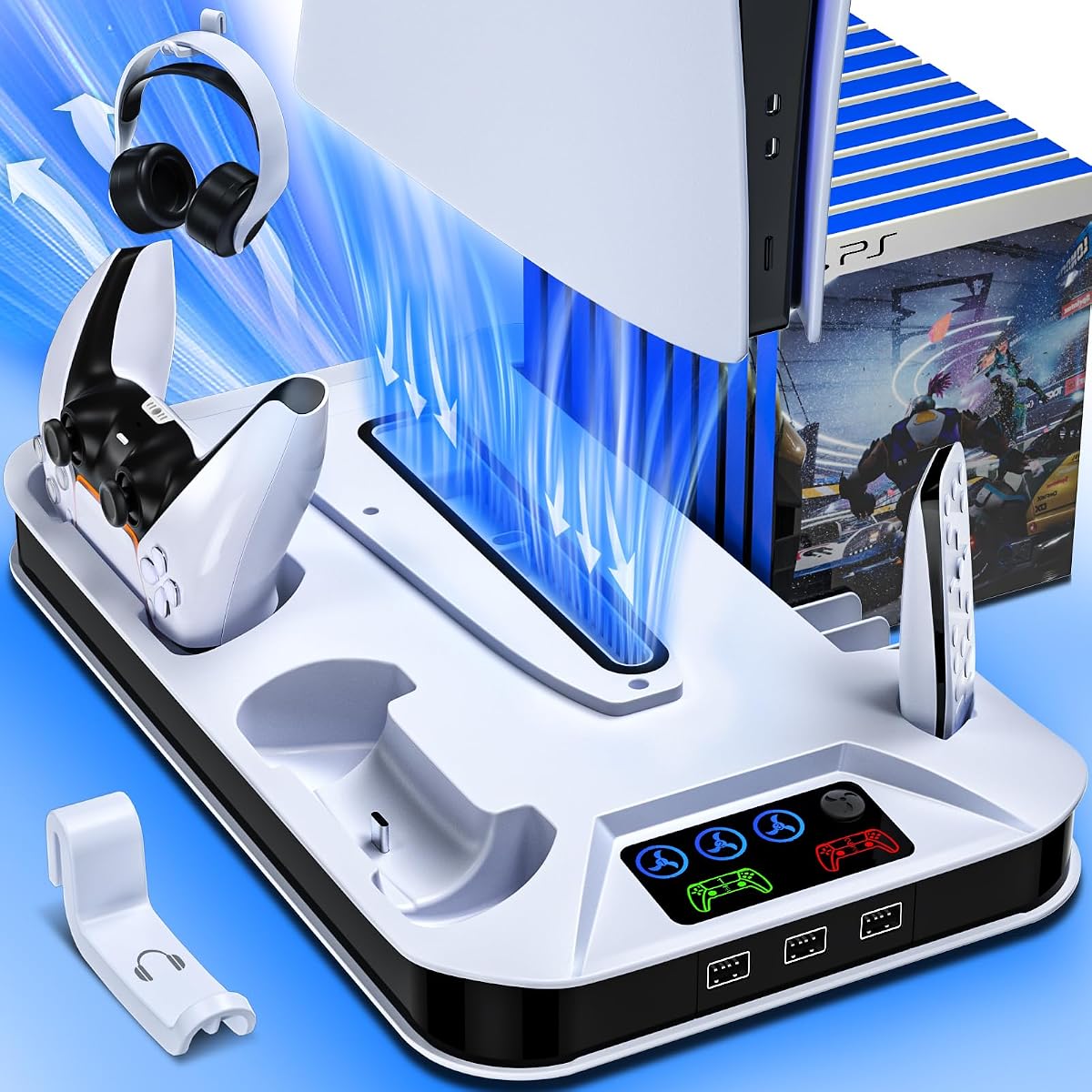
Auto temperature control fan
9 RGB honeycomb lights
2.5-hour fast charging
This guide compares the best cooling stand for PS5 console options available in October 2026 to help you choose the perfect accessory for your gaming setup.
Finding the right cooling stand for PS5 console is essential for maintaining peak performance during long gaming sessions. Overheating can lead to throttling and reduced hardware lifespan, so a reliable accessory is a smart investment for every owner.
We have carefully reviewed ten top-rated models based on cooling efficiency, build quality, and additional features like charging docks. Each product offers unique benefits designed to enhance your setup while protecting your valuable investment from heat damage.
Every pick below highlights key specifications and real-world performance insights to help you make an informed decision. Please note that availability and pricing may fluctuate, so checking the latest details before purchasing is always recommended for the best value.
4.5Editor score
4.4Editor score

4.5Editor score
The following table provides a quick side-by-side overview of the top ten cooling stands for PS5 console to help you compare key features at a glance before making your final selection.


This cooling station stands out as a top choice for PS5 owners seeking reliable thermal management. It features a high-efficiency turbo fan that dissipates heat from the bottom of the console effectively during long sessions.
We may earn a commission when you buy through this link, at no additional cost to you.
The standout feature is the fast charging capability that fully charges two controllers in just three hours. LED indicators clearly show fan speeds and charging status, ensuring you never miss a game due to dead batteries.
While the fan is powerful and adjustable, users with the Slim Digital version need to remove a panel adapter for a perfect fit. Also, Edge controllers are not supported which limits compatibility for some gamers.
If you prioritize cooling performance and convenience this is an excellent upgrade. It keeps your setup organized with dedicated slots for headsets and remotes making it a smart investment for any serious gamer.
The turbo fan actively pulls hot air away from the console base maintaining optimal operating temperatures during intense gameplay.
With space for controllers, headsets, and game discs this unit consolidates your accessories to reduce desk clutter.
We may earn a commission when you buy through this link, at no additional cost to you.
This horizontal model offers a sleek alternative for users who prefer their console lying flat. It supports both standard and Edge controllers making it versatile for different controller preferences.
We may earn a commission when you buy through this link, at no additional cost to you.
The scalable design ensures it fits every PS5 generation from the original to the Pro. Installation is straightforward with minimal tools needed allowing you to set it up in just a few steps.
While the cooling performance is solid the horizontal orientation might occupy more shelf space than vertical options. Additionally fitting the Digital edition requires using included EVA foam to secure the console properly.
Ideal for gamers with multiple console generations or Edge controllers this unit provides excellent flexibility. The dual charging dock and cooling fan make it a practical choice for a tidy gaming area.
Designed to work with all PS5 models including Edge controllers ensuring you are covered regardless of your hardware configuration.
No complex tools are required for assembly making this unit accessible for users of all technical skill levels.
We may earn a commission when you buy through this link, at no additional cost to you.
This model introduces smart automation with a built-in temperature probe that adjusts fan speed automatically. It keeps the console cool without manual intervention adapting to real-time heat levels.
We may earn a commission when you buy through this link, at no additional cost to you.
The RGB lighting adds a customizable visual element to your setup with nine different effects available. Charging is fast taking just two and a half hours to fully power two controllers simultaneously.
Users should note that controllers need to be seated firmly for optimal charging performance. The RGB lights may not suit every gaming environment so those preferring a clean look might disable them.
For tech-savvy users who value automation and style this unit delivers well. The memory function saves your preferred settings so you do not need to readjust after every reboot.
The internal probe monitors console heat and shifts fan speeds to maintain safe temperatures without user input.
Multiple RGB modes allow you to match the lighting to your mood or room decor for a personalized feel.
We may earn a commission when you buy through this link, at no additional cost to you.
White finish blends seamlessly with the PS5 design offering a clean and minimalist look. It operates quietly reducing noise pollution during immersive gaming sessions.
We may earn a commission when you buy through this link, at no additional cost to you.
The smart chip stops charging at 80 percent to protect battery health over time. This feature extends the lifespan of your controllers preventing degradation from constant full charging.
Edge controllers are not supported which may be a drawback for advanced users. Also ensure you remove the panel adapter if you own the Slim model for proper alignment.
This unit is ideal for those who value quiet operation and battery protection. The non-slip pads ensure the console stays stable while the extra USB ports keep other devices charged.
Smart circuitry limits charge cycles to prevent overcharging and prolong the overall life of your controllers.
The turbo fan is designed to minimize noise ensuring it does not interfere with in-game audio or voice chat.
We may earn a commission when you buy through this link, at no additional cost to you.
This stand prioritizes security with a safety screw that locks the console to the base. It prevents accidental tipping and keeps your investment stable even during vigorous gaming.
We may earn a commission when you buy through this link, at no additional cost to you.
It supports both standard and Edge controllers ensuring compatibility with high-end peripherals. The fan remembers your last speed setting so you do not need to adjust it after every restart.
The screw assembly adds a step to installation but ensures robust stability. The design focuses on function over flashy aesthetics which may appeal to practical users.
If securing your console is a priority this model delivers peace of mind. The media remote slot keeps your control center organized making it easy to reach without searching.
A safety screw prevents the console from shifting or falling which is crucial for tall vertical setups.
Designed to accommodate both standard and Edge controllers offering flexibility for competitive gamers.
We may earn a commission when you buy through this link, at no additional cost to you.
This budget-friendly option offers impressive features like auto temperature control and RGB lighting. It performs well for the price providing reliable cooling and fast charging.
We may earn a commission when you buy through this link, at no additional cost to you.
The honeycomb lighting adds a distinct visual flair to your setup. It supports both standard and Edge controllers ensuring wide compatibility without extra cost.
While sturdy it may not feel as heavy-duty as higher-end models. Some users might find the lighting too bright so dimming options are important to check.
For gamers on a budget who want premium features this unit is a top pick. The auto fan adjustment ensures your console stays cool without manual effort.
You get auto cooling and RGB lighting at a lower price making this an accessible upgrade for many.
Both controllers charge quickly in just two and a half hours ensuring you are never left without a working pad.
We may earn a commission when you buy through this link, at no additional cost to you.
This horizontal model is engineered for maximum compatibility with every PS5 generation. The scalable design ensures a perfect fit whether you have the original Slim or Pro.
We may earn a commission when you buy through this link, at no additional cost to you.
No tools are required for installation making setup quick and easy. The dual controller dock integrates seamlessly allowing you to charge two controllers simultaneously.
To enable charging while the console is off you may need to adjust power settings in the menu. Also the horizontal orientation takes up more shelf depth than a vertical stand.
Ideal for households with multiple consoles this unit adapts to any model. The integrated charger saves you from needing a separate dock keeping your area organized.
Setup is designed to be straightforward without requiring any screws or tools for assembly.
Adaptable structure ensures compatibility across all PS5 generations providing long-term utility.
We may earn a commission when you buy through this link, at no additional cost to you.
This premium option offers advanced features like smart chip protection and extensive game storage. It is designed for users who want comprehensive organization and cooling control.
We may earn a commission when you buy through this link, at no additional cost to you.
The fan adjusts automatically based on temperature ensuring silent operation when idle and power when needed. A smart chip stops charging at 70 percent to protect battery health.
While the 70 percent limit protects longevity some users may prefer a full charge. The setup involves more steps due to multiple ports and the Type-C cable.
For those seeking top-tier organization this unit excels. It holds up to 14 game discs and includes all necessary cables reducing the need for extra accessories.
Space for up to 14 game discs keeps your collection visible and accessible without clutter.
The intelligent circuit stops charging at 70 percent to prevent overcharging damage over time.
We may earn a commission when you buy through this link, at no additional cost to you.
This model focuses on aesthetics with a stunning ring of RGB LEDs that add flair to your desk. It offers silent cooling ensuring it does not disturb your gameplay experience.
We may earn a commission when you buy through this link, at no additional cost to you.
You can choose from eight vibrant colors and four lighting modes to match your setup. It supports both standard and Slim/Pro models ensuring wide compatibility across consoles.
The fan is quiet which is great for immersive sessions. However the USB ports are limited so you may need a separate hub for many devices.
If visual style is a priority this stand delivers. The combination of colorful lighting and silent performance makes it a standout choice for modern setups.
The fan is engineered for low noise keeping your gaming area peaceful during intense matches.
Multiple color modes allow you to create a vibrant atmosphere that reflects your personal style.
We may earn a commission when you buy through this link, at no additional cost to you.
This unit stands out for its versatile connectivity with multiple USB and Type-C ports. It charges your controllers and other devices like phones and laptops simultaneously.
We may earn a commission when you buy through this link, at no additional cost to you.
The smart chip protects against overcharging and overheating ensuring device safety. It fits all PS5 versions and provides a stable base for your console.
The price is higher than some options but the added connectivity justifies it. The build quality is solid providing a durable base for long-term use.
Ideal for users with multiple devices this hub is practical. It keeps your cables managed and your controllers charged without needing extra power sources.
Multiple ports allow you to charge phones tablets and controllers all from one central hub.
Integrated protection chips guard your devices against voltage spikes and short circuits.
We may earn a commission when you buy through this link, at no additional cost to you.
Selecting the right cooling stand involves evaluating several factors to ensure your console stays cool and organized. This section breaks down the most important features to consider before making your purchase.
Look for fans with multiple speed settings or automatic temperature control. A powerful turbo fan that can adjust based on heat levels ensures your console never overheats even during long sessions.
Prioritize models with quiet operation to avoid noise interference during immersive gameplay.
Ensure the stand fits your specific PS5 model whether standard Slim or Pro. Some models require panel adapters for a perfect fit so check if these are included.
A versatile design that supports all generations offers better long-term value if you upgrade in the future.
Check if the unit supports both standard and Edge controllers. Dual charging docks that work simultaneously reduce downtime between gaming sessions.
Fast charging speeds under three hours ensure your controllers are always ready to go when you need them.
Units with extra USB hubs allow you to charge headsets and other peripherals directly from the stand. A Type-C port adds modern versatility for newer devices.
More ports mean less cable clutter around your desk and a cleaner overall setup.
A sturdy base with safety screws ensures your console does not tip over during use. Non-slip pads add extra security to keep everything balanced.
High-quality materials will withstand daily wear and tear providing a durable solution for years.
RGB lighting can add a personalized touch to your gaming space. Choose models with multiple color modes if you want to match your setup.
If you prefer a clean look look for options that allow you to turn off the lighting easily.
Consider if the stand includes slots for game discs headsets or media remotes. Organized storage keeps your accessories within reach and reduces clutter.
Integrated storage saves space on your desk while keeping your essentials neatly arranged.
Smart chips that prevent overcharging and overheating are crucial for protecting your devices. Look for units that stop charging automatically to extend battery life.
These safety features ensure your controllers and console remain protected from electrical issues.
To set up your cooling stand, first secure the base on a flat stable surface. Attach any safety screws to lock the console in place and ensure it is balanced. Connect the power cable to the stand and plug it into your console or a power outlet.
Adjust the fan speed based on your cooling needs. Use manual settings to choose a specific speed or enable auto mode for temperature-based control. Test the cooling effect during a game session to ensure it is working effectively.
Clean the stand regularly by wiping down the surfaces and dusting the fan vents. Use a soft dry cloth to avoid scratching the plastic. Check the USB ports for debris to maintain optimal charging performance.
Most stands listed are designed to fit the standard Slim and Pro versions. Some require removing a panel adapter for specific models so check the product details for compatibility.
Not all models support Edge controllers. Check the compatibility specs before purchasing to ensure it works with your specific controller type.
Many units are designed for low-noise operation. However higher fan speeds may produce more sound so try to use lower settings during casual gaming.
Most stands charge two controllers in 2.5 to 3 hours. This is considered fast charging and ensures your controllers are ready quickly.
Most stands draw power from the PS5 so the console must be in standby mode. You may need to enable USB power delivery in the settings.
Most units include the necessary cables for power and charging. However always verify the package contents to ensure you have everything needed.
Most models allow you to turn off the RGB lights using a button or long press. Check the specific controls on your stand for lighting options.
Yes most stands require minimal tools and take just minutes to set up. Instructions are usually clear and straightforward for users of all levels.
Choosing the right cooling stand for your console ensures better performance and longer hardware life. Whether you prioritize speed RGB lighting or storage there is a model that fits your needs.
Focus on features that matter most to you such as fan performance or charging speed. Balancing these needs with your budget will help you find the perfect accessory.
Prices and availability may change so always check current offers before finalizing your purchase. Take your time to compare the options to make the best choice for your setup.