
GIGABYTE B550 Gaming X V2
4.5Editor score
Affordable AM4 Socket Support
Solid VRM Power Design
Reliable PCIe 4.0 Connectivity
This guide compares the top ten Gigabyte Motherboard options for gaming and workstations based on power delivery thermal performance and modern connectivity
Choosing the right Gigabyte Motherboard is essential for building a reliable and high-performance computer system. These boards support a wide range of processors and offer advanced features for enthusiasts.
We evaluated ten models based on power design thermal management connectivity options and overall build quality. Each product was analyzed to ensure it meets the demands of modern computing tasks.
Every pick highlights key strengths and ideal use cases for different users. Prices change often so check current listings before making your final decision.
4.5Editor score

4.4Editor score

4.2Editor score
The following table provides a side-by-side comparison of all ten Gigabyte Motherboard models reviewed in this guide to help you identify the best fit for your system requirements.


The GIGABYTE B650 AORUS Elite AX stands out as a top performer in the AM5 lineup. With its robust power design and advanced thermal solutions it ensures stable performance for Ryzen processors.
We may earn a commission when you buy through this link, at no additional cost to you.
Its 14+2+1 phase VRM and 70A power stages provide ample headroom for high-core-count CPUs. The extensive cooling including MOSFET heatsinks and M.2 guards keeps temperatures low under load.
Connectivity is well-covered with PCIe 5.0 support and rear USB-C ports. While premium features add cost the balance of performance and value makes it a compelling choice.
This motherboard is ideal for builders seeking a reliable platform for gaming and productivity. It offers a strong foundation for future upgrades without breaking the bank.
The twin power phase design ensures consistent voltage to the CPU even during intense workloads.
Full coverage heatsinks and thermal guards prevent throttling and extend component lifespan.
We may earn a commission when you buy through this link, at no additional cost to you.
The X870 AORUS Elite WIFI7 pushes the boundaries of what an AM5 board can offer. It features the latest WIFI7 and USB4 standards for ultimate speed and flexibility.
We may earn a commission when you buy through this link, at no additional cost to you.
With a 16+2+2 phase VRM and robust thermal guard the board handles power-hungry processors effortlessly. The sensor panel link adds a unique customizable touch for enthusiasts.
While expensive it delivers unmatched connectivity options for those who need every advantage. The build quality justifies the price for professional and enthusiast users.
Buy this if you want the absolute latest tech and top-tier performance. It is a future-proof choice for high-end workstations and gaming rigs.
WIFI7 provides significantly lower latency and higher throughput than previous generations.
Dual USB4 ports enable lightning-fast data transfers and external GPU connectivity.
We may earn a commission when you buy through this link, at no additional cost to you.
The X870E AORUS PRO ICE brings a striking white theme to the AM5 platform. It pairs looks with powerful specs including 80A smart power stages for stability.
We may earn a commission when you buy through this link, at no additional cost to you.
Thermal management is handled by robust guards on the VRM and M.2 slots. This ensures long-term reliability even under heavy sustained loads.
Connectivity remains top-notch with USB4 and PCIe 5.0 support. The design caters to builders who want style without sacrificing performance.
Choose this board for a cohesive white build that performs exceptionally well. It stands out visually and offers high-end features for serious users.
The white color scheme creates a clean and modern look for custom PC builds.
Smart power stages ensure efficient energy use and stable operation.
We may earn a commission when you buy through this link, at no additional cost to you.
The Z890 AORUS Master targets the latest Intel Core Ultra processors with a 18+1+2 phase VRM. It supports Thunderbolt 4 and 10GbE for fast wired and wired connections.
We may earn a commission when you buy through this link, at no additional cost to you.
With five M.2 slots and robust DIY tools like EZ-Latch it simplifies building a complex system. The EZ-Debug zone helps troubleshoot quickly.
While expensive it offers features that are rare in other boards. It is designed for users who need maximum bandwidth and connectivity options.
This board is for professionals and enthusiasts building high-end Intel systems. It future-proofs the build with advanced ports and power design.
Thunderbolt 4 offers data speeds up to 40Gbps for peripherals and storage.
Five M.2 slots allow for a vast array of high-speed storage configurations.
We may earn a commission when you buy through this link, at no additional cost to you.
The B650 Eagle AX offers a great balance of price and performance for AM5 users. Its 12+2+2 phase VRM supports modern Ryzen CPUs effectively.
We may earn a commission when you buy through this link, at no additional cost to you.
Thermal guards on the M.2 slots and VRM ensure stability during long sessions. Connectivity includes USB-C and WIFI6E for everyday needs.
While not feature-packed like premium boards it delivers reliability for the price. It is perfect for those wanting a solid foundation without overspending.
Buy this if you want a dependable AM5 board that fits a budget. It supports current and future Ryzen chips with ease.
Provides access to the latest AMD platform at a competitive price point.
Includes essential tools like Q-Flash for easy BIOS management.
We may earn a commission when you buy through this link, at no additional cost to you.
The B550 AORUS Elite AX V2 keeps the AM4 platform alive with strong features. It supports Ryzen 5000 series and offers PCIe 4.0 speeds.
We may earn a commission when you buy through this link, at no additional cost to you.
Its digital power solution and thermal armor keep the system cool and stable. Q-Flash Plus lets you update the BIOS without a CPU installed.
This is an excellent choice for upgrading an older build or building a budget PC. It offers reliable performance at a reasonable cost.
Choose this if you want to maximize value on the AM4 platform. It remains a strong option for users sticking with DDR4 memory.
Supports the latest Ryzen 5000 CPUs for a significant performance boost.
Q-Flash Plus simplifies updates for users who are not technically inclined.
We may earn a commission when you buy through this link, at no additional cost to you.
The Z790 Eagle AX brings DDR5 and PCIe 5.0 to a mid-range price. It supports Intel Core 12th to 14th Gen processors effectively.
We may earn a commission when you buy through this link, at no additional cost to you.
Its power design and thermal guards ensure stability for gaming and work. Features like Q-Flash and EZ-Latch simplify the building process.
While not the top of the line it offers great features for the cost. It is a solid pick for builders wanting modern tech without premium pricing.
Buy this for a balanced build with current Intel platforms. It provides the right mix of performance and affordability for most users.
Integrates DDR5 and PCIe 5.0 for future-ready storage and memory speeds.
Includes essential features without unnecessary cost or complexity.
We may earn a commission when you buy through this link, at no additional cost to you.
The Z790 AORUS Elite AX offers a robust 16+1+2 phase design for strong CPUs. It supports four M.2 slots for ample storage expansion options.
We may earn a commission when you buy through this link, at no additional cost to you.
Advanced thermal design ensures components stay cool during extended use. The board is well-built and offers a good mix of features.
It is a solid choice for those upgrading from older systems. The power delivery handles high-end chips well without overheating.
Buy this if you want reliable performance for your Intel system. It provides excellent value for users needing more storage and power.
The digital VRM solution ensures stability even with overclocked processors.
Four M.2 slots support multiple high-speed SSDs for large data needs.
We may earn a commission when you buy through this link, at no additional cost to you.
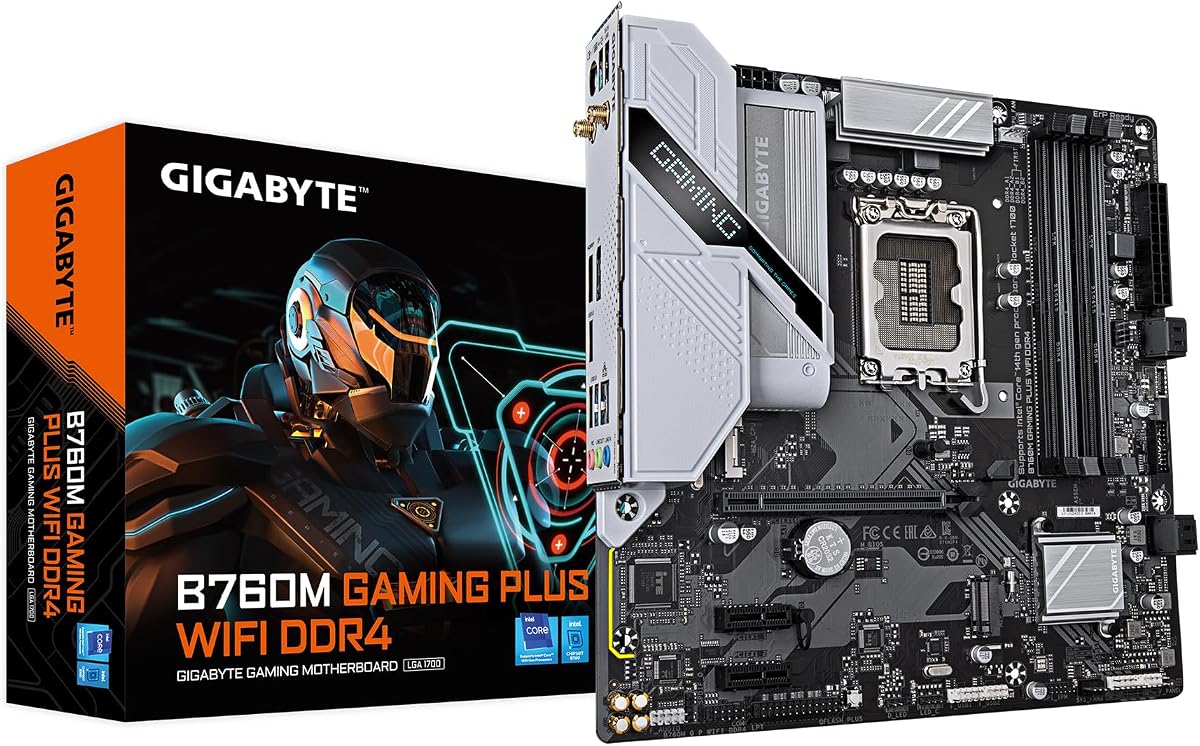
The B760M Gaming Plus WiFi is a compact choice for smaller cases. It fits well in budget builds and supports standard Intel Core processors.
We may earn a commission when you buy through this link, at no additional cost to you.
With a hybrid power solution and M.2 slots it handles gaming and workloads efficiently. The small footprint makes it easy to fit into tight spaces.
While limited in expansion it delivers essential features for the price. It is ideal for users needing a simple reliable system.
Buy this for a small build without sacrificing stability. It offers good value for those needing a straightforward motherboard solution.
The M-ATX size fits perfectly in compact cases for portable or small setups.
Includes key connections like USB-C and reliable LAN for daily tasks.
We may earn a commission when you buy through this link, at no additional cost to you.
The B550 Gaming X V2 is an affordable option for AM4 users. It supports Ryzen 5000 series with basic but reliable features for entry-level builds.
We may earn a commission when you buy through this link, at no additional cost to you.
Its integrated I/O shield and Q-Flash Plus make assembly and updates easy. It offers solid performance for the price.
While not feature-rich it covers all essential needs. It is perfect for budget gamers who need a dependable platform.
Buy this to save money without compromising stability. It is a great choice for first-time builders on a tight budget.
Offers essential performance and features at an entry-level price point.
Integrated shield and flash tools reduce build time and complexity.
We may earn a commission when you buy through this link, at no additional cost to you.
Selecting the right motherboard involves checking compatibility power delivery and features. This guide outlines the key factors to consider.
Ensure the motherboard socket matches your CPU. AM5 supports Ryzen 7000/8000/9000 while AM4 supports older Ryzen. Intel LGA 1700 and 1851 are used for Core chips.
Always verify the socket type before buying to avoid incompatibility.
Check if the board supports DDR5 or DDR4. Modern AM5 and Z790 boards use DDR5 while older AM4 boards use DDR4. Mixing types is not possible.
Choose the memory type that fits your budget and performance needs.
Look for strong VRM phases if you plan to use high-core CPUs. A higher phase count and better power stages ensure stable performance under load.
High-end builds need robust VRMs while basic builds can use simpler designs.
Advanced heatsinks and thermal guards keep components cool. Look for MOSFET heatsinks and M.2 thermal guards to prevent throttling.
Good thermal design extends component life and ensures steady performance.
Check USB ports PCIe slots and network speeds. Modern boards offer USB-C and PCIe 5.0 for fast data and storage. WIFI6 or WIFI7 improves wireless performance.
Prioritize features that match your workflow like fast network or many ports.
Count M.2 slots and PCIe slots for GPUs and drives. Some boards offer up to five M.2 slots for storage flexibility.
Ensure there is enough room for your planned components.
Check the warranty terms to ensure peace of mind. Most premium Gigabyte boards come with five years of coverage for defects.
A longer warranty indicates manufacturer confidence in the product.
Ensure the board fits your case. ATX is standard for full cases while M-ATX works in smaller ones.
Select the size that matches your PC case constraints.
Install the motherboard carefully by aligning it with the case standoffs. Use the included screws to secure it without overtightening.
Apply thermal paste correctly on the CPU to ensure good contact. Keep dust out of the heatsinks and fans for optimal cooling.
Update the BIOS regularly using the Q-Flash feature. Always ensure the power is stable during updates to avoid corruption.
You need an AM5 socket motherboard for Ryzen 9000 series. Boards like the B650 and X870 support these processors. Ensure DDR5 memory is used.
Yes Gigabyte motherboards are known for reliable performance and durability. They often include strong VRM designs and good thermal management. Many offer five-year warranties.
No AM5 boards only support DDR5 memory. DDR4 is used on AM4 boards like the B550. Always check the memory type before buying.
EZ-Latch is a tool-free design for installing GPUs or M.2 drives. It simplifies assembly and removal of components. This feature is found on many AORUS models.
You can use the Q-Flash feature to update the BIOS. This allows updates from a USB drive without installing the CPU. Follow the steps on the official website.
WIFI7 offers faster speeds and lower latency. It is best for future-proofing or high-demand networks. Consider if you need the latest wireless standards.
This guide reviewed ten top Gigabyte Motherboard options across various price points and platforms. Each board offers distinct strengths for different user needs.
Prioritize power delivery thermal design and socket compatibility when making your decision. Match the board to your CPU and future plans.
Check current prices and stock levels before purchasing. Deals change often so compare offers to find the best value.