
ASRock Intel Arc A580 Challenger 8GB OC
4.6Editor score
8GB GDDR6 Memory
Dual Fan Cooling
DirectX 12 Ultimate
Compare the top 10 Intel Arc GPU options for gaming, AI, and professional workloads to find the best performance, value, and features for your build today.
Choosing the right graphics processor is essential for modern computing tasks ranging from gaming to artificial intelligence. Intel Arc GPUs offer a competitive mix of performance and features for various workloads.
We compared ten distinct models based on architecture, memory capacity, cooling solutions, and specific use cases like rendering or inference. This list covers everything from entry-level cards to high-end workstation solutions.
Each pick highlights key strengths and trade-offs to help you decide based on your needs. Note that availability and pricing can fluctuate quickly so verify details before purchasing.
4.6Editor score

4.7Editor score

3.9Editor score
This side-by-side comparison outlines the core specifications and unique attributes of each model to help you identify the right fit for your specific computing needs.



This workstation GPU stands out with 24GB of GDDR6 memory designed for AI and rendering. Its ISV certification ensures stability for professional software tasks.
We may earn a commission when you buy through this link, at no additional cost to you.
The Xe2-HPG architecture provides significant compute power for inference and complex visual workflows. PCIe 5.0 support future proofs the card for bandwidth heavy platforms.
While the blower style cooling is effective in multi GPU setups it may generate more noise than dual fan designs. This is a trade off for dense server environments.
Ideal for engineers and AI researchers needing reliable performance without cloud dependency. It delivers professional grade capability in a single card form factor.
ISV certification ensures smooth operation with CAD and AI software.
Optimized for Linux multi GPU LLM deployments for scaled performance.
We may earn a commission when you buy through this link, at no additional cost to you.
This model delivers excellent performance for 1440p gaming with 10GB VRAM. The Xe2-HPG architecture supports advanced AI upscaling features for better visuals.
We may earn a commission when you buy through this link, at no additional cost to you.
Dual striped axial fans provide efficient cooling while keeping noise low during light loads. The metal backplate adds durability and prevents GPU sag in cases.
Users should note that memory is capped at 10GB which might limit some heavy texture games. However for most modern titles this capacity is still sufficient.
Recommended for gamers seeking high frame rates without breaking the bank. It balances power and price effectively for the current market.
XeSS 2 technology boosts frame rates with AI powered upscaling.
0dB silent cooling ensures quiet operation during lighter tasks.
We may earn a commission when you buy through this link, at no additional cost to you.
An affordable entry into high performance gaming with 8GB GDDR6 memory. It supports DirectX 12 Ultimate for modern visual features like ray tracing.
We may earn a commission when you buy through this link, at no additional cost to you.
The dual fan design manages heat well with 0dB silent mode for idle states. A metal backplate adds structural rigidity to the PCB assembly.
Installation requires two 8-pin power connectors which may need a robust power supply. The larger physical size also means checking case clearance before purchase.
Perfect for budget conscious gamers wanting solid 1440p performance. It offers significant value for the money spent on hardware.
Full support for DirectX 12 Ultimate and OpenGL 4.6.
0dB Silent Cooling stops fans at low temperatures for noiseless use.
We may earn a commission when you buy through this link, at no additional cost to you.
This card offers a solid middle ground with 12GB VRAM and high clock speeds. It uses TORN Cooling 2.0 to manage thermals efficiently during gaming.
We may earn a commission when you buy through this link, at no additional cost to you.
The boost clock reaches 2760MHz ensuring responsive performance in most titles. A metal backplate is included to prevent bending under load.
Some users may find single fan designs run hotter than dual fan setups. Ensure proper case airflow to maintain optimal thermal performance over time.
Recommended for gamers wanting extra memory for future titles. It balances cost and capacity well for mid range systems.
OC edition boost clock provides higher performance out of the box.
Blue breathing light adds a subtle aesthetic touch to the card.
We may earn a commission when you buy through this link, at no additional cost to you.
This dual GPU design delivers 48GB memory for running large models locally. It supports PyTorch and standard open source AI tools efficiently.
We may earn a commission when you buy through this link, at no additional cost to you.
With 394 TOPS compute power it handles complex inference workloads without cloud services. The turbo cooling design ensures stability during sustained heavy tasks.
Cost is a major factor for this level of hardware. You need a system capable of supporting the power and PCIe requirements.
Best for researchers needing local private AI deployment. It removes reliance on third party cloud infrastructure for sensitive tasks.
Runs 70B-class quantized models directly on a single card.
SR-IOV support allows flexible resource allocation across tasks.
We may earn a commission when you buy through this link, at no additional cost to you.
Designed for professional workloads this card offers massive memory in a dual slot. It is engineered for AI and complex visual computing tasks.
We may earn a commission when you buy through this link, at no additional cost to you.
Parallel processing power allows for faster rendering and inference speeds. The turbo cooling system exhausts heat efficiently to prevent throttling.
Users must ensure their power supply meets the energy demands of the system. This is specialized hardware not intended for standard gaming setups.
Ideal for studios needing high throughput without server costs. It provides enterprise features in a consumer friendly package.
Engineered to accelerate AI and machine learning applications.
Dual slot design fits standard cases without full motherboard monopolization.
We may earn a commission when you buy through this link, at no additional cost to you.
This bundle provides the GPU and a certified power supply for easy setup. It simplifies buying decisions by pairing compatible components together.
We may earn a commission when you buy through this link, at no additional cost to you.
The PSU is 80+ Gold certified ensuring stable clean power delivery. The GPU features dual fans for effective heat dissipation during gaming.
Upgrading later requires replacing the whole PSU which might limit future choices. The bundle locks in specific wattage that may not suit heavy overclocking.
Great for first time builders wanting a ready to install kit. It saves time on compatibility checks and ensures a solid start.
ATX 3.1 ready PSU delivers stable power for modern GPUs.
0dB silent cooling ensures silence during light usage or idle.
We may earn a commission when you buy through this link, at no additional cost to you.
This low profile card fits small cases while maintaining 16GB memory. It draws just 70W without needing external power connectors.
We may earn a commission when you buy through this link, at no additional cost to you.
The compact design makes it ideal for mini towers and edge workstations. AI compute capabilities allow for light inference directly on the machine.
Thermal performance may be constrained by the single fan design in dense cases. Users should ensure adequate case airflow for stable operation.
Recommended for small form factor builds needing AI or rendering. It brings workstation power to compact computing environments.
Fits into small form factor cases without expansion space issues.
70W draw requires no external PCIe power connectors.
We may earn a commission when you buy through this link, at no additional cost to you.
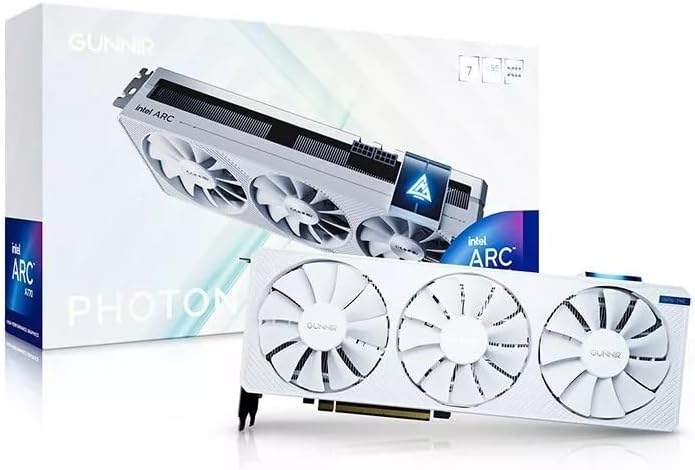
This card features a triple fan design for improved thermal performance. The white aesthetic appeals to users building clean looking systems.
We may earn a commission when you buy through this link, at no additional cost to you.
With 256-bit bus width it provides strong bandwidth for 4K displays. It handles demanding graphics workloads with ease due to robust cooling.
The larger physical size requires a spacious case to fit comfortably. Power consumption is higher than single fan variants but manageable.
Perfect for enthusiasts wanting better cooling and specific aesthetics. It supports modern displays and high resolution content effectively.
Triple fan design maintains stable temperatures during intense workloads.
Supports 4K monitors and latest displays easily.
We may earn a commission when you buy through this link, at no additional cost to you.
This card features four HDMI outputs ideal for multi display setups. It consumes only 50W making it energy efficient for light tasks.
We may earn a commission when you buy through this link, at no additional cost to you.
A single slot design ensures it fits in almost any case. It serves well as a dedicated media or display output device.
Performance is limited by only 4GB memory and basic architecture. Do not expect heavy gaming capabilities from this model.
Ideal for trading terminals or digital signage applications. It provides reliable display support without taxing system resources.
Four HDMI outputs allow expansive multi monitor workflows easily.
50W TBP keeps power draw minimal for budget builds.
We may earn a commission when you buy through this link, at no additional cost to you.
Selecting the right GPU depends on balancing your needs with available hardware compatibility and budget constraints.
Look for 8GB or more for gaming to handle modern textures effectively. Workstation users may need 24GB or 48GB for large AI models.
Prioritize VRAM size based on your resolution and application requirements.
Check power draw to ensure your PSU can handle the load safely. Some cards need external connectors while others draw directly from the slot.
Verify your power supply capacity before finalizing your purchase.
Choose between blower or dual fan styles based on your case airflow. Dual fans offer quieter operation while blowers work better in tight spaces.
Ensure adequate space in your case for the chosen cooling style.
PCIe 4.0 is standard but PCIe 5.0 offers future bandwidth benefits. Check motherboard compatibility to avoid bottlenecks.
Match the interface to your motherboard slot generation for best speed.
Verify driver availability for your specific use case or software. ISV certified cards are better for professional applications.
Research community support and driver stability for your OS.
Measure your case clearance to ensure the card fits inside. Some models have triple fan designs or unique shapes.
Check length and height limits before ordering to avoid returns.
Determine your price range and balance it with performance needs. Entry level models save money while premium cards offer longevity.
Invest in quality that matches your planned usage duration.
Install the latest drivers from Intel or the manufacturer for stable performance. Keep your system updated to ensure all features work correctly.
Use monitoring software to check temperatures and adjust fan profiles. Ensure airflow in your case prevents overheating during heavy loads.
Avoid overclocking unless you understand the risks to your components. Regularly clean dust from fans to maintain cooling efficiency.
Yes most modern Intel Arc GPUs include hardware accelerated ray tracing. This allows for realistic lighting effects in supported games and apps.
Many models support AI acceleration via XMX engines. Workstation cards with more VRAM are ideal for running large language models locally.
Xe Super Sampling uses AI to improve image quality and performance. It works similarly to DLSS in other ecosystem games and titles.
Low profile options exist for compact builds. Check dimensions carefully as some performance models require larger spaces.
Open source drivers are available and maintained by Intel. Most distributions support Arc GPUs out of the box with updates.
Newer architectures are generally efficient but check wattage. Ensure your PSU matches the card's TBP for stable operation.
Professional cards often support multi GPU scaling. Consumer models may have limited support depending on the software.
Check the specific memory amount listed in specs. Higher VRAM helps with higher resolutions and larger AI models.
The top picks cover a wide range of needs from budget gaming to professional AI work. Each model offers unique strengths for specific users.
Focus on memory capacity and cooling when making your decision. These factors heavily impact long term satisfaction with the hardware.
Always check current prices and availability before finalizing your order. Prices change frequently so verifying details ensures the best deal.