
Govee Smart TV LED Backlight Strip
4.6Editor score
Affordable RGBIC lighting effects
Easy app and voice control
Built in music sync feature
Discover the 10 best Govee TV Lights for 2026. We compare top models with camera sync, RGBIC strips, and smart features to enhance your viewing experience.
Transform your home theater with Govee TV Lights that sync perfectly with your screen content. These smart LED solutions create immersive ambiance by matching colors and brightness in real time. Whether you stream movies or play games, the right backlight elevates the mood.
We evaluated ten leading models based on sync accuracy, smart integration, and ease of installation. Our analysis covers camera-based systems, HDMI sync boxes, and versatile strips. Each option offers unique strengths for different TV sizes and smart home setups.
This guide reveals top picks for budget, premium, and specific use cases. You will find detailed pros and cons to help you decide. Keep in mind that pricing and availability can shift, so verify current details before purchasing.
4.6Editor score
4.5Editor score

4.4Editor score
Here is a side by side comparison of all ten models. We highlight key specs to help you find the right fit for your TV size and smart home ecosystem.


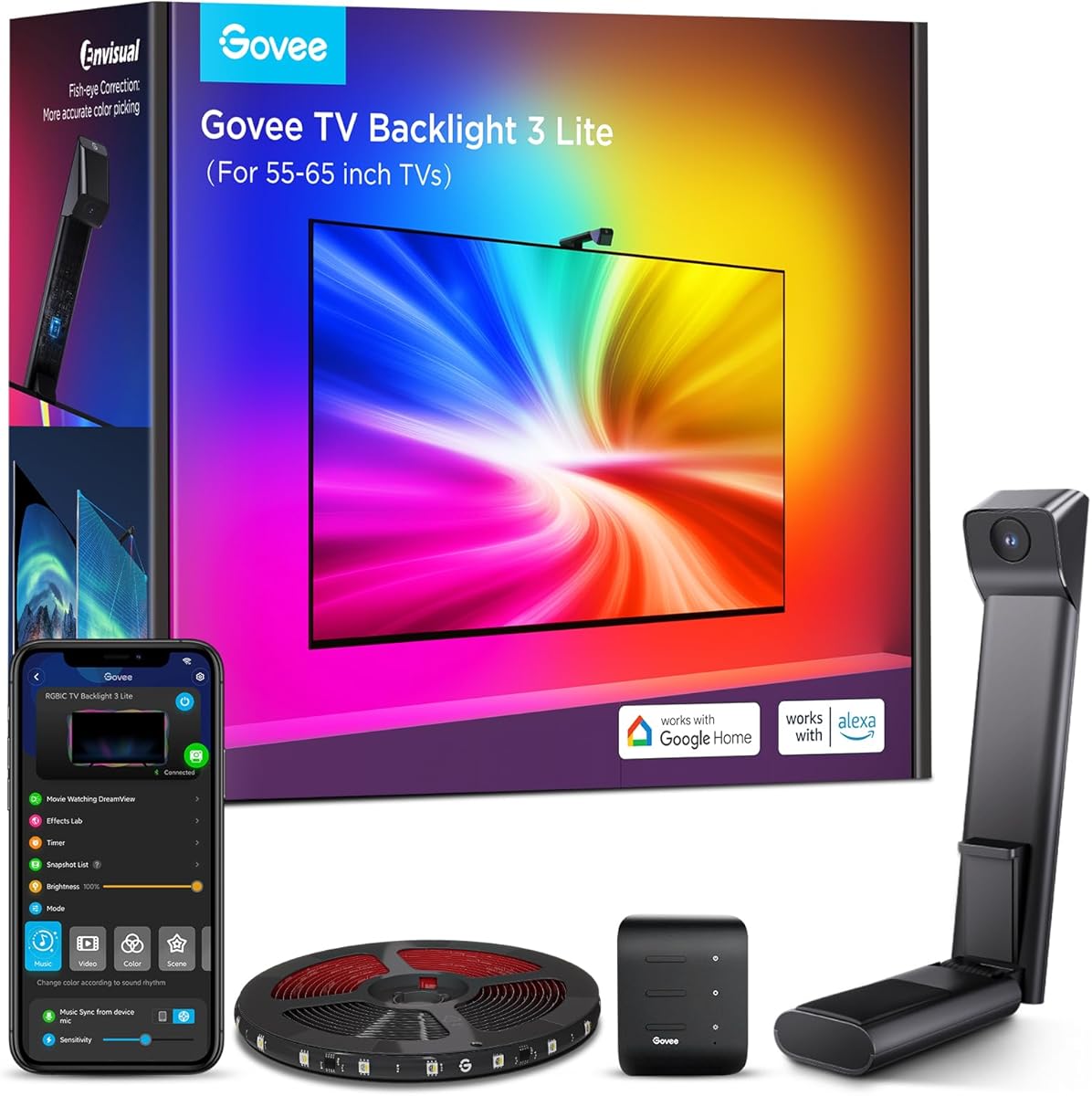
The Govee TV Backlight 3 Lite holds a strong 4.5 rating for its blend of performance and affordability. It offers upgraded Envisual technology that improves color matching along screen edges for a smoother look.
We may earn a commission when you buy through this link, at no additional cost to you.
Its 4-in-1 lamp beads deliver a purer white tone and better pixel density. The system works with any TV content instantly, avoiding common compatibility issues. You can also link up to seven sub-devices for whole room immersion.
Installation is simplified with a gravitational hanging design for the camera. This reduces wobble on ultra-thin TVs. However, you may need to adjust camera placement for optimal capture in different lighting conditions.
This model suits most viewers seeking reliable syncing without the cost of a premium system. It fits those who want smart activation and voice control with Alexa and Google Assistant.
The upgraded chip expands effective range and corrects fish-eye effects for better edge matching.
Instant capture of screen colors works whether you stream videos, game, or watch online.
We may earn a commission when you buy through this link, at no additional cost to you.
The Govee TV Backlight 3 Pro features a 4.4 rating and stands out with HDR sensor technology. It fuses exposures to keep detail in bright and dark scenes for theater-quality picture matching.
We may earn a commission when you buy through this link, at no additional cost to you.
Its high-precision triple camera independently captures colors across multiple calibrated zones. The strip uses 75 LEDs per meter with 5-in-1 RGBWWIC beads for richer layers. A 16-bit chip ensures accurate colors and smooth transitions.
Installation remains easy with a compact 85mm camera that fits ultra-thin TVs. Yet the camera is larger than other models, which may be noticeable. The premium features justify the cost for enthusiasts.
Choose this if you want precise HDR sampling and whole-home sync. It supports Matter and HomeKit for seamless integration and offers an AI filter for matching movie themes.
Fusing short and long exposures prevents overexposure while keeping dark areas rich.
Independent zone capture improves color accuracy by expanding the pick area around corners.
We may earn a commission when you buy through this link, at no additional cost to you.
This Govee Smart TV LED Backlight Strip has a 4.6 rating and is ideal for smaller TVs on a budget. It uses RGBIC technology to display multiple colors at once for vibrant visuals.
We may earn a commission when you buy through this link, at no additional cost to you.
You manage the lights via the Govee Home App or voice commands with Alexa and Google Assistant. The 77 preset scene modes plus music sync add variety. It includes clips for securing the strip snugly to your TV.
While it lacks color capture from the screen, the preset and DIY options cover many needs. It only works with 2.4G Wi-Fi. This trade-off keeps the price low while maintaining core smart features.
Buy this if you have a 40 to 50 inch TV and want basic smart lighting. It suits those who prefer preset scenes over auto-sync.
Each strip segment can show different colors at once for dynamic effects.
The built-in mic allows colors to sync with rhythm for an immersive vibe.
We may earn a commission when you buy through this link, at no additional cost to you.
The Govee TV Backlight 3 holds a 4.3 rating and offers a dual 4MP lens for sharp edge capture. It divides the screen into 24 zones for independent color capture to match mood without distraction.
We may earn a commission when you buy through this link, at no additional cost to you.
A hybrid lens structure minimizes color dispersion. The dual-chip delivers 132% faster processing for smooth fast-action scenes. The strip features 60 LEDs per meter with 4-in-1 beads for richer layers.
Installation is made easy with a gravity-fit camera that works with ultra-thin TVs. Still, camera placement matters for best results. You can link up to 10 devices for whole-home shows.
This model fits those who prioritize resolution and speed in color sync. It supports Matter and integrates well with smart homes for seamless control.
High resolution optical performance ensures every frame is captured with sharper edges.
Dual-chip processing reduces lag so lights track every frame perfectly during games.
We may earn a commission when you buy through this link, at no additional cost to you.
The Govee TV LED Backlight earns a 4.4 rating for its RGBIC technology that creates dynamic lighting effects. You can customize each segment for more vibrant colors to upgrade your visuals.
We may earn a commission when you buy through this link, at no additional cost to you.
It offers app and voice control via Alexa and Google Assistant. There are 99 preset scene modes and 11 music modes to suit your mood. The 12.5ft length covers four sides of a 55 to 65 inch TV.
Installation suggests using cable clips for a snug fit. While it lacks automatic color capture, the AI lighting bot allows personalized effects. It works on 2.4G Wi-Fi only.
This strip suits those who want segmentation and music sync without camera hardware. It fits users who prefer preset or DIY effects over auto-sync.
Realizes color segmentation display behind the TV for more dynamic and gorgeous effects.
Built-in mic syncs color and brightness with music for a concert-like experience.
We may earn a commission when you buy through this link, at no additional cost to you.
This Govee Smart RGBWIC Light Bar has a 4.6 rating and offers a distinct bar design. It produces more accurate colors and purer whites with extra LEDs compared to older models.
We may earn a commission when you buy through this link, at no additional cost to you.
The bars suit 45 to 70 inch TVs and come with mounting options for flexible placement. You can control them via Matter supported smart features or voice assistants. Music sync adds immersive transitions for movies and games.
While it lacks color matching from the screen, the preset scenes cover many moods. The setup is hub-free and supports instant response times for seamless smart lighting.
Choose this if you prefer bars over strips and want Matter integration. It fits users who value color accuracy without auto-sync needs.
Extra LEDs per bar deliver accurate colors and purer whites with smoother gradients.
You can mount behind the TV or stand it next to the TV for flexibility.
We may earn a commission when you buy through this link, at no additional cost to you.
The Govee Smart Light Bar holds a 4.6 rating and targets gaming ambiance with segmented RGBICWW color. It offers tunable white tones and vivid RGBIC colors for immersive viewing.
We may earn a commission when you buy through this link, at no additional cost to you.
A built-in mic syncs color and effects with ambient sound for ultra-responsive transitions. It supports Matter and allows voice control with Alexa and Google Home. You can customize exact colors via the Govee Home App.
Installation options include laying flat or mounting behind a TV. The cord length is 106 inches. While best for monitors under 45 inches, it can work for smaller TVs as well.
This bar suits gamers who want dynamic ambiance without complex sync. It fits users who prefer Matter integration and segmented control.
Offers tunable cool-to-warm white and vivid RGBIC colors for immersive gaming ambiance.
Voice-control colors and brightness via Alexa or Google Home with no hub needed.
We may earn a commission when you buy through this link, at no additional cost to you.
The Govee HDMI 2.1 AI Sync Box 2 holds a 4.3 rating and supports up to 8K at 60Hz and 4K at 144Hz. It uses CogniGlow AI to recognize images and text for match effects.
We may earn a commission when you buy through this link, at no additional cost to you.
It supports VRR and ALLM to reduce tearing and latency for a seamless experience. The high-density strip delivers 450 lumens per meter. Matter support allows integration with multiple smart ecosystems.
Automatic signal switching is not supported with multiple devices. Also, HDR may reduce saturation which you can adjust in the app. This box fits high-end setups needing HDMI sync.
Choose this if you want HDMI-based sync for gaming and high refresh rates. It suits those who value AI recognition and Matter integration.
Enables screen and lighting synchronization with resolutions up to 8K at 60Hz.
AI recognizes images and text to determine trigger conditions for specific effects.
We may earn a commission when you buy through this link, at no additional cost to you.
This Govee 16.4ft RGBIC LED Strip Lights holds a 4.4 rating and displays multiple colors on one line at once. It brings a strong visual impact for bedroom or ambient use.
We may earn a commission when you buy through this link, at no additional cost to you.
You unlock features via the Govee Home App to adjust colors and brightness. Upgraded music sync modes use a high-sensitivity mic for an immersive concert experience. There are 64 preset scenes to find proper lighting.
Note that it does not support Alexa and is not recommended for outdoor use. Installation requires wiping surfaces well for adhesion. This strip fits those who want DIY creativity.
Buy this if you need extra length for room lighting without smart sync. It suits users who prefer app control over voice.
RGBIC allows multiple colors on one line for stronger visual impact than RGB.
Built-in mic syncs with audio for a home concert experience.
We may earn a commission when you buy through this link, at no additional cost to you.
The Govee TV LED Backlight 2 holds a 4.4 rating and offers a fully cuttable design to fit any 32 to 70 inch TV. It delivers vivid RGBWIC color for accurate colors and pure white.
We may earn a commission when you buy through this link, at no additional cost to you.
Installation takes three minutes with no splicing or tools needed. You get 210 preset scenes and hands-free voice control via Alexa and Google Assistant. Ensure you cut only at marked scissor symbols.
This model lacks camera synchronization for color matching. Cutting elsewhere will damage the circuitry. Still, the cuttable feature makes it versatile for various TV sizes.
Choose this if you need a flexible strip for different TVs. It fits users who prioritize ease of install and voice control.
Customize length to fit any TV with marked scissor symbols for safe cutting.
Install one-piece lights in 3 minutes with no tools or complex wiring.
We may earn a commission when you buy through this link, at no additional cost to you.
Selecting the right Govee TV Light depends on your TV size, smart home needs, and budget. Consider these factors to find the best fit.
Check the supported TV size range to ensure full coverage. Some models fit 40 to 50 inches while others go up to 70 inches. Matching the strip length to your screen avoids dark corners and gaps.
Confirm the model supports your specific TV size for optimal effect.
Choose between camera-based, HDMI sync box, or preset-only options. Camera systems auto-match colors, while boxes work via HDMI and preset strips rely on manual scenes. Pick one that suits your setup.
Camera or HDMI sync offers real-time color matching; presets are simpler.
Look for RGBIC, RGBWIC, or RGBWWIC for richer whites and gradients. These advanced technologies offer purer tones and smoother transitions than basic RGB. More LEDs per meter increase brightness and detail.
Higher-end color tech improves white accuracy and overall visual depth.
Check compatibility with Alexa, Google Assistant, and Matter. Matter supported models allow seamless cross-platform control without hubs. Ensure your ecosystem aligns with the product for easy voice commands.
Matter support provides broad and flexible smart home control.
Consider gravitational hanging, clips, or mounting brackets. Slim camera designs fit ultra-thin TVs better. Some kits include tools for easy setup while others require extra steps for mounting.
Simpler designs reduce setup time and improve final fit.
Built-in microphones allow lights to react to audio for immersion. Check if you can adjust sensitivity or sync modes. This feature deepens the atmosphere during movies and games.
Music sync adds dynamic ambiance that responds to sound.
Entry-level models cost less but lack auto-sync. Premium units offer HDR and faster processing. Weigh features against your needs to find the best value without overspending.
Balance cost with essential features like sync and color quality.
Newer models include AI lighting bots for personalized effects. You can speak or snap to generate scenes. Check app presets and custom options for flexibility beyond auto-sync.
AI and app tools expand creative control without complex setups.
Start by cleaning the TV surface to remove dust and oils before applying adhesive. Attach the strip along the edges ensuring it aligns with corners. For camera models, mount the lens securely without blocking the screen.
Power on the device and connect to the Govee Home App via Wi-Fi. Calibrate the camera if needed to capture colors accurately. Link compatible smart devices for voice control via Alexa or Google Assistant.
Regularly wipe the strip with a dry cloth to maintain brightness. Avoid harsh chemicals that may degrade adhesive or LEDs. Update the app firmware to keep features functioning and secure.
Most models work with any TV brand as long as the size matches. The sync features capture colors from the screen regardless of brand. Just confirm the supported inch range before purchasing.
Some models can sync with projectors if you use the HDMI sync box. Camera systems may struggle with projector projection surfaces. Check product specs for projector compatibility.
No hub is needed for Alexa or Google Assistant. Matter models integrate directly into supported ecosystems. Just ensure your Wi-Fi is active and the app is connected.
Only cut at marked scissor symbols on the unpowered strip. Cutting elsewhere damages the circuit. Measure carefully before cutting to avoid waste.
LED strips are energy efficient compared to other lighting. They use low wattage to create bright effects. Expect minimal impact on your electricity bill.
Yes you can group multiple devices in the app for synchronized scenes. Use DreamView to link up to 10 devices for whole-home effects. This creates a unified ambiance across rooms.
We reviewed ten top models with camera sync, RGBIC strips, and smart features. Each offers unique strengths for different needs and budgets. The premium Pro leads in HDR accuracy while budget strips suit smaller TVs.
Prioritize sync method and TV size before choosing a model. Ensure smart home compatibility matches your voice assistants. Balance cost with the features you use most often.
Prices and stock vary so check current listings before buying. Verify model numbers to avoid mismatches. With the right setup your viewing experience will feel more immersive.