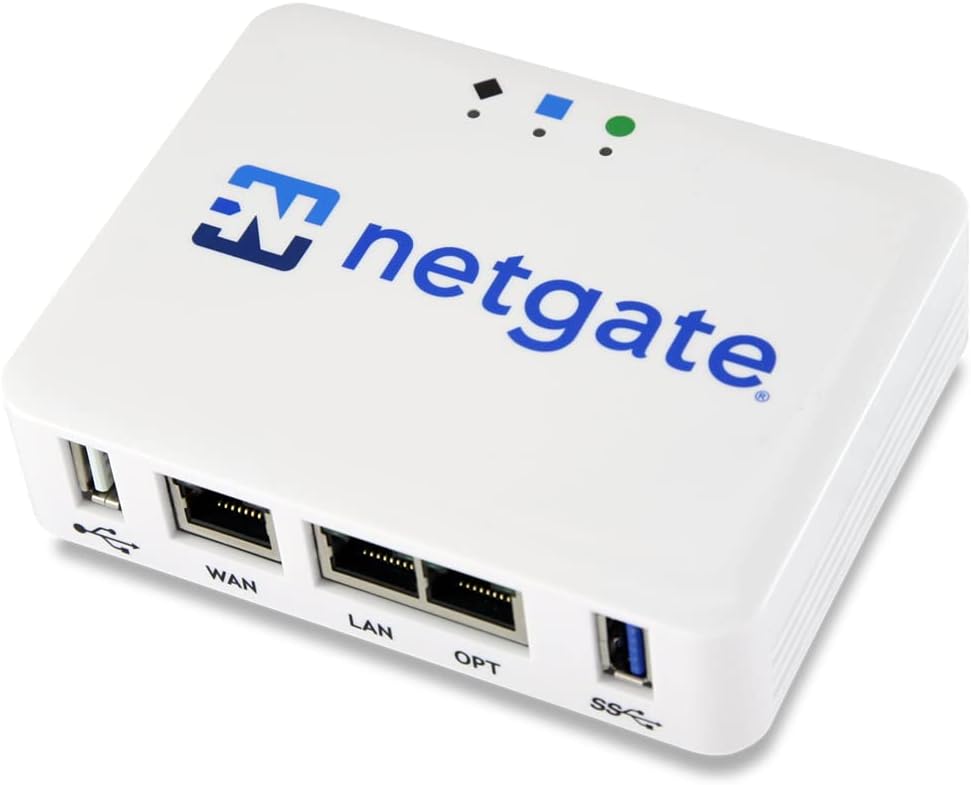
Netgate 1100 pfSense+ Security Gateway
4.1Editor score
Includes pfSense+ software updates
Dual core ARM processor
Silent compact operation
This guide compares the top hardware firewalls for businesses to help you secure your network with advanced threat protection and reliable performance.
Hardware firewalls provide a critical layer of defense for your network by filtering traffic before it reaches your devices. They offer robust security features that software solutions often cannot match, ensuring your data stays safe from external threats.
We evaluated ten leading models based on performance, security features, ease of management, and suitability for different business sizes. Each product was assessed against industry standards to ensure reliability and value for your specific networking needs.
Every pick includes detailed specifications, pros, and cons to help you make an informed decision. Please note that product availability and pricing may change over time, so verify current details before purchasing your chosen appliance.
4.1Editor score
4.2Editor score

This table provides a side-by-side comparison of all ten hardware firewall models to help you quickly identify the right fit for your network security requirements.


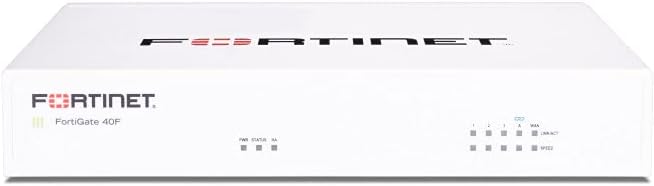
The FortiGate-40F is a robust hardware firewall designed specifically for small to mid-sized businesses. It delivers industry-leading security with a compact fanless design that operates quietly. Its high performance and AI-driven threat protection make it a top choice for reliable network defense.
We may earn a commission when you buy through this link, at no additional cost to you.
It features 5 Gigabit Ethernet ports and offers up to 1 Gbps IPS throughput. The purpose-built security processor ensures SSL traffic is handled efficiently. FortiGuard Labs integration provides comprehensive protection against known and unknown threats for your network.
The device requires a separate subscription for full services, which may be a consideration for tight budgets. Despite this, the hardware quality and performance justify the investment. It is ideal for businesses seeking scalable security without clutter.
Businesses needing strong protection in a small space should consider this appliance. It balances performance with ease of use effectively. The simplified management ensures you can maintain visibility without complex setup procedures.
The purpose-built security processor delivers industry-leading protection for encrypted traffic and maintains robust network safety.
Integrated AI-powered FortiGuard Labs identifies and mitigates both known and unknown threats to maintain security across your network.
We may earn a commission when you buy through this link, at no additional cost to you.
The Netgate 1100 pfSense+ Security Gateway offers powerful open-source security software pre-loaded for immediate use. Its dual-core ARM processor provides reliable routing and firewall throughput suitable for small networks. Business users benefit from included lifetime updates and technical support.
We may earn a commission when you buy through this link, at no additional cost to you.
It supports three separate Gigabit Ethernet ports for flexible WAN and LAN configuration. The compact form factor allows silent operation on a desktop or wall mount. TAC assistance is available around the clock to help with setup and troubleshooting quickly.
Throughput is near gigabit which is sufficient for basic needs but may not suit high-bandwidth environments. The requirement for an adult signature upon delivery adds a step to the process. Overall it is a cost-effective solution for secure edge networking.
This device is ideal for small offices needing reliable security without high costs. It balances flexibility with performance well for entry-level deployments. The included support ensures you are not left alone with configuration challenges.
Included pfSense+ software updates for the product lifetime ensure your firewall remains current with the latest security enhancements.
A dual-core ARM processor delivers near-gigabit routing with silent low-power operation ideal for desktop or rack placement.
We may earn a commission when you buy through this link, at no additional cost to you.
The Zyxel USGFLEX100H offers multi-layered security with flexible ports and centralized management. It supports up to 50 users with high firewall throughput suitable for growing small businesses. The Nebula portal simplifies configuration and policy sync across devices.
We may earn a commission when you buy through this link, at no additional cost to you.
Its offline-capable setup allows firmware updates without internet access which ensures continuity. The eight assignable 1G ports enable WAN load balancing or active-backup failover. This flexibility helps maintain connectivity even during primary link failures.
The Entry Defense Pack includes basic filtering but may require a Gold Security Pack for advanced features like anti-malware. Users must plan for licensing needs upfront to unlock full capabilities. This model balances usability with essential protection effectively.
Small offices needing reliable throughput and flexible port configuration should consider this device. It is well suited for environments requiring easy management and resilient connectivity. The Nebula cloud option enhances oversight for distributed setups.
Reputation filtering and SecuReporter visibility are included while optional licenses unlock full anti-malware and web filtering capabilities.
Eight 1G RJ-45 ports are assignable as WAN or LAN allowing load balancing and failover for resilient connectivity.
We may earn a commission when you buy through this link, at no additional cost to you.
The SonicWall TZ280 delivers high-speed Next-Gen firewall performance with advanced threat protection features. It provides up to 2.5 Gbps inspection throughput driven by a patented deep packet inspection engine. This appliance suits small businesses needing strong security without enterprise complexity.
We may earn a commission when you buy through this link, at no additional cost to you.
It includes connectivity options such as eight 1GbE ports and two 1G SFP interfaces for flexible setups. The device supports zero-touch deployment and cloud management for easy remote oversight. Active service subscriptions enable intrusion prevention and sandboxing capabilities.
Security services and firmware updates must be purchased separately to activate full protection. This upfront cost should be considered when budgeting for total ownership. Despite this the hardware performance and SD-WAN support are compelling for distributed sites.
Small to medium businesses requiring robust threat prevention and SD-WAN should choose this appliance. It balances performance with modern connectivity needs effectively. The cloud manager allows simplified control over distributed network security.
Up to 2.5 Gbps firewall inspection and 1 Gbps threat prevention ensure fast and secure network performance.
SonicOS 8 delivers intrusion prevention anti-malware and multi-engine sandboxing to protect against sophisticated attacks.
We may earn a commission when you buy through this link, at no additional cost to you.
The Fortinet FortiGate-70G offers Next-Gen firewall capabilities with ten Gigabit Ethernet ports for high-speed environments. It is designed for branch offices and small offices seeking secure SD-WAN improvements and deep traffic visibility. The integrated security features simplify network protection significantly.
We may earn a commission when you buy through this link, at no additional cost to you.
SSL inspection and application control provide visibility into encrypted traffic to govern access effectively. Centralized management via FortiGate Cloud or FortiManager streamlines policy enforcement across locations. Integration with FortiSwitch and FortiAP ensures a unified wired and wireless network.
The appliance supports a premium price which may limit adoption for smaller setups. However the performance and ecosystem integration offer long-term value. It is ideal for businesses needing high throughput and consistent security policies.
Branch offices and small businesses needing high-speed secure connectivity should consider this model. It delivers consistent policy enforcement and visibility. The unified ecosystem simplifies administration and enhances overall network reliability.
Secure SD-WAN improves cloud and SaaS performance while maintaining consistent security policy across all branches.
SSL inspection and application control identify and govern encrypted traffic to ensure safe access.
We may earn a commission when you buy through this link, at no additional cost to you.
The Sophos XGS 128 is a next-generation firewall appliance built for high performance and reliability in larger networks. It offers up to 19.1 Gbps firewall throughput with nine 2.5 GE ports and a fiber SFP port. This capacity supports larger offices needing resilient connectivity and traffic routing.
We may earn a commission when you buy through this link, at no additional cost to you.
Purpose-built hardware ensures reliable operation while the SD-WAN optimization provides intelligent routing across WAN links. VPN ready architecture supports secure site-to-site networking and encrypted remote access for employees. Subscription services enable IPS and advanced threat defense capabilities.
The appliance requires a Sophos subscription to enable full IPS and web security services. This ongoing cost adds to the total investment but ensures continuous protection. The hardware is designed to scale with growing business security demands.
Larger offices requiring high throughput and resilient routing should evaluate this appliance. It delivers reliable performance and supports modern connectivity needs. The enterprise firewall features align well with advanced security requirements.
Purpose-built next-generation hardware delivers up to 19.1 Gbps throughput for larger offices needing visibility and reliability.
Intelligent traffic routing and resilient connectivity are enabled across multiple WAN connections for business continuity.
We may earn a commission when you buy through this link, at no additional cost to you.
The Zyxel USGFLEX700 ZyWALL Cyber Security Firewall is designed for mid-size to large offices needing comprehensive security services. It includes a 1-Year UTM security pack covering anti-malware ransomware blocking and web filtering. This appliance supports up to 500 users with high throughput performance.
We may earn a commission when you buy through this link, at no additional cost to you.
Twelve configurable Gigabit Ethernet ports and two SFP fiber ports offer flexible local network connectivity. The Nebula Cloud Pro management solution simplifies monitoring and configuration across the network. Sessions capacity reaches 1.6 million ensuring stability under heavy load.
After the first year security services may require renewal to maintain full protection. This ongoing cost should be factored into long-term budgeting. The hardware supports high internet speeds up to 900 Mbps efficiently.
Businesses needing a complete security bundle with high throughput should consider this appliance. It is well suited for larger offices requiring centralized management. The Nebula cloud option enhances oversight for distributed teams.
Network security firewall with 1-Year UTM security services included covers anti-malware ransomware blocking and web filtering.
The bundle includes IDP security services and Nebula cloud Pro management for easy configuration and monitoring.
We may earn a commission when you buy through this link, at no additional cost to you.
The SonicWall TZ680 delivers high-end Next-Gen firewall performance suitable for distributed and high-end SMB environments. It provides up to 5 Gbps firewall inspection throughput driven by a patented deep packet inspection engine. The desktop form factor includes flexible high-speed connectivity options.
We may earn a commission when you buy through this link, at no additional cost to you.
It supports 8x1GbE ports plus 2x5G SFP+ and 2x10G SFP interfaces for modern network needs. Secure SD-WAN and Zero-Trust Network Access via Cloud Secure Edge keep distributed sites and remote workers protected. Active service subscriptions enable intrusion prevention and sandboxing.
Security services must be purchased separately to activate full protection and firmware updates. This upfront consideration ensures you budget for complete security readiness. The performance suits businesses needing strong distributed network defense.
Distributed businesses requiring high throughput and Zero-Trust features should consider this appliance. It balances performance with modern connectivity needs effectively. The cloud manager allows simplified control over distributed network security.
Up to 5 Gbps firewall inspection and 2.5 Gbps IPSec VPN throughput ensure fast secure network performance.
8x1GbE plus SFP+ and SFP interfaces offer flexible high-speed connections for modern enterprise needs.
We may earn a commission when you buy through this link, at no additional cost to you.
The Fortinet FortiGate 60F hardware comes bundled with 36 months of Unified Threat Protection services. This appliance secures against advanced online threats with comprehensive web filtering and anti-botnet technologies. It is tailored for medium-sized businesses needing robust security without large enterprise infrastructure.
We may earn a commission when you buy through this link, at no additional cost to you.
FortiCare Premium ensures high-quality support and service continuity for reliable uptime. Advanced filtering technologies safeguard against sophisticated threats effectively. The bundle simplifies budgeting by including protection services alongside the hardware unit.
The initial cost is higher than standalone hardware but includes substantial service coverage. This value proposition suits businesses wanting immediate protection without managing licenses separately. It is an effective choice for medium-sized environments.
Medium-sized businesses needing bundled protection and support should consider this device. It offers reliable customer support and effective protection against threats. The included services streamline deployment and maintenance significantly.
The appliance is bundled with 3 years of FortiCare Premium and FortiGuard Unified Threat Protection for complete coverage.
Advanced filtering technologies secure against advanced online threats with comprehensive web filtering and anti-botnet capabilities.
We may earn a commission when you buy through this link, at no additional cost to you.
The Cisco ASA5525-X ASA5525-K9 Security Appliance Firewall offers a cost-effective renewed hardware option for budget-conscious users. It features eight Gigabit Ethernet ports providing reliable connectivity for small networks. This edition delivers standard firewall performance suitable for basic business needs.
We may earn a commission when you buy through this link, at no additional cost to you.
Renewed hardware allows access to Cisco ASA security features without the cost of new equipment. The appliance supports Gigabit Ethernet connections ensuring fast network throughput for internal traffic. It fits well in environments where hardware lifespan is managed actively.
Condition variance in renewed products may affect expectations regarding physical wear or performance. Users should verify specifications with the seller before purchase. This model is best for temporary setups or secondary sites.
Businesses needing affordable gateway firewall capacity should consider this renewed appliance. It provides reliable connectivity and standard security features. Verify condition details to ensure it meets your operational requirements.
This edition delivers standard firewall performance suitable for basic business needs with reliable connectivity.
Renewed hardware allows access to Cisco ASA security features without the cost of new equipment.
We may earn a commission when you buy through this link, at no additional cost to you.
Selecting the right hardware firewall involves evaluating performance, security features, management needs, and budget. This section outlines key factors to consider for making a secure choice.
Evaluate the firewall's firewall throughput to ensure it meets your internet speed and traffic demands. Higher throughput ensures that security checks do not bottleneck your network during peak usage.
Match throughput requirements to your connection speed to avoid latency or dropped connections.
Look for essential security features such as Intrusion Prevention System (IPS), anti-malware, and web filtering. Some models require subscriptions to activate advanced threat protection capabilities.
Ensure the appliance supports the specific security services you need to protect against modern threats.
Check the number and type of ports available including Gigabit Ethernet and SFP options. Flexible ports allow for better network segmentation and WAN load balancing.
Choose a model with enough ports to support your current devices and future growth without extra switches.
Consider the management interface options such as cloud-based or on-box consoles. User-friendly dashboards simplify configuration and monitoring for IT teams.
Select a management approach that fits your operational capabilities and remote monitoring needs.
Ensure the firewall supports the number of users and concurrent sessions in your environment. Scalability allows you to add devices without upgrading hardware immediately.
Verify session limits and user capacity to avoid performance drops as your network expands.
Review the warranty coverage and technical support options provided by the manufacturer. Access to timely support is critical during security incidents or configuration issues.
Prioritize models that offer strong support agreements to minimize downtime and resolve problems quickly.
Account for both the hardware cost and any required subscription fees for security services. Total cost of ownership affects long-term value and ROI.
Calculate total expected expenses including renewals to ensure you stay within budget over time.
Select a form factor that fits your installation space such as desktop, wall-mount, or rack-mount. Noise levels and power consumption also matter for workspace comfort.
Ensure the physical design suits your office environment and operational constraints effectively.
Connect the firewall between your modem and internal network switches following the port assignments in the user guide. Verify firmware is updated immediately after setup to close known vulnerabilities.
Configure firewall policies using the web interface or cloud dashboard to define allowed traffic and block malicious sources. Enable logging and monitoring to detect unusual activity and respond quickly.
Schedule regular maintenance to review security settings and update firmware versions. Keep physical vents clear for proper airflow to prevent overheating during extended operation.
A hardware firewall is a physical device that filters network traffic before it reaches your internal network. It provides a robust layer of security protecting multiple devices from external threats without taxing individual endpoints. This centralized protection is essential for businesses needing comprehensive threat defense.
Many hardware firewalls require subscriptions to activate advanced security services like intrusion prevention and anti-malware. Basic traffic blocking may work without a subscription but protection will be limited. Always check if essential features require ongoing renewal.
Open-source options offer flexibility and lower costs but may require more technical expertise to configure. Vendor appliances provide pre-integrated features and support which can save time. Choose based on your internal IT skill level and budget constraints.
Yes many hardware firewalls include VPN features that secure connections for remote workers. They allow encrypted access to internal resources protecting data in transit. Ensure your device supports modern VPN protocols for best security.
Throughput refers to raw network capacity while security throughput accounts for performance when threat inspection is enabled. Security throughput is often lower because encryption and analysis consume processing power. Check security throughput numbers for realistic performance expectations.
Update firmware whenever the vendor releases a new version to fix vulnerabilities and improve features. Many appliances allow automatic updates or offer scheduled checks. Regular updates ensure your firewall stays effective against emerging threats.
Hardware firewalls provide network-level protection but do not replace antivirus software on individual devices. They prevent threats from entering the network but endpoint protection stops malware that may bypass the firewall. Use both for layered security.
Cloud management offers remote access and centralized policy sync across locations which is useful for distributed teams. Local management can be faster for direct access without internet dependency. Choose based on your management preferences and network location.
Choosing the best hardware firewall depends on your specific network size, budget, and security priorities. The FortiGate-40F offers an excellent balance for small businesses while the SonicWall TZ680 suits high-end needs.
Prioritize models that match your throughput requirements and include the security services you need. Consider management ease and support options to ensure smooth long-term operation.
Prices and availability may change so verify current details before purchasing. Use this guide to narrow down options that fit your business needs.