
Akai Professional LPK25
4.7Editor score
Plug and play USB
Built-in arpeggiator
Compact lightweight design
This guide compares the top 25 Key MIDI Controllers for production and performance, evaluating keybeds, DAW integration, pads, and portability.
Whether you are a beginner starting your music journey or a seasoned producer needing a portable sketchpad, a 25 key MIDI controller is essential. These compact devices bridge the gap between your ideas and your digital audio workstation with precision and speed.
We evaluated ten top models based on build quality, key response, control layout, and software integration. Our analysis focuses on how each unit handles real-world workflows from beat making to live performance scenarios.
Each review highlights unique strengths and potential limitations to help you match the hardware to your specific needs. Keep in mind that availability and pricing may shift so always verify details before purchasing your next tool.
4.7Editor score

4.6Editor score

4.6Editor score
The following table provides a side-by-side overview of key specifications and standout features across all ten models evaluated in this comprehensive guide.



The Akai Professional MPK Mini MK3 stands out as a top tier choice for producers needing reliable control over their software instruments. It holds a strong 4.6 star rating reflecting consistent performance and build quality across thousands of user reviews.
We may earn a commission when you buy through this link, at no additional cost to you.
Its keybed offers responsive velocity sensitivity that translates playing dynamics into expressive MIDI output. The eight backlit MPC style pads are highly durable and support Note Repeat and Full Level modes for dynamic drum programming and sample triggering.
While the thumbstick provides excellent pitch and modulation control some users may find the included software requires time to master fully. Additionally the package does not include a USB cable which is a minor inconvenience for newcomers.
This controller is ideal for beat makers and electronic musicians who value tactile control and deep integration with major DAWs. Its balance of features and portability makes it a standout recommendation for both home studios and live setups.
The eight velocity sensitive pads offer a tactile experience that rivals much larger controllers while the eight assignable knobs provide direct access to filter and effect parameters.
Buyers receive a robust suite of sounds and tools including MPC Beats and Komplete Select bundles ensuring a complete production experience right out of the box.
We may earn a commission when you buy through this link, at no additional cost to you.
The Akai Professional LPK25 delivers exceptional value for users prioritizing portability and simplicity. With a high 4.7 star rating it is celebrated for its plug-and-play functionality and reliable key response in a tiny form factor.
We may earn a commission when you buy through this link, at no additional cost to you.
Its slim profile fits easily into laptop bags while the USB bus power eliminates the need for external adapters. The built-in arpeggiator adds creative flair allowing users to generate complex patterns from simple input without DAW automation.
Lack of drum pads and limited modulation controls make this unit less suited for performance heavy workflows or complex sound design tasks. It focuses strictly on melody and bassline input which limits versatility for advanced producers.
Beginners and travelers will appreciate the straightforward layout and instant connectivity across Mac and PC systems. For those needing a secondary input device or a minimal controller for quick sketches this remains a top budget recommendation.
The device requires no drivers or configuration allowing musicians to start recording and composing immediately upon connecting it to any compatible USB port.
Users can engage the onboard arpeggiator to create rhythmic sequences and chord progressions effortlessly expanding creative possibilities without requiring complex software routing.
We may earn a commission when you buy through this link, at no additional cost to you.
The Arturia MiniLab 3 brings a fresh approach to MIDI control with a focus on sustainability and workflow efficiency. It boasts a 4.7 star rating highlighting user approval for its responsive keys and well-designed physical interface.
We may earn a commission when you buy through this link, at no additional cost to you.
Its keybed is notably smooth and expressive offering better playability than many competitors in the mini keyboard space. The inclusion of four motorized faders adds a professional touch for mixing and automation tasks within a compact layout.
The absence of a dedicated pitch wheel may hinder expressive performances for users accustomed to traditional keyboard controls. Additionally full feature utilization relies heavily on the Arturia software which might complicate simple setups.
This controller suits artists who value tactile control and environmental responsibility in their gear. It serves as an excellent main controller for electronic musicians seeking a balance between classic keyboard feel and modern production tools.
Arturia provides dedicated software that allows deep customization of button functions and parameter mapping to ensure the hardware adapts perfectly to specific production workflows.
Constructed with eco friendly materials and durable components this unit maintains structural integrity and performance reliability even after extensive daily use in various environments.
We may earn a commission when you buy through this link, at no additional cost to you.
The Novation Launchkey Mini 25 MK4 represents the premium end of compact controllers with advanced features that empower complex music creation. Its 4.6 star rating confirms strong performance in both studio and live performance contexts.
We may earn a commission when you buy through this link, at no additional cost to you.
Sixteen force sensitive resistor pads offer exceptional sensitivity and durability for drum programming and clip launching. The innovative Scale Mode and chord triggers make melody composition intuitive even for those with limited theoretical knowledge.
While the feature set is extensive some users may find the depth of controls overwhelming initially. The higher price compared to budget models reflects the superior build quality and advanced musical tools included in the package.
Producers looking for a comprehensive all-in-one solution will appreciate the deep DAW integration and included creative software. It stands out for those ready to invest in a controller that grows with their skills and ambitions.
Features like Scale Mode and Chord triggers simplify complex note choices allowing users to focus on creativity rather than technical music theory constraints during performance.
The Force Sensitive Resistor pads provide nuanced control over velocity and pressure enabling highly expressive drumming and sample triggering that standard capacitive pads cannot match.
We may earn a commission when you buy through this link, at no additional cost to you.
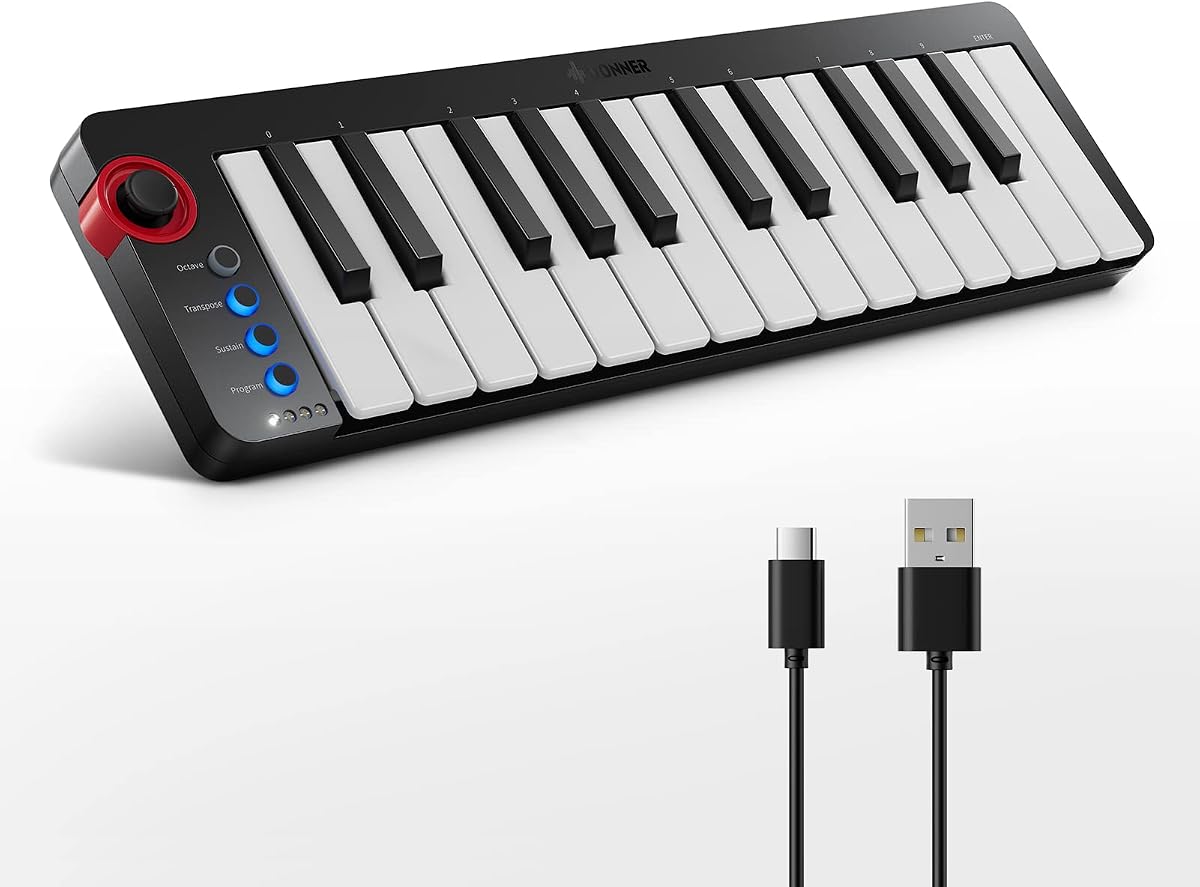
The Donner N-25 targets beginners with a user-friendly design and integrated educational resources. With a 4.1 star rating it is praised for its approachability and features that support new musicians learning production basics.
We may earn a commission when you buy through this link, at no additional cost to you.
Light-up buttons provide visual feedback during play helping users keep track of active parameters. The included forty teaching courses offer structured guidance covering arrangement essentials and DAW navigation to accelerate the learning curve.
Build materials are functional but not as robust as higher end competitors which may limit longevity with heavy use. The light-up features are engaging but serve mostly as visual aids rather than essential control elements.
This keyboard is ideal for students or hobbyists entering music production who need a supportive tool to learn with. Its combination of hardware and guided learning resources makes it a unique entry-level option in the market.
The package includes forty structured lessons designed to take users from beginner to advanced understanding of music arrangement and software instrument management quickly.
Light-up buttons give immediate visual confirmation of active banks and parameters reducing confusion during creative sessions for newcomers unfamiliar with MIDI control logic.
We may earn a commission when you buy through this link, at no additional cost to you.
The Rhymo 25 Key Portable controller emphasizes modern connectivity options including USB-C and Bluetooth MIDI for seamless device integration. It has earned a 4.1 star rating based on its convenient connectivity and compact footprint.
We may earn a commission when you buy through this link, at no additional cost to you.
The inclusion of a USB-C port aligns with current computer and tablet standards reducing the need for dongles. Bluetooth MIDI support allows wireless connection to mobile devices enabling music creation away from the computer.
Bluetooth stability may vary depending on the host device and environment which can introduce latency or dropouts during performance. The build is lightweight and utilitarian which may not appeal to users seeking premium aesthetics or durability.
This unit is perfect for mobile producers who value flexibility and modern connection standards. It is a solid choice for sketching ideas on tablets or phones where traditional USB cables might be restrictive.
USB-C and Bluetooth MIDI support allow connection to modern mobile devices and computers without adapters facilitating a streamlined workflow for on-the-go production tasks.
The X-Y joystick provides expressive pitch bend and modulation control enabling nuanced performance adjustments that enhance the musicality of synthesized sounds during live playing.
We may earn a commission when you buy through this link, at no additional cost to you.
The M-VAVE 25 Key controller stands out with its integrated battery offering up to 16 hours of continuous wireless operation. It holds a 4.5 star rating reflecting user satisfaction with its unique power features and robust build.
We may earn a commission when you buy through this link, at no additional cost to you.
Wireless connectivity via Bluetooth frees musicians from cable constraints allowing placement anywhere in the room. The semi-weighted keybed offers more tactile feedback than standard mini keys appealing to players who prefer a piano-like feel.
The larger battery and heavier build mean this unit is less portable than ultra-slim options. It requires periodic charging which adds a step to the setup process compared to USB-only bus powered devices.
For performers who value freedom of movement and physical key feedback this is a compelling option. The combination of battery power and semi-weighted keys makes it suitable for both studio and stage environments.
A built-in 2000mAh battery enables up to 16 hours of continuous wireless use allowing for long recording sessions or live performances without needing external power sources.
Bluetooth connectivity allows for a clutter-free workspace by connecting to smartphones or computers without cables while still maintaining responsive MIDI signal transmission.
We may earn a commission when you buy through this link, at no additional cost to you.
The Akai Professional MPK Mini Play MK3 functions as both a standalone instrument and a DAW controller offering unique versatility. Its 4.5 star rating highlights the utility of its built-in speaker and sound engine for spontaneous composition.
We may earn a commission when you buy through this link, at no additional cost to you.
Users can create beats and melodies without connecting to a computer thanks to the internal sound library and speaker. The OLED display provides clear feedback on settings and battery status which enhances ease of use.
Sound quality and variety in standalone mode are limited compared to professional software instruments. For serious production tasks this unit is best used in USB mode rather than relying on its internal engine for final mixes.
This controller is perfect for students or casual musicians who want an all-in-one tool for inspiration and practice. It bridges the gap between a toy keyboard and a serious production tool with professional build quality.
The built-in sound engine allows users to generate and record melodies without a computer enabling immediate creativity and practice sessions in any location.
An internal speaker provides instant audio feedback allowing musicians to play and listen without external monitors or headphones making it ideal for quick ideas.
We may earn a commission when you buy through this link, at no additional cost to you.
The Black edition of the Akai Professional MPK Mini MK3 offers the same high performance in a sleek classic finish. It shares the 4.6 star rating of its counterpart reflecting consistent quality and reliability across the series.
We may earn a commission when you buy through this link, at no additional cost to you.
This model provides the same responsive velocity keys and eight drum pads that define the series. The matte black finish offers a professional aesthetic that blends well with other studio gear and minimizes visible fingerprints.
Features remain consistent with the standard version meaning users gain the same extensive software and mapping capabilities. There are no additional hardware features specific to the color variant so buyers should choose based on aesthetic preference.
This unit is recommended for those who prefer a minimalist look without sacrificing functionality. It is a reliable choice for studios that value consistency and professional build standards in their hardware selections.
The matte black finish provides a sleek and professional appearance that integrates seamlessly into modern studio setups while resisting visible smudges and wear over time.
Despite the color difference this model maintains the same high quality keybed and control layout ensuring identical performance and workflow to the standard version.
We may earn a commission when you buy through this link, at no additional cost to you.
The Akai Professional APC Key 25 MK2 is designed specifically for integration with Ableton Live offering specialized control over clips and scenes. With a 4.4 star rating it appeals strongly to electronic producers working within this specific ecosystem.
We may earn a commission when you buy through this link, at no additional cost to you.
The 5×8 RGB pad matrix provides instant visual feedback on clip status making live performance and tracking seamless. Dedicated arrow buttons allow quick navigation through tracks and scenes without touching a mouse.
Its layout is tailored to clip launching which may feel restrictive for users focused on linear recording or MIDI note input. The keyboard section is functional but secondary to the pad matrix functionality.
This controller is the definitive choice for live performers and producers who use Ableton Live as their primary tool. It streamlines the workflow for electronic music creation by aligning hardware directly with software features.
The 5×8 RGB matrix pad offers a grid layout specifically designed for launching clips and scenes in Ableton Live providing intuitive visual feedback and control.
Dedicated arrow buttons allow producers to scroll through tracks and scenes efficiently enabling seamless transitions during live performances without needing to look at the screen.
We may earn a commission when you buy through this link, at no additional cost to you.
Choosing the right 25 key MIDI controller involves balancing your workflow needs with hardware features. This guide explores key factors to consider before making a purchase.
The keybed determines how your music feels when played. 25 key controllers typically use mini keys which are compact but may lack the fullness of standard keys. Look for velocity sensitivity if you want dynamic expression in your recordings.
Choose a keybed that matches your playing style. If you need expressive dynamics prioritize velocity sensitivity. If space is your main concern accept that mini keys offer less physical range but greater portability.
Beyond keys consider how many pads and knobs are included. Drum pads are essential for beat makers while knobs help control software parameters. Some controllers offer dedicated transport buttons or mixer controls to streamline production.
Ensure the layout supports your typical workflow. If you create electronic music prioritize pads. If you compose orchestral or classical music focus on keybed quality over additional controls.
Seamless integration with your preferred digital audio workstation saves setup time. Many controllers come with pre-mapped software or dedicated software for mapping parameters. This ensures immediate usability when you open your project.
Check compatibility with your specific DAW. While most controllers work universally some brands offer deeper integration with specific software like Ableton or Logic. Always verify pre-mapping features if you value convenience.
Decide between USB bus power and battery options. USB power ensures continuous operation without changing batteries but requires a cable. Battery powered units offer wireless freedom but add weight and require regular recharging.
Consider your primary use case. For a stationary studio USB power is ideal. For live performance or travel battery options provide necessary freedom of movement and placement flexibility.
25 key controllers are designed to be portable. Look for models with durable chassis and protective cases if you plan to move them frequently. Build quality affects longevity especially in high-use environments.
Prioritize materials that match your environment. Metal chassis offer durability but add weight. Plastic bodies are lighter but may feel less substantial. Assess how often you travel with your gear before deciding.
Many controllers include free DAWs and virtual instruments. These bundles can be valuable for beginners starting their production journey. However they may limit your access to industry standard software if you have specific preferences.
Evaluate the included software against your needs. If you are a beginner these inclusions provide immediate value. If you already own professional software focus on hardware features rather than digital inclusions.
Prices vary significantly based on features and build quality. Budget models offer basic functionality while premium options provide advanced tools like aftertouch or faders. Determine your maximum budget early to narrow down options.
Balance cost with necessary features. Do not overspend on advanced features you will not use. Conversely investing slightly more can yield better build quality and longevity for daily use.
Check for additional inputs like sustain pedals or auxiliary MIDI ports. These allow you to connect more controllers or instruments to your setup. Expandability ensures your controller remains relevant as your setup grows.
Consider future needs when buying. If you plan to add pedal inputs or extra controllers ensure the unit has the necessary ports. A lack of expandability may require buying a new unit later.
Connect your controller via USB or Bluetooth to your computer or tablet. Ensure your DAW recognizes the device and that MIDI routing is enabled within the software preferences.
Map your controls to specific parameters using the manufacturer's editor software if available. Assign knobs and faders to filter cutoffs or volumes to streamline your mixing process.
Store your controller in a dry environment away from direct sunlight. Clean keys regularly with a soft cloth to remove dust and oils. Avoid exposure to liquids to maintain internal circuitry integrity.
Yes a 25 key controller is ideal for beginners due to its compact size and affordability. It provides enough range for melody and bass without overwhelming complexity or taking up much desk space.
Most modern controllers are class compliant meaning they work without drivers on Mac and PC. However manufacturers often provide optional software for deeper mapping which may require installation for full customization.
Yes most 25 key controllers are compatible with iOS devices. You may need a Lightning to USB adapter or USB-C hub depending on the device. Always verify Bluetooth or USB requirements for specific iOS versions.
Velocity sensitivity measures how hard a key is struck to determine volume. Touch sensitivity measures how long a key is held to determine parameters like filter sweep. Velocity is standard while touch is rarer on mini keyboards.
Yes some models like the MPK Mini Play have built-in sounds and speakers allowing standalone use. Most however rely on a computer or mobile device to generate audio and manage software instruments.
Check your connection and restart the controller to refresh the connection. Ensure software drivers are updated and try reconnecting to a different USB port. If issues persist the internal mechanism may need professional inspection.
This guide reviewed ten excellent options covering diverse needs from beginners to professionals. The Akai Professional MPK Mini MK3 leads in overall versatility while the LPK25 remains the top budget pick.
Prioritize features that match your primary workflow such as pad quality or DAW integration. Do not overlook build quality as it determines how long your investment will last in daily use.
Always check current availability and verify compatibility with your software before purchasing. Prices and stock vary so confirming details ensures you get the right tool for your creative journey.