
SCRIB3D P1 3D Printing Pen
4.4Editor score
Affordable entry level price
Adjustable speed control slider
Includes starter PLA filament
This guide compares the top 3D printing pens for kids evaluating safety features ease of use and creative potential to help you find the perfect educational
Finding the right 3D printing pen for kids can transform screen time into hands-on creativity. These devices allow children to draw in three dimensions using safe, heated plastic that hardens instantly for endless artistic possibilities.
We evaluated the leading models based on safety ratings ease of use filament compatibility and included accessories. Our analysis focuses on pens designed specifically for younger users while also considering options for older kids and teens.
Each pick below highlights key features pros and cons to help you decide. Remember that prices change frequently so check current listings before purchasing to ensure you get the best value for your budget today.
4.4Editor score
4.4Editor score
4.5Editor score
The following table provides a side-by-side comparison of all ten models reviewed in this guide to help you quickly identify the features that matter most for your child's needs and skill level.


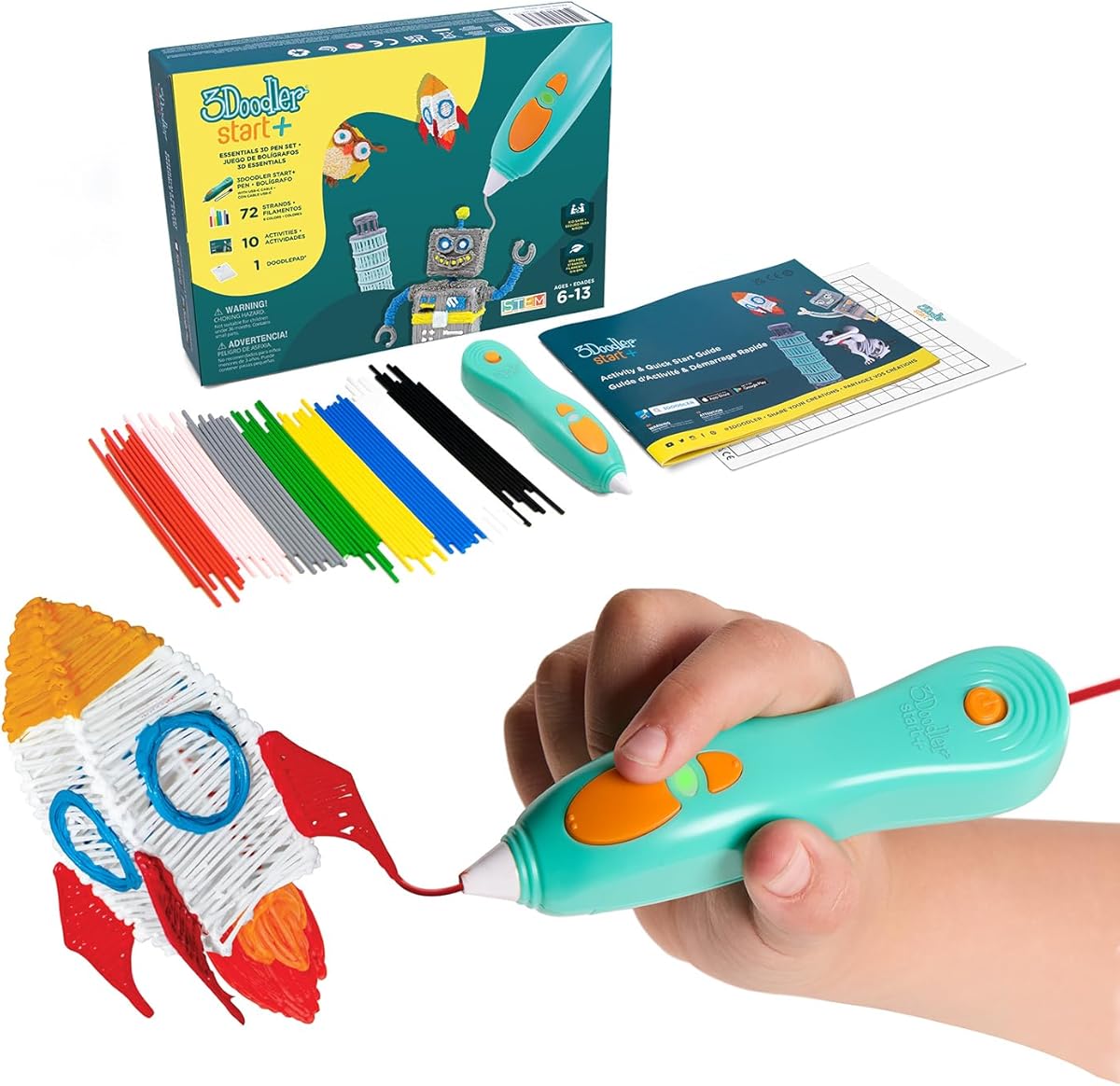
The 3Doodler Start+ Essentials is our top pick for kids because it prioritizes safety above all else. With no hot parts and a design meant for children aged six and up it allows young artists to explore 3D creation without burn risks.
We may earn a commission when you buy through this link, at no additional cost to you.
This kit comes fully loaded with a DoodlePad mixed color plastics and stencils so kids can start creating immediately. The upgraded experience offers faster charging and more filament to keep the creative sessions going for hours.
While it is limited to 3Doodler Start+ filaments which are pricier than generic options the safety features justify the cost for parents. The warranty policy and recyclable packaging also add value to this thoughtful educational gift.
We recommend this pen for parents seeking a safe introduction to 3D printing for younger children. It is an excellent choice for STEM learning at home where safety and ease of use are the highest priorities.
The pen and plastic filament can be touched safely without risk of burns making it ideal for ages six and up.
Includes 72 strands of filament stencils and a DoodlePad to support hours of screen-free artistic play.
We may earn a commission when you buy through this link, at no additional cost to you.
The SCRIB3D P1 offers an accessible entry point into 3D pen creativity without sacrificing essential features. It features a stepless speed slider and temperature adjustments that allow users to fine tune their printing experience.
We may earn a commission when you buy through this link, at no additional cost to you.
Users can enjoy quality family time making handmade gifts or decorations with this pen. The kit includes starter PLA filament and a stencil book so beginners can start creating three-dimensional masterpieces right out of the box.
The P1 Pen features a ceramic nozzle that ensures safety and performance though it does get hot and requires adult supervision for younger kids. The auto sleep function helps save power and extends the motor life.
This is the ideal choice for families on a budget who want a reliable pen for older kids or teens. It balances cost and functionality well making it a practical tool for everyday fixes or creative projects.
Compatible with both PLA and ABS filaments allowing for a wider range of projects and material properties.
The stepless speed slider lets you regulate flow for optimal control whether working on intricate or fast tasks.
We may earn a commission when you buy through this link, at no additional cost to you.
The MYNT3D Professional Printing 3D Pen with OLED Display is designed for those who demand precision and control over their work. The adjustable temperature in one degree increments allows for fine-tuning to achieve specific effects.
We may earn a commission when you buy through this link, at no additional cost to you.
The large OLED display lets you monitor temperature in real time which helps prevent clogs and ensures consistent material flow. The adjustable feed speed also gives you optimal control of the material while you are drawing.
While this pen excels in performance it may require a steadier hand and more attention to settings than basic models. It is best suited for older kids or adults who want to push the boundaries of 3D art.
We recommend this model for hobbyists and students who need professional grade features for STEM projects or artistic endeavors. The warranty and included filament make it a solid investment for serious creators.
Adjustable temperature in one degree increments from 140 to 230 degrees C for optimal material tuning.
The large display allows you to monitor temperature clearly to help achieve a wide variety of effects.
We may earn a commission when you buy through this link, at no additional cost to you.
The MYNT3D Super 3D Pen is built for durability with a new ultrasonic sealed nozzle that is nearly clog-proof. This feature is invaluable for maintaining consistent flow during creative sessions and reduces downtime.
We may earn a commission when you buy through this link, at no additional cost to you.
It features a stepless speed slider that lets you regulate flow for optimal control of material while you are drawing. The pen is great for kids artists and engineers of all ages due to its ergonomic design.
While it shares many features with the Professional model the Super focuses on reliability and ease of use. It may require a bit of practice to master the controls but the reliability makes up for it.
This pen is an excellent middle-ground option for users who want quality without the highest price point. It is suitable for a range of ages and projects making it a versatile addition to any toolkit.
The ultrasonic sealed nozzle provides market leading durability and is designed to prevent clogs during use.
Works with both 1.75mm ABS and PLA filaments offering flexibility for different project requirements.
We may earn a commission when you buy through this link, at no additional cost to you.
The SCRIB3D Advanced pen is designed for making accurate and creative 3D models and structures with engineering enhancements for a smooth experience. The large LCD screen helps you monitor heat to ensure you have the correct settings.
We may earn a commission when you buy through this link, at no additional cost to you.
It features a sleek ergonomic design with a soft touch surface for comfort during long sessions. The eight different speed options allow you to regulate flow for optimal control of line thickness while creating.
While it costs more than the P1 the Advanced offers better feedback through the LCD and more granular control. It is ideal for users ready to move beyond basics into more complex structures.
We suggest this for teens or adults who want to create precise models or decorations. The included filament and guide make it a ready-to-use kit that supports advanced creativity without extra purchases.
The ergonomic curvature and soft touch surface are designed for the most comfortable 3D drawing experience.
Eight speed options give you precise control over flow and line thickness for varied project needs.
We may earn a commission when you buy through this link, at no additional cost to you.
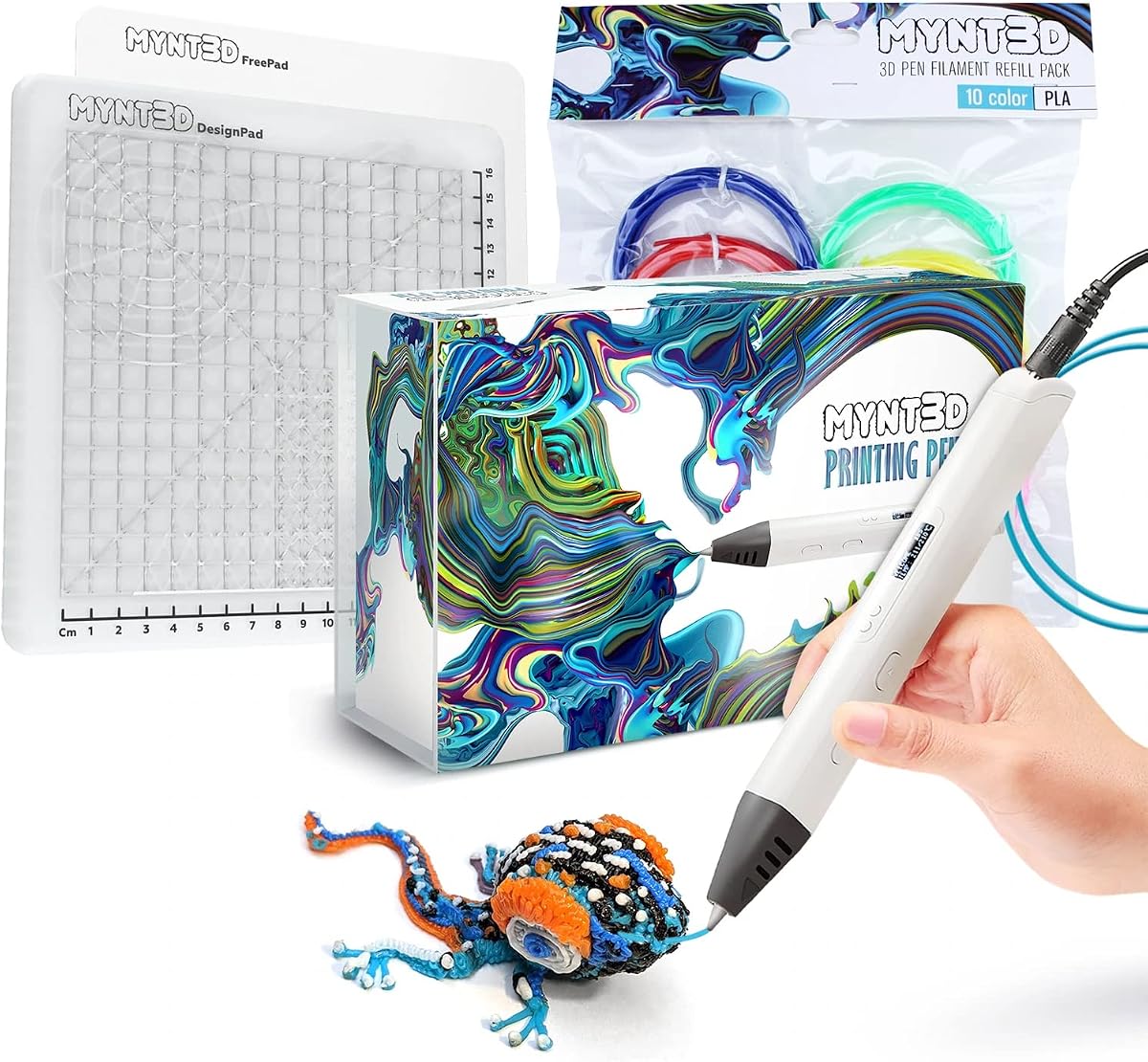
The MYNT3D Pro Kit provides everything you need to create like a pro with the pen refills and DesignPad mat kit all included. This bundle ensures you have the tools and materials to start immediately.
We may earn a commission when you buy through this link, at no additional cost to you.
The pen features stepless speed control and discrete temperature adjustability for upgraded material options. The replaceable sealed nozzle design ensures clog free and long lasting operation for extended use.
The DesignPad and FreePad included allow for geometric shapes and tracing which expands creative possibilities significantly. While expensive this kit removes the need for additional purchases and offers premium support.
We recommend this bundle for serious creators who want a comprehensive setup. It is perfect for advanced users who value quality materials and accessories that support complex 3D art and design projects.
Includes DesignPad and FreePad surfaces that let you design geometric shapes and trace patterns easily.
High quality vacuum sealed PLA in ten vibrant colors to support a wide range of creative ideas.
We may earn a commission when you buy through this link, at no additional cost to you.
The MYNT3D Super Kit bundles the Super pen with filament refills and a mat kit for a comprehensive package. It offers temperature adjustability for ABS or PLA and a replaceable sealed nozzle for clog free operation.
We may earn a commission when you buy through this link, at no additional cost to you.
This bundle includes ten colors of vacuum sealed PLA and the DesignPad for geometric shapes. The pen allows for stepless speed control which enhances flow regulation and precise material management.
While the pen is similar to the Pro the Super focuses on reliable performance at a slightly lower price point. It is a strong choice for those who want the bundle without the Pro features.
We suggest this for users who want a complete package with mat and filament included. It is a solid option for creating complex designs without needing to source accessories separately.
The DesignPad and FreePad included in the kit help you create perfect geometric shapes and trace patterns.
Stepless speed control allows you to regulate flow for enhanced precision during your drawing sessions.
We may earn a commission when you buy through this link, at no additional cost to you.
The 3Doodler Flow is designed for teens adults and creators who want a reliable pen with multi-functional compatibility. It works with 1.75 plastic filaments such as PLA ABS and wood for diverse project options.
We may earn a commission when you buy through this link, at no additional cost to you.
The integrated LCD provides real-time temperature monitoring to ensure smooth printing. It is user friendly with no complicated setup and allows you to build 3D structures or draw on stencils easily.
With 80 feet of plastic spools and an activity guide this kit is ready for fun and practical use. It is also compact so you can take your Flow on-the-go for various creative tasks.
We recommend this for older kids and adults looking for versatility and portability. It is an excellent tool for DIY repairs or creative projects where material variety is desired.
Compatible with PLA ABS and wood filaments allowing for unique textures and material properties in projects.
Compact and lightweight design makes it easy to carry for creative sessions anywhere you go.
We may earn a commission when you buy through this link, at no additional cost to you.
The SCRIB3D P1 Bundle adds a two-sided silicone mat to the standard kit for better practice and cleaner projects. The mat features built-in shapes and patterns to help guide designs for more consistent 3D pen work.
We may earn a commission when you buy through this link, at no additional cost to you.
This setup is beginner friendly with starter PLA filament and a power adapter included. The mat is durable and heat resistant so it can handle repeated use during drawing and tracing sessions.
The flexible surface makes tracing easier and keeps projects organized on the table. It is a practical addition for those who want a more structured approach to learning the basics.
We suggest this bundle for new users who need guidance on shaping and tracing. The included accessories make it a practical addition to your creative workspace for skill building.
The smooth silicone mat features built-in shapes to help guide designs and support consistent work.
The mat is easy to wipe clean and built to handle repeated use during creative sessions.
We may earn a commission when you buy through this link, at no additional cost to you.
The 3Doodler Start+ Bundle offers over 1250 feet of additional plastic filament for more 3D doodling fun. It is completely child-safe with no hot parts using only the safest plastic filaments for kids six and up.
We may earn a commission when you buy through this link, at no additional cost to you.
Includes the pen DoodlePad activity guide and stencils plus all refill bags to keep creativity going for months. Compatible with the free app which provides templates and step-by-step instructions for learning.
While expensive this bundle ensures you never run out of material for long-term use. It encourages screen-free play and learning of STEM skills as kids bring their 3D ideas to life.
We recommend this for families committed to long-term creative play. It is the ultimate safety-first option for younger kids with a massive supply of filament.
Compatible with the free 3Doodler app which provides stencils templates and step-by-step instructions.
Over 1250 ft of additional plastic filament ensures endless 3D doodling fun for creativity.
We may earn a commission when you buy through this link, at no additional cost to you.
Choosing the right pen involves evaluating safety materials features and ease of use to match your child's age and skill level.
For younger children look for pens that do not have hot nozzles or heating elements that are exposed. Pens like the 3Doodler Start+ are specifically designed so that the pen and plastic can be touched without burn risk.
Safety is the most important factor to ensure kids can explore without accidents or injuries during play.
Check which types of plastic filaments the pen accepts. Some pens only work with specific proprietary filaments which can be costly while others accept standard PLA or ABS.
Standard compatibility gives you more freedom to choose colors and types while proprietary systems may offer better safety.
Adjustable temperature and speed control allow for better project results. Look for pens with displays or sliders that let you regulate flow and heating precisely.
Better control helps avoid clogs and improves the quality of your 3D drawings and structures.
Many kits come with stencils activity guides and mats that help kids start creating immediately. These additions are helpful for beginners and add value to the purchase.
A complete kit reduces the need for extra purchases and makes the learning curve much smoother.
Beginner friendly setup is key for younger users. Look for pens that heat up quickly and have intuitive buttons for loading and unloading filament.
Simple controls prevent frustration and keep kids engaged in the creative process without technical hurdles.
A pen that is comfortable to hold will be used more often. Look for ergonomic designs with soft touch surfaces that fit well in a child's hand.
Comfort ensures that long creative sessions do not cause strain or discomfort for the user.
Prices range from affordable options to premium bundles with lots of filament. Determine how much you are willing to spend based on how often the pen will be used.
A higher price might be worth it if it includes more materials and features that support long-term creativity.
Some brands offer companion apps with templates and instructions that add educational value. These resources help kids learn new techniques and expand their projects.
Apps provide structured learning which can be especially helpful for beginners needing guidance.
To begin use plug the pen into the power adapter and wait for the indicator light to show it is heated up. This usually takes a few minutes before it is ready to extrude plastic.
Insert the filament from the back of the pen and press the forward button to feed it through until it comes out of the nozzle. Then you can start drawing on a safe surface or mat.
Always let the pen cool down completely before unplugging it and store it in a cool dry place away from kids when not in use to maintain longevity.
Many modern pens like the 3Doodler Start+ are designed to be safe with no hot parts. However standard pens do have hot nozzles so adult supervision is required for younger kids.
Most pens use 1.75mm PLA or ABS filaments. Some models are proprietary and require specific brand filaments while others are compatible with standard options.
Try using the reverse function to pull the filament out. If that fails cool the pen down and gently wipe the nozzle or use a cleaning needle if provided.
Yes these pens can be used for small DIY repairs around the home such as fixing broken plastics or assembling items using plastic extrusion.
It depends on usage but a standard pack of 30 to 50 feet can last for several creative sessions. Larger bundles offer more volume for extended projects.
No training is required but practice is needed to master the technique. Most kits include guides or apps to help beginners get started quickly.
Our top picks include the 3Doodler Start+ for safety the SCRIB3D P1 for budget and the MYNT3D Pro for premium features. Each offers unique benefits depending on your needs.
Consider your child's age and skill level when selecting a model. Younger kids benefit from safety features while older users can appreciate more control and advanced materials.
Remember to check current prices and availability before purchasing since deals and stock change often. We hope this guide helps you find the perfect creative tool for your child.