
3DMakerpro Fox 3D Scanner
3.2Editor score
0.07mm Accuracy
Markerless AI Tracking
Entry-Level Medium Format
3D scanners have transformed how we capture physical objects digitally, enabling everything from rapid prototyping to heritage preservation. Modern devices offer unprecedented accuracy and speed, making them accessible to professionals and hobbyists alike.
We evaluated ten leading models based on resolution, scanning modes, software capabilities, and real-world performance. Our analysis covers handheld units, industrial-grade systems, and budget-friendly options to ensure you find the best fit.
Each pick highlights key strengths and ideal use cases, helping you navigate features like AI processing, color capture, and wireless connectivity. Please note that prices and availability may change, so verify current listings before purchasing.
3.2Editor score

5.0Editor score

4.9Editor score
As an Amazon Associate we earn from qualifying purchases.
This table provides a side-by-side comparison of all ten selected 3D scanners, highlighting their key specifications, strengths, and primary use cases to facilitate informed decision-making.


The Creality Pika stands out as a premier handheld 3D scanner with its exceptional 0.03mm accuracy and advanced dual-mode scanning capabilities. It combines a portable design with professional-grade features like AI-powered body completion and retexturing, making it ideal for high-precision tasks.
We may earn a commission when you buy through this link, at no additional cost to you.
Its standout feature is the ability to switch between blue laser for fine details and structured light for full-body scans without changing hardware. The marker-free experience and 110 FPS capture rate ensure efficient workflows for reverse engineering or digital modeling projects.
While the price is higher than hobbyist options, the included accessories like the tripod and calibration board offer immediate value. Users may need time to master the AI features, but the results justify the investment for professional use.
This scanner is perfect for engineers, designers, and artists who need reliable, high-resolution data for 3D printing or archival purposes. Its robust feature set positions it as the top recommendation for serious applications in 2026.
Generate full-body models from partial scans in seconds using built-in AI tools.
Switch between laser precision and structured light speed without changing devices.
We may earn a commission when you buy through this link, at no additional cost to you.
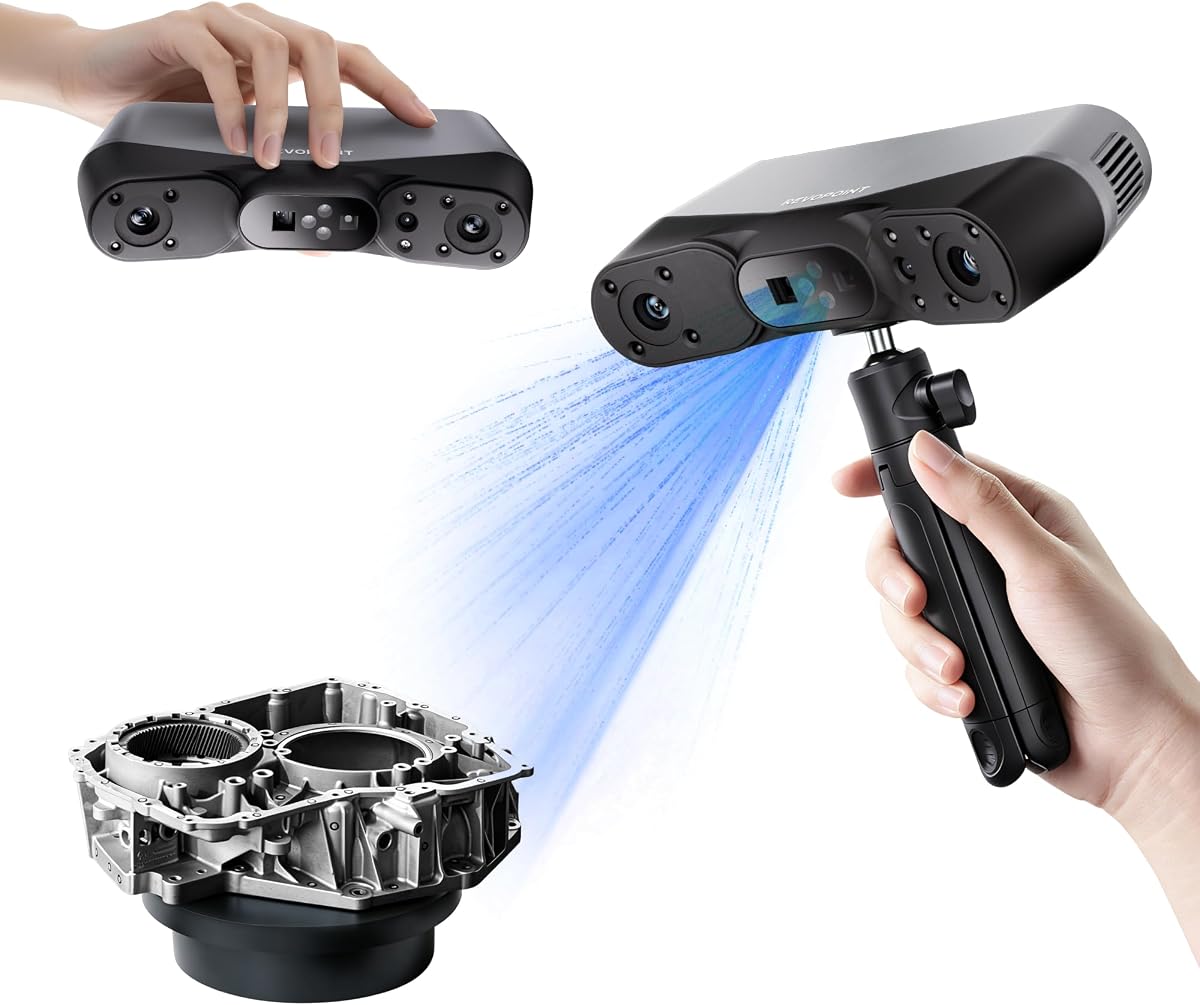
The POP 4 offers industrial-grade accuracy with multiple scanning modes tailored for diverse objects from tiny parts to large machinery. Its AI segmentation simplifies post-processing by isolating targets automatically, which is highly valuable for complex scenes.
We may earn a commission when you buy through this link, at no additional cost to you.
Performance is boosted by 105 FPS speeds and a robust frame rate, ensuring smooth captures of moving or large objects. The inclusion of VCSEL and multi-line laser options allows flexibility in different lighting conditions and surface types.
Despite its high cost, the comprehensive feature set including all-weather scanning capabilities justifies the price for professionals. The reliance on Windows for advanced software may limit Mac users, but the core scanning performance remains top-tier.
Ideal for professionals who need versatility across different environments and object types without multiple devices. Its AI tools save significant time in workflow, making it a smart choice for efficiency-focused teams.
Scan reliably outdoors up to 100,000 lux with specialized filters and modes.
Auto-filters background noise to deliver clean data in one click.
We may earn a commission when you buy through this link, at no additional cost to you.
The INSPIRE 2 is designed for mobility, weighing just 190g while still delivering 0.05mm accuracy for most industrial applications. Its dual modules allow users to handle reflective surfaces effectively without needing spray materials.
We may earn a commission when you buy through this link, at no additional cost to you.
Key advantages include an adjustable optical zoom for fine details and seamless interactive streaming for remote operations. This makes it perfect for field work or situations where carrying heavy equipment is impractical.
While it lacks the ultra-high precision of top-tier models, it balances cost and capability well. The lightweight design ensures fatigue-free use during long sessions, enhancing user experience significantly.
Best for users who prioritize portability and ease of use without sacrificing too much accuracy. It serves as a reliable tool for hobbyists and engineers needing flexible scanning solutions.
Magnify projected light to capture surface details on mixed-geometry surfaces.
Control scans in real-time via PC-to-mobile for seamless remote operations.
We may earn a commission when you buy through this link, at no additional cost to you.
The MetroY Ultra delivers industrial-grade precision with 0.01mm accuracy, making it suitable for tight tolerance measurements and reverse engineering. Its blue laser technology excels at scanning reflective surfaces without additional coatings.
We may earn a commission when you buy through this link, at no additional cost to you.
Performance is highlighted by 90 FPS speeds and 34-laser cross-lines for rapid data acquisition. The ergonomic design and wireless options ensure comfort and efficiency during extended field work or inspection tasks.
Though expensive, the high precision and speed justify the cost for manufacturing and quality control applications. Users can capture detailed data quickly, reducing downtime and improving workflow productivity.
Perfect for industries requiring high-fidelity data for inspection or quality assurance. Its robust construction and precision make it a reliable investment for long-term industrial use.
Capture intricate geometric details with 0.01mm single-frame precision.
Complete scans faster with 90 FPS speed and cross-laser lines.
We may earn a commission when you buy through this link, at no additional cost to you.
The MetroX Pro offers advanced automation features, particularly its one-click automatic turntable scanning for complex objects. This significantly reduces manual effort and ensures consistent data capture for repetitive industrial tasks.
We may earn a commission when you buy through this link, at no additional cost to you.
With 0.01mm accuracy and 7 million points per second, it captures intricate details efficiently. The multiple tracking modes allow it to adapt to various object geometries, ensuring reliable results across different projects.
The integration with professional software streamlines post-processing, though additional paid tools may be needed for CAD work. Users benefit from high-quality data ready for export and further analysis.
Ideal for engineers and designers needing automated, high-precision scanning for prototyping or quality checks. Its automation capabilities make it a strong candidate for high-volume production environments.
Automate scanning of complex objects with one click for better accuracy.
Process up to 7 million points per second for rapid model creation.
We may earn a commission when you buy through this link, at no additional cost to you.
The Fox is a highly accessible option for beginners, offering 0.07mm accuracy that outperforms many entry-level scanners. Its markerless AI visual tracking makes scanning intuitive, allowing users to resume without restarting.
We may earn a commission when you buy through this link, at no additional cost to you.
While it lacks the advanced features of industrial units, it provides sufficient precision for hobbyists and small projects. The integrated software handles data processing seamlessly, ensuring a smooth experience for new users.
Pricing is competitive, making it an excellent starting point for those exploring 3D scanning. However, professionals may find it limited in speed and advanced capabilities compared to premium models.
Best for hobbyists or students needing reliable scanning without a steep budget. It simplifies the learning curve, making 3D scanning approachable and enjoyable for beginners.
AI relocks onto objects if you move too fast, avoiding restarts.
Integrates scanning and editing into one seamless JMStudio workflow.
We may earn a commission when you buy through this link, at no additional cost to you.
The Otter Lite uses a unique quad-camera system to capture everything from small coins to large vehicles without changing devices. Its accuracy of 0.05mm and 30 FPS speed balance detail and efficiency for diverse tasks.
We may earn a commission when you buy through this link, at no additional cost to you.
Advanced DOE technology allows direct scanning of dark and metallic surfaces without spray. Full color texture capture ensures realistic models for product displays or digital archives.
While speed is moderate compared to industrial scanners, the versatility makes it ideal for varied projects. The Wi-Fi 6 support enhances connectivity, reducing cable clutter during use.
Perfect for users needing a versatile tool that handles small and large objects efficiently. It bridges the gap between hobbyist and professional needs with its wide scanning range.
Scan from 0.8 inches to 78 inches using dual focal lenses.
Concentrated light energy scans shiny surfaces directly without coating.
We may earn a commission when you buy through this link, at no additional cost to you.
The Ferret SE offers an affordable entry point with 0.1mm precision and anti-shake tracking to ensure smooth scans. It is designed to be beginner-friendly, capturing full-color models without complex setup.
We may earn a commission when you buy through this link, at no additional cost to you.
Its optimized handling of black and metal objects makes it useful for general tasks. The 2MP camera captures vibrant textures, bringing scans to life for casual users.
While not suitable for high-precision industrial work, it is effective for hobby projects and small repairs. The simplicity and low cost make it an attractive choice for first-time users.
Ideal for beginners needing a simple tool for fun or basic prototyping. It removes technical barriers, allowing anyone to start scanning immediately.
New imaging tech ensures smooth results even with rapid hand movements.
Built-in 2MP camera captures vivid details for realistic models.
We may earn a commission when you buy through this link, at no additional cost to you.
The Ferret Pro upgrades wireless capabilities with a Wi-Fi 6 bridge, enabling mobile control and data transfer. This enhances flexibility for field work, allowing users to check scans on phones or tablets.
We may earn a commission when you buy through this link, at no additional cost to you.
It maintains 0.1mm accuracy and anti-shake tracking, ensuring consistent results. Outdoor performance is robust up to 30,000 lux, useful for various environments without needing a computer.
While it shares hardware with the SE model, the mobile connectivity adds significant utility for professionals on the go. It balances cost with modern wireless features.
Best for users needing mobile compatibility and flexibility. Its wireless features make it a practical choice for dynamic workflows.
Wireless bridge supports Android and iOS for real-time preview.
Reliable in sunlight up to 30,000 lux with upgraded optics.
We may earn a commission when you buy through this link, at no additional cost to you.
The MIRACO Plus combines scanning, processing, and photogrammetry into a single device with 32GB RAM and an integrated 6-inch AMOLED screen. It eliminates the need for external PCs during the scanning phase.
We may earn a commission when you buy through this link, at no additional cost to you.
Its accuracy reaches 0.04mm with a photogrammetric kit for large object precision. The high-end hardware ensures fast processing and detailed results right on the device.
While the price is high, the convenience and standalone capabilities save time and equipment costs. It is designed for professionals who need a complete solution without dependency on laptops.
Ideal for experts requiring high-end mobility and processing power. Its all-in-one nature makes it the most comprehensive solution available in 2026.
Process scans onboard with 32GB RAM and 8-core processor.
Integrated kit ensures high-resolution capture for large objects.
We may earn a commission when you buy through this link, at no additional cost to you.
Choosing the right 3D scanner requires understanding key technical specs and workflow needs to ensure you get accurate results without overspending.
Accuracy determines how closely the digital model matches the physical object, measured in millimeters. For industrial applications, look for 0.05mm or better; for hobby projects, 0.1mm may suffice. Always check if the specs refer to single-frame or volumetric accuracy.
Prioritize accuracy that matches your smallest feature size to avoid missing critical details.
Frame rate (FPS) indicates how quickly data is captured, affecting efficiency for moving or large objects. Higher FPS reduces capture time and minimizes errors caused by hand shake. Look for at least 30 FPS for standard tasks and 90 FPS for rapid workflows.
Higher speeds are essential for dynamic environments or large-scale production projects.
Different scanners handle reflective or dark surfaces differently using laser, structured light, or hybrid systems. Blue lasers often handle shiny metal better without spray, while structured light suits matte surfaces. Check if the scanner works outdoors or in bright light.
Choose a unit that handles your target surfaces without needing extra preparation like spray powder.
Full-color texture capture is vital for visual applications like product design or heritage preservation. Ensure the device has a high-resolution RGB camera synchronized with geometry data. Some models offer advanced lighting systems for better color accuracy.
For visual fidelity, prioritize scanners with dedicated RGB cameras and color mapping tools.
Software determines how easily you can process and export data for CAD or printing. Check supported formats like STL, OBJ, or PLY and operating system compatibility. Some advanced tools require paid add-ons for reverse engineering.
Ensure the software workflow aligns with your existing tools to avoid compatibility issues.
Weight and battery life are crucial for field work or extended scanning sessions. Lightweight models under 200g reduce fatigue, while battery life should support at least two hours of continuous use. Wireless connectivity options enhance mobility.
Opt for lightweight designs with long battery life if you scan away from a power source.
Modern scanners often include AI tools for segmentation, hole filling, or auto-turntable scanning. These features reduce manual post-processing effort and improve consistency across complex objects. Look for smart features that match your workflow complexity.
AI features can significantly save time on repetitive tasks and improve model quality.
Prices range from entry-level under $300 to professional units over $2,000. Consider long-term value based on durability, support, and features included in the base package. Sometimes paying more for better accessories or software saves money overall.
Assess total cost of ownership, including software and necessary accessories, before buying.
Always start with a proper calibration using the included board to ensure optimal accuracy before every scanning session. Clean the scanner lens and sensor area with a soft cloth to remove dust that could affect light capture.
When scanning, move slowly and steadily around the object to capture all angles without gaps. Use overlapping scans to ensure the software can align data accurately. For dark or shiny objects, apply matte spray only if recommended for your specific model.
Store your scanner in a protective case to prevent physical damage. Keep firmware updated through the manufacturer's software to benefit from improvements and bug fixes. Regularly check battery health and replace it when performance drops significantly.
Most modern scanners like Creality Pika and Revopoint POP 4 use specialized blue laser or structured light modes that scan black and metal surfaces without spray. However, older or budget models may still require it. Always check your device's specific capabilities for reflective surfaces.
Most 3D scanners export universal formats like STL, OBJ, PLY, and 3MF which are compatible with major CAD and printing software. Some high-end models offer FBX or GLTF for animation and game development. Verify supported formats before purchasing if you have specific workflow needs.
Yes, many professional models include outdoor filters or VCSEL modes that function in sunlight up to 100,000 lux. Entry-level units may struggle with direct sunlight. Look for specified outdoor capabilities if you plan to scan in open environments.
While basic scanning can run on modest computers, processing high-resolution scans benefits from a GPU and at least 8GB of RAM. Standalone devices like MIRACO Plus reduce PC dependency. Always check minimum system requirements listed by the manufacturer.
Structured light projects a pattern of light and captures distortion to measure shape, while laser uses laser lines for higher precision on reflective surfaces. Both have strengths; structured light is often faster, while laser offers better accuracy on shiny materials.
Regularly calibrate using the provided board and keep the lens clean. Store in a cool, dry place to prevent sensor drift. Updating software ensures firmware optimizations are applied. Proper handling avoids physical damage that could degrade performance.
The 10 best 3D scanners in November 2026 range from accessible entry models to advanced industrial units. Each product brings unique strengths such as AI processing, high accuracy, or wireless flexibility to suit diverse needs.
Prioritize your specific use case whether it is prototyping, heritage preservation, or quality control to select the right device. Balancing features like speed, color capture, and software compatibility will ensure a smooth workflow.
Remember that prices may fluctuate so verify current offers before purchasing. With careful consideration of these factors, you can invest in a scanner that delivers precision and efficiency for your projects.