
M-AUDIO Keystation 49 MK3
4.5Editor score
Velocity sensitive keys
Plug and play setup
Includes software suite
This guide compares the top 49 Key MIDI Keyboards for music production, studio setups, and live performance based on key feel, features, and software bundles.
Finding the right 49 Key MIDI keyboard can transform your music production workflow significantly. These controllers offer a balanced range of notes without taking up too much desk space in your home studio.
We evaluated each model based on build quality, key action, software integration, and overall value. Our analysis focuses on how well these devices connect with popular digital audio workstations for seamless creative control.
Each pick below highlights specific strengths for different user needs and budgets. Prices change frequently so verify current costs before purchasing to ensure you get the best deal available today.
4.5Editor score

4.7Editor score

4.4Editor score
Below you will find a detailed side-by-side comparison of all ten models selected for this guide to help you identify the best fit for your specific production needs.




The Novation Launchkey 49 MK4 stands out as the top choice for producers seeking deep software integration and premium build quality. Its rating reflects high user satisfaction with the key action and overall feature set.
We may earn a commission when you buy through this link, at no additional cost to you.
This controller offers seamless workflows with major digital audio workstations like Ableton Live and Logic Pro. The 16 FSR pads provide responsive control for drumming and clip launching with polyphonic aftertouch adding expressiveness to your beats.
While the price is higher than entry level options the value provided by the included software and build quality justifies the cost. The Scale Mode ensures you always hit the right note which is helpful for beginners and pros alike.
Anyone serious about music production will find this keyboard an essential addition to their studio. It balances tactile control with software power effectively making it the best overall pick for 2026.
Launchkey integrates deeply with DAWs allowing you to control mixing and instrument parameters without touching your mouse for faster production times.
The FSR pads support polyphonic aftertouch enabling complex percussive expressions that are hard to achieve on standard MIDI controllers.
We may earn a commission when you buy through this link, at no additional cost to you.
The M-AUDIO Keystation 49 MK3 is the ideal budget friendly option for beginners who want a reliable controller without breaking the bank. It offers a solid foundation for learning music production and composing.
We may earn a commission when you buy through this link, at no additional cost to you.
This controller focuses on essentials like velocity sensitive keys and transport controls making it easy to plug in and start playing immediately. The included software suite adds value by providing tools to start creating music right away.
The lack of knobs and faders limits tactile control over parameters but this keeps the price low and the unit simple for new users. It is a straightforward device that does exactly what it promises without unnecessary complexity.
Beginners or those needing a secondary keyboard for a secondary room will appreciate its reliability and cost. It remains a top recommendation for anyone seeking the best value in a 49 key setup.
USB bus power and no driver requirements mean you can connect this controller to your computer and start making music within minutes of unboxing.
Included software like Ableton Live Lite and MPC Beats provides a comprehensive starting point for producers to learn and develop their craft.
We may earn a commission when you buy through this link, at no additional cost to you.
The Arturia KeyLab mk3 represents the premium end of the market with exceptional build quality and advanced features like aftertouch on the keys. It is designed for professionals who demand the best tactile response available.
We may earn a commission when you buy through this link, at no additional cost to you.
With 12 pressure sensitive pads and 9 encoders this controller offers extensive customization for mixing and sound design. The integration with Analog Lab V provides access to a vast library of sounds that complement the hardware perfectly.
The high cost and need for power might be deterrents for casual users but the performance justifies the investment for serious producers. The white finish also adds a unique aesthetic touch to any studio setup.
Professional producers and composers looking for a flagship controller will find this model hard to beat. Its combination of hardware excellence and software power makes it the best premium choice available.
The keys feature aftertouch allowing for expressive modulation of sound parameters based on how hard you press down during performance.
Multiple encoders and pads give you hands on access to virtually every parameter in your software reducing reliance on mouse clicks for mixing tasks.
We may earn a commission when you buy through this link, at no additional cost to you.
The M-AUDIO Oxygen 49 MKV is a strong contender for users invested in the Native Instruments ecosystem thanks to its seamless NKS integration. It allows you to browse and control presets directly from the keyboard.
We may earn a commission when you buy through this link, at no additional cost to you.
With eight knobs and nine faders this unit offers plenty of tactile control for tweaking synth parameters and automating effects in your DAW. The Smart Chord and Scale modes help simplify songwriting for users of all skill levels.
While the keybed feels slightly lighter than some competitors it remains responsive and suitable for most production tasks. The included software is standard for this price range and provides a good starting point.
Producers who use Native Instruments products will find this controller particularly useful for speeding up their workflow. It strikes a great balance between features and affordability for intermediate musicians.
NKS integration means you can browse sound libraries and load presets instantly without opening your DAW or using a mouse for selection.
Smart Chord and Scale modes help you create harmonious music even if you are not fully confident in music theory fundamentals.
We may earn a commission when you buy through this link, at no additional cost to you.
The Arturia KeyLab Essential mk3 is an excellent choice for producers who prioritize sound quality and software features over premium hardware materials. It comes packed with Analog Lab V offering access to thousands of presets.
We may earn a commission when you buy through this link, at no additional cost to you.
The RGB backlit pads and contextual buttons provide clear visual feedback during use which helps prevent errors in the dark. The LCD screen displays parameter changes in real time making it easy to see what you are adjusting.
While it lacks aftertouch and has a more plastic build than the premium version it is still robust enough for regular use. The price is reasonable considering the amount of content included with the package.
Music producers looking for a versatile controller with powerful included software will find this model highly satisfying. It is a strong option for those who want sound variety without buying extra plugins.
Included Analog Lab V gives you instant access to over 2000 high quality sounds ranging from vintage synths to modern orchestral textures.
The 2.5 inch LCD screen provides real-time information about your current preset and parameter adjustments so you never lose your place.
We may earn a commission when you buy through this link, at no additional cost to you.
This generic 49-key MIDI keyboard is designed for those who need a basic input device without spending much money. It fits on small desks and provides standard MIDI control for recording and composition tasks.
We may earn a commission when you buy through this link, at no additional cost to you.
Made with ABS construction it is durable enough for light use in home studios or practice areas. The compact profile makes it easy to move or store when not in use compared to larger professional controllers.
However it lacks the advanced features like aftertouch or DAW integration found on more expensive models. You will need to provide your own software and there is no warranty support from a major manufacturer.
It is suitable for absolute beginners or as a spare controller for a second room. If you need a simple way to play MIDI notes without extra features this is a functional choice.
The compact dimensions allow this keyboard to fit comfortably on smaller workspaces where larger controllers would take up too much room.
Without complex controls it offers a straightforward interface that is easy to understand for anyone new to using MIDI controllers.
We may earn a commission when you buy through this link, at no additional cost to you.
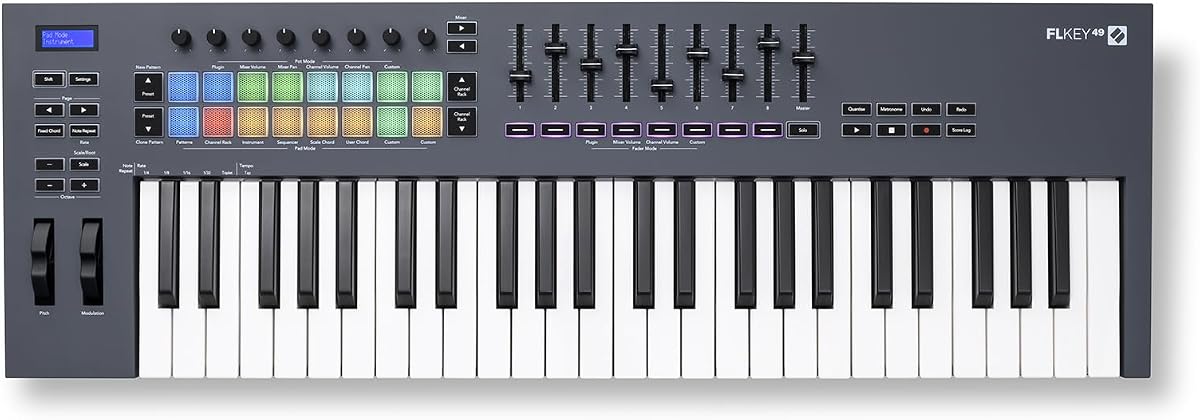
The Novation FLkey 49 is tailored specifically for producers who use FL Studio as their primary digital audio workstation. It brings the mixer and channel rack controls directly into your physical workspace for faster editing.
We may earn a commission when you buy through this link, at no additional cost to you.
You can sequence beats using the pads which map directly to the step sequencer in the software. This allows for a more tactile approach to beat making that keeps you in the creative flow without using a mouse.
While it works well with FL Studio it is not as versatile with other DAWs compared to the Launchkey series. If you are committed to FL Studio this is arguably the best controller you can use.
FL Studio users will appreciate how intuitive the mapping is for automation and mixing tasks. It is a specialized tool that excels in its intended environment without wasting resources on unneeded features.
The controls are pre-mapped to FL Studio software allowing you to mix and automate tracks without needing to assign parameters manually.
Pads map to the step sequencer so you can program rhythms quickly by tapping the pads instead of clicking steps on the screen.
We may earn a commission when you buy through this link, at no additional cost to you.
The M-AUDIO Oxygen Pro 49 distinguishes itself with a dedicated 5-pin MIDI output allowing you to connect external hardware synthesizers directly. This makes it an essential tool for studios that use physical instruments alongside software.
We may earn a commission when you buy through this link, at no additional cost to you.
It features semi weighted keys with aftertouch providing a more traditional piano feel than lighter controllers. The sixteen RGB pads and extra controls ensure you have access to every function your DAW supports.
The inclusion of aftertouch on the keys is rare at this price point and adds expressive depth to your performances. It is a robust piece of equipment that supports complex production workflows without limitations.
Hardware enthusiasts and producers needing MIDI out capabilities will find this model invaluable. It offers the most comprehensive control options in the M-AUDIO Oxygen line for professional applications.
The 5-pin MIDI out port lets you control external synths and drum machines directly from the keyboard without needing extra interfaces.
Sixteen velocity sensitive pads offer ample space for triggering samples and launching clips with clear visual feedback via RGB lights.
We may earn a commission when you buy through this link, at no additional cost to you.
The midiplus AK490 is one of the most affordable controllers available making it accessible for students or hobbyists just starting out. It provides basic velocity sensitivity and a MIDI output for connecting to hardware gear.
We may earn a commission when you buy through this link, at no additional cost to you.
The build is simple and lightweight which is fine for beginners but might not withstand heavy touring use. It lacks the extra controls like faders and knobs that allow for deeper mixing capabilities in a DAW.
It is designed primarily for playing notes rather than controlling complex workflows which keeps the price down. This makes it a good second keyboard for a laptop setup where you already have a main controller.
If you need a budget way to play MIDI instruments without extra features this is a functional option. It gets the job done for basic recording tasks without requiring a significant financial investment.
This controller focuses on the basics of playing and recording MIDI data without adding features you might not need for simple projects.
The MIDI DIN out jack allows you to connect to older hardware synthesizers that do not have USB ports for control.
We may earn a commission when you buy through this link, at no additional cost to you.
The Nektar SE49 offers strong value for its price with a focus on easy DAW integration for common software environments. It is a reliable workhorse for those who want basic control without complex features.
We may earn a commission when you buy through this link, at no additional cost to you.
It comes with Bigwig Studio which provides a starting point for recording and mixing tracks on your computer. The Mac and PC compatibility ensures it works with most common systems found in home studios.
The build is simple and the keys are functional but not premium. It is intended for producers who value utility over high-end tactile feedback and want to keep costs down.
This controller is ideal for users who need a straightforward tool for recording MIDI and mixing. It balances price and functionality well for budget-conscious creators.
Nektar integration lets you control transport and basic mixer functions directly from the keyboard without setting up complex mappings manually.
Bigwig Studio DAW included in the package allows you to start recording your ideas immediately after unboxing the controller.
We may earn a commission when you buy through this link, at no additional cost to you.
Choosing the right 49 Key MIDI keyboard requires understanding your specific needs regarding workflow software and budget to ensure long term satisfaction.
Keys range from synth action to semi weighted piano style. Semi weighted keys offer resistance similar to real pianos while synth keys are lighter and faster for electronic sounds.
Choose semi weighted if you play piano melodies frequently but opt for synth action for quick electronic playing.
Integration with your Digital Audio Workstation like Ableton or Logic saves time by mapping transport and mixing controls automatically. Look for controllers with custom scripts for your software.
Prioritize brands like Novation or Arturia if deep control is needed for your primary production environment.
Knobs faders and pads allow you to manipulate sounds without using a mouse. Ensure the layout matches your workflow needs such as 8 knobs for filter control or 16 pads for drums.
More controls generally mean a higher price so decide how much physical access you really need.
Aftertouch allows you to modulate sound by pressing keys harder after the initial hit. This adds expressiveness to performances and is vital for advanced sound design.
If you play expressive leads or solos look for models with polyphonic or channel aftertouch specifically.
Many controllers include free versions of DAWs and instruments like Ableton Live Lite or analog synths. This adds significant value especially for beginners.
Check the software value to ensure you are not paying extra for tools you could get separately.
USB is standard but some models include 5-pin MIDI out for hardware synths. USB-C is becoming more common for faster data transfer and charging.
Verify you have the right ports on your computer before purchasing to avoid needing extra adapters.
Plastic units are lighter and cheaper while metal or dense ABS builds withstand touring and heavy use. Consider where you will keep the controller.
If you plan to move it often a lighter but sturdy build is more practical for travel.
Prices range from under 100 dollars to over 400 dollars depending on features. Decide your maximum spend before browsing to narrow down options effectively.
Entry level options often suffice for learning while pros may need advanced controls.
Connect your keyboard to your computer via USB and install any required drivers or DAW mapping files. Ensure your DAW recognizes the controller as an input device in settings.
Pressing keys should trigger sounds in your software. Use pitch bend and modulation wheels to add expression. Adjust knobs to control filters or volume levels in real time.
Keep dust off the keys and pads using a dry cloth. Avoid placing liquids near the unit. Store it in a dry place when not in use to protect internal electronics.
Most modern keyboards are class compliant and work without drivers on Mac and Windows. However checking the manufacturer website for updates is recommended to ensure full feature support and stability.
Velocity measures how fast you press a key to determine volume. Aftertouch measures pressure applied while holding a key to modulate sound parameters like vibrato or filter cutoff.
Yes most keyboards work with FL Studio but specific models like the FLkey offer deeper integration for mixing and automation. Ensure mapping is set up correctly in your preferences.
Higher prices usually reflect better key quality aftertouch support DAW mapping scripts and software bundles. These features improve workflow and sound expressiveness for professional users.
Most use USB bus power so no adapter is needed. However some professional models require external power for better stability or features. Check product specs before buying.
Yes it offers a balanced range of notes without taking up too much desk space. It is versatile enough for most production tasks in a compact home environment.
We reviewed ten top options ranging from budget basics to premium controllers. The Launchkey MK4 stands out for deep integration while the Keystation 49 MK3 leads for value.
Prioritize controls that match your workflow such as pads for beat makers or faders for mixing. A controller is an investment so choose one that will grow with your skills over time.
Prices fluctuate often so check current listings before purchasing. Ensure you select the model that fits your budget and production goals for the best experience in 2026.