
Mechanic Master C34 Ultra-Compact ATX PC Case with Handle Silver
4.6Editor score
Compact ATX design
Built-in carry handle
Flexible cooling support
This guide compares the top aluminum PC cases for airflow, build quality, and compatibility to help you choose the best chassis for your next custom PC build.
Aluminum PC cases offer a unique blend of premium aesthetics and superior thermal performance. Their durable construction resists corrosion while providing excellent heat dissipation for high performance components.
We evaluated ten leading models based on airflow design, component compatibility, build quality, and overall value. Each selection represents a distinct approach to chassis engineering for diverse user needs.
Every pick highlights key strengths and potential trade-offs to guide your decision. Please note that prices fluctuate frequently so verify current availability before purchasing.
4.6Editor score
4.4Editor score

4.6Editor score
The following table provides a side-by-side comparison of all ten selected aluminum PC cases. Review key specifications and features to find the perfect match for your hardware.




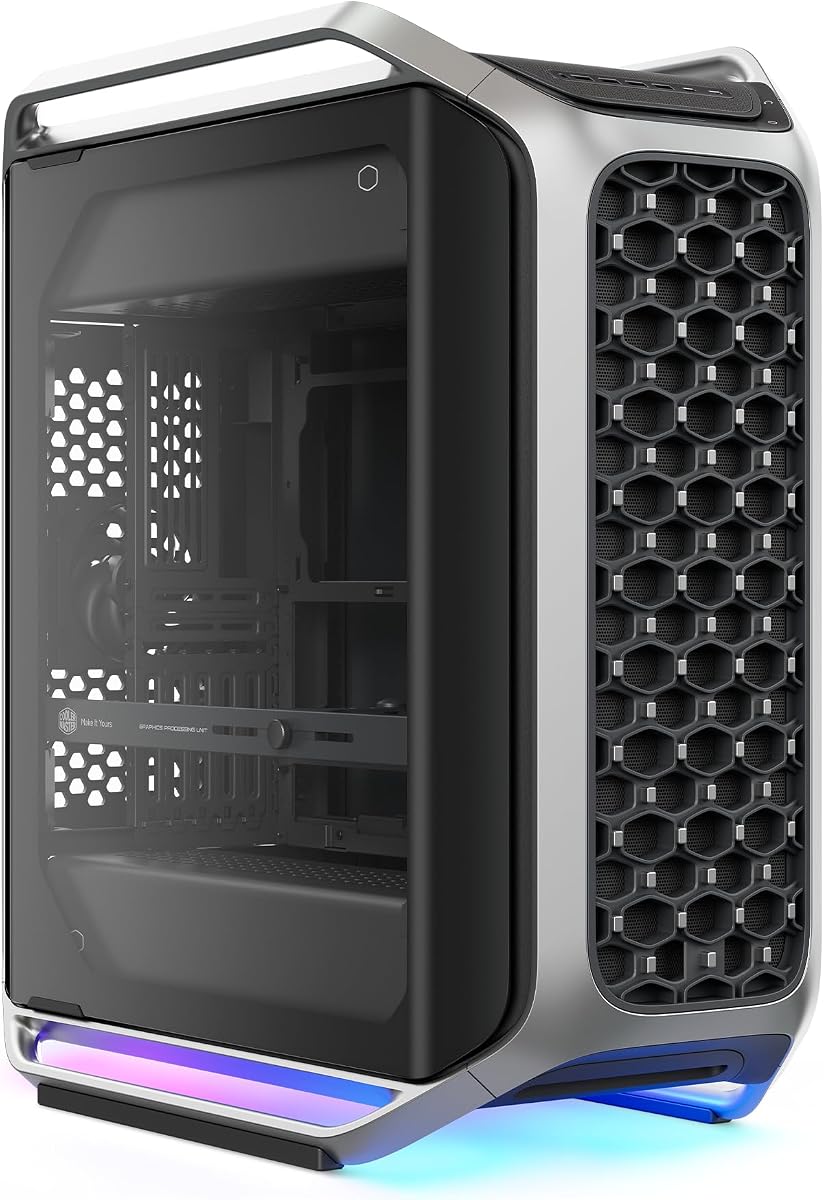
The Cooler Master Cosmos Alpha stands out as a flagship full tower case with its iconic curved aluminum frame. It earns an Editor's Choice badge for blending premium aesthetics with extreme hardware compatibility and modern connectivity.
We may earn a commission when you buy through this link, at no additional cost to you.
Its unique FreeForm 2.0 rotatable layout allows you to orient components for optimal airflow or desk placement. The case supports massive GPUs up to 400mm and includes Next-Gen Front I/O with USB-C ports.
Trade-offs include its large footprint and high cost. These are acceptable because the build quality and design innovation justify the investment for enthusiasts wanting a true showcase PC.
Buy this if you want a statement piece that supports high-end E-ATX builds. It is the top recommendation for anyone prioritizing design and flexibility.
The premium curved aluminum frame preserves the iconic COSMOS look while elevating your build into a true showcase.
All internal components rotate left or right for custom orientations optimizing airflow and visual presentation.
We may earn a commission when you buy through this link, at no additional cost to you.
The MATX Case B2Pro is a full aluminum chassis with 3mm thickness that offers perfect heat dissipation. It achieves a perfect 5.0 rating for its robust build and unique exterior design with a convenient handle.
We may earn a commission when you buy through this link, at no additional cost to you.
Its side panels mesh design ensures airflow while the exquisite foot stand and handle make it easy to move on a desktop. It supports ATX SFX power supplies and 240mm water cooling.
The main limitation is its size which restricts you to MATX or ITX motherboards. This is acceptable for users seeking a compact portable workstation or secondary build machine.
Choose this for a reliable small form factor case with premium aluminum construction. It is ideal for desktops needing high quality in a small package.
The case frame is full aluminum thickness 3mm with side panels thickness 2mm for durability.
Side panels mesh design provides perfect heat dissipation with a convenient handle for moving.
We may earn a commission when you buy through this link, at no additional cost to you.
This open air frame computer case is made of aerospace magnesium aluminum alloy with 8mm thickness. It supports installation of water cooling devices and is compatible with ITX MATX and ATX motherboards.
We may earn a commission when you buy through this link, at no additional cost to you.
The design includes metal support rods and anti slip pads on the bottom bracket. It supports standard ATX power supply and is suitable for long-term high-intensity disassembly.
Note that this product is not finished at shipment and requires installation. This is acceptable for enthusiasts who want a barebones test bench for overclocking.
Buy this if you need a flexible platform for hardware testing or water cooling. It is perfect for builders who want open access to components.
The open frame design allows for installation of water cooling devices and easy access.
Made of aerospace magnesium aluminum alloy with surface treatment to reduce corrosion.
We may earn a commission when you buy through this link, at no additional cost to you.
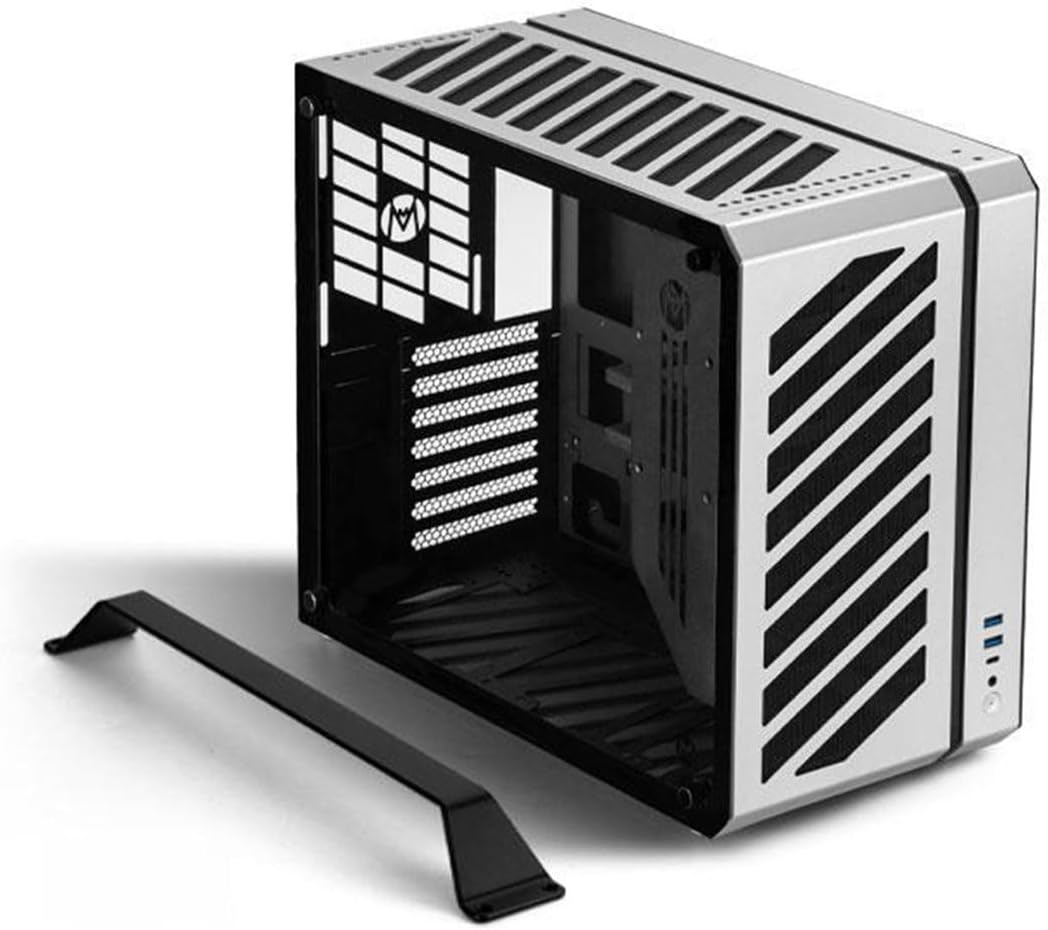
The Mechanic Master C34 is a compact ATX case with an integrated handle for enhanced portability. It supports standard ATX motherboards and full-size ATX power supplies in a small form factor.
We may earn a commission when you buy through this link, at no additional cost to you.
Its optimized interior simplifies the installation process and it includes a modern USB Type-C port. When using air cooling it fits CPU coolers up to 162mm tall.
Cable management is tighter than larger cases but it accommodates 240mm liquid cooling. This is acceptable for LAN event attendees needing a portable high-performance system.
Choose this for a powerful desktop you can easily transport to events. It is the best value option for portable aluminum PC cases.
The integrated handle makes it easy to transport your powerful desktop PC to LAN events.
Accommodates high-performance builds with support for a 240mm liquid cooling radiator.
We may earn a commission when you buy through this link, at no additional cost to you.
The Cooler Master MasterFrame 500 features a FreeForm 2.0 aluminum Exo-structure with an open-frame design. It includes pre-installed dual 200mm fans for powerful airflow and effective cooling.
We may earn a commission when you buy through this link, at no additional cost to you.
Its flexible motherboard support covers Mini-ITX to E-ATX sizes. The customization-ready design with interchangeable panels allows for personalized builds and modding.
The open frame means components are exposed to dust but airflow is excellent. This is acceptable for enthusiasts who prioritize cooling performance over dust protection.
Buy this if you want an open case with high airflow and modding flexibility. It is ideal for builds where visibility and cooling are top priorities.
FreeForm 2.0 aluminum Exo-structure enables flexible configurations and various installation scenarios.
Equipped with two front 200mm intake fans pre-installed for powerful airflow.
We may earn a commission when you buy through this link, at no additional cost to you.
The Mechanic Master C34Pro is a portable compact case supporting ATX and E-ATX motherboards. It fits 360mm radiators and 420mm GPUs with a 2mm aluminum shell and steel frame.
We may earn a commission when you buy through this link, at no additional cost to you.
Its efficient thermal design includes multi-zone fan mounts and dust filters. Versatile PSU mounting options allow front bottom and side configurations for various layouts.
The build quality is robust but assembly can be complex. This is acceptable for users needing a portable solution that supports flagship components.
Choose this for a versatile portable case with strong cooling. It is great for LAN gamers who need performance in a compact shell.
Supports ATX/E-ATX motherboards and MATX expansion via PCIe slot adjustments.
2mm aluminum shell plus 1mm steel frame ensures durability.
We may earn a commission when you buy through this link, at no additional cost to you.
The Fractal Design Define 7 XL features a refined front door with brushed aluminum encasing. It is a silent modular full tower case that supports E-ATX boards and SSI-EEB.
We may earn a commission when you buy through this link, at no additional cost to you.
You can install up to 18 HDDs and convert to an open layout for custom water loops. Versatile multi-brackets convert unused fan positions to HDD SSD or pump mounts.
It is heavy and prioritizes silence over raw airflow by default. This is acceptable for professional workstations needing storage capacity and quiet operation.
Buy this for a premium silent case with massive storage and aluminum aesthetics. It is the top choice for media centers and workstations.
Brushed aluminum encases a refined front door design with reversible dual-handed hinges.
Convert to Open Layout for room for custom water loops and large reservoirs.
We may earn a commission when you buy through this link, at no additional cost to you.
The Lian Li V100-ATX includes 4 pre-installed PWM-controlled 120mm ARGB fans. Each side panel features a tool-less mounting mechanism for fast access to components.
We may earn a commission when you buy through this link, at no additional cost to you.
It supports back-connect ATX motherboards for cleaner routing. Fits high-end hardware with support for GPUs up to 420mm and CPU coolers up to 178mm.
You may need a custom power cable for back-connect boards. This is acceptable given the premium build quality and lighting features.
Choose this for a stylish mid-tower with excellent lighting and airflow. It is ideal for gamers wanting a clean look with RGB integration.
Integrated 26-LED ARGB strip offers full spectrum color control and synchronization.
Each side panel features a tool-less mounting mechanism for easy access.
We may earn a commission when you buy through this link, at no additional cost to you.
The LIAN LI O11D EVO RGB offers a seamless view by removing the front support pillar. It provides ample room with 455.7mm clearance and seven expansion slots.
We may earn a commission when you buy through this link, at no additional cost to you.
Features two 1.5mm L-shaped RGB strips and cable management straps. The internal layout can be adjusted with two height options for motherboard installation.
Airflow needs careful fan setup. This is acceptable for builders prioritizing aesthetics and component display.
Buy this for a high-quality display case with RGB. It is perfect for showing off custom loops and high-end hardware.
Remove the front support pillar without affecting structural integrity for an uninterrupted view.
Internal layout adjusts with two height options for motherboard installation.
We may earn a commission when you buy through this link, at no additional cost to you.
This JOYJOM Mini PC Case has 4.3L capacity made of 2.0mm aluminum alloy. It includes a PCIe 3.0 Riser Cable and supports standard ITX motherboards.
We may earn a commission when you buy through this link, at no additional cost to you.
It supports GPU cards up to 17cm and FLEX-Small power supplies. The body is made of high-quality aluminum alloy for good heatsink performance.
Component size is strictly limited to fit the small volume. This is acceptable for portable builds where space is the primary constraint.
Choose this for an entry-level small form factor case. It is ideal for travelers needing a minimalistic gaming setup.
The case is only 4.3L capacity with size 18.4×10.4×22.3 cm.
The body of case is made of 2.0mm Aluminum Alloy for good heatsink performance.
We may earn a commission when you buy through this link, at no additional cost to you.
Choosing the right aluminum case requires evaluating size compatibility and build quality to match your specific hardware needs.
Ensure the case supports your motherboard size such as Mini-ITX Micro-ATX ATX or E-ATX. Aluminum cases often feature modular interiors but check specific limits before buying.
Always verify motherboard dimensions against case specifications to avoid fit issues.
Look for cases with thicker aluminum walls like 3mm rather than thin sheet metal. Thicker material provides better rigidity heat dissipation and a more premium feel.
Prioritize cases with robust aluminum construction for long-term durability.
Aluminum naturally conducts heat but airflow design determines cooling efficiency. Check for mesh panels pre-installed fans and radiator support in millimeters.
Select cases with generous fan and radiator mounting options.
Verify graphics card length and CPU cooler height limits as high-end components grow larger. Aluminum frames may have internal braces that reduce clearance.
Measure your components and compare them to case specs carefully.
Aluminum cases often have mesh panels that let dust in. Look for removable dust filters on intake fans and drives to keep components clean.
Ensure the case includes dust filters for essential intake areas.
Deep aluminum cases offer better cable routing behind the motherboard tray. Check if there is enough space for power connectors and SATA cables.
Choose cases with ample behind-the-back routing space.
Anodized or brushed aluminum offers different looks and scratch resistance. Decide between matte silver polished black or custom colors to match your setup.
Pick a finish that complements your other peripherals.
Aluminum cases cost more than standard steel but offer better build and looks. Decide if the premium is worth it for your use case.
Balance the extra cost against the durability and visual benefits.
Before installing components remove all panels and lay out your motherboard and power supply. Check for internal standoffs and install them where needed for your motherboard size.
Use dust filters on intake vents to prevent accumulation and clean them every two months to maintain good airflow through the aluminum chassis.
Handle the case by its frame or handles to avoid scratching the aluminum finish. Store the case in a dry place if not in use for long periods.
Aluminum is a better conductor of heat than steel so it helps transfer heat from components. However cooling mainly depends on airflow design so a mesh aluminum case will be cooler than a sealed steel one.
Generally aluminum is lighter than steel for the same strength but aluminum cases often use thicker panels which can add weight. Most aluminum cases are comparable to or lighter than similar steel cases.
Yes most aluminum cases support water cooling with radiator mounts available on top front or bottom. Just check clearance for radiators and tubing routing before purchasing.
Most aluminum cases feature anodized or coated surfaces that resist corrosion. As long as you keep the case dry and avoid harsh chemicals it should last for years.
No aluminum cases use standard M3 motherboard screws and standard drive screws. Just follow the manufacturer instructions to avoid stripping the threads.
Aluminum costs more than steel and requires more complex manufacturing. The premium finish and better heat dissipation justify the higher price for many enthusiasts.
The Cooler Master Cosmos Alpha leads as a flagship full tower while the Mechanic Master C34 offers great portable value. The Fractal Design Define 7 XL stands out for premium silent builds.
Prioritize airflow and motherboard support over pure aesthetics to ensure your system performs well. Match the case size to your hardware to avoid costly mistakes.
Always check current pricing and availability before purchasing as stock changes frequently. We hope this guide helps you find the perfect aluminum case.