
MAYFLASH Arcade Stick F700
4.5Editor score
Wireless Bluetooth connection
Compatible with multiple platforms
Supports Sanwa components
Discover the top arcade stick for PS5 options ranked by performance and compatibility to help you choose the perfect fighting game controller for your setup.
Finding the right arcade stick for PS5 is crucial for competitive fighting game enthusiasts who demand precision and reliability during intense matches. Modern players need controllers that offer low latency, durable components, and seamless integration with the latest console hardware to ensure every input registers accurately.
We compared ten leading models based on build quality, button responsiveness, joystick mechanisms, and compatibility across multiple platforms including PC and Switch. Our analysis focuses on real-world performance metrics, user feedback, and official licensing status to provide a comprehensive overview of the current market landscape for serious gamers.
Each pick below highlights specific strengths such as customization options, connectivity methods, and official endorsements from major developers. Keep in mind that pricing fluctuates frequently due to supply chain dynamics and promotional events, so verify current costs before making your final purchasing decision for your gaming station.
4.5Editor score

4.6Editor score
4.5Editor score
This side-by-side comparison highlights the core specifications and unique selling points of each featured fight stick to help you identify the model that aligns best with your specific gameplay needs and budget constraints.


The HORI PlayStation 5 Fighting Stick Alpha stands out as a top-tier option for serious competitive players seeking official support and robust construction. With a rating of 4.6 stars it consistently delivers high performance across fighting titles on PS5 PS4 and PC systems.
We may earn a commission when you buy through this link, at no additional cost to you.
Its standout quality lies in the proprietary Hayabusa buttons and joystick which offer precise input registration and rapid actuation essential for executing complex combos without delay. The unit opens up for easy maintenance allowing users to swap out parts quickly to suit their specific preferences.
While the build quality is exceptional some users may find the initial investment steep compared to generic alternatives. Additionally the replaceable top-panel artwork is a nice touch but custom designs might require extra effort to source if the default look is not appealing enough.
This stick is ideal for tournament players or enthusiasts who prioritize official licensing and component quality. If you are ready to invest in a reliable controller that respects the PlayStation ecosystem this model offers the best balance of performance and durability available today.
Being officially licensed by Sony ensures seamless recognition and plug-and-play functionality on your console without requiring additional adapters or complex setup procedures.
The modular design allows you to open the unit easily to clean internal mechanisms or upgrade components like buttons and sticks for personalized feel and longevity.
We may earn a commission when you buy through this link, at no additional cost to you.
The Nacon Daija Arcade Fight Stick is designed in collaboration with professional gamers to deliver high precision and comfort during extended play sessions. Its 4.2 rating reflects strong performance in titles like Street Fighter and Tekken while offering extensive customization options.
We may earn a commission when you buy through this link, at no additional cost to you.
Key strengths include the use of Sanwa joystick and action buttons which are industry standards for reliability and response speed. The textured palm rest provides sturdy support and the lock function prevents accidental presses that could interrupt intense matches or training routines.
One drawback is the weight which might make portability slightly more difficult compared to lighter models. Also full button mapping requires the dedicated software on PC or Mac which adds a step before you can tailor controls to your exact needs.
This stick is perfect for players who value ergonomic comfort and want to tweak every button layout. If you are looking for a well-rounded fight stick that supports audio chat and comes with all necessary tools this model is a strong contender.
The textured palm rest ensures you can maintain a firm grip and reduce fatigue during long tournaments or casual matches by providing stable support for your hands.
With full button mapping software you can create specific game profiles to match different titles allowing for optimized control schemes without manual remapping each time.
We may earn a commission when you buy through this link, at no additional cost to you.
The MAYFLASH Arcade Stick F700 offers incredible value by supporting both wireless and wired connections across a wide range of platforms including PS5 Switch and PC. With a 4.5 rating it appeals to gamers who need versatility without breaking the bank.
We may earn a commission when you buy through this link, at no additional cost to you.
Its wireless capabilities via Bluetooth or 2.4G receiver provide freedom from cable clutter while the hidden compartment keeps the receiver safe when not in use. The unit also supports turbo functions and allows for customization using Sanwa components if you wish to upgrade later.
Keep in mind that this stick is designed specifically for fighting games so it may not support other genres on certain consoles. Additionally wireless mode relies on battery power which means you will need to manage recharging or battery replacement to avoid interruptions.
This model is an excellent choice for casual players or those with multiple systems to connect. If you want a flexible controller that supports modern titles like Street Fighter 6 and Tekken 8 at a lower cost this stick delivers great performance.
Support for Bluetooth 2.4G and wired USB allows you to switch between devices like PS5 Switch and PC easily without needing separate controllers for each system.
The internal design supports Sanwa Denshi buttons and joystick meaning you can replace parts easily to match your preferred feel or repair the unit over time.
We may earn a commission when you buy through this link, at no additional cost to you.
The Qanba N3 Drone 2 Wired Joystick is a solid entry-level choice for players looking for an officially licensed product at a competitive price point. With a 4.5 rating it provides reliable performance for Street Fighter and Tekken titles on PS5 PS4 and PC.
We may earn a commission when you buy through this link, at no additional cost to you.
Key strengths include the authentic Qanba buttons and lever which deliver consistent feedback during play. The full control panel includes a touchpad and microphone input which is useful for voice chat during online matches without needing an external headset splitter.
One limitation is the lack of wireless connectivity which limits portability compared to modern Bluetooth models. Also the customization options are more limited than higher-end boards so you may not be able to swap parts as easily as with other units.
This stick is perfect for beginners who want an official accessory without paying premium prices. If you are just getting started with fighting games and need a reliable tool for daily practice this model offers excellent value and simplicity.
As an officially licensed Sony peripheral it guarantees compatibility and safety standards that are expected from first-party accessories ensuring smooth operation on your console.
The built-in 3.5mm microphone input with mute button lets you communicate with teammates or opponents directly through the controller without extra hardware.
We may earn a commission when you buy through this link, at no additional cost to you.
The MAYFLASH Arcade Stick F700 Elite elevates the standard F700 with premium Sanwa components and a robust build for serious players. Its 4.6 rating highlights its reliability and responsiveness across major fighting titles on PS5 and PC systems.
We may earn a commission when you buy through this link, at no additional cost to you.
It features eight highly responsive buttons and a precision 4-way joystick ensuring you can strike instantly and accurately game after game. The full-size anti-slip rubber mat holds the stick firmly in place and the audio support allows background music or chat through wired headsets.
While the build quality is excellent you may need to update firmware to ensure compatibility with the latest systems or features. Also the price is slightly higher than basic models which might be a consideration for budget-conscious buyers.
This stick is ideal for players who want top-tier components without paying full premium brand prices. If you are looking for a reliable and well-equipped fight stick that performs consistently in competitive matches this model is a fantastic choice.
Using premium Sanwa buttons and joystick ensures you get the tactile feedback and durability that professional gamers rely on during high-stakes tournament play.
The included anti-slip rubber mat provides stability during intense input sequences keeping the controller from sliding across your desk or table surface.
We may earn a commission when you buy through this link, at no additional cost to you.
The MAYFLASH F500 Arcade FightStick Bundle provides exceptional versatility by including the Magic Boots for seamless compatibility with PS5 PS4 and Xbox consoles. With a 4.0 rating it is a practical choice for gamers who own multiple systems and want one stick for all.
We may earn a commission when you buy through this link, at no additional cost to you.
Key strengths include the plug and play setup which eliminates the need for original controllers when used with PS5 or PS4. The support for turbo functions and headsets adds functionality that many other budget sticks lack at this price point.
Some users note that Xbox connectivity requires specific adapters or controllers which can add steps to the setup process. Additionally the build quality is functional but may not feel as premium as higher-end branded options available on the market.
This bundle is perfect for players who switch between Xbox and PlayStation frequently. If you want a cost-effective solution that covers a vast range of platforms without buying separate controllers this model offers significant convenience.
Compatibility with PS5 Xbox Series S and Switch means you can keep your setup simple with one controller that works across different gaming ecosystems.
The Magic Boots adapter allows you to connect directly to the console without needing a separate controller to bridge the connection on PlayStation systems.
We may earn a commission when you buy through this link, at no additional cost to you.
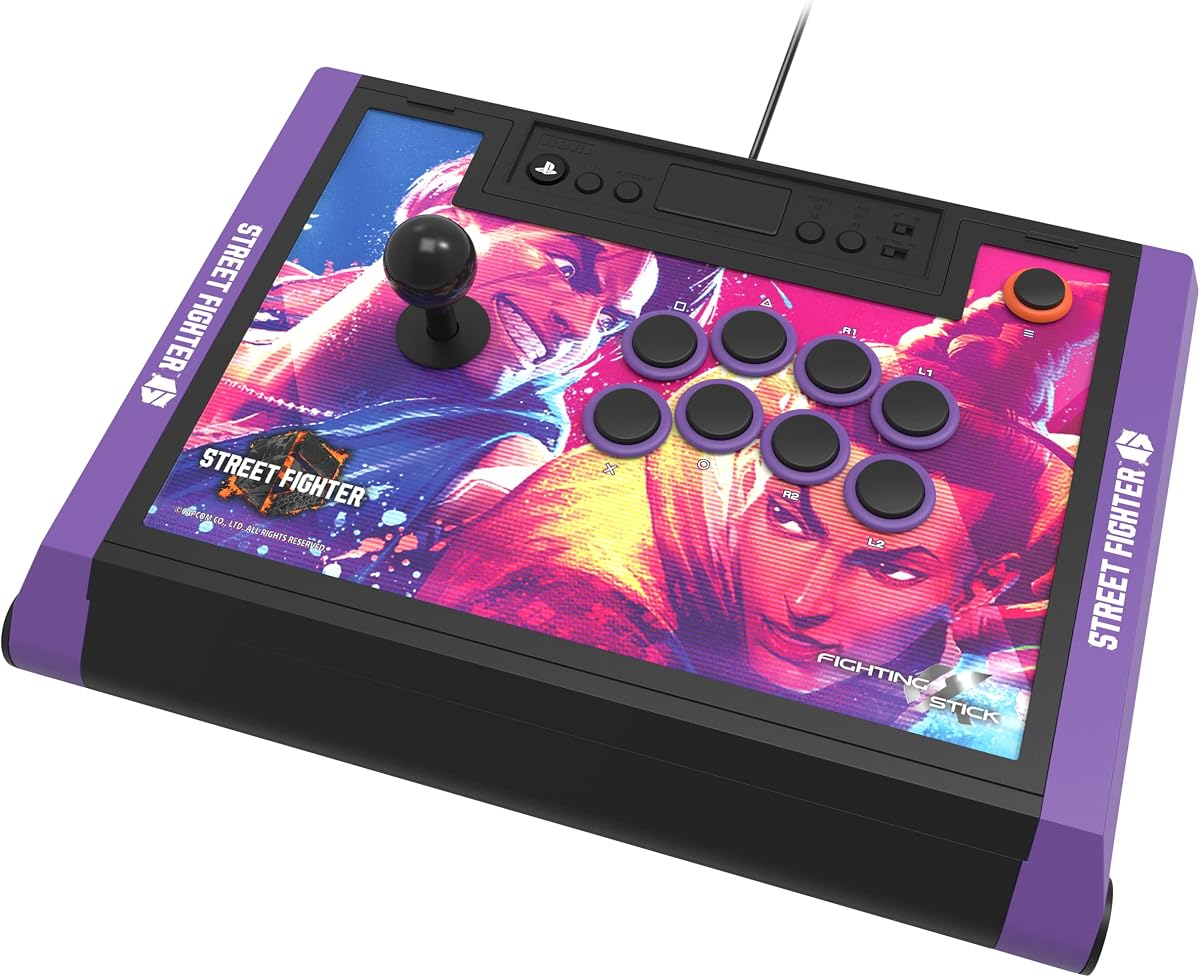
The HORI PlayStation 5 Fighting Stick Alpha (Street Fighter 6 Edition) brings a premium themed experience to fans of the iconic franchise. Its 4.5 rating confirms it meets the high standards of the original Alpha while adding exclusive visual appeal.
We may earn a commission when you buy through this link, at no additional cost to you.
Key strengths include the Street Fighter 6 top-panel artwork and downloadable hi-res images of characters allowing you to customize the look to your liking. It features the same proprietary HAYABUSA buttons and joystick ensuring top-tier performance for competitive play.
While the design is appealing some users might prefer neutral looks to ensure longevity as game popularity shifts. The higher price point is justified by the licensed quality but it may be a barrier for casual players not deeply invested in the series.
This stick is ideal for hardcore Street Fighter fans or tournament goers who want to show their allegiance. If you are looking for a visually striking and reliable controller that respects the game's legacy this edition offers a fantastic combination of style and function.
Official licensing by Sony and Capcom ensures the design and features align perfectly with the game's aesthetic and performance needs for an immersive experience.
The included link to downloadable images allows you to update your top panel with new character art to match current tournaments or personal favorites easily.
We may earn a commission when you buy through this link, at no additional cost to you.
The Qanba Q7 Obsidian 2 Wired Joystick offers a solid mid-range solution for players who want high-quality components without the top-tier price tag. With a 4.3 rating it delivers reliable performance and official licensing for PS5 PS4 and PC gaming.
We may earn a commission when you buy through this link, at no additional cost to you.
Key strengths include the swappable Sanwa JLF joystick tops which allow you to adjust the lever style to your preference easily. The OBSF action buttons provide a distinct feel and the touchpad offers additional control options during gameplay.
One limitation is that it is wired only so you cannot use it wirelessly with your console. Additionally the price falls between budget and premium which might make it a target for those looking for specific features rather than value.
This stick is ideal for players who prefer wired connections for zero latency and want customization options like swappable parts. If you value component quality and official licensing this model balances performance and practicality well.
The ability to swap Sanwa JLF joystick tops means you can switch between round and square gate styles to match your fighting style without replacing the whole unit.
Including a touchpad gives you extra input options that can be used for system navigation or specific game functions enhancing overall versatility.
We may earn a commission when you buy through this link, at no additional cost to you.
The HORI PlayStation 5 Fighting Stick Alpha (TEKKEN 8 Edition) is a premium choice tailored specifically for fans of the Tekken series. With a 4.6 rating it combines the proven build quality of the Alpha series with exclusive branding and artwork.
We may earn a commission when you buy through this link, at no additional cost to you.
It features the TEKKEN 8 top panel artwork and downloadable alternate artwork to print allowing for personal customization. The proprietary HAYABUSA buttons and joystick ensure that performance matches the visual style making it a complete package for tournament play.
While the design is stunning for fans it might not appeal to players who prefer generic aesthetics. The price reflects the licensing and quality but could be a consideration if you are not deeply invested in the Tekken community.
This stick is ideal for Tekken enthusiasts looking for a high-end controller. If you want a tournament-ready device that shows your dedication to the game while delivering consistent precision this edition is a top choice.
Official licensing by Sony and Bandai Namco Entertainment ensures the design aligns with game branding while maintaining high manufacturing standards.
The ability to print downloadable alternate art lets you refresh the look of your stick periodically to keep it feeling new and personalized.
We may earn a commission when you buy through this link, at no additional cost to you.
The GuileKeys GK-18 Leverless Arcade Stick offers a unique alternative to traditional sticks by using eighteen keys for movement and actions. With a 4.3 rating it appeals to players seeking ultra-low latency and modern customization features.
We may earn a commission when you buy through this link, at no additional cost to you.
Key strengths include the Kailh Choc low-profile switches which provide fast response and smooth typing feel. The RP2040 controller chip ensures input latency is less than 1ms in all modes and the RGB lighting adds a vibrant visual touch to your setup.
One challenge is that it requires an additional arcade stick converter for PS4 PS5 compatibility which adds complexity. Also transitioning from a joystick to a leverless layout may take time to master for new users.
This stick is ideal for tech-savvy players who want total customization and maximum speed. If you are willing to adapt to a new layout and value hot-swappable parts this model offers a futuristic approach to fighting game controllers.
The RP2040 chip and firmware GP2040-CE ensure input latency remains under 1ms which is critical for precise timing in competitive games.
Support for hot swapping means you can change switches or keycaps without soldering allowing for quick adjustments and repairs over time.
We may earn a commission when you buy through this link, at no additional cost to you.
Choosing the right fight stick involves weighing several factors from compatibility to build quality. This guide breaks down the key elements to consider before making your purchase.
Ensure the stick supports your primary console. PS5 compatibility is essential but check if it also supports PC or Switch if you play across multiple systems. Some sticks require specific adapters or firmware updates to work seamlessly with newer hardware.
Decide between traditional joysticks and leverless button layouts. Traditional sticks offer directional input via a physical lever while leverless models use buttons. Both have pros and cons depending on your experience and playstyle.
Look for sticks using Sanwa or Hayabusa components as they are industry standards for durability and responsiveness. High-quality buttons and levers reduce wear and tear and improve overall performance during intense gameplay.
Some sticks open up for easy customization allowing you to replace panels or upgrade parts. If you plan to personalize your setup consider models with modular designs that support hot-swappable switches or buttons.
Choose between wired and wireless options based on your needs. Wired sticks offer zero latency while wireless models provide convenience. If you play competitively wired is often preferred but modern Bluetooth sticks have improved significantly.
Officially licensed products ensure better compatibility and safety standards. Sticks with Sony or game developer licenses often come with optimized features that work directly without requiring additional software or complex configurations.
Comfort is key during long sessions. Look for models with palm rests or ergonomic designs to reduce hand fatigue. A sturdy base prevents slipping and ensures your setup remains stable during matches.
Set a budget but prioritize performance. Higher-priced sticks often come with better components and longer warranties. Weigh the cost against the features you truly need to avoid overspending on unnecessary extras.
Connect your stick via USB or wireless mode according to the manufacturer instructions. Most PS5 compatible sticks will be recognized immediately but you may need to update firmware on the console for full support.
Calibrate your stick settings in the console control panel if available. Adjust button mapping to match your preferred layout and test inputs using a demo game to ensure everything registers correctly.
Maintain your stick by keeping it clean and dry. Dust can accumulate inside the mechanisms so wipe surfaces regularly and store it in a safe place to avoid accidental damage or wear.
Many modern sticks support PC via USB or Bluetooth modes. Check the product description to confirm PC compatibility and if any specific drivers are required for your operating system.
Modern wireless sticks with low-latency technology are viable for most players. However for tournament environments wired connections are often preferred to ensure zero lag and consistent performance.
Most PS5 compatible sticks are plug-and-play without extra drivers. However for PC use you may need specific software to customize buttons or update firmware to latest versions.
Joystick sticks use a lever for directional input while leverless sticks use buttons. The choice depends on personal preference and comfort with traditional arcade layouts versus modern keyboard-like inputs.
Officially licensed sticks typically ensure compatibility and meet safety standards. They often include optimized features for the console reducing troubleshooting time and ensuring smoother gameplay experience.
Use a soft cloth to wipe the surface and avoid moisture on the buttons. If the unit opens easily check inside for dust and use compressed air carefully to clean the internal mechanisms.
Some sticks allow full customization via software or hardware swaps. Check if the model supports hot-swapping or has a mapping utility to remap inputs to your liking.
Titles like Street Fighter Tekken Mortal Kombat and Guilty Gear work exceptionally well. These games benefit from precise input registration that arcade sticks provide compared to standard controllers.
The HORI PlayStation 5 Fighting Stick Alpha and MAYFLASH F700 Elite stand out as top contenders offering a balance of quality and performance for most players.
Consider your budget and platform needs when making a decision. If you prioritize official licensing choose Sony models but for versatility multi-platform sticks offer more flexibility.
Always verify current pricing and availability before buying as deals change frequently. Selecting the right stick can elevate your gameplay experience and help you perform at your best.