
ASRock DeskMini X300 2.5G Series
4.2Editor score
Ultra-compact 1.92L size
AM4 socket compatibility
Triple display capability
Compare the top barebone PCs with AMD processors for gaming and productivity. This guide reviews specs, features, and performance of the best mini PCs
Finding the right barebone PC with AMD technology can transform your computing experience. These compact systems offer powerful performance while saving valuable desk space. Whether you need a gaming rig or a workstation, there are excellent options available today.
We evaluated ten leading models based on processor power, connectivity options, and build quality. Each product brings unique strengths to the table for different user needs. Our analysis focuses on real-world usability and technical specifications that matter most.
Every selection below highlights specific advantages and potential limitations for informed choices. You will see detailed breakdowns of what each system delivers out of the box. Keep in mind that component availability and pricing may shift over time.
4.2Editor score

4.0Editor score

3.1Editor score
This side-by-side comparison highlights key specifications across all ten selected models to help you identify the best fit for your specific computing requirements and workflow demands.





This mini PC stands out with its powerful Ryzen 7 PRO 8845HS processor and Radeon 780M graphics. It delivers solid performance for gaming and creative tasks while maintaining efficiency through smart thermal design.
We may earn a commission when you buy through this link, at no additional cost to you.
The inclusion of OCuLink support sets it apart by enabling external GPU connections with minimal latency. Dual USB4 ports allow for versatile display setups and fast data transfers. You can build a custom setup tailored to exact needs.
While it requires purchasing RAM and storage separately, this flexibility allows for better long-term upgrades. The compact form factor fits easily on small desks without sacrificing power. It is ideal for users who value modularity.
Buy this if you need a high-performance system for work or play. The combination of processing power and expansion options makes it a top contender. Ensure you budget for necessary components before purchase.
OCuLink allows direct PCIe access for external GPUs, reducing bottlenecks common with USB-based connections.
The chassis uses recycled aluminum to reduce carbon emissions significantly compared to traditional plastics.
We may earn a commission when you buy through this link, at no additional cost to you.
This model focuses on visual productivity with support for four 4K displays simultaneously. The Ryzen 7 PRO 8845HS handles demanding graphics tasks smoothly. It is perfect for creative professionals needing extensive screen real estate.
We may earn a commission when you buy through this link, at no additional cost to you.
A vapor chamber cooling system keeps temperatures low during prolonged use. Three BIOS modes let you balance silence and performance based on current workloads. DDR5 memory ensures fast data access for complex applications.
The lack of hot-swap support for OCuLink requires power cycling when changing external GPUs. This adds a minor inconvenience for enthusiasts who swap hardware frequently. Otherwise the design is robust for stationary setups.
Choose this for multi-monitor office or creative workstations. The combination of visual output and thermal management is excellent. Verify your display ports match your needs before buying.
Support for four 4K screens enables efficient multitasking across multiple applications.
Vapor chamber technology spreads heat evenly to prevent hotspots during heavy loads.
We may earn a commission when you buy through this link, at no additional cost to you.
The GEM12+ PRO introduces fingerprint recognition for quick and secure system access. This feature adds convenience for shared environments or business use. It also supports custom display settings via dedicated software for monitoring.
We may earn a commission when you buy through this link, at no additional cost to you.
Like its sibling, it features OCuLink for external GPU connectivity without sacrificing internal slots. The vapor chamber ensures stable performance under load. It supports up to four 4K displays for extensive multitasking.
You must purchase RAM and SSD separately which increases initial total cost. The BIOS customization offers flexibility but may require technical know-how. This is best for advanced users comfortable with configuration.
Opt for this if security and modularity are priorities. The biometric unlock is a valuable addition for data protection. Ensure you have compatible peripherals ready for installation.
Fingerprint scanning provides fast login without needing passwords repeatedly.
Real-time monitoring allows users to adjust system settings based on live data.
We may earn a commission when you buy through this link, at no additional cost to you.
This kit stands out because it includes a 500W power supply and supports full PCIe cards. It accepts a wide range of AM4 processors giving you upgrade flexibility. The dual M.2 slots allow for fast storage options.
We may earn a commission when you buy through this link, at no additional cost to you.
While it uses DDR4 memory which is older than DDR5, it remains cost-effective and fast enough for most tasks. The compact 8-liter design fits well in home offices or living rooms. It offers solid build quality for the price.
The lack of integrated graphics means you need a dedicated GPU for video output. This requires an extra component purchase but adds versatility for gaming. It is a true mini PC platform rather than a pre-built system.
Choose this for budget builds needing upgrade potential. The included PSU saves time and extra cost. Ensure you have a compatible AM4 CPU ready before starting assembly.
A dedicated 500W PSU allows for full expansion without needing separate purchases.
Support for Ryzen 5000 series ensures long-term viability and upgrade paths.
We may earn a commission when you buy through this link, at no additional cost to you.
This unit impresses with its minimal footprint while delivering strong iGPU performance. The Ryzen 7 255 handles daily tasks and light gaming effectively. Triple display support makes it great for small office setups.
We may earn a commission when you buy through this link, at no additional cost to you.
It uses PCM phase-change material to manage heat efficiently without noise. The full USB4 port supports high-speed data and power delivery. OCuLink is supported but requires an adapter plate for connection.
You must install the OCuLink adapter yourself which adds a step to setup. DDR5 memory supports up to 128GB allowing for future-proofing. It is a solid choice for travelers or small desks.
Buy this for portability and silent operation. The compact design hides power effectively. Verify adapter needs for eGPU use before purchasing.
PCM phase-change material absorbs heat to maintain quiet operation during use.
Wi-Fi 6e ensures stable wireless speeds for remote work and streaming.
We may earn a commission when you buy through this link, at no additional cost to you.
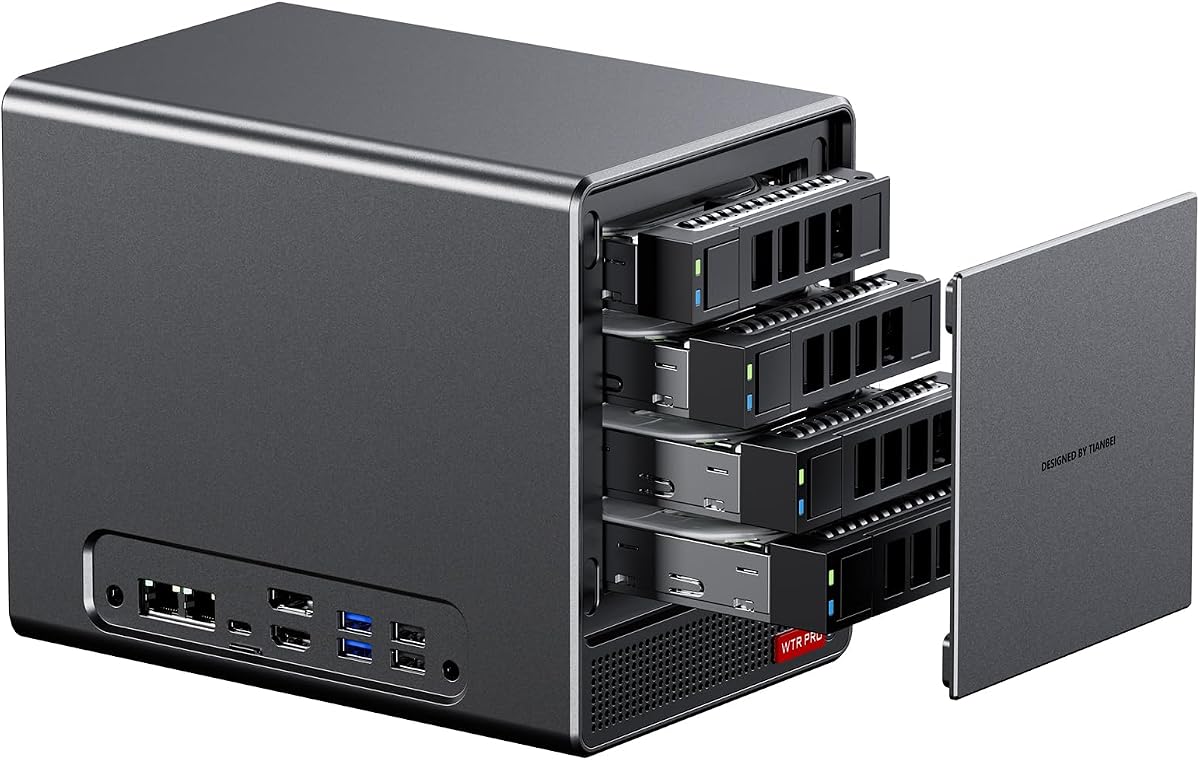
Designed specifically for storage, this model offers four drive bays for massive capacity. The Ryzen 7 5825U provides enough power for media streaming and virtualization. Dual M.2 slots allow for fast cache or OS drives.
We may earn a commission when you buy through this link, at no additional cost to you.
Energy efficiency is a priority with power draw staying between 15W and 25W. A through-the-wall fan design keeps noise low even under load. It supports Windows and Linux for flexible server OS choices.
The lack of a rating indicates limited reviews for this specific variant. You need to source DDR4 RAM and drives yourself. The weight reflects the sturdy metal construction needed for drives.
Select this for NAS or soft router builds. The low power usage saves money over time. Ensure you have sufficient clearance for the larger chassis.
Four 3.5 inch bays allow for up to 88TB of total storage.
Designed to run 24/7 with minimal electricity usage.
We may earn a commission when you buy through this link, at no additional cost to you.
At just 1.92 liters, this is one of the smallest kits available. It supports AM4 CPUs allowing you to pick performance levels freely. Triple display output makes it great for home office setups.
We may earn a commission when you buy through this link, at no additional cost to you.
Dual M.2 slots provide fast storage for OS and applications. The 2.5G LAN port ensures network speeds match modern home fiber connections. It includes a wireless slot for Wi-Fi module integration.
Without a PCIe slot, graphics expansion is limited to integrated GPUs. You must buy CPU and RAM separately. The compact size limits cooling options slightly for high wattage parts.
Choose this for minimalism and space saving. The toolless design simplifies upgrades significantly. Check cooling limits before selecting high power processors.
The 1.92L volume allows fitting the PC behind a monitor.
2.5G LAN provides faster wired speeds than standard 1G ports.
We may earn a commission when you buy through this link, at no additional cost to you.
This model brings advanced AI processing with the Ryzen AI 300 Series and XDNA2 NPU. It supports Wi-Fi 7 for future-proof connectivity. The toolless design makes hardware changes quick and simple.
We may earn a commission when you buy through this link, at no additional cost to you.
Four 4K displays can be driven simultaneously for complex workflows. The ultra-thin chassis is durable enough for 24/7 operation. It is built for business environments needing reliability.
The high price reflects the enterprise features and build quality. It may be overkill for home use. Review the specific NPU capabilities to ensure they match your software needs.
Buy this for business deployment requiring AI workloads. The 3-year warranty adds peace of mind. Ensure your budget supports premium component costs.
Dedicated NPU boosts machine learning tasks like speech recognition.
Wi-Fi 7 ensures high throughput for bandwidth heavy applications.
We may earn a commission when you buy through this link, at no additional cost to you.
With six drive bays, this model offers massive storage potential for data. The dual 2.5G LAN ports allow for network redundancy and fast speeds. It handles virtualization well for running multiple OSs.
We may earn a commission when you buy through this link, at no additional cost to you.
Intelligent fan speed regulation keeps the unit quiet even with heavy loads. It supports Windows and Linux for flexible software choices. The chassis is dustproof to maintain long term reliability.
Users on Linux may face SATA power management bugs requiring config fixes. The physical size is larger to accommodate drives. Ensure your space can handle the volume.
Select this for large home labs or media servers. The dual LAN options add robust networking. Review Linux compatibility if using open source OS.
RAID support secures data against drive failures.
Dual LAN ports allow for load balancing and failover.
We may earn a commission when you buy through this link, at no additional cost to you.
This kit offers a sleek design suited for professional spaces. Tool-free access simplifies maintenance and component swapping. It features the latest Wi-Fi 7 connectivity for fast wireless speeds.
We may earn a commission when you buy through this link, at no additional cost to you.
Radeon 740M graphics handle basic video and office tasks well. The eco-conscious chassis ensures long-term reliability. It is designed for 24/7 continuous operation.
The lack of reviews makes performance harder to gauge. It lacks the AI NPU of the higher model. Check your specific software needs before investing.
Choose this for business environments needing reliability. The toolless design saves time on maintenance. Ensure Wi-Fi 7 routers are available at your location.
Toolless access reduces service time for IT departments.
Sustainable materials contribute to lower environmental impact.
We may earn a commission when you buy through this link, at no additional cost to you.
Selecting the right AMD barebone PC depends on your specific workflow and budget.
Modern Zen 4 processors offer better single-core performance for gaming and creative workloads.
Older AM4 platforms remain viable for budget builds needing high core counts.
DDR5 supports faster speeds for data heavy tasks while DDR4 is more cost effective.
Ensure the kit supports at least 32GB to allow for smooth multitasking.
PCIe 4.0 NVMe slots are essential for high speed application and file loads.
Dual M.2 slots allow for RAID setups or separate OS and data drives.
USB4 and OCuLink ports enable external GPU connections for expanded graphics power.
Wi-Fi 6e or 7 ensures your wireless speeds do not bottleneck wired capabilities.
Vapor chambers or VC spreaders are critical for maintaining performance during long sessions.
Intelligent fan control balances noise and cooling to suit office or home environments.
Small chassis like 1.92L save desk space but limit cooling options.
Larger units support more drives and better airflow for silent operation.
External power bricks are portable but internal PSUs allow for full expansion.
Check wattage requirements if you plan to add a dedicated GPU later.
Toolless designs simplify maintenance and hardware swaps over the system life.
Verify BIOS support for future processors to extend the usable life of the kit.
Install compatible DDR4 or DDR5 memory modules carefully aligning the notch to avoid damage. Insert M.2 SSDs into the slots and secure them with the provided screws.
Connect your power supply and ensure the case is placed in a well ventilated area. Plug in a monitor and input device to begin the operating system setup process.
Update your BIOS to the latest version to ensure maximum hardware compatibility. Keep the vents clear of dust using compressed air every few months.
A barebone PC comes without RAM, storage, or operating system requiring you to install them manually. This offers flexibility to choose specific components while a prebuilt system is ready to use out of the box.
Many modern kits include OCuLink or USB4 ports that support eGPU docks. This allows you to connect high performance desktop GPUs to improve gaming or rendering speeds significantly.
Radeon 780M graphics provide solid performance for esports titles and older games. They are not ideal for AAA gaming at high settings but are sufficient for light gaming and general use.
A minimum of 16GB is recommended for smooth multitasking and media editing. 32GB is better if you plan to run virtual machines or handle heavy development workloads.
No, the barebone kit includes the chassis and mounting hardware. You only need to add memory and storage which fit into the provided internal slots without extra cases.
Most kits support Windows 10 and 11 as well as Linux distributions like Ubuntu. Check compatibility for specific Wi-Fi modules if you plan to use Linux.
These top selections highlight the versatility of AMD based mini PCs across various use cases. From the powerful MACO model to the budget friendly DeskMini, there is a system for every need.
Prioritize the features that matter most to your workflow such as connectivity or thermal performance. Choosing the right processor tier ensures you get the value you need without overspending.
Always verify component availability before starting your build to avoid delays. Check the latest product pages for the most current stock and shipping details.