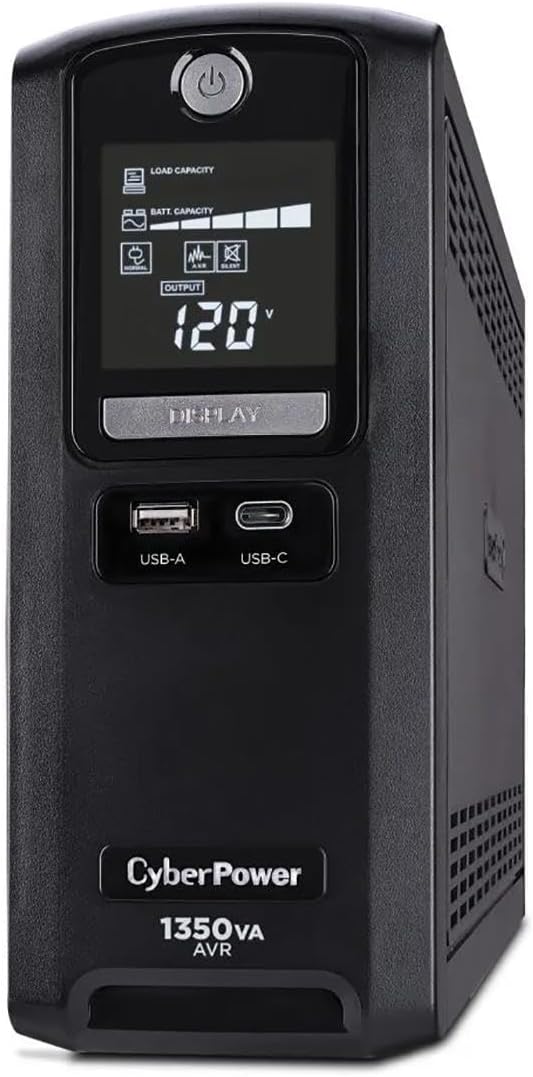
CyberPower CST135UC
4.9Editor score
1350VA Simulated Sinewave
Extended Runtime at Half Load
Network and Coax Protection
This expert guide compares the top 10 battery backup solutions for small offices, evaluating surge protection, runtime, outlet count, and reliability features
Power outages can disrupt productivity and damage equipment in any small office setting. A reliable battery backup ensures your critical devices stay online during interruptions, safeguarding data and maintaining workflow continuity without unexpected downtime.
We evaluated ten leading uninterruptible power supply models based on runtime capacity, surge protection ratings, outlet configurations, and smart management features. Our analysis focuses on units suitable for desks, workstations, and networking gear in professional environments.
Each pick highlights specific strengths like sine wave output, LCD monitoring, or energy efficiency. Prices fluctuate based on availability and retailer promotions, so verify current costs before purchasing to ensure you get the best value for your specific setup needs.
4.9Editor score

4.5Editor score

4.2Editor score
The following table provides a side-by-side comparison of all ten selected battery backup units. Review key specifications like wattage, outlet types, and unique features to determine which model aligns best with your office power requirements.


This unit stands out as the top choice for small offices needing reliable power protection. It offers a high capacity 1500VA rating with true sinewave output, ensuring compatibility with Active PFC power supplies found in modern computers and servers.
We may earn a commission when you buy through this link, at no additional cost to you.
The multifunction color LCD provides immediate feedback on battery status and load conditions, alerting you to issues before downtime occurs. With six battery backup outlets and six surge-only outlets, it accommodates both critical and non-critical devices effectively.
While the initial investment is higher than budget models, the connected equipment guarantee and three-year warranty provide significant peace of mind. The AVR technology also corrects minor voltage fluctuations without draining the battery, extending its lifespan over time.
Ideal for offices with critical workstations or network racks, this UPS ensures seamless operation during interruptions. The included software allows for automated safe shutdowns, making it a comprehensive solution for professional environments.
Active PFC power supplies require clean sine wave power to operate correctly. This model delivers that precision, preventing potential hardware damage or shutdowns that simulated waveforms might cause.
Beyond standard outlets, the USB ports allow you to keep mobile devices charged during an outage. This ensures your team stays reachable even when main power is lost.
We may earn a commission when you buy through this link, at no additional cost to you.
The CP1500AVRLCD3 is a powerful option designed to handle substantial electrical loads. Its intelligent LCD panel offers detailed insights into power conditions, helping users manage energy usage and anticipate battery replacement needs before failures happen.
We may earn a commission when you buy through this link, at no additional cost to you.
While it uses simulated sine wave technology which is slightly less precise than pure sine, it remains suitable for most workstations and networking equipment. The six battery backup outlets ensure your core systems remain online during unexpected blackouts.
The included PowerPanel software adds value by allowing remote monitoring and automated shutdowns. This integration is crucial for offices where IT staff manage multiple devices and need to protect data integrity across the network.
Choose this model if you need a balance of high wattage and smart features. It is particularly effective for offices with multiple monitors or high-performance computing needs that require consistent power support.
The intelligent LCD displays specific metrics like remaining runtime and battery health. This transparency helps you plan for maintenance and ensures you are never caught off guard by a low battery.
Automatic voltage regulation stabilizes input power without switching to battery. This reduces unnecessary discharge cycles, preserving battery life and ensuring maximum runtime when it truly matters.
We may earn a commission when you buy through this link, at no additional cost to you.
This unit focuses on efficiency, making it a smart choice for environmentally conscious offices. The ECO mode automatically cuts power to peripherals when the main computer is off or sleeping, significantly reducing energy waste without user intervention.
We may earn a commission when you buy through this link, at no additional cost to you.
The multifunction LCD keeps you informed about power status, ensuring you are aware of any fluctuations or battery issues. With a mix of battery backup and surge-only outlets, you can prioritize essential equipment while protecting sensitive electronics.
Although it has a lower wattage capacity compared to top-tier models, it is sufficient for standard office desktops and routers. The design balances cost and functionality, offering robust protection for small teams without overloading the budget.
Select this if you want to lower energy costs while maintaining reliable backup. It is an excellent fit for small offices with moderate power needs and a focus on sustainability.
This feature detects when a computer enters sleep mode and turns off connected peripherals like printers or speakers. It saves energy by preventing standby power consumption when the gear is not in use.
By combining surge protection with backup power, it offers dual functionality. This reduces the need for separate devices, saving space on crowded office desks and reducing clutter.
We may earn a commission when you buy through this link, at no additional cost to you.
Designed with space efficiency in mind, this UPS fits neatly into compact office environments. The slim profile allows it to sit under desks or in tight corners without taking up valuable workspace area for your daily operations.
We may earn a commission when you buy through this link, at no additional cost to you.
Despite its size, it offers a generous number of outlets, including wide spacing to accommodate large power bricks. This ensures you can plug in all your necessary gear without adapters or extra extension cords cluttering the area.
The GreenPower UPS technology ensures high efficiency, reducing heat generation and energy costs during normal operation. For offices prioritizing efficiency over maximum wattage, this unit delivers reliable protection at a reasonable price point.
Pick this for small desks or home offices where space is premium. It provides essential backup and surge protection for personal computers and peripherals without dominating your layout.
The slim form factor is engineered to minimize physical footprint. This is particularly useful in shared desks or co-working spaces where every inch of surface area matters for productivity.
High efficiency means less energy is wasted as heat. This not only lowers electricity bills but also keeps the device cooler, contributing to the longevity of the internal components and battery.
We may earn a commission when you buy through this link, at no additional cost to you.
This model offers exceptional versatility by protecting data lines alongside power. The integrated network and coax protection is critical for offices relying on internet connections, preventing surges from traveling through cables and damaging routers or modems.
We may earn a commission when you buy through this link, at no additional cost to you.
With a high rating and robust capacity, it supports extended runtime when loads are moderate. This gives you ample time to save work and shut down systems properly, ensuring no data is lost during sudden power failures.
The USB ports and advanced LCD panel make management easy. You can monitor status visually and use software for automated shutdowns. The build quality reflects its premium positioning, providing durable protection for expensive hardware investments.
Choose this if your office depends on stable internet connectivity. It combines power and data protection in one unit, making it a top choice for tech-focused small businesses.
Surges can travel through phone and network lines just as easily as power lines. This device guards against these threats, protecting your modem and connected network equipment from damage.
At half load, the battery provides ten minutes of backup. This extra time is vital for complex tasks like saving large files or completing transactions before power is fully restored.
We may earn a commission when you buy through this link, at no additional cost to you.
The AVRG900LCD combines automatic voltage regulation with detailed LCD monitoring to keep your equipment safe. It corrects minor voltage fluctuations without switching to battery, which helps preserve battery health for longer-term outages.
We may earn a commission when you buy through this link, at no additional cost to you.
Data line protection is a valuable addition for offices with phone or network cables. This feature prevents surges from damaging electronics connected via these lines, offering a layered defense against electrical hazards.
Its 480W capacity is sufficient for standard desktops and peripherals. The LCD panel ensures you know exactly what is happening with your power supply at any moment, reducing uncertainty during critical moments.
Select this model for a reliable mix of protection features. It is well suited for small offices needing standard backup with extra safeguards for connected communication lines.
Automatic voltage regulation adjusts high and low voltage without using battery. This keeps your equipment running safely during brownouts without unnecessarily draining the internal battery reserves.
By including data line protection, it defends against surges on multiple fronts. This comprehensive approach ensures that your networking gear remains protected from all potential electrical entry points.
We may earn a commission when you buy through this link, at no additional cost to you.
For those needing a cost-effective solution, this unit delivers essential protection without a high price tag. Its compact size and wide-spaced outlets make it easy to fit into tight office setups where space is at a premium.
We may earn a commission when you buy through this link, at no additional cost to you.
It provides adequate power for basic computers and networking gear. The sine wave output in AC mode ensures compatibility with standard devices. It is a practical choice for small businesses needing basic outage protection.
The ability to wall mount saves desk space entirely. With an easily replaceable battery cartridge, maintenance is straightforward. This extends the product life without requiring a full replacement, offering better long-term value.
Pick this for budget-conscious offices with light power needs. It is perfect for protecting essential devices like routers or basic PCs without overspending on features you might not need.
Wall mounting allows you to free up your desk surface. This reduces clutter and ensures the device is out of the way, reducing the risk of accidental bumps or cable tangles.
Batteries eventually wear out, but the cartridge system makes swapping them quick. This ensures your unit stays reliable over years without needing to buy a completely new system.
We may earn a commission when you buy through this link, at no additional cost to you.
The BC350R is designed for minimal footprints, making it ideal for desks with limited space. It provides 210W of backup, which is sufficient for small PCs and essential networking equipment without taking up room on your workspace.
We may earn a commission when you buy through this link, at no additional cost to you.
Its auto restart feature ensures your devices come back online automatically once power is restored. This removes the need for manual intervention, which is helpful if you are away when power returns.
Setup is straightforward, requiring only a plug and press of a button. The user-friendly design and replaceable battery make it a hassle-free option for small teams that need reliable but basic protection.
Choose this for very small setups or kiosks. It delivers essential protection at a minimal cost, ensuring your critical systems do not shut down unexpectedly during brief outages.
When power returns, the UPS restarts connected devices automatically. This is useful for remote offices or unmanned areas where manual power switching is not feasible or practical.
No complex configuration is needed. Just plug it in and start protecting your devices. This simplicity ensures that anyone can use it without technical training or IT support.
We may earn a commission when you buy through this link, at no additional cost to you.
This model is specifically optimized to keep internet connections alive during outages. With five battery backed outlets, it ensures your router and modem stay online, maintaining vital connectivity for your office team during storms or grid issues.
We may earn a commission when you buy through this link, at no additional cost to you.
The built-in USB port allows you to charge phones, keeping communication lines open even when power is down. This feature adds practical value for teams relying on mobile devices for work coordination.
Battery replacement is simple, using a standard cartridge you can swap yourself. This reduces maintenance costs and downtime. APC is a trusted brand known for reliable performance in office environments.
Pick this if your main goal is keeping the internet running. It balances capacity and usability well for small offices needing robust connectivity protection without complex features.
Outages often disrupt internet first. This unit prioritizes outlets for networking gear, ensuring your team can continue working remotely or stay connected with clients during local power failures.
The USB port provides essential charging during blackouts. This helps keep your team connected through mobile devices, ensuring no one gets cut off from communication channels.
We may earn a commission when you buy through this link, at no additional cost to you.
The ST425 is an entry-level model designed for essential protection on a budget. It offers eight outlets, providing enough ports for a computer, monitor, and peripheral gear. The LED lights clearly show power and fault status at a glance.
We may earn a commission when you buy through this link, at no additional cost to you.
Efficiency is key here, with GreenPower technology reducing consumption when plugged in. This helps keep costs down over time. The transformer spacing prevents plug interference, allowing you to use larger adapters alongside standard ones.
While it lacks advanced LCD features, it covers the basics well. For offices with minimal needs, this provides sufficient protection against sudden outages. The included software and warranty add value to its simple design.
Choose this for basic needs or secondary locations. It is a practical solution for small offices needing simple backup without paying for extra features that might not be used.
Simple LED lights show if power is flowing or if there is a fault. This clear visual feedback ensures you can check the status of your unit quickly without complex interfaces.
High efficiency reduces energy waste during normal operation. This feature ensures the unit stays cool and costs less to run, making it an economical choice for daily use.
We may earn a commission when you buy through this link, at no additional cost to you.
Selecting the right battery backup requires understanding your specific power needs. We break down the key factors to consider when shopping for a UPS solution.
VA (Volt-Ampere) and wattage determine how much load the unit can handle. Match the UPS capacity to your devices' power draw plus a margin. Higher values provide longer runtime and support for more gear.
Calculate total wattage of all connected devices to ensure the UPS can sustain them during an outage.
Pure sine wave is needed for Active PFC power supplies found in servers and high-end PCs. Simulated sine wave works for most consumer electronics but may cause issues with sensitive equipment.
Choose pure sine wave for critical servers to ensure safe operation and prevent shutdowns.
Check the number of outlets and their spacing. Look for units with enough battery-backed outlets for critical gear and surge-only outlets for peripherals. Wide spacing accommodates bulky power adapters.
Ensure the outlet count matches your device list to avoid needing extra extension cords.
Runtime varies by load. A unit might last minutes at full load but much longer at half load. Review runtime charts to confirm you have enough time to save data safely.
Prioritize models with longer half-load runtime for complex work sessions.
LCD panels and USB ports allow monitoring and software integration. These features help automate shutdowns and alert you to battery issues before they cause problems.
Look for software compatibility to enable automated safe shutdowns.
Higher joule ratings provide better defense against surges. Ensure the unit meets or exceeds the protection needs for your sensitive electronics and networking gear.
Select a unit with at least 1000 joules for comprehensive hardware protection.
A longer warranty and equipment guarantee reduce risk. Check the included support terms and ease of battery replacement to ensure long-term reliability and maintenance simplicity.
Verify the warranty covers the battery and connected equipment.
Consider the unit size and mounting options. Slim profiles fit under desks, while wall-mountable options save floor space. Ensure the physical fit matches your office layout.
Choose a design that fits your workspace without cluttering desks.
Plug the UPS into a grounded outlet and connect critical devices to battery backup outlets. Ensure no surge-only devices are connected to backup ports to maximize available capacity.
Regularly check the LCD or LED indicators to confirm battery status. Test the unit every few months by unplugging the power cord to verify it switches on smoothly.
Replace the battery every three to five years to maintain performance. Follow manufacturer instructions for swapping cartridges and ensure the new battery is compatible with your model.
Runtime depends on load and battery capacity. Small units might last minutes at full load but longer at half load. Check the product's runtime charts to confirm duration for your specific gear.
Printers often draw high power. Only connect printers to surge-only outlets unless the UPS has enough capacity. Connecting them to backup outlets may drain the battery quickly.
Pure sine wave matches utility power perfectly and is needed for Active PFC devices. Simulated is cheaper and works for most electronics but may cause issues with sensitive hardware.
Indicators like flashing lights or software alerts signal battery aging. Typically, batteries last three to five years. Regular testing and monitoring help identify when replacement is due.
Yes, most UPS units include surge protection. However, some budget models might have lower ratings. Ensure your unit has high enough joules to defend against electrical spikes.
UPs protect against common power surges but may not survive a direct lightning strike. Additional whole-home surge protectors are recommended for extreme weather areas.
Use the included software like PowerPanel or APC PowerChute. Connect the UPS via USB or network to enable automatic safe shutdowns when battery levels drop.
No, most units mix battery backed and surge-only outlets. Always check the label on the unit to know which ports provide backup power.
We highlighted ten top-rated UPS models ranging from compact budget units to high-capacity premium options. Whether you need pure sine wave protection or simple connectivity, there is a solution for every small office.
Prioritize runtime and waveform type based on your devices. For servers, choose pure sine wave. For basic desks, a high-efficiency unit with ample outlets will suffice.
Prices fluctuate based on availability and promotions. Check current listings and compare specs before finalizing your purchase to ensure the best value for your unique office setup.