
OMTech K40+ 45W Desktop CO2 Laser Engraver & Cutter
4.4Editor score
45W laser power
12×8 inch workspace
LightBurn compatibility
This guide compares the top CO2 laser cutters for precision cutting and engraving on wood acrylic leather and more to help you find the best machine.
CO2 laser cutters offer precise cutting and engraving on non-metal materials like wood acrylic and leather. Choosing the right machine depends on your power needs workspace size and budget constraints for your projects.
We evaluated ten leading CO2 laser cutters based on power output workspace dimensions safety features software compatibility and user feedback. Each model brings unique strengths for hobbyists makers and professionals seeking reliable performance.
Each pick highlights key specs pros and cons to help you decide quickly. Prices and availability change frequently so check the links for the most current information before making your final purchase decision today.
4.4Editor score

4.5Editor score

5.0Editor score
The following comparison table highlights key specifications across all ten CO2 laser cutters to help you evaluate power workspace and features side by side quickly.



The xTool P3 80W leads the list with industrial-grade power and intelligent automation. Rated 4.5 stars it offers 80W cutting power and a massive 36 by 18 inch workspace for professional projects.
We may earn a commission when you buy through this link, at no additional cost to you.
Its Revolutionary Automated Creation System uses LiDAR and dual cameras for perfect autofocus and positioning. Smart Nesting achieves 98.7 percent material utilization saving time and reducing waste on every cut.
While the high cost may be a barrier the safety and efficiency gains are significant. Class 1 safety and active detection systems ensure peace of mind during long production runs.
Ideal for professionals needing speed and reliability the P3 delivers consistent results. It is the best choice for users who prioritize automation and large work areas over budget constraints.
The ACS system simplifies setup significantly reducing manual adjustments and improving overall workflow efficiency for repeated production tasks.
A fully enclosed Class 1 safety rated design with lid interlocks and active detection keeps users protected during high power operations.
We may earn a commission when you buy through this link, at no additional cost to you.
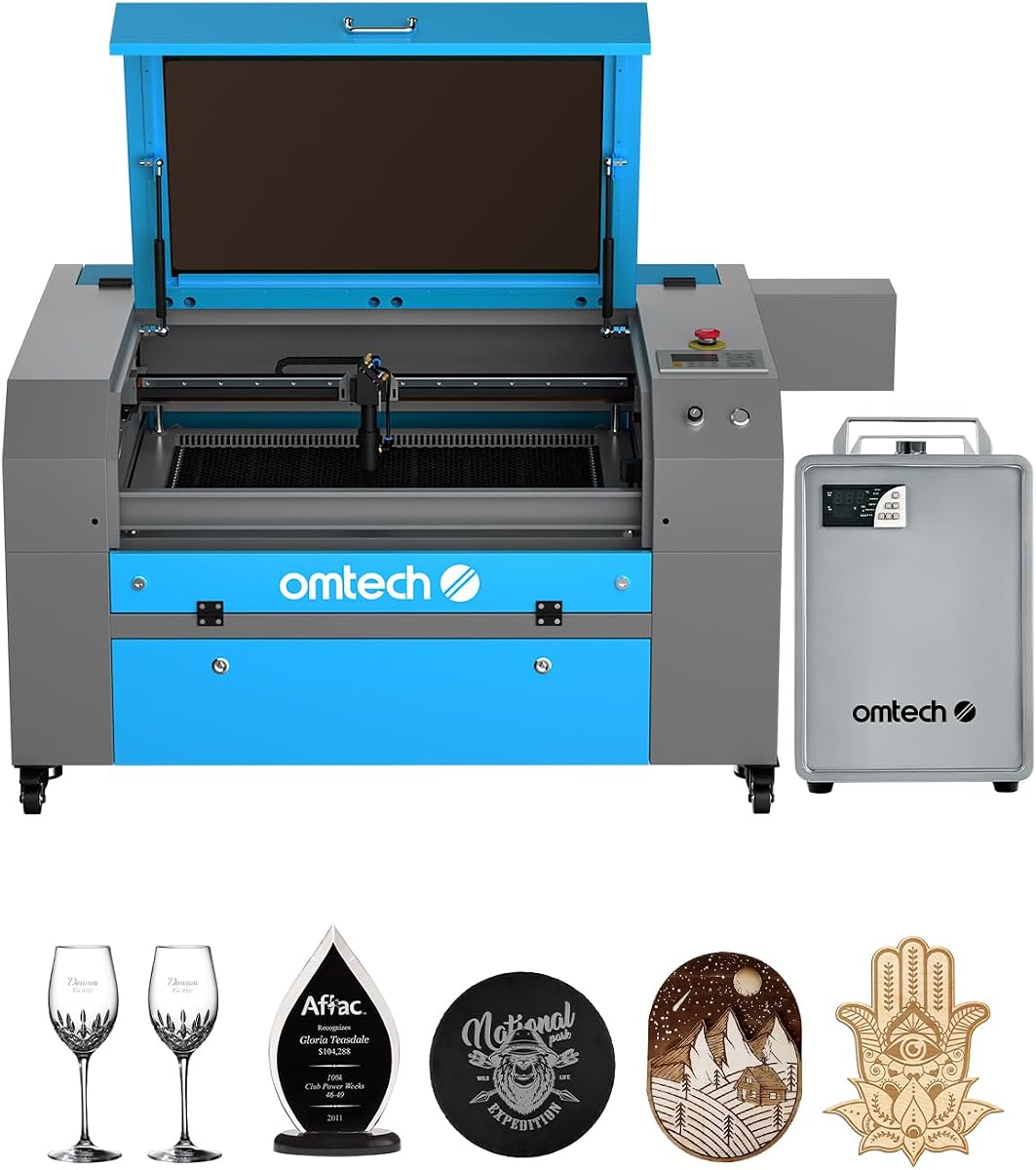
The OMTech K40+ 45W is a strong entry-level choice for hobbyists and small businesses. With a 4.4 star rating it balances power and cost effectively for those starting their laser journey.
We may earn a commission when you buy through this link, at no additional cost to you.
Upgraded to 45W it cuts 10mm acrylic and 8mm wood with ease. The integrated air assist system clears smoke and protects the lens while reducing fire risk during high power tasks.
The compact 12 by 8 inch workspace limits larger projects but suits desktop use well. Flexible work area design supports irregular materials and optional rotary axes for cylindrical engraving.
For DIY enthusiasts the K40+ offers reliable performance without breaking the bank. Its wide software compatibility ensures smooth workflows from design to finished product for most users.
Upgraded 45W power boosts cutting speed by 1.5 to 2 times compared to standard models improving efficiency for common materials.
Full support for LightBurn and LaserGRBL provides seamless control for beginners and experts alike with smooth workflows.
We may earn a commission when you buy through this link, at no additional cost to you.
The VEVOR 100W stands out for its spacious 24 by 35 inch working area. Rated 5.0 stars it offers significant capacity for large projects while maintaining high precision and speed.
We may earn a commission when you buy through this link, at no additional cost to you.
With 100W power it cuts materials up to 0.59 inches thick in one pass. The digital control panel works with most graphic software including LightBurn and AutoCAD for versatile workflows.
Front and back pass-through doors allow handling of longer items without moving the machine. The honeycomb bed ensures stability and the red-dot pointer helps with accurate placement every time.
This model is ideal for users needing more space than desktop units provide. Its robust build and safety features make it a solid investment for semi-professional applications.
The large workspace and pass-through doors make it easy to handle long and wide materials without repeated repositioning.
Digital controls and a red-dot pointer ensure you never miss your mark with smooth curve cutting on linear guide rails.
We may earn a commission when you buy through this link, at no additional cost to you.
The OMTech Maker 90W excels in handling extended engraving sessions with its bundled water chiller. It delivers 90W power for deep cuts on wood acrylic leather and other nonmetallic materials.
We may earn a commission when you buy through this link, at no additional cost to you.
The honeycomb and aluminum blade beds offer a 20 by 28 inch work area. Four-way pass-through doors make accommodating larger and longer items a breeze during production runs.
Safety features include a widened viewing window and interlock that cuts the beam if opened. The air assist removes smoke and dust protecting lenses and reflective mirrors from debris.
For users running long jobs the water chiller helps maintain tube lifespan. This machine balances power safety and workspace size effectively for growing businesses.
The bundled water chiller provides effective cooling allowing for extended engraving sessions without overheating issues.
A widened flame retardant viewing window lets users monitor progress safely while interlock features prevent accidental exposure.
We may earn a commission when you buy through this link, at no additional cost to you.
The OMTech Maker 60W comes bundled with LightBurn and a water chiller making it a convenient starter package. It offers 60W power for consistent performance on common nonmetallic materials.
We may earn a commission when you buy through this link, at no additional cost to you.
Autofocus technology adjusts the workbed at the touch of a button saving setup time and guesswork. The 20 by 28 inch area fits most projects with four-way pass-through for flexibility.
Built-in air assist removes smoke while the flame retardant window ensures safe use. This setup reduces initial configuration effort significantly for new users.
Ideal for those wanting a complete solution out of the box this model provides intuitive navigation and reliable results for small business owners.
LightBurn software and water chiller included ensure consistent performance and easy navigation from day one.
Preinstalled autofocus finds the right focal distance automatically reducing struggles with manual adjustments.
We may earn a commission when you buy through this link, at no additional cost to you.
The OMTech K40+ 45W appears again for its consistent performance and support network. Rated 4.5 stars it serves as a reliable desktop tool for DIY makers and small businesses.
We may earn a commission when you buy through this link, at no additional cost to you.
Engraving speeds up to 300 mm/s allow complex designs to be completed quickly. The integrated air assist system clears debris and reduces wood carbonization effectively during high-power jobs.
A compact 12 by 8 inch workspace supports standard materials well. Detachable bases and optional rotary axes expand creative potential for cylindrical objects and taller items.
Global support and local care options provide peace of mind. For beginners needing a dependable machine this model offers a solid balance of features and cost.
High-speed engraving capability up to 300 mm/s is ideal for complex designs and bulk orders saving time.
24/7 global support and local demos ensure expert assistance is available whenever technical guidance is needed.
We may earn a commission when you buy through this link, at no additional cost to you.
The OMTech Pronto 100W offers revolutionary speeds up to 1000 mm/s for unmatched efficiency. Rated 5.0 stars it transforms creative visions into reality quickly with consistent precision.
We may earn a commission when you buy through this link, at no additional cost to you.
The high-performance tube delivers 100W power for up to 12000 hours of usage. Autofocus technology removes guesswork from setup ensuring high-quality results on intricate designs and thick materials.
A powerful air pump and fan ensure precise clean cuts with reduced material burn. Safety features like water protection and temperature alarms prioritize user security during operation.
For makers seeking a competitive edge this model delivers speed and versatility. It handles various non-metal materials well and supports large items through pass-through doors.
Engraving speeds of up to 39.4 inches per second provide a competitive edge and faster turnaround times.
Equipped with a powerful air pump and fan the cuts remain precise and clean reducing material burn significantly.
We may earn a commission when you buy through this link, at no additional cost to you.
The OMTech Pronto 130W is a powerhouse with 130W power for deep cuts on nonmetallic materials. Rated 5.0 stars it handles a 51 by 35 inch area and impresses with high speed.
We may earn a commission when you buy through this link, at no additional cost to you.
Autofocus technology ensures the right focal distance is found automatically for consistent results. The tube supports up to 12000 hours of usage when used at lower settings regularly.
Pass-through doors make handling larger items easier than many desktop models. Comprehensive protection features include water protection temperature alarms and an emergency stop button.
Ideal for professionals needing extra power this model supports artistic visions and wows clients. Its large workspace ensures versatility for varied project sizes.
130W power engraves as deep as 0.4 inches on various nonmetallic materials allowing for deep detailed work.
Comprehensive protection features including temperature alarms and emergency stop ensure peace of mind during operations.
We may earn a commission when you buy through this link, at no additional cost to you.
The OMTech K40+ 45W variant offers a compact footprint ideal for limited spaces. Rated 5.0 stars it provides reliable performance for basic engraving and cutting tasks.
We may earn a commission when you buy through this link, at no additional cost to you.
With Class 2 safety it ensures safe operation with built-in protection. The 12 by 8 inch area is suitable for small projects and prototyping needs.
Its straightforward design allows users to focus on creation without complex configuration. Compatible with standard software it fits well into existing workflows.
Perfect for hobbyists this model delivers consistent results within a small package. It remains a solid entry point for those exploring laser engraving.
Compact dimensions make this unit easy to fit on standard desks without requiring special industrial setup.
Class 2 safety standards and protective panels ensure safe operation for casual and regular users alike.
We may earn a commission when you buy through this link, at no additional cost to you.
The OMTech Pro 130W delivers industrial performance with a built-in water chiller and servo motors. Rated 5.0 stars it is ideal for professional and industrial use in large studios.
We may earn a commission when you buy through this link, at no additional cost to you.
WiFi connectivity and a touchscreen allow effortless control from anywhere. The 35 by 55 inch workspace with four-way pass-through handles even the largest materials with ease.
Servo motors and ball-bearing guide rails achieve speeds up to 1200 mm/s for precise rapid engraving. The tempered glass viewing window ensures safety while visibility is enhanced.
For those needing top-tier power and features this model excels. It maintains temperature within tight tolerances ensuring consistent quality across high-volume production runs.
High-speed engraving up to 1200 mm/s with servo motors delivers precise rapid results for demanding workflows.
WiFi connectivity and touchscreen allow effortless control of the machine from a distance or mobile device.
We may earn a commission when you buy through this link, at no additional cost to you.
Selecting the right CO2 laser cutter requires understanding key factors like power workspace size and software needs.
Laser power measured in watts determines cutting depth and speed. Higher watts like 100W or 130W allow deeper cuts and faster throughput for thicker materials.
Choose 45W for thin materials and beginners or 100W for versatility in industrial settings.
Workspace dimensions dictate the maximum size of your projects. Larger areas like 36×18 inches offer flexibility for full sheets of material.
Ensure the bed fits your typical project sizes to avoid constant repositioning.
Safety is critical with high-power lasers. Look for Class 1 or 2 ratings interlocks and enclosed designs to protect eyes and skin.
Prioritize units with emergency stops and flame-retardant windows.
Software determines your workflow ease. Check if the machine supports LightBurn or native software you know.
Compatibility with Windows and Mac OS ensures you can use your preferred design tools.
Air Assist blows away debris and smoke keeping the lens clean and cuts precise. It reduces fire risk and carbonization on wood.
Integrated systems are preferred for convenience over manual attachments.
Water chillers extend tube life and maintain stable operation during long sessions. They prevent overheating which can reduce laser power.
Look for bundled chillers or easy integration options.
Pass-through doors allow you to cut longer materials by feeding them through the machine. This is essential for sign-making or long panels.
Check if two-way or four-way doors are included.
Automation like autofocus and cameras reduces setup time. LiDAR systems help with positioning without manual alignment.
This feature improves workflow speed significantly for repetitive tasks.
Start by ensuring the workspace is well-ventilated and free of flammable materials. Place the machine on a stable surface to prevent vibration during operation.
Always wear appropriate safety glasses when operating the laser. Verify that the protective lens and viewing windows are clean and unobstructed.
Regularly clean the mirrors and lens to maintain beam quality. Use a water chiller if available to prevent tube overheating during long projects.
CO2 laser cutters work on wood acrylic leather fabric cardboard and glass. They cannot cut metals without special coatings. Always check material safety sheets.
Yes when used with proper ventilation and eye protection. Enclosed units with Class 1 safety minimize risks. Never leave the machine unattended.
Typically 8000 to 12000 hours depending on usage. Water cooling and moderate power settings extend tube life significantly.
LightBurn is widely recommended for its intuitive interface and broad compatibility. LaserGRBL is another popular free option for basic users.
For extended sessions yes. Water chillers prevent overheating and maintain consistent power. Many units bundle this accessory.
Standard CO2 lasers do not cut bare metals. You may coat materials with spray to mark them but true metal cutting requires fiber lasers.
Clean mirrors and lenses monthly using alcohol. Check alignment and air flow. Lubricate rails as per manufacturer instructions to ensure smooth motion.
Autofocus automatically adjusts the bed height to the right focal distance. It saves time and reduces guesswork for accurate results.
The xTool P3 and OMTech Pro models offer top performance for professionals. The OMTech K40+ remains a solid budget entry for hobbyists.
Prioritize safety features and workspace size based on your typical projects. Automation can save significant time on production runs.
Check current prices and availability via our links before purchasing to ensure you get the best deal.