
Thames & Kosmos My Robotic Pet
4.1Editor score
Screen-free color sensor coding
Three unique play modes included
Realistic robotic reptile design
Explore the best coding toys for kids in October 2026. This guide compares top STEM robots and screen-free learning tools to help you choose the perfect
Coding toys transform playtime into powerful learning experiences for young minds. These interactive robots and building kits teach fundamental programming concepts through hands-on engagement. Children develop logical thinking and problem-solving skills while enjoying creative exploration without heavy screen dependence.
Our team analyzed ten leading products based on educational value, ease of use, and build quality. We examined user feedback and technical specifications to identify standout options across different age groups. Each selection offers unique features designed to spark interest in technology and engineering principles.
Every pick highlights key strengths and ideal use cases for different learning styles. Detailed reviews explain what each toy teaches and how it supports child development. Please note that product availability and pricing may vary over time on retail platforms.
4.1Editor score

4.6Editor score

4.6Editor score
This side-by-side comparison outlines key specifications for all ten featured coding toys. Review each productâ core features to determine which aligns best with your childâ age and learning goals.





The Thames & Kosmos My Robotic Pet stands out as a leading choice for screen-free learning. With a rating of 4.1 stars, this kit invites children to build and program a robotic chameleon using physical cards. Its design emphasizes hands-on engineering without relying on tablets or smartphones for control.
We may earn a commission when you buy through this link, at no additional cost to you.
Children assemble a fifteen-inch robotic reptile featuring articulated joints for realistic movement. The color sensor allows the pet to change hues based on surroundings, while infrared sensors enable gesture responses. Coding happens through action cards that define movement sequences, teaching sequencing and logic directly.
Assembly takes time and may need adult help for younger users around age eight. Independent play is recommended for twelve year olds. While the guide is comprehensive, the physical nature means parts can be lost easily during active play sessions.
This toy is ideal for families seeking educational play that minimizes screen time. It suits children interested in biology and engineering who enjoy tactile building. The award recognition confirms its value as a structured STEM introduction.
The guide explains how nature inspires engineering design, helping kids connect biology to robotics.
Coding, Wild, and Pet modes offer varied engagement to sustain interest over time.
We may earn a commission when you buy through this link, at no additional cost to you.
The Makeblock mBot ranks highly as a versatile entry-level robotics kit. Boasting a 4.6 rating, it bridges the gap between simple play and serious programming. Children build their robot quickly and progress from Scratch to Arduino environments seamlessly.
We may earn a commission when you buy through this link, at no additional cost to you.
Building takes about fifteen minutes with clear instructions, allowing immediate play. The metal material ensures durability against rough handling. Software support includes three free apps and mBlock, enabling remote control, games, and custom coding projects.
Batteries for the robot and remote are not included in the package. Users need four AA batteries for the kit and a CR2025 for the controller. This extra step might delay initial fun if not prepared beforehand.
This kit suits children ready for structured learning with room to expand. Its compatibility with LEGO and add-on packs encourages creativity. It is a strong gift for budding engineers seeking a lasting educational tool.
Resources guide users from basic block coding to advanced text-based programming.
Supports connection to over one hundred electronic modules for advanced projects.
We may earn a commission when you buy through this link, at no additional cost to you.
The Wonder Workshop Dash Robot offers immediate engagement with no assembly required. Rated 4.6 stars, it delivers a polished experience for children six and older. The robot arrives ready to dance, sing, and navigate obstacles right out of the box.
We may earn a commission when you buy through this link, at no additional cost to you.
Dash uses five dedicated apps across multiple operating systems including iOS and Android. These apps teach concepts like loops and variables through games and challenges. Its memory and battery improvements support up to five hours of active play.
The unit does not include a camera for visual recognition tasks. While the price is higher than basic kits, the durability and educational adoption justify the investment. Schools globally use it for structured STEM curricula.
This robot is perfect for users wanting a hassle-free start to coding. It suits classrooms or homes prioritizing ease of use and longevity. The app ecosystem provides continuous content updates to keep learning fresh.
Multiple apps offer different challenges and learning paths for varied interests.
Voice commands add an interactive layer to standard programming exercises.
We may earn a commission when you buy through this link, at no additional cost to you.
The Learning Resources Code & Go Robot Mouse targets the youngest coders with simplicity. Rated 4.5 stars, it supports children as young as four using physical buttons. This approach removes digital barriers, focusing on sequence logic and problem solving.
We may earn a commission when you buy through this link, at no additional cost to you.
The set includes Colby the mouse, sixteen grids, and various walls to build mazes. Activity cards provide guided challenges for structured learning. The mouse navigates the course, reinforcing directional understanding and cause and effect concepts.
Three AAA batteries are required but not included in the box. The plastic components are durable yet small enough to be lost if not stored properly. Younger children might need help navigating complex maze setups.
This toy is an excellent classroom or home entry point for preschoolers. It teaches foundational coding concepts without screens. Teachers appreciate the repeatable activities for group rotations and small labs.
Cards map directly to robot moves, making abstract logic tangible.
A guide offers ideas for extending play beyond the included challenges.
We may earn a commission when you buy through this link, at no additional cost to you.
The TEACH TECH Mech-5 offers a deep dive into mechanical engineering principles. Rated 4.5 stars, it targets older children ready for complex assembly. The robot performs actions like lifting and kicking, driven by physical coding buttons.
We may earn a commission when you buy through this link, at no additional cost to you.
Building this robot takes multiple hours, encouraging patience and precision. The instructions are detailed to ensure proper assembly. Once constructed, users code tasks by snapping buttons onto a coding wheel, controlling mechanical functions directly.
This project is not for those seeking quick assembly. The build complexity might frustrate impatient users. However, the satisfaction of completing a functional machine outweighs the initial time investment for motivated learners.
Ideal for future engineers, this kit connects coding to physical mechanics. It suits children interested in how machines move. The mission-based approach ensures each coding task has a tangible real-world outcome.
Buttons snap onto a wheel to define actions like lift or throw.
Tasks are structured as challenges to inspire engineering solutions.
We may earn a commission when you buy through this link, at no additional cost to you.
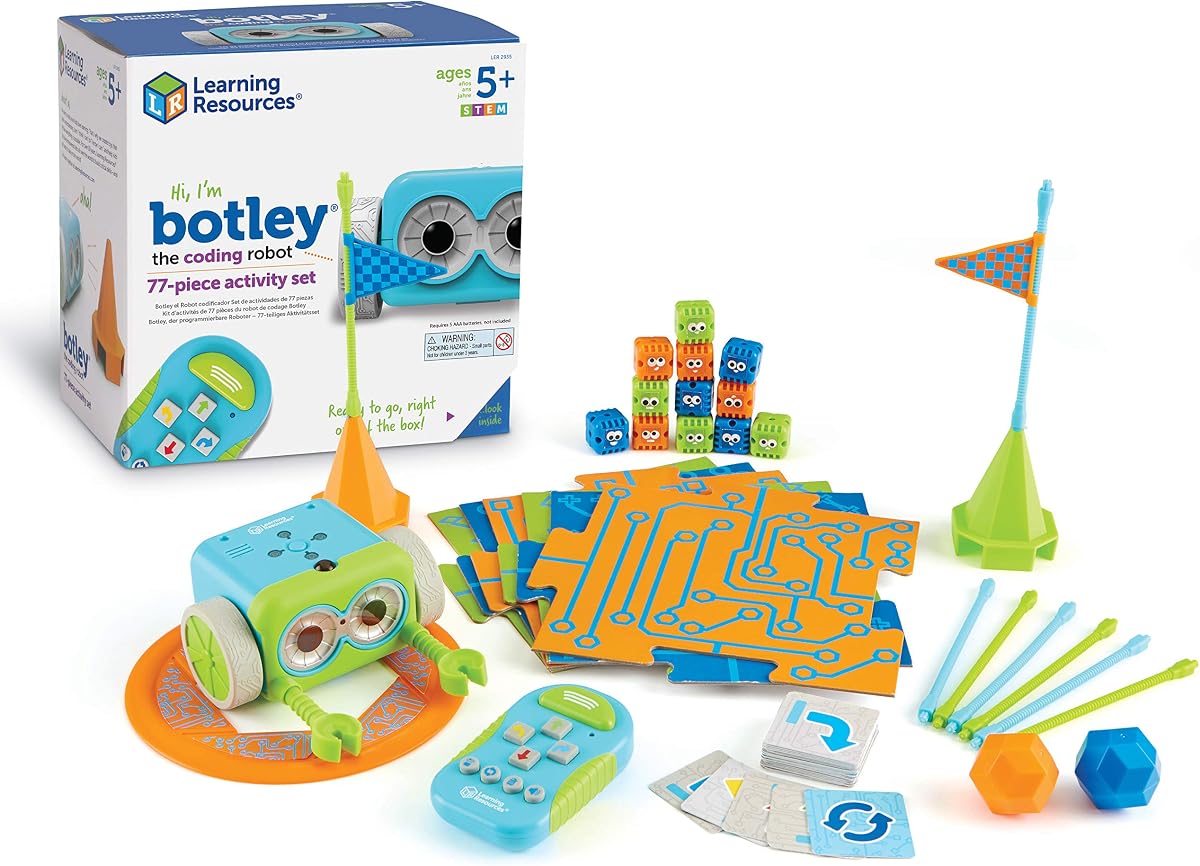
Learning Resources Botley provides screen-free coding with a dedicated remote programmer. Rated 4.6 stars, it is designed for quick setup after assembly. Children use the remote to send commands and navigate obstacle courses without devices.
We may earn a commission when you buy through this link, at no additional cost to you.
The robot can detect objects and avoid them automatically, adding interactivity. It supports looping commands and black-line paths for advanced logic. The activity set includes tiles, arms, and cards for extensive creative play.
Assembly requires a Phillips screwdriver and five AAA batteries for the units. The remote uses two extra AAA batteries not included. This setup is straightforward but requires preparation before coding begins.
Botley is perfect for introducing logic and sequencing to early elementary kids. It avoids screen dependency while maintaining high engagement. Teachers find it effective for STEM centers and small group rotations.
Sensors allow the robot to react to physical obstacles independently.
Unlockable features encourage exploration and deeper discovery.
We may earn a commission when you buy through this link, at no additional cost to you.
The Ozobot Evo Kit bridges screen-free and online coding for grades K to twelve. Rated 4.6 stars, it introduces color code markers and digital programming. The robot follows drawn paths and responds to online Blockly commands.
We may earn a commission when you buy through this link, at no additional cost to you.
Educators access over seven hundred free lessons covering STEAM subjects. Five skill levels ensure the kit grows with the child. Markers are housed in a hard case for organization during classroom use.
The price point is high compared to home toys, reflecting its educational depth. Markers can run dry or stain if not stored properly. However, the curriculum resources justify the cost for schools.
This kit suits classrooms or parents seeking structured curriculum support. It balances physical drawing with digital coding. Teachers value the adaptability for varied learning styles and skill levels.
Color codes allow screen-free programming through marker patterns.
Hundreds of lessons cover core subjects and computer science basics.
We may earn a commission when you buy through this link, at no additional cost to you.
Botley 2.0 enhances the original with object sensing and advanced coding paths. Rated 4.5 stars, it adds complexity through four-five degree turns and reactions. The set includes stackable pieces to build custom mazes and challenges.
We may earn a commission when you buy through this link, at no additional cost to you.
Programming uses coding cards to design command sequences for the robot. Lights and sounds offer multisensory feedback during play. Sixteen secret code combinations allow for open-ended creative discovery.
This version builds on the original but requires new batteries for the robot and remote. The extra features increase complexity which might need adult guidance initially. It suits children ready to tackle more complex routes.
This toy is ideal for those familiar with basic coding who want to advance. It supports logical thinking through detailed path planning. The open-ended design encourages repeated engagement with new stories.
Four-five degree turns allow precise route planning and maze navigation.
Lights and music provide immediate feedback to code inputs.
We may earn a commission when you buy through this link, at no additional cost to you.
Sphero Mini packs programming power into a ball sized like a ping pong ball. Rated 4.6 stars, it connects via Bluetooth to phones for control. Users can code using blocks or JavaScript through the free Edu app.
We may earn a commission when you buy through this link, at no additional cost to you.
Drive modes include joystick and tilt control for gaming. It includes cones and pins for obstacle courses right out of the box. The LED lights provide visual feedback during play and coding.
Battery life is limited to one hour per charge. It requires a smartphone which adds a device dependency. However, the compact size makes it great for travel and limited spaces.
This robot suits tech savvy kids who enjoy gaming and coding. It is perfect for quick sessions due to its portability. The app features allow for creative game design and control.
Free apps support both learning and pure gaming experiences.
Included cones and pins enable immediate setup for challenges.
We may earn a commission when you buy through this link, at no additional cost to you.
TaleBot Pro focuses on storytelling and language skills alongside coding. Rated 4.7 stars, it supports children ages three to five with voice commands. The interactive map provides immediate feedback to voice or button inputs.
We may earn a commission when you buy through this link, at no additional cost to you.
Children can record their own stories and commands for the robot to play. It supports ten languages and is compatible with Lego blocks for building. The map serves as a stage for imaginative scenarios and challenges.
Battery life depends on recording and playback usage. The map may need activity boxes for extended play. However, the storytelling aspect creates unique engagement beyond standard movement.
This toy is excellent for toddlers developing speech and early logic. It bridges coding with creativity through narrative. Parents appreciate the voice recording for memory keeping and fun.
The map provides context for commands and story progression.
Ten supported languages allow international and bilingual learning.
We may earn a commission when you buy through this link, at no additional cost to you.
Selecting the right coding toy depends on age, learning goals, and screen preferences. Understanding key factors ensures you choose a tool that grows with your child.
Choose toys that match your childâ cognitive development level. Younger children benefit from button-based coding while older kids enjoy complex apps.
Decide if you prefer physical coding cards or screen-based apps. Screen-free options minimize device usage while apps offer broader programming languages.
Some kits require hours of building which adds to the learning experience. Others are ready out of the box for immediate play and engagement.
Check if batteries are included or sold separately. Rechargeable units save money but may limit play during charging cycles.
Look for kits compatible with other toys or add-ons. Expandable systems provide long-term value as coding skills grow.
Products with lesson plans or tutorials support structured learning. Access to guides ensures adults can assist effectively.
Robust construction withstands active play by children. Metal or thick plastic builds last longer during rough handling.
Start by reading the manual thoroughly before assembling. Ensure all parts are present and batteries are fresh.
Store small pieces like cards or wheels in labeled containers. A dedicated box keeps accessories safe from loss.
Charge or replace batteries before play sessions to avoid interruptions. Follow manufacturer guidelines to maintain device longevity.
Coding toys span ages four to twelve. Younger kids enjoy button-based logic while older ones tackle apps. Always check the manufacturer recommended age for best results.
Not all require phones. Some use physical cards or remotes. App-based models need Bluetooth connection but offer deeper coding features.
Most do not include batteries. You must purchase AA or AAA cells separately. Rechargeable options are common in newer models.
Some models like Makeblock are compatible with LEGO parts. This adds creativity and allows building custom robot accessories.
Battery life varies by model. Some offer up to five hours while others last one. Check specs before buying for your needs.
Many are classroom ready with durable builds and group activities. Teachers find them effective for STEM labs and small rotations.
The top picks offer distinct advantages for different needs. The Thames & Kosmos Pet is budget-friendly and screen-free. Makeblock mBot balances build and app features. Wonder Workshop Dash delivers a premium ready experience.
Prioritize age match and learning goals when deciding. Screen-free tools support early logic while apps expand programming depth. Expandability ensures long-term use as skills improve.
Always check current prices and availability before buying. Educational kits change frequently across retail platforms. This guide helps you pick based on verified expert data.