
Switch 2 Pro Controller Charging Station
3.5Editor score
Dual charging for Pro controllers
LED indicators show charge status
Compact desktop saving design
This guide compares the top ten controller charging dock for Switch 2 options featuring fast charging, RGB lighting, and organized storage for gaming setups.
Finding the right controller charging dock for Switch 2 ensures your gamepad stays powered during long sessions. A good dock offers stable power, clear indicators, and compact design to keep your desk tidy and ready for action.
We evaluated ten highly rated charging stations based on charging speed, compatibility with JoyCons and Pro controllers, and build quality. Each product was reviewed for safety features, LED status lights, and ease of use in typical gaming environments.
Every pick shows key specifications and real-world performance notes to help you choose confidently. Prices and availability may change over time, so verify current details on the retailer page before completing your purchase decision today.
3.5Editor score

4.7Editor score
4.3Editor score
The following table compares all ten selected charging docks side by side to highlight key differences in capacity, lighting, and compatibility for your Switch 2 setup.



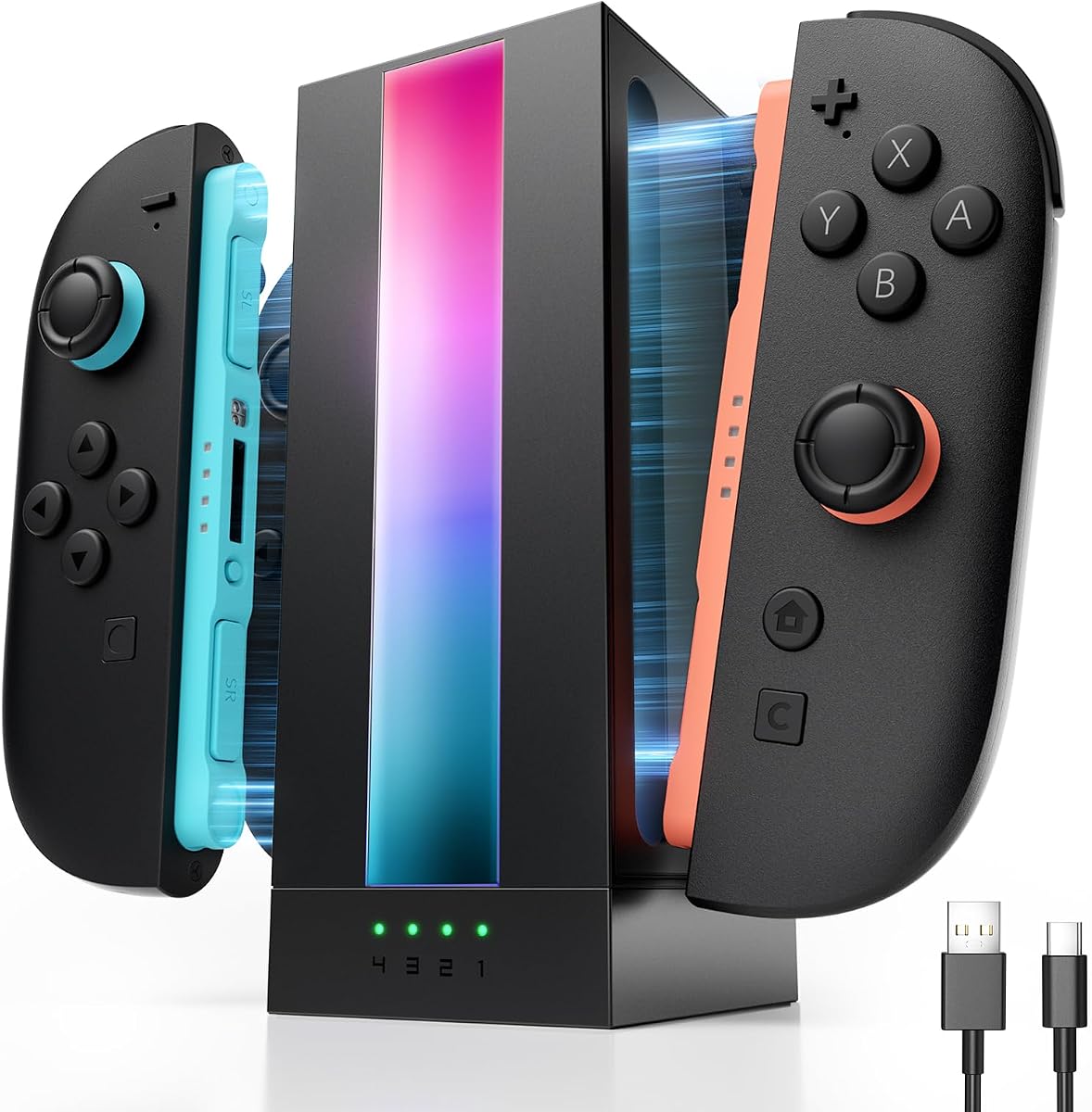
This FASTSNAIL dock is designed exclusively for Nintendo Switch 2 JoyCon with magnetic alignment for effortless charging. It scores 4.7 stars for its ability to charge four controllers simultaneously while keeping your desk clean.
We may earn a commission when you buy through this link, at no additional cost to you.
The magnetic design allows you to place JoyCons without worrying about plus or minus sides. This secure hold prevents damage from repeated plugging and ensures stable contact during charging sessions. RGB lights enhance ambiance with nine customizable modes.
While it needs a separate 5V 2A adapter for best performance, the included cable makes setup simple. Some users note magnetic strength can vary slightly between units but overall charging consistency remains reliable across daily use.
Ideal for multiplayer nights or solo marathons where having multiple charged controllers ready is essential. Its touch controls and memory function add convenience making this a top pick for organized gaming setups.
The dual-direction magnetic design ensures JoyCons snap into place correctly every time without manual alignment adjustments.
Built-in overcharge and overcurrent protection keeps your controllers safe from power surges during extended charging periods.
We may earn a commission when you buy through this link, at no additional cost to you.
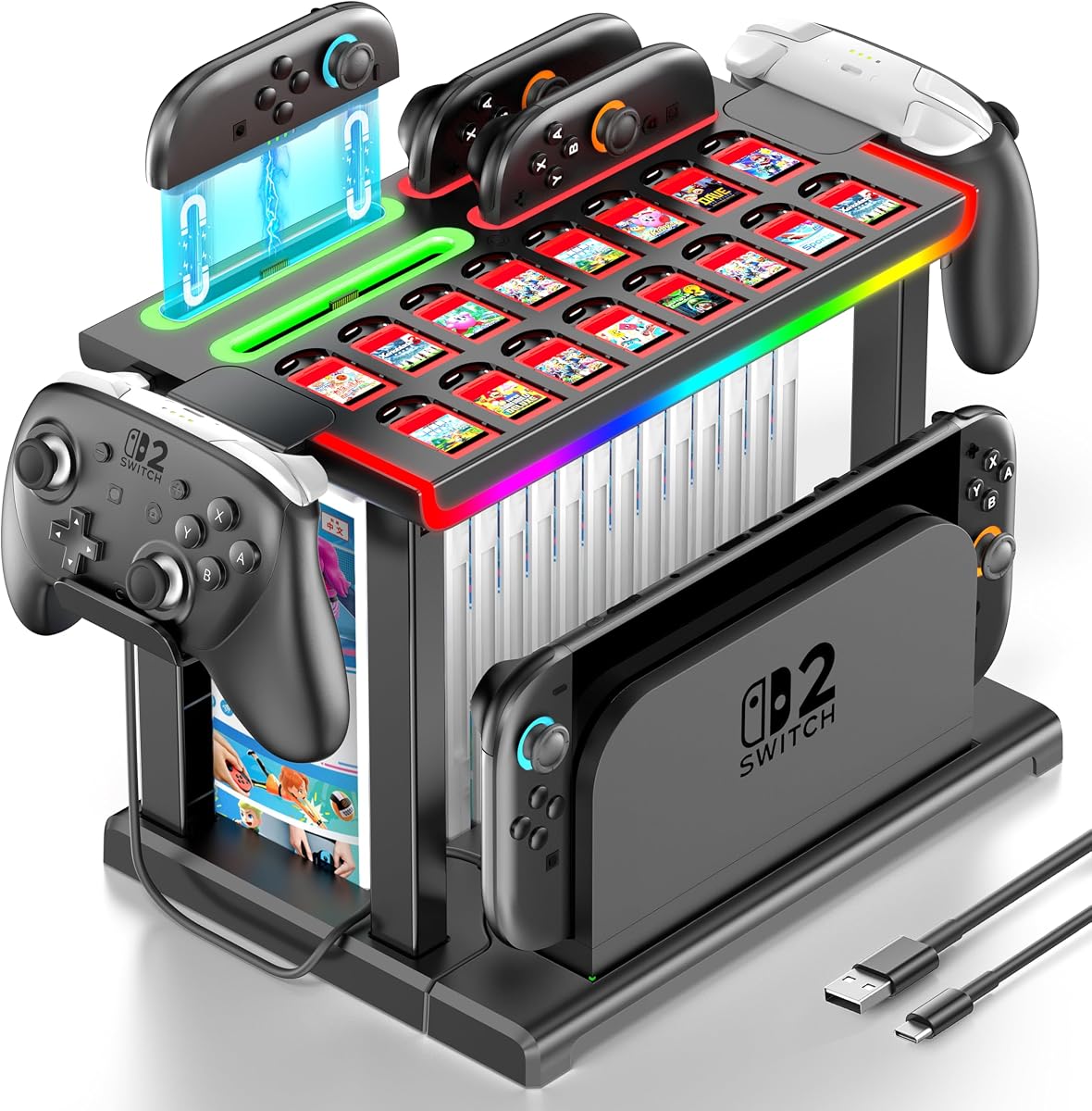
This organizer station combines storage and charging for a tidy gaming setup. It holds four JoyCons, sixteen game cases, and even your TV dock making it a powerhouse for organization with 4.6 star rating.
We may earn a commission when you buy through this link, at no additional cost to you.
Fast charging completes a full JoyCon charge in about two hours with clear LED status lights. The RGB lighting adds flair with seven single-color modes syncing with your gaming rhythm for enhanced visual appeal.
Assembly is tool free and quick with non-slip pads ensuring stability on your desk. Some users find the RGB too bright for night play but it can be turned off easily with a long press.
Perfect for families or roommates who need to store multiple accessories neatly while keeping controllers powered. Its spacious design makes accessing games and headsets convenient without cluttering your entertainment center.
Holding sixteen game cases and sixteen memory cards means you rarely need to shuffle media around during game nights.
Short press cycles modes while long press turns lights off giving you full control over ambiance during gameplay.
We may earn a commission when you buy through this link, at no additional cost to you.
This FASTSNAIL dock features magnetic alignment for effortless charging and scores 4.7 stars for reliability. It charges four controllers simultaneously while keeping your desk clean and organized for seamless gaming experiences.
We may earn a commission when you buy through this link, at no additional cost to you.
The dual-direction magnetic design allows JoyCons to snap into place without distinguishing plus or minus sides. This secure hold prevents wear on ports and ensures stable power delivery during extended charging sessions at home.
While it requires a separate 5V 2A adapter for optimal performance the included cable simplifies setup. Some users note magnetic strength can vary slightly between units but overall charging consistency remains reliable across daily use.
Ideal for multiplayer nights or solo marathons where having multiple charged controllers ready is essential. Its touch controls and memory function add convenience making this a top pick for organized gaming setups.
The dual-direction magnetic design ensures JoyCons snap into place correctly every time without manual alignment adjustments.
Built-in overcharge and overcurrent protection keeps your controllers safe from power surges during extended charging periods.
We may earn a commission when you buy through this link, at no additional cost to you.
This dual charging station supports two Switch 2 Pro Controllers with efficient 5V 2A charging. It offers clear LED indicators to monitor power levels and earns a 3.5 star rating for its straightforward budget friendly design.
We may earn a commission when you buy through this link, at no additional cost to you.
The compact stand keeps your gaming setup neat while providing quick access to controllers whenever you play. Built-in smart protection prevents overcharging and overheating ensuring safe and dependable charging for your valuable Pro controllers.
Limited to Pro controllers only it does not support JoyCons which may require additional chargers. Some users report slower charging if power source lacks sufficient wattage so using recommended adapter helps performance.
Great for gamers who mainly use Pro Controllers and want an affordable tidy solution. Its simple design and reliable charging make it a solid choice for smaller gaming desks needing basic functionality.
Dedicated slots for Pro Controllers ensure perfect fit without adapters for those who prefer full-size pads.
Red light means charging and green means full allowing you to check status without opening any apps.
We may earn a commission when you buy through this link, at no additional cost to you.
PowerA delivers a bold charging base that charges JoyCon and wireless controllers simultaneously. With a 4.6 star rating it offers reliable performance and clear LED indicators to track when your controllers are fully charged.
We may earn a commission when you buy through this link, at no additional cost to you.
Fully compatible with Nintendo Switch Pro Controllers this base fits well with any gaming set-up. The LED lights indicate status so you never lose track of battery levels during gameplay or storage periods at home.
Design is eye-catching but lacks RGB effects found in other models. Some users prefer minimalist setups but this base offers good value for those who trust the brand for Switch accessories quality.
Recommended for fans of PowerA accessories needing a dependable dock for multiple controller types. Its straightforward design ensures compatibility and ease of use for everyday charging needs.
PowerA is known for quality Switch accessories making this base a safe choice for long-term durability and support.
Visible LED lights let you confirm charge status at a glance without needing to check device settings manually.
We may earn a commission when you buy through this link, at no additional cost to you.
This six in one charging station supports Nintendo Switch JoyCons and Pro Controllers plus PS5 controllers. With a 4.7 star rating it offers flexible charging options using game console USB hub or wall charger.
We may earn a commission when you buy through this link, at no additional cost to you.
It can charge four JoyCons and two Pros at the same time with clear status indicators. The built smart IC chip and fireproof panel design ensure safety and reliability for all your connected devices.
No RGB lighting keeps the look simple but functional for any desk setup. Some users note it needs a separate USB cable which is included but adapter must be sourced separately for best performance.
Perfect for multi-platform gamers who want one dock for Switch and PlayStation controllers. Its versatility makes it a practical choice for households sharing devices across different consoles.
Supporting PS5 alongside Switch means you can manage all your gaming hardware with one compact charging station.
Fireproof panel and IC chip guard against over-voltage and short-circuit so you charge without worrying about risks.
We may earn a commission when you buy through this link, at no additional cost to you.
HEATFUN dock supports Switch Pro and Switch 2 Pro plus PS5 and Xbox Series controllers. It earns 3.9 stars for wide compatibility and USB-C adapters that reduce wear on controller ports during daily use.
We may earn a commission when you buy through this link, at no additional cost to you.
Charge two controllers simultaneously with stable 5V 2A input for best performance. The compact low-standby design fits neatly on desks and TV stands without taking up extra space in your gaming area.
Not compatible with PowerA or Luna controllers so check model before buying. Users note lower-power USB ports may cause slow charging so using recommended adapter ensures efficient power delivery.
Great for gamers with mixed controller collections needing one reliable dock. Its adaptability and port-saving design make it a practical choice for those who switch between consoles regularly.
Removable USB-C adapters allow drop-in charging reducing physical strain on controller ports over time.
Support for PS5 and Xbox Series means you can manage multiple console hardware with one single docking station.
We may earn a commission when you buy through this link, at no additional cost to you.
SUPCASE charging dock holds four JoyCon controllers with dual-side charging for easy placement. It earns 4.7 stars for magnetic design and clear LED indicators showing real-time charge status for every JoyCon.
We may earn a commission when you buy through this link, at no additional cost to you.
Nine RGB lighting modes personalize your space while smart chip safety prevents overcharging and overheating effectively. The compact and organized design keeps your gaming area neat and ready for action whenever needed.
Some users note JoyCons must be aligned carefully but magnets assist in secure placement. Requires separate power adapter not included so factor that into your purchase planning before buying.
Ideal for families needing multiple JoyCons charged at once without clutter. Its magnetic alignment and safety features ensure reliable performance and longevity for your daily gaming routine.
Charge all four JoyCons simultaneously so you always have backup batteries ready for extended play sessions.
Magnetic design improves charging efficiency and reduces wear on ports by ensuring controllers sit in right place.
We may earn a commission when you buy through this link, at no additional cost to you.
FASTSNAIL 10-in-1 dock charges up to ten controllers and JoyCons simultaneously. It scores 4.2 stars for massive capacity and 3-hour fast charging with clear indicators and eleven RGB modes including memory function.
We may earn a commission when you buy through this link, at no additional cost to you.
Extra USB 2.0 ports allow data transfer or charging more devices keeping your desk functional. The advanced multi-protection chip ensures safe charging and extends controller battery lifespan for long term reliability.
Requires NS2 official dock as power source for best performance so plan accordingly. Not compatible with third-party controllers which may limit flexibility depending on your hardware mix at home.
Perfect for households with many controllers needing one central hub. Its high capacity and extra USB ports make it a powerful organizer for complex gaming setups.
Ten charging slots solve the need for multiple docks and let you manage all your controllers at once.
Two USB 2.0 ports let you connect other devices or charge peripherals without adding more cables.
We may earn a commission when you buy through this link, at no additional cost to you.
JSAUX EnergyFlow dock is designed exclusively for 2025 Switch 2 JoyCon with four high speed ports. It earns 4.3 stars for being up to 30% more efficient than previous models and reducing wait time.
We may earn a commission when you buy through this link, at no additional cost to you.
Immersive dynamic RGB light bar enhances setup and one-touch button control lets you adjust ambiance easily. Each port has independent LED indicators showing flashing or solid green for accurate charging status at all times.
Requires matching plus and minus marks for proper alignment but magnets help secure placement. Power adapter not included but 1.5m cable is provided ensuring compatibility with most power setups around the house.
Best for those wanting a premium sleek dock tailored to new JoyCon. Its speed and visual appeal make it a top choice for stylish and efficient charging setups.
Up to 30% faster charging reduces downtime during multiplayer sessions so you stay in the game longer.
Each port has its own light so you can track every JoyCon individually without confusion or guesswork.
We may earn a commission when you buy through this link, at no additional cost to you.
Choosing the right charging dock involves considering capacity compatibility safety and design. This guide highlights key factors to help you match a dock to your specific gaming setup and controller types.
Ensure the dock supports your specific Switch 2 JoyCons and Pro Controllers since some docks only work with certain models or exclude third-party options. Always check the product details for compatibility before buying to avoid mismatched hardware.
Verify that your controller type is listed explicitly in the description to guarantee proper fit and function during charging sessions.
Look for docks that support charging multiple JoyCons and Pro Controllers simultaneously so you never run out of power during play. Consider how many controllers you need to keep charged and pick a dock with enough slots for all.
Select a dock with capacity matching your household size and gaming habits to minimize waiting times between sessions.
Fast charging docks using 5V 2A adapters reduce wait time and keep your controllers ready quickly. Check if the dock supports fast charging and whether power adapters are included or must be sourced separately.
Choose a dock with efficient power delivery to maximize playtime and reduce charging downtime effectively.
Built-in smart chips prevent overcharging overheating and short circuits protecting your controllers from damage. Ensure the dock has certified safety features for reliable and safe charging over extended periods.
Prioritize docks with multiple safety protections to extend the lifespan of your expensive gaming controllers.
Clear LED lights show charging status at a glance so you know when controllers are fully charged. Look for docks with distinct colors like red for charging and green for full to simplify monitoring.
Opt for visible status lights to avoid interrupting gameplay due to dead controller battery unexpectedly.
Some docks feature customizable RGB modes that enhance your gaming setup ambiance and visual appeal. Decide if you want these effects or prefer a minimalist look for your desk and TV stand.
Pick a dock with lighting modes that match your preference for style without distracting from gameplay focus.
Compact docks save desktop space and fit neatly on TV stands or desks without clutter. Choose a design that matches your setup and includes non-slip pads for stability during use.
Select a space-saving dock with a sturdy base to keep your gaming area tidy and organized.
Extra USB ports storage slots for games or docks may add utility beyond just charging controllers. Consider docks with multi-functionality if you need to store game cases or charge other devices nearby.
Evaluate docks with extra features to maximize desk utility and reduce accessory clutter efficiently.
Plug the dock into a power source using the provided cable and recommended adapter to ensure stable charging for your controllers. Place your controllers on the dock slots and watch the LED indicators show charging status clearly.
Allow controllers to charge until the indicator turns green or shows full before removing them to avoid partial battery depletion. Keep the dock in a dry and cool spot away from direct sunlight or heat sources.
Periodically clean the charging contacts on the dock with a dry cloth to maintain good connection and prevent corrosion. Avoid using water or harsh chemicals near the electronics to keep your docking station safe for long term use.
Most docks are designed specifically for Switch 2 JoyCons and may not fit older models due to different connector layouts. Always check product compatibility details before purchasing to ensure your controllers will charge properly.
Many docks support fast charging with a 5V 2A adapter which can match or exceed console USB charging speeds. Using recommended power sources ensures optimal performance and quick charge times for all your controllers.
Some docks offer separate slots or adapter slots for both controller types allowing you to charge them simultaneously. Confirm compatibility for both JoyCons and Pro Controllers on the product page before buying.
Most modern docks have smart protection that stops charging when the battery is full to prevent overcharging. This feature protects the battery lifespan and ensures your controllers remain safe for long-term use.
Many docks include USB cables but power adapters are often sold separately. Check the package details to confirm what is included and prepare the necessary power source for charging.
Some docks explicitly exclude third-party controllers such as PowerA or Luna so verify compatibility before purchase. Official Nintendo controllers are generally guaranteed to work while others may not fit properly.
The FASTSNAIL charging dock offers magnetic alignment and four-slot capacity for efficient multi-controller charging making it a top choice. For budget-conscious buyers the Switch 2 Pro Station provides reliable dual charging while the JSAUX EnergyFlow dock delivers premium high-speed performance.
Prioritize docks with safety features clear status indicators and compatibility with your specific controller types to ensure reliable use. Consider how many controllers you need to charge at once and choose a model with enough slots for your setup.
Always verify current prices and availability on retailer pages as deals and stock may change frequently. Your ideal dock keeps your gaming experience uninterrupted by keeping controllers powered and organized in one tidy spot.