
Behringer X AIR XR18
4.6Editor score
18-channel tablet control
MIDAS preamps for quality
Built-in Wi-Fi router
This guide compares the top digital mixing consoles for live sound and studio use, evaluating features like channel count, preamps, and connectivity to help
Digital mixing consoles have revolutionized how audio engineers manage sound in both live and studio environments. These advanced systems offer precise control over multiple inputs, effects, and routing options that analog boards simply cannot match. Choosing the right console depends on your specific needs, budget, and the complexity of your audio projects.
We have carefully evaluated ten leading digital mixing consoles available on the market today. Our comparison focuses on critical aspects such as input channel capacity, preamp quality, screen usability, and connectivity options. Each product has been selected based on its reputation for reliability, sound quality, and user feedback from professional audio technicians.
Each review below highlights the key strengths and potential limitations of every console featured in this guide. You will find detailed insights into how each model performs in real-world scenarios. Please note that pricing and availability can change frequently, so always check current listings before making a purchase decision.
4.6Editor score

4.7Editor score

4.2Editor score
The following table provides a side-by-side comparison of all ten digital mixing consoles featured in this guide. It highlights essential specifications to help you quickly identify which model aligns with your technical requirements and workflow preferences.




The Behringer X32 stands out as a premier choice for professionals seeking a powerful digital mixing solution. With a rating of 4.7 stars, it has earned widespread acclaim for its audio fidelity and versatile feature set. This console is designed to handle both live sound reinforcement and studio recording with equal ease.
We may earn a commission when you buy through this link, at no additional cost to you.
At the heart of the X32 are 32 MIDAS-designed mic preamps that deliver audiophile-grade sound quality. The 40-input channel capacity ensures you have enough bandwidth for large ensembles or multi-track recording sessions. Additionally, the 25 fully automated motorized 100mm faders allow for precise control and seamless scene management during performances.
While the console offers immense power, its size and complexity can present challenges. The physical footprint is substantial, requiring a dedicated mixing position or rack setup. Furthermore, new users may find the extensive parameter set overwhelming at first, but the detailed documentation helps mitigate this issue.
This console is ideal for touring bands, church audio teams, and recording studios that need reliable, high-performance mixing. If you require deep control over your audio environment and value sound quality above all else, the X32 remains a top-tier investment. It continues to set the standard for mid-range digital consoles.
The MIDAS-designed preamps ensure clean gain and low noise, making them perfect for capturing subtle audio details.
Motorized faders and LCD Scribble Strips streamline channel identification and recall, saving valuable time during shows.
We may earn a commission when you buy through this link, at no additional cost to you.
The Yamaha DM3 Standard brings legendary audio quality to a more portable form factor. Rated 4.4 stars, it appeals to users who need professional performance without the bulk of larger consoles. Its ultracompact design makes it suitable for portable setups or limited stage real estate.
We may earn a commission when you buy through this link, at no additional cost to you.
Featuring 22 channels and a 96kHz sample rate, this console delivers crisp, high-fidelity audio reproduction. The 9-inch Best screen offers intuitive control over mixing parameters, while the 16 professional Yamaha preamps ensure clean signal capture. The built-in USB audio interface allows for direct recording without additional hardware.
The main trade-off lies in its channel limitations compared to full-size consoles. Users requiring extensive input capacity may find this model restrictive for very large events. Additionally, some users prefer physical knobs over touch controls for rapid adjustments during live mixing.
This model is excellent for small venues, mobile recording, and installation projects where space is a premium. It balances power and portability effectively. If you prioritize Yamaha's signature sound and need a compact digital solution, the DM3 Standard is a strong candidate.
The 96kHz sample rate ensures accurate sound reproduction that meets professional studio standards.
The large touchscreen simplifies complex routing tasks, making advanced mixing accessible to more users.
We may earn a commission when you buy through this link, at no additional cost to you.
The Behringer WING is engineered for large-scale productions that demand extensive routing and channel capacity. With a 4.2 rating, it offers a robust platform for professional audio engineers. The console supports up to 48 channels and 28 buses, providing unmatched flexibility for complex audio environments.
We may earn a commission when you buy through this link, at no additional cost to you.
Key features include 8 MIDAS PRO mic preamps and outputs that guarantee superior signal integrity. The plug-and-play remote I/O connectivity allows for up to 144 signals over AES50 ports with minimal latency. This makes it ideal for distributed audio systems where the mixer is far from the stage.
While the performance is exceptional, the complexity and cost reflect its target audience. It may be overkill for simple setups or those with limited budgets. Users should also be prepared for a steep learning curve to fully utilize its advanced capabilities effectively.
For touring productions, large houses of worship, or broadcast facilities, the WING is a powerful tool. Its ability to manage intricate signal flows without compromise makes it a top choice. If you need a console that scales with your most demanding projects, consider this model.
AES50 SuperMAC technology ensures stable, low-latency transmission of large numbers of audio signals.
The touch-sensitive editing section and adjustable display swivel enhance workflow efficiency during long sessions.
We may earn a commission when you buy through this link, at no additional cost to you.
The Yamaha MGX12 has achieved a perfect 5.0 rating, indicating high user satisfaction with its performance. This 18-channel console is designed for modern workflows that require digital recording and playback capabilities. Its dual USB-C interface simplifies connections for computers and mobile devices.
We may earn a commission when you buy through this link, at no additional cost to you.
This model includes a software bundle with Cubase AL and WaveLab Cast LE, adding significant value for content creators. The 4.3-inch touchscreen provides access to controls, while built-in DSP ensures professional sound without external processors. Assistive features like Auto Gain make operation easier for less experienced users.
While excellent for mid-size applications, it lacks the deep routing of larger boards. It may not suit events needing extensive matrix outputs or complex subgroups. The limited channel count also restricts its use for very large bands without additional hardware.
Ideal for podcasters, streamers, and small venue sound reinforcement, this console offers a great balance of features and ease of use. The included software enhances its appeal for multimedia production. If you need a straightforward, modern console with recording capabilities, this is a strong option.
Dual USB-C ports allow for fast data transfer and easy integration with laptops and tablets.
Included DAW and casting tools provide immediate value for recording and streaming projects.
We may earn a commission when you buy through this link, at no additional cost to you.
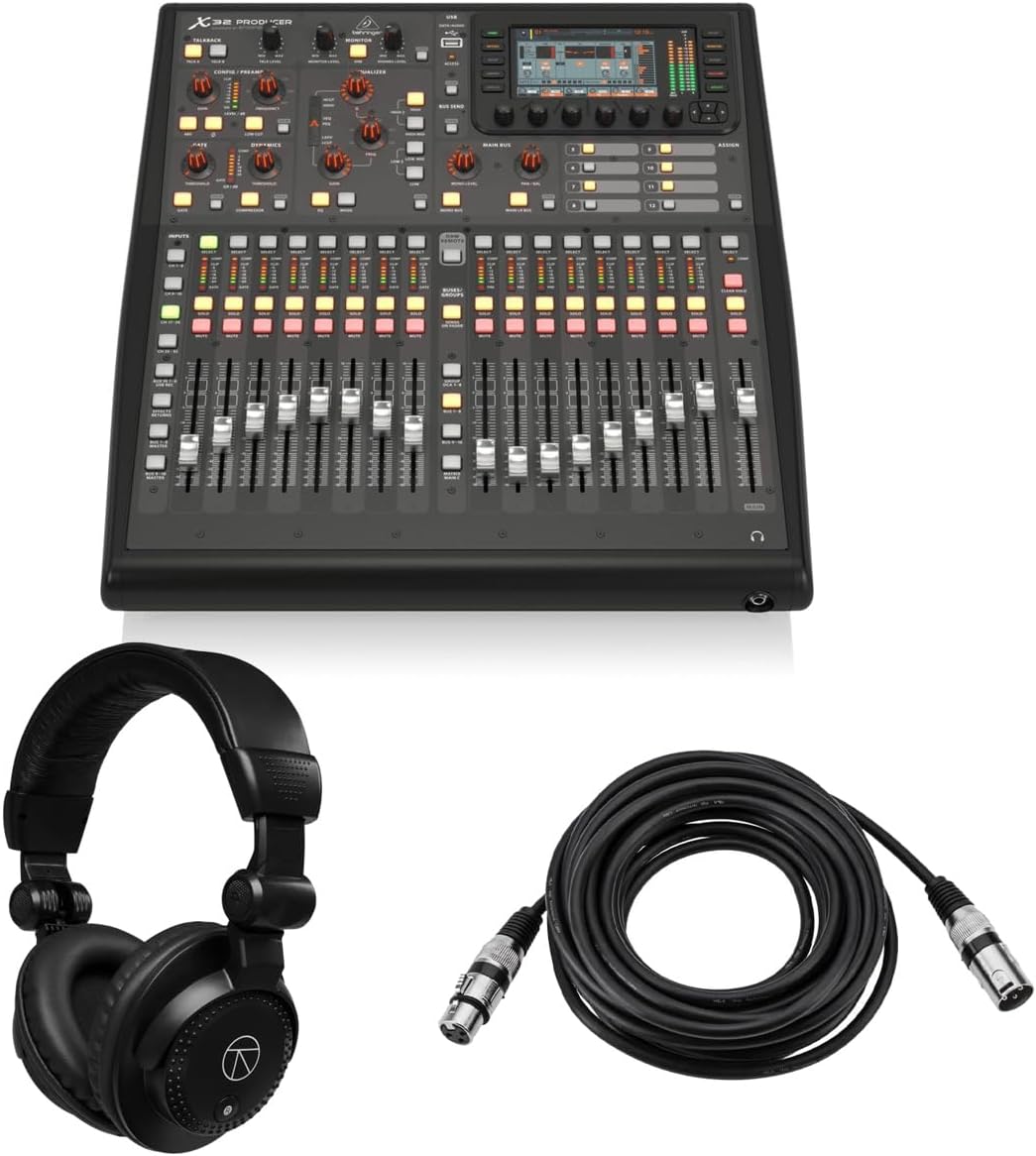
The Behringer X32 PRODUCER receives a 5.0 rating for its reliable performance and value-packed bundle. This rack-mountable console retains the core functionality of the full X32 while offering a compact form factor suitable for fixed installations. It comes with headphones and cables to get you started immediately.
We may earn a commission when you buy through this link, at no additional cost to you.
Features include 16 programmable MIDAS preamps and 24-bit/48 kHz conversion for professional sound quality. The 40 input channels and 25 buses allow for complex routing, while the 8 true-stereo effects engines provide creative sound shaping. It includes a 5-inch color TFT display for clear visualization.
The lack of motorized faders on the producer version can make scene recall less intuitive compared to the full model. Rack-mounting also means physical access to faders may be limited depending on the setup. However, these are acceptable compromises for the cost savings and space efficiency.
This model is ideal for installed systems in churches or venues where space is limited. It offers robust sound quality and reliable operation. If you need a compact X32 experience with accessories included, this bundle is an excellent choice.
The inclusion of headphones and XLR cables reduces initial costs and simplifies deployment for new users.
High dynamic range and built-in effects ensure clean, polished audio without needing external processors.
We may earn a commission when you buy through this link, at no additional cost to you.
The Behringer X32 COMPACT delivers the renowned X32 sound quality in a smaller package. With a 4.7 rating, it is favored by engineers who need mobility without sacrificing performance. It retains the essential features of the original model while optimizing for space.
We may earn a commission when you buy through this link, at no additional cost to you.
It features 16 MIDAS-designed preamps and 17 fully automated motorized faders for precise control. The 40-input channel capacity ensures versatility for various setups. LCD Scribble Strips on all channels and buses help with easy assignment and intuitive distinction during busy mixes.
While it shares many features with the full X32, the physical footprint reduction means fewer direct outputs. Users needing extensive local connections might find this limiting. However, for most live and studio needs, the console provides ample connectivity.
This model suits mobile engineers and smaller installations requiring rack space efficiency. It maintains the high performance expected from the X32 series. If you need a balance between portability and advanced mixing capability, the Compact version is a smart choice.
Transporting the console is easier without compromising on the high-fidelity audio and routing options.
LCD Scribble Strips simplify channel identification, reducing errors during fast-paced operations.
We may earn a commission when you buy through this link, at no additional cost to you.
The PreSonus StudioLive Classic 16.0.2 is designed for straightforward digital mixing and recording. While it has a 3.9 rating, it remains a reliable choice for those needing basic digital capabilities. It focuses on simplicity and integration with computer-based workflows.
We may earn a commission when you buy through this link, at no additional cost to you.
Features include 12 Class A XMAX mic preamplifiers and Fat Channel processing on all inputs. This provides 3-band semi-parametric EQ and dynamics processing for shaping sound. The 18-in/16-out USB 2.0 interface allows recording of all channels directly to a computer.
Users might find the interface less advanced compared to newer consoles with touchscreens or motorized faders. The feature set is more traditional, which can be a pro or con depending on preference. However, it offers solid reliability for simple applications.
This console is suitable for small bands or home studios needing an all-in-one solution. It pairs well with the included PreSonus software. If you prefer a straightforward digital console with good preamps, this model is worth considering.
Direct USB interface allows for simultaneous playback and recording of multiple tracks without extra hardware.
The control surface design mimics analog workflows, making it easier for transitioning users.
We may earn a commission when you buy through this link, at no additional cost to you.
The Behringer X AIR XR18 offers exceptional value for budget-conscious professionals. With a 4.6 rating, it delivers high-quality audio at a fraction of the cost of larger consoles. Its unique design relies on wireless control via tablets, freeing up physical space.
We may earn a commission when you buy through this link, at no additional cost to you.
It includes 16 MIDAS-designed mic preamps that ensure audiophile sound quality. The built-in Tri-mode Wi-Fi router enables direct operation without external networks. The 18 x 18 channel bidirectional USB interface supports recording directly to iPads or computers.
Because it lacks physical knobs and faders, operation relies entirely on software apps. This can be limiting in environments where touch screens are impractical or battery life is a concern. However, the flexibility and cost savings are significant advantages.
Ideal for mobile DJs, small bands, or installation where space is limited, this console is highly efficient. It brings professional features to a compact form. If you value mobility and cost-effectiveness, the XR18 is an outstanding option.
Getting MIDAS preamps and digital routing at this price point is rare in the market.
Direct Wi-Fi control removes the need for extra routers or cables, simplifying setup.
We may earn a commission when you buy through this link, at no additional cost to you.
The Allen & Heath Qu-5 represents high-performance digital mixing with 96kHz FPGA processing. While rated N/A in some listings, its technical specs suggest professional quality. It provides 38 inputs and 24 outputs, making it suitable for demanding live and recording environments.
We may earn a commission when you buy through this link, at no additional cost to you.
It features a 7-inch capacitive touchscreen and 17 motorized faders for intuitive workflow. The SLink expansion port allows for flexible system scaling. Integrated recording and effects, including multi-FX engines and USB-C multitrack recording, simplify production tasks.
The complexity and cost may deter casual users. Those unfamiliar with FPGA-based systems may need time to adapt to the interface. However, professionals seeking precision and low latency will find these features invaluable.
This mixer is best for high-end live sound, broadcast, and recording applications. It offers the power and performance needed for critical listening. If you need a top-tier digital mixer with robust connectivity, the Qu-5 is a strong contender.
The FPGA processing delivers ultra-low latency essential for live monitoring and recording.
The large touchscreen and motorized faders enhance efficiency during complex mixing sessions.
We may earn a commission when you buy through this link, at no additional cost to you.
The QSC TouchMix-16 is designed for ease of use in compact setups. With a 4.4 rating, it is praised for its straightforward workflow and included accessories. It supports 20 full function inputs, allowing for a wide range of sources.
We may earn a commission when you buy through this link, at no additional cost to you.
Each channel features a 4-band full parametric EQ, offering detailed tone shaping. TRS aux outs drive wired in-ear monitors directly, saving budget on external gear. The included carrying bag ensures portability and protection during transport.
While functional for most tasks, it may lack the deep automation of higher-end consoles. Advanced users might miss features like macro commands or complex scene layers. However, for simple setups, its capabilities are sufficient and reliable.
This model is perfect for churches, corporate AV, and small events where ease of use is key. It balances functionality with user-friendly design. If you need a reliable, portable digital mixer with essential features, the TouchMix-16 is a great choice.
TRS aux outputs support direct IEM feeds without additional mixers or converters.
The included bag and compact design make it easy to transport and set up quickly.
We may earn a commission when you buy through this link, at no additional cost to you.
Selecting the right digital mixing console requires understanding your specific audio needs and workflow requirements. The following factors will help you evaluate options effectively.
The number of input channels determines how many microphones or instruments you can connect simultaneously. For small bands, 16 to 20 channels may suffice, while larger productions need 32 or more to accommodate full mixes and backups.
Always choose a console with enough channels for your current needs plus room for future growth to avoid outgrowing the unit quickly.
Mic preamps are critical for capturing clean, low-noise signals from microphones. Models with MIDAS or Class A preamps typically offer superior audio fidelity compared to standard options. This difference is most noticeable in quiet passages and solo instruments.
Prioritize consoles with high-quality preamps if you work with sensitive microphones or require broadcast-grade audio clarity.
Consider the types and number of outputs available, such as XLR, TRS, or AES50. USB interfaces allow for direct recording to computers, while network connections enable remote control and expansion. Check if the console supports your existing audio gear and recording needs.
Ensure the console has sufficient outputs for your main speakers, monitors, and recording devices without requiring extra hardware.
Touchscreens offer flexible control but may lack the tactile feedback of physical knobs. Motorized faders streamline scene recall, which is vital for live shows. Decide if you prefer visual navigation or physical controls based on your mixing style.
A balanced interface with both touch and physical controls often provides the best workflow experience for varied tasks.
Buses determine how signals are sent to different outputs like monitors, recording, and effects. More buses mean greater flexibility for complex setups. Check if the console supports matrix outputs and subgroup routing for advanced signal management.
For large events, ensure the routing system can handle all necessary mixes and monitoring configurations without bottlenecks.
Physical dimensions and weight impact ease of transport. Rack-mountable units save space but may limit access to controls. Compact models are ideal for mobile setups but might reduce channel capacity. Consider how often you will move the console.
Select a form factor that fits your transportation method and workspace constraints to maintain efficiency during setup.
Many consoles offer companion software for remote control, recording, or scene editing. Compatibility with iOS, Android, and desktop systems enhances flexibility. Check if the software supports your operating system and provides necessary features for your workflow.
Robust software support can significantly improve efficiency, allowing for adjustments without standing at the physical console.
Digital mixing consoles vary widely in cost depending on features and build quality. Higher-priced models offer more channels, better preamps, and advanced routing. Balance your budget against the features you truly need to ensure long-term value.
Invest in a console that meets your core requirements without paying for unnecessary extras that inflate the cost.
Begin by setting up the console on a stable surface and connecting all inputs and outputs securely. Check that your audio sources are properly routed to the correct channels to avoid signal loss. Use the manual to guide initial configuration of gain structures.
Regularly update the firmware to ensure compatibility with new software and access bug fixes. Back up your scenes and settings to external storage to prevent data loss in case of hardware issues. This practice saves time during critical events.
Maintain the hardware by keeping the surface clean and avoiding exposure to moisture or extreme temperatures. Dust the controls and screen periodically with a soft cloth. Store the unit in a protective case or rack when not in use to prevent physical damage.
Digital consoles offer greater flexibility with features like scene recall, extensive routing, and built-in effects. They also provide precise control over audio processing and allow for easy recording without extra hardware. This makes them ideal for modern production environments.
No, most digital mixers function independently as standalone units. However, a computer is useful for recording multitrack audio, updating firmware, or using advanced editing software. Some models offer control via tablets or phones instead of PCs.
Unlike analog gear, digital consoles are mostly fixed hardware, but firmware updates can add features. Some models support expansion cards for extra I/O or processing. Always check if future upgrades are available before purchasing a specific model.
Buses determine how many independent mixes you can create, such as monitor mixes or recording outputs. More buses provide greater flexibility for complex productions. If you need multiple monitors or zone mixes, ensure the console has enough bus options.
Touchscreens offer intuitive navigation but may require adjustment for users used to physical knobs. They can be slower for rapid changes during live mixes. However, many modern units include hybrid controls to balance ease of use with tactile feedback.
Look for models with built-in Wi-Fi or support for tablet apps. Network connections allow for control from a different room, which is useful for sound checks. Ensure the connection is stable and secure to avoid signal drops during events.
Motorized faders automatically move to match saved scenes, making them essential for live shows with frequent changes. Non-motorized faders are cheaper but require manual resetting. Consider how often you recall scenes to decide if motorization is necessary.
If you work in professional environments with demanding needs, a higher-end model offers better build quality and features. For casual use, a mid-range console may suffice. Assess your long-term goals and frequency of use before deciding on budget.
We have reviewed ten top digital mixing consoles ranging from budget-friendly options to premium professional models. Each offers distinct strengths in sound quality, connectivity, and ease of use to suit various applications. The Behringer X32 leads as an all-rounder with excellent preamps and routing.
When choosing, prioritize the number of inputs and the quality of preamps to match your recording and live needs. Consider how you will interact with the console and whether touch or physical controls suit your workflow. Portability is also key if you move frequently between venues.
Remember that the best model depends on your specific workflow and technical requirements. Always verify current availability and compatibility with your existing gear before purchasing. With the right choice, you can achieve professional audio results with confidence and ease.