
Edible Ink Coffee Printer Custom Coffee Printer
Handheld latte design device
5 inch touchscreen interface
Real-time visual positioning
This guide compares the top ten edible ink printers for cakes coffee coffee, and desserts, reviewing features, bundle contents, and performance ratings to help
Edible ink printers allow bakers and cafes to print custom images directly onto food items like cakes, coffee, and cookies. These specialized devices use food-safe cartridges to produce vibrant designs that enhance presentations without compromising safety standards or taste.
We evaluated ten leading models ranging from full bundle kits to handheld accessories and refillable cartridges. Our assessment considers print quality, ease of use, compatibility with wafer or icing paper, and overall value for professional or home bakers.
Each pick highlights specific strengths such as wireless connectivity, included supplies, or unique handheld capabilities. Remember that product availability and pricing can change frequently so always verify current offers before making your final purchase decision.

4.1Editor score

4.5Editor score
The following table provides a side-by-side overview of all ten products reviewed in this guide. Each entry lists key specifications to help you quickly identify which model meets your specific printing needs and budget requirements.
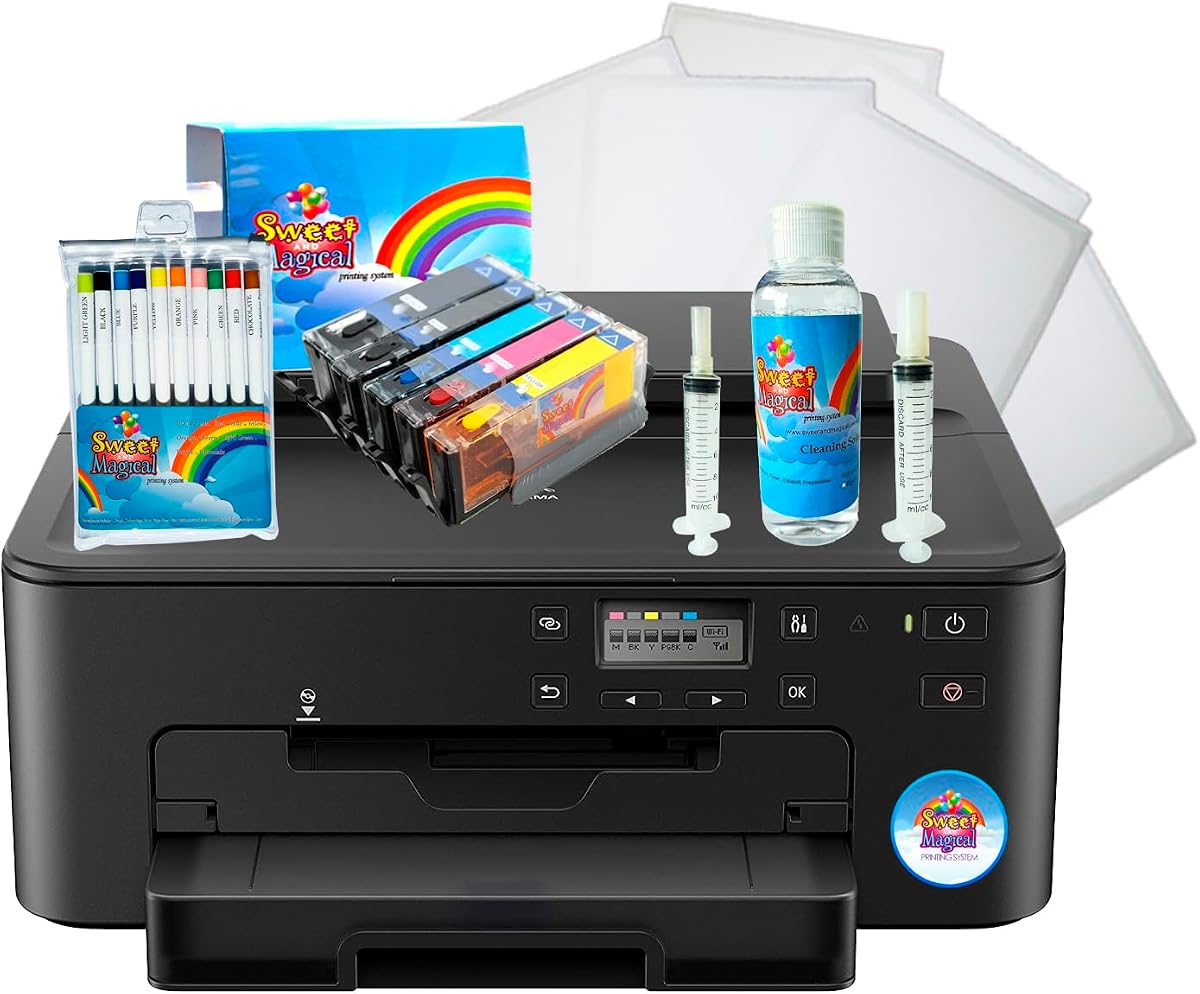


The Ediblethingz bundle is the top choice for bakers needing an all-in-one solution. It arrives with a wireless printer plus essential supplies so you can start decorating immediately upon delivery.
We may earn a commission when you buy through this link, at no additional cost to you.
Its standout quality lies in the included 50 premium wafer sheets and 12 icing sheets. The wireless 4-in-1 printer supports touch controls and mobile printing which simplifies workflows in busy kitchens.
While the price is higher than standalone units the convenience of included paper offsets the initial investment. Users may need time to configure settings initially but the results are worth the effort.
This model suits both professionals and home decorators seeking reliability. We recommend it for anyone wanting a streamlined experience without sourcing compatible paper separately.
Everything required for printing arrives in one box including the printer cleaning kit and premium paper.
Wi-Fi and AirPrint support allow printing from phones or tablets without connecting cables to your computer.
We may earn a commission when you buy through this link, at no additional cost to you.
This bundle focuses on providing necessary accessories for birthday parties. It includes five ink cartridges alongside frosting paper and markers to help personalize cakes easily.
We may earn a commission when you buy through this link, at no additional cost to you.
The inclusion of a printhead kit ensures maintenance is straightforward. Markers add an extra creative layer for hand-tracing or adding text where printers cannot reach.
While details about the specific printer are limited the packaging promises fast shipping which helps last-minute planners. The value lies in the variety of supplies included.
Ideal for event organizers needing quick setup supplies. Consider this if you prioritize having markers and maintenance tools alongside your ink supplies.
Beyond ink and paper the kit offers markers and cleaning tools for complete decoration readiness.
The printhead kit helps maintain quality over time preventing clogs during important event days.
We may earn a commission when you buy through this link, at no additional cost to you.
Similar to the Cake bundle this product emphasizes versatility with frosting and chocolate transfer capabilities. Ten markers allow for detailed handwork alongside printed images.
We may earn a commission when you buy through this link, at no additional cost to you.
The printhead cleaner ensures longevity for your device. With twelve frosting sheets included you have immediate stock for small to medium projects.
Lack of a specific printer rating makes it harder to evaluate performance reliability. However the low entry cost for supplies makes it accessible for beginners.
Choose this if you need flexible paper types and want to save money on initial supplies. It works well for hobbyists experimenting with edible printing.
Prints on frosting wafer and chocolate transfer papers for diverse dessert decorating options.
The affordable price point lowers the barrier for new users entering the edible printing market.
We may earn a commission when you buy through this link, at no additional cost to you.
These cartridges serve as a cost-effective refill option for compatible Canon printers. With a high page yield the 5-pack set supports longer usage without frequent replacements.
We may earn a commission when you buy through this link, at no additional cost to you.
The compatibility list covers many TS and TR models making them versatile for home offices or small businesses. A rating of 4.7 suggests users find them reliable for general printing needs.
Since they are standard ink cartridges you may need to swap in edible ink separately. This requires extra steps but saves money for bulk printing projects.
Best for users owning specific Canon models who want to reduce ink costs. Ensure you buy the correct edible ink separately to meet food safety standards.
Compatible cartridges offer a cheaper alternative to OEM brands for non-edible base printing needs.
Works with TS702 TR8620 TS9520 and other Canon models listed in the product description.
We may earn a commission when you buy through this link, at no additional cost to you.
These refillable cartridges provide an eco-friendly option for frequent printers. They include smart chips that recognize the printer and monitor ink levels in real time.
We may earn a commission when you buy through this link, at no additional cost to you.
The 5-pack combo covers black and color needs. High capacity pages mean fewer interruptions for refills. This appeals to users wanting to reduce plastic waste.
You must purchase edible ink separately to refill these. Manual filling requires care to avoid spills but offers savings over time for regular decorators.
Ideal for budget-conscious buyers with compatible PIXMA printers. Ensure you source food-safe edible ink to comply with safety regulations when using these refillable units.
Smart chips make installation easy and provide real-time ink level tracking for your printer.
Refillable units reduce waste compared to disposable cartridges while maintaining high output volume.
We may earn a commission when you buy through this link, at no additional cost to you.
This set offers a straightforward refill solution for PIXMA users. The smart chip ensures seamless installation and accurate ink level tracking during use.
We may earn a commission when you buy through this link, at no additional cost to you.
With vivid colors and easy installation it is suitable for general printing. The 5-pack covers all standard needs with cyan magenta yellow and black cartridges included.
While not designed specifically for food you can refill them with compatible edible ink. This flexibility lowers ongoing costs for those printing large volumes frequently.
Best for owners of TS models needing reliable refills. Verify compatibility with your printer model before buying to avoid installation errors.
The smart chip technology reduces errors during installation and tracks levels accurately.
Produces clear printing results with rich vibrant hues for high-quality visual output.
We may earn a commission when you buy through this link, at no additional cost to you.
This bundle is designed for users who prefer S and M branded supplies. It includes a branded printer and five bottles of 100 ml ink for substantial print volume.
We may earn a commission when you buy through this link, at no additional cost to you.
The 25 premium wafer sheets offer immediate use for cake toppers. The setup targets birthday party decorators who want consistent brand compatibility.
While the rating is moderate users appreciate the included bottle volume which reduces refill frequency. The branding may limit choices but ensures quality consistency if you trust the brand.
Pick this if you already use S and M inks or prefer consistent brand ecosystems. Ensure the printer matches your required connectivity needs before purchasing.
Five bottles of 100 ml ink provide ample supply for multiple printing sessions without immediate refills.
Using matched branded components may reduce compatibility issues common with third-party accessories.
We may earn a commission when you buy through this link, at no additional cost to you.
This handheld device specializes in printing on coffee foam and desserts. The 5-inch touchscreen and built-in camera allow precise visual positioning of your designs.
We may earn a commission when you buy through this link, at no additional cost to you.
With a 300 dpi resolution you get sharp logos and patterns directly on drinks. The large design area supports ambitious branding projects that exceed compact models.
The standalone operation means no smartphone app is needed which simplifies usage. However the higher cost limits accessibility for casual hobbyists.
Best for cafes and bakeries seeking professional beverage branding. If you need high-volume drink decoration with precision this premium tool delivers advanced features.
The camera and touchscreen let you preview design placement before printing to avoid misaligned artwork.
Ideal for cafés needing consistent logos on lattes and cocktails for brand identity.
We may earn a commission when you buy through this link, at no additional cost to you.
This accessory pod works with the EVEBOT PrintPen to print on drinks and sweets. Each pod holds 20ml of ink and offers a production capacity of 7000 prints.
We may earn a commission when you buy through this link, at no additional cost to you.
The design prioritizes ease of cleaning and use. It is recommended to remove the pod if unused for several days to maintain performance.
The rating reflects some user challenges but the convenience of a single-use pod remains a benefit. It avoids complex refilling mechanisms.
Choose this if you own the PrintPen and need convenient disposable options. The food-grade safety makes it suitable for direct contact with consumables.
Pre-filled pods simplify the process by removing the need for manual ink handling and refilling.
Food-grade materials and easy cleaning steps ensure safe application on desserts and beverages.
We may earn a commission when you buy through this link, at no additional cost to you.
These high-yield cartridges are designed for large printing tasks. With 6360 pages for black and standard color yields they minimize downtime for replacements.
We may earn a commission when you buy through this link, at no additional cost to you.
They are compatible with Canon TS702 and similar models. The professional quality output ensures crisp text and vivid colors for your designs.
Like other refillables you will need edible ink separately to ensure food safety. The cost savings for bulk printing make them a practical choice.
Best for commercial kitchens printing high volumes of labels or toppers. Verify your printer model compatibility and source food-safe inks separately.
The high-yield design supports extended use which is ideal for high-volume commercial printing needs.
Delivers crisp text and vivid true-to-life colors for professional presentation on printed items.
We may earn a commission when you buy through this link, at no additional cost to you.
Selecting the right edible ink printer depends on your specific needs volume of production and budget. Consider these factors to find a model that suits your baking or beverage operations.
Decide between a full desktop printer or a handheld device. Desktop units are better for large batches while handhelds work well for individual beverages.
Choose the type based on your primary use case.
Some bundles include wafer paper and cleaning kits while others only provide the device. Bundles save time but ensure the included paper matches your needs.
Prioritize bundles that include sufficient starter supplies.
Confirm the printer accepts edible ink cartridges or refillable units. Standard office printers can often be adapted but check food safety certifications.
Verify compatibility before buying to avoid safety issues.
Look for wireless options like Wi-Fi or AirPrint. Mobile printing allows you to send designs directly from your phone without connecting to a computer.
Wireless connectivity adds significant workflow flexibility.
Resolution affects how sharp your images look. Aim for at least 300 dpi for clear logos and detailed graphics on food surfaces.
Higher resolution ensures professional looking results.
Print heads can clog if not cleaned regularly. Choose a model with a cleaning kit or easy access for maintenance to ensure longevity.
Plan for regular cleaning to keep your printer working.
Prices vary widely from standalone cartridges to full bundles. Determine your initial budget and factor in the cost of ongoing ink and paper supplies.
Balance upfront costs with long-term operational expenses.
Ensure all inks and papers are food-grade certified. Safety is paramount when printing directly on items that will be consumed.
Always verify food-safe certifications before use.
Set up your printer according to the manual instructions. Connect it to your Wi-Fi network and install the necessary drivers on your computer or mobile device.
Load edible wafer or icing paper into the input tray carefully. Ensure the paper is flat and aligned to prevent jams during the printing process.
Clean the print head regularly using the included kit or recommended solution. This maintains print quality and extends the life of your device for future use.
Edible ink printers use food-grade dye-based inks that are safe for consumption. These inks are often sold in refillable cartridges or bottles. Always verify the ink is certified food-safe for your specific model.
No standard printer paper is not edible and can be toxic. You must use specialized edible paper such as wafer or icing sheets designed for food contact. These papers are safe for consumption and compatible with edible inks.
Lifespan depends on usage frequency and model. Standard cartridges may last for hundreds of prints while refillable bottles can produce thousands. Store them in a cool dry place to prevent drying.
Many Canon and Epson models work well for edible printing. Ensure the printer supports refillable cartridges or has a compatible feed system for the paper thickness used in edible projects.
Yes when using certified food-grade inks and papers. The printed image sits on top of the wafer or icing sheet which is edible. Always check product labels to confirm safety certifications.
Wafer paper is best for smooth surfaces like fondant while icing sheets work well for buttercream. Choose based on the texture of your dessert surface for optimal adhesion.
Use the included cleaning kit or a damp cloth to wipe the print head. Run maintenance cycles through the printer settings regularly to prevent ink clogs during use.
Some edible transfer papers work on chocolate but results vary by type. Check if your printer supports chocolate transfer sheets for best results on solid chocolate surfaces.
We recommend the Ediblethingz bundle for its complete supply set and wireless ease of use. For cafes the handheld Edible Ink Coffee Printer offers advanced beverage branding options.
If budget is a priority the refillable cartridge options provide great value for users with existing Canon printers. Evaluate your setup to find the best fit for your operations.
Always check current pricing and availability before purchasing. Product specs and stock can change so verify details on the manufacturer or retailer site.