
10Gb/s SFP+ Fiber Port Ethernet Adapter
4.3Editor score
Intel 82599ES Chipset
10Gb/s SFP+ Port
Wide OS Support
This guide compares ten top fiber optic network interface cards for servers and PCs, evaluating speed, compatibility, and reliability for optimal network
Choosing the right fiber optic network interface card can transform your server or desktop into a high-speed powerhouse. These cards offer superior speed and reliability compared to traditional copper connections, making them essential for modern data centers and demanding home labs.
We analyzed ten leading models based on chipset quality, compatibility, and real-world performance metrics. Our selection includes options from trusted brands like Intel, StarTech, and TP-Link, ensuring you find a card that meets your specific bandwidth and budget requirements.
Each pick highlights key features, pros, and cons to help you make an informed decision quickly. Remember that prices and availability change frequently, so always verify current details before purchasing to ensure you get the best deal available today.
4.3Editor score

5.0Editor score

4.9Editor score
Below is a side-by-side comparison of the top ten fiber optic network interface cards, highlighting their key specifications and unique features to help you choose the perfect fit for your setup.


The StarTech 2-Port GbE SFP Network Card stands out as the top choice for reliable server upgrades. Featuring the trusted Intel I350 chipset, it delivers consistent gigabit performance with two flexible SFP slots for copper or fiber connections.
We may earn a commission when you buy through this link, at no additional cost to you.
Its standout qualities include robust offloading features and broad OS compatibility, making it ideal for virtualization environments. The built-in heatsink ensures stable operation under load, while LED indicators simplify network diagnostics.
While limited to 1G speeds, its reliability and compatibility outweigh this for most users. The need to purchase separate SFP modules adds to the total cost but ensures optimal customization.
Server administrators and home lab enthusiasts should prioritize this card for its stability. It is a dependable investment for those seeking consistent gigabit connectivity without compatibility headaches.
The Intel I350 chipset ensures stable data transmission with advanced offloading features that reduce CPU load.
Two unlocked SFP slots support various transceivers, allowing adaptation to existing fiber or copper cabling.
We may earn a commission when you buy through this link, at no additional cost to you.
This 10Gb/s SFP+ adapter offers exceptional value for users needing 10G connectivity without breaking the bank. Powered by the Intel 82599ES controller, it delivers consistent performance ideal for NAS and gaming scenarios.
We may earn a commission when you buy through this link, at no additional cost to you.
Its major strengths include support for both fiber and direct-attach copper, plus broad compatibility with various operating systems. The PCIe x4 interface provides ample bandwidth, while the included brackets fit most cases.
However, Windows users must install drivers for Windows 10 and 11, which can be a minor hurdle. The passive heatsink may require case airflow to avoid overheating under sustained loads.
Budget-conscious buyers should choose this card for its cost-effective 10G upgrade path. It is particularly recommended for home labs and NAS users looking for reliable high-speed storage access.
Competitively priced while retaining high-quality Intel silicon, making it accessible for DIY enthusiasts.
Supports iSCSI and FCoE protocols, enabling efficient storage over Ethernet for network-attached storage systems.
We may earn a commission when you buy through this link, at no additional cost to you.
The Asus 10Gbps Gigabit Ethernet adapter delivers blazing fast speeds with a sophisticated design. It supports 10Gbps speeds, offering a significant boost over standard gigabit connections for demanding tasks.
We may earn a commission when you buy through this link, at no additional cost to you.
Key strengths include its aluminum heatsink for thermal management and built-in QoS technology to prioritize bandwidth for critical streams. The SFP+ cage ensures flexibility for both fiber and direct-attach copper connections.
One trade-off is the higher price compared to generic alternatives, but the build quality and features justify the cost. Users must purchase separate SFP modules to utilize the fiber capabilities.
Gamers and power users should opt for this card for its performance and aesthetic appeal. It is ideal for those who value both speed and reliable thermal management in their build.
A stylish aluminum heatsink keeps the adapter cool during high-performance tasks, ensuring sustained operation.
Built-in QoS automatically boosts bandwidth to important streams or games, reducing lag during critical moments.
We may earn a commission when you buy through this link, at no additional cost to you.
This 10Gtek card provides high performance with an authentic Intel 82599EN controller, ensuring reliable stability for servers and workstations. It supports both Windows Server and Linux environments effectively.
We may earn a commission when you buy through this link, at no additional cost to you.
Strengths include support for I/O virtualization and compatibility with various brackets for different chassis types. The card handles storage protocols like iSCSI and NFS well, making it a strong choice for data transfer.
Note that Windows 11 users need to install drivers correctly, which may be a minor challenge. It also does not support hot swapping, requiring a system shutdown for changes.
Server users should buy this for its robust controller and virtualization support. It is well-suited for data center environments needing reliable single-port 10G connections.
Equipped with an original Intel controller that supports I/O virtualization, enhancing server stability and efficiency.
Includes both full-height and low-profile brackets, allowing easy installation in various computer case sizes.
We may earn a commission when you buy through this link, at no additional cost to you.
This card features the Realtek RTL8127 controller with PCIe Gen4 x1 interface, offering modern connectivity options. It supports up to 10Gb/s speeds and includes exclusive RealWoW technology for enhanced data transmission stability.
We may earn a commission when you buy through this link, at no additional cost to you.
Key strengths include broad slot compatibility and robust protocol support like VLAN tagging. The card works seamlessly with Windows and various Linux kernels, making it versatile for different setups.
However, Linux users are limited to kernel versions up to 6.15, and FreeBSD is not supported. This may restrict its use in older or alternative Linux environments.
Buyers should choose this for its modern PCIe interface and stability features. It is a great fit for users needing flexible installation and reliable performance on supported systems.
Features a PCIe Gen4 x1 lane design that is operable in various slots, ensuring wide compatibility.
Exclusive RealWoW technology significantly boosts data transmission stability with wake-up and diagnostics functions.
We may earn a commission when you buy through this link, at no additional cost to you.
This card utilizes genuine Intel 82599EN silicon, offering a cost-effective way to add 10G throughput to systems. It is compatible with X520-DA1 and works well for NAS transfers and VM migrations.
We may earn a commission when you buy through this link, at no additional cost to you.
Its major strengths include no vendor lock-in on the SFP cage, allowing use with third-party modules. It is also detected by many systems without drivers, simplifying setup.
The passive heatsink runs warm by design, so adequate airflow is essential for stable operation. This may not be ideal for silent builds without additional cooling measures.
Budget buyers should prioritize this for its genuine Intel core and broad compatibility. It is a solid choice for NAS users needing reliable high-speed connections at a low cost.
Third-party transceivers and cables work without issues, unlike branded cards that restrict modules.
Detected by Proxmox and TrueNAS without driver steps, streamlining the initial installation process.
We may earn a commission when you buy through this link, at no additional cost to you.
The CX4121A adapter offers a high-performance dual-port solution for advanced server needs. Based on the Mellanox ConnectX-4 Lx controller, it provides cost-effective 25GbE connectivity for demanding applications.
We may earn a commission when you buy through this link, at no additional cost to you.
Key strengths include RDMA over RoCE support and advanced overlay network features like NVGRE and VXLAN. The dual SFP28 ports ensure high bandwidth with flexible media options.
It requires specific transceivers for optimal performance, which may limit some users. Power consumption is higher due to the advanced features, so ensure adequate system power.
Enterprise users should opt for this for its high speed and virtualization support. It is ideal for cloud and storage platforms needing efficient data transfer.
Supports RDMA over RoCE for low-latency data transfer, ideal for high-performance computing environments.
Advanced overlay network support provides adaptability for complex cloud and data center infrastructure.
We may earn a commission when you buy through this link, at no additional cost to you.
This fiber optic network card features a stable 82599EN chip and includes a multimode optical module, offering immediate usability. It supports 10Gb speeds and is compatible with various operating systems.
We may earn a commission when you buy through this link, at no additional cost to you.
Strengths include gold-plated fingers for reliable contact and support for both single-mode and multimode modules. The card offloads TCP/IP tasks to free up CPU resources efficiently.
It is limited to a single port, which may restrict dual-link setups. Ensure your system has a PCIe X1 or larger slot, as it is not compatible with legacy PCI slots.
Users should buy this for its bundled module and reliability. It is well-suited for workstations and industrial PCs needing straightforward fiber connectivity.
Comes with a multimode optical module included, saving time and cost on initial setup.
Gold-plated fingers ensure effective oxidation resistance and reduce hardware contact faults.
We may earn a commission when you buy through this link, at no additional cost to you.
The TP-Link TX401 uses 10GBase-T technology to deliver 10G speeds over standard copper cables. It is an excellent choice for those avoiding fiber optics or complex SFP module setups.
We may earn a commission when you buy through this link, at no additional cost to you.
Key strengths include backwards compatibility with lower data rates and inclusion of a CAT6A cable. The QoS technology ensures prioritized performance for gamers and streaming tasks.
Since it uses RJ45 ports, it requires structured cabling for optimal performance. Ensure your switch and cabling support 10GBase-T to get full benefits.
Buyers should choose this for simple copper upgrades. It is ideal for desktop users needing 10G without investing in new fiber infrastructure.
Uses standard RJ45 connections, making it easy to integrate with existing copper cabling systems.
Backwards compatible with multiple data rates, automatically negotiating for optimal connection speed.
We may earn a commission when you buy through this link, at no additional cost to you.
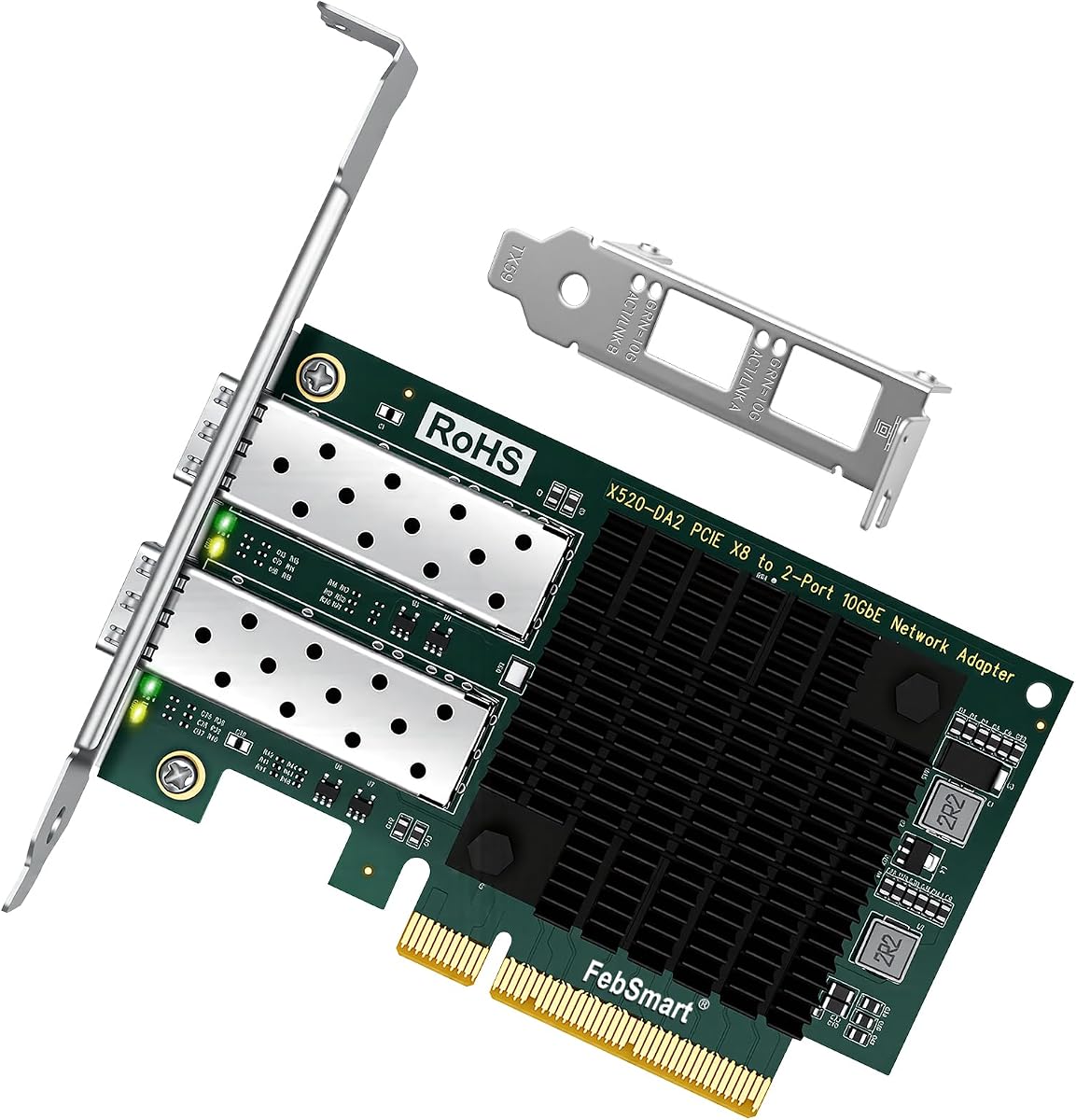
The FebSmart X520-DA2 provides dual 10GbE SFP+ ports for high-bandwidth connectivity. Powered by the Intel 82599ES controller, it delivers stable LAN and SAN connectivity for desktops and servers.
We may earn a commission when you buy through this link, at no additional cost to you.
Strengths include support for Intel Virtualization Technology and protocols like FCoE. The PCIe x8 interface ensures sufficient bandwidth for full-duplex operations across both ports.
Note it requires a PCIe x8 slot, which may not fit all motherboards. Users must also purchase separate SFP+ transceivers to activate the ports.
Virtualization users should opt for this for its dual-port capacity. It is ideal for servers needing redundant high-speed connections or dedicated storage links.
Features two SFP+ ports allowing redundant connections or simultaneous data paths for high throughput.
Includes VMDq and SR-IOV support, enhancing performance in virtualized server environments.
We may earn a commission when you buy through this link, at no additional cost to you.
Selecting the right fiber optic network interface card requires understanding several key factors. This guide walks you through the essential considerations to ensure optimal performance for your specific needs.
The chipset determines the reliability and feature set of the card. Opt for cards with proven chipsets like Intel 82599 or I350 for consistent performance.
Prioritize cards with trusted chipsets to avoid compatibility issues.
Decide between fiber (SFP/SFP+) or copper (RJ45) based on your existing cabling. Fiber offers longer reach, while copper is easier to set up.
Match the port type to your current network infrastructure.
Assess your bandwidth needs. Options range from 1G to 10G or 25G. Choose based on your server or desktop workload.
Select a speed that matches your application demands.
Verify that the card supports your operating system. Linux, Windows Server, and VMware support varies by model and driver availability.
Ensure driver support for your OS to avoid setup issues.
Check the form factor and slot requirements. Some cards need PCIe x8 while others fit x1. Also consider low-profile brackets for small cases.
Confirm slot and bracket compatibility with your case.
If using virtual machines, look for support like SR-IOV and VMDq. These enhance network performance in virtualized environments.
Prioritize virtualization features if running VMs.
High-speed cards generate heat. Ensure your case has adequate airflow or look for models with active cooling.
Consider thermal design to prevent overheating.
Remember that SFP cards require separate transceivers. Factor these in to your total budget when selecting a card.
Account for extra costs like modules in your budget.
Install the card in a compatible PCIe slot and secure it with a bracket. For fiber connections, insert the appropriate SFP module and connect the fiber cable carefully to avoid damage.
After installation, install the necessary drivers for your operating system. Ensure your BIOS settings enable PCIe slots properly for optimal functionality.
Keep the card clean and ensure airflow around it to prevent overheating. Regularly check link lights for connection status and troubleshoot via LEDs if issues arise.
SFP supports up to 1G speeds, while SFP+ handles up to 10G. SFP+ is backward compatible with SFP modules but may not reach full speed with older optics.
Yes, most fiber cards do not include SFP modules. You must purchase them separately based on your fiber type, such as multimode or singlemode.
SFP+ cards can use direct-attach copper (DAC) cables instead of fiber. This is a cost-effective alternative for shorter connections.
Most cards support Windows Server, Linux, and VMware. Always check driver availability for specific OS versions before purchasing.
Yes, most need drivers installed on Windows or Linux. Some are plug-and-play on Windows Server, but desktop OS versions may require manual installation.
Yes, if your case has a compatible PCIe slot and proper airflow. Ensure the card fits the bracket size and slot width.
RDMA allows data to be transferred directly between memory without CPU intervention. It improves performance for high-speed storage and virtualization.
High-speed data processing generates heat. Ensure your case has adequate ventilation to cool the card's passive heatsink.
The top picks highlight a range of reliable options from budget-friendly to premium 25G speeds. Each offers unique advantages tailored to different server and desktop needs.
Prioritize chipset quality and OS compatibility for long-term satisfaction. Ensure your system has the necessary physical space and cooling to support your choice.
Always verify current availability and pricing before purchasing. Network requirements change, so choose a card that aligns with your future infrastructure goals.