
Wireless Caregiver Pager
4.7Editor score
Expandable system
Bright and proof
Affordable price
Caring for aging parents often requires thoughtful tools that enhance safety and independence. The right gadgets can provide peace of mind for family members while supporting daily routines at home effectively.
We evaluated ten highly rated devices focusing on ease of use, reliability, and specific needs like memory loss or emergency alerts. Each product was selected based on user feedback and essential features for seniors.
Every pick includes key specifications and real-world benefits to help you decide quickly. Please note that availability and pricing may vary over time so checking current listings is recommended.
4.7Editor score

4.8Editor score

4.4Editor score
As an Amazon Associate we earn from qualifying purchases.
The following table offers a quick side-by-side look at the top ten gadgets evaluated for seniors. Compare key specifications and features to find the best fit for your specific household needs and requirements.


This WiFi care pager stands out as the top choice for modern families needing reliable remote alerts. It combines traditional pager reliability with smart app notifications to ensure help is never delayed when seniors need it.
We may earn a commission when you buy through this link, at no additional cost to you.
The standout feature is the ability to send instant alerts to mobile phones via an app without ongoing costs. The waterproof call button works in bathrooms while the watch button provides convenient wrist access for daily use.
Some users may find the Wi-Fi setup slightly technical compared to simple radio signals. Additionally phone and SMS alerts require an optional subscription which adds a small cost but is not essential for basic safety.
This device is ideal for tech-savvy caregivers who want flexibility across multiple devices. It offers peace of mind through its multi-channel alert system and robust physical design for daily home monitoring needs.
Family members receive push notifications on smartphones so they can respond even when away from home ensuring continuous support regardless of location.
Seniors can choose between a handheld button or a wearable watch button allowing them to call for help in whichever way feels most natural and comfortable for them daily.
We may earn a commission when you buy through this link, at no additional cost to you.
For households needing a reliable call system without extra bells and whistles this wireless pager offers excellent value. It delivers core functionality like long range and expandability at a price point that is hard to beat.
We may earn a commission when you buy through this link, at no additional cost to you.
The 1500-foot wireless transmission allows caregivers to roam freely while staying connected. With room to add up to 30 call buttons it scales well for larger homes or multi-room setups where multiple alerts may be needed.
It lacks digital connectivity but that simplicity is often a benefit for elderly users who prefer straightforward tools. The rugged build handles varied temperatures making it suitable for various indoor environments comfortably.
This is the perfect starting point for families on a tight budget who still need dependable emergency contact. Its simplicity ensures seniors can use it intuitively while caregivers remain confident in coverage.
You can expand the system with up to 30 call buttons allowing you to add more points of contact as your household needs grow over time.
Built to withstand extreme temperatures from freezing to very hot conditions this pager ensures reliable operation in diverse household environments throughout the year.
We may earn a commission when you buy through this link, at no additional cost to you.
This device goes beyond simple alerts by offering a visual connection between seniors and their families. The large screen allows parents to see smiling faces without managing complicated smartphone apps which is a major plus for isolation.
We may earn a commission when you buy through this link, at no additional cost to you.
Beyond communication it provides physical safety through fall and distress sound detection. The camera auto-tracks movement so seniors remain in view automatically while privacy features allow families to respect personal time when needed.
The requirement for constant power and setup could be a hurdle for less technical seniors. However the absence of hidden subscription fees makes it a cost-effective solution for long-term monitoring and video interaction.
Families seeking both safety and emotional connection will find this tool invaluable. It bridges the gap between remote care and presence ensuring parents feel seen and protected throughout their day.
Parents can see family members directly on the screen with a single press reducing feelings of loneliness while allowing relatives to share joyful moments easily.
The camera detects loud crashes or cries and immediately alerts phone so that potential falls or medical emergencies are noticed by family without delay.
We may earn a commission when you buy through this link, at no additional cost to you.
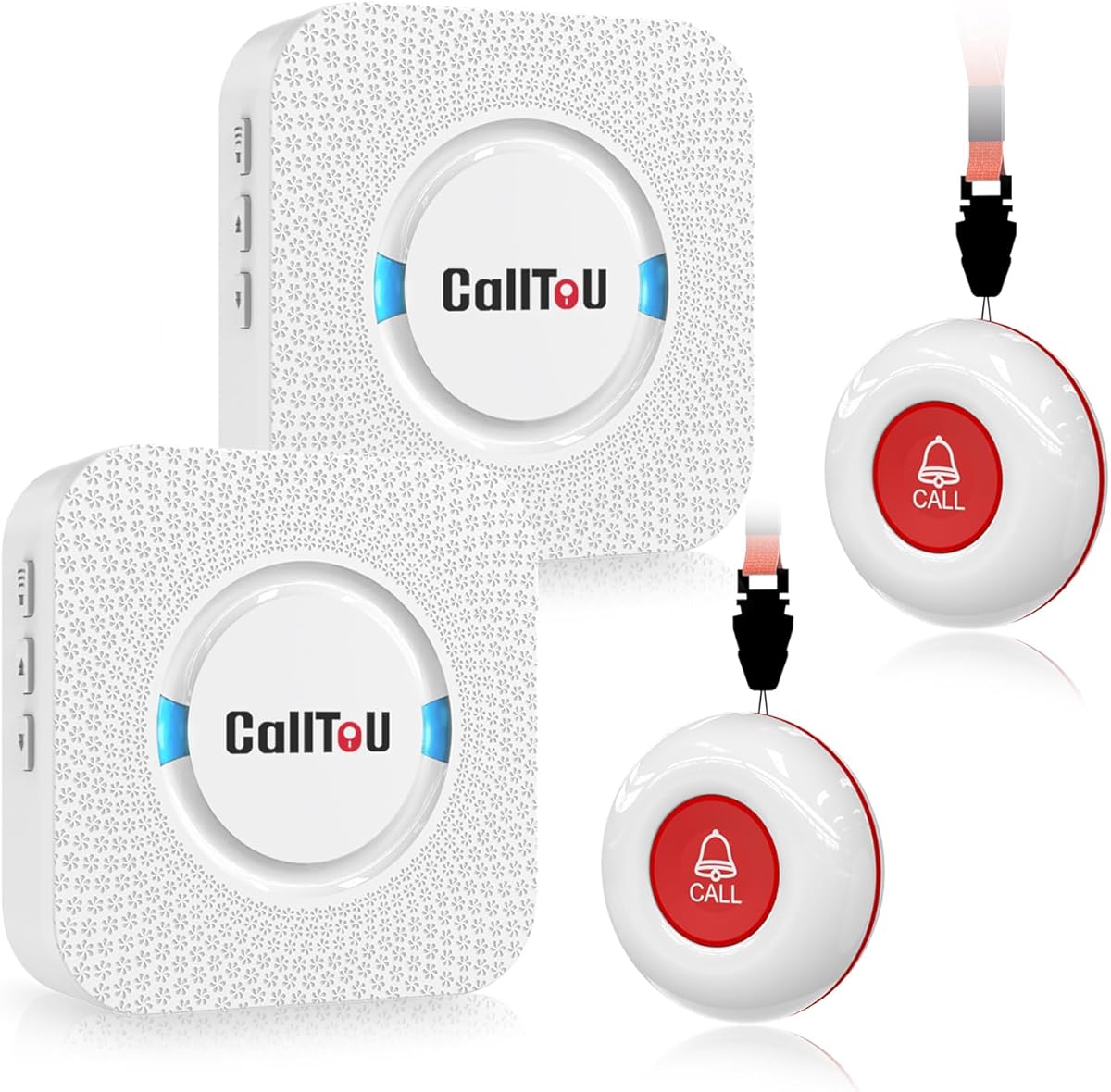
The CallToU pager is designed for homes where loud alerts and waterproof safety are top priorities. Its robust receiver allows caregivers to move through rooms while ensuring the signal is always clearly heard.
We may earn a commission when you buy through this link, at no additional cost to you.
It features 55 different ringtones and adjustable volume up to 110dB which is perfect for noisy environments or hard of hearing users. The buttons can be hung around the neck or wall mounted for versatility.
The need to plug the receiver into an outlet limits flexibility slightly compared to battery powered options. But the waterproof build ensures it works in bathrooms where falls are most common.
This model suits families who prioritize simple strong alerts over smart features. It provides consistent communication where loud clear sound and water resistance matter most for effective caregiving.
With 55 ringtones you can choose a tone that is distinct and easy to recognize quickly in any noisy household situation to ensure alerts are never missed.
Call buttons can be secured around the neck like a pendant offering a hands-free option for seniors who need to move freely around the house.
We may earn a commission when you buy through this link, at no additional cost to you.
FullHouse offers a flexible system that works well for various locations including hospitals and private homes. The inclusion of a wristband gives seniors immediate access to calling help without fumbling for devices.
We may earn a commission when you buy through this link, at no additional cost to you.
A unique feature is the silent mode with LED flash which is ideal for shared living spaces or night times. The signal reaches up to 1000 feet in open air making it robust for large layouts.
While the button is splash proof it should be removed before showering which limits bathroom use during water exposure. This is a small trade-off for the versatility it provides elsewhere in the home.
This device is well-suited for families who need a balance of range and affordability. It supports both wall mounted and wearable options to adapt to different daily needs.
The silent LED flash option lets caregivers know when a call is made without disturbing others sleeping nearby during night hours.
The included wristband ensures that a call button is always on the person allowing for quick emergency signaling if the senior falls in an unmonitored area.
We may earn a commission when you buy through this link, at no additional cost to you.
This clock is specifically designed to reduce confusion for seniors with memory loss or dementia. It spells out morning afternoon and evening clearly rather than using confusing AM PM codes to aid orientation.
We may earn a commission when you buy through this link, at no additional cost to you.
Auto night dimming protects eyes and sleep quality while backup settings ensure the clock stays accurate during power outages. It also supports eight languages making it versatile for diverse households or visitors.
The device requires a constant power source and does not have battery backup for timekeeping which limits placement options. But for those needing clear time orientation the benefits are substantial.
It is an essential tool for those needing structure in their day. The visual clarity helps seniors know exactly what part of the day it is without needing assistance to interpret the display.
Time is displayed as morning afternoon or evening which removes ambiguity and helps seniors with memory issues stay oriented to their daily schedule.
The screen dims automatically at night to prevent bright light from disrupting sleep while remaining readable when needed.
We may earn a commission when you buy through this link, at no additional cost to you.
For those with weak vision or mobility this clock offers a voice function to announce the time and date. This hands-free feature is highly beneficial for seniors who cannot easily read small screens or reach buttons.
We may earn a commission when you buy through this link, at no additional cost to you.
It features large bold letters and auto dimming to adapt to daily lighting. The setup is intuitive allowing quick configuration of multiple alarms for medication or appointments without technical struggles.
The absence of a wall mount option means it stays on a table or shelf which might limit placement flexibility. But the voice feature compensates well for visual or physical limitations.
This clock is a great gift for seniors needing assistance reading displays. It combines simplicity with functional aids to make daily routines smoother and safer for memory support.
Pressing a button announces the time and date aloud which is a critical aid for seniors with visual impairments or arthritis.
Multiple alarm settings allow seniors to schedule alerts for medications or activities helping them stay on track independently.
We may earn a commission when you buy through this link, at no additional cost to you.
This system allows multiple family members to receive alerts simultaneously ensuring someone is always available to respond. The app interface lets you customize sounds so you know exactly which button was pressed.
We may earn a commission when you buy through this link, at no additional cost to you.
It integrates phone notifications for offline situations ensuring messages are not missed. The wristband option offers a wearable solution for seniors who prefer carrying a device on their body.
Dependency on Wi-Fi can be an issue in homes with unstable internet. However the option to upgrade to phone and text alerts provides a reliable backup for critical safety moments.
Ideal for families needing coordinated response capabilities this pager keeps everyone informed. It balances modern connectivity with simple hardware design for practical caregiving support.
Shared alerts ensure that multiple caregivers are notified at once reducing the risk of a call going unanswered when one person is busy.
You can choose specific ringtones for different buttons so you know immediately if a wrist or wall button was pressed in any room.
We may earn a commission when you buy through this link, at no additional cost to you.
This clock doubles as an electronic photo frame allowing families to display cherished memories on a large display. It provides both time orientation and emotional comfort for seniors needing a touch of home.
We may earn a commission when you buy through this link, at no additional cost to you.
It includes 20 alarms and reminders for daily tasks like water intake or medication which supports independent living. Custom themes and brightness levels make it adaptable for different visual preferences.
It lacks a voice function which might be a drawback for visually impaired seniors. But the photo feature adds a unique value that purely functional devices do not offer for mental engagement.
Perfect for households wanting to reduce isolation this device offers both utility and joy. It helps seniors stay organized while feeling connected to their family through displayed photos.
Uploading family photos to the screen provides a constant source of comfort and connection for seniors spending time alone at home.
Custom reminders let you set alerts for specific needs like drinking water or attending appointments ensuring they stay on schedule safely.
We may earn a commission when you buy through this link, at no additional cost to you.
This compact pager system offers flexibility with a belt clip for caregivers and wall brackets for seniors. It is ideal for smaller spaces or where a discreet solution is needed without sacrificing reliability.
We may earn a commission when you buy through this link, at no additional cost to you.
It includes both a chime and a continuous siren option ensuring alerts are noticeable. The battery life is long-lasting reducing maintenance efforts for caregivers managing daily equipment.
The range is standard but sufficient for most home setups. While simple it focuses on the essential function of calling help quickly without unnecessary complications for elderly users.
For those needing a portable and low-maintenance call system this pager works well. It ensures caregivers stay close enough to respond while providing seniors with reliable help options.
The clip lets the pager attach to a belt or waistband keeping the device close and handy for busy caregivers.
Switching to alarm mode provides a continuous sound that is harder to ignore than a simple chime ensuring urgent calls are heard.
We may earn a commission when you buy through this link, at no additional cost to you.
Selecting the right gadget depends on specific needs such as mobility, memory, or communication. This guide outlines essential factors to consider for making a safe and practical choice.
Determine whether a simple pager, smart app, or video call is best. Pagers offer loud alerts while apps provide remote reach and video adds emotional connection.
Choose the alert type that matches your family's tech comfort and the senior's daily routine.
Consider the distance between rooms and floors in the home. Systems with longer wireless ranges or WiFi connectivity ensure no area is left uncovered.
Verify coverage limits to ensure help can be reached from every important area in the house.
Look for large buttons simple interfaces and intuitive designs. Complex setups can be a barrier for those with memory loss or limited dexterity.
Prioritize devices that require minimal steps to activate in an emergency.
Waterproof or water-resistant designs are essential for bathroom use where falls are common. Ensure the device can handle splashes or humidity safely.
Check for splash-proof ratings if the device will be placed in wet areas.
Review whether the device requires ongoing fees. Some smart alerts offer monthly plans while basic systems function without additional costs.
Opt for one-time purchase devices if budget is a concern for long term use.
Check if the device needs constant power or battery backup. Battery operated units offer flexibility but need recharging which can be forgotten.
Consider devices with long battery life or backup power to prevent unexpected failures.
For clocks and screens ensure fonts are large and clear. High contrast displays help seniors with declining vision stay oriented.
Choose products with adjustable brightness to protect eyes during the night.
Select brands that offer clear warranties and responsive customer support. Access to help during setup or troubleshooting is critical for reliable use.
Check for warranties of at least one year to cover potential defects.
Place call buttons or watches in locations where they are easy to reach such as beside beds or in bathrooms. Ensure seniors know how to press them clearly for help.
Regularly test the system by activating the alert and confirming the signal is received. This keeps the device ready for real emergencies and ensures connections stay active.
Keep batteries charged and screens clean to maintain performance. Update app notifications as needed and check for any software or firmware changes periodically.
Yes many devices on this list offer large displays and voice announcements designed specifically for memory support. Clocks that spell out time periods help reduce confusion and aid daily orientation effectively.
Most of the pagers and alarms listed function without monthly subscriptions. Smart systems may offer optional plans for advanced alerts but core safety features work on a one-time purchase basis.
Yes some models support shared notifications allowing multiple family members to be alerted simultaneously. This ensures help is always available even if one caregiver is occupied.
Waterproof buttons are highly recommended if you plan to use the device in a bathroom. Falls often occur in wet areas and a waterproof seal protects the device from damage.
Most devices require plugging the receiver into an outlet and pairing buttons via a simple button press. Follow the included manual for range testing to confirm connection reliability.
Most devices designed for seniors are simple to use with minimal training. Large buttons and clear indicators help them call for help without needing assistance.
The devices highlighted in this guide offer a range of solutions from basic pagers to smart monitoring tools. Selecting the right one ensures both safety and peace of mind for all family members.
Prioritize ease of use and reliability over complex features if your seniors prefer simplicity. The goal is to create a secure environment where help is always accessible without hassle.
Always check current availability and support details before buying as offerings can change. Your choice should reflect the unique needs and comfort levels of your loved ones.