
DUMOS 52" Reversible Gaming Computer Desk with Drawers and Power Outlet
4.6Editor score
Reversible L/R Setup
Smart RGB Lighting Control
Integrated Power Hub
Finding the right gaming desk for console setup transforms your entertainment space into a professional battlefield. You need ample surface area for monitors, consoles, and accessories while keeping cables organized and within easy reach during intense gameplay sessions.
We compared ten highly rated desks based on storage capacity, power accessibility, lighting features, and structural stability. Each model offers unique benefits like reversible layouts, built-in drawers, or specialized PC stands to match your specific console and computer configuration needs.
Every pick highlights key strengths and potential trade-offs to help you decide quickly. Product availability and pricing fluctuate frequently, so check current listings before purchasing to ensure you secure the best value for your dedicated gaming environment setup.
4.6Editor score

4.7Editor score
4.6Editor score
As an Amazon Associate we earn from qualifying purchases.
This side-by-side comparison highlights the unique specifications and standout features of each recommended desk to simplify your final selection process for a customized console gaming station.




This L-shaped desk earns our editor choice award for balancing storage, lighting, and power in a single unit. It scores high on organization with shelves and outlets that keep consoles and accessories tidy during long sessions.
We may earn a commission when you buy through this link, at no additional cost to you.
The reversible layout allows you to configure the desk for left or right handed use while the RGB LED strip adds customizable ambience. Integrated AC and USB ports mean you never need extension cords near your console setup.
Stability is solid with X-shaped supports but the metal frame is lightweight compared to solid wood options. Assembly tools are included though having a helper speeds up the process significantly for larger rooms.
Ideal for gamers needing a dedicated corner station this desk offers exceptional value. Prioritize it if you want integrated power and lighting without complex wiring or separate accessories cluttering your space.
Built-in AC outlets and USB ports reduce clutter while the RGB LED strip adds immersive lighting effects controlled by memory functions and dynamic modes.
Interchangeable side modules let you reconfigure the desk for your specific room corner ensuring optimal space use for consoles and peripherals.
We may earn a commission when you buy through this link, at no additional cost to you.
DUMOS offers an affordable yet feature-rich option for console setups without sacrificing key elements like storage or lighting. Its budget-friendly price still delivers reversible design and smart RGB control via app.
We may earn a commission when you buy through this link, at no additional cost to you.
Three fabric drawers provide hidden storage for game controllers and wires keeping the desktop clear. The monitor stand elevates screens to eye level reducing strain during extended play sessions comfortably.
Music sync lighting is a standout feature allowing lights to pulse with game audio or music. While the frame is sturdy the fabric drawers need occasional cleaning to stay looking fresh.
Choose this if you want smart lighting and organization on a budget. It suits smaller rooms where compact storage and ergonomic monitor placement matter more than expansive desktop surface area.
RGB LED strips sync with music or game audio via app control creating an immersive experience with over 60000 colors and dynamic modes.
Three fabric drawers keep controllers and cables out of sight ensuring a tidy workspace while maintaining easy access during gameplay.
We may earn a commission when you buy through this link, at no additional cost to you.
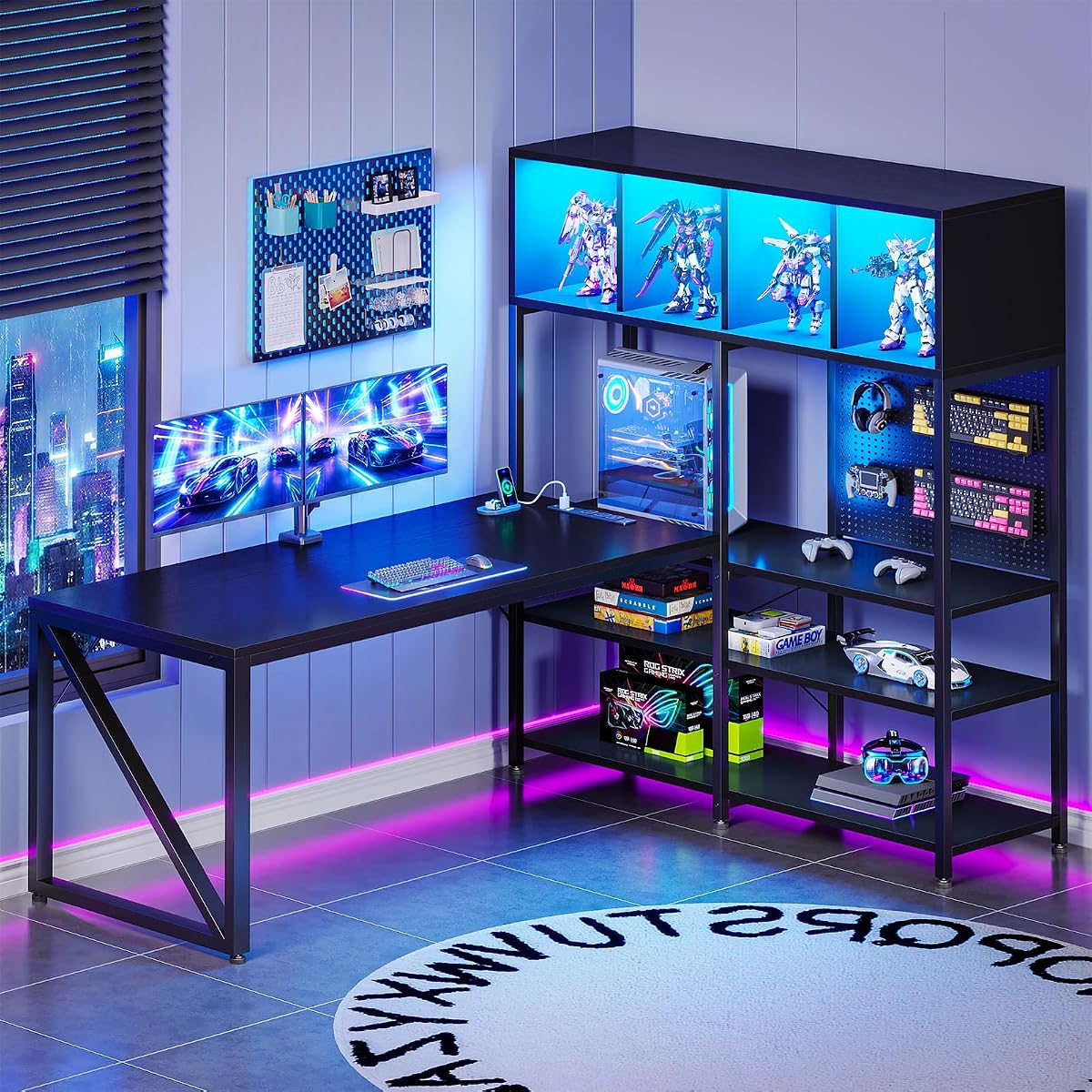
This premium model stands out with a dedicated display cabinet and pegboard for a show-ready gaming setup. It excels in organization and aesthetics for collectors wanting to showcase figures alongside their console gear.
We may earn a commission when you buy through this link, at no additional cost to you.
The 21 inch deep desktop provides room for large mouse pads and dual monitors without crowding. Under-desk shelves keep consoles and boxes off the floor maintaining a clean visual profile.
Built-in power outlets simplify cabling while the reversible shelves adapt to your room layout. Stability is excellent with thick legs though the price reflects these upgraded features and larger size.
Select this if you want a complete workstation with display capabilities. It fits users who value organization and space for collectibles alongside powerful gaming hardware in a single cohesive unit.
A four compartment display cabinet protects collectibles while keeping them visible and the pegboard allows hanging accessories for quick access and a tidy desktop.
An extra deep 21 inch desktop accommodates large mouse pads and provides comfortable viewing distance for dual monitors and multi-device setups.
We may earn a commission when you buy through this link, at no additional cost to you.
This desk targets PC gamers who want their rig to be the centerpiece. The elevated stand lifts transparent cases to eye level creating a striking visual centerpiece without blocking desk surface.
We may earn a commission when you buy through this link, at no additional cost to you.
Three drawers swallow cables and accessories keeping the workspace minimalist while RGB lighting syncs with the PC case for a cohesive ecosystem. Vertical space is used wisely with a side display shelf.
The reinforced frame supports heavy glass cases and GPUs though this design trades some surface space for the PC stand. Airflow around the tower improves compared to under-desk placement.
Choose this for a show-ready setup where the PC is part of the decor. It suits enthusiasts wanting seamless lighting and organized storage without sacrificing vertical display options for their tower.
An exclusive elevated stand brings PC cases to eye level maximizing visibility of internal components while protecting them from floor dust and debris.
LED strips under the monitor shelf sync with PC lighting creating a glowing ecosystem that enhances the gaming atmosphere and show-ready vibe.
We may earn a commission when you buy through this link, at no additional cost to you.
This desk balances size and features for medium rooms where space is limited but functionality is key. It includes four fabric drawers and an open rack for towers making storage straightforward.
We may earn a commission when you buy through this link, at no additional cost to you.
LED lighting and USB charging keep your setup vibrant and powered while the monitor stand frees up valuable desk space underneath. The carbon fiber texture adds a modern look to any room.
Stability is reliable with a sturdy metal frame though the width may be tight for two large monitors. Assembly is simple with labeled parts ensuring a quick start to gaming.
Ideal for users needing a compact station with storage and style. It works well in dorms or bedrooms where organizing gear and maintaining a clean look are top priorities for gaming.
Four fabric drawers and an open tower rack keep accessories and hardware organized ensuring everything remains within reach during intense gaming or work sessions.
A raised monitor stand elevates screens to eye level reducing neck strain and freeing up desk space for keyboards and other essential peripherals.
We may earn a commission when you buy through this link, at no additional cost to you.
AODK provides a flexible L-shaped option with a reversible upper hutch for display or monitor support. It fits well in corners where space optimization is critical without losing key power features.
We may earn a commission when you buy through this link, at no additional cost to you.
LED lighting offers multiple modes to reduce strain during late sessions while the power station keeps outlets accessible. A storage bag adds convenience for small items like cables or tools.
The compact dimensions suit tighter rooms though depth may be less for large mousepads. Assembly is straightforward with pre-labeled parts ensuring a hassle-free setup experience for users.
Choose this for efficient corner use with essential power and lighting. It suits those who need a modular desk adaptable to their changing setup or limited floor space needs.
The hutch can be installed on left or right and used as a display shelf or monitor stand maximizing flexibility for your specific room layout.
Integrated outlets and USB ports simplify charging while LED lights provide customizable ambiance to reduce eye strain and improve focus.
We may earn a commission when you buy through this link, at no additional cost to you.
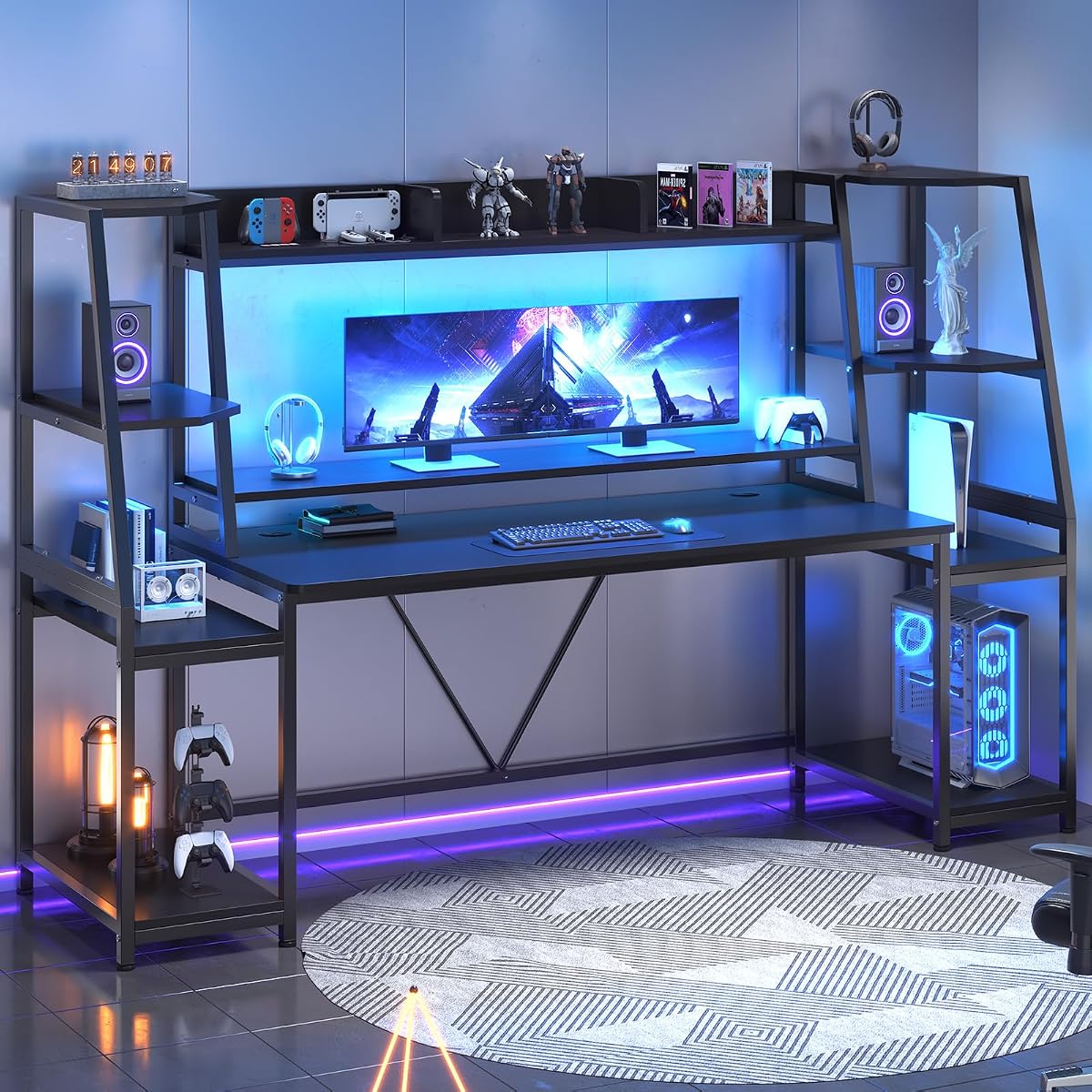
This wide desk provides massive surface area suitable for multiple monitors and consoles without feeling cramped. Two large shelves support heavy gear while a top hutch displays collectibles securely.
We may earn a commission when you buy through this link, at no additional cost to you.
LED strips sync with music creating dynamic effects and the monitor stand reduces neck strain. The layout keeps essentials accessible with room for dual computers simultaneously without clutter.
Stability is reliable though the size makes moving difficult once assembled. Assembly instructions are clear with numbered parts simplifying the process for large heavy furniture pieces.
Ideal for spacious rooms requiring a complete command center. Select this if you need to accommodate multiple screens large towers and accessories while maintaining a clean organized gaming environment.
A 55 inch wide desktop easily fits multiple keyboards, mice, and accessories while two large shelves support heavy PC towers and gaming hardware.
Music sync LED strips create dynamic lighting effects while the ergonomic monitor stand positions screens to reduce neck strain during long sessions.
We may earn a commission when you buy through this link, at no additional cost to you.
This model focuses on organization with fabric drawers and a sliding shelf for towers keeping your desk clutter-free. An extended monitor riser boosts ergonomics while power outlets keep cables managed.
We may earn a commission when you buy through this link, at no additional cost to you.
The L shape optimizes corner space and the power station supports multiple devices simultaneously. Assembly is straightforward though some users note slower setup with larger panels and screws.
Fabric drawers provide good capacity but may require care with heavy items. Stability remains solid on the floor with adjustable pads ensuring a wobble-free surface for gaming gear.
Choose this if storage is your top priority for your gaming setup. It works well for users wanting hidden compartments for controllers and wires without losing surface space for monitors.
Fabric drawers and a sliding shelf keep cables and devices organized while the power station allows multiple electronics to run simultaneously without messy cords.
An extended monitor riser lifts screens to comfortable viewing height freeing up desktop space for accessories and reducing neck strain.
We may earn a commission when you buy through this link, at no additional cost to you.
Perfect for small spaces this desk maximizes utility with five drawers and a full monitor mount. Despite its compact footprint it includes essential LED lighting and power outlets for modern gaming needs.
We may earn a commission when you buy through this link, at no additional cost to you.
The steel frame ensures durability while the mount reduces neck strain. Drawers organize documents and supplies keeping the desktop clear for focused gaming or work sessions effectively.
Assembly is intuitive with labeled parts and tools included. However the width limits large mousepad movement and dual monitor use compared to larger models in this roundup.
Ideal for dorms or apartments needing a clean compact setup. Select this if you prioritize storage capacity and ergonomic height in a smaller footprint without sacrificing essential power features.
Five flexible fabric drawers provide ample storage for documents and supplies ensuring a neat workspace while accommodating various room layouts easily.
A full-coverage monitor mount positions screens at the perfect viewing height reducing strain and freeing up valuable desk space for accessories.
We may earn a commission when you buy through this link, at no additional cost to you.
This standing desk promotes health with electric height adjustments and memory presets. A spacious surface accommodates monitors and consoles while quiet motors allow seamless transitions between sitting and standing.
We may earn a commission when you buy through this link, at no additional cost to you.
Cable management keeps cords tidy and the sturdy frame stays stable at full height. Assembly is quick compared to traditional desks offering solid value for users prioritizing ergonomics and health.
While it lacks RGB lighting the functional design supports long gaming and work sessions effectively. The motor operates quietly ensuring no distraction during intense gameplay or streaming.
Choose this for a health-focused setup that encourages movement. It suits users wanting electric height adjustment without complex electronics keeping a simple reliable and spacious gaming environment.
Electric height adjustment lets you switch between sitting and standing anytime with memory presets and a quiet motor to ensure a peaceful workspace.
A 55 inch surface fits multiple monitors while built-in cable management keeps cords tidy for a clean and organized workspace without clutter.
We may earn a commission when you buy through this link, at no additional cost to you.
Selecting the right console desk involves evaluating dimensions, storage, power, and ergonomics to match your room layout and hardware needs.
Measure your room's corner or wall space to ensure the desk fits without blocking walkways. L-shaped desks provide more surface area for consoles and monitors while straight desks save space.
Pick a layout that matches your room and hardware needs without crowding your space.
Look for drawers shelves and hooks to organize controllers cables and accessories. Open racks work well for PC towers or consoles while drawers keep smaller items hidden.
Prioritize storage types that keep your main workspace clear and tidy.
Built-in outlets and USB ports reduce the need for extension cords keeping cables safe and tidy. Check the number of AC ports needed for your console monitors and peripherals.
Choose a desk with sufficient outlets to power all your devices conveniently.
RGB LED strips add ambiance and reduce eye strain during long sessions. Look for models with app control or music sync if you want dynamic lighting effects.
Select lighting that enhances your gaming atmosphere without needing extra accessories.
Monitor stands raise screens to eye level reducing neck and shoulder strain. Ensure the desk height allows comfortable wrist and hand movement during gameplay.
Choose a setup that supports comfortable posture during extended play.
Steel frames and thick desktops provide stability for heavy gear. Check weight capacity to ensure the desk supports your monitors and console safely.
Prioritize sturdy materials for a wobble-free surface during intense gaming.
Look for clear instructions and labeled parts to simplify setup. Good customer support ensures quick help if parts are missing or damaged.
Choose models with clear instructions and responsive customer care.
Integrated channels and under-desk trays keep wires out of sight. Check how easy it is to route cables from consoles and monitors.
Ensure the design simplifies wire routing to maintain a tidy room.
Start by assembling the frame carefully using all provided tools and labeled parts. Level the desk on the floor using adjustable feet to prevent wobbling during use.
Route console cables through built-in channels or ties to keep wires organized and safe. Adjust LED lighting modes and brightness to reduce eye strain during long sessions.
Clean the surface regularly with a soft dry cloth to avoid scratches. Dust drawers and shelves often to maintain smooth operation and appearance over time.
For one console and two monitors aim for at least 50 inches of width. L-shaped desks offer more room for multiple devices without crowding your workspace.
Most desks include open racks or shelves rated to hold standard towers. Verify the weight capacity before placing heavy glass cases to ensure stability.
Many models feature built-in AC outlets and USB ports for easy charging. This reduces the need for external power strips near your gaming setup.
Use a soft dry cloth for daily cleaning to avoid scratches. Avoid harsh chemicals that may damage the finish or coatings over time.
Most desks can be assembled by one person though a second helps with larger pieces. Clear instructions and labeled parts simplify the process.
Yes many models function well for office work with ergonomic monitor stands. The storage options also support office supplies and documents.
LED lighting uses minimal power and is energy efficient. The impact on your overall energy usage is negligible compared to consoles or monitors.
Contact the seller immediately using the support info provided. Most vendors offer replacement parts or refunds within 24 hours for missing items.
These top ten desks offer diverse storage power and lighting options for every console gaming need. The ODK and DUMOS models stand out for value while the AODK premium provides advanced organization.
Prioritize ergonomics and stability to support long comfortable gaming sessions. Choose a size that fits your room without limiting movement or cable access.
Check current availability and prices as they can change quickly. Select the model that best aligns with your budget and room layout for the best setup.