
MAIWO Hard Drive Docking Station Cloner
4.5Editor score
Offline cloning without PC
3x USB 3.0 Hub
Supports up to 48TB
Finding the right storage solution is crucial for modern data management. A reliable hard drive duplicator cloner docking station simplifies backup and migration tasks without requiring complex software setups or constant computer connections.
We evaluated ten top models based on cloning speed, drive compatibility, and build quality. Each option supports standalone operations and offers varying bay counts to suit different professional and home user scenarios effectively.
This guide details the strengths and limitations of each pick to help you decide. Prices and availability change frequently so verify current listings before purchasing to ensure you get the best deal available today.
4.5Editor score

4.5Editor score

4.5Editor score
As an Amazon Associate we earn from qualifying purchases.
This side-by-side comparison highlights the key specifications of every model to help you identify the best fit for your specific storage requirements and workflow needs.




The SABRENT USB 3.0 Dual Bay Hard Drive Docking Station stands out as a top choice for reliable data duplication. With a rating of 4.5 stars it delivers consistent performance for users needing quick backups without software overhead.
We may earn a commission when you buy through this link, at no additional cost to you.
Its standout feature is the offline cloning capability which allows users to clone drives up to 60Mbps without connecting to a PC. This simplifies workflows for IT professionals or home users who need rapid disk duplication.
While it supports up to 10TB per drive it lacks NVMe support which might limit future-proofing for some users. However for standard SATA drives the speed and ease of use make these trade-offs acceptable for most scenarios.
We recommend this dock for anyone needing a straightforward reliable solution for SATA drive cloning. Its plug-and-play nature ensures minimal setup time making it an essential tool for regular data management tasks.
The standalone cloning button allows for quick drive duplication without needing a host computer or drivers.
No software installation is required as the device mounts as a standard USB drive on any compatible system.
We may earn a commission when you buy through this link, at no additional cost to you.
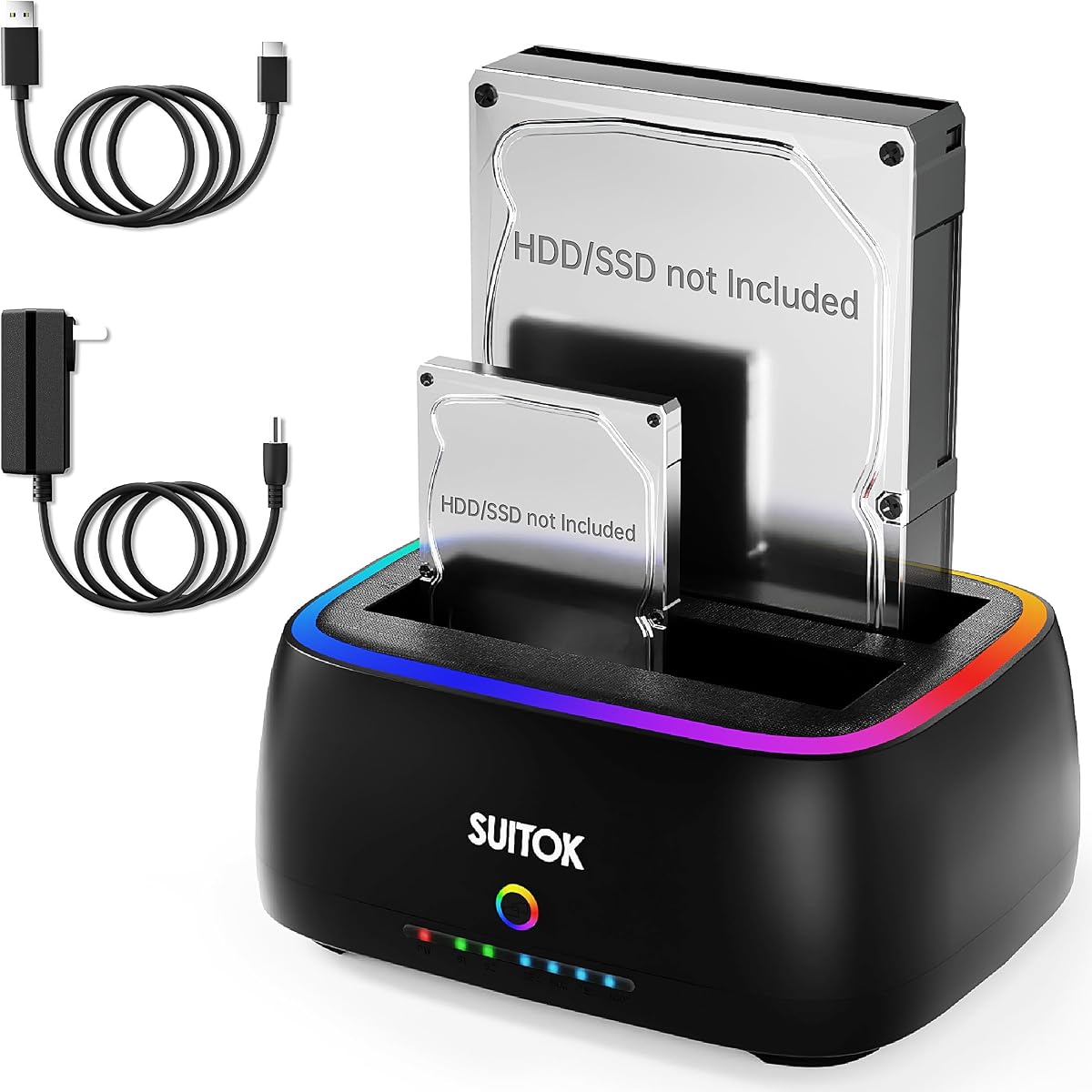
The MAIWO Hard Drive Docking Station Cloner offers exceptional value for users on a budget. With a 4.5 star rating it provides essential cloning and docking features at a price point that undercuts most competitors significantly.
We may earn a commission when you buy through this link, at no additional cost to you.
One of its unique advantages is the included 3x USB 3.0 hub extension which allows you to connect additional peripherals while the dock is in use. This multi-functionality reduces cable clutter on your desk effectively.
Although the build is primarily plastic it remains robust enough for regular use. The 12V 3A power supply ensures stable operation even when handling high-capacity drives which is critical for data integrity.
This dock is ideal for casual users or small offices needing basic backup capabilities. The combination of low cost and practical features makes it a smart buy for straightforward cloning tasks.
The additional USB ports allow you to connect flash drives or mice while the dock is in use.
LED lights indicate cloning progress at 25% 50% 75% and 100% for easy monitoring.
We may earn a commission when you buy through this link, at no additional cost to you.
The StarTech.com 4-Bay Hard Drive Duplicator is a powerhouse designed for professional environments. Its 4.5 rating reflects its robust capabilities for bulk cloning and secure erasing without requiring a computer connection.
We may earn a commission when you buy through this link, at no additional cost to you.
The standout feature here is the ability to perform standalone cloning for three target drives at once from a single source. The LCD menu display provides detailed drive info which enhances control and transparency.
While the price is significantly higher than consumer options the included IDE adapter and secure erase modes justify the cost for IT professionals. It ensures data security during device decommissioning effectively.
We recommend this tool for businesses managing large volumes of drives. Its reliability and advanced features make it a worthy investment for environments where data integrity and volume are priorities.
Compliant with NIST standards this device ensures drives are securely wiped before reuse or disposal.
The package includes cables to support older IDE drives extending compatibility beyond modern SATA standards.
We may earn a commission when you buy through this link, at no additional cost to you.
The SABRENT Dual-Bay USB-C Hard Drive Docking Station is perfect for modern laptops that lack traditional USB-A ports. With a 4.4 star rating it offers a sleek solution for connecting and cloning SATA drives easily.
We may earn a commission when you buy through this link, at no additional cost to you.
The USB-C interface supports speeds up to 5Gbps ensuring fast file transfers between connected devices. It is also backwards compatible with USB-A if you use a standard adapter cable.
While it is limited to SATA drives the tool-free design makes swapping drives quick and hassle-free. The LED indicators on each bay provide clear status updates during operations.
We recommend this dock for users with newer MacBooks or Windows laptops needing modern connectivity. Its portability and speed make it a great choice for on-the-go data management.
USB-C ensures you can connect directly to the latest laptops without needing bulky adapters.
Drives can be inserted and removed without tools making it easy to switch between tasks quickly.
We may earn a commission when you buy through this link, at no additional cost to you.
The ICY BOX TripleBay Docking Station stands out by supporting M.2 NVMe SSDs alongside traditional SATA drives. This versatility makes it one of the few docks that cover nearly all modern storage types effectively.
We may earn a commission when you buy through this link, at no additional cost to you.
It features USB 3.2 Gen 2 technology which provides transfer speeds up to 10Gbps. This ensures that fast NVMe drives are not bottlenecked during data transfers or cloning operations.
While it costs more than dual-bay SATA docks the ability to mix drive types adds significant value. The one-touch offline cloning works between SATA and NVMe drives offering flexible migration options.
We recommend this for power users who own both SSDs and HDDs. It simplifies storage management by providing a single dock for all your different drive formats and interfaces.
Cloning between SATA and NVMe drives is supported allowing for seamless upgrades or backups.
The 10Gbps USB-C connection ensures fast throughput for large files and entire system images.
We may earn a commission when you buy through this link, at no additional cost to you.
This Dual Bay SATA Hard Drive Cloner offers a modern approach to docking with its USB-C interface and open-air design. It supports massive drives up to 20TB each which is great for expanding storage libraries.
We may earn a commission when you buy through this link, at no additional cost to you.
The RTL9201DP bridge chip ensures stable data transmission reducing latency during large backups. The open-air vertical design helps with heat dissipation which is crucial for long cloning sessions.
While it is a mid-range option the inclusion of TRIM support helps maintain SSD health over time. The anti-slip pads keep the unit steady on your desk even when swapping heavy drives.
We recommend this for users looking for high capacity support in a compact unit. It balances speed and functionality well making it a solid choice for home media centers or backups.
The vertical design allows air to flow through the drive slots keeping temperatures low during use.
With 40TB total capacity you can connect and manage very large drives for extensive data needs.
We may earn a commission when you buy through this link, at no additional cost to you.
StarTech is known for professional-grade peripherals and this Dual-Bay Duplicator lives up to that reputation. It offers fast sector-by-sector copying at speeds up to 28GB/min which is faster than many competitors.
We may earn a commission when you buy through this link, at no additional cost to you.
The tool-less design allows for quick access to drives without struggling with screws or trays. It is also backwards compatible with SATA I and II drives ensuring you can use older hardware with ease.
While it comes at a premium price the build quality and support reflect the cost. The included USB-C and USB-A cables make it easy to connect to various computers without buying extras.
We recommend this for professional use where speed and reliability are critical. The robust construction ensures it can handle daily use in demanding environments without failure.
With 28GB/min you can clone large drives in a fraction of the time it takes with standard USB docks.
Backwards compatibility means older SATA drives can be used with this modern dock without issues.
We may earn a commission when you buy through this link, at no additional cost to you.
The Rosewill M.2 NVMe & SATA Docking Station offers a compact solution for users needing hybrid support. With a 4.5 star rating it delivers excellent performance in a small footprint ideal for mobile users.
We may earn a commission when you buy through this link, at no additional cost to you.
It supports USB 3.2 Gen 2×1 which provides blazing fast 10Gbps speeds. This is essential for NVMe SSDs to perform at their full potential during data transfers.
The tool-free design makes it easy to swap drives quickly. While it is small it is robust enough for regular use and the lightweight build makes it easy to store in a laptop bag.
We recommend this for travelers or small offices with limited desk space. It combines high speed with portability ensuring you can manage different drive types wherever you go.
The small size allows for easy transport making it perfect for field work or travel.
Access both modern NVMe SSDs and traditional SATA drives with a single versatile docking unit.
We may earn a commission when you buy through this link, at no additional cost to you.
The ORICO 5 Bay Hard Drive Docking Station is designed for users with massive storage needs. It can support up to 100TB total capacity which is ideal for photographers or video editors managing large projects.
We may earn a commission when you buy through this link, at no additional cost to you.
The standout feature is the 1:4 offline duplication mode that allows cloning one source drive to four target drives simultaneously. This multiplies the cloning process significantly reducing total backup time.
While the user rating is slightly lower the aluminum alloy build ensures efficient heat dissipation for all five drives. The included USB-C to USB-A cable provides flexibility for connecting different devices.
We recommend this for creative professionals needing high capacity. The ability to clone to four drives at once makes it a powerful tool for bulk data duplication tasks.
Supporting up to 100TB allows you to manage huge video libraries or photo archives easily.
Clone one source to four targets at once to save hours during large backup cycles.
We may earn a commission when you buy through this link, at no additional cost to you.
The WAVLINK USB 3.0 Dual-Bay Docking Station offers solid performance at an affordable price. With a 4.4 star rating it is a great choice for users who need reliable cloning without spending much money.
We may earn a commission when you buy through this link, at no additional cost to you.
It supports UASP which allows transfer speeds up to 6Gbps faster than standard USB 3.0. This ensures that file transfers are quick and efficient even when moving large media files.
The built-in power control switch and auto sleep mode help manage energy consumption. This makes it a practical choice for users who need the dock to run for long periods without worry.
We recommend this for budget-conscious users needing standard SATA support. It balances cost and functionality well making it a smart purchase for basic backup needs.
The UASP technology increases transfer speeds by reducing CPU load and latency during data transfers.
Auto sleep mode saves energy when the drives are idle making it efficient for long-term use.
We may earn a commission when you buy through this link, at no additional cost to you.
Selecting the right docking station involves evaluating capacity speed and compatibility to match your specific workflow needs.
Check whether the dock supports SATA M.2 NVMe or IDE drives. Some units only handle SATA while others offer hybrid support for newer SSDs.
Ensure the dock matches your drive types to avoid purchasing a device that cannot connect to your existing hardware.
Cloning speeds vary between models with some offering up to 10Gbps and others limited to USB 2.0 speeds. Higher speeds reduce the time required for large backups.
Look for USB 3.0 or 3.2 standards to ensure fast data transfer rates during both cloning and daily file management.
Dual-bay units are common for simple backups while five-bay options allow for massive storage expansion. Choose based on how many drives you need to access simultaneously.
More bays mean more versatility but also require more power and desk space to operate effectively.
Standalone cloning allows you to duplicate drives without a computer connected which is ideal for IT technicians working in the field.
Verify that the unit has a dedicated cloning button or LED indicator to monitor progress without external software.
High capacity drives require stable power which often means an external adapter rather than bus power. Ensure the power supply is included and rated for your drive types.
A reliable power source prevents drive failure and ensures consistent performance during long cloning sessions.
Aluminum alloys offer better heat dissipation than plastic which is crucial for maintaining drive health over time.
Look for ventilation slots and sturdy construction to prevent overheating when multiple drives are running at once.
Check if the included cables match your computer ports. USB-C is becoming standard but many older PCs still rely on USB-A.
Some docks come with adapter cables which adds convenience so check the box contents before purchasing.
To begin use insert your source drive into the designated source slot and the target drive into the target slot. Ensure the drives are seated fully to avoid connection errors.
If cloning without a computer press the dedicated clone button and wait for the LED indicators to complete. Do not remove drives until the process is finished to prevent data loss.
Keep the unit ventilated and clean the metal surfaces with a dry cloth to prevent dust buildup. Storing drives in protective cases after removal helps maintain their lifespan.
No the target drive must be equal to or larger than the source drive. If the source is larger the cloning process will fail or result in data loss.
Most modern docks are compatible with Mac OS but verify specific model support. USB-C models often work seamlessly with newer MacBooks without extra drivers.
No offline cloning is handled directly by the dock hardware. This eliminates the need for installation software and simplifies the process significantly.
Only hybrid docks explicitly supporting M.2 NVMe can use these drives. Standard SATA docks will not recognize NVMe SSDs without an adapter.
If power is lost the process will stop and may corrupt data. Always use a stable power source or consider a UPS to prevent interruptions.
Firmware updates are rare but checking the manufacturer website ensures optimal performance. Most users do not need to update unless they encounter specific issues.
Some professional models include secure erase modes that overwrite data. Standard docks usually just copy data so use separate tools for secure wiping.
Yes multi-bay docks allow you to mount multiple drives simultaneously. This is useful for transferring files between drives without cloning.
Choosing the right hard drive duplicator cloner docking station depends on your specific needs for capacity speed and drive types. Whether you need basic backup or professional-grade cloning this guide highlights the top options for every user.
Prioritize models that support your current and future drive formats. Investing in a unit with USB-C and NVMe support ensures longevity even as storage technology evolves.
Prices and availability change frequently so verify current listings and reviews before purchasing. This ensures you get the best value and the latest model available for your data management tasks.