
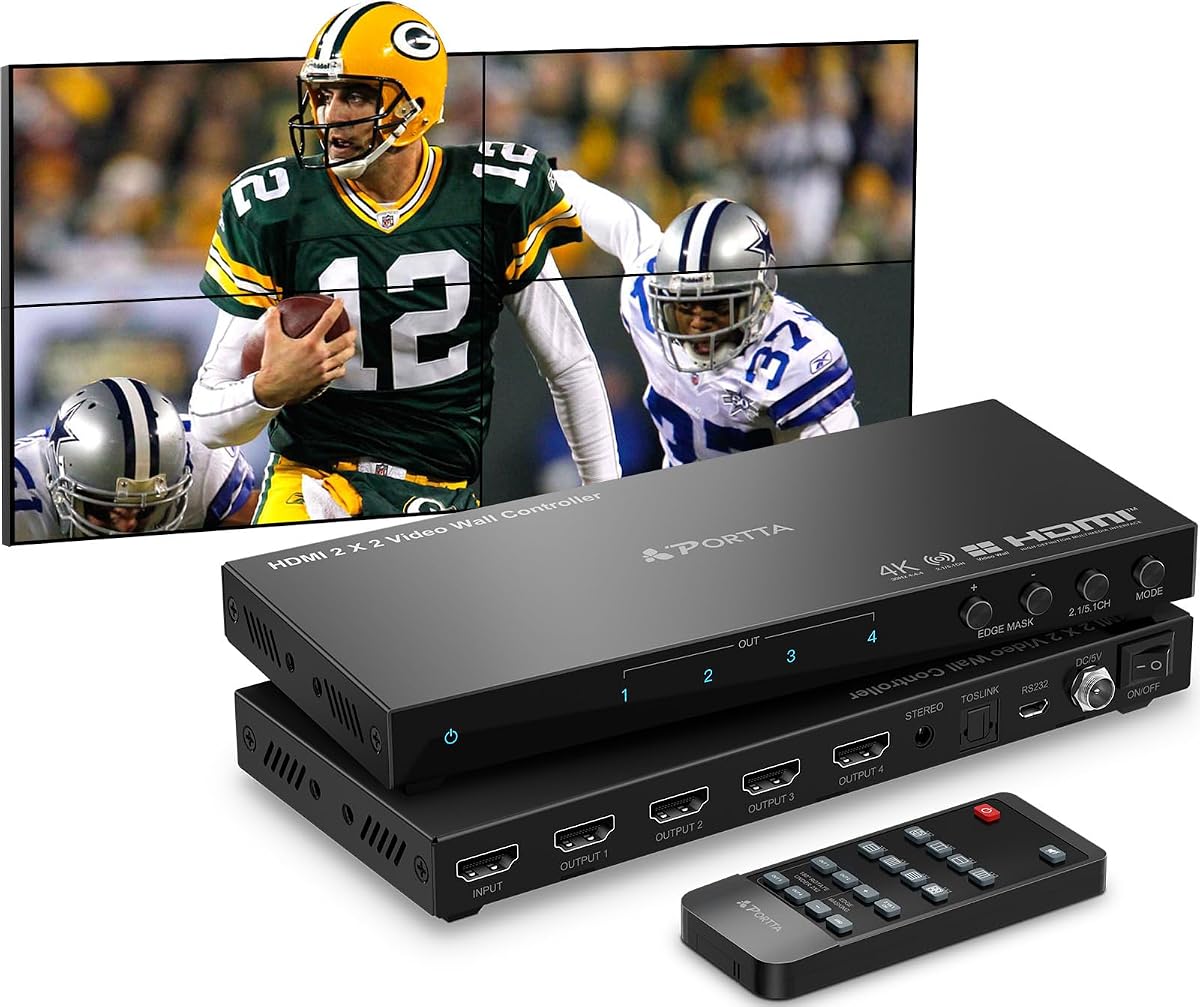
2×2 4k Video Wall Controller
4.6Editor score
Accepts HDMI or DVI input signals
Supports 11 splicing modes
Includes IR remote and RS232
Compare the top 10 HDMI Video Wall Controller units for 2026. This guide reviews features, specs, and performance to help you choose the right display solution.
Creating a seamless multi-screen display requires the right hardware to manage inputs and outputs effectively. An HDMI video wall controller splits a single source across multiple screens, ensuring synchronized visuals for presentations or digital signage.
We evaluated ten top-rated models based on resolution support, display modes, and ease of setup. Each product offers unique capabilities like bezel adjustment, audio extraction, and various control methods to suit different professional environments.
Every pick below highlights key strengths and potential trade-offs to help you decide. Note that product availability and pricing can change over time, so always verify current details before making a final purchase decision.
4.6Editor score

4.8Editor score

4.2Editor score
The following table provides a side-by-side comparison of all ten reviewed products. It highlights key specifications such as input types, maximum resolution, and unique features to help you quickly identify the best fit for your needs.



This J-Tech Digital model stands out as a top choice for creating a 2×2 video wall. With a high customer rating, it delivers reliable performance for splitting one HDMI source across four displays. The inclusion of free lifetime technical support adds significant value for professional users.
We may earn a commission when you buy through this link, at no additional cost to you.
It supports 4K input at 30Hz and offers 8 distinct display modes. You can switch between configurations like 1×4 or 4×1 easily. The edge masking feature helps eliminate distortion by adjusting output picture edges by 8 pixels, ensuring a cleaner look across the wall.
While it handles 4K input well, the output is typically fixed at 1080P for the four screens. This is a reasonable trade-off for the price point and functionality offered. The audio extraction via SPDIF and 3.5mm ports allows you to route sound to external systems effectively.
Anyone looking to combine up to four displays into one seamless video wall will find this processor useful. Its straightforward setup and robust support make it a recommended choice for small to medium installations that need reliable performance without complex configurations.
You can toggle between 8 different display modes to match your specific setup needs effectively.
Route audio from your source device to an external sound system via SPDIF Optical and 3.5mm ports.
We may earn a commission when you buy through this link, at no additional cost to you.
This unit offers an extremely affordable way to create a multi-screen display. It supports both HDMI and DVI inputs, making it versatile for older hardware. The core function is to split a complete 4K image signal into 4 HDMI outputs for various display devices.
We may earn a commission when you buy through this link, at no additional cost to you.
It features 11 different splicing modes, including 2×2 and 4×1 configurations. The memory function remembers your last settings when plugged in again, ensuring a seamless experience without resetting every time. You can control modes via hotkeys on the remote or button presses.
The controller allows each screen to be rotated by 180 degrees, which is helpful for installing TVs upside down. Edge mask function corrects bezels and image edges for a visually appealing result. However, DVI inputs do not support 4K resolution, limiting high-end setups.
Budget-conscious buyers looking for basic multi-screen capabilities will appreciate this controller. Its plug-and-play design and wide compatibility with HDMI and DVI devices make it easy to integrate into existing setups without needing extra software or complex wiring.
Supports HDMI or DVI input, allowing you to use a wider range of source devices for your wall.
Rotate each single screen by 180 degrees and control modes via IR remote or button press.
We may earn a commission when you buy through this link, at no additional cost to you.
This premium model is designed for users who need high-performance video wall capabilities. It supports 4K60Hz input signals and routes them to any combination of 4 output displays seamlessly. The inclusion of LAN and web control adds a significant layer of management flexibility.
We may earn a commission when you buy through this link, at no additional cost to you.
You can choose from 5 different multiviewer presets to view all 4 source signals on one screen. The device allows you to upscale or downscale output resolution to match your needs. With 10 different video wall configurations, it offers extensive customization options for complex installations.
The price is higher than standard controllers, but the advanced features justify the cost for professional environments. The ability to switch signals with no delay or picture loss makes it ideal for critical applications. Setup may require some technical knowledge for web integration.
Professionals managing large displays or needing remote control will find this matrix powerful. The combination of high-resolution support, flexible multiviewing, and LAN connectivity makes it a top choice for demanding digital signage or command center applications.
Each HDMI output can choose from 5 different multiviewer presets allowing you to view all 4 source signals.
Take advantage of the versatility by upscaling or downscaling your output resolution to various standard formats.
We may earn a commission when you buy through this link, at no additional cost to you.
This OREI device allows you to take one HDMI or USB-C source and divide it across 4 TV display screens. It supports high-quality 4K 60Hz input, ensuring smooth visuals. The inclusion of USB-C makes it compatible with modern laptops and devices easily.
We may earn a commission when you buy through this link, at no additional cost to you.
Multiple display modes include 2×2, 1×4, and 1×4 Splitter Mode. You can adjust bezels and use EDID management for optimal screen setup. Audio extraction is possible via Optical and L/R outputs, supporting various formats like LPCM and Dolby Digital.
While it handles 4K 60Hz well, it does not support HDR10 or Dolby Vision. This may be a limitation for media content that relies on high dynamic range. The dual voltage power supply makes it suitable for international use with an included adapter.
Businesses needing a controller that accepts USB-C sources will find this useful. The 1-year warranty and support add reliability. It is a solid choice for standard video walls where HDR is not a primary requirement for visual quality.
Divide one HDMI or USB-C source across 4 TV screens with high-quality 4K 60Hz input support.
Audio extraction through Optical and L/R outputs ensures you can route sound to external systems easily.
We may earn a commission when you buy through this link, at no additional cost to you.
This controller can distribute 1 HDMI input to 4 HDMI outputs with 8 display modes. It supports 4K 30Hz input but outputs at 1080p 60Hz. The device includes edge masking to prevent image distortion and unnatural appearance by adjusting the output picture edge.
We may earn a commission when you buy through this link, at no additional cost to you.
Image rotation allows each screen to be rotated by 180 degrees in 2×2 mode. This helps adjust border orientation with the thinnest edges of each screen to reduce splicing gaps. Control options include manual, IR remote control, or RS232 control for integration.
The resolution of the 4 HDMI outputs is fixed at 1080p 60Hz. This means you cannot display true 4K across all screens simultaneously. However, for digital signage or information display, this resolution is often sufficient for clear text and images.
Users looking for a reliable processor with good warranty support will appreciate this model. The hassle-free 2-year warranty and lifetime technical support provide peace of mind. It fits well in advertising or entertainment setups where cost-effectiveness is key.
Edge Masking prevents image distortion by adding or cutting the output picture edge by 8 pixels each.
Control options include manual, IR remote control, or RS232 control for flexible integration.
We may earn a commission when you buy through this link, at no additional cost to you.
This model connects one HDMI or USB-C source and displays content across four TV screens simultaneously. It supports 4K@60Hz input, ensuring smooth performance for video sources. The device includes bezel adjustment and EDID management for optimal screen setup.
We may earn a commission when you buy through this link, at no additional cost to you.
It supports various configurations including 2×2, 1×2, and 4×1 modes. RS-232 control allows for advanced integration into larger systems. Separate Optical and Analog outputs allow for flexible audio extraction to external sound systems effectively.
The output resolution is limited to 1080p. This might not be ideal for high-end graphics work but is perfect for general digital signage. The dual voltage supply with a US plug and adapter for international use makes it versatile for global installations.
Organizations needing a controller that supports 4K input but works with 1080p displays will find it suitable. The 1-year warranty and support add reliability for professional deployments. It is an excellent choice for businesses using modern laptop connections via USB-C.
The device comes with a dual voltage supply using a US plug, and an adapter/converter is provided for international use.
Supports RS-232 control for advanced integration and manual operation through the front panel or remote.
We may earn a commission when you buy through this link, at no additional cost to you.
This device allows you to seamlessly switch 4 HDMI sources to 4 displays or split one source across 4 screens. It supports up to 4K@60Hz input, making it suitable for high-performance needs. The matrix design offers more flexibility than simple controllers.
We may earn a commission when you buy through this link, at no additional cost to you.
Advanced EDID management and audio support including PCM and Dolby TrueHD make it robust. You can use web control to manage displays remotely. This is ideal for larger installations that need to switch between multiple inputs like PCs or gaming consoles.
The price is higher than standard 2×2 controllers, reflecting its matrix capabilities. It might be complex for simple setups that only need one source. However, for rooms with multiple input devices, the flexibility to switch sources seamlessly is a major advantage.
Professional setups requiring matrix switching alongside video wall capabilities will find this powerful. The ability to handle multiple sources efficiently makes it a strong investment for control rooms or conference halls needing versatile display management.
Seamlessly switch 4 HDMI sources to 4 displays or split one source across 4 screens simultaneously.
Supports PCM, DD, DD+, DTS, Dolby TrueHD & DTS-HD for rich audio experiences.
We may earn a commission when you buy through this link, at no additional cost to you.
This controller supports HDMI and USB-C input with max resolution reach 3840*2160@60H. With 4x HDMI output, each output port supports 3840*2160 resolution. You can make 4x 4K TVs into 1 wall without scaling down the signal.
We may earn a commission when you buy through this link, at no additional cost to you.
It supports splice modes like 2×2, 1×2, 1×3, and 4×1. Each output port can output the image rotated 180 degrees. If you install the TV rotated 180 degrees, you will also get normal image display on the screen.
The design ensures stable work for 24×7, which is critical for digital signage that runs continuously. The plug and play feature makes connection simple. However, ensuring your source supports 4K60 is essential for full functionality.
Organizations needing true 4K output on all screens will appreciate this model. The stable operation and multiple splice modes make it a solid choice for demanding environments where uptime is essential for business continuity and display quality.
With 4x HDMI output, each output port resolution support 3840*2160 allowing full 4K across the wall.
Professional design ensures stable work for 24×7, making it ideal for continuous digital signage use.
We may earn a commission when you buy through this link, at no additional cost to you.
This controller supports input resolution max 3840×2160@60Hz. It features 2x HDMI 2.0 and 1x USB 2.0 inputs, allowing you to play media directly from USB. All input signals can be switched to 4 splicing displays effectively for different use cases.
We may earn a commission when you buy through this link, at no additional cost to you.
USB auto display plays max 3840×2160@60Hz videos in MP4 and MOV formats. It supports 3.5mm analog audio out and SPDIF optical audio out. Each output supports 180 degrees rotation for TV upside down installation, providing flexibility in mounting.
Image brightness, sharpness, and contrast can be set for optimal viewing. The border adjustment and image cropping function help display without black edges. This ensures a seamless look across the multi-screen setup without unnecessary blank space.
Users needing to play files directly from USB drive will find this unique feature useful. The ability to adjust image settings like brightness and color temperature makes it suitable for varied lighting conditions in different display rooms.
Support USB disk access and USB auto display when inserting USB without needing an external source.
Support setup of image brightness, sharpness, contrast, and color temperature for optimal viewing.
We may earn a commission when you buy through this link, at no additional cost to you.
This unit supports HDMI and USB-C input with max resolution reach 3840*2160@60H. With 6x HDMI output, each output port supports 3840*2160 resolution. You can make 6x 4K TVs into 1 wall for large display needs.
We may earn a commission when you buy through this link, at no additional cost to you.
It supports splice modes like 2X3, 3X2, and 6X1. Each output port can output the image rotated 180 degrees. If you install the TV rotated 180 degrees, you will also get normal image display on the screen effectively.
The controller is simple for connection and installation, allowing you to switch displays via remote. It is designed for professional use and stable work for 24×7. The 6 outputs make it ideal for larger walls that standard controllers cannot handle.
Anyone planning to create a 6-screen wall will find this controller essential. The ability to handle 4K inputs on all 6 ports ensures quality content is displayed across the entire surface without compromising resolution or performance.
With 6x HDMI output, each output port supports 3840*2160 allowing true 4K across 6 screens.
Supports 2X3, 3X2, and 6X1 splicing modes for versatile multi-screen configurations.
We may earn a commission when you buy through this link, at no additional cost to you.
Choosing the right controller involves understanding your specific setup needs. Key factors include input resolution, output capabilities, and control methods.
Ensure the controller supports the resolution of your source device. Some units support 4K input but output at 1080p, which is sufficient for many tasks.
Check if all outputs need to support 4K simultaneously. If you plan to create a high-resolution wall, verify this capability before purchase.
Look for units that offer modes like 2×2, 1×4, or 4×1 depending on your screen layout. Flexible modes allow you to adapt the setup easily.
Confirm that the controller supports the exact number of screens you plan to use. Some models are limited to 4 screens while others support up to 6.
Decide if you need manual control, IR remote, or RS-232 integration. Advanced setups benefit from RS-232 or LAN control for remote management.
Simple displays may work fine with a remote control. Check if the controller includes necessary cables for your chosen control method.
Verify that the device supports audio extraction via HDMI or optical outputs. This is important if you want to route sound to a separate system.
Check supported audio formats like PCM or Dolby Digital. Ensure they match your sound system capabilities for optimal audio quality.
Edge masking or bezel adjustment features help hide gaps between screens. This ensures a seamless look for your video wall.
Rotation support allows you to flip the image by 180 degrees. This is useful if your screens are mounted upside down.
Ensure the controller is compatible with your source devices such as PCs or consoles. Check if it supports USB-C or HDMI inputs specifically.
Compatibility with your TVs or monitors is key. Confirm that the HDMI ports on your displays align with the controller's output specifications.
Look for units with dual voltage power supplies if you plan to use them internationally. Check if adapters are included for different regions.
Plug and play designs simplify setup. If you need professional installation, consider models with robust mounting options.
A manufacturer warranty provides peace of mind. Check if the product includes a replacement warranty or repair service.
Access to technical support is vital for setup issues. Brands with responsive customer service help resolve problems quickly.
Connect your source device to the HDMI or USB-C input port using a high-quality cable. Ensure all displays are connected to the HDMI output ports securely.
Power on the controller and all displays. Use the remote control or button press to select the desired display mode for your wall layout.
Adjust bezels and audio settings using the front panel or software. Regularly update the device settings to match any changes in your system setup.
A HDMI Video Wall Controller is used to display a single video source across multiple screens. It splits the signal to create a seamless large display or separate content for each screen.
Yes, many units support 4K input. However, some may output at 1080p. Check the specs to ensure both input and output meet your needs.
Standard HDMI cables are usually sufficient. Ensure cables support the resolution you plan to use. USB-C cables may be required for USB-C inputs.
Most controllers include edge masking or bezel adjustment features. Use the remote or settings menu to crop the image edges slightly.
Many controllers allow 180-degree rotation. This helps align images when screens are mounted upside down or in portrait orientation.
RS-232 control is useful for professional setups requiring remote management. For basic home or office use, a remote control is usually enough.
The J-Tech Digital models and OREI units offer strong value across different price points. Select based on your specific resolution needs and setup complexity.
Prioritize controllers that support your source devices and screen layout. Features like bezel adjustment and audio extraction add significant convenience to your display system.
Always check current product details and availability before purchasing. Prices and specifications may change over time so verify the latest info before buying.