
Razer Basilisk V3 Pro
4.4Editor score
Focus Pro 35K Optical Sensor
HyperScroll Tilt Wheel
140 Hour Battery Life
This guide compares the top 10 high DPI mice optimized for 4K gaming precision to help you find the best wireless and wired options for competitive play.
Finding the right high DPI mouse for 4K gaming precision is essential for competitive players who demand accuracy. Modern gaming monitors display incredible detail, requiring peripherals that can track movement with zero lag or jitter. A quality mouse ensures your aim translates perfectly to the screen.
We evaluated ten leading gaming mice based on sensor performance, build quality, and ergonomic design. Our analysis focuses on devices capable of handling high resolution displays without compromising speed or responsiveness. Each product offers unique features tailored to different play styles and hand sizes.
Each pick highlights specific strengths such as wireless latency, battery life, or customizable buttons. While prices fluctuate over time, these models represent the current leaders in precision tracking technology. Check the latest offers before making your final decision for your gaming setup.
4.4Editor score
4.3Editor score

4.6Editor score
This table provides a side-by-side comparison of all ten selected mice to help you quickly identify the best fit for your specific needs and preferences.

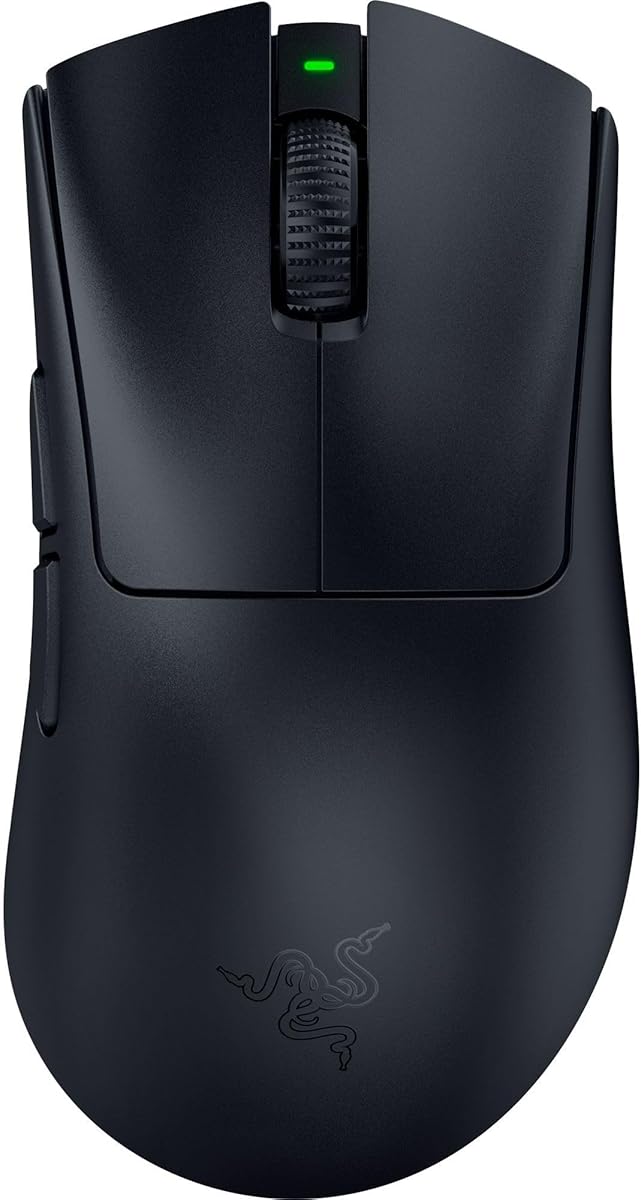




The Razer Basilisk V3 Pro stands out as a top-tier option for gamers seeking precision. It features a Focus Pro 35K optical sensor that delivers flawless tracking across various surfaces. This mouse is designed for those who demand high performance and extensive customization in their setup.
We may earn a commission when you buy through this link, at no additional cost to you.
Its HyperScrol tilt wheel offers unique versatility by switching between free-spin and tactile modes seamlessly. The 140-hour battery life ensures extended play sessions without frequent recharging. Additionally, 13 customizable controls allow for complex macros and commands to be mapped efficiently.
While the price is higher than some competitors, the build quality and feature set justify the investment. The reliance on Razer Synapse for full customization might be a hurdle for users preferring plug-and-play setups. However, the performance gains are noticeable in competitive scenarios.
Gamers looking for a premium wireless experience with granular control will find this model ideal. It balances comfort and functionality effectively. We recommend it for users who value sensor accuracy and extensive button options over budget constraints.
The Focus Pro 35K sensor ensures zero smoothing or acceleration for precise aiming.
Extended battery life allows for uninterrupted gaming sessions across multiple days.
We may earn a commission when you buy through this link, at no additional cost to you.
The Razer DeathAdder V3 Pro is celebrated for its ultra-lightweight design and ergonomic shape. At 63g, it offers speed and control favored by top esports players. The Focus Pro 30K sensor provides exceptional tracking performance on a wide range of surfaces including glass.
We may earn a commission when you buy through this link, at no additional cost to you.
Its optical mouse switches offer a 90-million click lifecycle with zero double-clicking issues. The Razer Hyperspeed wireless technology ensures low latency connectivity crucial for competitive play. The 90-hour battery life supports continuous play without constant interruptions.
The primary trade-off is the limited button count compared to multi-function models. It is also strictly designed for right-handed users which may exclude some players. However, the comfort and speed it provides are unmatched for its target audience.
We recommend this mouse for FPS enthusiasts who prioritize speed and comfort over extra macros. Its legacy of ergonomic handling continues to impress. It is a solid choice for anyone seeking a lightweight wireless solution.
The 63g weight reduces fatigue during intense gaming sessions.
Advanced wireless tech prevents lag even in noisy environments.
We may earn a commission when you buy through this link, at no additional cost to you.
This variant of the Basilisk V3 Pro emphasizes visual customization with its Chroma lighting system. It features 13 zones that react dynamically with over 150 integrated games. The sensor remains a Focus Pro 30K which offers flawless tracking for precision gaming tasks.
We may earn a commission when you buy through this link, at no additional cost to you.
The HyperScrol wheel allows users to switch between free-spin and tactile modes instantly. Battery life is robust with up to 110 hours on wireless mode for constant motion. The ergonomic form supports cutting-edge comfort for extended use cases.
Some users may find the extensive RGB setup requires too much software configuration. The sensor is slightly lower than the 35K version but still highly effective for most tasks. It balances aesthetics with practical functionality effectively.
We recommend this model for gamers who want to match their setup with dynamic lighting. It suits those who value immersion alongside performance. A great pick for users prioritizing visual feedback.
13-zone lighting enhances the gaming atmosphere significantly.
Multiple wireless modes offer flexibility for different setups.
We may earn a commission when you buy through this link, at no additional cost to you.
The Razer DeathAdder V4 Pro pushes the boundaries of speed with an 8K polling rate. It weighs just 56g enabling faster swipes and precise tracking for esports tournaments. The Focus Pro Optical Sensor Gen-2 offers 900 IPS tracking for maximum aim precision.
We may earn a commission when you buy through this link, at no additional cost to you.
Optical scroll and switches provide tactile feedback with durability up to 100 million clicks. Users can switch between wireless and wired modes while maintaining high performance. The battery lasts up to 150 hours at 1000 Hz for extended play.
The extreme lightness may feel too light for those preferring a heavier grip. The price reflects its premium technology. However the speed improvements are significant for competitive users seeking an edge.
We recommend this for professionals or serious competitive players. It is a top-tier tool for minimizing input delay. Consider it if speed is your primary requirement.
8K polling rate reduces latency to near zero.
99.8% accuracy ensures tracking reliability across surfaces.
We may earn a commission when you buy through this link, at no additional cost to you.
The GravaStar Mercury M1 Pro features a unique design with a magnesium alloy shell. It weighs 88g which provides a solid feel during use. The PAW3395 sensor offers 26K DPI and 4K polling for smooth tracking and accuracy.
We may earn a commission when you buy through this link, at no additional cost to you.
Users can switch between 2.4G Bluetooth and wired modes instantly. The battery life is exceptional at up to 200 hours. RGB zones can be customized to match your setup or game preferences.
The heavier weight might be a downside for fast-paced shooters. The ergonomic shape is not as conventional as others. However the build quality and connectivity options are standout features.
We recommend this for users who value aesthetics and durability. It is ideal for hybrid work and gaming setups. A distinctive choice for those wanting something different.
Magnesium alloy provides strength and a premium feel.
Up to 200 hours ensures long unplugged usage.
We may earn a commission when you buy through this link, at no additional cost to you.
The ATTACK SHARK RS3 utilizes a carbon fiber hybrid shell for strength and lightness. It supports up to 8000Hz polling via the 8K receiver for ultra-low latency. The sensor allows 52K DPI adjustments for precise control during gameplay.
We may earn a commission when you buy through this link, at no additional cost to you.
Battery life reaches up to 800 hours at 1000Hz which is industry leading. Customization is done via a web driver eliminating the need to install desktop software. Optical switches are rated for 100 million clicks.
Being a newer brand users might have concerns about long-term support. The web driver is convenient but may limit advanced macros. However the performance metrics are incredibly competitive.
We recommend this for budget conscious gamers wanting high specs. It offers great value for the features provided. A strong contender for performance seekers.
Browser-based customization saves installation time.
Exceptional battery life reduces charging frequency.
We may earn a commission when you buy through this link, at no additional cost to you.
The Logitech G502 Hero is a classic choice for gamers needing extensive customization. Its HERO sensor delivers precision tracking up to 25600 DPI. The mouse features 11 programmable buttons and a dual-mode hyper-fast scroll wheel.
We may earn a commission when you buy through this link, at no additional cost to you.
Users can adjust weights to match their playing style for personalized balance. The mechanical switch tensioning provides a crisp clean click feel. RGB lighting syncs with your gaming for immersion.
As a wired mouse it lacks wireless freedom which some prefer. The weight can be heavy even without extra weights for some. However its ergonomics and button layout are beloved by many.
We recommend this for users who prioritize control and buttons. It is perfect for MMOs and MOBAs. A timeless pick for wired gaming fans.
Adjustable weights let you find your perfect balance point.
11 buttons support complex game macros.
We may earn a commission when you buy through this link, at no additional cost to you.
The Redragon M916 offers a high performance option at an accessible price. Weighing 49g it is built from ultra-light materials for speed. The Nordic flagship chip provides 4000Hz report rate for precise tracking.
We may earn a commission when you buy through this link, at no additional cost to you.
It supports cables and 2.4G nano receiver for the purest experience. Users get 5 programmable buttons for tactical keybinds. The natural grip design helps reduce fatigue during long sessions.
The build may feel less premium compared to high-end brands. Software is functional but basic compared to Razer or Logitech. Despite this the performance is impressive for the cost.
We recommend this for students or budget focused gamers. It delivers value without compromising speed. A smart choice for entry level wireless needs.
High polling rate is available without high costs.
49g weight minimizes hand fatigue.
We may earn a commission when you buy through this link, at no additional cost to you.
The Razer Basilisk V3 provides a reliable wired solution for competitive gaming. It features a Focus Plus 26K optical sensor for pixel-precise accuracy. The 11 programmable buttons support extensive macro commands for any game.
We may earn a commission when you buy through this link, at no additional cost to you.
Optical switches provide 0.2ms actuation speed for quick responses. The HyperScrol wheel supports free-spin and tactile modes for different tasks. Chroma lighting zones react dynamically with games for immersion.
Being wired limits freedom of movement compared to wireless options. Some users may dislike the cable drag on certain surfaces. However it removes battery anxiety and ensures zero lag.
We recommend this for desk-bound gamers who prioritize cost. It is a robust choice for daily gaming. A solid option for reliability over wireless.
Direct connection ensures consistent performance.
Scroll wheel offers satisfying tactile feel.
We may earn a commission when you buy through this link, at no additional cost to you.
The Logitech G703 Lightspeed is known for its compatibility with wireless charging systems. The HERO 25K sensor offers 1:1 tracking with zero smoothing. It features LIGHTSPEED wireless for professional level responsiveness.
We may earn a commission when you buy through this link, at no additional cost to you.
Users can add a POWERPLAY charging system to keep the mouse charged while at rest. The design includes rubber side grips for comfort and durability. RGB lighting syncs across G gear for a cohesive look.
The weight is higher than modern lightweight gaming mice. The charging pad is sold separately which adds to the cost. However the convenience of never charging manually is valuable.
We recommend this for users who want ergonomic comfort and charging. It is great for office and gaming setups. A thoughtful choice for convenience.
Never worry about battery life with continuous charging.
Side grips enhance comfort during long sessions.
We may earn a commission when you buy through this link, at no additional cost to you.
Choosing the right mouse for high DPI gaming involves balancing sensor accuracy, weight, and connectivity. This guide breaks down the essential factors to help you make an informed decision.
The sensor is the heart of any precision mouse. Look for optical sensors with high DPI capabilities such as 20K or higher for 4K displays. Ensure the sensor has no acceleration or smoothing to maintain consistency in tracking.
Weight influences speed and comfort. Lighter mice reduce fatigue and allow quicker movements. Ergonomics ensure the mouse fits your hand shape preventing strain. Test different forms to find what feels natural for long sessions.
Wireless mice offer freedom but check for latency issues. Wired mice provide zero latency but restrict movement. Modern wireless tech like 2.4GHz often rivals wired performance. Select based on your setup constraints.
Battery life is critical for wireless users. Look for models offering 100 hours or more. Some support fast charging which helps minimize downtime. Powerplay systems are a great alternative for continuous use.
Custom buttons help execute complex commands quickly. More buttons are useful for MMOs but may clutter the hand for FPS players. Ensure the software supports macros and remapping without bloat.
Polling rate determines how often the mouse reports to the PC. Higher rates like 4K or 8K reduce input lag. Ensure your system supports high polling rates to benefit fully from the feature.
Optical switches offer faster actuation and durability. Mechanical switches feel clickier but may wear out faster. Check switch ratings for clicks to ensure long-term reliability. Avoid models with double-click issues.
A sturdy shell prevents flex during intense play. Materials like carbon fiber or magnesium add durability without extra weight. Ensure the skates are smooth for consistent movement across your mousepad.
Clean your mouse feet regularly with a microfiber cloth to maintain smooth movement. Dust buildup can cause sticking or inconsistent tracking on certain pads. Use a soft brush to remove debris from the sensor lens.
Not necessarily. DPI determines sensitivity. For 4K monitors higher DPI helps control large screens. However raw performance depends on sensor quality and polling rate. A lower DPI can be more stable for precise tasks.
Modern wireless mice with 2.4GHz tech are now competitive with wired ones. They use low latency dongles to ensure speed. If you need 8K polling check if the wireless model supports it without lag.
Optical switches use light to register clicks which is faster than mechanical metal contacts. This reduces actuation time. They also prevent double-clicking issues common in mechanical switches over time.
Not all mice track on glass. High-end optical sensors often have this capability. Check the specs for tracking on glass if you use non-traditional surfaces. Standard sensors may struggle with reflective materials.
Update drivers when firmware updates are released by the manufacturer. These often fix bugs or improve performance. Check the manufacturer app or website regularly to keep your device running smoothly.
Some wired mice like the G502 Hero allow weight adjustments via compartments. Others are fixed. If weight customization is important look for models with removable weights to fit your preference.
We have reviewed ten excellent mice that excel in tracking and ergonomics for high DPI gaming. The Razer Basilisk V3 Pro offers premium versatility while the DeathAdder V3 Pro provides lightweight speed. Budget options like the G502 Hero remain reliable favorites.