
GEEKOM IT13 MAX AI
4.6Editor score
Intel Ultra 9 185H chip
Quiet cooling for shared spaces
Three year warranty included
This guide compares ten top Intel Core i9 Mini PC models for performance, features, and value to help you find the right compact desktop for office home or
Finding the right compact computer often means balancing power with size. An Intel Core i9 Mini PC offers flagship processing in a tiny footprint. These systems handle demanding tasks while saving desk space.
We evaluated ten models based on processor speed, memory options, and connectivity. Each entry meets strict standards for build quality and real-world performance. This list covers diverse needs from home offices to professional workstations.
Every pick highlights key strengths and potential trade-offs for your setup. Prices and stock change frequently so verify details before purchasing. This guide helps you navigate the latest options with confidence and clarity.
4.6Editor score

4.5Editor score
4.6Editor score
The following table details each model processor generation, memory type, storage capacity, and key connectivity ports. It provides a quick reference for comparing technical specifications across all ten selected units.


The MINISFORUM M1-1390 stands out as a powerful desktop replacement for professionals needing raw computing power in a small chassis. With a 24 core Intel Core i9-13900HX processor it handles multitasking and heavy workloads effortlessly. Its high rating reflects consistent performance and solid build quality.
We may earn a commission when you buy through this link, at no additional cost to you.
This model excels in productivity scenarios due to its 32GB of DDR4 RAM and 1TB PCIe 4.0 SSD. The ability to drive three 4K displays simultaneously makes it ideal for trading or editing. Connectivity is robust with 2.5G LAN and WiFi 6E ensuring fast network speeds.
While the system is powerful the use of DDR4 memory instead of DDR5 might limit peak bandwidth for some users. The cooling system is active which is necessary for the high TDP but may generate noise under full load.
Anyone seeking a balance between high end performance and small form factor will find this unit highly reliable. It suits developers and video editors who need multiple screens and fast storage access in a quiet office environment.
The hybrid architecture of the 13900HX efficiently distributes tasks across performance and efficiency cores for smooth multitasking.
Triple display support via HDMI DP and USB-C allows users to maximize screen real estate for complex workflows.
We may earn a commission when you buy through this link, at no additional cost to you.
The Beelink GTi13 brings advanced connectivity to the compact desktop market with its inclusion of Thunderbolt 4 support. Its 13900HK processor offers strong single core speeds for responsive performance. The high user rating indicates satisfaction with its reliability and feature set.
We may earn a commission when you buy through this link, at no additional cost to you.
Equipped with 32GB of DDR5 RAM this unit provides faster data transfer rates than previous generations. The Thunderbolt 4 interface allows for high speed data transfer and external GPU connections which expands creative possibilities significantly for designers.
The fingerprint sensor adds a layer of security convenient for shared office spaces. However the active cooling system may be audible during intensive tasks which could be distracting in quiet environments.
Tech enthusiasts who require external expansion capabilities will appreciate the Thunderbolt 4 implementation. It is also suitable for users who value security features like biometric login in their daily computing routine.
Thunderbolt 4 ensures compatibility with next gen peripherals and high bandwidth storage devices for future upgrades.
The built-in fingerprint sensor allows for quick and secure logins without needing additional peripherals or software.
We may earn a commission when you buy through this link, at no additional cost to you.
KAMRUI Hyper H2 delivers exceptional performance with its 14th Gen Intel Core i9-14900HX processor. The design prioritizes thermal management which is critical for maintaining high clock speeds in a small chassis. Its solid rating reflects stability under load.
We may earn a commission when you buy through this link, at no additional cost to you.
The cooling system features dual copper heat pipes and a dual-fin module to keep temperatures stable. This allows the processor to sustain higher frequencies for longer periods compared to models with less robust thermal solutions.
While it offers great processing power the reliance on DDR4 memory may be a constraint for bandwidth heavy tasks. The compact size is beneficial for living rooms but may limit port accessibility compared to larger units.
Gamers and content creators needing high single thread performance will find this unit valuable. The VESA mount option allows for flexible placement behind monitors to save desk space completely.
The all-copper structure enhances thermal conductivity to ensure the CPU maintains performance during extended gaming sessions.
Included VESA mount hardware lets users attach the unit directly to a monitor for a clean minimalist setup.
We may earn a commission when you buy through this link, at no additional cost to you.
The MINISFORUM NAB9S offers an accessible entry point into i9 performance with its competitive pricing. Despite the lower price it includes a capable 13900HK processor for daily tasks. Its good rating suggests it delivers value for money effectively.
We may earn a commission when you buy through this link, at no additional cost to you.
Users can expand storage easily due to the dual storage expansion slots. The quad screen display support via dual HDMI and USB-C ports makes it useful for multi-monitor setups without requiring adapters.
The base configuration includes 16GB RAM which may need upgrading for heavy multitasking. The smaller SSD capacity means users will likely want to add more storage soon after purchase.
Budget conscious buyers who prioritize processor speed over immediate storage capacity will find this a smart choice. It is excellent for office use where multiple displays improve productivity significantly.
Dual storage slots allow mixing SSD and HDD for fast system drives and bulk storage separately.
Two 2.5G Ethernet ports support link aggregation for faster file transfers in home lab environments.
We may earn a commission when you buy through this link, at no additional cost to you.
This Mini Workstation targets professional environments with enterprise level features like vPro support. It provides high speed networking with dual 10G SFP+ ports for fast data transmission. The rating confirms its reliability for critical business operations.
We may earn a commission when you buy through this link, at no additional cost to you.
The PCIe 4.0 x16 slot allows for external GPU or network card additions which is rare in mini PCs. Storage is flexible supporting multiple M.2 NVMe SSDs in RAID configurations for redundancy or speed.
The complexity of managing SFP+ ports may require networking knowledge not common among average users. The higher price point makes it less attractive for casual home office use.
Businesses requiring secure remote management and ultra-fast network throughput will find this unit indispensable. It acts as a powerful server node or workstation in a space efficient chassis.
Intel vPro support enables secure remote IT management and better security features for corporate fleets.
Multiple M.2 slots support RAID0 and RAID1 configurations for improved performance or data safety.
We may earn a commission when you buy through this link, at no additional cost to you.
The IT13 MAX AI features the latest Intel Ultra 9 processor with dedicated NPU acceleration for local AI tasks. Its quiet operation makes it suitable for shared environments like classrooms. The high rating highlights user satisfaction with its stability.
We may earn a commission when you buy through this link, at no additional cost to you.
Built for productivity it handles creative workflows efficiently without needing cloud processing. The 3-year warranty offers significant peace of mind compared to standard one-year coverage from other manufacturers.
The 16GB RAM may feel tight for heavy virtualization but is adequate for standard office use. The new processor architecture might require driver updates for specific legacy applications.
Professionals focused on privacy and local AI inference will appreciate the NPU capabilities. It is a reliable choice for schools or businesses wanting long term support guarantees.
The integrated NPU allows running AI models locally ensuring data privacy and reducing cloud latency.
A three-year official warranty provides long-term reliability and reduces risk for business investments.
We may earn a commission when you buy through this link, at no additional cost to you.
This barebone version allows buyers to select specific RAM and storage to meet exact needs. It retains the powerful features of the full workstation including the PCIe slot. The positive rating confirms the chassis quality and thermal performance.
We may earn a commission when you buy through this link, at no additional cost to you.
Builders can choose DDR5 memory and high capacity SSDs to maximize the potential of the i9 processor. The inclusion of dual 10G SFP+ ports makes it ideal for home lab networking enthusiasts.
Assembly is not for everyone as it requires technical knowledge to install components correctly. Lack of an included operating system means extra steps to finalize setup.
Tinkerers and IT professionals who prefer building their own systems will value this flexibility. It serves as a robust base for a custom server or specialized workstation.
Empty slots allow users to install preferred memory and storage capacities without paying for unwanted bundles.
A standard PCIe x16 slot enables adding dedicated graphics or network cards for specialized use cases.
We may earn a commission when you buy through this link, at no additional cost to you.
The XT13 Pro emphasizes storage with a massive 2TB SSD suitable for large media libraries. Its 32GB RAM ensures smooth operation during heavy multitasking. The rating reflects general user satisfaction with performance and capacity.
We may earn a commission when you buy through this link, at no additional cost to you.
The integrated Iris Xe graphics support AV1 encoding making it decent for video editing without a dedicated GPU. The 3-year warranty provides confidence for long term usage in business or creative settings.
Gamers seeking high end graphics might find the integrated GPU limiting for demanding titles. The design focuses on productivity rather than raw gaming capability.
Content creators needing ample local storage for video files will appreciate the configuration. It offers a ready to use solution with minimal setup or extra hardware purchases.
A 2TB PCIe 4.0 SSD allows storage of extensive media libraries without immediate need for external drives.
AI assisted tools help automate routine tasks like transcription or content organization for efficiency.
We may earn a commission when you buy through this link, at no additional cost to you.
This unit combines powerful processing with advanced AI features suitable for intelligent computing tasks. The Intel Arc graphics provide better visual performance than standard integrated solutions. The rating indicates strong performance in professional environments.
We may earn a commission when you buy through this link, at no additional cost to you.
The NPU supports up to 11 TOPS enabling efficient local processing of AI models for developers. The reinforced ABS housing and wide temperature range make it durable for industrial or educational settings.
Cost is higher due to the specialized components which may not suit every budget. The 16GB RAM is standard but may require upgrades for heavy workloads.
Developers needing local machine learning capabilities will find this system particularly useful. It balances creative performance with robust physical design for varied environments.
Intel Arc graphics deliver improved rendering capabilities for creative software and visual workflows.
Rigorous testing ensures stable operation across a wide temperature range suitable for diverse locations.
We may earn a commission when you buy through this link, at no additional cost to you.
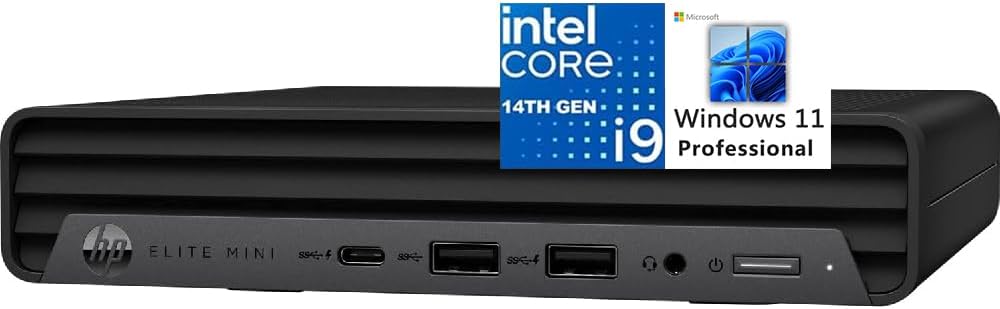
HP delivers a top tier business Mini with this Elite Mini model featuring the latest 14th Gen processor. The ultra-quiet design ensures it remains unobtrusive in open office settings. Its high rating reflects enterprise quality and reliability.
We may earn a commission when you buy through this link, at no additional cost to you.
It comes with a keyboard and mouse which simplifies deployment for IT departments. Windows 11 Pro offers advanced security features needed for corporate environments and remote management tools.
The price is higher than consumer models reflecting the enterprise grade build quality and support. The 16GB RAM might feel limited for heavy engineering tasks compared to higher capacity options.
Large enterprises looking for a polished, silent, and secure solution will find this unit ideal. It offers a complete package that reduces setup time and administrative overhead.
Advanced thermal design minimizes fan noise to maintain a calm office environment during operation.
Windows 11 Pro includes Group Policy and BitLocker for enhanced security and device management.
We may earn a commission when you buy through this link, at no additional cost to you.
Selecting a compact desktop requires careful attention to processor generation, memory, and connectivity. This guide explains key factors to ensure you choose a model that fits your specific workflow needs.
Choose a newer generation Intel Core i9 processor for better efficiency and performance. Look for models with hybrid architecture to balance high speed tasks with power conservation.
Prioritize 13th or 14th Gen chips for future proofing and compatibility with the latest software.
Aim for at least 32GB of RAM if you plan to run multiple applications or virtual machines. DDR5 memory offers higher bandwidth and efficiency compared to DDR4.
Ensure the system supports RAM expansion to handle growing data needs over time.
SSDs are essential for fast boot times and application loading. Look for PCIe 4.0 NVMe drives for top speeds.
Check for multiple storage slots to add more capacity later without replacing the drive.
Verify the availability of USB-C Thunderbolt or HDMI ports for your monitors and peripherals. High speed network ports like 2.5G LAN are useful for data transfer.
Choose units with ample USB ports to connect all your devices without dongles.
Effective cooling is critical for maintaining performance during heavy workloads. Look for models with large fans or copper heat pipes.
Silent operation is preferred for office environments to avoid distracting background noise.
If you need multiple monitors check the maximum number of supported displays and their resolution. Triple 4K support is common in high-end models.
Ensure the video output matches your existing monitors to avoid adapter issues.
A longer warranty period indicates manufacturer confidence in build quality. Look for options that include at least three years of coverage.
Responsive customer support is valuable if technical issues arise with hardware or drivers.
Choose models that allow easy access to memory and storage slots. This future-proofs your investment against rapid technology changes.
Look for PCIe slots if you plan to add specialized cards later for specific tasks.
Place the unit in a well-ventilated area to prevent overheating. Avoid enclosing it in tight cabinets or near heat sources to maintain airflow.
Keep the exterior clean by gently wiping with a microfiber cloth. Dusting the vents regularly helps maintain efficient cooling performance.
Regularly update drivers and system firmware for optimal stability. Use disk management tools to monitor storage and memory usage for peak performance.
Yes. most models with high core counts and 32GB of RAM handle 4K video editing well. They include capable graphics units suitable for creative workloads.
Many units support triple or quad 4K display output via HDMI and USB-C ports. Check the specific model specifications for the number of supported screens.
Quality models use efficient fans that remain quiet during normal tasks. Under full load fans may ramp up but reputable brands keep noise manageable.
Most models have accessible slots allowing memory upgrades up to 64GB or 96GB. Check the user manual for the maximum supported capacity.
Some latest models offer WiFi 7 support for faster wireless speeds and lower latency. Ensure compatibility with your router before purchase.
These units use compact power adapters usually included in the box. They are designed for standard outlets without needing specialized wiring.
We found the MINISFORUM M1-1390 offers the best balance of power and features. The GEEKOM IT13 MAX AI stands out for budget conscious buyers needing modern AI tools.
Prioritize memory capacity and connectivity options that match your daily workflows. A system with enough RAM and flexible ports ensures long term usability.
Verify current availability and warranty details before finalizing your decision. Prices fluctuate so check retailer pages for the most accurate information today.