
Logitech K120
4.6Editor score
Spill-resistant durable design
Plug-and-play USB setup
Full-size layout with number pad
Finding the right input device is critical for smooth daily operations in any retail or hospitality environment. A dedicated keyboard for POS systems ensures speed, accuracy, and durability under constant use.
We evaluated ten leading models based on build quality, layout efficiency, connectivity options, and special features like touchpads or magnetic readers. Our goal is to highlight tools that streamline checkout processes.
Each selection includes detailed specs and real-world performance notes to help you match hardware to your specific workflow. Please note that product availability and pricing may change over time.
4.6Editor score
4.5Editor score

4.3Editor score
As an Amazon Associate we earn from qualifying purchases.
This side-by-side comparison highlights key specifications and unique features across all ten models to help you quickly identify the best fit for your point of sale environment.


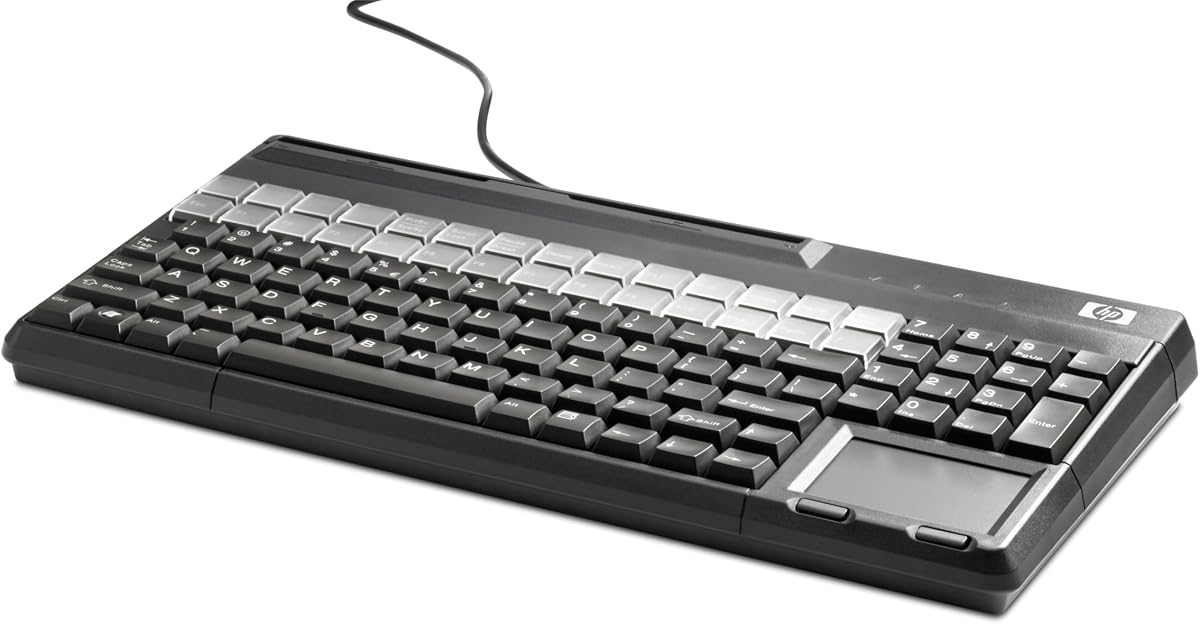
The HP POS Keyboard stands out as a top choice for businesses needing an all-in-one input solution. Its rating reflects strong reliability in retail settings where speed and space efficiency matter most.
We may earn a commission when you buy through this link, at no additional cost to you.
Key strengths include the integrated magnetic stripe reader which eliminates the need for a separate peripheral. The 28 relegendable keys allow staff to program shortcuts specific to your inventory or POS software workflow.
While the price is higher than standard keyboards, the consolidation of functions often offsets the cost by reducing clutter on crowded checkout counters. The USB connection ensures plug-and-play ease without driver hassles.
If you run a busy store where every square inch counts, this keyboard is a smart investment. It balances professional durability with practical features designed specifically for point of sale environments.
The built-in magnetic reader reduces cable clutter and simplifies the checkout surface for faster customer transactions.
Relegendable keys let you assign specific functions to buttons, streamlining repetitive tasks for your cashiers.
We may earn a commission when you buy through this link, at no additional cost to you.
For smaller businesses or secondary terminals, the Logitech K120 offers exceptional value without compromising on basic usability. It holds a high rating due to its consistent performance and low cost of ownership.
We may earn a commission when you buy through this link, at no additional cost to you.
The spill-proof design is a major advantage in food service or retail environments where accidents happen. You can clean it easily without worrying about internal damage, ensuring long-term uptime.
It lacks specialized POS features like card readers, but it functions perfectly as a general entry device. The simple USB connection means you can deploy multiple units across a store quickly.
Choose this keyboard if budget is your primary constraint and you do not need specialized hardware integration. It is a reliable workhorse that handles daily typing tasks efficiently.
The spill-resistant construction ensures that minor liquid accidents do not lead to expensive replacements or downtime.
It works seamlessly with Windows systems, making it easy to integrate into existing POS setups without extra drivers.
We may earn a commission when you buy through this link, at no additional cost to you.
This Cherry model is designed for environments requiring extensive input options, such as warehouses or complex retail systems. Its high key count and relegendable options make it adaptable to specialized software needs.
We may earn a commission when you buy through this link, at no additional cost to you.
The 42 relegendable keys allow for deep customization, letting you map complex commands to single presses. Combined with the magnetic stripe reader, it consolidates multiple functions into one durable unit.
The main trade-off is the size; it takes up significant desk space and may require training for staff used to standard layouts. However, for power users, the efficiency gains are worth the setup effort.
Invest in this keyboard if your operations demand high levels of customization and integration. It is built to withstand continuous use in demanding professional settings.
With 42 keys that can be relabeled, you can tailor the device to match your unique inventory management software shortcuts.
Built with industrial standards in mind, this unit is designed to endure long shifts and rigorous daily handling.
We may earn a commission when you buy through this link, at no additional cost to you.
The Cherry G86-62401 is ideal for setups where counter space is at a premium. By integrating a touchpad, it removes the need for a separate mouse, streamlining the user experience.
We may earn a commission when you buy through this link, at no additional cost to you.
The spill-resistant build adds peace of mind in busy environments. Its compact design ensures it fits comfortably on smaller desks without sacrificing the essential full-size layout.
While the touchpad may require some adjustment for users accustomed to traditional mice, it functions well enough for most POS tasks. It balances portability with practical functionality effectively.
Consider this option if you need a clean workspace without extra peripherals. It is a solid choice for retail counters where every inch of space counts.
The integrated touchpad reduces cable clutter and frees up space for other essential equipment on the counter.
Designed to withstand accidental spills, this keyboard ensures longevity in environments where food or drinks are present.
We may earn a commission when you buy through this link, at no additional cost to you.
The Perixx PERIBOARD-513III combines a full-size layout with a built-in touchpad while keeping noise levels low. This makes it suitable for quieter stores or offices where loud typing is disruptive.
We may earn a commission when you buy through this link, at no additional cost to you.
The scissor-switch mechanism provides a laptop-like feel, ensuring comfort during long shifts. Multimedia hotkeys add convenience for media control without leaving the application interface.
Its price point makes it accessible for businesses looking to upgrade without breaking the bank. The extra-long cable offers flexibility in cable management for complex setups.
Opt for this keyboard if noise reduction and comfort are priorities. It offers a modern typing experience at a competitive market price.
The low-profile scissor keys reduce finger fatigue, making long shifts more comfortable for staff members.
Integrated multimedia keys allow for quick adjustments to system audio and shortcuts during operational hours.
We may earn a commission when you buy through this link, at no additional cost to you.
The Adesso Easy Touch 630Ub is engineered for harsh environments where liquids and dirt are constant threats. Its IP67 rating ensures it can withstand submersion, making it ideal for kitchens or food markets.
We may earn a commission when you buy through this link, at no additional cost to you.
The large keys provide high contrast and ease of use, reducing errors in fast-paced settings. The rugged construction allows for rough handling and frequent cleaning without degradation.
While it lacks advanced programming options, its reliability in tough conditions is unmatched. It ensures continuous operation even when exposed to challenging elements throughout the day.
If your business involves food preparation or wet areas, this keyboard is essential. It provides peace of mind through superior protection against environmental hazards.
Rated IP67, this keyboard can be submerged briefly without damage, ensuring safety in wet work areas.
Large keys with clear printing ensure that operators can type accurately even in low-light or high-stress conditions.
We may earn a commission when you buy through this link, at no additional cost to you.
This Cherry model offers significant programmability with 127 programmable keys for advanced workflows. The integrated touchpad helps save space while keeping navigation accessible for operators.
We may earn a commission when you buy through this link, at no additional cost to you.
Despite a lower user rating compared to others, the technical specifications are robust. It serves well for systems requiring deep key mapping and customization features not found in standard units.
The setup process may be complex, requiring careful attention to mapping each key correctly. Once configured, it offers a highly tailored experience that can improve operational efficiency.
Choose this if customization is non-negotiable for your software. It is a niche tool designed for power users who need maximum control over input.
The high number of programmable keys allows you to map specific software commands directly to the hardware interface.
Including a touchpad reduces the need for external pointing devices, streamlining the input station layout.
We may earn a commission when you buy through this link, at no additional cost to you.
Security is the primary focus of the Cherry KC 1000, which integrates a smartcard reader directly into the keyboard. It is designed for secure environments where authorized access is critical.
We may earn a commission when you buy through this link, at no additional cost to you.
With FIPS 201 approval and secure PIN entry capabilities, it meets strict compliance standards. The thin design ensures it fits discreetly on any workstation without cluttering the space.
While it is specialized for secure access rather than general retail, its reliability and encryption features are top-tier. It is ideal for government or high-security commercial applications.
Invest in this device if security compliance is your priority. It provides a seamless secure entry experience that standard peripherals cannot match.
FIPS 201 approval ensures the device meets rigorous federal and commercial standards for secure data handling.
Integrated smartcard functionality allows for quick and secure user authentication without external dongles.
We may earn a commission when you buy through this link, at no additional cost to you.
The Cherry G80-1800 brings mechanical durability to industrial applications. Its compact dimensions make it suitable for tight spaces where full-size units won't fit.
We may earn a commission when you buy through this link, at no additional cost to you.
Using Cherry MX Black switches ensures reliable actuation over millions of cycles. The support for PS/2 adapters offers legacy compatibility, adding flexibility for older systems.
While the mechanical switches offer great tactile feedback, they may be louder than membrane options. However, the build quality justifies the choice for long-term heavy usage.
Choose this if you need a rugged, compact keyboard for a demanding environment. It balances traditional switch reliability with space-saving design.
The MX Black switches are rated for high actuation cycles, ensuring the device lasts through heavy daily use.
Support for both USB and PS/2 means this keyboard works with modern and legacy hardware setups seamlessly.
We may earn a commission when you buy through this link, at no additional cost to you.
Wireless flexibility is the main advantage of the Logitech K270. It provides a full-size layout without cables, making setup cleaner and easier in shared spaces.
We may earn a commission when you buy through this link, at no additional cost to you.
The 24-month battery life reduces maintenance efforts, ensuring the device stays operational for long periods. Its spill-proof design adds a layer of protection against accidental liquids.
While wireless tech can sometimes face interference, the reliable connection holds up well in most POS environments. It is a practical choice for modern setups wanting minimal wires.
Select this keyboard if you value a clean desk and mobility. It offers a reliable wireless experience suitable for standard retail counters.
Wireless connectivity removes cable clutter, making it easier to clean and organize the counter area.
With up to two years of battery life, you rarely need to worry about replacing power sources frequently.
We may earn a commission when you buy through this link, at no additional cost to you.
Selecting the right POS keyboard involves evaluating durability, layout, and connectivity to match your daily operational needs.
POS keyboards must withstand heavy use and potential spills. Look for models with spill-resistant designs, sturdy frames, and high actuation ratings to ensure longevity.
Prioritize keyboards rated for industrial or commercial environments to avoid frequent replacements.
Consider how many keys you need. A full-size keyboard is great for data entry, but compact models save space on crowded counters.
Evaluate relegendable keys for customization if your workflow requires specific shortcuts.
USB is standard, but some legacy systems may require PS/2. Wireless options offer flexibility but require battery management.
Choose the interface that matches your existing hardware to ensure seamless integration.
Some models come with touchpads or card readers, which can reduce desk clutter. Decide if these features are necessary for your specific business type.
Integrated peripherals can simplify the checkout process by consolidating functions into one device.
If your environment involves food or liquids, waterproof or IP-rated keyboards are essential. These protect against accidental spills and allow for easy cleaning.
Look for ratings like IP67 to ensure the keyboard can handle harsh conditions.
Plug-and-play models save time during installation. Avoid units that require complex drivers or software configuration.
Simpler setup means your staff can start using the new equipment immediately without technical delays.
Comfortable typing angles and key profiles reduce fatigue during long shifts. Consider split designs or wrist rests for high-volume entry tasks.
Good ergonomics improve staff satisfaction and efficiency over long working hours.
Prices vary significantly based on features. Set a budget that balances cost with necessary functionalities like durability or wireless capability.
Invest in quality where it matters most to avoid hidden costs from frequent replacements or downtime.
Start by connecting your keyboard to the available USB port on your POS terminal. Ensure the connection is secure and that the lights indicate power.
Keep your workspace clean by wiping down keys regularly with a dry cloth. Avoid harsh chemicals that might damage the surface or internal components.
Inspect cables occasionally for wear and tear, especially in high-traffic areas. Proper care extends the life of the device significantly.
A POS keyboard is designed for commercial use with features like spill resistance, compact layouts, and durable keys. Standard keyboards lack these specialized protections.
Most modern POS keyboards support Windows and Linux. Always check compatibility before purchasing to ensure it works with your POS software.
Yes, modern wireless keyboards with 2.4 GHz connections are reliable. However, ensure your counter does not have significant interference.
Turn it off and unplug it before wiping with a damp cloth. Most spill-resistant models allow for gentle cleaning without removing keys.
These are keys that can be physically relabeled to change their function. They are useful for customizing your workflow to specific tasks.
Mechanical keyboards are more durable and tactile, while membrane ones are quieter. Choose based on your environment noise and durability needs.
Our top picks include the HP POS Keyboard for its all-in-one design and the Logitech K120 for budget-friendly reliability. Each option serves different business scales effectively.
Prioritize durability and layout features that match your staff volume. A well-chosen keyboard improves speed and accuracy at the checkout.
Always check current product availability and pricing as market conditions change. Ensuring you have the right tools helps your business run smoothly every day.