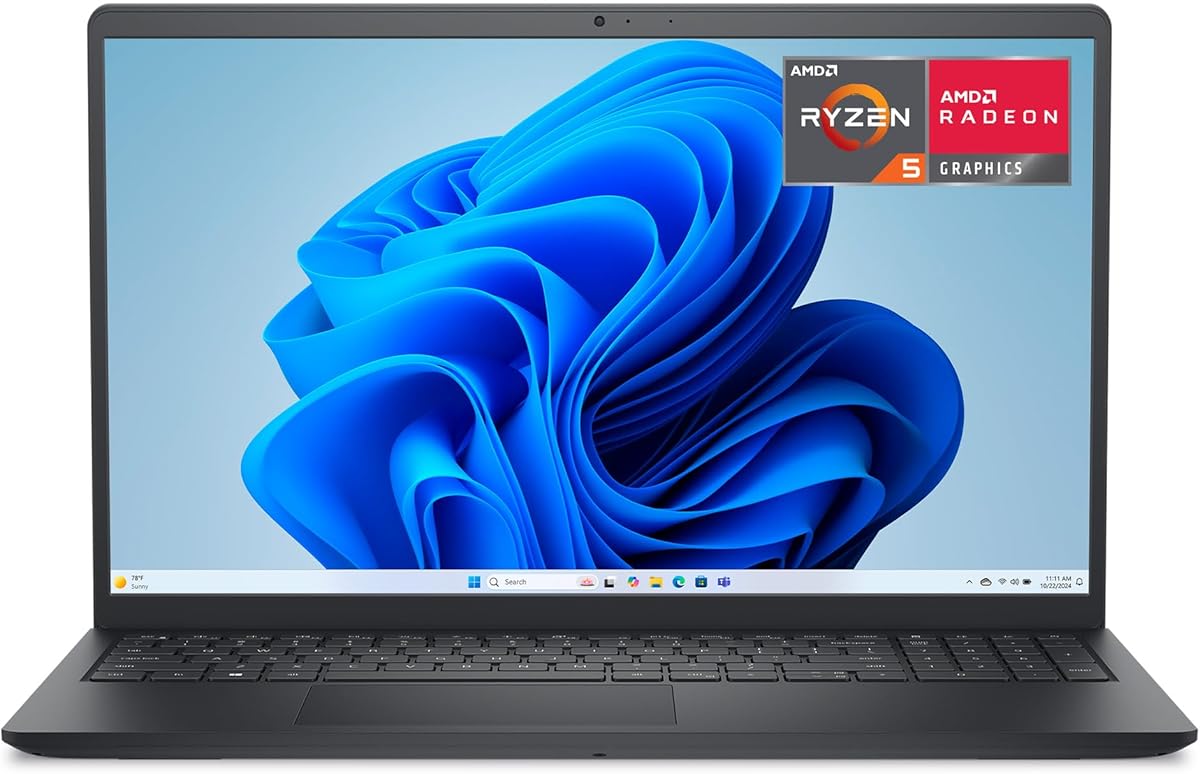
Dell 15.6 Laptop
4.3Editor score
AMD Ryzen 5 7520U
Radeon 610M Graphics
Ergonomic Typing Angle
1 Year Onsite Service
Enscape is a powerful real-time rendering and virtual reality plugin for architecture and design professionals. To run it smoothly, you need a laptop with a strong processor, dedicated graphics, and a vibrant display to visualize your 3D models accurately.
We compared ten top-rated laptops available in November 2026 based on their CPU performance, memory capacity, storage speed, and display quality. Our analysis focuses on devices that can handle complex modeling tasks without lag or thermal throttling during extended work sessions.
Each pick below highlights key strengths and potential trade-offs to help you find the right machine for your workflow. Please note that prices and availability fluctuate frequently, so check the linked product pages for the most current information before purchasing.
4.3Editor score

4.1Editor score

4.4Editor score
As an Amazon Associate we earn from qualifying purchases.
The following table provides a side-by-side overview of the top ten laptops we reviewed, highlighting their core specifications to help you quickly identify the right device for your rendering needs.





The HP OmniBook 3 14 inch Next Gen AI PC stands out as a top contender for modern visualization tasks. With a rating of 4.1 stars, it combines a powerful Snapdragon processor with a vibrant 2K OLED display that brings your 3D models to life.
We may earn a commission when you buy through this link, at no additional cost to you.
Its standout qualities include the rich color reproduction of the OLED panel and the incredibly long battery life that lasts over 41 hours. The integration of Copilot+ PC experiences allows for efficient workflow management, making it ideal for professionals on the move.
However, the storage capacity is limited to 256GB, which may require external drives for large project files. Additionally, as a Snapdragon-based device, users should ensure compatibility with all their specific architectural software before purchase.
If you prioritize screen quality and battery longevity for daily design work, this laptop is highly recommended. It offers a premium experience for those who value portability and visual fidelity without sacrificing performance.
The 2K OLED display delivers crisp visuals and deep blacks, essential for spotting details in complex 3D renders and ensuring color accuracy.
With up to 41 hours of battery life, you can work through multiple projects without needing to plug in, offering unmatched mobility for field work.
We may earn a commission when you buy through this link, at no additional cost to you.
This Light Gaming Laptop offers robust performance for a budget-friendly price point. Rated 4.6 stars, it features an AMD Ryzen 7 processor and 16GB of RAM, which helps handle multiple design applications simultaneously without significant slowdowns.
We may earn a commission when you buy through this link, at no additional cost to you.
The key strengths lie in its storage and memory configuration. The 512GB NVMe SSD ensures rapid application loading, while the integrated AMD Radeon Graphics provide decent processing for lighter rendering tasks and everyday productivity.
While the graphics are integrated, they are sufficient for basic modeling and viewing but may struggle with heavy real-time rendering compared to dedicated GPUs. The build quality is functional but not as premium as higher-end business laptops.
For students or freelancers starting out with Enscape who need a cost-effective solution, this laptop is an excellent choice. It balances performance and price well for entry-level visualization needs.
The Ryzen 7 processor delivers high-frequency performance that outperforms basic chips, ensuring smooth operation during typical design workflows.
With HDMI, Type-C, and USB 3.2 ports, you can easily connect external monitors and peripherals to expand your workspace flexibility.
We may earn a commission when you buy through this link, at no additional cost to you.
The Dell 16 Laptop DC16251 is designed for professionals who need a premium and reliable workstation. With a rating of 4.4 stars, it features a large 16-inch FHD+ screen and an Intel Core 7 processor that supports heavy business and design workloads.
We may earn a commission when you buy through this link, at no additional cost to you.
Key strengths include the immersive viewing experience provided by the edge-to-edge display and the ComfortView Plus feature that reduces blue light. This is crucial for long hours of modeling work to keep your eyes comfortable.
While it lacks a dedicated GPU description, the Intel Core 7 integrated graphics are efficient for general tasks. The price is higher than competitors, and you should verify graphics requirements for intensive rendering before buying.
If you need a durable business laptop with excellent screen quality and support, this model is ideal. It offers a premium experience for users who prioritize comfort and reliability in their daily workflow.
The 16-inch screen with a 16:10 aspect ratio provides more vertical space for detailed 3D modeling and tool palettes.
ComfortView Plus helps reduce harmful blue light emissions, preserving true-to-life color while protecting your eyes during long sessions.
We may earn a commission when you buy through this link, at no additional cost to you.
This HP 17 inch Business Laptop Computer is perfect for users needing a large workspace. With a 4.5 rating, it offers a spacious 17.3 inch display that is great for multitasking and detailed architectural views.
We may earn a commission when you buy through this link, at no additional cost to you.
The standout feature is the full-size keyboard with a numeric keypad, which speeds up data entry and calculations. The 16GB RAM ensures smooth performance for multiple applications, and the anti-glare display reduces eye strain.
However, the larger screen size makes it heavier and less portable for travel. The webcam is 720p, which is acceptable for calls but not the highest quality for client presentations.
Ideal for office environments where screen real estate is a priority, this model offers solid reliability. It is a great choice for those who want a big screen for design work without sacrificing basic performance.
The large 17.3 inch display with slim bezels provides an immersive view that helps you see more of your project details at once.
A full-size keyboard with a dedicated numeric keypad allows for quick input of dimensions and numbers during design work.
We may earn a commission when you buy through this link, at no additional cost to you.
The HP 2025 New 17 inch Laptop stands out for its massive memory and storage specs. Rated 4.2 stars, it features 32GB of RAM and a total of 1.5TB storage, which is excellent for handling large 3D project files and multiple software instances.
We may earn a commission when you buy through this link, at no additional cost to you.
Its key strengths are the high memory capacity and the included portable SSD, ensuring you have ample space for all your assets. The display offers 60% NTSC color coverage, making visuals clear and vibrant for design work.
The main trade-off is the price, which is higher than average, and the bulkier build due to the large screen and components. It is not the most portable option for frequent travelers.
If you need maximum capacity and performance for heavy local storage and multitasking, this laptop is a strong contender. It is best suited for stationary workstations where portability is less critical.
With 32GB of DDR4 RAM, you can run heavy design applications and background processes simultaneously without performance drops.
The 1.5TB total storage ensures you can keep multiple large project files and archives locally without constantly managing space.
We may earn a commission when you buy through this link, at no additional cost to you.
This HP Laptop 14 Computer is a budget-friendly entry-level option. With a rating of 4.3 stars, it offers basic functionality for web browsing and light editing, making it suitable for users with minimal rendering needs.
We may earn a commission when you buy through this link, at no additional cost to you.
It includes a full-size keyboard and Wi-Fi 6 for reliable connectivity. The 14-inch HD display is compact and portable, fitting easily into smaller bags for daily transport to client meetings.
However, the 4GB RAM and 128GB storage are significant limitations for running Enscape or other heavy design software. It may struggle with complex tasks compared to higher-spec machines.
If you only need a device for simple planning or viewing 2D plans, this is a valid choice. For serious 3D rendering, you should consider models with more memory and processing power.
Its compact design makes it easy to carry with you, allowing you to work from various locations without carrying a heavy burden.
With Wi-Fi 6 and Bluetooth 5.4, you get fast and reliable wireless connections for efficient file transfers and peripherals.
We may earn a commission when you buy through this link, at no additional cost to you.
The HP OmniBook 3 16 inch offers a 2K touchscreen display that is great for interactive design work. With a rating of 4.5 stars, it balances performance and features, making it suitable for users who value direct screen interaction.
We may earn a commission when you buy through this link, at no additional cost to you.
Its key strengths include the vibrant HDR visuals and the ability to charge from 0 to 50% in about 45 minutes. The AMD Radeon 610M GPU provides reasonable graphics performance for lighter visualization tasks.
The processor is mid-range, which means it may not handle very heavy multitasking or complex rendering as well as higher-end chips. The 8GB RAM is also a constraint for large projects.
For students or casual designers who need a responsive screen and good battery, this is a solid pick. It is a versatile machine for everyday productivity and light creative work.
The 2K IPS touchscreen delivers incredible detail and wide viewing angles, allowing you to interact directly with your 3D models.
HP Fast Charge restores your battery significantly in short bursts, ensuring you spend less time waiting and more time working.
We may earn a commission when you buy through this link, at no additional cost to you.
This Dell 15.6 Laptop is designed for efficient everyday computing with a strong focus on user comfort. With a 4.3 rating, it features an AMD Ryzen 5 processor and adaptive thermals that keep the system running smoothly even during heavy use.
We may earn a commission when you buy through this link, at no additional cost to you.
The standout qualities include the ergonomic typing angle and the reliable 1-year onsite service support. This ensures that you can get help quickly if any hardware issues arise during your work.
While the build materials are standard and the display is basic, the device performs consistently for general tasks. It is a good choice for those who prioritize reliability and support over high-end features.
Ideal for daily work where stability is key, this laptop offers a balanced experience. It is best for users who need a dependable machine for basic design and office tasks.
Adaptive thermals allow your PC to adjust power usage dynamically, maintaining efficiency whether you are at a desk or on your lap.
Lifted hinges provide an ergonomic typing angle, keeping your wrists comfortable during long periods of input and modeling work.
We may earn a commission when you buy through this link, at no additional cost to you.
The Lenovo V15 Gen 4 Business Laptop offers strong processing power in a classic form factor. With a rating of 4.3 stars, it features an Intel Core i5-13420H processor that beats many standard i7s, ensuring high performance for demanding applications.
We may earn a commission when you buy through this link, at no additional cost to you.
Key strengths include the 16GB RAM and the Windows 11 Pro operating system, which provides advanced security and management features. The numeric keypad and HDMI ports make it versatile for business presentations and data entry.
It lacks a dedicated graphics card, which may limit performance in graphics-intensive tasks like heavy Enscape rendering. The chassis is also slightly heavier than ultrabooks, which might affect portability.
If you need a business-ready laptop with strong CPU performance for complex calculations, this is an excellent option. It is a great fit for professionals who prioritize raw processing power and enterprise features.
The Intel Core i5-13420H outperforms standard i7-1355U processors, delivering robust computing power for efficient task execution.
Ports like HDMI and RJ45 ensure you can connect to various external devices and networks reliably for presentations and transfers.
We may earn a commission when you buy through this link, at no additional cost to you.
This HP OmniBook 3 17.3 inch model brings a large screen to an affordable price point. With a rating of 4.5 stars, it offers a spacious display and solid battery life, making it a practical choice for budget-conscious users.
We may earn a commission when you buy through this link, at no additional cost to you.
Its key strengths include the 17.3-inch screen for multitasking and advanced AI noise reduction for clear calls. The 512GB SSD provides fast storage, and the AMD Radeon 610M graphics handle everyday tasks well.
The processor is on the lower end, which limits high-performance rendering capabilities. The 8GB RAM is also a constraint for complex design work, so it is better for light usage.
If you need a large screen for reviewing plans without breaking the bank, this is a good choice. It is ideal for users who prioritize screen size and battery life over raw speed.
The large 17.3-inch display offers crystal-clear images and wide viewing angles, perfect for spreading out your design tools.
Advanced AI noise reduction tracks your voice during calls, filtering out background noise for more focused professional communication.
We may earn a commission when you buy through this link, at no additional cost to you.
Selecting the right laptop for Enscape requires balancing several key factors to ensure smooth performance during 3D rendering and visualization tasks.
The CPU is the brain of your laptop. For Enscape, you want at least an Intel Core i5 or AMD Ryzen 5 processor with multiple cores. This ensures that modeling and rendering operations run without lag.
Look for processors with high turbo speeds to handle complex calculations efficiently during active work sessions.
Enscape relies heavily on the GPU for real-time rendering. While integrated graphics can work for basic tasks, a dedicated GPU is preferred for heavy projects. Check for compatible NVIDIA or AMD Radeon cards.
Higher graphical power means faster frame rates and smoother navigation through your 3D environments.
Memory allows your system to handle multiple programs at once. For professional design work, 16GB of RAM is a safe baseline. It prevents slowdowns when running Enscape alongside other design software.
More RAM ensures your workflow remains fluid even with large files open.
Solid State Drives (SSDs) are essential for fast boot times and quick file access. Aim for at least 512GB of space to store projects and software locally.
A fast NVMe SSD reduces wait times when loading complex scenes.
A good display is critical for seeing true colors and details. Look for Full HD or higher resolution with good color accuracy. An anti-glare coating helps reduce eye strain.
High brightness and wide color gamuts improve the fidelity of your visual output.
If you work on the go, battery life matters. Look for models promising over 10 hours of real-world use. Fast charging technology is also a valuable bonus for quick top-ups.
Longer battery life ensures you can work anywhere without hunting for a power outlet.
Consider the weight and size of the laptop. A lighter device is easier to carry to client meetings. However, larger screens might add weight but offer better workspace.
Balance the need for a big screen with how much you travel.
Ensure the laptop has enough ports for your peripherals. HDMI and USB-C are essential for connecting external monitors and storage. Wi-Fi 6 ensures fast internet for cloud uploads.
Versatile ports give you flexibility in setting up your workspace.
To get the most out of your laptop, keep it in a cool and dry environment. Enscape can generate heat during rendering, so ensure adequate airflow around the device.
Regularly update your graphics drivers and operating system. This maintains compatibility with the latest Enscape features and improves overall performance and security.
Use a protective sleeve or case when transporting your device. Avoid putting pressure on the screen or keyboard when storing it in a bag to prevent physical damage.
While Enscape can technically run on 8GB of RAM, 16GB is highly recommended for smooth performance. More memory allows you to handle larger models and keep other design software open without slowdowns.
Integrated graphics can handle basic visualization tasks. However, a dedicated GPU is recommended for complex projects and real-time rendering to ensure the best frame rates and visual fidelity.
All the laptops listed in this guide are Windows-based. While Enscape supports macOS, you will need to verify specific compatibility if you are looking for Apple devices in the future.
A larger screen provides more workspace for your tool palettes and model views. This can improve efficiency and reduce eye strain during long working sessions on detailed projects.
Wi-Fi 6 provides faster speeds and better stability than older standards. This helps when uploading large rendering files to the cloud or collaborating with team members in real time.
During intensive rendering or design work, battery life will be shorter than typical browsing. Expect around 4 to 6 hours of active heavy use depending on the model and settings.
We reviewed ten distinct options ranging from budget-friendly choices to premium workstations. Each model offers unique strengths in display quality, processing power, and portability to fit different needs.
Prioritize what matters most to you. If battery life is critical, consider the HP OmniBook series. If performance is key, look at the Dell or Lenovo options with stronger processors.
Prices and availability change often. Please check the current listings before making your purchase to ensure you get the best deal available at this time.