
MokerLink 8 Port 10G Managed Ethernet Switch
4.3Editor score
8 x 10G Ports
Web and CLI Managed
Auto Adaptive Speeds
This guide compares the top Layer 3 Network Switch models for enterprise and home lab use, evaluating routing features, port speeds, and management tools.
Layer 3 network switches are essential for modern networks requiring intelligent routing and segmentation. They combine switching speed with routing logic to optimize traffic flow efficiently.
We evaluated ten top models based on port speed, management capabilities, and routing features. Our analysis focuses on real-world performance and versatility across different network sizes.
Each pick highlights specific strengths like PoE support or fiber uplinks. Please note that prices and availability change frequently, so verify details before purchasing.
4.3Editor score

4.7Editor score

4.5Editor score
The following table provides a side-by-side comparison of all ten models featured in this guide. Use this to quickly assess key specifications and features.
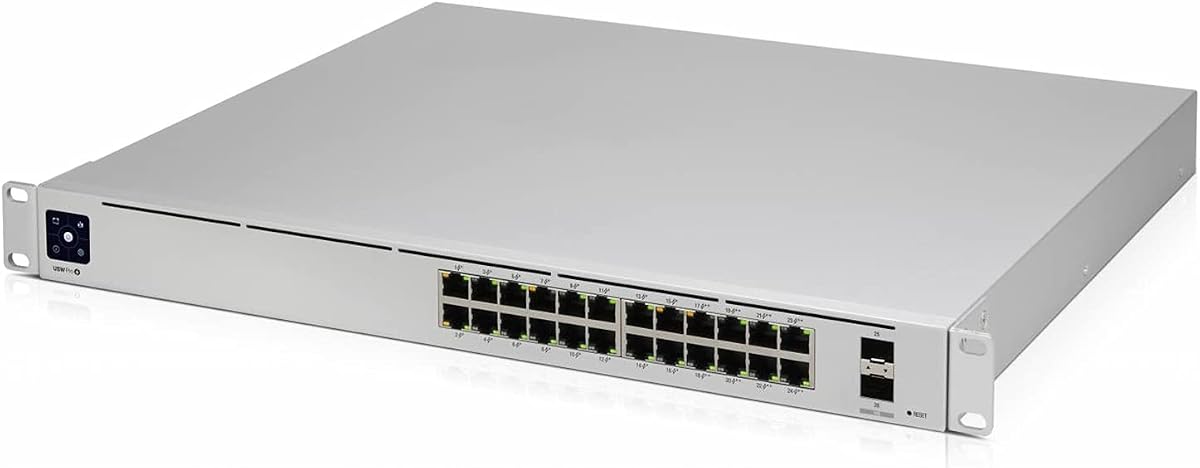




This Ubiquiti switch delivers robust Layer 3 capabilities ideal for growing networks. It features 24 ports and supports PoE for connected devices like access points.
We may earn a commission when you buy through this link, at no additional cost to you.
The routing capabilities allow for efficient traffic segmentation and inter VLAN routing. This reduces load on your main router and improves overall network performance significantly.
While it carries a premium price, the build quality and ecosystem integration justify the cost. It requires careful planning to ensure it fits your existing setup.
It is an excellent choice for businesses needing reliable, scalable network infrastructure with advanced routing and power features integrated seamlessly.
Layer 3 routing enables smart traffic flow management. This ensures data reaches its destination quickly without unnecessary hops.
Integrated PoE simplifies device power. You can connect access points and cameras without extra power supplies.
We may earn a commission when you buy through this link, at no additional cost to you.
The MokerLink switch offers incredible value with eight 10G ports. It supports auto-adaptive speeds and detailed Layer 3 management via web or CLI.
We may earn a commission when you buy through this link, at no additional cost to you.
Its adaptive ports handle various speeds seamlessly, making it versatile for mixed device environments. Security features like DoS protection ensure your network remains safe.
Management requires some technical knowledge but provides deep control. The lack of widespread PoE might limit use cases for powered devices.
This switch is perfect for budget-conscious users needing high-speed connectivity and granular control without enterprise pricing.
Ports adapt to 10G, 5G, 2.5G, or 1G. This ensures compatibility with devices ranging from NAS to standard PCs.
Built-in DoS protection and dynamic ARP inspection protect against common threats. It maintains network integrity and device safety.
We may earn a commission when you buy through this link, at no additional cost to you.
This Pro Max switch brings 2.5G speeds to Ubiquiti's ecosystem. It features 16 managed ports ideal for high throughput applications like video production.
We may earn a commission when you buy through this link, at no additional cost to you.
Integrated routing features allow efficient VLAN handling. The management is intuitive, offering deep insights into network traffic and health easily.
It is costly and relies heavily on the UniFi ecosystem. This limits flexibility if you mix vendors in your setup significantly.
Ideal for pros already using Ubiquiti gear. It delivers top tier performance and ease of use for demanding environments.
2.5G ports provide faster data transfer than standard Gigabit. This accelerates workflow for large file transfers and streaming.
Seamlessly integrates with UniFi controllers. You can monitor and manage switches alongside routers and access points in one app.
We may earn a commission when you buy through this link, at no additional cost to you.
This switch combines 2.5G access ports with 10G uplinks and robust PoE++. It supports high power devices like Wi-Fi 7 access points efficiently.
We may earn a commission when you buy through this link, at no additional cost to you.
Layer 3 features include static routing and OSPF. This offloads routing tasks from your main router. improving network stability and speed.
The fan ensures cooling but adds some noise. Setup is complex for beginners due to advanced routing options available.
It is a powerhouse for studios and heavy users needing power and speed. Ensure you need the specific PoE standards offered.
Ports support up to 90W PoE++. This powers demanding devices like PTZ cameras and high-end access points easily.
Layer 3 routing helps segment traffic effectively. This keeps sensitive data separate and optimizes bandwidth usage across VLANs.
We may earn a commission when you buy through this link, at no additional cost to you.
MikroTik switches are known for powerful RouterOS features. This model offers 10G ports and robust Layer 3 switching capabilities for professionals.
We may earn a commission when you buy through this link, at no additional cost to you.
It handles complex routing and filtering rules well. The 1U size fits neatly in standard server racks. saving valuable space effectively.
Configuration requires significant technical expertise. New users may struggle without prior network administration experience or training.
Best for IT professionals needing granular control and high speed. It offers enterprise features at a competitive hardware price.
Leverages the full RouterOS feature set. This includes advanced routing, filtering, and firewall capabilities for secure networks.
Provides 10G links for backbone connections. This ensures high bandwidth availability for critical network segments and data centers.
We may earn a commission when you buy through this link, at no additional cost to you.
This MikroTik unit focuses on fiber connectivity with multiple SFP+ slots. It provides Layer 3 switching and management features in a small chassis.
We may earn a commission when you buy through this link, at no additional cost to you.
Ideal for connecting remote offices via fiber optics. The console port allows detailed configuration and debugging of network settings effectively.
The lack of copper ports limits direct PC connections. Setup complexity requires networking expertise to utilize its full potential correctly.
Perfect for fiber-centric backbones or server connectivity. It delivers high performance for specific infrastructure needs efficiently.
Designed for SFP+ module usage. This enables long-distance connections and high speed backbones between switches or data centers.
Offers managed features for detailed control. You can configure VLANs, QoS, and routing policies to optimize traffic flow.
We may earn a commission when you buy through this link, at no additional cost to you.
This switch provides massive port density with 48 Gigabit ports. It includes four 10G SFP+ uplinks and supports basic Layer 3 routing.
We may earn a commission when you buy through this link, at no additional cost to you.
The touchscreen allows local configuration without a computer. Integration with UniFi controllers ensures seamless monitoring and management across the network.
User reviews suggest mixed experiences. Performance is reliable, but cost per port might be high compared to non-Ubiquiti options.
Ideal for large deployments requiring centralized management. If you are already invested in UniFi, this is a natural choice.
48 ports connect many devices easily. Perfect for offices or hotels needing extensive wired connections in a small footprint.
The touchscreen offers immediate status checks. You can see traffic and port health at a glance without logging into software.
We may earn a commission when you buy through this link, at no additional cost to you.
This switch excels in quiet environments with its fanless design. It offers eight 10G SFP+ ports for high-speed fiber connections and routing.
We may earn a commission when you buy through this link, at no additional cost to you.
Layer 3 features include static and OSPF routing. This helps manage traffic flow efficiently. ensuring data takes optimal paths.
It requires separate SFP+ modules for connections. This adds to initial costs but allows flexibility in choosing transceiver types.
Excellent for quiet offices or studios needing fiber speeds. Its silent operation and reliable performance make it a strong contender.
No fans means zero noise. This makes it perfect for home labs, studios, or offices where noise is a concern.
Features secure routing protocols. It helps prevent internal spoofing and ensures network data remains safe from manipulation.
We may earn a commission when you buy through this link, at no additional cost to you.
The Pro Max series brings modern speeds to Ubiquiti's lineup. This switch offers 16 ports with a mix of 2.5G and 1G connectivity.
We may earn a commission when you buy through this link, at no additional cost to you.
It supports advanced Layer 3 features and integrates seamlessly with UniFi systems. Management is centralized and intuitive for users.
Dependency on the UniFi controller might limit flexibility. The price reflects its premium features but may not fit tight budgets.
Best for users expanding their UniFi network. It provides high speed connectivity with minimal configuration effort.
2.5G ports bridge the gap between 1G and 10G. This offers cost-effective upgrades for devices that do not need full 10G.
Works best within the UniFi ecosystem. You gain unified monitoring and management across all your networking devices effectively.
We may earn a commission when you buy through this link, at no additional cost to you.
This Pro Max model adds PoE support to the Pro series. It offers 180W of power budget to support access points and other devices.
We may earn a commission when you buy through this link, at no additional cost to you.
The Etherlighting feature illuminates ports to show status. This helps physical identification and troubleshooting in dark rack environments easily.
It is a premium product with a matching price. The limited PoE++ ports might restrict power for high demand devices.
Ideal for modern deployments needing power and data. It combines advanced features with a silent, user-friendly design.
Etherlighting ports light up based on status. This makes identifying active ports and VLANs physically much easier.
Provides 180W total PoE budget. This supports multiple devices without needing external power injectors for them.
We may earn a commission when you buy through this link, at no additional cost to you.
Selecting the right Layer 3 switch requires understanding your network needs. This guide highlights key factors to consider for an informed decision.
Determine the number of devices you need to connect. Ensure speeds match your bandwidth requirements like 1G, 2.5G, or 10G.
Choose a switch with enough ports to avoid extra hardware or patching.
Layer 3 features allow inter-VLAN routing and static routes. This reduces the load on your main router significantly.
Look for protocols like OSPF if you need dynamic routing support.
If you connect cameras or access points, PoE is vital. Check total wattage and per-port limits to support your devices.
PoE+ or PoE++ might be required for newer high-power equipment.
Management options range from simple web UIs to advanced CLI. Choose based on your technical comfort and need for detail.
Centralized systems like UniFi simplify management across multiple devices.
Consider where the switch will live. Desktop models suit homes while rackmount units fit server closets and professional installations.
Ensure dimensions match your available space for installation.
Switches often work best within a brand ecosystem. Mixing vendors can complicate management and feature integration.
Stick to one brand if possible for seamless operation.
Look for features like ACLs, storm control, and port security. These protect your network from unauthorized access and attacks.
Advanced security ensures data integrity and network safety.
Balance features with cost. Ensure the switch allows room to grow as your network expands over time.
Future-proofing with higher speed ports can save costs later.
Start by mounting the switch securely. Use rack rails for server rooms or a flat surface for desktop units.
Connect your devices using appropriate cables. Ensure fiber modules are seated correctly for optical links.
Regularly update firmware and check logs. This keeps the switch secure and running smoothly without issues.
A Layer 3 switch combines switching and routing capabilities. It forwards data based on IP addresses, making it efficient for routing within a LAN.
If your network has multiple VLANs or complex traffic needs, yes. It offloads routing from your router and speeds up internal data transfer.
Layer 2 switches handle MAC addresses for local traffic. Layer 3 switches also handle IP addresses to route traffic between different subnets.
For internal traffic, yes. But you may still need a router for internet connectivity unless the switch has a WAN port.
Use a web browser for a GUI, command line for CLI, or management software. Follow the manufacturer's setup guide to configure access.
Common protocols include static routing, OSPF, and RIP. These help define paths for data packets across your network efficiently.
Choosing the right Layer 3 switch depends on your specific needs. The top picks offer strong routing, speed, and management options.
Prioritize features like PoE and speed ports based on your setup. Ensure management fits your technical comfort level.
Always check current prices before buying. Prices fluctuate often, so verify details for the best deal available.