
ASRock Motherboard Micro ATX DDR3 1066 NA D1800M
4.0Editor score
Includes Intel J1800 Processor
Supports up to 16GB RAM
Features HDMI and VGA outputs
This guide compares the top ten low power motherboard options for NAS, servers, and home builds based on efficiency, performance, and features.
Finding the right low power motherboard is essential for building energy-efficient systems like home servers, NAS devices, or compact desktops. These boards balance performance with minimal electricity usage to reduce heat and operating costs over time.
We evaluated ten top-rated models focusing on processor efficiency, connectivity options, and build quality. Each selection offers unique advantages for specific use cases ranging from basic office work to demanding virtualization tasks.
Every pick highlights key specs and real-world benefits to help you decide quickly. Prices and availability may change frequently so always verify current details before making your final purchase decision online.
4.0Editor score

4.5Editor score
This side-by-side comparison highlights the most important specifications across all ten models to help you find the best fit for your specific energy and performance needs.




This industrial NAS motherboard stands out with its Intel Celeron N5105 processor and four 2.5GbE network ports. It is rated 4.5 stars for its reliability in network-intensive applications like firewalls and media servers.
We may earn a commission when you buy through this link, at no additional cost to you.
Its standout quality is the high-speed networking which enables fast data transfers between devices. The support for dual 4K displays adds versatility for setups needing visual monitoring or media playback alongside storage duties.
Honest trade-offs include potential sleep mode bugs and the need for both 24PIN and 4PIN power connectors. These are acceptable because the board is designed for continuous 24/7 operation rather than frequent power cycling.
It is ideal for users building high performance NAS systems or virtualization hosts. If you need robust networking and low power draw without breaking the budget this board delivers excellent value.
The four 2.5GbE ports ensure that your storage system can handle multiple high bandwidth connections simultaneously without bottlenecks.
Dual 4K display support via HDMI and DP allows you to connect multiple monitors for management interfaces or multimedia streaming directly from the server.
We may earn a commission when you buy through this link, at no additional cost to you.
The ASRock D1800M offers an affordable entry into low power computing with an integrated Intel J1800 processor. Rated 4.0 stars it is perfect for light office work or basic media playback needs.
We may earn a commission when you buy through this link, at no additional cost to you.
Its key strength lies in simplicity and cost efficiency. With built-in graphics and essential ports like HDMI and USB 3.0 it removes the need for extra hardware while maintaining a compact footprint.
Trade-offs include reliance on older DDR3 RAM and fewer high speed interfaces. These are acceptable since the price is extremely low and the performance is adequate for non-demanding tasks.
Buy this if you need a no fuss cheap system for digital signage or light home use. It is the most cost effective solution on our list for basic computing needs.
The CPU is included with the board which means you save money and installation time compared to buying separate components.
Support for legacy ports like VGA and DVI makes it easy to connect older monitors or projectors without additional adapters.
We may earn a commission when you buy through this link, at no additional cost to you.
This Micro ATX board is designed for users wanting to leverage AMD Ryzen efficiency without high costs. It carries a 4.4 rating for its solid support of Ryzen 5000 series processors and modern storage options.
We may earn a commission when you buy through this link, at no additional cost to you.
The standout features are PCIe 4.0 support and dual M.2 slots which allow for fast storage expansion. The Q-Flash BIOS update utility makes managing firmware straightforward even for less experienced builders.
Trade-offs include a basic VRM design that may limit heavy overclocking. This is acceptable because the board targets steady power delivery for standard usage rather than extreme performance tuning.
Choose this for a balanced AMD build that prioritizes value and efficiency. It is a smart pick for those needing a capable base for future Ryzen upgrades.
Compatibility with Ryzen 5000 series ensures you can upgrade your CPU later without swapping out the entire motherboard.
Dual M.2 slots enable you to install multiple NVMe SSDs for fast system drive and separate storage partitions.
We may earn a commission when you buy through this link, at no additional cost to you.
The MSI PRO B550M-P offers impressive cooling capabilities with its Frozr AI technology that adjusts fans based on temperatures. It is rated 4.4 stars for reliability and performance in AMD based compact systems.
We may earn a commission when you buy through this link, at no additional cost to you.
Key strengths include the AI cooling which keeps the system running quietly and efficiently. The Core Boost technology ensures the CPU receives stable power for consistent performance even during longer workloads.
Trade-offs involve a slightly higher price compared to simpler boards. This is acceptable because the thermal management extends hardware life and maintains efficiency under load.
Buy this if you need a quiet efficient system that won't overheat easily. It is an excellent choice for home offices or small form factor builds requiring stable operation.
The AI cooling system automatically optimizes fan speeds to balance noise and heat reduction effectively.
Memory Boost supports high speeds up to 4400+ MT/s which improves overall system responsiveness and multitasking.
We may earn a commission when you buy through this link, at no additional cost to you.
This board features the Intel J4125 quad-core processor making it suitable for compact media centers or small servers. It has a 3.4 rating due to mixed user feedback but remains affordable for specific low power needs.
We may earn a commission when you buy through this link, at no additional cost to you.
Its main appeal is the integrated processor and WiFi slot which simplifies building small devices. The use of DDR4 memory ensures decent speed for everyday tasks without high power consumption.
Trade-offs include a lower user rating suggesting possible stability quirks. These are acceptable if you prioritize size and low cost over premium performance or features.
Ideal for hobbyists or compact builds where space is limited. If you need a simple energy efficient board for a media box this is a solid budget choice.
The Micro ATX design fits easily into small cases allowing you to build discreet systems for living rooms or desks.
Support for M.2 Key E allows adding a WiFi card easily if you prefer wireless over wired internet connections.
We may earn a commission when you buy through this link, at no additional cost to you.
This board supports Ryzen 5000 series and offers three video outputs including VGA which is rare in modern boards. Rated 4.5 stars it is perfect for office setups requiring multiple monitors or legacy displays.
We may earn a commission when you buy through this link, at no additional cost to you.
Key strengths include high speed memory support and robust power protection. The six power phase design ensures the CPU runs steadily even during busy tasks.
Trade-offs include basic audio quality and fewer high-speed USB ports. These are acceptable since the board focuses on stable office performance rather than multimedia or gaming.
Buy this if you need a versatile board with legacy monitor support. It is an excellent value for businesses or home offices needing multiple display connections.
Having HDMI DVI and VGA outputs means you can connect any monitor type without buying adapters.
Support for overclocked speeds up to 4733+ (OC) provides faster data processing for productivity applications.
We may earn a commission when you buy through this link, at no additional cost to you.
This Mini-ITX board is perfect for ultra-compact builds needing modern connectivity. It carries a 4.4 rating for its quality build and included Intel WiFi with Bluetooth which saves internal slot usage.
We may earn a commission when you buy through this link, at no additional cost to you.
The standout feature is the robust cooling and PWM design for such a small board. This ensures the CPU stays cool even in tight enclosures without excessive noise.
Trade-offs include PCIe 3.0 instead of 4.0 and limited RAM slots. These are acceptable for small home theater PCs or basic desktops where size matters most.
Choose this for the smallest reliable build possible. If you need a silent compact PC with wireless connectivity this board is an ideal foundation.
Built-in WiFi and Bluetooth mean you do not need extra dongles or cards for wireless connections.
Direct digital PWM helps maintain stable power delivery reducing heat output in small cases.
We may earn a commission when you buy through this link, at no additional cost to you.
This board stands out with Wi-Fi 6E and premium audio making it a top choice for high-end compact builds. Rated 5.0 stars it delivers exceptional connectivity and sound quality for multimedia use.
We may earn a commission when you buy through this link, at no additional cost to you.
Key strengths include the latest Wi-Fi 6E for low latency internet and high quality audio. The eight USB ports ensure plenty of room for peripherals without extra hubs.
Trade-offs involve a higher cost compared to standard boards. This is acceptable because the features provide convenience and future-proofing that justifies the investment.
Ideal for users wanting a feature-rich motherboard without upgrading to larger cases. It is perfect for home entertainment centers or high performance workstations.
Wi-Fi 6E offers faster speeds and less congestion which improves streaming and online gaming performance.
The Realtek ALC1220 codec delivers clearer audio output suitable for headphones and high fidelity speakers.
We may earn a commission when you buy through this link, at no additional cost to you.
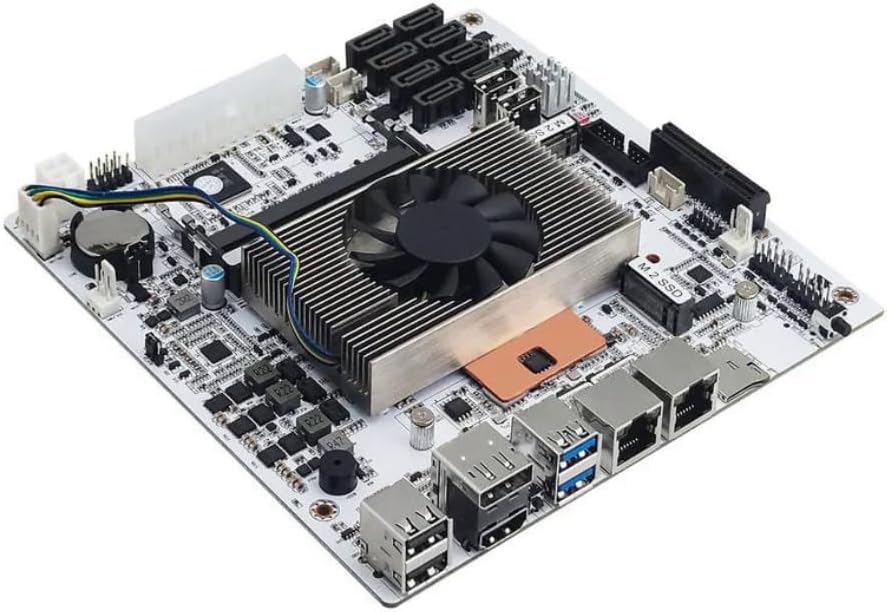
This board is built for servers needing heavy storage and virtualization capabilities. It is rated 4.1 stars for its ability to run multiple VMs and NAS services efficiently with low power draw.
We may earn a commission when you buy through this link, at no additional cost to you.
The standout features are the eight SATA ports and dual 2.5GbE LAN for high throughput. The processor supports VT-x and VT-d which are critical for smooth virtual machine operation.
Trade-offs include known sleep mode issues and potential boot delays. These are acceptable because servers typically run continuously without needing sleep functions.
Choose this for robust home servers or network appliances. If you need to run multiple virtual machines efficiently this is a strong option.
Eight SATA ports allow you to connect many drives for RAID arrays or extensive file storage.
Dual 2.5GbE LAN ports enable link aggregation for faster network speeds or failover setups.
We may earn a commission when you buy through this link, at no additional cost to you.
This NAS motherboard combines an Intel Core i5 processor with extensive storage options for power users. It rates well for performance despite being an ES version since it handles heavy virtualization and storage tasks easily.
We may earn a commission when you buy through this link, at no additional cost to you.
Its standout qualities are the dual NVMe slots and eight SATA ports for maximum storage flexibility. The 2.5GbE LAN ensures your files transfer quickly over the network.
Trade-offs include using an ES processor and lacking sleep mode which may increase power use slightly. These are acceptable for dedicated servers that need consistent high performance.
Buy this for a high-performance storage server or virtualization host. If you need to run multiple VMs alongside a NAS this board offers excellent value.
The Core i5 processor provides more raw compute power than low-end CPUs for complex tasks.
Combining NVMe for speed and SATA for capacity gives you the best balance for caching and bulk storage.
We may earn a commission when you buy through this link, at no additional cost to you.
Selecting the right low power motherboard involves balancing efficiency with the features you need for your specific system.
Low power boards often use embedded or mobile CPUs designed for efficiency. These chips typically have low TDP ratings which reduce heat and energy costs. Look for modern architectures like Jasper Lake or Alder Lake-N for better performance per watt.
Prioritize a processor that matches your workload needs without unnecessary power draw.
Some models support DDR3 while others support DDR4. DDR4 offers higher speeds and efficiency but costs more. Check how many slots are available and the maximum capacity supported for your tasks.
Ensure the memory type aligns with your budget and performance expectations.
Modern low power boards often include multiple USB 3.0 or higher ports. If you need high speed networking look for 2.5GbE or multiple Gigabit Ethernet ports. This is critical for NAS or server use.
Verify the number of rear and internal ports match your peripheral requirements.
Consider how many SATA ports you need for hard drives. M.2 slots add speed for system drives. Boards for NAS usually offer more SATA ports than standard consumer boards.
Choose a model with enough storage bays for your current and future plans.
Mini-ITX boards fit smallest cases while Micro ATX offers more slots. Low power builds often benefit from smaller sizes to reduce cooling needs. Ensure your case supports the board size you choose.
Select a form factor that balances expansion needs with physical space.
Integrated graphics allow you to connect monitors without a dedicated GPU. Look for HDMI 2.0 or DP 1.4 for 4K support. Some boards offer multiple video ports for multi-monitor setups.
Ensure the video outputs match your display requirements.
Most low power boards need standard 24PIN connectors but some require extra 4PIN power. Check the power supply compatibility before buying. Some units are designed for continuous operation without sleep modes.
Confirm your power supply can handle the specific connector needs of the board.
Wi-Fi 6E or 6 is a premium feature that reduces cable clutter. It helps for small builds where internal slots are limited. Bluetooth adds convenience for peripherals like mice or keyboards.
Decide if built-in wireless justifies the extra cost for your setup.
Install the motherboard in a compatible case with proper standoffs to avoid short circuits. Connect the power supply cables securely ensuring both main and auxiliary connectors are fully seated for stable power.
Update the BIOS to the latest version immediately after installation. This ensures system stability and enables support for newer CPUs or features that improve efficiency and performance.
Keep the interior dust free by regular cleaning with compressed air. Good airflow helps maintain low temperatures which reduces fan noise and extends the lifespan of your components.
Yes they are excellent because they consume less electricity and generate less heat. This makes them cost effective for 24/7 operation without needing active cooling systems.
Most embedded boards have soldered CPUs so you cannot upgrade. However AM4 or Intel socket boards allow future CPU swaps. Check the specific socket type before buying to ensure upgradeability.
Some boards have additional power rails for stability with multiple drives or ports. The extra 4PIN connector ensures consistent voltage delivery during high load periods.
Many modern low power CPUs support VT-x and VT-d which are required for virtual machines. Check the CPU specs to confirm if virtualization is supported for your OS.
TDP varies from 10W to 65W depending on the CPU. Lower TDP models are better for passive cooling while higher ones may need small fans for optimal performance.
No they are bare boards requiring a separate OS installation. You can install Linux Windows or a NAS system like TrueNAS depending on your hardware compatibility.
This depends on the number of SATA ports. Some models offer up to 8 SATA ports plus M.2 slots. Review the specs to match your storage needs.
Some models have known bugs with sleep modes due to firmware issues. For server use continuous operation is preferred so this limitation is often acceptable.
We recommend the Celeron N5105 Industrial Motherboard for most users needing robust networking and storage. Its balance of performance and efficiency makes it a standout for NAS and server builds.
If you are on a tight budget the ASRock Micro ATX board offers great value with integrated components. For premium needs the NAS Motherboard 8 Bay Core i5 provides the power and connectivity of a server class system.
Remember to check current availability and compatibility with your chosen components. Prices fluctuate so verify the latest details to ensure you get the best deal for your low power build.