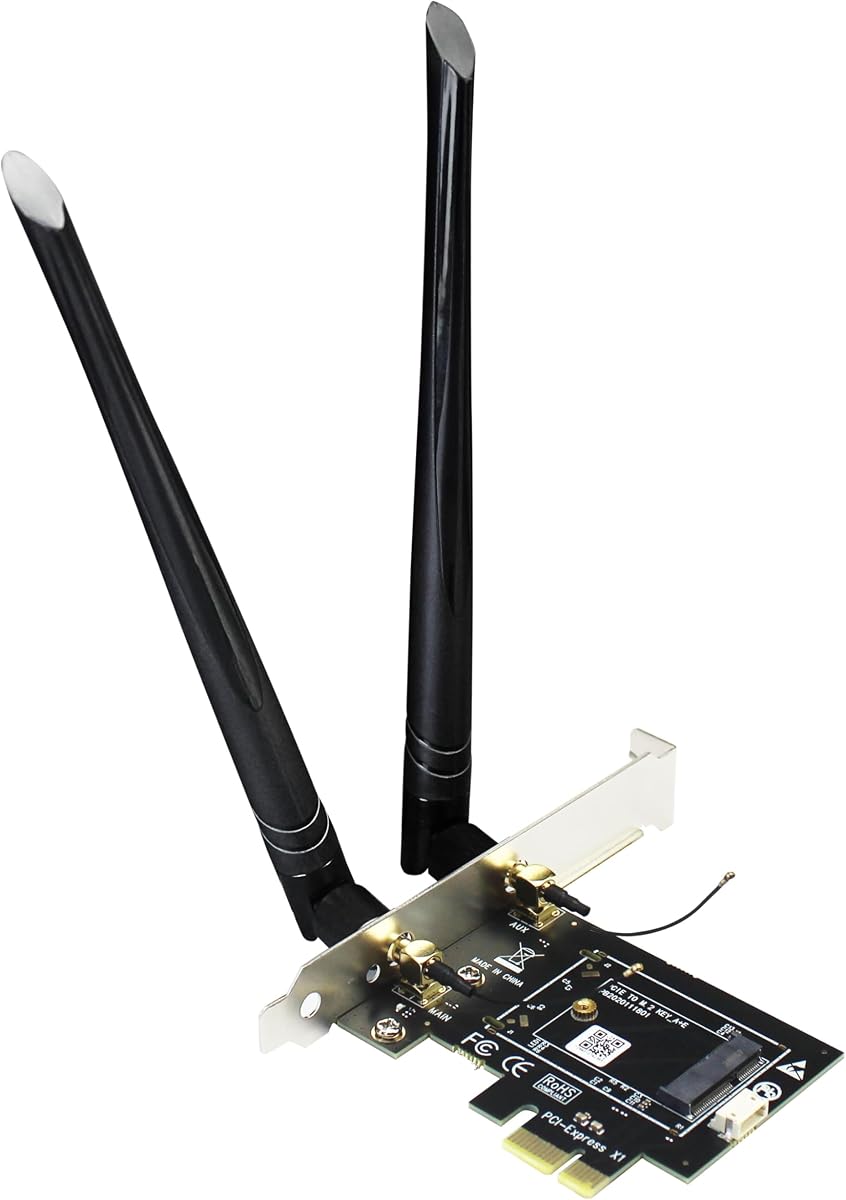
GLOTRENDS WA01 M.2 E Key Adapter
4.1Editor score
Converts M.2 Key E to PCIe X1
Includes 6-dBi SMA antenna kits
Supports multiple WiFi modules easily
This guide compares the top M2 Key E WiFi cards for laptops and desktops featuring Intel AX210 and WiFi 7 chips for ultimate wireless upgrades.
Finding the right internal wireless adapter can transform your computing experience dramatically. Modern M2 Key E WiFi cards offer tri-band support, high throughput, and Bluetooth integration that older hardware simply cannot match. These modules are designed to fit standard slots in laptops and desktops.
We evaluated ten distinct products based on chipset technology, compatibility, included accessories, and real-world performance metrics. Our analysis covers everything from budget-friendly Intel AX210 modules to cutting-edge WiFi 7 options capable of handling demanding applications. Each entry provides specific details on what you get.
Every pick highlights key strengths, potential limitations, and ideal use cases for different users. We ensure each product title matches official listings accurately for clarity. Note that pricing fluctuates frequently based on market supply and demand dynamics across online retail channels.
4.1Editor score

4.5Editor score

4.6Editor score
The following table provides a side-by-side comparison of all ten selected M2 Key E WiFi cards. You can quickly see the differences in specifications, connectivity options, and included accessories to make an informed decision for your specific hardware setup needs.


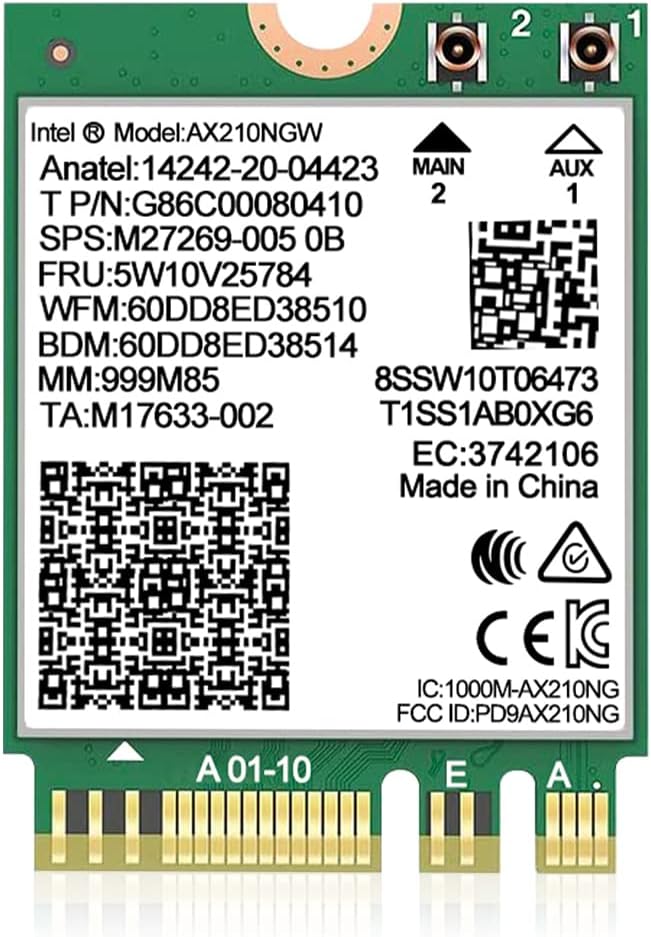



The AX210NGW DTK WiFi Card stands out as a comprehensive solution for users needing reliable tri-band connectivity. With a high rating of 4.5 stars it combines Intel AX210 technology with essential accessories like 5dBi antennas and RF cables. This makes installation straightforward for desktop and laptop upgrades without needing extra parts.
We may earn a commission when you buy through this link, at no additional cost to you.
Its standout feature is the inclusion of the 6GHz band alongside standard 5GHz and 2.4GHz ranges. This tri-band capability allows for interference free connections crucial for high speed tasks like 8K streaming or competitive online gaming. Bluetooth 5.3 is also integrated ensuring low latency connections for wireless headphones and peripherals.
While the performance is excellent the product requires you to download drivers from Intel manually. Additionally the 11 inch cables might be too long for extremely compact builds requiring careful cable management. These are minor trade-offs given the robust performance and included hardware value.
Buyers looking for a complete upgrade kit that delivers maximum speed and reliability should choose this card. It is perfect for gamers streamers and professionals who need stable connections without buying extra brackets or wires separately.
The 6GHz band provides extra bandwidth for devices in crowded environments reducing congestion significantly.
Included cables and brackets ensure you have everything needed for a secure physical installation immediately.
We may earn a commission when you buy through this link, at no additional cost to you.
The GLOTRENDS WA01 adapter offers an extremely budget friendly way to add modern connectivity to older desktops. Rated 4.1 stars it is designed to bridge the gap between M.2 Key E modules and standard PCIe slots. This flexibility makes it useful for users who already own compatible WiFi cards or want to test different modules.
We may earn a commission when you buy through this link, at no additional cost to you.
It supports a wide range of chips including AX210 and BE200 ensuring future proofing for WiFi 7 upgrades. The included 6-dBi antennas provide decent signal strength for typical home environments. However users must note that Bluetooth requires a separate USB connection to the motherboard which adds a slight complexity to the setup.
The main limitation is incompatibility with CNVio2 modules like AX211 or AX201 which use different signaling protocols. This means you cannot use it with certain newer Intel modules unless you have a compatible NGFF card. For most general users this is a minor constraint given the low cost.
This adapter is ideal for budget conscious builders or those restoring older systems who need modern WiFi capabilities. It provides excellent value for money by allowing flexibility in card selection without breaking the bank on proprietary solutions.
Supports multiple WiFi standards from 4 to 7 allowing you to swap in future upgrades easily.
Transforms any M.2 Key E slot into a full height PCIe expansion slot for desktop cases.
We may earn a commission when you buy through this link, at no additional cost to you.
The Intel Killer BE200 represents the peak of consumer wireless technology with true WiFi 7 capabilities. Rated 4.6 stars it offers theoretical speeds up to 5.8Gbps which is a massive leap over previous generations. This card is engineered for users who demand the fastest possible connection for competitive gaming or large data transfers.
We may earn a commission when you buy through this link, at no additional cost to you.
Its Ultra Low Latency feature is particularly beneficial for online gaming where reaction time matters. Bluetooth 5.4 ensures peripheral connections are stable and power efficient. However this performance comes with hardware requirements as it only works with Intel processors and requires Windows 11 on 64-bit systems.
Users with AMD systems cannot utilize this specific card due to platform restrictions. Additionally full WiFi 7 speeds require a compatible WiFi 7 router and environment configuration. These constraints mean it is best suited for high end builds where you have control over the entire system stack.
Enthusiasts building a top tier gaming rig should consider this card for its raw speed and reliability. It delivers the ultimate wireless experience when paired with modern hardware and networking equipment supporting the latest standards.
Multi Link Operation and 320MHz channels allow for massive bandwidth and reduced network congestion.
Optimized for low latency to ensure smooth responsive gameplay even in crowded network environments.
We may earn a commission when you buy through this link, at no additional cost to you.
This QCNCM865 card brings next generation WiFi 7 features to laptops and desktops with M.2 Key E slots. With a 4.1 rating it offers impressive speeds of up to 5.8Gbps across three bands. The inclusion of Multi Link Operation allows simultaneous connection to multiple bands which reduces latency and improves reliability significantly.
We may earn a commission when you buy through this link, at no additional cost to you.
Users benefit from 4K QAM modulation which increases data throughput within the same spectrum. This makes it excellent for 4K streaming and large file transfers. Bluetooth 5.3 ensures your peripherals remain connected efficiently without draining battery life. It works with both Intel Z890 and AMD Ryzen motherboards.
Operating system requirements are strict requiring Windows 11 version 24H2 or newer for full functionality. You must download drivers from the manufacturer website which can be inconvenient for some users. However these requirements ensure you get the full potential of the WiFi 7 hardware without compatibility issues.
This card is perfect for tech enthusiasts who want to future proof their system with WiFi 7 capabilities. It provides a balanced mix of high performance and compatibility with modern motherboard chipsets from major vendors.
Combines frequencies for faster speeds and lower latency compared to traditional single band connections.
Works seamlessly with both Intel Z890 and AMD Ryzen 9000 series motherboards for wide adoption.
We may earn a commission when you buy through this link, at no additional cost to you.
This AX210NGW card offers reliable tri-band performance with a strong 4.6 star rating. It provides speeds up to 5400Mbps across 2.4GHz 5GHz and 6GHz bands. The module comes with Bluetooth 5.3 which improves connection stability and range over previous versions. It is designed for both Windows 10 and 11 64-bit systems.
We may earn a commission when you buy through this link, at no additional cost to you.
The inclusion of the NGFF M2 2230 A/E key form factor ensures it fits most modern laptops and desktops. However it is not compatible with CNVio2 slots found in some specific laptops which limits its universality slightly. You will need to install drivers from Intel website for best performance.
Users who need a standard WiFi 6E card with proven reliability will find this option excellent. It balances performance and cost well making it suitable for daily productivity and media streaming. The warranty support adds peace of mind for buyers worried about hardware defects.
This is a great choice for general users who want a direct upgrade from older WiFi 5 cards. It delivers consistent speeds and broad compatibility with most modern routers and operating systems out of the box.
Dedicated 6GHz band reduces interference for smoother streaming and gaming experiences.
Uses standard M.2 NGFF 2230 slot ensuring fit in most laptops and desktop motherboards.
We may earn a commission when you buy through this link, at no additional cost to you.
This module delivers high performance WiFi 6E capabilities with a focus on speed and security. It features the AX210 chipset which supports tri-band communication at 5400Mbps. MU-MIMO technology allows simultaneous data transmission to multiple devices reducing latency on busy networks. It also supports WPA3 network security for better protection.
We may earn a commission when you buy through this link, at no additional cost to you.
Bluetooth 5.3 is integrated to handle peripheral connections with low latency. While it offers great speed the package typically excludes external antennas which may need to be sourced separately. You will need to download drivers from the Intel website to activate full functionality.
The card is compatible with both Intel and AMD platforms making it versatile for many systems. It is best suited for users upgrading a laptop or desktop where you can add your own antennas. This ensures you get a reliable connection without the bloat of unnecessary accessories.
Buyers needing a fast secure internal WiFi card will appreciate its performance and modern features. It is an excellent choice for media consumption and gaming where stable connections are critical.
MU-MIMO allows multiple devices to communicate simultaneously improving efficiency on busy home networks.
WPA3 support ensures your wireless network is protected against modern security threats effectively.
We may earn a commission when you buy through this link, at no additional cost to you.
This option stands out because it includes high gain 8dBi antennas in the package. Rated 4.4 stars it ensures strong signal reception even in challenging environments. The AX210 chip supports tri-band speeds across 2.4GHz 5GHz and 6GHz for balanced performance. Brackets and cables are included for a complete desktop solution.
We may earn a commission when you buy through this link, at no additional cost to you.
The 8dBi antennas provide greater range than standard 5dBi models which is helpful for large homes. However their larger size might be noticeable if not managed well in compact cases. You still need to install drivers manually to unlock full speed potential on your system.
For users who want a plug and play experience without buying separate antennas this kit is ideal. It simplifies the upgrade process significantly by providing every physical component needed. This is a strong value proposition for desktop owners upgrading from WiFi 5.
This kit is perfect for those prioritizing signal strength and range over size. It delivers robust performance for streaming and gaming with the convenience of a bundled accessory package.
8dBi antennas offer significantly better range than standard 5dBi models for large spaces.
Includes cables and brackets so you have all physical parts for installation immediately.
We may earn a commission when you buy through this link, at no additional cost to you.
This network card supports WiFi 7 standards with Multi Link Operation for improved bandwidth. Rated 4.4 stars it delivers speeds up to 5800Mbps which exceeds most current internet plans. Bluetooth 5.3 ensures low latency connections for gaming headsets and keyboards. It works only with Windows 11 systems.
We may earn a commission when you buy through this link, at no additional cost to you.
The MLO feature allows simultaneous transmission on multiple bands which reduces network congestion significantly. However this technology requires a compatible WiFi 7 router to function fully. You will need to download drivers from the manufacturer to activate all features properly.
Users with legacy systems running Windows 10 cannot use this card which limits its general adoption. However for those with modern systems it provides the fastest available wireless performance. It is an ideal choice for tech enthusiasts wanting to test the latest standards.
This card is best for users who want maximum speed and are willing to invest in new routers. It provides a future proof solution for home networks aiming for ultimate performance and responsiveness.
Multi Link Operation combines multiple channels for higher speeds and better reliability simultaneously.
Supports 4K QAM modulation to extract maximum throughput from available spectrum.
We may earn a commission when you buy through this link, at no additional cost to you.
This card offers a budget friendly option for WiFi 6 upgrades with dual-band support. Rated 4.4 stars it delivers up to 574Mbps on 2.4GHz and 1201Mbps on 5GHz. Bluetooth 5.2 is included for reliable peripheral connections. It uses the standard 2230 size which fits most laptops and desktops easily.
We may earn a commission when you buy through this link, at no additional cost to you.
While it lacks 6GHz support it still provides significant speed improvements over older standards. It is compatible with Linux systems with kernel 6.5 or higher but official support is limited to Windows 10 and 11. This makes it versatile for users with different operating system preferences.
The main limitation is the absence of tri-band capability which means less freedom in crowded networks. However for most typical home internet speeds this bandwidth is sufficient. It is a great value for basic streaming and browsing without needing extra features.
Buyers looking for a simple affordable upgrade for older laptops should consider this option. It delivers reliable dual-band connectivity and Bluetooth integration at a competitive price point.
Combines 2.4GHz range with 5GHz speed for balanced performance in most environments.
Works on Windows and Linux making it suitable for users with different system setups.
We may earn a commission when you buy through this link, at no additional cost to you.
This card offers a compact solution for modern laptops and mini-PCs with M.2 Key E slots. It delivers true WiFi 7 speeds up to 5.8Gbps across three bands. The design is small and integrates cleanly with newer Intel and AMD motherboards. Bluetooth 5.3 is included for peripheral support.
We may earn a commission when you buy through this link, at no additional cost to you.
Its main benefit is the future proofing of WiFi 7 capabilities in a small form factor. However it requires Windows 11 with specific versions to run properly. Users must download drivers from the manufacturer website to activate features fully. This adds a step to setup but ensures compatibility.
The performance is ideal for gaming and streaming where low latency is critical. It works well with Intel Z890 and AMD Ryzen 9000 series. While the requirements are strict the performance gains justify the effort for enthusiasts building high end systems.
This card is best for users with modern hardware who want maximum wireless performance. It delivers top tier connectivity in a size that fits even compact builds without sacrificing speed.
Delivers next gen speeds in a small form factor that fits modern laptops easily.
WiFi 7 capabilities ensure your system is ready for the latest router technologies.
We may earn a commission when you buy through this link, at no additional cost to you.
Choosing the right M2 Key E WiFi card requires understanding your motherboard's compatibility and your internet usage needs. This guide explains the key factors to consider before purchasing.
The chipset determines the maximum speed and features available on the card. Intel AX210 supports WiFi 6E which is standard for most users. Newer QCNCM865 or BE200 chips support WiFi 7 which offers faster speeds but requires compatible routers.
Always check the manufacturer specifications to ensure the chipset meets your performance goals and software requirements.
Some modern cards like the BE200 or QCNCM865 require Windows 11 version 24H2 or newer. Older cards may work with Windows 10. Linux compatibility varies by driver support and kernel version.
Verify your current operating system version before buying to avoid installation issues or feature limitations.
M.2 Key E slots are standard for WiFi cards but some use CNVio2 or CNVio which are not compatible with all adapters. If your board has CNVio you may need a specific card that matches the protocol.
Confirm your laptop or desktop manual to ensure the slot is a standard Key E port before purchasing.
Some kits include antennas cables and brackets while others do not. Missing accessories can lead to poor signal strength or installation difficulties. Full kits save time and money in the long run.
Look for bundles that include everything you need for installation to ensure a complete setup experience.
WiFi 6E cards offer 6GHz bands for reduced interference while WiFi 7 offers even faster speeds. If your router is older a WiFi 6E card still provides improvements over WiFi 5.
Choose a card that matches your current router capabilities or allows for future upgrades to next gen networks.
Bluetooth 5.3 and 5.4 offer lower latency and better range compared to older versions. This is important if you use wireless headphones or controllers alongside your WiFi connection.
Ensure the card has a Bluetooth version that supports your peripherals for a seamless wireless experience.
Budget adapters are available for those who just want connectivity while premium cards cost more for speed. Consider your internet plan and typical usage to justify the investment.
Balance your budget with the features you actually need to avoid overspending on unused capabilities.
Many cards require manual driver downloads from the manufacturer or Intel website. Ensure the brand provides active support and easy access to drivers for your system.
Good driver support ensures long term stability and security updates for your wireless connection.
Before installation ensure your computer is powered off and unplugged from the wall. Open the case carefully and locate the M.2 Key E slot usually found near the CPU or on the back of the motherboard.
Insert the card at a slight angle into the slot and secure it with the screw provided. Connect the antenna cables to the gold pins firmly until they click into place ensuring no loose connections.
Close the case and power on your computer. Install the latest drivers from the manufacturer website to activate all features and ensure stable performance for your network connection.
Most laptops use standard M2 Key E slots but some manufacturers use proprietary CNVio or CNVio2 slots. You must check your specific laptop model to confirm slot compatibility before buying a new card to ensure it fits correctly.
WiFi 7 cards are backward compatible with older WiFi 6 and WiFi 6E routers. You will still benefit from improved Bluetooth and connection stability but will not get the full WiFi 7 speed without a compatible router.
Many Intel based cards like AX210 have good Linux support through the mainline kernel. However specific cards may require manual driver installation. Always check the manufacturer specifications for Linux kernel version requirements before purchasing.
Weak signal usually comes from unconnected antennas or cables. Ensure all antenna plugs are snapped in firmly and cables are not damaged. Also check if the new card is properly seated in the slot without obstruction.
If your desktop has no M2 slot you can use a PCIe adapter card that converts a PCIe slot to M2 Key E. Ensure you get one that supports the Bluetooth connection separately if needed for full functionality.
Yes to utilize the 6GHz band you must have a WiFi 6E or WiFi 7 router. Without a compatible router the card will still work but will only use the 5GHz and 2.4GHz bands available.
We reviewed ten M2 Key E WiFi cards ranging from budget adapters to premium WiFi 7 modules. The AX210NGW DTK offers the best overall value with included accessories while the BE200 is ideal for high end gaming builds.
When choosing a card prioritize compatibility with your operating system and motherboard slot type. Ensure the WiFi standard matches your current router to get the most value from your purchase.
Prices for these components change often so check current listings before buying to secure the best deal for your upgrade project.