
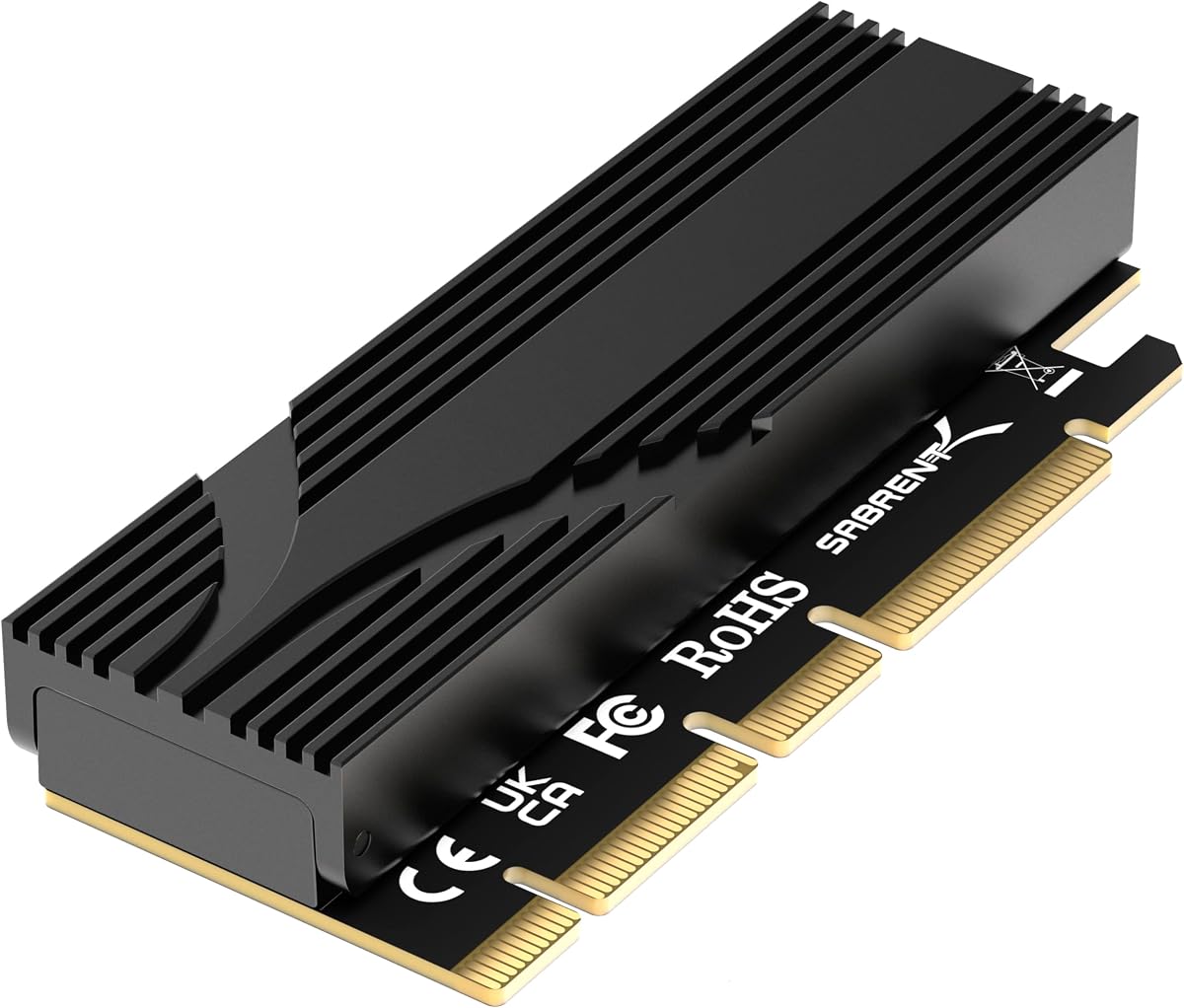
GLOTRENDS M.2 NVMe to PCIe 4.0 X4 Adapter with Heatsink for NVMe SSD
4.6Editor score
Supports PCIe 4.0 and 3.0 speeds
Includes cooling heatsink for thermal management
Compatible with 2230 to 2280 SSD sizes
This guide compares the top M2 Pcie Adapter options for NVMe SSDs, evaluating speed, cooling, compatibility, and value to help you choose the right expansion
Expanding your storage with an M2 Pcie Adapter allows you to utilize high-speed NVMe SSDs in systems lacking native M2 slots. These adapters bridge the gap between modern solid-state drives and legacy or limited motherboard interfaces, ensuring your data access remains fast and reliable for demanding tasks.
We evaluated ten leading M2 Pcie Adapter models based on build quality, thermal management, slot compatibility, and user feedback. Our analysis covers single-drive solutions for casual users, multi-drive cards for professionals, and budget-friendly options that maintain essential performance without unnecessary cost.
Each pick highlights specific strengths like Gen5 support, tool-free installation, or bifurcation capabilities. While prices fluctuate, the core features remain consistent. Always verify your motherboard specs before purchasing to ensure the adapter matches your system capabilities for optimal performance.
4.6Editor score
4.6Editor score

4.4Editor score
The following table provides a side-by-side overview of the top ten M2 Pcie Adapter options available today. It highlights key specifications such as supported PCIe generations, drive counts, and cooling methods to help you quickly identify the best fit for your hardware setup.


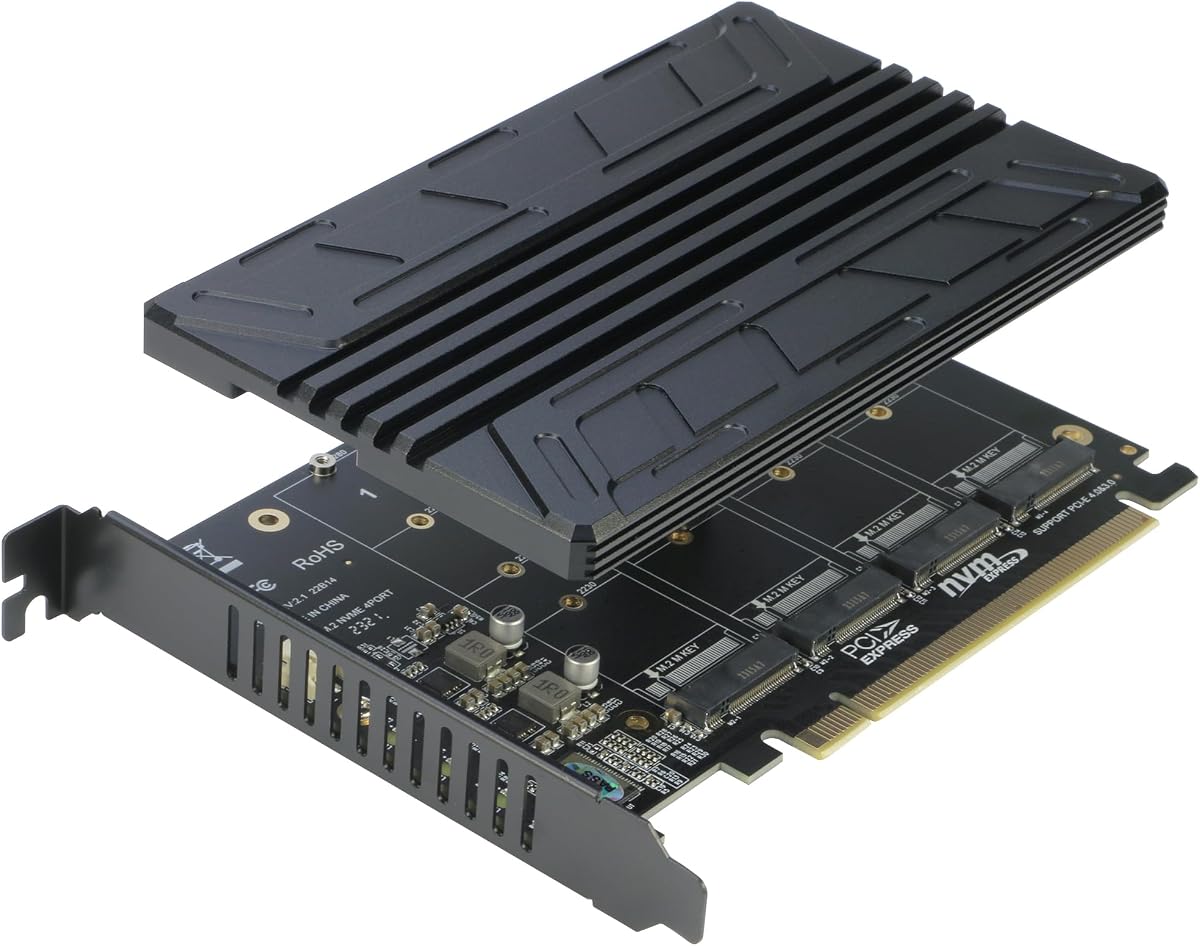


The SABRENT M.2 NVMe SSD to PCIe x16 Adapter Card stands out as the top choice for users seeking peak performance. With a 4.6 rating, it supports Gen5 speeds up to 16GBps when paired with a compatible motherboard. Its standout quality is the tool-free installation design, making upgrades seamless without searching for tiny screws.
We may earn a commission when you buy through this link, at no additional cost to you.
This adapter connects at x4 and supports up to PCIe 5.0 for incredible bidirectional throughput. It uses a single M.2 card with an x16 physical edge for stability. A built-in aluminum heatsink and thermal padding keep the SSD cool under sustained load without needing active fans. It is also compatible with older B+M key PCIe drives.
While it does not support SATA M.2 drives, the performance trade-off is acceptable for NVMe users. The card requires a motherboard that is NVMe-capable to boot or see the drive. Users should check their slot generation before buying if Gen5 throughput is the goal as the card cannot add generations.
This adapter is ideal for professionals needing fast data access and a clean install process. Its passive cooling ensures silence while maintaining drive health. For anyone upgrading to high-speed storage, this SABRENT card delivers reliability and speed without complexity or noise issues in the case.
The card supports PCIe 5.0 for up to 16GBps bidirectional when the host slot is Gen5.
Drop the SSD in and lock it down without hunting for a tiny M.2 screw or screwdriver.
We may earn a commission when you buy through this link, at no additional cost to you.
The GLOTRENDS M.2 NVMe to PCIe 4.0 X4 Adapter offers exceptional value with a 4.6 rating. It turns a motherboard PCIe X4/X8/X16 slot into an M.2 Key M slot for easy installation. The included heatsinks cool M.2 SSDs by 5 to 20 degrees, ensuring stable performance during heavy workloads.
We may earn a commission when you buy through this link, at no additional cost to you.
This adapter works with PCIe 4.0 and 3.0 NVMe SSDs. It supports all sizes from 2230 to 2280. New SSDs need initialization but the drive handles this. It includes 12cm regular and 8cm low-profile brackets for any PC frame. It supports OS boot from NVMe SSD on most boards.
Intel CPUs below 11th gen do not support PCIe 4.0, limiting speed to Gen3. M.2 SATA SSDs are not supported. Despite this, the price remains competitive for the features provided. Users get lifetime tech support which adds value to the purchase.
This adapter is perfect for budget-conscious users who still want Gen4 speeds. It is reliable and comes with everything needed for installation. If your system supports Gen4, this card delivers full speed without breaking the bank.
Comes with heatsinks that cool M.2 SSDs by 5 to 20 degrees Celsius.
Includes 12cm regular and 8cm low-profile brackets for any PC frame.
We may earn a commission when you buy through this link, at no additional cost to you.
The ASUS Hyper M.2 X16 PCIe 3.0 X4 Expansion Card V2 is designed for power users needing massive storage capacity. With a 4.4 rating, it supports four additional NVMe M.2 drives. It reaches up to 128 Gbps transfer speeds using Intel VROC. It has an integrated blower style fan to prevent throttling.
We may earn a commission when you buy through this link, at no additional cost to you.
This card supports Intel VROC ready and NVMe RAID support on AMD Ryzen Threadripper. It features a new two phase power solution with up to 14W output. It uses PCI Express 3.0 x16 interface compatible with x8 and x16 slots. The stylish heatsink and fan keep all drives running cool under load.
Users should note that Intel VROC readiness requires specific motherboard support. The fan is effective but adds active noise to the system. It is a premium solution for those who need maximum I/O performance. The four drive capacity is unmatched in this form factor.
This adapter is best for workstation builds requiring high throughput and capacity. It handles intensive tasks with ease. For users needing RAID or multiple boot drives, this card provides the hardware backbone needed for serious storage expansion.
Supports four additional NVMe M.2 drives using Intel VROC for transfer speeds up to 128 Gbps.
Stylish heatsink and integrated blower style fan prevent M.2 throttling during sustained loads.
We may earn a commission when you buy through this link, at no additional cost to you.
StarTech M.2 PCIe SSD Adapter enhances performance by connecting a PCIe M.2 SSD to your computer through PCI Express. With a 4.6 rating, it is compatible with PCIe 3.0 motherboards and backward compatible with Gen2 and Gen1. It supports PCIe M.2 SSDs like 2242, 2260, 2280, and 22110 drives for ultimate compatibility.
We may earn a commission when you buy through this link, at no additional cost to you.
This adapter features native OS support ensuring fast setup. It includes a full-profile bracket and a half-height low-profile bracket for small form-factor computers. It is equipped with solid-state capacitors for stable voltage regulation. It works with PCIe x8 and x16 slots easily.
The lack of a built-in heatsink is acceptable for light loads. The 2 year warranty includes free 24/5 North America based multi-lingual assistance. This makes it a reliable choice for IT professionals needing stable connectivity. The broad compatibility ensures it fits many legacy systems.
This adapter is ideal for IT professionals or businesses needing stable PCIe expansion. It ensures legacy systems can utilize modern SSDs. If reliability and support are priorities over raw speed, this StarTech adapter is a safe and professional choice.
Compatible with PCIe 3.0 motherboards and backward compatible with PCIe 2.0 and PCIe 1.0.
Equipped with a full-profile bracket, and includes a half-height/low-profile bracket for installation in small form-factor computers.
We may earn a commission when you buy through this link, at no additional cost to you.
The Dual M.2 PCIE Adapter supports two M.2 SSD simultaneously with one SATA interface and one NVMe interface. With a 4.3 rating, it converts one M.2 NVMe SSD to PCIe 3.0 x4 interface and one M.2 SATA SSD to SATA 6Gbps interface. It has advanced heat sink solution for effective ventilation.
We may earn a commission when you buy through this link, at no additional cost to you.
It supports M.2 SSD size 2230, 2242, 2260, 2280, and 22110mm. The PCB features 24 X 5 copper hole effective ventilation heat dissipation. It includes both regular size and low-profile slot brackets. It includes LED power and data transfer status indicators so you know activity.
One SATA connection requires a cable which adds to clutter. The rating is lower than single drive adapters but the utility is high. It is a practical choice for mixing drive types. No driver installation is required for standard Windows environments.
This adapter is best for users who need to mix SATA and NVMe drives. It allows legacy SATA SSDs to be used alongside modern NVMe. If you have a mix of drive types, this card provides the flexibility to use both efficiently.
Supports two M.2 SSD simultaneously with one SATA interface and one NVMe interface.
LED power and data transfer status indicators provide visual confirmation of drive activity.
We may earn a commission when you buy through this link, at no additional cost to you.
This M.2 NVMe to PCIe X4 Adapter supports PCI Express X4, X8, X16 slots. With a 4.6 rating, it offers PCIe 4.0 lanes with up to 64Gbps bandwidth. It is backward compatible with PCIe 1.0 2.0 3.0. It includes an aluminum heatsink solution for cooling SSDs effectively.
We may earn a commission when you buy through this link, at no additional cost to you.
It supports NVMe SSD, AHCI SSD in 2280/2260/2242/2230mm sizes. The package includes 1-M.2 PCIe Adapter, 2-SSD Spare bolts, 3-Low Profile Bracket, and 5-Regular Profile Bracket. It includes 6-Heat conducting silica gel pad and 7-Aluminum Heatsink. It includes 2-Heatsink fixing spring nails.
Win7 requires additional drivers for NVMe SSD. But Win8 and above system do not need driver. This adapter ensures full release of PCIE 3.0/4.0 X4 Full Speed M.2 PCIe SSD. It is a complete package with everything needed for installation and cooling.
This adapter is a complete package with brackets and thermal pads. It is perfect for users who want a hassle free setup. For most modern systems, it delivers full speed and reliable cooling without additional purchases or complications.
Includes brackets, screws, thermal pads, and heatsink in one package for easy installation.
Supports PCIe 4.0 lanes with up to 64Gbps bandwidth for high speed NVMe SSDs.
We may earn a commission when you buy through this link, at no additional cost to you.
RIITOP Quad PCIe NVMe Adapter allows you add 4x NVMe SSDs simultaneously via available PCI-e 4.0 or 3.0 x16 Slot. With a 4.4 rating, it supports PCIe x16 Bifurcation. Full-speed transmission up to 4x 32Gbps. It includes 0.32inch Heatsink to avoid low speeds due to high temperature.
We may earn a commission when you buy through this link, at no additional cost to you.
Motherboard must support PCIe x16 Bifurcation and be set as PCI-e x4x4x4x4 in BIOS. It includes individual LED Indicator design to show each SSD's Working Status. It is compatible with M.2 PCI-e NVMe SSDs in all sizes: 2280/2260/2242/2230. It does not support M.2 SATA-Based B+M Key SSD.
Motherboard Compatibility includes Most Server and X299, X399. It does not Support Hardware Raid but supports soft raid in Win10. 4 SSDs should be same model for RAID. The bifurcation requirement adds complexity but provides massive expansion.
This adapter is best for workstation or server environments. It offers massive storage capacity in one slot. If your motherboard supports bifurcation, you can add four high-speed drives easily. This is a powerful tool for serious storage needs.
Motherboard must support PCIe x16 Bifurcation and be set as PCI-e x4x4x4x4 in BIOS.
Individual LED Indicator design will show each SSD's Working Status for easy monitoring.
We may earn a commission when you buy through this link, at no additional cost to you.
ELUTENG M.2 NVMe PCIe Adapter is compatible with M.2 PCIE (NVMe) M key SSDs. With a 4.4 rating, it reduces temperature and stabilizes performance. The M.2 PCIE adapter card with a maximum read/write speed of 16Gb/s. It supports PCIe 1X to 4X to 8X to 16X slots.
We may earn a commission when you buy through this link, at no additional cost to you.
Solid-state capacitors are used for voltage regulation preventing current waves. It supports Windows 11/10/8/7 and Linux. No driver is needed for win8 and above system. It is just a matter of attaching the backplate to the pcie nvme adapter with one of the included screws and plugging it in.
The adapter is automatically recognized by windows. It includes a low-profile bracket for small cases. It is safe and stable with voltage regulation. It is a good option for small form factor PCs needing storage expansion.
This adapter is ideal for users needing a compact solution with thermal protection. It ensures safe operation with solid-state capacitors. If you need reliable expansion for a small PC, this adapter delivers stability and performance in a minimal package.
Solid-state capacitors are used for voltage regulation preventing current waves from being generated.
Just attach the backplate with included screws and plug it in for automatic recognition.
We may earn a commission when you buy through this link, at no additional cost to you.
M.2 NVME to PCIe 4.0 x4 Adapter features an aluminum heatsink. With a 4.6 rating, it reaches 5-20 degrees celsius cooling effect. It supports 2280/2260/2242/2230mm M.2 SSD. It supports NVMe SSD and PCIe 4.0 x4 support PCIe x4 / x8 / x16 slot.
We may earn a commission when you buy through this link, at no additional cost to you.
It works with Samsung 950Pro/960EVO/XP941/PM951/PM961/SM951/SM961, Plextor M6e Series. It is a simple adapter for expanding NVMe storage. It provides cooling and stability for high-speed drives. It is easy to install into any available PCIe x4 or larger slot.
There are no extra accessories beyond the card itself. This makes it straightforward for users who need basic expansion. The heatsink is effective for most workloads. It supports many well-known NVMe models for reliable compatibility.
This adapter is best for users needing a reliable and straightforward solution. It ensures your drives stay cool while running at full speed. For basic expansion needs without extra features, this card provides excellent value and performance.
Equipped with Aluminum heatsink can reach 5-20 degrees celsius cooling effect.
Supports NVMe SSD, such as Samsung 950Pro, Plextor M6e Series, and Kingston HyperX Predator.
We may earn a commission when you buy through this link, at no additional cost to you.
GLOTRENDS PA09-X1 turns your motherboard's PCIE X1 slot into an M.2 Key M slot. With a 4.5 rating, it uses the free motherboard PCIE X1 slot. Its maximum bandwidth is limited to PCIe X1 and cannot reach PCIe X4 full speed. It supports 2230/2242/2260/2280 sizes.
We may earn a commission when you buy through this link, at no additional cost to you.
It includes 12cm regular and 8cm low-profile brackets. It is compatible with Windows 11/10/8 and Mac OS. M.2 SATA SSDs aren't supported. It supports OS boot from NVMe SSD on some motherboards. It is perfect for saving a larger slot for a graphics card.
Users should note the speed limitation. X1 lanes provide less bandwidth but are still useful. It preserves the X16 slot for a GPU which is critical for gaming. It is a niche solution for systems with limited slot availability.
This adapter is best for systems needing a single drive without sacrificing GPU slots. It is reliable and works with many OS. If you need extra storage but cannot spare a larger slot, this adapter is your best option.
Uses the free motherboard PCIE X1 slot instead of occupying the X16 slot for GPU.
Includes 12cm regular and 8cm low-profile brackets for any PC frame.
We may earn a commission when you buy through this link, at no additional cost to you.
Choosing the right adapter requires understanding your system's limitations and goals.
Your motherboard's PCIe slot generation determines the maximum speed of your adapter. A Gen5 adapter requires a Gen5 slot to achieve full speed. Otherwise it falls back to the slot's generation. Always check your motherboard's specifications before purchasing.
Check your motherboard's PCIe slot generation to ensure compatibility and performance.
Single drive adapters are common and simple. Multi-drive cards require bifurcation support to function correctly. If you need multiple drives ensure your BIOS supports splitting lanes. Otherwise you may only get one drive working.
Choose single drive for simplicity and multi-drive for capacity with bifurcation support.
NVMe drives can heat up during sustained use. Passive cooling using aluminum heatsinks is common. Active cooling with fans is better for multi-drive or high performance cases. Thermal pads help transfer heat from the drive to the heatsink.
Ensure the adapter includes adequate cooling like a heatsink or fan to prevent throttling.
Most adapters only support NVMe M-key drives. SATA M.2 drives use a different protocol and often a B+M key. Verify your drive's interface before buying. A SATA drive will not work on an NVMe only adapter.
Verify your drive interface is NVMe to ensure it will work with the adapter.
Adapters vary in height and length. Full-length adapters need a full slot clearance. Low profile brackets allow installation in small cases. Check your CPU cooler and GPU clearance to avoid conflicts.
Check physical dimensions and clearance to ensure the adapter fits your chassis.
Some systems allow booting from NVMe via PCIe. Others may only allow booting from the onboard M.2 slot. If you want to boot from the adapter ensure your BIOS supports PCIe boot options. Otherwise it will be storage only.
Confirm BIOS boot support if you need the adapter to be your primary boot drive.
Some adapters feature tool-free locking mechanisms. These save time during installation. Others require small M.2 screws. Check what is included and what you might need to buy separately.
Look for tool-free designs if you frequently swap drives without extra tools.
Major brands like StarTech and ASUS often offer better warranty support. They provide clear documentation. Check if the product includes drivers or requires updates for your OS. A good warranty protects your investment over time.
Choose reputable brands with clear documentation and warranty to ensure support.
First remove your PC from power and ground yourself to avoid static damage. Open your case and locate an empty PCIe slot. Ensure you have enough clearance around the slot for the adapter card.
Insert the adapter firmly into the slot and secure it with the bracket screw. Insert your NVMe drive into the M.2 slot on the adapter and lock it. If thermal pads are provided ensure they are between the drive and heatsink.
Power on your PC and enter BIOS if needed to enable PCIe bifurcation or boot from the adapter. Install the OS or format the drive. Always ensure the drive has enough airflow to stay cool during operation.
Most NVMe adapters are not compatible with SATA M.2 drives. SATA drives use a different protocol and physical keying. Always check if the adapter supports SATA before purchasing.
No drivers are needed for Windows 8 and above or Linux. The OS recognizes PCIe NVMe natively. Windows 7 may need a driver download from the SSD manufacturer.
Bifurcation allows one PCIe slot to be split into multiple lanes. You need it for multi-drive adapters. Single drive adapters do not require it to function properly.
No it typically does not affect GPU performance. If using a GPU in an x16 slot keep the adapter in an x4 or x8 slot. Do not place the adapter directly under a tall CPU cooler.
It depends on your motherboard BIOS support. Some BIOSes allow PCIe NVMe booting. Others restrict booting to onboard M.2. Check your manual for boot option settings.
High heat can cause throttling reducing speed. Use adapters with heatsinks or add case fans. Ensure thermal pads are installed correctly between drive and heatsink.
Most adapters have no capacity limit and support 2TB or 4TB drives. The limit is determined by your motherboard or OS. Initialize and format new SSDs before first use.
Some advanced adapters support hardware RAID. Most consumer adapters support software RAID only. RAID requires identical drives and motherboard support for proper function.
This guide highlighted top options like the SABRENT Gen5 Adapter for speed, the GLOTRENDS PCIe 4.0 Adapter for value, and the ASUS Hyper M.2 X16 for multi-drive needs. Each model serves a distinct use case depending on your system and goals.
Prioritize slot generation compatibility and cooling features when choosing. Ensure your motherboard supports your requirements for optimal performance. A good adapter should match your current hardware without limiting future upgrades.
Prices fluctuate based on market demand and supply. Always check current pricing before purchasing to confirm best value. With the right adapter you can expand your storage effectively and enjoy fast speeds for years.