
RedThunder One Handed Gaming Keyboard RGB Backlit 35 Keys Portable Mini Gaming Keypad Ergonomic Game Controller for PC Gamer
4.4Editor score
3ms fast response speed
35 anti-ghosting keys
Macro recording support
Explore our expert guide comparing the top gaming keypads for speed and customization. Find the best one-handed keyboard for your gaming style.
Gaming keypads offer a specialized solution for players seeking enhanced control and efficiency. These devices streamline complex inputs and allow for precise macro management during intense matches.
We evaluated ten leading models based on switch technology, ergonomics, and customization options. Our analysis covers wired and wireless designs suitable for various gaming genres and budgets.
Each selection highlights unique strengths such as Hall Effect switches or programmable layouts. Note that pricing fluctuates frequently so verify current costs before purchasing your preferred unit.
4.4Editor score

4.3Editor score

4.3Editor score
This side-by-side comparison details the specifications and features of each selected keypad to help you decide which model aligns best with your specific gaming needs and preferences.




The Razer Tartarus V2 stands out as a top choice for gamers seeking a blend of tactile feedback and extensive programmability. It holds a solid rating from users who appreciate its unique hybrid switch technology that bridges the gap between membranes and mechanicals.
We may earn a commission when you buy through this link, at no additional cost to you.
Its standout feature is the combination of 32 programmable keys and an 8-way directional thumbpad. This layout allows players to execute complex combos and navigate menus with one hand while keeping the other free for mouse movement. The mecha-membrane switches offer the softness of rubber domes but with a firmer click that mimics mechanical keys.
While the device requires Razer Synapse software to unlock its full potential, the integration with Chroma lighting is a significant benefit for immersion. The ability to sync colors with games and other peripherals creates a cohesive visual experience. However, the reliance on proprietary software can be a downside for users who prefer plug-and-play simplicity.
This keypad is ideal for gamers who want a high-quality one-handed solution without sacrificing comfort or customization. Its ergonomic design reduces fatigue during long sessions, making it suitable for both competitive play and creative workflows. For those invested in the Razer ecosystem, this is a premium option worth the investment.
The mecha-membrane switches provide a unique feel that offers durability and comfort simultaneously. This design ensures that keystrokes register quickly while maintaining a soft touch for prolonged use.
Razer Hypershift allows for complex macro configurations and remapping. This flexibility ensures that every key can be tailored to specific game mechanics or application shortcuts.
We may earn a commission when you buy through this link, at no additional cost to you.
The Redragon K585 offers incredible value for gamers looking for a robust one-handed keypad without breaking the bank. With a high rating from users, it is praised for its tactile switches and extensive key count. The ability to swap switches without soldering makes it a favorite among enthusiasts who like to tweak their setup.
We may earn a commission when you buy through this link, at no additional cost to you.
One of its strongest features is the hot-swap capability which allows users to change the mechanical switches easily. This means you can tune the feel of the keypad to match your main keyboard or personal preference. Additionally, the USB pass-through port helps keep your desk organized by allowing you to plug in a mouse directly into the device.
The inclusion of seven onboard macro keys ensures that frequent commands can be executed instantly. This is particularly useful for MMOs where ability rotations need to be precise and fast. However, users should note that the software is required for deeper customization which may present a learning curve for some.
This model is perfect for budget-conscious gamers who still want high performance and customization. The detachable wrist rest adds comfort during long sessions and the RGB lighting helps it blend into any battlestation. It is a reliable choice for those entering the world of specialized gaming peripherals.
The socket design accepts most standard mechanical switches allowing for a personalized typing feel. This modularity extends the lifespan of the device as you can replace switches if they wear out.
With four profiles and seven macro keys you can store multiple sets of commands for different games. This flexibility ensures you are always ready for the demands of various genres.
We may earn a commission when you buy through this link, at no additional cost to you.
The Redragon K585 PRO takes the features of its wired counterpart and adds wireless functionality to create a versatile tool for gamers. It maintains the high rating associated with the brand while offering the convenience of a clutter-free desk. This model is particularly appealing for those who want to place their keypad anywhere within reach.
We may earn a commission when you buy through this link, at no additional cost to you.
Its connectivity options include both Bluetooth and 2.4GHz wireless modes which ensure a stable connection during gameplay. The battery life supports extended sessions without the need for constant charging making it reliable for long gaming marathons. The hot-swap switch design remains a standout feature allowing for easy mechanical adjustments.
Despite the wireless convenience users should be aware of the battery constraints compared to larger devices. The software is necessary to fully utilize the macro and lighting features which might be a minor hurdle. However the performance remains solid for the price point especially considering the added flexibility of a cordless design.
This keypad is ideal for users who prioritize desk space and flexibility. It allows for a cleaner setup and can be paired easily with laptops or consoles. For gamers who need a portable yet powerful tool this model delivers a strong balance of features and cost.
Support for both Bluetooth and 2.4GHz ensures you can connect to various devices seamlessly. This dual mode capability makes it a versatile addition to multi-device setups.
The detachable wrist rest allows for adjustment based on your comfort needs. This feature helps maintain wrist health during prolonged gaming or work sessions.
We may earn a commission when you buy through this link, at no additional cost to you.
The AZERON Gaming Keypad is a specialized device designed for gamers who demand the highest level of control and ergonomics. It distinguishes itself with a Hall Effect analog thumbstick that replaces traditional WASD keys for movement. This allows for smooth directional inputs that mimic a controller while maintaining keyboard speed.
We may earn a commission when you buy through this link, at no additional cost to you.
Its construction is based on 3D printing which enables a high degree of customization regarding shape and fit. Users can adjust various parts to ensure the keypad fits their hand perfectly reducing strain during play. The software allows for deep customization of the thumbstick including sensitivity and dead zones to fine-tune performance.
While the device offers exceptional precision it comes with a premium price tag that may not be accessible to everyone. The setup involves a learning curve to calibrate the thumbstick and map inputs effectively. However for competitive players the potential performance gains are often considered worth the investment and effort.
This model is best suited for enthusiasts who want to optimize every aspect of their input method. It bridges the gap between keyboard speed and controller fluidity making it unique in the market. If you prioritize ergonomics and precise analog control this keypad is a top contender.
The Hall Effect thumbstick allows for smooth directional inputs without the discrete steps of traditional keys. This is especially useful for genres that require nuanced movement or aiming.
Adjustable parts allow users to modify the fit to suit their hand size and preferences. This adaptability helps prevent fatigue and ensures long-term comfort during use.
We may earn a commission when you buy through this link, at no additional cost to you.
The RedThunder One Handed Gaming Keyboard is designed for portability and simplicity making it ideal for gamers on the go. It has a strong user rating for its reliability and ease of use. The compact form factor saves desk space and allows for a clean setup without the bulk of a full keyboard.
We may earn a commission when you buy through this link, at no additional cost to you.
Its key feature is the anti-ghosting technology which ensures that multiple key presses are registered simultaneously. This is crucial for complex game inputs where timing and multiple button presses are essential. The macro recording function allows users to set up custom sequences quickly without needing external software.
The RGB lighting provides a visual flair with multiple modes to choose from including static and breathing effects. While it lacks advanced software customization it makes up for it with user-friendly hardware controls. This makes it a great choice for those who want immediate functionality right out of the box.
This keypad is perfect for casual gamers or those with limited desk space. Its plug-and-play nature ensures compatibility across various operating systems without hassle. For anyone seeking a lightweight solution that delivers solid performance without complexity this device is a strong recommendation.
All 35 keys are designed to register simultaneously ensuring no input is lost during intense moments. This feature is essential for maintaining control in fast-paced games.
The compact design makes it easy to transport to LAN parties or travel with a laptop. It fits easily into bags without taking up much room.
We may earn a commission when you buy through this link, at no additional cost to you.
The Keychron C0 HE is engineered for competitive gamers who need the fastest possible response times from their input devices. It features Hall Effect magnetic switches that allow for rapid trigger functionality enabling instant key resets. This technology is particularly beneficial for shooters where quick strafing and movement are critical.
We may earn a commission when you buy through this link, at no additional cost to you.
The 8K polling rate ensures that inputs are registered with minimal delay providing a smooth and responsive experience. Users can adjust actuation points to suit their preference which adds a layer of personalization often found in high-end peripherals. The web-based configurator allows for easy access to settings across different operating systems.
Despite its advanced features the device requires a browser for configuration which some users might find less intuitive than desktop software. The price point reflects the premium technology it uses but it is a worthwhile investment for serious competitive players. The build quality is sturdy and designed to withstand the rigors of intense gaming.
This keypad is best suited for those who want to maximize their competitive edge through technology. The ability to customize actuation and trigger points allows for a tailored setup that can improve performance. For FPS fans looking for the latest in switch technology this model is an excellent choice.
This feature allows keys to reset as soon as you lift your finger rather than after a fixed point. This enables faster repeated inputs and more precise movement control in games.
Users can set the exact distance a key must travel to register. This customization helps prevent accidental presses and optimizes speed for different play styles.
We may earn a commission when you buy through this link, at no additional cost to you.
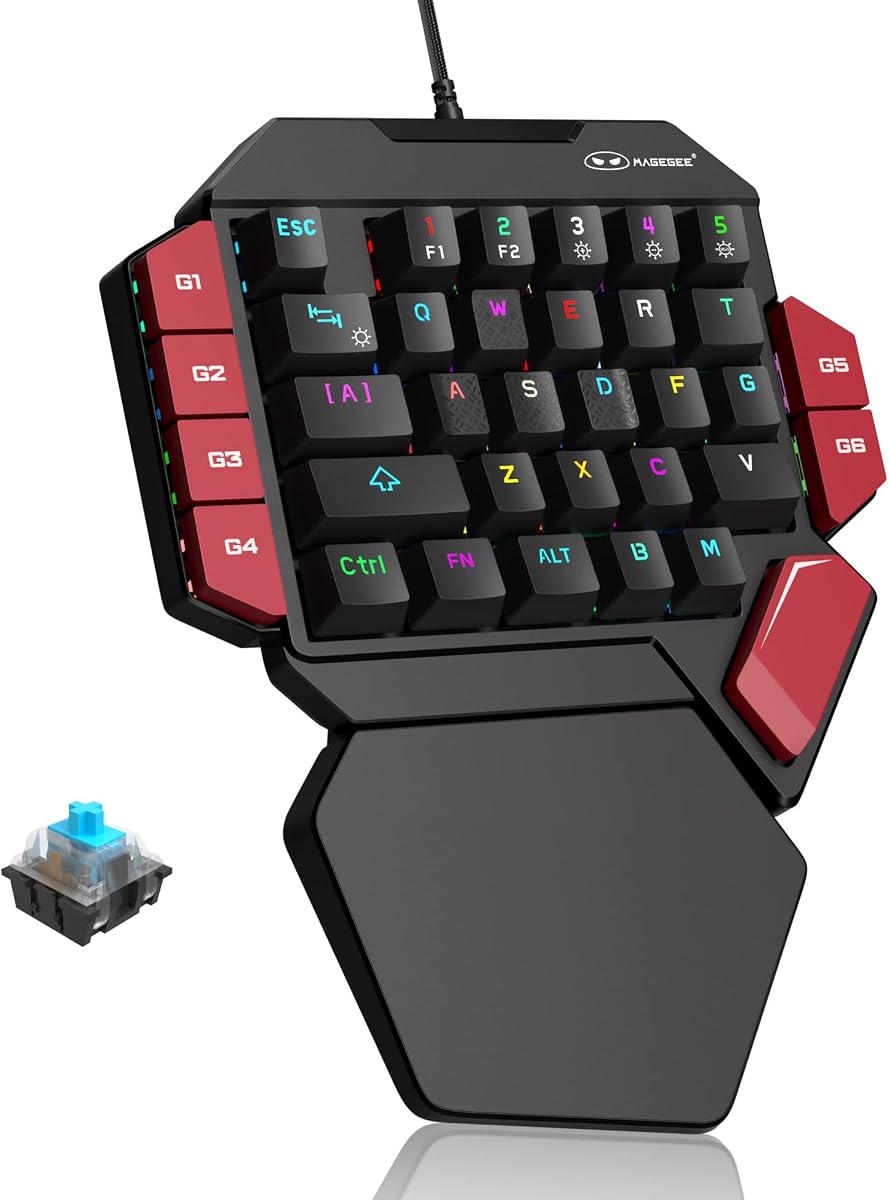
The MageGee One Handed Professional Gaming Keyboard brings the experience of full mechanical switches to a compact layout. It holds a positive rating from users who enjoy the tactile click and durability of mechanical switches. This device is a great way to experience mechanical feel without the cost of a full-size board.
We may earn a commission when you buy through this link, at no additional cost to you.
Its blue switches provide a distinct tactile feedback that is satisfying for both typing and gaming. The anti-conflict design ensures that no keypresses are missed even when multiple keys are pressed together. This reliability is essential for maintaining performance during complex maneuvers in games or productivity tasks.
The RGB lighting offers various modes to enhance the visual appeal of the setup. While it does not support deep software customization the hardware controls are easy to use for changing lights. This simplicity makes it accessible for users who do not want to deal with complex drivers.
This keypad is ideal for those who prioritize tactile feedback and durability on a budget. The mechanical switches are rated for millions of clicks ensuring longevity over time. For gamers who love the sound and feel of mechanicals this model delivers that experience in a portable form factor.
Blue switches offer a strong tactile bump and audible click that confirms every keypress. This feedback helps improve typing accuracy and gaming precision.
Mechanical switches are known for their long lifespan compared to membrane alternatives. This makes the device a reliable choice for daily use without wear.
We may earn a commission when you buy through this link, at no additional cost to you.
The AJAZZ AK029 is a compact powerhouse designed for gamers who want high performance in a small footprint. With the highest rating in its category it is praised for its build quality and fast response times. The Hall Effect switches ensure consistent performance without the degradation common in traditional mechanical switches.
We may earn a commission when you buy through this link, at no additional cost to you.
Its 29-key layout saves significant desk space allowing more room for mouse movement which is beneficial for low-sensitivity gamers. The 8KHz polling rate provides near-instant response times making it a strong competitor in the fast-paced gaming environment. Users appreciate the stability provided by the aluminum internal plate.
While the layout is smaller it includes all essential keys for gaming productivity. The web driver software allows for deep customization without needing to install heavy applications. This makes it easy to transfer profiles between computers keeping your settings intact regardless of where you play.
This model is perfect for competitive players who need speed and precision in a portable package. The lack of key matrix limitations ensures every key is individually connected for reliability. If you want a sleek high-performance device that does not take up much space this is a top choice.
The compact design frees up desk space allowing for larger mouse movements and better positioning. This is especially helpful in crowded setups or on smaller desks.
Hall Effect switches use magnets to detect keypresses preventing physical contact and wear. This ensures consistent actuation points and longevity over time.
We may earn a commission when you buy through this link, at no additional cost to you.
This version of the Razer Tartarus V2 highlights the strength of its mecha-membrane switches and extensive programmability. Users rate it well for its ability to adapt to different gaming needs through software. The ergonomic design ensures that users can play for long periods without discomfort or fatigue.
We may earn a commission when you buy through this link, at no additional cost to you.
The 32 programmable keys allow for complex macros and hotkeys to be mapped to specific buttons. This flexibility is supported by Razer Synapse which offers deep customization for lighting and functions. The Chroma lighting adds a visual element that can be synced with games for an immersive experience.
While the software is powerful it does require installation and an account to access all features. This might be a barrier for those seeking a purely hardware-based solution. However for those who want to integrate their keypad into a larger ecosystem this model offers seamless connectivity and control.
This device is a solid choice for gamers who value customization and comfort. It balances tactile feedback with programmable efficiency to suit a wide range of play styles. If you want a device that can be tailored to your exact needs this keypad is a reliable option.
The design includes features that support the hand and wrist reducing strain during long sessions. This focus on comfort helps maintain performance over extended periods.
The ability to sync with other Razer products creates a unified experience across peripherals. This integration enhances the overall functionality and visual appeal of the setup.
We may earn a commission when you buy through this link, at no additional cost to you.
The Redragon RM104 offers a unique approach by combining wireless connectivity with a functional control knob. It has a high user rating for its versatility and robust battery life. This device is designed for those who want the convenience of wireless alongside the utility of a dedicated control dial.
We may earn a commission when you buy through this link, at no additional cost to you.
It supports Bluetooth and 2.4GHz wireless making it easy to switch between devices or connect to consoles. The multifunction knob allows for quick adjustments to volume or lighting which adds a layer of convenience to the desktop experience. The large battery ensures that you can use it for extended periods without recharging.
While this model is broader than a typical numpad it functions effectively as a comprehensive input tool. The software support allows for macro programming and lighting customization to suit different preferences. Users appreciate the compatibility across Windows and Mac which broadens its utility across different systems.
This keyboard is ideal for users who want a versatile wireless solution with added control features. The inclusion of a knob distinguishes it from standard keyboards and provides tactile feedback for media control. For those who value convenience and multi-device support this model is a strong contender.
Support for multiple wireless modes ensures you can connect to a variety of devices easily. This makes it suitable for setups that include computers and consoles.
The integrated knob provides quick access to volume and lighting adjustments without software. This physical control adds speed and convenience to daily tasks.
We may earn a commission when you buy through this link, at no additional cost to you.
Selecting the right gaming keypad requires understanding your specific needs regarding ergonomics, switches, and connectivity options.
Switches determine the tactile feel and durability of the device. Mechanical switches provide a distinct click and high durability while membrane or mecha-membrane switches offer a softer and quieter experience. For competitive gamers, Hall Effect switches provide rapid triggering and adjustable actuation points which can enhance reaction times.
Consider your preference for tactile feedback and noise levels when choosing switch technology.
Key count varies from compact 29-key layouts to larger 42-key versions. More keys allow for more complex macro assignments and are suitable for MMOs. Smaller layouts free up desk space for mouse movement which is beneficial for FPS players.
Choose a layout that matches your genre and desk space constraints.
Wired connections offer stable zero-latency performance which is vital for competitive play. Wireless options provide a cleaner setup and portability but rely on battery life and connection stability. Some models offer tri-mode options allowing you to switch between Bluetooth and 2.4GHz wireless or wired modes.
Decide if you prioritize the freedom of wireless or the reliability of a wired connection.
Ergonomic design is crucial for preventing fatigue during long sessions. Look for padded wrist rests and adjustable angles that support your natural hand position. Customizable devices like 3D printed keypads allow for a tailored fit which can significantly improve comfort over time.
Prioritize comfort features to maintain performance and health during extended use.
Software allows you to map macros, adjust lighting, and configure key layouts. Some brands offer open-source or web-based drivers that are lightweight and easy to use. Others rely on heavy proprietary suites that offer deep integration but require installation and account management.
Evaluate if you are comfortable managing software drivers for full device functionality.
Prices range significantly from budget-friendly options to high-end premium models. Budget models often sacrifice features like wireless connectivity or advanced switch technology for cost savings. Premium models offer specialized features like Hall Effect switches or unique form factors that justify the higher cost for enthusiasts.
Set a budget that aligns with the features you consider essential for your experience.
Durability is measured in switch lifespan and build quality. Mechanical switches are typically rated for millions of keystrokes ensuring they last through years of use. Materials like aluminum reinforce the chassis to prevent flexing and damage during intense gaming sessions.
Look for products with proven build quality and high switch lifespan ratings.
Additional features like RGB lighting, thumbpads, or control knobs can enhance usability. A thumbpad is useful for movement in strategy games while a knob offers quick media control. Lighting sync capabilities allow the device to match your other peripherals for a cohesive visual experience.
Consider which extra features add real value to your specific workflow and setup.
To ensure optimal performance, keep the device clean by regularly removing dust and debris from the keys using a soft brush or compressed air. This prevents debris from interfering with switch movement and ensures consistent input registration over time.
For software-based models, install the necessary drivers immediately after unboxing to access all features. Configure your macros and key bindings to suit your favorite games and save profiles to onboard memory if available for easy switching between devices.
If using a wireless model, monitor battery levels closely and charge the device before it depletes to avoid interruption during gaming. Store the device in a dry and cool environment to prevent damage to electronic components and extend its overall lifespan.
A gaming keypad allows for faster access to complex macros and skills that would be difficult to reach on a full keyboard. It also frees up your dominant hand for precise mouse control, which is critical in competitive genres like shooters and strategy games.
Yes, many keypads are useful for productivity tasks like video editing or CAD work. Programmable keys can be set up to trigger shortcuts and commands specific to professional software, increasing workflow efficiency.
Most gaming keypads work with consoles like PlayStation or Xbox depending on driver support. Check the product specifications to ensure compatibility before purchasing since not all devices support console inputs out of the box.
Hall Effect switches use magnets to detect keypresses instead of physical contact. This technology allows for adjustable actuation points and rapid triggering, reducing wear and improving response times for competitive gaming.
Basic functions work plug and play, but software is required for advanced customization. You will need software to map macros, customize lighting, and configure actuation points for models with advanced features.
Battery life varies but generally ranges from 15 to 40 hours depending on usage and RGB settings. Some models support fast charging or wired use while charging to ensure continuous gameplay without interruptions.
Yes, a wrist rest provides ergonomic support and helps prevent strain during long sessions. It ensures your hand remains in a neutral position which reduces fatigue and improves overall comfort.
Most modern keypads support RGB customization through dedicated software or onboard controls. You can choose static colors, breathing effects, or sync them with other devices for a unified lighting setup.
We have explored ten top-rated gaming keypads that cater to different needs and preferences from compact budget options to premium Hall Effect models.
Prioritize switch technology and ergonomics when making your final decision to ensure the device supports your play style and comfort needs.
Always check the current pricing and availability before purchasing as offers and stock fluctuate frequently on major online marketplaces.