
New IR Remote Control Replecement for Dish Network 20.1 IR Satellite Receiver TV DVD VCR
3.7Editor score
Affordable replacement option
Compatible with 20.1 receivers
One year warranty included
This guide compares the top 10 Dish Network replacement remotes including upgraded voice models, IR remotes, and universal options for all receiver types.
Finding a reliable Dish Network replacement remote can be challenging when your original controller stops working or gets lost. We have analyzed the best available options to help you restore full control over your satellite TV experience without hassle.
Our team evaluated ten top-rated remotes based on compatibility, build quality, and features like voice search or backlighting. We considered user feedback and technical specifications to ensure every pick works seamlessly with your specific Dish receiver model.
Each product listing below shows key details including ratings, images, and direct links to verified sellers. Please note that prices and availability change frequently so check the current offer before completing your purchase today.
3.7Editor score

4.5Editor score

4.6Editor score
The following comparison table highlights the key specifications and features of each remote control option to help you quickly identify the best match for your Dish Network receiver setup.

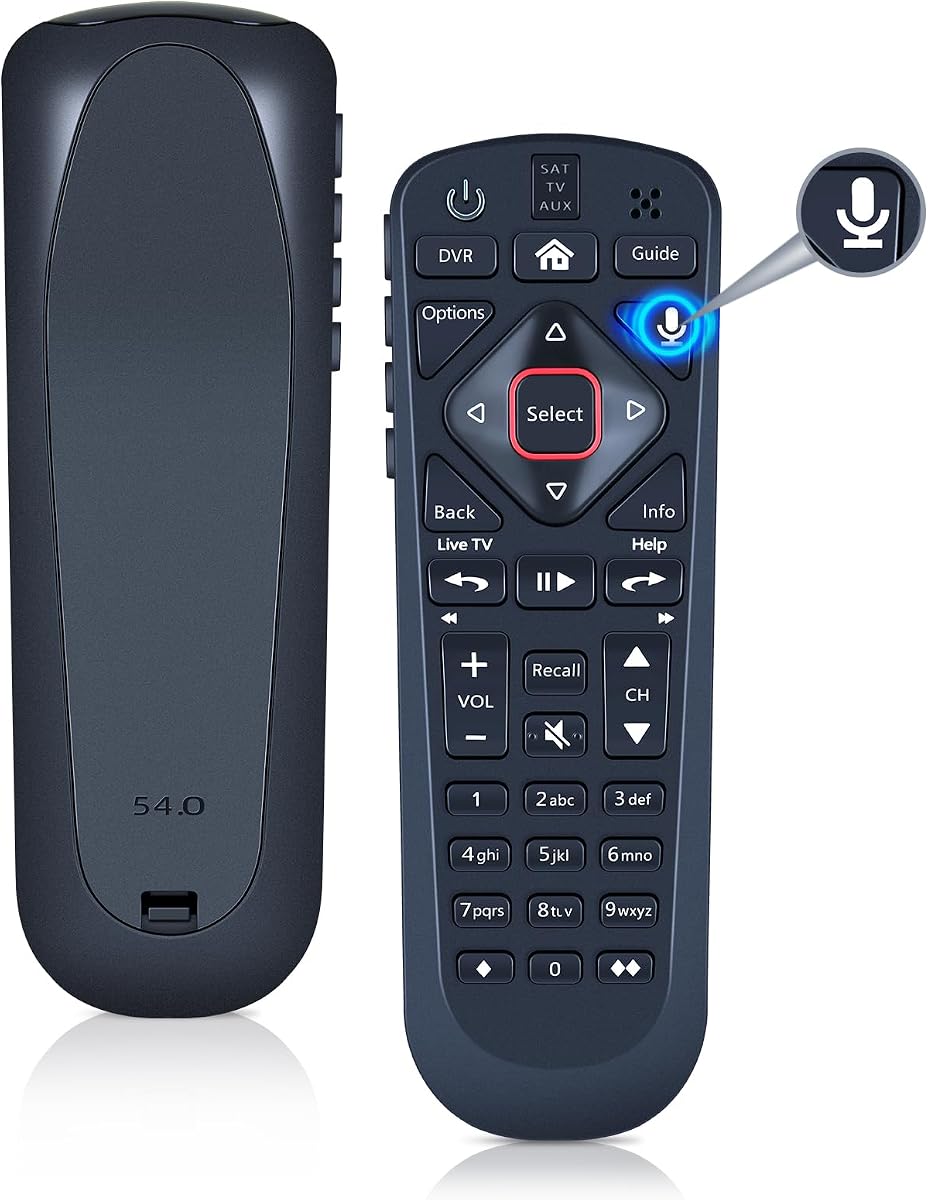



This replacement remote is designed specifically for Dish Upgraded Network 54 series receivers and offers voice search functionality that enhances usability. It has a solid rating from users who appreciate the seamless integration with their existing satellite setup without needing extra adapters.
We may earn a commission when you buy through this link, at no additional cost to you.
The pairing process involves pressing the SYS INFO button on the receiver and the SAT button on the remote to establish a connection through three beeps. Users can also pair this remote with auxiliary devices like Blu-ray players or stereo systems for comprehensive home theater control.
While the remote works well for most users, it requires a brief setup period to pair correctly with the receiver and TV. Some users may find the initial unpairing steps necessary if connection issues arise, but these are standard procedures for UHF remotes.
This remote is an excellent choice for anyone with a Dish 54 series receiver who wants voice control and reliable UHF connectivity. It provides a straightforward solution to replace a lost or damaged original remote while maintaining full functionality.
The built-in microphone allows you to search for shows and channels using voice commands which saves time compared to typing with arrow keys.
Beyond your receiver you can pair this remote with auxiliary devices such as streaming players or audio systems to consolidate your control options.
We may earn a commission when you buy through this link, at no additional cost to you.
The Dish 54.0 Remote Control is built for the Hopper family of receivers and stands out with features like backlit keys and a remote locator. It holds a high rating for its ability to control Hopper Joey and Wally receivers with ease.
We may earn a commission when you buy through this link, at no additional cost to you.
Users benefit from the backlit keypad which illuminates automatically in dark settings making it easier to navigate channels without turning on lights. The remote locator function allows you to press a button on the DVR to make the remote beep and blink when lost.
Personalization options let you program hot keys to launch apps record shows or turn on closed captioning quickly. However full search functionality requires internet connectivity which may limit usage in areas with unstable network connections.
This premium remote is ideal for Hopper users who want enhanced features and better usability in low light conditions. It offers a complete control experience with added convenience features that justify the higher cost.
The keys light up automatically when you pick up the remote in a dark setting which improves visibility and usability during nighttime viewing.
A dedicated button on your DVR triggers the remote to beep and blink helping you locate it quickly if it is misplaced under cushions or behind furniture.
We may earn a commission when you buy through this link, at no additional cost to you.
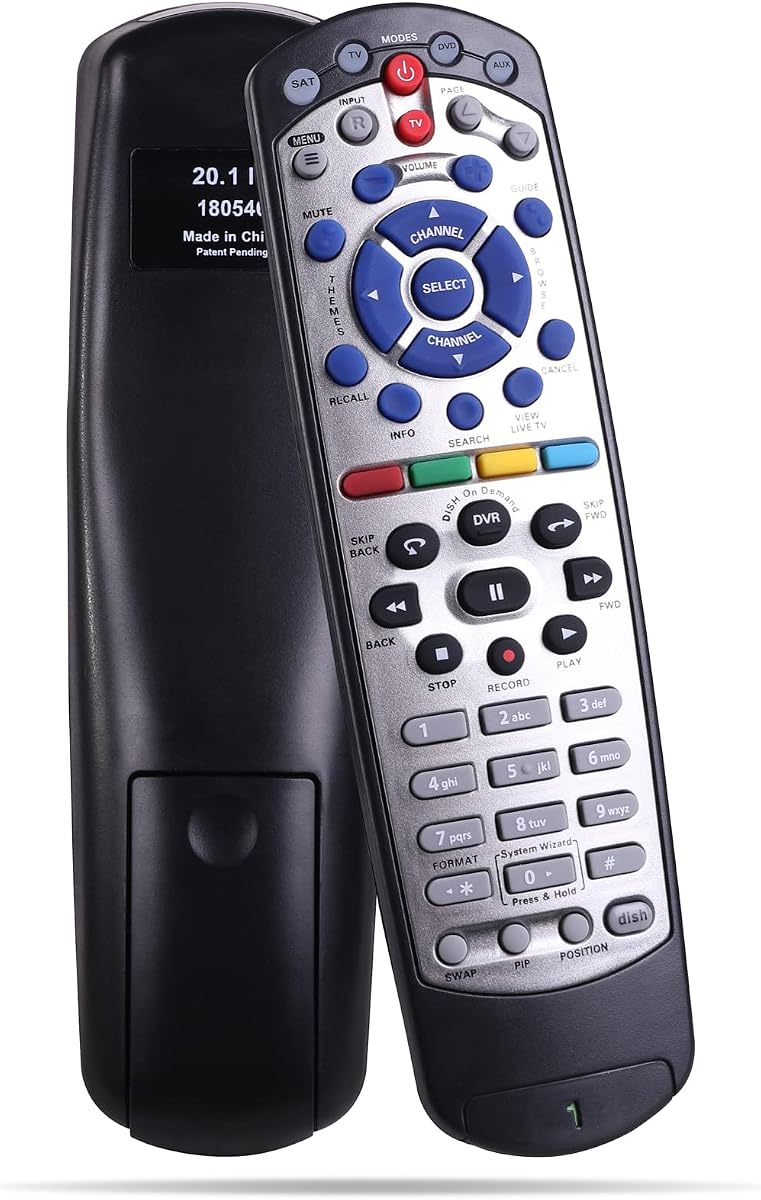
This IR remote control is a budget-friendly option for Dish Network 20.1 receivers offering basic functionality without advanced features. It is designed for users who need a straightforward replacement that works with their existing satellite setup.
We may earn a commission when you buy through this link, at no additional cost to you.
The remote requires setup before use which involves pairing and choosing the correct code for your TV brand during programming. It is an infrared remote so it does not have learning or Bluetooth functionality but it covers essential TV control needs.
While it may lack advanced features the remote is backed by a one year warranty and comes with a manual to guide you through setup. Users report it works well as a basic replacement when paired correctly with their receiver.
This remote is suitable for those seeking an economical solution for a 20.1 receiver without needing extra connectivity options. It provides the core functions required to control your satellite TV and connected devices effectively.
Priced affordably this remote offers a cost effective solution for replacing a lost or broken remote without sacrificing basic control functionality.
Users must complete setup before use by following the manual to pair the remote and select the correct TV code for proper operation.
We may earn a commission when you buy through this link, at no additional cost to you.
This replacement remote supports voice search and works with Dish Upgraded 54 Series receivers offering a convenient way to control your satellite system. It uses UHF connectivity for reliable wireless communication with the receiver.
We may earn a commission when you buy through this link, at no additional cost to you.
The remote includes voice search functionality which allows you to find shows faster without typing. Setup involves adding AAA batteries and pairing through the receiver settings menu using the TV Pairing Wizard for TV devices.
While it offers voice features it is not compatible with Dish Hopper 3 receivers which is an important distinction to check before purchasing. Users must ensure their receiver model matches the supported series for proper operation.
This remote is a good option for 54 series owners who want voice search capabilities at a reasonable price point. It provides essential control features and wireless connectivity that work well with compatible receivers.
Built-in microphone supports voice search allowing you to browse channels and shows using voice commands for faster access.
This remote is not compatible with Dish Hopper 3 receivers so verify your receiver model before purchasing to ensure proper function.
We may earn a commission when you buy through this link, at no additional cost to you.
This replacement voice remote control features a built-in microphone for voice search and is compatible with Dish Network Upgraded 54 Series receivers. It offers a convenient way to control your system without typing on arrow keys.
We may earn a commission when you buy through this link, at no additional cost to you.
Setup involves adding AAA batteries and following pairing steps through the receiver settings. You can pair it with your TV using the TV Pairing Wizard or with auxiliary devices like players or stereo systems.
The remote is backed by a six-month warranty and offers a reliable solution for users needing a voice-enabled replacement. It simplifies channel navigation and show searching through voice commands.
This remote is suitable for 54 series owners who want voice control at an affordable price. It provides essential features and pairing flexibility that work well with compatible receivers.
Built-in microphone supports voice search allowing you to find shows faster without typing with arrow keys for better user experience.
You can pair the remote with your TV using the TV Pairing Wizard or with auxiliary devices for comprehensive home theater control.
We may earn a commission when you buy through this link, at no additional cost to you.
The Dish Network 21.1 IR/UHF PRO Universal Remote is designed to support DISH TV receivers at TV1 and TV2 locations. It offers flexible operation with both IR and UHF modes for various setup needs.
We may earn a commission when you buy through this link, at no additional cost to you.
This remote provides universal receiver support which makes it versatile for different Dish Network configurations. Users can manage multiple receiver locations with a single remote device using the available signal modes.
While detailed feature lists are limited it is known to support both IR and UHF communication for reliable control. It fits standard use cases where basic receiver management is required.
This remote is suitable for users who need a PRO option supporting multiple receiver locations. It offers a practical solution for Dish setups with TV1 and TV2 configurations.
This remote supports both IR and UHF modes providing flexibility for different receiver setups and signal requirements in your home.
Designed to support DISH TV receivers at TV1 and TV2 locations this remote allows management of multiple setups from one device.
We may earn a commission when you buy through this link, at no additional cost to you.
This replacement remote is designed for Dish 20.0 and 20.1 TV1 receivers and requires no programming or pairing. Simply install new AAA batteries and you can start using it immediately without additional setup.
We may earn a commission when you buy through this link, at no additional cost to you.
The remote stores receiver settings directly in the device which ensures compatibility and consistent performance with your specific receiver model. It features high quality sensitive keys that feel comfortable to hold during use.
Users appreciate that this remote works right out of the box without needing to input codes or pair with devices. It is a straightforward solution for replacing a damaged or lost 20.1 remote.
This remote is ideal for users seeking a simple plug-and-play replacement for their 20.1 receiver. It offers reliable performance with essential features needed for daily control.
This remote requires no programming or pairing allowing you to install batteries and use it immediately without any additional configuration steps.
The remote stores receiver settings locally ensuring it works seamlessly with your specific 20.1 TV1 receiver without manual setup.
We may earn a commission when you buy through this link, at no additional cost to you.
This value pack includes two new replacement remotes designed for Dish Network 20.1 IR satellite receivers. Each remote is rigorously quality tested to operate like an original remote ensuring reliable performance.
We may earn a commission when you buy through this link, at no additional cost to you.
You simply insert new AAA batteries set up the model number and you are ready to go. The compact size makes it easy to hold and the transmitting distance is stable for regular use.
The package includes detailed instruction sheets to guide you through setup and operation. With a one year warranty this pack offers good value for households needing multiple remotes or a backup.
This pack is suitable for families who want spare remotes or need replacements for multiple locations. It provides the same functionality as the original remote at a better price point.
Each item is tested and inspected before shipment to ensure it operates like an original remote for consistent reliable performance.
This pack includes two remotes which is ideal for families or for having a backup remote so you are never without a control device.
We may earn a commission when you buy through this link, at no additional cost to you.
This IR remote control is a replacement for Dish Network 20.1 IR satellite receivers and offers the same functions as the original remote. It requires setup before use by following the manual to pair and choose the correct TV code.
We may earn a commission when you buy through this link, at no additional cost to you.
You need to insert new AAA batteries to get it working and then pair it with your receiver and TV. Once set up it can perform just like your original remote for daily use.
The remote is backed by a one year warranty and customer service is available for any questions after receiving the product. It provides a reliable way to control your satellite and TV setup.
This remote is suitable for users seeking a cost effective replacement for their 20.1 receiver. It offers essential control functions and support when you need a working remote.
Finish setup before use by following the manual to pair the remote and choose the code that matches your TV for proper operation.
The remote carries a one year warranty and customer support is available to answer questions and provide high quality service after purchase.
We may earn a commission when you buy through this link, at no additional cost to you.
The Dish Network Remote 52.0 works with all Hoppers Joeys and Wally receivers and includes a Remote Finder function to locate it easily. It features backlit keys that illuminate automatically in dark settings for improved usability.
We may earn a commission when you buy through this link, at no additional cost to you.
You can program hot keys to launch Netflix record shows or turn on closed captioning for personalized control. The Remote Finder function allows you to locate the remote by pressing a button on your receiver.
This remote provides a comprehensive control solution for Hopper families with features that enhance convenience. It is built to work with the full range of Hopper compatible receivers.
This remote is ideal for Hopper owners who want personalized hot keys and backlit navigation. It offers essential features that make daily use more convenient.
The Remote Finder function allows you to locate your remote by pressing a button on your receiver so it beeps or blinks when lost.
You can program hot keys to launch Netflix record shows or turn on closed captioning to customize your remote for quick access.
We may earn a commission when you buy through this link, at no additional cost to you.
Choosing the right replacement remote requires understanding your receiver model and the features that matter most to your daily viewing habits.
The most critical factor is ensuring the remote works with your specific Dish receiver model. Some remotes are designed for 20.1 receivers while others are built for 54 series or Hopper families. Always verify the compatibility list before purchasing.
Check your receiver model number and match it with the remote specifications to avoid returns.
Remotes use either IR or UHF signals. IR remotes require line of sight while UHF remotes work through obstacles and from greater distances. Choose based on your setup and whether you need to control receivers from another room.
UHF offers better flexibility for complex setups while IR is simpler for basic use.
Some replacement remotes include voice search functionality which lets you find shows using your voice. This feature is especially useful if you have difficulty typing on the remote or want faster access to content.
Voice remotes require a built-in microphone and may need internet connectivity for full functionality.
Backlit keys illuminate automatically in dark settings which improves visibility when using the remote at night. This feature is available on premium remotes and helps prevent accidental button presses.
Consider this if you watch TV in low light conditions regularly.
Some remotes require pairing with the receiver using setup steps while others work out of the box. Understand the setup requirements to ensure you are comfortable with the installation process.
Remotes that need pairing may take extra time but offer more customization options.
Replacement remotes come with varying warranty periods from six months to one year. A warranty provides protection against defects and ensures you can get a replacement if issues arise.
Prioritize remotes with longer warranties for peace of mind.
Most remotes use AAA batteries which are not included with the purchase. Consider whether the remote has battery saver features or efficient power usage to reduce replacement frequency.
Check if the remote uses standard batteries or rechargeable options.
Prices range from budget-friendly options to premium remotes with advanced features. Evaluate which features you actually need versus what you are willing to pay for.
Balance cost with functionality to get the best value for your setup.
Insert fresh AAA batteries into the battery compartment ensuring correct polarity to power the remote. For remotes requiring pairing follow the on-screen instructions to connect the remote to your receiver.
Clean the remote regularly with a soft dry cloth to remove dust and debris from buttons. Avoid using harsh chemicals or excessive moisture that could damage the electronic components inside.
Store the remote in a dry place away from direct sunlight or heat sources to preserve battery life and casing integrity. If the remote will not be used for an extended period remove the batteries to prevent leakage.
Most replacement remotes require pairing with your Dish receiver before they can control it. The pairing process typically involves pressing specific buttons like the SAT button and following on-screen prompts to complete the connection. Some models may work out of the box but checking the manual is recommended.
IR remotes use infrared light which requires line of sight between the remote and receiver. UHF remotes use radio frequency signals that can pass through obstacles and work from greater distances. Choose UHF if you need to control a receiver from another room.
Not all replacement remotes work with Hopper receivers. You must select a remote specifically designed for Hopper family receivers like the Dish 54.0 model. Verify compatibility details before purchasing to ensure it works with your setup.
To unpair a remote you typically press and hold the SAT button for three seconds until the indicator light flashes. Then press and hold the Home and Guide buttons together for three seconds until the buzzer beeps. This resets the pairing so you can try again.
Yes many replacement remotes allow you to pair with your TV using the TV Pairing Wizard in the settings menu. This enables you to control power and volume directly from the remote without needing a separate TV remote.
Basic remotes do not require internet but voice search remotes may need internet connectivity for full search functionality. If you rely on voice commands ensure your receiver has an active internet connection for those features to work.
First check that the batteries are installed correctly and have enough charge. Try unpairing and re-pairing the remote with the receiver to reset the connection. If issues persist the remote may be defective and require replacement.
Most replacement remotes come with a warranty ranging from six months to one year depending on the seller. Check the product details for warranty coverage which typically protects against defects in materials or workmanship.
We have covered ten top replacement remotes ranging from budget IR options to premium voice-enabled models. Each choice was evaluated for compatibility build quality and essential features like voice search or backlighting.
Prioritize your receiver model and signal needs when selecting a remote to ensure seamless integration with your setup. Consider whether features like voice search or backlit keys are worth the extra cost for your viewing habits.
Prices and availability change frequently so verify the current offer before completing your purchase. Check the product page for any promotions or warranty details that may affect your final decision.