
UGREEN Power Bank 25000mAh
4.3Editor score
145W USB-C PD
25000mAh capacity
Wide device compatibility
This guide compares the top 10 battery backup solutions for Dell laptops including UPS systems and portable power banks to ensure reliable power during outages.
Finding a reliable battery backup for your Dell laptop is essential for protecting your data and hardware during unexpected power outages. Whether you need a full UPS or a portable power bank, having the right solution ensures you stay productive without interruption.
We evaluated ten top-rated products based on capacity, compatibility, output wattage, and overall build quality. Our analysis focuses on how well these devices integrate with Dell systems to provide seamless power continuity during critical work sessions or emergencies.
Each pick highlights specific strengths like wattage output, port selection, and runtime capabilities. Note that prices change frequently on Amazon so check current listings before purchasing to get the best deal available for your specific needs.
4.3Editor score

4.4Editor score

4.5Editor score
Here is a side-by-side comparison of all ten products to help you quickly identify the best fit for your Dell laptop setup based on key technical specifications.




The CyberPower EC850LCD is a robust UPS solution that provides comprehensive power protection for Dell laptops and their peripherals. With a rating of 4.4 stars it delivers reliable backup power along with surge protection across twelve NEMA outlets. The multifunction LCD panel offers immediate insights into battery conditions and power status which helps users manage energy consumption effectively.
We may earn a commission when you buy through this link, at no additional cost to you.
Key strengths include the ECO mode feature that automatically cuts power to peripherals when the computer sleeps significantly reducing energy costs. The included PowerPanel Personal Edition software allows for remote monitoring and management of the UPS via connected devices. This makes it an excellent choice for home offices or small businesses needing to safeguard critical hardware against sudden outages.
Trade-offs involve its physical size and weight which might limit portability compared to smaller battery packs. However for stationary setups this bulk is often acceptable given the higher capacity and versatility of outlet protection. The three-year warranty covering the battery adds significant value and peace of mind for long-term users seeking durable infrastructure.
This UPS is ideal for users who need more than just a portable power bank for their Dell system. It protects desktop setups monitors and routers as well. For comprehensive backup power that ensures uninterrupted workflow during extended blackouts the CyberPower EC850LCD stands out as a top-tier investment for reliability and efficiency.
The ECO mode intelligently shuts off unused devices to save energy and lower electricity bills automatically.
A three-year warranty including the battery ensures long-term protection and reduces replacement costs for users.
We may earn a commission when you buy through this link, at no additional cost to you.
The Ostrich Charger is a highly rated compatible adapter designed for Dell laptops requiring a round tip connection. With a 4.5 rating it delivers a maximum output of 65W suitable for most Inspiron XPS and Vostro models. It includes a converter cable to support different connector sizes making it a versatile replacement for original adapters.
We may earn a commission when you buy through this link, at no additional cost to you.
Safety is a primary focus here as the product meets standards from a leading consumer testing laboratory in the US and Canada. It features built-in protections against short circuits overvoltage and overheating to prevent damage to your Dell device. The comprehensive warranty includes a thirty-day return policy and a lifetime exchange guarantee for defective units.
Users should note that while this adapter ensures continuous power it does not provide battery backup during outages. It functions purely as a wall charger solution. However its reliability and safety features make it a strong choice for those needing a dependable primary or secondary charging source at a budget-friendly price point.
If your Dell laptop has a failing original charger or you need a travel spare this adapter offers excellent value. It ensures your laptop remains charged and operational without compromising on safety. For users prioritizing cost-effective safety and compatibility over portable power storage this is a solid hardware choice.
Independent testing confirms electrical safety compliance protecting your laptop from voltage irregularities and short circuits.
The manufacturer offers a lifetime exchange policy ensuring long-term support and satisfaction for all customers.
We may earn a commission when you buy through this link, at no additional cost to you.
The UGREEN Power Bank is a premium portable solution capable of delivering 145W of charging power via USB-C. Rated at 4.3 stars it supports a wide range of devices including Dell XPS laptops MacBooks and tablets. The 25000mAh capacity can recharge a laptop up to 1.3 times providing essential backup power during travel or emergencies.
We may earn a commission when you buy through this link, at no additional cost to you.
Its standout feature is the ultra-fast charging capability that can power a 16-inch MacBook Pro to 56 percent in thirty minutes. The digital display shows remaining battery life clearly allowing users to manage their power consumption effectively. Bi-directional technology enables the power bank to recharge itself in just two hours using a compatible charger.
Trade-offs include a relatively higher price point and added weight due to the high capacity battery. While it fits in a backpack it is not as light as smaller phone-only power banks. However for users needing genuine laptop-grade power on the go these compromises are minor compared to the performance and reliability it offers.
This power bank is perfect for professionals who work remotely or travel frequently with their Dell laptops. It eliminates the worry of finding an outlet during critical meetings or flights. For those seeking a high-performance portable power station that supports fast charging and multiple devices this UGREEN unit delivers premium value.
Supports 145W total output to quickly power laptops and devices even while you work.
Recharges fully in two hours so you are ready for your next trip or task immediately.
We may earn a commission when you buy through this link, at no additional cost to you.
The Omni 20C+ is a versatile power bank designed to charge multiple devices simultaneously through USB-C ports. With a 71Wh battery capacity it can power laptops like MacBook Pro or Surface Book effectively. Its 4.2 rating reflects solid performance across various scenarios including travel and office work.
We may earn a commission when you buy through this link, at no additional cost to you.
Beyond standard charging it offers unique features like wireless charging and a USB Hub mode for file transfers. The pass-through charging function allows you to charge the bank and devices at the same time efficiently. Integrated overcharge protection ensures safety for connected devices during extended use sessions.
Users should note that the wall charger is not included which may require purchasing one separately. Also it is optimized for USB-C laptops so older Dell models with round tips need a cable adapter. Despite this its multifunctional design makes it a strong option for users who value connectivity features.
If you need a power bank that doubles as a hub and wireless charger this unit fits the bill perfectly. It keeps your entire ecosystem charged without requiring multiple adapters. For tech-savvy users who prioritize versatility and advanced features over raw wattage this Omni 20C+ is a compelling choice.
Connect peripherals through the USB Hub mode while charging your laptop and phone simultaneously.
Built-in overcharge protection prevents damage to batteries ensuring safe and reliable charging sessions.
We may earn a commission when you buy through this link, at no additional cost to you.
This original Dell 65W USB Type C AC adapter ensures compatibility with a wide range of Latitude and XPS laptops. Rated at 4.0 stars it supports multiple wattage outputs from 15W to 65W via USB-C to handle different charging scenarios. It comes with a power cord and is packed in non-retail packaging for a straightforward replacement experience.
We may earn a commission when you buy through this link, at no additional cost to you.
The genuine product quality guarantees safe charging and prevents the compatibility issues often seen with third-party alternatives. It supports part numbers like 0WMDHR and 0VT148 ensuring it fits specific factory models accurately. The included power cord makes it ready to use right out of the box without additional purchases.
Users may find the 4.0 rating lower than third-party options which often boast higher marketing scores. However genuine hardware typically offers long-term reliability and safety. It does not offer battery backup functionality serving only as a direct wall charging solution for your Dell system.
If you prefer original hardware to ensure warranty compliance and safe power delivery this adapter is ideal. It restores your Dell laptop to its intended charging performance effectively. For users prioritizing OEM quality and precise fit over extra features this genuine charger delivers the needed reliability and trust.
Original Dell packaging and components ensure the safest and most reliable charging experience for your device.
Compatible with numerous Latitude and XPS models making it a versatile replacement for various devices.
We may earn a commission when you buy through this link, at no additional cost to you.
The Dell External USB Slim DVD RW Drive provides essential optical media functionality for ultrabooks lacking built-in drives. Rated 4.5 stars it connects via USB and draws power from the laptop so no extra battery or cord is needed. This sleek 14mm profile fits easily into bags for on-the-go media playback.
We may earn a commission when you buy through this link, at no additional cost to you.
It comes pre-loaded with CyberLink Media Suite allowing users to burn and play discs immediately. The plug-and-play feature means no drivers are required for most operating systems. Its exceptional performance ensures smooth burning of CDs and DVDs without stuttering or delays during use.
While useful for media management it does not function as a battery backup or power source for the laptop itself. In an era of cloud storage its utility is specific to legacy media needs. However for users relying on physical discs this remains a reliable and compact accessory.
This drive is perfect for home users or professionals who still need to access physical media. It restores full media capabilities to slim laptops effortlessly. For those needing a portable optical solution that works seamlessly with Dell ultrabooks this drive is a straightforward and effective choice.
Draws power directly from the USB port removing the need for extra adapters or battery packs.
Plug-and-play design means no driver installation is needed to start using the drive immediately.
We may earn a commission when you buy through this link, at no additional cost to you.
This 65W AC charger is designed for Dell Inspiron series laptops with round power sockets. It has a 4.4 rating and supports multiple models from the 3000 to 7000 series. The input range accommodates global voltages while the output matches standard Dell specs for stable performance.
We may earn a commission when you buy through this link, at no additional cost to you.
Safety certifications like CE and FCC ensure it meets rigorous electrical standards for safe use. The 8.8ft cord provides extra length to reach outlets conveniently in larger spaces. It replaces various part numbers such as LA45NM140 and DA45NM131 offering broad compatibility.
As a third-party option it lacks original branding but offers significant cost savings. It does not provide battery backup during outages but works reliably as a replacement for daily charging. For users seeking a budget-friendly charger that delivers consistent power this is a practical and affordable solution.
Ideal for students or home users needing a spare charger without high costs. It ensures your Inspiron stays powered during work or study sessions. For those balancing cost and performance this adapter delivers essential charging functionality effectively and safely.
An 8.8ft cord offers flexibility to reach distant outlets without additional extension cords.
CE and FCC certifications guarantee safe operation without compromising device integrity or safety.
We may earn a commission when you buy through this link, at no additional cost to you.
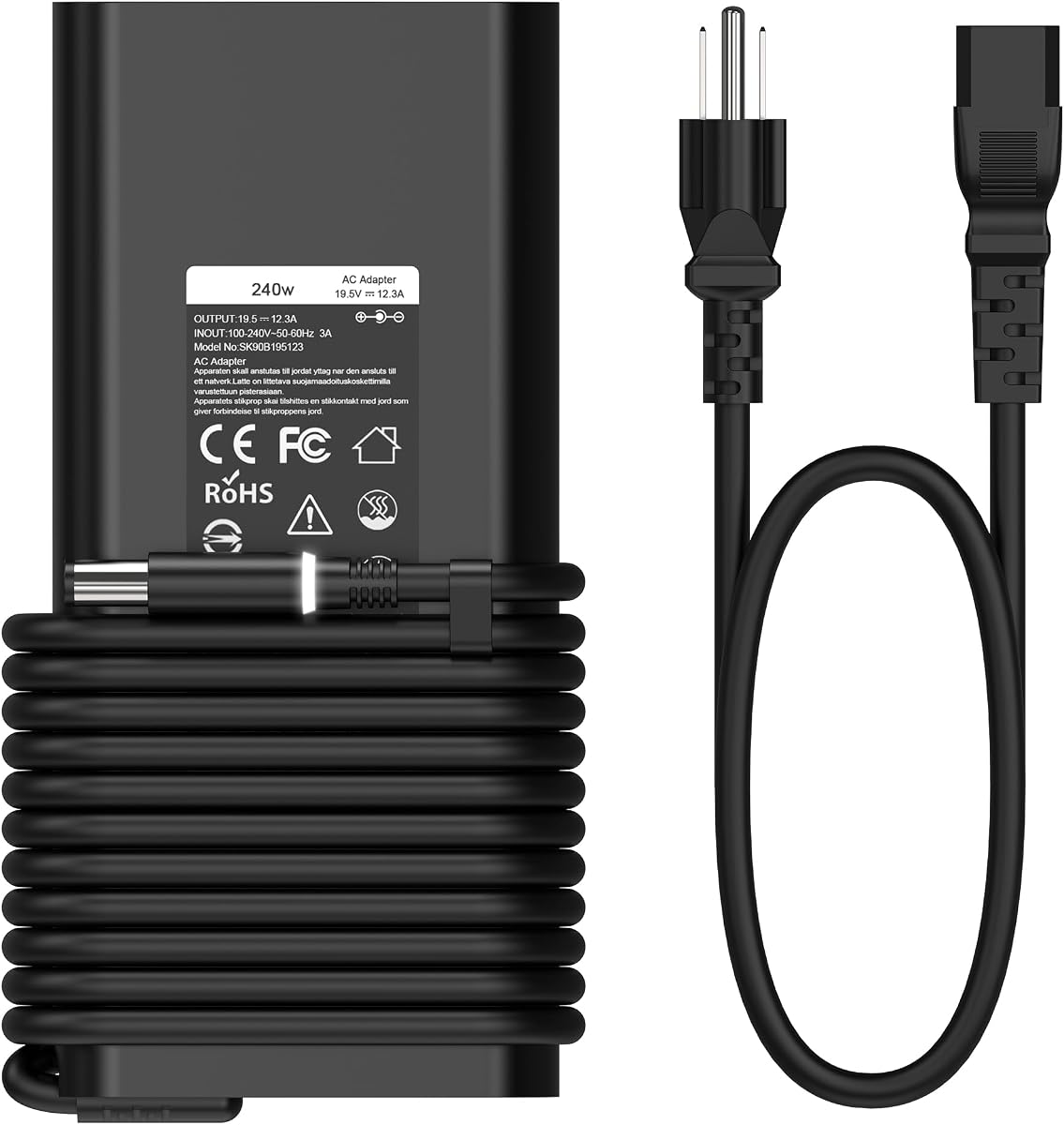
The 240W Alienware Charger is built for high-performance Dell laptops like Alienware and Precision series. It delivers a maximum of 240W ensuring enough power for demanding tasks. Rated at 4.4 stars it supports a wide range of models from M15 to Precision 7710 making it versatile.
We may earn a commission when you buy through this link, at no additional cost to you.
It includes a list of compatible part numbers ensuring precise fit for your specific device. The slim design reduces bulk while maintaining high output capabilities for gaming or rendering. A seller offer warranty provides extra confidence for long-term usage beyond Amazon return windows.
Users should note this is purely an AC adapter offering no portable backup power. It is optimized for stationary charging of high-end machines. However for owners of Alienware laptops needing a reliable high-voltage source this adapter meets those requirements effectively.
If you own a high-end Dell gaming laptop this charger ensures consistent performance during heavy loads. It prevents underpowering that can throttle speeds. For gamers and professionals needing robust power delivery this adapter delivers stable energy for uninterrupted productivity.
240W output ensures high-performance laptops receive full power for gaming and rendering tasks.
Detailed model lists and seller warranties provide extra assurance for long-term users.
We may earn a commission when you buy through this link, at no additional cost to you.
The 330W Alienware Charger delivers maximum power to high-end laptops like Alienware M16 and X18. Rated 4.7 stars it prevents thermal throttling during intensive gaming sessions ensuring peak performance. The 7.4mm tip fits specific Alienware ports securely for stable power delivery.
We may earn a commission when you buy through this link, at no additional cost to you.
It is safe for backward compatibility with lower wattage devices like 180W models. This extra headroom reduces stress on the adapter keeping it cooler during long sessions. Detailed part number lists help users confirm exact compatibility with their hardware.
Price is a significant factor here as this is a premium accessory for niche high-power devices. It does not function as a portable power bank but ensures your machine runs at full potential plugged in. For serious gamers the investment prevents hardware strain and performance drops.
If you need the highest power available for your Alienware machine this charger is the top choice. It guarantees smooth gameplay without frame drops. For users prioritizing raw power delivery and hardware safety this adapter offers unmatched reliability for demanding systems.
Full power output ensures your GPU and CPU perform at their highest levels without slowdowns.
Extra power headroom keeps the adapter running cooler and extends its overall lifespan.
We may earn a commission when you buy through this link, at no additional cost to you.
The KFD USB C to DC Power Adapter Kit converts USB-C PD power to various DC tips for different laptops. With 15 connectors it supports almost any laptop with a round DC port. Rated at 4.0 stars it delivers up to 100W for fast charging of Dell and other brands.
We may earn a commission when you buy through this link, at no additional cost to you.
Smart E-mark chips automatically adjust current to match the device needs safely. The 3.8ft cable offers decent reach for desktop setups. While useful for travelers needing a single power source for multiple devices it requires a source with 20V output to work fully.
Setup can be tricky since users must select the correct tip and ensure the source power meets requirements. It is not a standalone battery but an adapter for existing power banks. For users with mixed hardware this kit offers flexibility without carrying multiple chargers.
Ideal for travelers or IT pros managing diverse devices. It simplifies the power setup by unifying connections. For those needing a universal adapter solution this kit provides broad compatibility and practical flexibility.
Includes 15 tip sizes to fit nearly any laptop with a round DC charging port.
Built-in chips prevent overcharging by adjusting current to match device specifications automatically.
We may earn a commission when you buy through this link, at no additional cost to you.
Choosing the right battery backup requires understanding power needs capacity and port types to ensure compatibility with your specific Dell model.
Ensure the backup device outputs at least the wattage your Dell laptop needs. Most Dell laptops require 65W to 130W but high-performance models need 240W or more.
Match the wattage to avoid slow charging or device damage during use.
Check if your laptop uses USB-C or a round DC tip. Many newer models use USB-C but older ones need 4.5mm or 7.4mm tips.
Verify the tip size matches your laptop port to prevent connection issues.
Look for capacity measured in Wh or mAh. Higher capacity means longer runtime during power outages.
Select a capacity that supports your typical work session length or travel needs.
Consider weight and size if you travel often. Large UPS systems are heavy but power banks like UGREEN are portable.
Choose a size that fits in your bag without adding too much bulk.
Check for certifications like FCC or CE to ensure electrical safety. Features like overcharge protection protect your laptop.
Prioritize safety-certified devices to prevent hardware damage.
Count the available ports to charge multiple devices simultaneously. USB-C and USB-A ports add flexibility.
Choose a backup that supports your entire device ecosystem.
Fast charging features reduce downtime during recharges. Look for PD and QC support.
Ensure the backup recharges quickly so it is ready for the next use.
Check the warranty length and what it covers. Some offer multi-year coverage for peace of mind.
Select a product with strong warranty terms to protect your investment.
Connect the backup device to your laptop securely ensuring the tip matches the port. If using a UPS plug it into the wall and your devices into the UPS outlets.
Allow the battery to reach full charge before using it for the first time. Regular calibration helps maintain accurate battery life readings.
Store the device in a cool dry place away from direct sunlight. Keep it plugged in occasionally to prevent battery degradation over time.
Yes but you need a UPS with USB-C outlets or a compatible adapter. Check the specific model compatibility to ensure the wattage meets your Dell laptop requirements.
Yes power banks with USB-C PD support work well. Ensure the power bank outputs at least 65W to match your Dell charger specifications for reliable charging.
Runtime depends on capacity and device load. Small power banks offer 1 to 2 hours while larger units can last several hours depending on usage.
If using a power bank with USB-C output and your laptop uses DC you need an adapter. Verify tip sizes to ensure a secure connection.
Look for FCC CE or UL certifications to ensure electrical safety. These guarantee the device meets strict industry standards for safe operation.
Yes power banks under 100Wh are generally allowed on planes. Check airline rules and ensure the battery is within legal limits for carry-on.
The best battery backup depends on your specific needs. The CyberPower EC850LCD offers comprehensive UPS protection while the UGREEN Power Bank provides portable power.
Prioritize compatibility with your Dell model and wattage requirements to ensure uninterrupted performance. Safety and capacity are key factors to consider for reliable backup power.
Check current prices and availability before purchasing to get the best deal for your setup. Regular updates ensure you have the latest offers available.