
Redragon K617 Wired 60%
4.6Editor score
Compact 60 percent layout
Hot-swap sockets standard
Affordable price point
Explore our expert review of the best hot swappable keyboards for 2026 comparing top models for gaming typing and customization with detailed specs and
Hot swappable keyboards allow you to change switches without soldering making them ideal for enthusiasts who want to tweak their typing feel. These boards offer versatility for gamers and professionals seeking customization options tailored to their specific workflow needs.
We compared ten top models based on build quality layout options connectivity features and switch compatibility. Our selection includes wired and wireless options ranging from compact 60 percent designs to full-size layouts suitable for various desk setups and usage scenarios.
Each pick highlights unique strengths like gasket mounting RGB lighting or tri-mode connectivity to help you choose the right board. Remember that prices and availability may change so check current listings before making your final purchase decision today.
4.6Editor score

4.8Editor score

4.5Editor score
This side-by-side comparison helps you evaluate key specs across all ten models. We highlight layout types connectivity options and unique features to simplify your decision process.





The Keychron C1 is a tenkeyless hot-swappable mechanical keyboard designed for both Mac and Windows users. With a 4.7 rating it stands out for its reliability and ease of customization without soldering.
We may earn a commission when you buy through this link, at no additional cost to you.
Its Gateron G Pro Brown switches provide tactile responsiveness with a 50 million keystroke lifespan. The double-shot ABS keycaps ensure clear legends that glow subtly through the white backlight modes.
While limited to white lighting it offers decent customization for budget-conscious buyers. The USB Type-C connection ensures stable power which is ideal for office or home use.
Buy this if you want a compact reliable board that supports your operating system. It remains a top value option for those starting their mechanical keyboard journey.
The C1 includes extra keycaps for both systems ensuring seamless switching. The layout retains essential multimedia keys for productivity on either platform.
An inclined bottom frame with two-level adjustable feet improves ergonomics. This design helps maintain comfort during extended typing sessions at home or work.
We may earn a commission when you buy through this link, at no additional cost to you.
The Logitech G316 X 98 delivers elite gaming performance with an 8 kHz report rate for precise signal transmission. Its gasket-mounted structure ensures a quiet refined typing experience.
We may earn a commission when you buy through this link, at no additional cost to you.
Hot-swappable switches and double-shot PBT keycaps allow for easy personalization. The interactive LED dot-matrix display lets you control volume and brightness without leaving your game.
Its 98 percent layout saves desk space while keeping full functionality including a numpad. Dynamic LIGHTSYNC RGB adds immersive visual effects that react to in-game actions.
Choose this board for top-tier responsiveness and build quality. It is ideal for gamers who demand speed and premium features in a compact footprint.
The 8 kHz report rate minimizes latency for rapid commands. Combined with G HUB customization this keyboard adapts to complex macro setups easily.
High-quality materials and translucent accents ensure durability. The sound-dampening foam layers reduce noise making it suitable for shared spaces.
We may earn a commission when you buy through this link, at no additional cost to you.
The AULA F99 offers three connection methods including Bluetooth 5.0 and 2.4GHz wireless for up to five devices. Its gasket structure optimizes resilience and stability for a softer typing feel.
We may earn a commission when you buy through this link, at no additional cost to you.
Pre-lubed linear switches provide a smooth pleasant sound ideal for gaming. The 8000mAh battery ensures long sessions without frequent recharging for travel or office use.
RGB lighting supports cool music rhythm effects and N-key rollover for real-time games. Five layers of filling silencer reduce cavity noise significantly for a cleaner sound.
Buy this if you need seamless switching between multiple devices. It combines strong battery life with customization features suited for both work and play.
The multi-device connection supports work and gaming setups easily. Switch between devices using simple FN combinations without interrupting your workflow.
Hot-swap PCB allows replacing switches easily without soldering. Pre-lubed linear switches ensure smooth keystrokes with reduced friction and sound.
We may earn a commission when you buy through this link, at no additional cost to you.
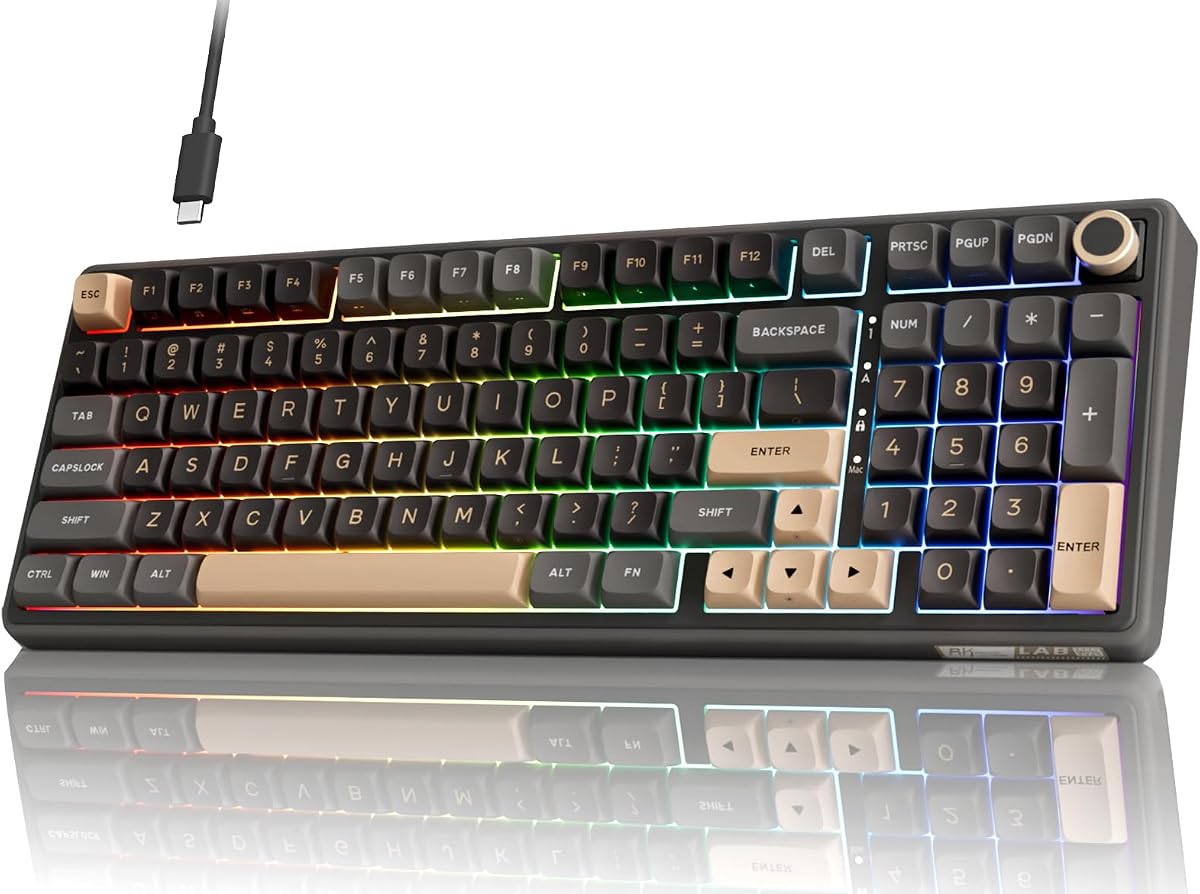
The Redragon K617 is a 60 percent compact keyboard that frees up desk space for wide mouse movements. Its upgraded sockets accept almost any 3-pin or 5-pin switch for easy swaps.
We may earn a commission when you buy through this link, at no additional cost to you.
Stock Red linear switches keep clicks discreet for shared spaces. Up to 20 preset lighting modes give your desk a vibrant glow suitable for eSports setups.
Switches are rated for 50 million keypresses ensuring durability. Pro software enables deeper customization for lighting and macros to adapt to workflows.
Choose this for cost-effective portability without sacrificing features. It is ideal for gamers with limited desk space or those on a tight budget.
Removing the numpad and nav cluster creates room for mouse swipes. This helps maintain low sensitivity and accurate flicks in games.
Software allows programming advanced macros and custom keybindings. RGB modes adjust brightness and speed to match your environment.
We may earn a commission when you buy through this link, at no additional cost to you.
The Redragon K771 delivers full-size functionality with 108 keys and four dedicated hotkeys for essential controls. Its gasket mount design replaces rigid screws with flexible feedback.
We may earn a commission when you buy through this link, at no additional cost to you.
Five layers of foam and silicone absorb hollow noise for ultra-quiet acoustics. Tri-mode connectivity supports wireless pairing with up to five devices seamlessly.
Pre-lubed linear switches reduce scratchiness for enhanced comfort. The 8000mAh battery fuels marathon sessions and weeks of use on a single charge.
Buy this if you need a full layout without compromising silence. It is perfect for office environments where quiet typing is prioritized.
The 108-key layout ensures conflict-free multi-key presses for gaming. Dedicated hotkeys like mute and calculator add workflow efficiency.
Integrated padding absorbs case ping and hollow sounds effectively. This creates a focused acoustic environment ideal for long sessions.
We may earn a commission when you buy through this link, at no additional cost to you.
The RK ROYAL KLUDGE R98 Pro features a gasket mount design with five layers of sound-absorbing foam for a thocky feeling. Its pre-lubed linear cream switches deliver a unique pleasing sound.
We may earn a commission when you buy through this link, at no additional cost to you.
The detachable volume knob allows quick adjustments without navigating software. MDA profile PBT keycaps offer a matte surface that resists fading over time.
Programmable online drivers allow you to redefine keys and set macros. RGB backlight modes add dynamic visual effects for gaming setups.
Choose this if you prioritize a soft acoustic profile. It is ideal for users who enjoy a distinct typing sound and tactile feedback.
The CNC metal knob provides quick volume adjustments. Indicator lights show status clearly for various modes like Caps Lock.
Double-shot PBT ensures long service life and non-fading legends. MDA profile fits fingers better for enhanced typing wrapping.
We may earn a commission when you buy through this link, at no additional cost to you.
The Logitech G512 X 75 offers dual swap capabilities between magnetic analog and mechanical switches for maximum versatility. TMR sensors deliver high-resolution responsiveness for competitive gameplay.
We may earn a commission when you buy through this link, at no additional cost to you.
Customizable actuation points allow fine-tuning for faster keystrokes. The 8K performance mode ensures zero-latency command speed essential for gaming.
G Hub software supports advanced remapping and profile management. The silicone gasket mount ensures durability with up to 44 percent recycled plastic.
Buy this if you demand advanced customization features. It is best for competitive gamers who need precise control and analog performance.
Magnetic sensors allow rapid trigger and actuation adjustments. This provides a competitive edge with instant re-actuation.
Certified recycled plastic and PBT keycaps ensure long life. The SAPP rings offer a tangible second actuation feel.
We may earn a commission when you buy through this link, at no additional cost to you.
The TECKNET Mechanical Keyboard offers tri-mode wireless connectivity supporting up to five devices with ultra-low latency. Sky switches provide smooth keystrokes with balanced actuation for gaming.
We may earn a commission when you buy through this link, at no additional cost to you.
A 5-layer dampening structure reduces noise while delivering a soft thock sound. The durable metal frame ensures stable performance during intense sessions.
Software allows macro programming and RGB customization on Windows. A 36-month warranty guarantees customer support for any issues arising.
Choose this for reliable performance and extended protection. It is ideal for users seeking a balance of features and long-term security.
The 36-month warranty ensures peace of mind. Registering on the official website activates full support and 24/7 service.
Bluetooth and 2.4GHz wireless support seamless device switching. Wired mode provides low latency for competitive gaming.
We may earn a commission when you buy through this link, at no additional cost to you.
The EPOMAKER X Aula F75 MAX features a customizable TFT screen and volume knob for enhanced productivity. Its gasket-mount structure separates the PCB from the shell to reduce harsh bottom-out.
We may earn a commission when you buy through this link, at no additional cost to you.
Factory-lubed and tuned stabilizers ensure a creamy smooth melody. The 75 percent layout includes full connectivity support with high polling rates.
South-facing per-key LEDs brighten the RGB backlight effectively. Software supports key remapping and macro editing for efficiency.
Buy this for a unique smart display experience. It suits users who value visual feedback and ergonomic comfort in a compact layout.
The TFT smart display shows battery and connectivity status. It simplifies customization with intuitive visual controls.
Cherry-profile keys reduce wrist strain during long use. The 2cm-low front height improves typing angles.
We may earn a commission when you buy through this link, at no additional cost to you.
The Keychron K10 HE uses Hall Effect magnetic switches for ultra-responsive performance without physical contact. Rapid trigger technology allows instant re-actuation essential for competitive gaming.
We may earn a commission when you buy through this link, at no additional cost to you.
The 100 percent layout blends classic mechanical feel with modern tech. Tri-mode connectivity supports seamless switching across up to three devices.
Wood sidings add a refined organic touch to the design. The Launcher Web Configurator allows fine-tuning actuation points easily.
Buy this if you want cutting-edge switch technology. It is ideal for users seeking magnetic speed and durability in a full layout.
Hall Effect sensors detect keypresses via magnetism reducing wear. Actuation points adjust from 0.2mm to 3.8mm.
OSA-profile PBT keycaps resist shine and wear. Natural wood sidings provide a unique aesthetic.
We may earn a commission when you buy through this link, at no additional cost to you.
Choosing the right hot swappable keyboard involves considering layout size connectivity and switch types. This guide outlines key factors to help you make an informed decision.
Layout size determines desk space usage and functionality. Full-size boards offer everything including a numpad while compact 60 percent designs maximize mouse room. Consider your workflow needs and space constraints.
Wired connections ensure stable performance for gaming. Wireless options provide flexibility but may add latency. Tri-mode connectivity supports multiple devices for versatility.
Hot-swap sockets support 3-pin or 5-pin switches. Check the socket type to ensure future upgrade options. Pre-lubed switches offer better sound out of the box.
Gasket mounts reduce harsh bottom-out and improve feel. PBT keycaps resist shine and last longer than ABS. Metal frames provide stability and durability.
Wireless keyboards need substantial battery capacity for long use. Higher mAh ratings reduce charging frequency. Wired models avoid battery concerns entirely.
RGB adds visual flair and can indicate system status. Ensure backlight brightness is adjustable and modes are customizable. Some models support music sync effects.
Driver software allows macros remapping and advanced RGB settings. Check OS compatibility to ensure full feature access. Some models offer web configurators.
A longer warranty indicates manufacturer confidence. Support availability helps resolve issues quickly. Register products to activate full protection.
Connect your keyboard via USB-C or Bluetooth based on setup. Ensure drivers are installed for full RGB and macro features. Press keys gently to avoid damaging contacts during swaps.
To change switches use a puller tool to remove stems carefully. Insert new switches until they seat firmly. Test all keys after swapping to ensure correct detection.
Clean with compressed air to remove dust from sockets. Avoid liquids near electronic ports. Store spare switches properly to prevent damage or loss.
Yes hot swappable keyboards are designed with reinforced sockets to withstand multiple switch removals. The switches themselves often rate for 50 million keystrokes ensuring long life.
Most kits include a switch puller and keycap puller. These tools allow safe removal without damaging the PCB. Standard tools are widely available for upgrades.
Yes modern 2.4GHz wireless models offer low latency suitable for gaming. Wired connections are slightly better but wireless is acceptable for most titles.
Five-pin switches have two extra pins for stability. Hot-swap sockets generally support both but 5-pin requires space for the extra pins.
Basic functions work without software. Macros and RGB customization require drivers or web configurators specific to the model.
Linear switches feel smooth and quiet while tactile ones have a bump. Choose based on whether you prefer feedback or minimal noise.
The ten models reviewed offer diverse options from compact gaming boards to full-size productivity tools. Each provides unique features like wireless connectivity or magnetic switches to suit different needs.
Prioritize layout size and connection type based on your daily workflow. Features like gasket mounting and sound dampening significantly improve the typing experience.
Check current prices and availability before purchasing to ensure the best deal. With so many choices finding the right hot swappable keyboard is easier than ever.