
THUSTAR 8MP Document Camera
4.4Editor score
8MP high resolution capture
Adjustable LED lighting levels
Foldable compact design
Finding the right document projector for classroom use is essential for modern educators who want to engage students with clear visual presentations. These devices allow teachers to display documents, textbooks, and objects in real time, making lessons more interactive and accessible for everyone in the room.
We compared ten highly rated document projectors and cameras based on resolution, connectivity options, brightness, and ease of use. Our analysis focuses on features that matter most in educational settings, including compatibility with common software, durability for daily use, and flexibility for different teaching styles.
Each pick below shows key specifications, pros and cons, and detailed insights into how the product performs in real classroom scenarios. Prices and availability may change over time, so we recommend checking current listings before making a final decision on which device fits your needs.
4.4Editor score

4.5Editor score

4.6Editor score
As an Amazon Associate we earn from qualifying purchases.
The following table provides a side-by-side comparison of all ten document projectors and cameras evaluated in this guide. Each entry highlights core specifications and capabilities to help you quickly identify which model aligns best with your classroom requirements and budget constraints.





The IPEVO V4K Ultra High Definition document camera stands out as the top choice for educators seeking professional quality without the bulk of a traditional projector. With an 8-megapixel Sony CMOS sensor, it captures crisp images up to 3264 by 2448 pixels, ensuring that even fine details in text or artwork are visible to every student in the room.
We may earn a commission when you buy through this link, at no additional cost to you.
Its high frame rate allows for lag-free live streaming at up to 30 frames per second in full HD, making it ideal for demonstrations involving movement like science experiments or art projects. The multi-jointed stand provides flexibility to adjust angles and heights easily, while the focus speed minimizes interruptions when switching between different materials during a lesson.
While the device lacks wireless connectivity, its robust USB connection ensures stable performance across Mac, Windows, and Chromebook systems. Teachers should note that optimal streaming requires specific hardware specifications, which might necessitate an upgrade for older computers. However, for most modern classroom setups, the reliability and image quality outweigh these minor system requirements.
This camera is perfect for educators who prioritize image fidelity and ease of use during live demonstrations. Its design supports both in-person and remote teaching scenarios, making it a versatile tool for hybrid classrooms. Investing in the V4K means choosing a device that delivers consistent, professional results day after day.
The Sony CMOS sensor reduces noise and enhances color reproduction, ensuring images look natural even in lower light conditions commonly found in classrooms.
The multi-jointed stand allows teachers to tighten loose joints caused by daily use, maintaining stability and precise positioning over time.
We may earn a commission when you buy through this link, at no additional cost to you.
The Apollo Overhead Projector represents a traditional approach to classroom visualization, offering a large open head and high brightness suitable for well-lit rooms. With 2000 lumens of output, it ensures that content projected onto a screen remains visible even when ambient light is present, which is often a challenge in modern educational environments.
We may earn a commission when you buy through this link, at no additional cost to you.
Its 10 by 10 inch open head allows for the projection of standard-sized documents and materials without the need for specialized equipment. The inclusion of VGA and USB ports provides versatility in connecting to various devices, making it a practical choice for schools that have invested in older infrastructure but still require reliable projection capabilities.
However, the projector's size and design may not fit well in smaller classrooms or settings where portability is a priority. Additionally, reliance on VGA connections can limit compatibility with newer laptops that lack these ports without adapters. Educators should consider whether their specific room layout and device compatibility needs align with this model's strengths.
This projector is best suited for institutions that need a sturdy, high-brightness solution for permanent installations. It offers a proven track record for delivering clear images over long periods. For teachers who prefer a hands-on approach to managing transparency and documents, this model provides a straightforward and effective interface.
The 2000 lumen output ensures visibility in bright classrooms, reducing the need to dim lights during presentations.
Support for both VGA and USB allows integration with older and newer devices without extensive reconfiguration.
We may earn a commission when you buy through this link, at no additional cost to you.
The IPEVO VZ-X Wireless document camera offers unparalleled flexibility for modern classrooms where mobility is key. With three connectivity modes including Wi-Fi, HDMI, and USB, it bridges the gap between traditional and wireless presentations, allowing educators to switch seamlessly between devices without being tethered to a single workstation or cable.
We may earn a commission when you buy through this link, at no additional cost to you.
Its 8MP sensor captures images in near 4K quality via USB, and high definition via Wi-Fi or HDMI, ensuring that text and images remain crisp on large screens. The built-in battery provides up to 9 to 12 hours of life, meaning a full day of classes or presentations can be completed without needing to find a power outlet mid-session.
The swiveling head and multi-jointed stand enable capturing from various angles and heights, which is particularly useful for 3D objects or group activities. While the price is higher than basic models, the freedom it offers in terms of movement and setup simplicity justifies the investment for schools looking to modernize their teaching tools.
This device is ideal for tech-forward educators who need to move around the classroom while presenting. It works well with iOS, Android, and TV systems, making it versatile for different ecosystems. If you value wireless connectivity and long battery performance, the VZ-X is a premium choice that delivers on its promises.
Works wirelessly with iOS, tvOS, and Android devices, expanding the reach of presentations beyond traditional computers.
Up to 12 hours of battery life ensures uninterrupted sessions, removing the stress of finding power sources during class.
We may earn a commission when you buy through this link, at no additional cost to you.
The THUSTAR 8MP Document Camera delivers impressive performance at a budget-friendly price point, making high-quality visual teaching accessible to more schools and educators. It supports 4K resolution via USB, providing ultra-high-definition images that allow students to see fine details in documents and artwork clearly during live demonstrations.
We may earn a commission when you buy through this link, at no additional cost to you.
A standout feature is its adjustable image brightness and built-in ring lamp beads with three levels of brightness. This allows teachers to adapt to different lighting conditions in the classroom, eliminating shadows or glare that might obscure content. The foldable design also makes it easy to store or transport, which is great for shared equipment or mobile classrooms.
While it may not have the advanced software integration of premium models, its plug-and-play compatibility with Windows, Mac, and Chrome OS ensures it works immediately upon connection. The dual microphones help reduce noise during virtual sessions, enhancing the audio experience for remote learners. However, the build materials are more basic compared to higher-end options.
This camera is perfect for educators on a tight budget who still need reliable visual aids for their lessons. It covers all the essential bases without unnecessary complexity. If you need a cost-effective solution that performs well for daily document sharing and basic video conferencing, this model is a strong contender.
Three levels of adjustable LED brightness ensure clear imaging in both dark and bright environments.
The foldable design occupies small space after folding, making it ideal for teachers who move between rooms.
We may earn a commission when you buy through this link, at no additional cost to you.
The INSWAN INS-2 UHD document camera is tailored for professionals and educators who need to display large documents, artwork, or two-page spreads with exceptional clarity. Its 13MP Sony sensor captures 4K Ultra HD images, ensuring that intricate details in visual materials are preserved and visible to all students during presentations.
We may earn a commission when you buy through this link, at no additional cost to you.
Designed with an A3 capture area, it accommodates large sheets of paper or materials that would otherwise require multiple adjustments. The multi-joint arm allows flexible angle adjustments, making it easy to position the camera for different types of content. Additionally, the built-in LED light and anti-glare sheet help maintain image quality in various lighting setups.
The included Documate software adds value by offering zoom, annotation, and OCR features directly within the presentation interface. This reduces the need for third-party tools and streamlines the teaching process. However, setting up the software requires a bit more time than simple plug-and-play cameras, which may be a hurdle for less tech-savvy users.
This device is best for art instructors or schools focusing on visual learning that require robust performance for large formats. The balance of hardware quality and software utility makes it a comprehensive solution. If you need to handle complex visuals frequently, the INS-2 offers the tools to do so effectively.
The A3 capture size ensures that large documents and multi-page spreads are captured in a single view.
Documate software provides annotation and OCR tools that enhance the interactive potential of document sharing.
We may earn a commission when you buy through this link, at no additional cost to you.
The Lumens DC166 is a standalone document camera projector that does not require a computer to function, making it ideal for settings where simplicity is paramount. With SXGA resolution and a 6x optical zoom, it allows teachers to magnify details without losing image quality, which is crucial for close-up demonstrations in science or math.
We may earn a commission when you buy through this link, at no additional cost to you.
Its internal memory can store up to 120 JPEG images, enabling teachers to save and recall visual content during lessons. The SD card slot supports cards up to 32 GB, adding flexibility for storing larger files. Additionally, compatibility with interactive whiteboards enhances its utility in modern smart classrooms.
However, some users have reported lower overall ratings compared to newer models, possibly due to interface limitations or resolution caps. The price point is also higher than simple USB cameras, which might be a consideration for budget-conscious buyers. Despite this, the ability to work independently of a laptop offers significant convenience.
This model is best for schools that want to reduce dependency on personal devices or computers. The integrated memory and zoom capabilities make it a versatile tool for focused instruction. If you need a device that stands alone and connects easily to large displays, the DC166 provides a reliable pathway.
Works without a PC, allowing for quicker setup and less reliance on external computing resources.
The 6x optical zoom ensures that small details remain sharp when magnified for the whole class.
We may earn a commission when you buy through this link, at no additional cost to you.
The Epson PowerLite 118 is a robust traditional LCD projector that excels in delivering vibrant, eye-catching images through its 3LCD technology. It is ceiling mountable, which saves valuable table space in classrooms, and includes HDMI connectivity for seamless video and audio transmission through a single cable. This simplicity makes it a favorite among educators who prioritize ease of use.
We may earn a commission when you buy through this link, at no additional cost to you.
With a lamp life of 17,000 hours, this projector offers long-term durability, reducing the frequency and cost of maintenance. The built-in speaker ensures that audio is present even without external equipment, making it suitable for multimedia lessons. Additionally, the moderator function allows up to 50 users to connect simultaneously, supporting collaborative activities.
While it does not function as a document camera itself, pairing it with a USB document camera creates a complete presentation system. The 4:3 aspect ratio is standard for educational content but may not fit modern widescreen displays perfectly without adjustments. Overall, its reliability and brightness make it a solid choice for permanent installations.
This projector is best for classrooms that need a dependable display engine for presentations and video content. It pairs well with external document cameras for a full visual teaching solution. If you need a projector that handles high-usage environments without frequent replacements, the PowerLite 118 is an excellent investment.
With 17000 hours of lamp life, this projector supports years of regular use without frequent bulb changes.
The moderator function supports multiple user connections, fostering interactive learning environments.
We may earn a commission when you buy through this link, at no additional cost to you.
The DLP Business Projector is designed for everyday indoor use, offering 3300 lumens of brightness to ensure clear display of documents and charts even in bright environments. Its DLP technology supports natural color presentation and enhanced contrast, making it suitable for professional visuals and teaching materials that require accuracy and clarity.
We may earn a commission when you buy through this link, at no additional cost to you.
The fast startup design reduces preparation time, allowing teachers to begin lessons immediately without waiting for the bulb to warm up. This efficiency is valuable in busy school schedules. The setup is straightforward, relying on simple wired connections that minimize technical hurdles for educators of all skill levels.
While it lacks integrated document camera features, its brightness and color performance make it an excellent display unit when paired with a separate document camera. The wide display capability supports group presentations, ensuring everyone in the room can follow along. However, it is geared more towards business settings than specialized educational tools.
This projector is ideal for environments where quick, reliable visibility is a priority. It works well for large group sessions and training spaces where consistent image quality is needed. If your primary need is a bright, responsive display for daytime use, this model delivers solid performance.
3300 lumens ensures that content remains visible even when classroom lights are on during the day.
Fast startup design minimizes wait time, allowing immediate transitions between classes or presentations.
We may earn a commission when you buy through this link, at no additional cost to you.
The Epson PowerLite E20 is another strong contender from Epson, offering vibrant true-to-life images through its 3LCD technology. Like its counterpart, it is ceiling mountable and includes HDMI connectivity for easy video transmission. The built-in 5-watt speaker provides engaging audio for displays without needing extra equipment, which simplifies classroom tech setups.
We may earn a commission when you buy through this link, at no additional cost to you.
With a durable design providing a lamp life of 12,000 hours, it ensures consistent performance over time. The flexible construction makes it easy to display from virtually anywhere, giving educators options for room layout. While the lamp life is slightly lower than the 118 model, it still represents significant value for typical classroom usage patterns.
This projector is a reliable workhorse for schools that need a standard display solution without extra complexity. It handles multimedia content effectively and pairs well with external document cameras for full lesson support. Users should note that it lacks modern wireless features, relying instead on traditional wired connections for stability.
If you need a projector that offers a balance of quality and longevity at a moderate price, the E20 is a smart choice. It serves well in permanent installations where stability is key. For educators who value consistency and straightforward operation, this model meets those needs effectively.
3LCD technology produces images that maintain color accuracy, which is vital for art and science lessons.
Flexible construction allows for mounting in various locations, optimizing the room layout for viewing.
We may earn a commission when you buy through this link, at no additional cost to you.
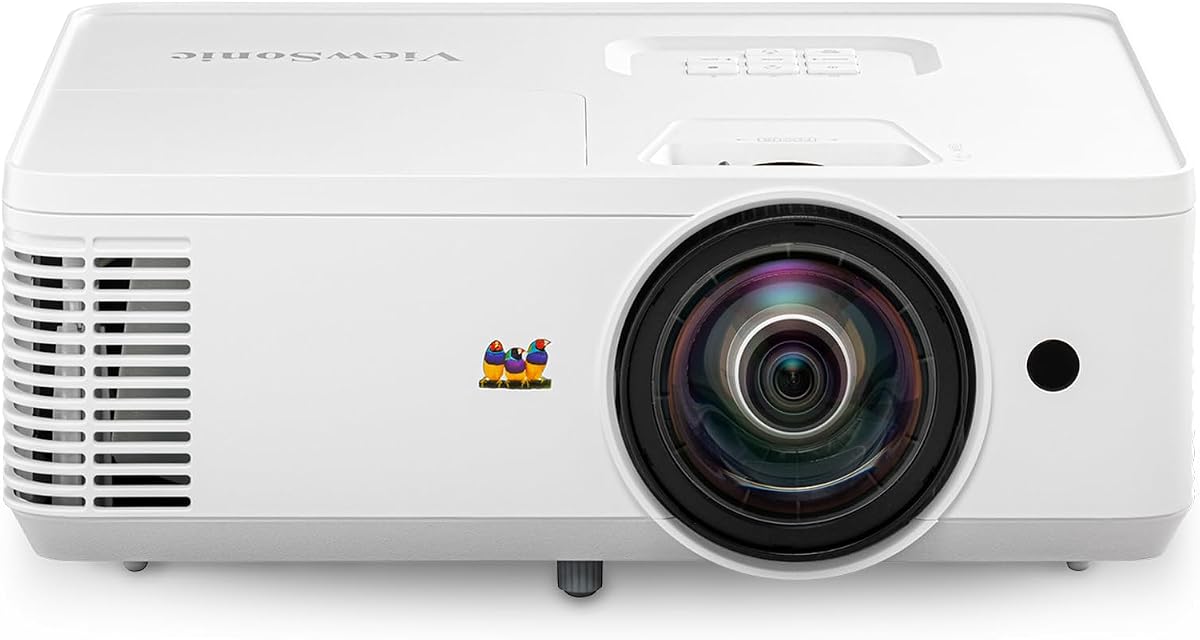
The ViewSonic PS502W is a short throw projector designed to create large, clear images in small classrooms or meeting rooms without casting shadows from the presenter. With a 0.5 throw ratio, it can project a 100-inch image from just 4.5 feet away, which maximizes floor space and keeps the presenter free to move around.
We may earn a commission when you buy through this link, at no additional cost to you.
Its 4000 ANSI lumens ensure punchy images that hold up against moderate ambient light, making it suitable for daytime sessions without needing to darken the room completely. SuperColor technology provides a wide color gamut, resulting in lifelike visuals that enhance engagement. Dual HDMI ports allow for flexible connections without needing adapters.
Vertical auto-keystone correction simplifies setup, ensuring the image remains squared without manual adjustments. The instant power on and off capabilities remove wait times, allowing for quick transitions between lessons. While the short throw technology can be sensitive to alignment, the benefits of space saving and visibility are significant.
This projector is ideal for classrooms where space is at a premium but a large display is still needed. It supports professional presentations and educational content with high fidelity. If you need to project big in a tight space, the PS502W offers the most efficient solution.
The short throw ratio allows large projections from a close distance, saving valuable floor space.
Instant power on and off capabilities reduce downtime between lessons, improving classroom efficiency.
We may earn a commission when you buy through this link, at no additional cost to you.
Selecting the right document projector for your classroom involves balancing features like resolution, connectivity, and brightness with your specific teaching needs and budget.
Resolution determines how clear text and images appear on the screen. For detailed work like art or fine print, look for 8MP or higher cameras that support 4K or near-4K capture to ensure students can see every detail without squinting.
Higher resolution means sharper visuals, which is crucial for maintaining student engagement during complex lessons.
Consider whether you need wired or wireless connections. USB is reliable and standard, but Wi-Fi or HDMI adds flexibility for moving around the room or connecting to modern devices without dongles.
Flexible connectivity options allow you to integrate the projector with various devices and teaching setups.
If your classroom is bright during the day, a projector with higher lumen output is essential to prevent washed-out images. Document cameras with built-in LED lights help control the environment around the lens for better contrast.
Adjustable lighting and high lumen counts ensure visibility regardless of ambient light conditions.
If you move between classrooms or share equipment, a foldable or lightweight model with a sturdy multi-jointed stand makes setup easier. A stable stand ensures the camera stays in position without needing constant readjustment during lessons.
Portable designs and sturdy stands save time and reduce wear on the equipment during daily use.
Check if the device works seamlessly with your school's operating system, such as Chrome OS or Windows. Some models come with dedicated software for annotation or recording, which adds value to interactive lessons.
Software that aligns with your existing infrastructure prevents compatibility issues and simplifies the user experience.
Classroom devices face frequent handling, so robust build quality and a good warranty are important. Look for models made with durable materials that can withstand the rigors of daily use.
Investing in a durable model reduces long-term replacement costs and ensures consistent performance.
Set a realistic budget based on what features matter most. Sometimes a basic camera with high resolution is better than an expensive projector that lacks compatibility with your devices.
Prioritize features that impact your daily teaching workflow to get the best value for your investment.
Teachers need tools that are intuitive. Plug-and-play devices that require minimal configuration allow you to focus on teaching instead of troubleshooting technical issues.
User-friendly setups save time and reduce stress during busy school days.
To start using your document projector or camera, connect it to your computer or display using the appropriate cable. For cameras, ensure the lens is positioned directly over the material you wish to display, and adjust the focus knob until the text is sharp.
Adjust the lighting settings if your device has built-in LEDs to avoid glare or shadows. Use the software provided to annotate or highlight specific parts of the document during your presentation to engage students actively.
Regularly clean the lens with a microfiber cloth to prevent dust from affecting image quality. Store the device in a safe, dry place when not in use to protect it from physical damage and extend its lifespan.
A document camera captures real-time images of objects or documents to send to a display, whereas a projector displays content from a source onto a screen. Some devices combine both functions, allowing you to show documents directly without needing a separate camera.
Some models have internal memory and HDMI outputs that allow them to connect directly to a projector or TV without a computer. However, many standard cameras require a computer connection to process the video feed for presentation.
Yes, many document cameras function as webcams and can be used in video conferencing software like Zoom or Microsoft Teams. This allows you to share physical documents or objects with remote students effectively during online classes.
For general classroom use, an 8MP resolution is sufficient to display text and images clearly. If you need to show fine details, look for cameras that support 4K or near-4K capture to ensure high fidelity for students.
Most document cameras connect via USB to a computer which then sends the signal to the projector, or via HDMI directly to the projector if supported. Check the manual for your specific device to ensure you use the correct cable and settings.
Wireless connectivity offers greater freedom to move around the room but may introduce latency or stability issues. Wired connections are more reliable for high-quality streaming but limit your physical movement during presentations.
Choosing the right document projector for classroom use ultimately depends on your specific needs for resolution, mobility, and budget. The IPEVO V4K and VZ-X models stand out for their balance of quality and connectivity, while budget options like the THUSTAR offer great value.
Prioritize features that directly impact your teaching workflow, such as ease of setup and compatibility with your existing devices. Whether you need a high-end wireless solution or a robust traditional projector, there is an option suited for your classroom environment.
Remember that prices and availability can change quickly. We recommend checking the latest listings and reviews before finalizing your purchase to ensure you get the best deal on a device that will serve your students well.