
Digital Calendar 10.1" Touchscreen
4.4Editor score
No subscription fees
Weekly meal manager
Flexible mounting
Modern households need centralized tools to manage complex schedules. A digital touchscreen organizer brings calendars, chores, and photos into one smart display. These devices replace cluttered paper planners with vibrant, interactive screens that keep everyone aligned. They are essential for busy families seeking efficiency and connection.
We evaluated ten leading models based on screen quality, sync options, and ease of use. Our analysis covers battery life, mounting flexibility, and subscription models to ensure value. Each product was assessed for its ability to handle daily tasks like meal planning and activity tracking. This guide highlights the most reliable options available.
Every pick in this list offers unique strengths for different home needs. You will find budget-friendly frames and premium command centers with advanced apps. Note that prices fluctuate frequently, so verify current costs before purchasing. Our recommendations focus on long-term usability and family satisfaction above all else.
4.4Editor score

4.4Editor score

4.6Editor score
As an Amazon Associate we earn from qualifying purchases.
This side-by-side comparison highlights key specifications across all ten models. We focus on screen size, sync capabilities, and unique features to help you decide. Each entry reflects the core strengths and limitations found in our detailed review section.


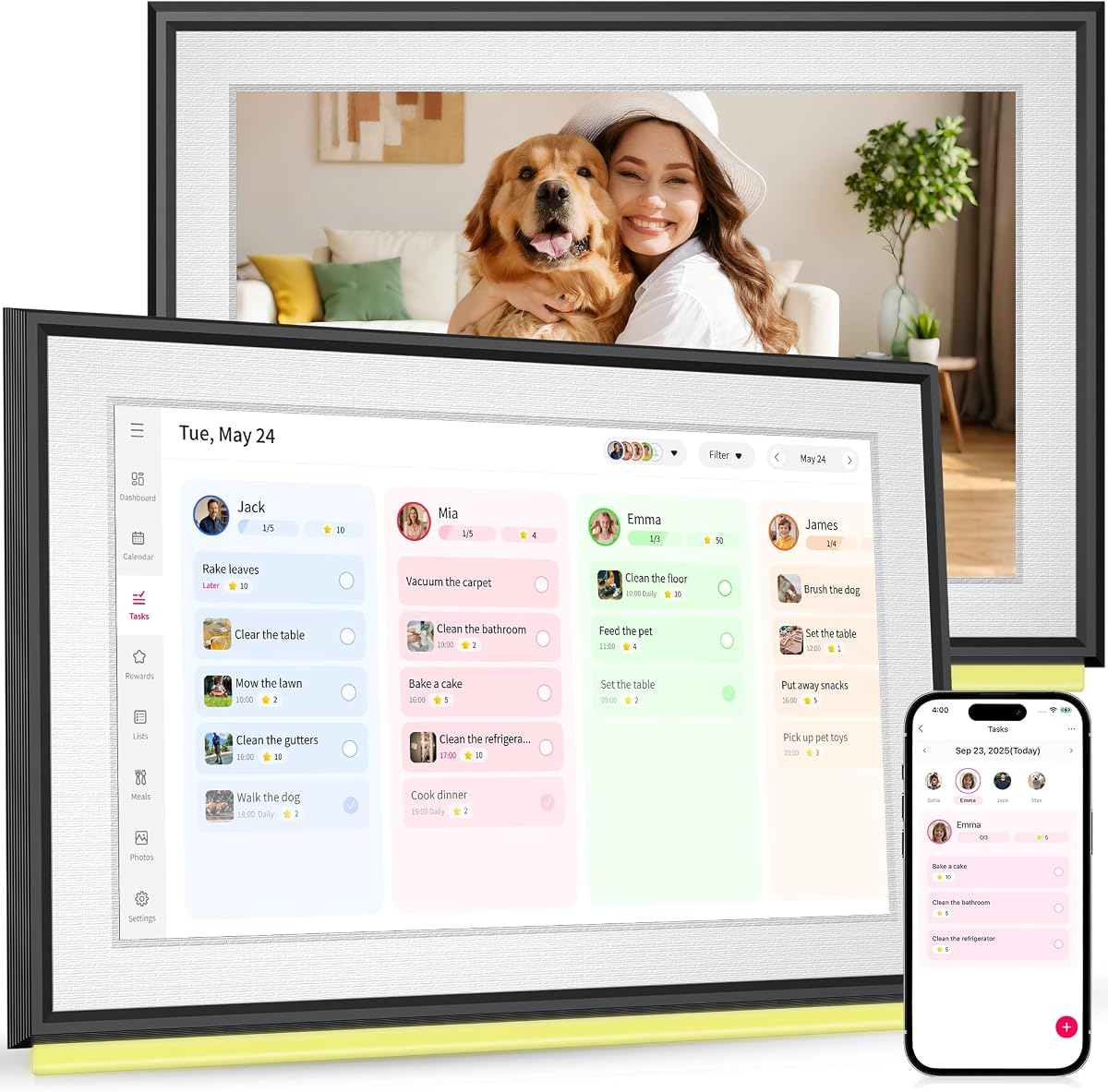

This model stands out as the premier family command center with a massive 15.6 inch display. It integrates seamlessly with major calendar platforms without requiring any subscription fees. The built-in chore system turns daily tasks into a fun activity for children using rewards.
We may earn a commission when you buy through this link, at no additional cost to you.
The real-time sync capability ensures that every family member sees updates instantly on Google or Outlook. Its photo frame mode utilizes AI enhancement to automatically improve old images during idle times. The 32GB storage provides ample space for thousands of family memories without external drives.
While the display is vibrant, setup does require a stable Wi-Fi connection for full functionality. Some users may find the initial configuration of multiple calendars slightly involved but straightforward. The lack of included batteries for remote functions is a minor inconvenience worth noting.
Families looking for a central hub to manage schedules and chores will find this device ideal. It bridges the gap between digital efficiency and personal connection through shared visual updates. We recommend it for households prioritizing screen size and cost effective operation.
Syncs instantly with Google, Outlook, and iCloud to keep all schedules aligned without manual entry.
Gamified chore charts with point systems encourage responsibility and positive behavior among children.
We may earn a commission when you buy through this link, at no additional cost to you.
The Skylight Calendar brings a premium touch with its clean white design and 15.4 inch screen. It focuses heavily on visual appeal and user experience for family scheduling tasks. Users can access a range of customization options through its dedicated mobile application.
We may earn a commission when you buy through this link, at no additional cost to you.
A unique selling point is the Disney Mode which adds character animations and themes to the screen. This feature makes the device highly engaging for younger children who love their favorite characters. The meal planning tools help reduce daily stress by visualizing weekly menus clearly.
However, unlocking the full potential often requires a Plus Plan which incurs a monthly fee. Some users might find the free version limited compared to competitors offering all features upfront. The subscription model may not suit everyone looking for a one-time purchase solution.
Families who prioritize aesthetics and child engagement will appreciate the magical themes offered here. It serves well as a decorative kitchen or office piece that manages daily tasks. Consider the subscription cost against the unique entertainment value it provides for kids.
Disney Mode adds immersive animations and avatars to make the calendar entertaining for children.
Weekly meal plans display visually to simplify dinner decisions and grocery list preparation.
We may earn a commission when you buy through this link, at no additional cost to you.
This compact option proves that budget-friendly does not mean lacking in functionality or essential features. It offers full access to calendars and chores without any monthly subscription charges. The interface is designed to be intuitive for women who manage household operations efficiently.
We may earn a commission when you buy through this link, at no additional cost to you.
The weekly meal manager is a standout feature that helps streamline grocery shopping and dinner planning. Users can upload recipes and generate lists automatically which saves significant time during busy weeks. The sync capabilities cover major platforms like Google and Outlook for seamless integration.
While the screen is smaller at 10.1 inches it remains readable and responsive for daily updates. The build quality is adequate for desk use but might lack the durability of higher-end models. It is perfect for smaller spaces where a large command center would be overwhelming.
Families needing a simple and cost-effective tool will find this an excellent choice. It delivers core organizational benefits without unnecessary complexity or ongoing costs. We recommend it as a first digital organizer for those testing the category.
All features including calendars and chores are fully unlocked without monthly fees or hidden charges.
Built-in tools allow recipe uploads and automatic grocery list generation for efficient meal prep.
We may earn a commission when you buy through this link, at no additional cost to you.
This model combines a 1080p HD screen with generous storage to handle extensive photo libraries easily. It is designed to serve as both a functional planner and a vibrant memory display. The AI-powered imports help organize files automatically reducing manual effort for users.
We may earn a commission when you buy through this link, at no additional cost to you.
The ability to store thousands of photos and videos directly on the device is a significant advantage. Families can curate their own slideshows without relying entirely on cloud services. Mounting options are flexible allowing it to sit on a desk or hang on a wall securely.
Some users might find the app ecosystem limited compared to more open platforms available on Android. A stable Wi-Fi connection is essential for syncing data effectively which could be a challenge in weak signal areas. The interface remains simple though which aids quick adoption by everyone.
Perfect for users who want a digital frame that also manages household schedules efficiently. The storage capacity makes it a safe choice for preserving digital memories alongside daily tasks. Consider it if you value local storage and high resolution visuals highly.
32GB built-in storage allows storing thousands of photos and videos directly on the device.
Includes hardware for both wall mounting and desk placement to fit any room layout.
We may earn a commission when you buy through this link, at no additional cost to you.
Achieving a perfect rating this planner offers a reliable and comprehensive solution for family organization. The 15.6 inch HD display provides ample space for viewing schedules and photos clearly. Its standout feature is the integrated weather display which adds practical daily value.
We may earn a commission when you buy through this link, at no additional cost to you.
Color coding tasks and assignments helps different family members instantly identify their responsibilities. This visual organization reduces confusion and improves compliance with daily chores. The device includes a sleep wake mode to save energy while staying ready for use.
It requires a standard US style plug which limits placement options near specific outlets. App customization is less flexible than open systems but ensures a stable and focused experience. The high rating suggests strong reliability and user satisfaction across diverse household needs.
Families needing a clear and easy to read central planner will appreciate this device. The inclusion of weather data makes it a practical tool for morning planning routines. We recommend it for those prioritizing reliability and visual clarity over complex customization.
Real-time weather updates are displayed directly on the screen to help plan daily activities.
Color-coded lists allow quick identification of tasks for different family members at a glance.
We may earn a commission when you buy through this link, at no additional cost to you.
This model distinguishes itself with built-in recipe saving functionality for kitchen focused usage. It allows users to store favorite cuisines and manage grocery lists directly from the screen. The multi-platform sync ensures work and school schedules are visible alongside meal plans.
We may earn a commission when you buy through this link, at no additional cost to you.
Remote photo sharing capabilities enable grandparents to view family growth moments from anywhere instantly. This feature strengthens family bonds by allowing distant relatives to stay connected visually. The responsive touch screen ensures smooth operation even with frequent use in a kitchen setting.
While the design is minimalist it may lack the premium finish of more expensive models. Support relies on third-party apps which might limit advanced customization options for tech savvy users. The warranty offers peace of mind for the first year of ownership and usage.
Users who enjoy cooking and need a central recipe hub will find this highly useful. It serves as both a planner and a memory display with strong remote access features. Consider it if you want to integrate recipe management into your daily routine.
Built-in tools allow saving recipes and generating grocery lists for easier weekly meal prep.
Remote photo sharing allows distant family members to view updates from anywhere securely.
We may earn a commission when you buy through this link, at no additional cost to you.
The Apolosign 21.5-inch model offers a premium experience with a massive display and dual modes. It runs on Android allowing access to a wide range of applications beyond just calendars. This versatility makes it a true smart home hub rather than just a simple planner.
We may earn a commission when you buy through this link, at no additional cost to you.
Google Gemini voice integration lets users check schedules or control lights using voice commands effortlessly. Customizable widgets provide a dashboard view that fits specific home automation needs and preferences. The large screen ensures all content is visible from across the room clearly.
The initial investment is higher than average models which may deter budget-conscious shoppers. A strong Wi-Fi connection is essential to handle the data load from Android apps effectively. However, the long-term value of an open system often justifies the higher price point.
Tech enthusiasts looking for a fully connected central hub will love the flexibility offered here. It balances home management with entertainment capabilities better than standard calendars. We recommend it for those willing to pay extra for open platform access.
Dual Mode allows installing any Android app to customize the dashboard for specific needs.
Built-in Google Gemini supports voice commands and smart device control directly from the screen.
We may earn a commission when you buy through this link, at no additional cost to you.
This version comes with a stand making it perfect for desktop or countertop placement. The anti-glare display ensures readability even in bright kitchens or offices with overhead lighting. Users can switch between focused Calendar Mode and open Android Mode with a single touch.
We may earn a commission when you buy through this link, at no additional cost to you.
The inclusion of a stand adds to its versatility for desk setups without requiring wall drilling. Voice assistant features work well for hands-free updates while cooking or cleaning nearby. It avoids subscription fees while still offering advanced customization options for power users.
The stand adds a small footprint which may not suit very limited counter space. Setup involves configuring both modes which might take slightly longer than standard models. However, the flexibility gained from dual modes usually compensates for this initial effort.
Users needing a flexible device for both wall and desk use will find it practical. It bridges the gap between a simple planner and a full smart display efficiently. Consider this if you need a portable central hub without mounting requirements.
Includes a sturdy stand for convenient placement on desks or kitchen counters without tools.
Switch between simple Calendar Mode and customizable Android Mode instantly for different tasks.
We may earn a commission when you buy through this link, at no additional cost to you.
This compact unit is designed specifically for desk use without wall mounting capabilities. It features color coding to simplify task assignment and visual organization for family members. The free mobile app provides additional control and sync options for users on the go.
We may earn a commission when you buy through this link, at no additional cost to you.
Regular software updates ensure new features like rewards and photos are accessible over time. The interface is straightforward making it easy for less tech-savvy users to adopt quickly. Its smaller footprint fits well on tight surfaces without dominating the workspace visually.
It cannot be mounted on a wall which limits its placement to tables or shelves only. The rating score is lower than competitors suggesting potential inconsistencies in quality or support. Users should verify current software version to ensure full feature access immediately upon arrival.
Desks needing a simple non-mountain organizer will find this unit adequate. The color coding feature helps maintain order in busy family schedules efficiently. Consider it if wall mounting is not a requirement for your setup space.
Color coded tasks help family members quickly identify their assigned responsibilities and deadlines.
Frequent version updates introduce new features and improvements to keep the device current.
We may earn a commission when you buy through this link, at no additional cost to you.
This device offers a large 21.5 inch display with customizable themes to match room decor. It focuses heavily on positive reinforcement through points that motivate children to finish tasks. The included mounting kit allows for versatile installation as a wall unit or desk planner.
We may earn a commission when you buy through this link, at no additional cost to you.
IPS technology ensures wide viewing angles so family members can see details from different spots. The free app provides perpetual access to sync features without extra charges. US based support adds reliability for troubleshooting any connectivity or account issues quickly.
Setup steps can be complex requiring careful attention to detail during configuration. Some users report mixed feedback on long-term stability compared to other market leaders. However, the large screen and reward features make it a strong contender for interactive use.
Families looking for a large interactive display that incentivizes chores will appreciate this model. The theme options allow for a personalized touch that matches your interior style. Consider it if you want a big screen with flexible installation options included.
Chore rewards system uses points to incentivize kids to complete tasks independently.
Select from multiple themes to match your home decor style and personal preferences.
We may earn a commission when you buy through this link, at no additional cost to you.
Selecting the right organizer depends on your specific household needs and technical preferences.
Screen size determines visibility and how much content you can display at once. Larger screens like 21.5 inches offer better clarity for photos and schedules across a room. Ensure the display has high resolution like 1080p to avoid pixelation when viewing images. Look for anti-glare coatings to maintain visibility under bright kitchen or office lighting.
Aim for at least 15 inches if you plan to mount it centrally in a busy area.
Some organizers require monthly subscriptions to unlock core features like syncing and photos. Always check if the device offers full functionality without recurring costs for long term value. Devices without subscriptions reduce ongoing expenses and are better for budget-conscious buyers. However, subscription models might offer advanced cloud features or exclusive content like themes.
Prioritize models that offer all essential features without mandatory monthly payments for better value.
Ensure the organizer supports your current email and calendar services like Google or Outlook. Multi-platform sync prevents missed appointments by keeping all schedules in one place. Check if the device supports third-party apps like Cozi for broader compatibility with family tools. Seamless sync reduces manual entry and ensures accuracy across all family devices.
Verify compatibility with your existing calendar ecosystem before making a purchase decision.
Some models are strictly for desk use while others come with wall mounting hardware. Consider where you plan to place the device before choosing between fixed or flexible setups. Wall mounting saves counter space and keeps the unit at eye level for better access. Desk models often include stands and might be easier to move around the house.
Choose a model that matches your intended location to avoid installation issues later.
Storage capacity is crucial if you want to use the device as a primary photo frame. Look for devices with local storage or expandable options to host thousands of images. Cloud sync ensures your photos are backed up and accessible even if the device is reset. AI enhancement features can improve old photos automatically adding extra value to your memories.
Opt for at least 32GB local storage or strong cloud integration for extensive photo needs.
Advanced models offer voice assistants or smart home integration for hands-free control. These features allow you to check schedules or control lights without touching the screen. Android based systems provide access to a wider range of apps beyond just calendars. Consider how much automation you need versus a simple dedicated calendar experience.
Select smart features that align with your daily routine to maximize convenience.
A user-friendly interface ensures that all family members can operate the device easily. Look for intuitive menus and clear instructions during the initial configuration phase. Remote setup via apps allows you to configure settings before placing the device in its final spot. Simple setup reduces frustration and encourages consistent use by everyone in the household.
Prioritize devices with guided setup processes to ensure quick adoption by the whole family.
Warranty terms vary significantly between brands so check the duration of coverage before buying. US based customer support can resolve issues faster than international help centers for many users. Look for models that offer at least a one-year warranty to cover potential manufacturing defects. Reliable support ensures you can get assistance quickly if connectivity issues arise.
Choose a brand with a proven track record of responsive support for long-term reliability.
Start by connecting the device to a stable Wi-Fi network to enable syncing capabilities. Use the provided app on your phone to link your existing calendars for automatic updates. Configure basic settings like time zones and brightness to match your room lighting. Spend a few minutes exploring the menu to understand all available features.
Keep the screen clean with a microfiber cloth to maintain clarity over time. Avoid using harsh chemicals that could damage the anti-glare coating on the display. Place the device away from direct heat sources to ensure electronic components function properly. Regular restarts can help clear minor software glitches if the screen freezes.
Update the software regularly to access new features and security patches. Use the photo upload feature to keep memories fresh on the screen regularly. Adjust brightness settings based on time of day to reduce eye strain for all users. Ensure mounting hardware is secure if you choose a wall installation option.
Many top models like the 15.6-inch Digital Calendar offer full features without monthly costs. However, some premium brands may require a Plus Plan for advanced themes or unlimited cloud storage. Always check the specific product details before buying to ensure it fits your budget.
Yes, most devices support syncing with multiple platforms including Google, Outlook, and iCloud. This allows you to view work and personal events on the same screen seamlessly. Ensure you install the companion app on your phone to manage these links easily.
Many models include wall mounting hardware for permanent placement in kitchens or offices. Others come with stands specifically designed for desk use. Always check the specifications to confirm if wall mounting is supported for your chosen model.
You can typically upload photos via the companion mobile app or directly on the device. Some models support linking with Google Photos for automatic cloud syncing. The process usually involves logging into the app and selecting images to transfer.
These screens are designed to be child-friendly with simple interfaces and touch controls. Most devices include parental controls or restricted modes to limit access. The touch responsiveness ensures easy interaction without needing complex navigation skills.
The device will generally continue to show local content like the calendar and photos offline. However, real-time sync updates will pause until the connection is restored. Basic features remain accessible so you can still view stored schedules and lists.
Premium models like the Apolosign series include built-in voice assistants like Google Gemini. These allow you to check schedules or control smart lights using voice. Standard models usually require touch interaction without voice capabilities.
Most digital organizers are designed to be plugged in constantly rather than relying on batteries. They often include power-saving modes that dim the screen during sleep hours. Some accessories might need batteries but the main unit is typically mains powered.
We recommend the 15.6-inch Digital Calendar Wall Touch Screen as the top choice for most families. It offers a perfect balance of size, features, and cost-effectiveness without monthly fees. For those seeking advanced automation, the Apolosign 21.5-inch provides unmatched versatility with Android apps.
Focus on what matters most to your household whether that is screen size or syncing capabilities. A clear visual display helps everyone stay on track for appointments and daily tasks. Prioritize devices that are easy to use for all ages to ensure long-term adoption.
Prices for these tech products fluctuate regularly so verify the latest costs before purchasing. Use our links to check current availability and any active discounts on these models. We hope this guide helps you find the perfect command center for your home.